系列文章
《微信小程序》 https://blog.csdn.net/sen_shan/category_13069009.html
第七章:TabBar设计https://blog.csdn.net/sen_shan/article/details/153969785
文章目录
目录
前言
这篇文章详细介绍了微信小程序中「个人中心」页面的设计与实现,主要包含以下内容:
页面功能模块:
用户登录状态展示与切换
订单入口(带角标提示)
功能菜单(地址管理、优惠券等)
退出登录功能
技术实现要点:
登录态判断使用本地token缓存
订单角标动态更新策略
统一的路由跳转规范
订单列表页面实现(支持Tab切换)
测试流程:
登录状态验证 订单查看功能
退出登录流程
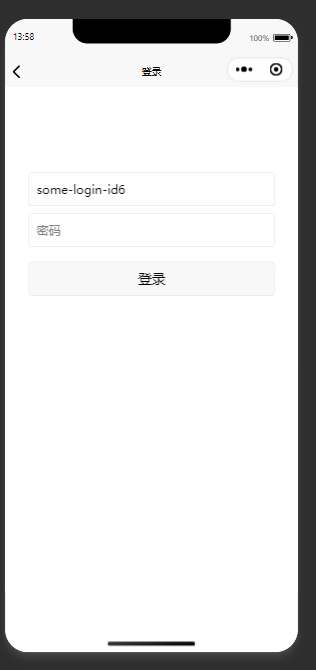
重新登录验证
我的
html
<template>
  <view class="mine-page">
    <!-- 头部:登录状态 -->
    <view class="header" >
      <image class="avatar" src="/static/img/avatar.png" mode="aspectFill" />
      <view class="info">
        <text class="name">{{ userName }}</text>
        <text class="desc">{{ userDesc }}</text>
      </view>
      <text class="btn" @tap="goAuth">{{ isLogin ? '退出' : '点击登录' }}</text>
    </view>

    <!-- 订单入口 -->
    <view class="order-card">
      <view class="title">我的订单</view>
      <view class="order-grid">
			<view v-for="o in orderList" :key="o.type" class="item" @tap="goOrder(o.type)">
			  <view class="icon-box">
				<image class="icon-img" :src="o.icon" />
				<view v-if="o.badge" class="badge">{{ o.badge }}</view>
			  </view>
			  <text class="label">{{ o.label }}</text>
			</view>

      </view>
    </view>

    <!-- 功能菜单 -->
    <view class="menu-list">
      <view v-for="m in menuList" :key="m.type" class="menu-item" @tap="onMenu(m.type)">
        <image class="icon-img" :src="m.icon" />
        <text class="label">{{ m.label }}</text>
        <text class="arrow iconfont icon-arrow-right" />
      </view>
    </view>

    <!-- 退出登录(已登录才显示) -->
    <view v-if="isLogin" class="logout" @tap="logout">退出登录</view>
  </view>
</template>

<script setup>
import { ref, computed, reactive } from 'vue'
import { onShow } from '@dcloudio/uni-app'

/* ---------- 状态 ---------- */
const token = ref('')
const userInfo = reactive({ name: '', phone: '' })

onShow(() => {
  token.value = uni.getStorageSync('token') || ''
  const info = uni.getStorageSync('userInfo') || {}
  console.log(userInfo)
  userInfo.name = info.username || ''
  userInfo.phone = info.phone || ''
})

/* ---------- 计算属性 ---------- */
const isLogin = computed(() => !!token.value)
const userName = computed(() => (isLogin.value ? userInfo.name : '游客'))
const userDesc = computed(() => (isLogin.value ?  '' : '登录后享受更多功能'))

/* ---------- 数据 ---------- */
const orderList = [
  { type: 'unpay',  label: '待付款', icon: '/static/icon/mine/unpay.png',  badge: 0 },
  { type: 'send',   label: '待发货', icon: '/static/icon/mine/send.png',   badge: 1 },
  { type: 'receive',label: '待收货', icon: '/static/icon/mine/receive.png',badge: 0 },
  { type: 'comment',label: '待评价', icon: '/static/icon/mine/comment.png',badge: 3 }
]
const menuList = [
  { type: 'address', label: '收货地址', icon: '/static/icon/mine/address.png' },
  { type: 'coupon',  label: '优惠券',  icon: '/static/icon/mine/coupon.png'  },
  { type: 'collect', label: '我的收藏', icon: '/static/icon/mine/collect.png' },
  { type: 'setting', label: '设置',     icon: '/static/icon/mine/setting.png' }
]

/* ---------- 方法 ---------- */
function goAuth() {
  if (isLogin.value) return logout()          // 已登录→走退出
  uni.navigateTo({ url: '/pages/login/index' }) // 未登录→去登录
}
function logout() {
  uni.showModal({
    title: '提示',
    content: '确定退出登录?',
    success: res => {
      if (res.confirm) {
        uni.removeStorageSync('token')
        uni.removeStorageSync('userInfo')
        token.value = ''
      }
    }
  })
}
function goOrder(type) {
  uni.navigateTo({ url: `/pages/order/index?type=${type}` })
}
function onMenu(type) {
  uni.navigateTo({ url: `/pages/mine/${type}` })
}
</script>

<style scoped>
/* ===== 全局基础 ===== */
.mine-page {
  background: #f5f5f5;
  min-height: 100vh;
  padding-bottom: calc(50px + env(safe-area-inset-bottom));
}

/* ===== 头部 ===== */
.header {
  display: flex;
  align-items: center;
  background: #fff;
  padding: 30rpx;
  margin-bottom: 20rpx;
}

.avatar {
  width: 100rpx;
  height: 100rpx;
  border-radius: 50%;
}

.info {
  flex: 1;
  margin-left: 20rpx;
}

.name {
  font-size: 32rpx;
  color: #333;
}

.desc {
  font-size: 24rpx;
  color: #999;
  margin-top: 6rpx;
}

.btn {
  font-size: 28rpx;
  color: #07c160;
  border: 1rpx solid #07c160;
  padding: 6rpx 16rpx;
  border-radius: 8rpx;
}

/* ===== 订单卡片 ===== */
.order-card {
  background: #fff;
  margin-bottom: 20rpx;
  padding: 20rpx 0;
}

.title {
  padding: 0 30rpx;
  font-size: 28rpx;
  color: #333;
  margin-bottom: 20rpx;
}

.order-grid {
  display: flex;
}

.item {
  flex: 1;
  display: flex;
  flex-direction: column;
  align-items: center;
  position: relative;
}

.icon-box {
  position: relative;
  margin-bottom: 6rpx; /* 图标与文字间距 */
}

.icon-img {
  width: 40rpx;
  height: 40rpx;
}

.badge {
  position: absolute;
  top: -8rpx;
  right: -12rpx;
  background: #ff4757;
  color: #fff;
  font-size: 20rpx;
  line-height: 1;
  padding: 2rpx 8rpx;
  border-radius: 12rpx;
}

.label {
  font-size: 24rpx;
  color: #666;
}

/* ===== 菜单列表 ===== */
.menu-list {
  background: #fff;
  margin-bottom: 20rpx;
}

.menu-item {
  display: flex;
  align-items: center;
  padding: 26rpx 30rpx;
  border-bottom: 1rpx solid #f1f1f1;
}

.menu-item:last-child {
  border: none;
}

.menu-item .icon-img {
  width: 32rpx;
  height: 32rpx;
  margin-right: 20rpx;
}

.menu-item .label {
  flex: 1;
  font-size: 28rpx;
  color: #333;
}

.menu-item .arrow {
  font-size: 24rpx;
  color: #ccc;
}

/* ===== 退出登录 ===== */
.logout {
  margin: 40rpx 30rpx;
  text-align: center;
  background: #fff;
  padding: 24rpx;
  border-radius: 10rpx;
  font-size: 30rpx;
  color: #e64340;
}
</style>
一、组件定位
商城小程序「个人中心」模块的核心页面,承担:
-
登录态展示与切换
-
订单入口分流(带角标)
-
功能菜单跳转
-
全局退出登录
二、关键实现细节
1 登录态判断
TypeScript
const isLogin = computed(() => !!token.value)仅依赖本地 token,不做接口校验,减少 onShow 耗时。
如业务需要强校验,可在 onShow 中调用 Api 刷新。
2 角标刷新策略
目前写死 badge: 0/1/3 ;
真实场景在 onShow 中调 /api/order/count 赋值,保持与「我的」TabBar 角标同步。
3 跳转规范
TypeScript
function goOrder(type) {
  uni.navigateTo({ url: `/pages/order/index?type=${type}` })
}
路径统一为 /pages/order/index ,接收 type 参数后自动高亮对应 Tab。
避免使用 redirectTo 防止用户无法返回「我的」
订单清单
新建pages\order\index.vue文件
html
<template>
  <view class="order-page">
    <!-- 顶部 Tab -->
    <view class="tab-bar">
      <view
        v-for="t in tabs"
        :key="t.type"
        class="tab-item"
        :class="{ active: curTab === t.type }"
        @tap="curTab = t.type"
      >
        <text>{{ t.name }}</text>
        <view v-if="curTab === t.type" class="line" />
      </view>
    </view>

    <!-- 订单列表 -->
    <scroll-view class="order-list" scroll-y>
      <view v-if="showList.length">
        <view v-for="o in showList" :key="o.id" class="order-card">
          <view class="card-header">
			<text class="orderNo">{{ o.orderNo }}</text>
            <text class="time">{{ o.createTime }}</text>
            <text class="status" :style="{ color: '#07c160' }">{{ o.statusTxt }}</text>
          </view>

          <view class="goods-list">
            <view v-for="g in o.goods" :key="g.id" class="goods-item">
              <image class="goods-img" :src="g.img" />
              <view class="goods-info">
                <text class="goods-title">{{ g.title }}</text>
                <text class="goods-spec">{{ g.spec }} ×{{ g.num || 1 }}</text>
                <text class="goods-price">¥{{ g.price }}</text>
              </view>
            </view>
          </view>

          <view class="card-footer">
            <text class="total">共{{ o.totalNum }}件 合计:¥{{ o.totalPrice }}</text>
            <text class="btn" @tap="goDetail(o.id)">查看详情</text>
            <text v-if="o.status === 'unpay'" class="btn primary" @tap="goPay(o.id)">立即付款</text>
          </view>
        </view>
      </view>

      <!-- 空态 -->
      <view v-else class="empty">
        <image class="empty-img" src="/static/img/empty/order.png" />
        <text class="empty-txt">暂无订单</text>
      </view>
    </scroll-view>
  </view>
</template>

<script setup>
import { ref, computed } from 'vue'
import { onLoad } from '@dcloudio/uni-app'

onLoad((query) => {
  // 如果地址栏带了 type 且是合法值,就高亮对应 Tab
  const { type = 'all' } = query
  const allow = ['all', 'unpay', 'send', 'receive', 'comment']
  curTab.value = allow.includes(type) ? type : 'all'
})


/* ----------------- 顶部 Tab ----------------- */
const tabs = [
  { type: 'all',   name: '全部' },
  { type: 'unpay', name: '待付款' },
  { type: 'send',  name: '待发货' },
  { type: 'receive', name: '待收货' }
]
const curTab = ref('all')

/* ----------------- 死数据 ----------------- */
const orderList = ref([
  {
    id: 1,
    orderNo: 'DD2025060112000001',   // ← 新增
    createTime: '2025-06-01 12:00',
    status: 'unpay',
    statusTxt: '待付款',
    totalNum: 2,
    totalPrice: 299,
    goods: [
      { id: 11, title: 'uni-app 实战教程', spec: '彩色版', price: 149, img: '/static/goods/01.png' },
      { id: 12, title: 'uni-app 组件库',  spec: '专业版', price: 150, img: '/static/goods/02.png' }
    ]
  },
  {
    id: 2,
    orderNo: 'DD2025060210300002',   // ← 新增
    createTime: '2025-06-02 10:30',
    status: 'send',
    statusTxt: '待发货',
    totalNum: 1,
    totalPrice: 199,
    goods: [
      { id: 21, title: 'Vue3 组件库', spec: '专业版', price: 199, img: '/static/goods/03.png' }
    ]
  },
  {
    id: 3,
    orderNo: 'DD2025060315200003',   // ← 新增
    createTime: '2025-06-03 15:20',
    status: 'receive',
    statusTxt: '待收货',
    totalNum: 3,
    totalPrice: 447,
    goods: [
      { id: 31, title: 'JavaScript 高级', spec: '精装版', price: 89,  img: '/static/goods/04.png' },
      { id: 32, title: 'CSS 魔法',         spec: '电子版', price: 59,  img: '/static/goods/05.png' },
      { id: 33, title: 'HTML5 指南',      spec: '电子版', price: 299, img: '/static/goods/06.png' }
    ]
  },
  {
    id: 4,
    orderNo: 'DD2025060409000004',   // ← 新增
    createTime: '2025-06-04 09:00',
    status: 'finish',
    statusTxt: '已完成',
    totalNum: 1,
    totalPrice: 89,
    goods: [
      { id: 41, title: 'Node.js 实战', spec: '平装版', price: 89, img: '/static/goods/07.png' }
    ]
  }
])

/* ----------------- 计算属性 ----------------- */
const showList = computed(() =>
  curTab.value === 'all'
    ? orderList.value
    : orderList.value.filter(o => o.status === curTab.value)
)

/* ----------------- 事件 ----------------- */
function goDetail(id) {
  uni.navigateTo({ url: `/pages/order/detail?id=${id}` })
}
function goPay(id) {
  uni.showToast({ title: `去支付 #${id}`, icon: 'none' })
}
</script>

<style scoped>
/* ========== 页面框架 ========== */
.order-page {
  height: 100vh;
  display: flex;
  flex-direction: column;
  background: #f5f5f5;
}

/* ========== Tab 栏 ========== */
.tab-bar {
  display: flex;
  height: 88rpx;
  background: #fff;
  border-bottom: 1rpx solid #e5e5e5;
}
.tab-item {
  flex: 1;
  display: flex;
  align-items: center;
  justify-content: center;
  font-size: 28rpx;
  color: #666;
  position: relative;
  transition: color 0.2s;
}
.tab-item.active {
  color: #07c160;
}
.tab-item .line {
  position: absolute;
  left: 50%;
  bottom: 0;
  width: 60rpx;
  height: 4rpx;
  background: #07c160;
  transform: translateX(-50%);
}

/* ========== 订单列表 ========== */
.order-list {
  flex: 1;
  overflow-y: auto;
  padding: 20rpx;
}
.order-card {
  background: #fff;
  border-radius: 12rpx;
  margin-bottom: 20rpx;
  padding: 24rpx;
}
.card-header {
  display: flex;
  justify-content: space-between;
  align-items: center;
  margin-bottom: 16rpx;
}
.time {
  font-size: 24rpx;
  color: #999;
}
.status {
  font-size: 26rpx;
  color: #07c160;
}
.goods-list {
  margin-bottom: 16rpx;
}
.goods-item {
  display: flex;
  margin-bottom: 12rpx;
}
.goods-img {
  width: 120rpx;
  height: 120rpx;
  border-radius: 8rpx;
  margin-right: 16rpx;
}
.goods-info {
  flex: 1;
  display: flex;
  flex-direction: column;
  justify-content: space-between;
}
.goods-title {
  font-size: 28rpx;
  color: #333;
  line-height: 40rpx;
  overflow: hidden;
  text-overflow: ellipsis;
  display: -webkit-box;
  -webkit-line-clamp: 2;
  -webkit-box-orient: vertical;
}
.goods-spec {
  font-size: 24rpx;
  color: #999;
}
.goods-price {
  font-size: 28rpx;
  color: #e64340;
}
.card-footer {
  display: flex;
  justify-content: flex-end;
  align-items: center;
}
.total {
  font-size: 26rpx;
  color: #333;
  margin-right: 16rpx;
}
.btn {
  font-size: 26rpx;
  padding: 8rpx 20rpx;
  border-radius: 8rpx;
  border: 1rpx solid #ccc;
  color: #333;
  margin-left: 12rpx;
}
.btn.primary {
  color: #fff;
  background: #07c160;
  border-color: #07c160;
}

/* ========== 空态 ========== */
.empty {
  flex: 1;
  display: flex;
  flex-direction: column;
  align-items: center;
  justify-content: center;
}
.empty-img {
  width: 240rpx;
  height: 240rpx;
}
.empty-txt {
  font-size: 28rpx;
  color: #999;
  margin-top: 24rpx;
}
</style>
只是为了验证,所以技术文档暂不提供。
调试与测试
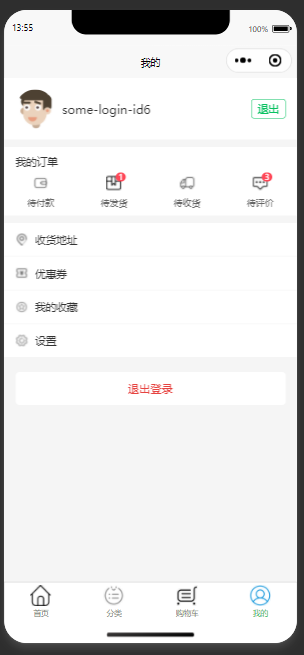
1.登录后进入我的
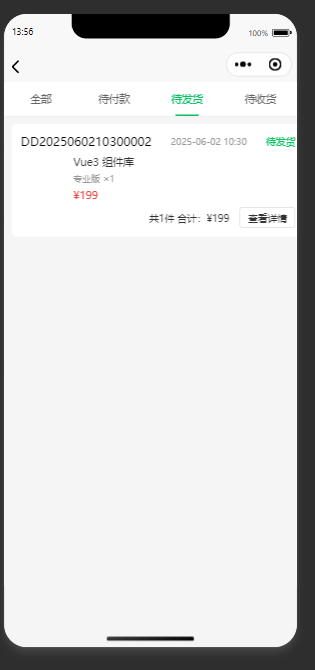
2.点击待发货
3.返回后点击退出
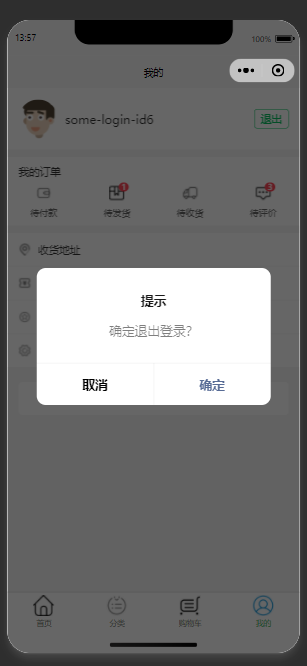
4.退出确认
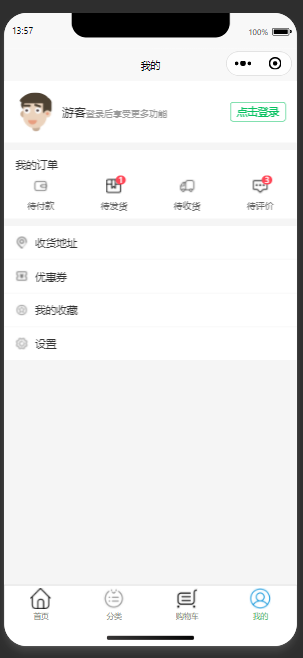
5.点击登录