总体效果展示:以车辆图片为例:
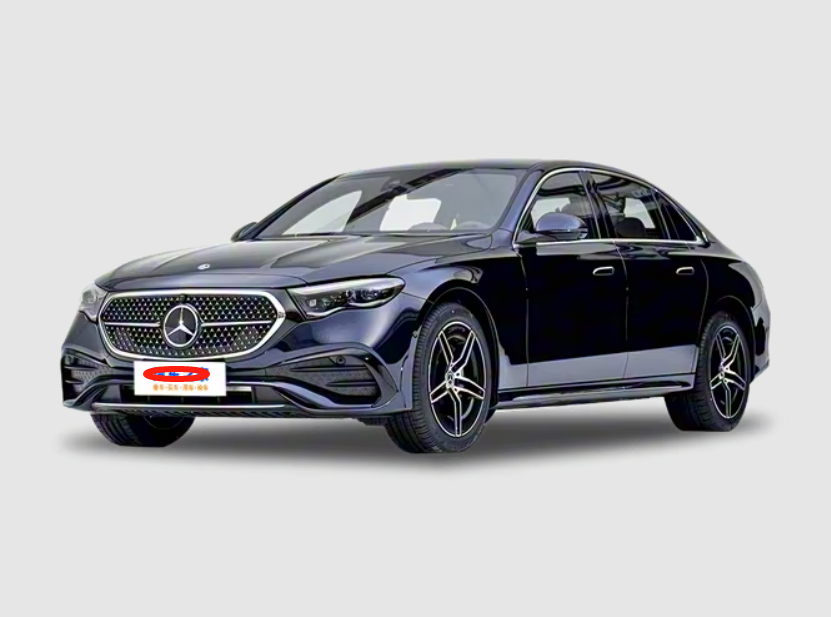

一、图片网页搜索代码:
java
package main.boot.test;

import main.boot.DealImage;
import org.jsoup.Jsoup;
import org.jsoup.nodes.Document;
import org.jsoup.nodes.Element;
import org.jsoup.select.Elements;
import org.openqa.selenium.By;
import org.openqa.selenium.WebDriver;
import org.openqa.selenium.chrome.ChromeDriver;
import org.openqa.selenium.chrome.ChromeOptions;
import org.openqa.selenium.support.ui.ExpectedConditions;
import org.openqa.selenium.support.ui.WebDriverWait;

import java.time.Duration;

public class ImageUrlExtractor {
    public static void main(String[] args) {
        getCarImage("奔驰E300");
    }

    public static String getCarImage(String carInfo) {
        // 目标网页 URL
        String url = "https://sou.autohome.com.cn/zonghe?q=" + carInfo + "&entry=42&error=0&pvareaid=6861421&mq=&charset=utf8";
        System.out.println("请求URL:" + url);
        // 配置 Chrome 浏览器(无头模式,不显示窗口)
        // 根据不同JDK 这里需要注释 或者关闭注释 21 关闭注释   17打开注释
        // System.setProperty("webdriver.chrome.driver", "src/main/resources/chromedriver-win64/chromedriver.exe");

        ChromeOptions options = new ChromeOptions();
        options.addArguments("--headless=new"); // 无头模式,适合服务器环境
        options.addArguments("--disable-gpu");
        options.addArguments("--window-size=1920,1080"); // 模拟窗口大小,避免响应式布局影响

        // 初始化浏览器驱动
        WebDriver driver = new ChromeDriver(options);
        try {
            // 打开网页
            driver.get(url);
            // 等待页面动态加载完成(关键:等待包含 cus-react-img 类的元素出现,最多等 10 秒)
            WebDriverWait wait = new WebDriverWait(driver, Duration.ofSeconds(2));
            // 等待第一个包含 cus-react-img 类的元素加载出来
            wait.until(ExpectedConditions.presenceOfElementLocated(By.cssSelector("img.cus-react-img")));

            // 额外等待 1 秒,确保图片都加载完成(根据实际情况调整)
            Thread.sleep(1000);

            // 获取加载完成后的完整页面源码
            String pageSource = driver.getPageSource();

            // 用 Jsoup 解析源码,提取特定 class 的图片 URL
            Document document = Jsoup.parse(pageSource);
            Elements imgElements = document.select("img.cus-react-img");
            //  System.out.println(imgElements);
            // 只处理第一个匹配的图片元素
            if (imgElements.isEmpty()) {
                System.out.println("未找到 class='cus-react-img' 的图片元素");
            } else {
                Element firstImg = imgElements.first();
                String imgUrl = firstImg.attr("src");

                // 处理相对路径(如果有的话)
                if (imgUrl != null && !imgUrl.isEmpty()) {
                    if (!imgUrl.startsWith("http")) {
                        imgUrl = "https:" + imgUrl; // 补充协议头(根据网站实际情况调整)
                    }
                    System.out.println("第一个 cus-react-img 图片 URL: " + imgUrl); // 调用方法
                    String finalDealImage = DealImage.doWork(imgUrl);
                    System.err.println("处理后的图片:" + finalDealImage);
                    return finalDealImage;
                } else {
                    System.out.println("第一个 cus-react-img 图片没有 src 属性");
                    return "没有找到图片...";
                }
            }

        } catch (Exception e) {
            System.out.println("获取图片失败:" + e.getMessage());
            e.printStackTrace();
        } finally {
            // 关闭浏览器
            driver.quit();
        }
        return "获取图片失败";
    }
}
二、阿里万相代码
java
package main.boot;

import com.google.gson.Gson;

import java.net.URI;
import java.net.http.HttpClient;
import java.net.http.HttpRequest;
import java.net.http.HttpResponse;
import java.time.Duration;
import java.util.List;

public class DealImage {
    public static final Gson gson = new Gson();

    public static void main(String[] args) {
        String apiKey = "sk-";
        String requestBody = """
                {
                    "model": "wan2.5-i2i-preview",
                    "function":"super_resolution",
                    "size":"1024*1024",
                    "input": {
                        "prompt": "去除图片中的汽车之家LOGO,换成车来客三个红色的字。图像超分,图像要有合适的背景。",
                        "negative_prompt": "不要有很粗糙的线条。不要出现低分辨率、差质量、低质量、残缺、比例不良等情况",
                        "images": [
                            "https://g.autoimg.cn/@img/car3/cardfs/series/g24/M02/24/84/666x501_autohomecar__wKgHH1qnPRyAUl8pAAVh9jdZkj0538.png"
                        ]
                    },
                    "parameters": {
                        "n": 1
                    }
                }
                """;
        try {
            HttpClient client = HttpClient.newBuilder().connectTimeout(Duration.ofSeconds(10)).build();
            HttpRequest request = HttpRequest.newBuilder().uri(URI.create("https://dashscope.aliyuncs.com/api/v1/services/aigc/image2image/image-synthesis")).header("X-DashScope-Async", "enable").header("Authorization", "Bearer " + apiKey).header("Content-Type", "application/json").POST(HttpRequest.BodyPublishers.ofString(requestBody)).timeout(Duration.ofSeconds(30)).build();
            HttpResponse<String> response = client.send(request, HttpResponse.BodyHandlers.ofString());
            // System.out.println("状态码: " + response.statusCode());
            System.out.println("状态码: " + response.statusCode() + "响应: " + response.body());
            JsonParse1 jsonParse1 = gson.fromJson(response.body(), JsonParse1.class);
            // System.out.println(jsonParse1.output.task_id);
            String taskId = jsonParse1.output.task_id;
            request = HttpRequest.newBuilder().uri(URI.create("https://dashscope.aliyuncs.com/api/v1/tasks/" + taskId)).header("Authorization", "Bearer " + apiKey).GET().timeout(Duration.ofSeconds(30)).build();
            while (true) {
                response = client.send(request, HttpResponse.BodyHandlers.ofString());
                // System.out.println("状态码: " + response.statusCode() + "响应: " + response.body());
                if (response.statusCode() == 200) {
                    JsonParse1 jsonParse2 = gson.fromJson(response.body(), JsonParse1.class);
                    if (jsonParse2.output.task_status.equals("SUCCEEDED")) {
                        List<Results> resultsList = jsonParse2.output.results;
                        System.out.println("最终处理后的图片URL地址为:" + resultsList.get(0).url);
                        break;
                    } else {
                        System.out.println("图片处理中...");
                        Thread.sleep(6000); // 3秒查询一次
                    }
                } else {
                    break;
                }
            }

        } catch (Exception e) {
            e.printStackTrace();
        }
    }

    public static String doWork(String originImageUrl) {
        String apiKey = "sk-";
        String requestBody = """
                {
                   "model": "wan2.5-i2i-preview",

                    "input": {
                        "prompt": "去除图片中的汽车之家LOGO,换成三个红色的字。图像超分,图像要有合适的背景。",
                        "negative_prompt": "不要有很粗糙的线条。不要出现低分辨率、差质量、低质量、残缺、比例不良等情况",
                        "images": [
                            "%s"
                        ]
                    },
                    "parameters": {
                        "n": 1
                    }
                }
                """.formatted(originImageUrl);

        // 后续使用 requestBody 发送请求
        System.out.println(requestBody);
        try {
            HttpClient client = HttpClient.newBuilder().connectTimeout(Duration.ofSeconds(10)).build();
            HttpRequest request = HttpRequest.newBuilder().uri(URI.create("https://dashscope.aliyuncs.com/api/v1/services/aigc/image2image/image-synthesis")).header("X-DashScope-Async", "enable").header("Authorization", "Bearer " + apiKey).header("Content-Type", "application/json").POST(HttpRequest.BodyPublishers.ofString(requestBody)).timeout(Duration.ofSeconds(30)).build();
            HttpResponse<String> response = client.send(request, HttpResponse.BodyHandlers.ofString());
            // System.out.println("状态码: " + response.statusCode());
            System.out.println("状态码: " + response.statusCode() + "响应: " + response.body());
            JsonParse1 jsonParse1 = gson.fromJson(response.body(), JsonParse1.class);
            // System.out.println(jsonParse1.output.task_id);
            String taskId = jsonParse1.output.task_id;
            request = HttpRequest.newBuilder().uri(URI.create("https://dashscope.aliyuncs.com/api/v1/tasks/" + taskId)).header("Authorization", "Bearer " + apiKey).GET().timeout(Duration.ofSeconds(30)).build();
            String dealImageUrl = "";
            while (true) {
                response = client.send(request, HttpResponse.BodyHandlers.ofString());
                // System.out.println("状态码: " + response.statusCode() + "响应: " + response.body());
                if (response.statusCode() == 200) {
                    JsonParse1 jsonParse2 = gson.fromJson(response.body(), JsonParse1.class);
                    if (jsonParse2.output.task_status.equals("SUCCEEDED")) {
                        List<Results> resultsList = jsonParse2.output.results;
                        // System.out.println("最终处理后的图片URL地址为:" + resultsList.get(0).url);
                        dealImageUrl = resultsList.get(0).url;
                        break;
                    } else {
                        System.out.println("图片处理中...");
                        Thread.sleep(3000); // 3秒查询一次
                    }
                } else {
                    dealImageUrl = "图片处理异常";
                    break;
                }
            }
            return dealImageUrl;
        } catch (Exception e) {
            e.printStackTrace();
        }
        return "图片处理异常";
    }

    class JsonParse1 {
        Output output;
    }

    class Output {
        String task_id;
        String task_status;
        List<Results> results;
    }

    class Results {
        String url;
    }
}
三、SPRINGBOOT启动API服务代码
java
package main.boot.controller;


import main.boot.pojo.Car;
import main.boot.test.ImageUrlExtractor;
import org.springframework.web.bind.annotation.*;

@RestController
@RequestMapping("/api")
@CrossOrigin(origins = "*")
public class ImageController {
    @PostMapping("/get_processed_car_image")
    public String get_processed_car_image(@RequestBody Car car) {
        String dealImageUrl = ImageUrlExtractor.getCarImage(car.getCarInfo());
        return dealImageUrl;
    }
}
java
package main.boot.pojo;

import lombok.Data;

@Data
public class Car {
    String carInfo;
}
java
package main.boot;

import org.openqa.selenium.WebDriver;
import org.openqa.selenium.chrome.ChromeDriver;
import org.openqa.selenium.chrome.ChromeOptions;
import org.springframework.beans.factory.annotation.Value;
import org.springframework.context.annotation.Bean;
import org.springframework.context.annotation.Configuration;
import org.springframework.context.annotation.Scope;

import java.util.concurrent.TimeUnit;

@Configuration
public class SeleniumConfig {

    @Value("${webdriver.chrome.driver:}")
    private String chromeDriverPath;

    @Bean
    @Scope("prototype")  // 每次注入都创建新实例
    public WebDriver webDriver() {
        if (!chromeDriverPath.isEmpty()) {
            System.setProperty("webdriver.chrome.driver", chromeDriverPath);
        }

        ChromeOptions options = new ChromeOptions();
        options.addArguments("--headless=new");
        options.addArguments("--disable-gpu");
        options.addArguments("--no-sandbox");
        options.addArguments("--disable-dev-shm-usage");
        options.addArguments("--window-size=1920,1080");
        options.addArguments("--remote-allow-origins=*");

        WebDriver driver = new ChromeDriver(options);
        driver.manage().timeouts().implicitlyWait(3, TimeUnit.SECONDS);
        return driver;
    }
}
java
package main.boot;

import org.jsoup.Jsoup;
import org.jsoup.nodes.Document;
import org.jsoup.nodes.Element;
import org.jsoup.select.Elements;
import org.openqa.selenium.By;
import org.openqa.selenium.WebDriver;
import org.openqa.selenium.support.ui.ExpectedConditions;
import org.openqa.selenium.support.ui.WebDriverWait;
import org.springframework.beans.factory.ObjectFactory;
import org.springframework.beans.factory.annotation.Autowired;
import org.springframework.stereotype.Service;

import java.time.Duration;

@Service
public class ImageExtractionService {

    @Autowired
    private ObjectFactory<WebDriver> webDriverFactory;

    /**
     * 获取汽车图片URL
     *
     * @param carInfo 汽车信息
     * @return 图片URL
     */
    public String getCarImage(String carInfo) {
        WebDriver driver = webDriverFactory.getObject();
        try {
            String url = "https://sou.autohome.com.cn/zonghe?q=" + carInfo + "&entry=42&error=0&pvareaid=6861421&mq=&charset=utf8";

            // 打开网页
            driver.get(url);

            // 等待页面动态加载完成
            WebDriverWait wait = new WebDriverWait(driver, Duration.ofSeconds(10));
            wait.until(ExpectedConditions.presenceOfElementLocated(By.cssSelector("img.cus-react-img")));

            // 额外等待确保图片加载完成
            Thread.sleep(1000);

            // 获取加载完成后的完整页面源码
            String pageSource = driver.getPageSource();

            // 用 Jsoup 解析源码,提取特定 class 的图片 URL
            Document document = Jsoup.parse(pageSource);
            Elements imgElements = document.select("img.cus-react-img");

            if (imgElements.isEmpty()) {
                throw new RuntimeException("未找到 class='cus-react-img' 的图片元素");
            }

            Element firstImg = imgElements.first();
            String imgUrl = firstImg.attr("src");

            // 处理相对路径
            if (imgUrl != null && !imgUrl.isEmpty()) {
                if (!imgUrl.startsWith("http")) {
                    imgUrl = "https:" + imgUrl;
                }
                return imgUrl;
            } else {
                throw new RuntimeException("第一个 cus-react-img 图片没有 src 属性");
            }

        } catch (Exception e) {
            throw new RuntimeException("获取图片失败:" + e.getMessage(), e);
        } finally {
            // 确保每次使用后都关闭 driver
            if (driver != null) {
                driver.quit();
            }
        }
    }

    /**
     * 获取汽车图片并处理后返回
     *
     * @param carInfo 汽车信息
     * @return 处理后的图片信息
     */
    public String getProcessedCarImage(String carInfo) {
        try {
            String imgUrl = getCarImage(carInfo);
            // 调用您的图片处理方法
            return DealImage.doWork(imgUrl);
        } catch (Exception e) {
            throw new RuntimeException("图片处理失败:" + e.getMessage(), e);
        }
    }
}
java
package main.boot;

import org.springframework.http.HttpStatus;
import org.springframework.http.ResponseEntity;
import org.springframework.web.bind.annotation.ExceptionHandler;
import org.springframework.web.bind.annotation.RestControllerAdvice;

import java.util.HashMap;
import java.util.Map;

@RestControllerAdvice
public class GlobalExceptionHandler {

    @ExceptionHandler(Exception.class)
    public ResponseEntity<Map<String, String>> handleException(Exception e) {
        Map<String, String> response = new HashMap<>();
        response.put("error", "服务内部错误");
        response.put("message", e.getMessage());
        response.put("status", "error");

        return ResponseEntity.status(HttpStatus.INTERNAL_SERVER_ERROR).body(response);
    }

    @ExceptionHandler(RuntimeException.class)
    public ResponseEntity<Map<String, String>> handleRuntimeException(RuntimeException e) {
        Map<String, String> response = new HashMap<>();
        response.put("error", "业务处理错误");
        response.put("message", e.getMessage());
        response.put("status", "error");

        return ResponseEntity.status(HttpStatus.BAD_REQUEST).body(response);
    }
}
四、测试代码
java
package main.boot.test;


import okhttp3.*;

import java.io.IOException;
import java.util.concurrent.TimeUnit;

public class CarImageRequest {
    public static void main(String[] args) {
        try {
            String url = "http://xxx:9999/api/get_processed_car_image";
            String jsonInput = "{\"carInfo\":\"奇瑞E3\"}";
            System.out.println("请求已发送,需要在线搜图-阿里大模型改图-最后返回,请稍后...");
            String response = sendPostRequest(url, jsonInput);
            System.out.println("响应结果: " + response);
        } catch (Exception e) {
            e.printStackTrace();
        }
    }

    public static String sendPostRequest(String urlString, String jsonInput) throws IOException {
        // 创建 OkHttpClient 并设置超时时间
        OkHttpClient client = new OkHttpClient.Builder().connectTimeout(3000, TimeUnit.SECONDS)    // 连接超时
                .readTimeout(3000, TimeUnit.SECONDS)       // 读取超时
                .writeTimeout(3000, TimeUnit.SECONDS)      // 写入超时
                .build();

        // 创建请求体
        MediaType JSON = MediaType.parse("application/json; charset=utf-8");
        RequestBody body = RequestBody.create(jsonInput, JSON);

        // 创建请求
        Request request = new Request.Builder().url(urlString).post(body).addHeader("Content-Type", "application/json; utf-8").addHeader("Accept", "application/json").build();

        // 发送请求并处理响应
        try (Response response = client.newCall(request).execute()) {
            if (!response.isSuccessful()) {
                throw new IOException("Unexpected code: " + response);
            }
            return response.body().string();
        }
    }
}