Android EDLA项目导入mainline包后蓝牙报错分析解决
文章目录
- [Android EDLA项目导入mainline包后蓝牙报错分析解决](#Android EDLA项目导入mainline包后蓝牙报错分析解决)
-
- 一、前言
- 二、分析解决
- 三、其他
-
- 1、EDLA项目导入mainline包后蓝牙报错分析解决小结
- 2、导入GMS后蓝牙打开崩溃
- [3、Android EDLA开发认证说明和开发流程](#3、Android EDLA开发认证说明和开发流程)
一、前言
Android EDLA 项目移植GMS和mainline包后,发现蓝牙打开崩溃。
分析发现是和蓝牙签名有关,分析logcat报错也是有提示 userdebug/test-keys,蓝牙应用签名不对应导致。
查看报错日志有selinux权限报错,Zygote权限无法添加,设置关闭selinux可以临时规避;
如何解决这个问题?
需要重新生成蓝牙签名文件,系统源码中替换蓝牙对应的签名信息文件后,编大包就可以了。
开发Android EDLA的可以收藏看看。
二、分析解决
1、logcat报错日志
全局搜索AndroidRuntime崩溃报错,有如下日志:
10-23 05:57:59.696     0     0 I [2 T367   -.] logd: logdr: UID=1002 GID=1002 PID=5298 n tail=500 logMask=8 pid=5295 start=0ns deadline=0ns
10-23 05:57:59.697     0     0 I [2 T367   -.] logd: logdr: UID=1002 GID=1002 PID=5298 n tail=500 logMask=1 pid=5295 start=0ns deadline=0ns
10-23 05:57:59.702   733   733 D hdmicecd: [CEC]:printCecMessage, [0 -> 5] len: 0, body:, result:no ack
10-23 05:57:59.705  5298  5298 F DEBUG   : *** *** *** *** *** *** *** *** *** *** *** *** *** *** *** ***
10-23 05:57:59.705  5298  5298 F DEBUG   : Build fingerprint: 'KTC/W82B_A/W82B_A:16/202510/AB01:userdebug/test-keys'
10-23 05:57:59.705  5298  5298 F DEBUG   : Revision: '0'
10-23 05:57:59.705  5298  5298 F DEBUG   : ABI: 'arm64'
10-23 05:57:59.705  5298  5298 F DEBUG   : Timestamp: 2025-10-23 05:57:59.363798197-0400
10-23 05:57:59.705  5298  5298 F DEBUG   : Process uptime: 0s
10-23 05:57:59.705  5298  5298 F DEBUG   : Cmdline: zygote64
10-23 05:57:59.705  5298  5298 F DEBUG   : pid: 5295, tid: 5295, name: main  >>> zygote64 <<<
10-23 05:57:59.705  5298  5298 F DEBUG   : uid: 1002
10-23 05:57:59.705  5298  5298 F DEBUG   : tagged_addr_ctrl: 0000000000000001 (PR_TAGGED_ADDR_ENABLE)
10-23 05:57:59.705  5298  5298 F DEBUG   : signal 6 (SIGABRT), code -1 (SI_QUEUE), fault addr --------
10-23 05:57:59.705  5298  5298 F DEBUG   : Abort message: 'JNI FatalError called: (com.android.bluetooth) frameworks/base/core/jni/com_android_internal_os_Zygote.cpp:2145: selinux_android_setcontext(1002, 0, "default:privapp:targetSdkVersion=36:partition=system:complete", "com.android.bluetooth") failed'
10-23 05:57:59.705  5298  5298 F DEBUG   :     x0  0000000000000000  x1  00000000000014af  x2  0000000000000006  x3  0000007fc36b5450
10-23 05:57:59.705  5298  5298 F DEBUG   :     x4  666d6873716e6160  x5  666d6873716e6160  x6  666d6873716e6160  x7  7f7f7f7f7f7f7f7f
10-23 05:57:59.705  5298  5298 F DEBUG   :     x8  00000000000000f0  x9  f4314aa36265c802  x10 0000000000000001  x11 00000079a06e9ca0
10-23 05:57:59.705  5298  5298 F DEBUG   :     x12 0090ffe000000000  x13 0000000004000000  x14 0000000000000010  x15 0000000000000000
10-23 05:57:59.705  5298  5298 F DEBUG   :     x16 00000079a0757a70  x17 00000079a073d6c0  x18 00000079ca880000  x19 00000000000014af
10-23 05:57:59.705  5298  5298 F DEBUG   :     x20 00000000000014af  x21 00000000ffffffff  x22 000000791240d000  x23 000000791240ee20
10-23 05:57:59.705  5298  5298 F DEBUG   :     x24 00000079cb209880  x25 00000000000003ea  x26 00000079cb52c390  x27 0000007fc36becf4
10-23 05:57:59.706  5298  5298 F DEBUG   :     x28 0000007fc36b5921  x29 0000007fc36b54d0
10-23 05:57:59.706  5298  5298 F DEBUG   :     lr  00000079a06d3b28  sp  0000007fc36b5450  pc  00000079a06d3b4c  pst 0000000000000000
10-23 05:57:59.706  5298  5298 F DEBUG   : 23 total frames
10-23 05:57:59.706  5298  5298 F DEBUG   : backtrace:
10-23 05:57:59.706  5298  5298 F DEBUG   :       #00 pc 000000000009cb4c  /apex/com.android.runtime/lib64/bionic/libc.so (abort+156) (BuildId: 95066c92ab2937e0f8184a9392b1f6cd)
10-23 05:57:59.706  5298  5298 F DEBUG   :       #01 pc 00000000008a0c74  /apex/com.android.art/lib64/libart.so (art::Runtime::Abort(char const*)+476) (BuildId: 80d2ab18f9d259d8e546c1e6bae752b1)
10-23 05:57:59.706  5298  5298 F DEBUG   :       #02 pc 0000000000016188  /apex/com.android.art/lib64/libbase.so (android::base::SetAborter(std::__1::function<void (char const*)>&&)::$_0::__invoke(char const*)+80) (BuildId: 8aca1185566f3990ce9d6c61841c18af)
10-23 05:57:59.706  5298  5298 F DEBUG   :       #03 pc 0000000000015730  /apex/com.android.art/lib64/libbase.so (android::base::LogMessage::~LogMessage()+544) (BuildId: 8aca1185566f3990ce9d6c61841c18af)
10-23 05:57:59.706  5298  5298 F DEBUG   :       #04 pc 000000000081681c  /apex/com.android.art/lib64/libart.so (art::JNI<true>::FatalError(_JNIEnv*, char const*)+164) (BuildId: 80d2ab18f9d259d8e546c1e6bae752b1)
10-23 05:57:59.706  5298  5298 F DEBUG   :       #05 pc 000000000025e204  /system/lib64/libandroid_runtime.so (android::zygote::ZygoteFailure(_JNIEnv*, char const*, _jstring*, std::__1::basic_string<char, std::__1::char_traits<char>, std::__1::allocator<char>> const&)+196) (BuildId: de55fd4d928c489a3d432ef5fea47854)
10-23 05:57:59.706  5298  5298 F DEBUG   :       #06 pc 000000000026a684  /system/lib64/libandroid_runtime.so ((anonymous namespace)::SpecializeCommon(_JNIEnv*, unsigned int, unsigned int, _jintArray*, int, _jobjectArray*, long, long, long, int, _jstring*, _jstring*, bool, bool, _jstring*, _jstring*, bool, _jobjectArray*, _jobjectArray*, bool, bool, bool)+26388) (BuildId: de55fd4d928c489a3d432ef5fea47854)
10-23 05:57:59.706  5298  5298 F DEBUG   :       #07 pc 000000000026275c  /system/lib64/libandroid_runtime.so (android::com_android_internal_os_Zygote_nativeSpecializeAppProcess(_JNIEnv*, _jclass*, int, int, _jintArray*, int, _jobjectArray*, int, _jstring*, _jstring*, unsigned char, _jstring*, _jstring*, unsigned char, _jobjectArray*, _jobjectArray*, unsigned char, unsigned char, unsigned char)+316) (BuildId: de55fd4d928c489a3d432ef5fea47854)
10-23 05:57:59.706  5298  5298 F DEBUG   :       #08 pc 0000000000860ddc  /system/framework/arm64/boot-framework.oat (art_jni_trampoline+316) (BuildId: 6b64a1b6c3dcceaf63e753ea910f729fa365ee0b)
10-23 05:57:59.706  5298  5298 F DEBUG   :       #09 pc 00000000006899d8  /apex/com.android.art/lib64/libart.so (nterp_helper+2152) (BuildId: 80d2ab18f9d259d8e546c1e6bae752b1)
10-23 05:57:59.706  5298  5298 F DEBUG   :       #10 pc 0000000000290574  /system/framework/framework.jar (offset 0x245b000) (com.android.internal.os.Zygote.specializeAppProcess+0)
10-23 05:57:59.706  5298  5298 F DEBUG   :       #11 pc 0000000000689954  /apex/com.android.art/lib64/libart.so (nterp_helper+2020) (BuildId: 80d2ab18f9d259d8e546c1e6bae752b1)
10-23 05:57:59.706  5298  5298 F DEBUG   :       #12 pc 000000000028ff04  /system/framework/framework.jar (offset 0x245b000) (com.android.internal.os.Zygote.childMain+692)
10-23 05:57:59.706  5298  5298 F DEBUG   :       #13 pc 00000000007e95a0  /system/framework/arm64/boot-framework.oat (com.android.internal.os.ZygoteConnection.processCommand+1440) (BuildId: 6b64a1b6c3dcceaf63e753ea910f729fa365ee0b)
10-23 05:57:59.706  5298  5298 F DEBUG   :       #14 pc 00000000007eaf8c  /system/framework/arm64/boot-framework.oat (com.android.internal.os.ZygoteServer.runSelectLoop+2092) (BuildId: 6b64a1b6c3dcceaf63e753ea910f729fa365ee0b)
10-23 05:57:59.706  5298  5298 F DEBUG   :       #15 pc 00000000007fa560  /system/framework/arm64/boot-framework.oat (com.android.internal.os.ZygoteInit.main+2960) (BuildId: 6b64a1b6c3dcceaf63e753ea910f729fa365ee0b)
10-23 05:57:59.707  5298  5298 F DEBUG   :       #16 pc 000000000032d460  /apex/com.android.art/lib64/libart.so (art_quick_invoke_static_stub+640) (BuildId: 80d2ab18f9d259d8e546c1e6bae752b1)
10-23 05:57:59.707  5298  5298 F DEBUG   :       #17 pc 000000000032bfc8  /apex/com.android.art/lib64/libart.so (art::JValue art::InvokeWithVarArgs<_jmethodID*>(art::ScopedObjectAccessAlreadyRunnable const&, _jobject*, _jmethodID*, std::__va_list)+800) (BuildId: 80d2ab18f9d259d8e546c1e6bae752b1)
10-23 05:57:59.707  5298  5298 F DEBUG   :       #18 pc 000000000064a488  /apex/com.android.art/lib64/libart.so (art::JNI<true>::CallStaticVoidMethodV(_JNIEnv*, _jclass*, _jmethodID*, std::__va_list)+156) (BuildId: 80d2ab18f9d259d8e546c1e6bae752b1)
10-23 05:57:59.707  5298  5298 F DEBUG   :       #19 pc 00000000000ff628  /system/lib64/libandroid_runtime.so (_JNIEnv::CallStaticVoidMethod(_jclass*, _jmethodID*, ...)+104) (BuildId: de55fd4d928c489a3d432ef5fea47854)
10-23 05:57:59.707  5298  5298 F DEBUG   :       #20 pc 000000000012abcc  /system/lib64/libandroid_runtime.so (android::AndroidRuntime::start(char const*, android::Vector<android::String8> const&, bool)+924) (BuildId: de55fd4d928c489a3d432ef5fea47854)
10-23 05:57:59.707  5298  5298 F DEBUG   :       #21 pc 000000000000459c  /system/bin/app_process64 (main+1212) (BuildId: 8a088e1ca57c767592398fc0248a609b)
10-23 05:57:59.707  5298  5298 F DEBUG   :       #22 pc 0000000000095d68  /apex/com.android.runtime/lib64/bionic/libc.so (__libc_init+120) (BuildId: 95066c92ab2937e0f8184a9392b1f6cd)
10-23 05:57:59.748   498   498 E tombstoned: Tombstone written to: tombstone_10
搜索关键字:"Fatal" 的严重异常日志也可以定位到上面异常日志。
主要异常日志:
10-23 05:57:59.263  5295  5295 F zygote64: jni_internal.cc:826] JNI FatalError called: (com.android.bluetooth) frameworks/base/core/jni/com_android_internal_os_Zygote.cpp:2145: selinux_android_setcontext(1002, 0, "default:privapp:targetSdkVersion=36:partition=system:complete", "com.android.bluetooth") failed
10-23 05:57:59.285  5295  5295 F libc    : Fatal signal 6 (SIGABRT), code -1 (SI_QUEUE) in tid 5295 (main), pid 5295 (main)

10-23 05:57:59.705  5298  5298 F DEBUG   : *** *** *** *** *** *** *** *** *** *** *** *** *** *** *** ***
10-23 05:57:59.705  5298  5298 F DEBUG   : Build fingerprint: 'KTC/W82B_A/W82B_A:16/202510/AB01:userdebug/test-keys'
10-23 05:57:59.705  5298  5298 F DEBUG   : Abort message: 'JNI FatalError called: (com.android.bluetooth) frameworks/base/core/jni/com_android_internal_os_Zygote.cpp:2145

10-23 05:57:59.706  5298  5298 F DEBUG   : backtrace:
...
10-23 05:57:59.706  5298  5298 F DEBUG   :       #04 pc 000000000081681c  /apex/com.android.art/lib64/libart.so (art::JNI<true>::FatalError(_JNIEnv*, char const*)+164) (BuildId: 80d2ab18f9d259d8e546c1e6bae752b1)
看前面报错是和selinux有关,可以尝试关闭selinux权限校验,查看是否可以规避这个问题。
后面有提示 userdebug/test-keys 说明和签名有关,可以更新签名信息试试。
2、临时规避解决
从报错日志看,有多个selinux权限报错,以为可以适配selinux进行解决这个问题;
但是里面有个Zygote的权限,底层开发人员试过,这个权限无法添加,添加后会有其他问题。
下面是Zygote报错日志:
Abort message: 'JNI FatalError called: (com.android.bluetooth) frameworks/base/core/jni/com_android_internal_os_Zygote.cpp:2145: selinux_android_setcontext(1002, 0, "default:privapp:targetSdkVersion=36:partition=system:complete", "com.android.bluetooth") failed'
10-23 05:57:59.705  5298  5298 F DEBUG   :     x0  0000000000000000  x1  00000000000014af  x2  0000000000000006  x3  0000007fc36b5450
后续尝试关闭selinux可以规避这个崩溃问题。
关闭selinux的方式,只能用来进行临时的调试,因为进行EDLA认证过程需要,开启selinux。
后面这个问题是通过更新蓝牙签名信息进行解决的。
但是并不是所有的签名报错都可以通过关闭selinux权限解决,这个估计是个例。
需要大概知道:AOSP和EDLA系统的签名是有区别的就行,如果同一套代码,从AOSP切换到EDLA,会涉及GMS和不同的系统签名。
下面看看怎么解决这个问题。
3、正常解决
(1)生成签名文件命令
生成文件的命令:
//bluetooth
development/tools/make_key bluetooth   '/C=CN/ST=Guangdong/L=Shenzhen/O=KXX/OU=KtXX/CN=KXX/emailAddress=gms@XXX.cn'
openssl genrsa -out  bluetooth.pem 4096
external/avb/avbtool.py  extract_public_key --key bluetooth.pem --output  bluetooth.avbpubkey

//com.android.btservices
development/tools/make_key com.android.btservices '/C=CN/ST=Guangdong/L=Shenzhen/O=KXX/OU=XX/CN=KXX/emailAddress=wen_h@XX.cn'
openssl genrsa -out  com.android.btservices.pem 4096
external/avb/avbtool.py  extract_public_key --key com.android.btservices.pem --output  com.android.btservices.avbpubkey
上面除了要生成蓝牙应用的签名,还有生成蓝牙服务应用的签名;不然可能有问题。
上面的命令是在系统源码release目录下生成的;
命令格式都是比较固定的,只是把公司的信息写入就行;申请系统签名和nfc签名也是类似的。
执行上面命令后生成的文件:
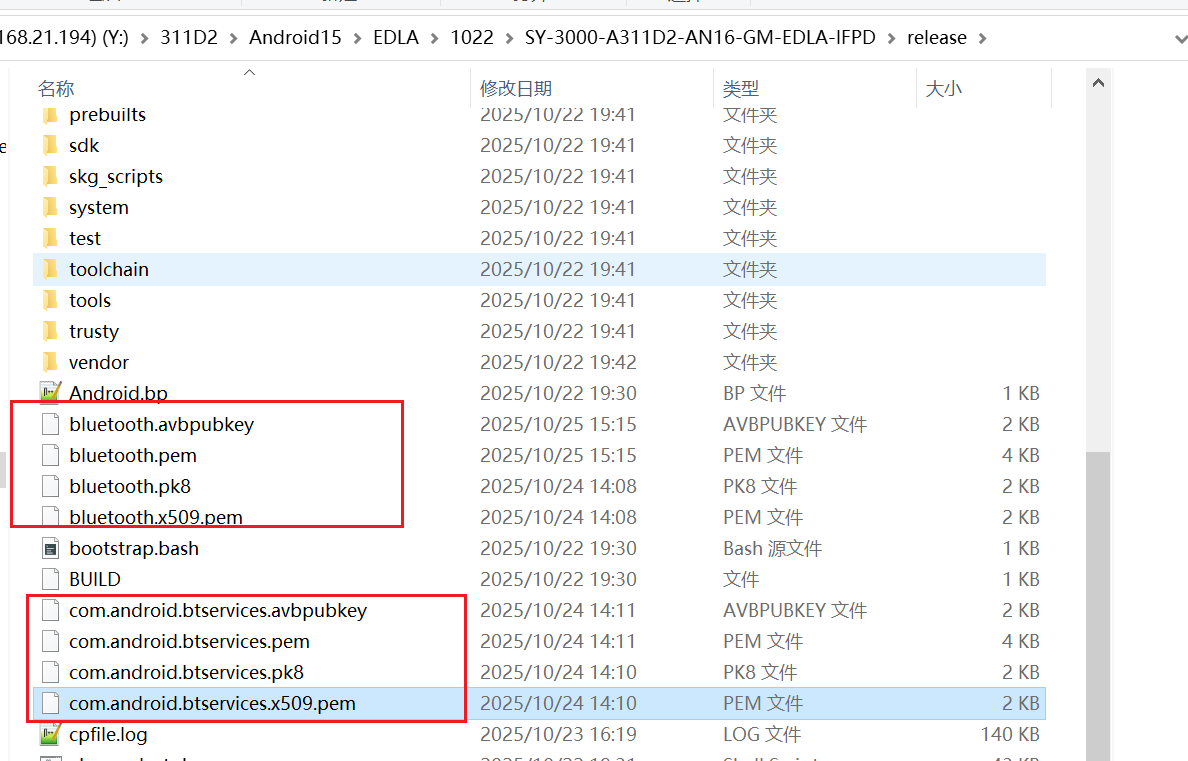
(2)替换几个签名文件
修改的目录是:
//build
build\make\target\product\security/bluetooth.pk8
build\make\target\product\security/bluetooth.x509.pem

//package
//这里只有两个文件,替换这两个文件就可以了,需要把bluetooth修改成com.android.bluetooth
packages/modules/Bluetooth/android/app/certs/com.android.bluetooth.pk8
packages/modules/Bluetooth/android/app/certs/com.android.bluetooth.x509.pem

packages/modules/Bluetooth/apex/com.android.btservices.avbpubkey
packages/modules/Bluetooth/apex/com.android.btservices.pem
packages/modules/Bluetooth/apex/com.android.btservices.pk8
packages/modules/Bluetooth/apex/com.android.btservices.x509.pem

//vendor
vendor/partner_modules/build/certificates/bluetooth.x509.pem
上面的bluetooth.pk8 和 com.android.bluetooth.pk8 是同一个签名文件,只是命名不同?
是的。估计是不同文件下需要的命名规则不同,x509.pem也是同样的。
(3)不同方案上的注意点
mtk方案的EDLA主要修改内容:
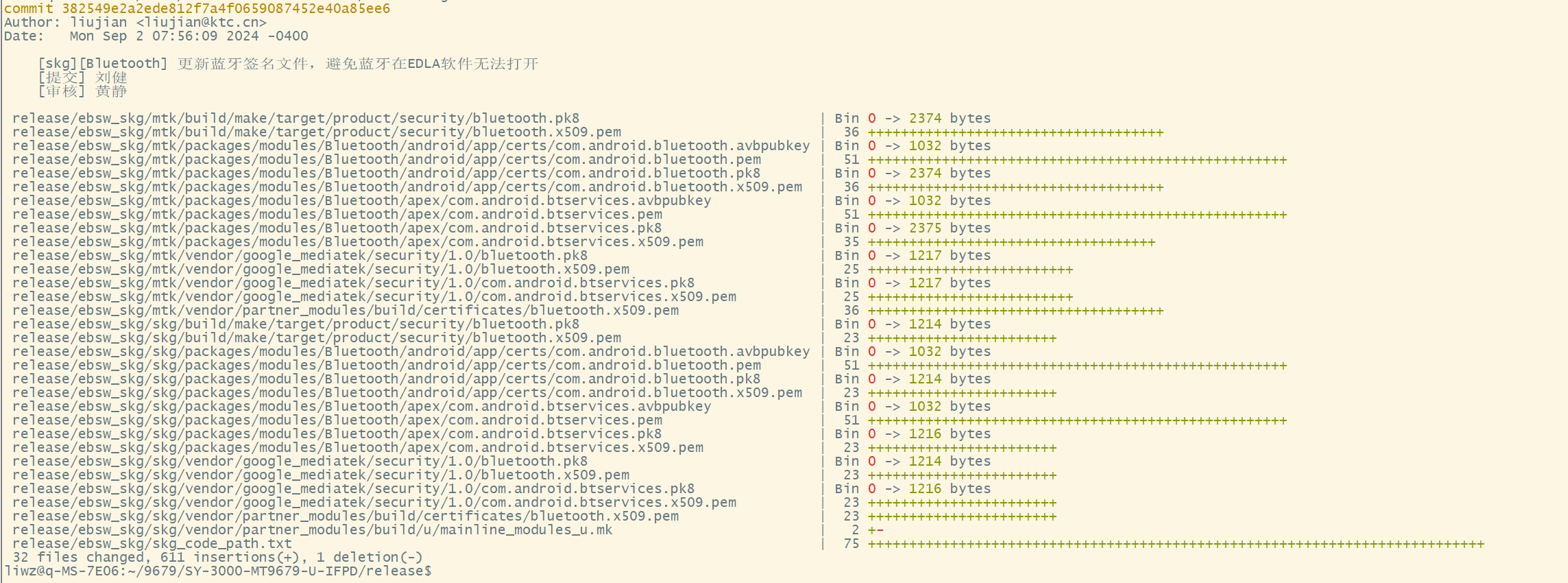
上面是加了拷贝框架,所以有mtk原生代码。
实际的MTK方案修改蓝牙签名信息,修改的代码目录大概是:
build/make/target/product/security/bluetooth.pk8
build/make/target/product/security/bluetooth.x509.pem

packages/modules/Bluetooth/android/app/certs/com.android.bluetooth.avbpubkey
packages/modules/Bluetooth/android/app/certs/com.android.bluetooth.pem
packages/modules/Bluetooth/android/app/certs/com.android.bluetooth.pk8
packages/modules/Bluetooth/android/app/certs/com.android.bluetooth.x509.pem

packages/modules/Bluetooth/apex/com.android.btservices.avbpubkey
packages/modules/Bluetooth/apex/com.android.btservices.pem
packages/modules/Bluetooth/apex/com.android.btservices.pk8
packages/modules/Bluetooth/apex/com.android.btservices.x509.pem

vendor/partner_modules/build/certificates/bluetooth.x509.pem

//下面这几个目录是mtk独有的。
vendor/google_mediatek/security/1.0/bluetooth.pk8
vendor/google_mediatek/security/1.0/bluetooth.x509.pem
vendor/google_mediatek/security/1.0/com.android.btservices.pk8
vendor/google_mediatek/security/1.0/com.android.btservices.x509.pem
上面的 google_mediatek 是mtk独有的文件,在其他方案是没有的,有些供应商会有overlay的情况;
所以可以在全局代码grep 一下相关签名文件,以防万一;
也可以在主要目录(package、vendor、build)进行grep:
grep -nr "bluetooth.pk8"
grep -nr "com.android.bluetooth.pk8"
grep -nr "com.android.btservices.pk8"

grep -nr "bluetooth.x509.pem"
grep -nr "com.android.btservices.x509.pem"
系统还有其他签名文件,有时候也是需要替换的,下面是主要签名信息文件:
SY-3000-A311D2-AN16-GM-EDLA-IFPD/release/build/make/target/product/security$ ls -l
total 88
-rw-rw-r-- 1 liwz liwz 1379 Oct 22 19:30 Android.bp
-rw-rw-r-- 1 liwz liwz 1217 Oct 25 17:07 bluetooth.pk8
-rw-rw-r-- 1 liwz liwz 1391 Oct 25 17:08 bluetooth.x509.pem
-rw-rw-r-- 1 liwz liwz 1217 Oct 22 19:30 cts_uicc_2021.pk8
-rw-rw-r-- 1 liwz liwz 1464 Oct 22 19:30 cts_uicc_2021.x509.pem
-rw-rw-r-- 1 liwz liwz 1484 Oct 22 19:30 fsverity-release.x509.der
-rw-rw-r-- 1 liwz liwz 1216 Oct 22 19:30 media.pk8
-rw-rw-r-- 1 liwz liwz 1675 Oct 22 19:30 media.x509.pem
-rw-rw-r-- 1 liwz liwz 2375 Oct 22 19:30 networkstack.pk8
-rw-rw-r-- 1 liwz liwz 2094 Oct 22 19:30 networkstack.x509.pem
-rw-rw-r-- 1 liwz liwz 2374 Oct 22 19:30 nfc.pk8
-rw-rw-r-- 1 liwz liwz 2110 Oct 22 19:30 nfc.x509.pem
-rw-rw-r-- 1 liwz liwz 1216 Oct 22 19:30 platform.pk8
-rw-rw-r-- 1 liwz liwz 1675 Oct 22 19:30 platform.x509.pem
-rw-rw-r-- 1 liwz liwz 4247 Oct 22 19:30 README
-rw-rw-r-- 1 liwz liwz 1219 Oct 22 19:30 sdk_sandbox.pk8
-rw-rw-r-- 1 liwz liwz 1464 Oct 22 19:30 sdk_sandbox.x509.pem
-rw-rw-r-- 1 liwz liwz 1218 Oct 22 19:30 shared.pk8
-rw-rw-r-- 1 liwz liwz 1675 Oct 22 19:30 shared.x509.pem
-rw-rw-r-- 1 liwz liwz 1217 Oct 22 19:30 testkey.pk8
-rw-rw-r-- 1 liwz liwz 1675 Oct 22 19:30 testkey.x509.pem
SY-3000-A311D2-AN16-GM-EDLA-IFPD/release/build/make/target/product/security$
系统主要相关估计就是platform、bluetooth、media、nfc等签名信息。
应用的jks签名文件就是从platform.pk8 + platform.x509.pem 生成的。
三、其他
1、EDLA项目导入mainline包后蓝牙报错分析解决小结
抓取主要崩溃日志,查看是否和test-keys有关。
如果有关,大概率就是蓝牙签名导致崩溃,可以替换签名文件试试。
生成蓝牙签名文件,替换蓝牙签名文件重新编译大包,确认是否ok。
不同的系统方案可能需要替换的签名文件数量不一样,最好全局搜索一下,替换全部相关的。
2、导入GMS后蓝牙打开崩溃
Android13 上安装谷歌GMS相关服务后,无法打开蓝牙,打开蓝牙马上异常导致自动关闭蓝牙。
这个问题国内估计大部分开发者不会遇到,但是如果是面向国外用户需要安装谷歌相关服务可能会遇到。
这个主要是打开蓝牙后进行了BLE扫描,新版本的原生设置估计没有这个问题,自定义开发的应用有可能会有这个问题。
https://blog.csdn.net/wenzhi20102321/article/details/134220850
3、Android EDLA开发认证说明和开发流程
在国内的商显设备是不需要EDLA认证的,如果是国外并且需要安装GMS套件的必须是要进行EDLA认证才能使用。
下面简单介绍一下EDLA相关内容:
https://blog.csdn.net/wenzhi20102321/article/details/153839933