概述:路由器交换机的镜像口核心作用是复制端口的网络流量,供监控、分析设备抓取数据,主要用于网络故障排查、流量分析和安全审计与监控(对关键区域端口进行流量镜像,结合IDS或日志审计工具,监控敏感数据或恶意行为等)等场景。
*eNSP中的交换机端口配置镜像之后,镜像口****抓不到镜像流量,这里使用路由器AR3260演示。(主要是Router没法识别镜像端口的配置命令)。
1、topo图
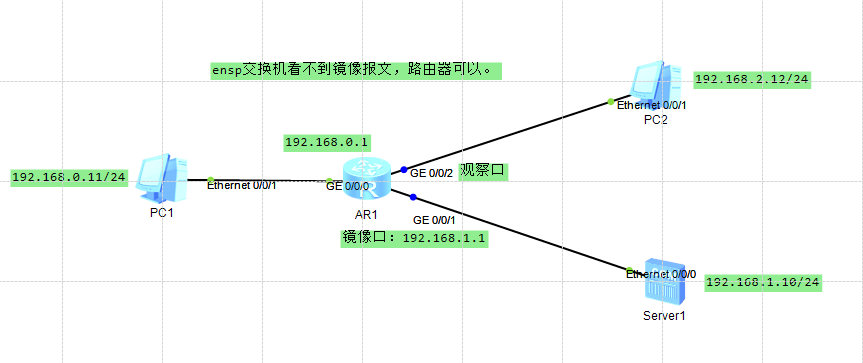
2、配置
网络可达:
[Huawei]int g0/0/0

[Huawei-GigabitEthernet0/0/0]ip add 192.168.0.1 24

[Huawei-GigabitEthernet0/0/0]int g0/0/1

[Huawei-GigabitEthernet0/0/1]ip add 192.168.1.1 24

[Huawei]dis ip int bri
*down: administratively down
^down: standby
(l): loopback
(s): spoofing
The number of interface that is UP in Physical is 4
The number of interface that is DOWN in Physical is 0
The number of interface that is UP in Protocol is 3
The number of interface that is DOWN in Protocol is 1

Interface                         IP Address/Mask      Physical   Protocol
GigabitEthernet0/0/0              192.168.0.1/24       up         up
GigabitEthernet0/0/1              192.168.1.1/24       up         up
GigabitEthernet0/0/2              unassigned           up         down
NULL0                             unassigned           up         up(s)
[Huawei]
观察口,镜像口配置:
[Huawei]observe-port int g0/0/2

[Huawei]int g0/0/1

[Huawei-GigabitEthernet0/0/1]mirror to observe-por both

[Huawei]dis mirror    //查询镜像端口
  ---------------------------------------------------------------------------
    Mirror-port              Direction  Observe-dest
  ---------------------------------------------------------------------------
  1 GigabitEthernet0/0/1     Both       GigabitEthernet0/0/2
  ---------------------------------------------------------------------------

[Huawei]dis observe-port    //查询观察口
  ----------------------------------------------------------------------
  Index    : 1
  Interface: GigabitEthernet0/0/2
  Used     : 2
  ----------------------------------------------------------------------
3、镜像验证
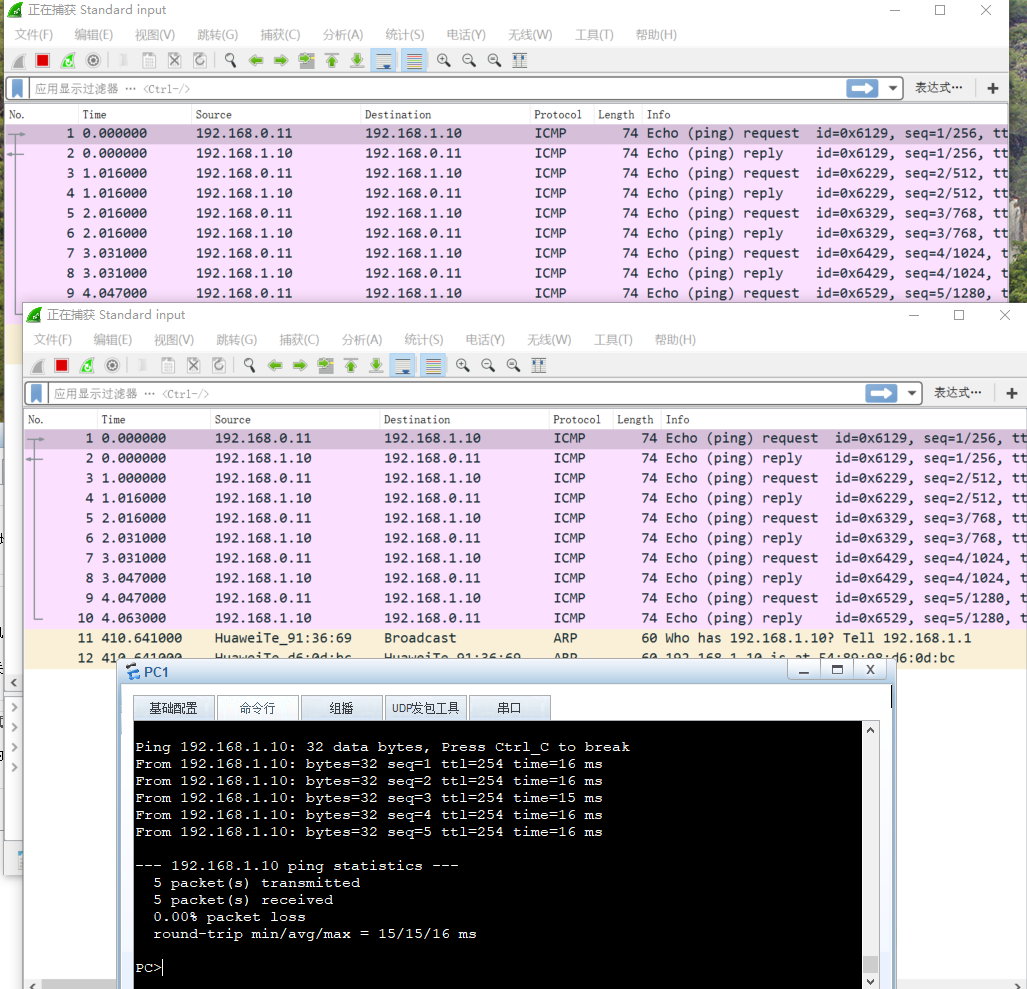
*关于eNSP可以配置镜像但是无法抓取镜像流量报文问题评论区可探讨。