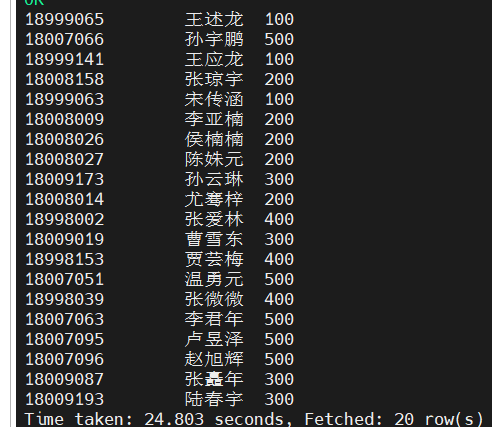
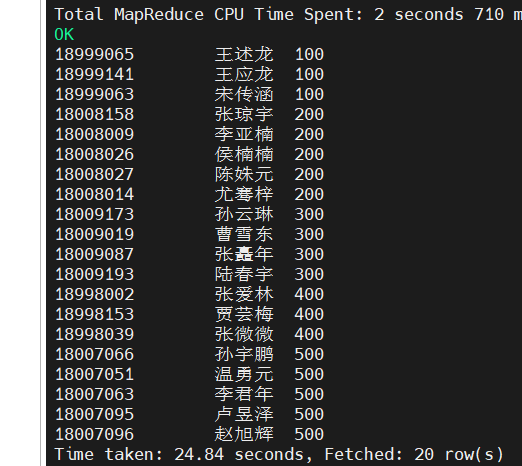
案例6-1 比较运算符应用
1.需求 创建学生emp外部表,向外部表中导入数据,并应用比较运算符做简单查询。
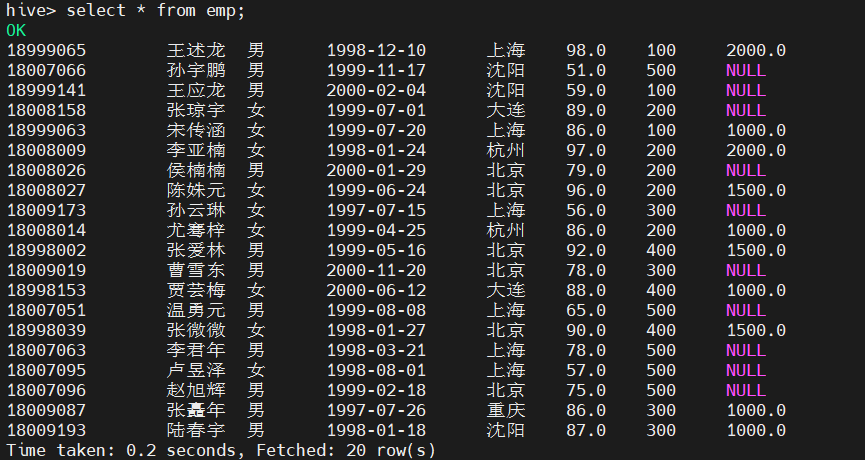
2.数据准备 (1)原始数据 emp表中数据见表6-1。
18999065 王述龙 男 1998-12-10 上海 98 100 2000
18007066 孙宇鹏 男 1999-11-17 沈阳 51 500
18999141 王应龙 男 2000-02-04 沈阳 59 100
18008158 张琼宇 女 1999-07-01 大连 89 200
18999063 宋传涵 女 1999-07-20 上海 86 100 1000
18008009 李亚楠 女 1998-01-24 杭州 97 200 2000
18008026 侯楠楠 男 2000-01-29 北京 79 200
18008027 陈姝元 女 1999-06-24 北京 96 200 1500
18009183 陆春宇 男 1998-01-18 沈阳 87 300 1000
18009173 孙云琳 女 1997-07-15 上海 56 300
18008014 尤骞梓 女 1999-04-25 杭州 86 200 1000
18998002 张爱林 男 1999-05-16 北京 92 400 1500
18009019 曹雪东 男 2000-11-20 北京 78 300
18998153 贾芸梅 女 2000-06-12 大连 88 400 1000
18007051 温勇元 男 1999-08-08 上海 65 500
18998039 张微微 女 1998-01-27 北京 90 400 1500
18007063 李君年 男 1998-03-21 上海 78 500
18007095 卢昱泽 女 1998-08-01 上海 57 500
18007096 赵旭辉 男 1999-02-18 北京 75 500
18009087 张矗年 男 1997-07-26 重庆 86 300 1000
(2)创建本地数据文件emp.txt vim emp.txt 并将表6-1中数据导入其中,然后保存并退出。
3.Hive实例操作
(1)创建外部表emp
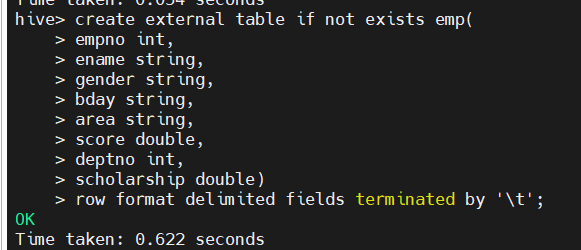
create external table if not exists emp(
empno int,
ename string,
gender string,
bday string,
area string,
score double,
deptno int,
scholarship double)
row format delimited fields terminated by '\t';
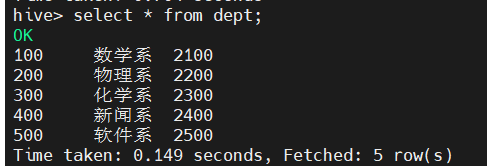
(1.1)创建dept表
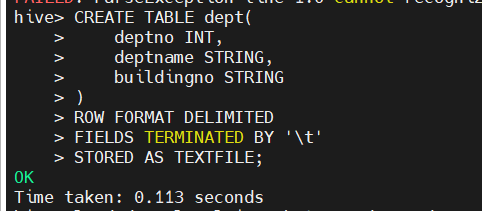
CREATE TABLE dept(
deptno INT,
deptname STRING,
buildingno STRING
)
ROW FORMAT DELIMITED
FIELDS TERMINATED BY '\t'
STORED AS TEXTFILE;
(2)向外部表emp中导入数据
load data local inpath '/opt/datas/emp.txt' into table emp;
load data local inpath '/opt/datas/dept.txt' into table dept;


(3)设置汉字编码,否则汉字出现乱码
alter table emp set serdeproperties('serialization.encoding'='utf-8');

(4)查询成绩为98分的学生的所有信息
select empno,ename,gender,bday,area,score,deptno from emp where score =98;

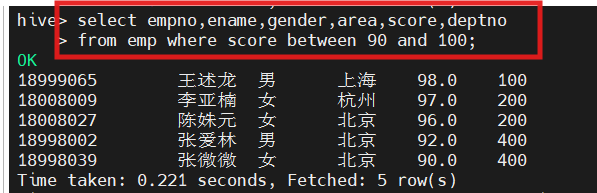
(5)查询成绩为90分到100分的学生信息
select empno,ename,gender,area,score,deptno from emp where score between 90 and 100;
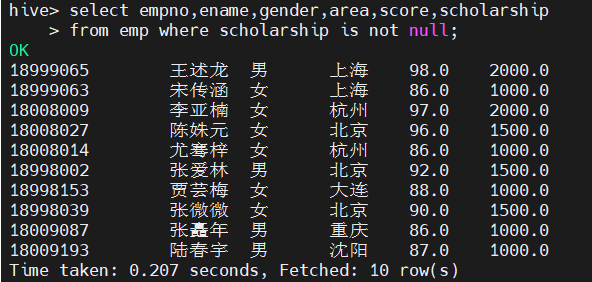
(6)查询奖学金scholarship不为空的所有学生信息
select empno,ename,gender,area,score,scholarship from emp where scholarship is not null;
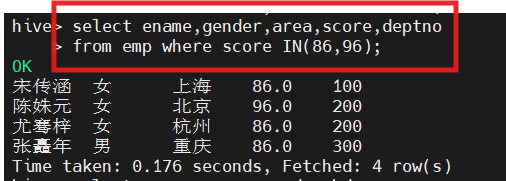
(7)查询成绩为86分或96分的学生信息
hive(hivedwh)>select ename,gender,area,score,deptno from emp where score IN (86, 96);
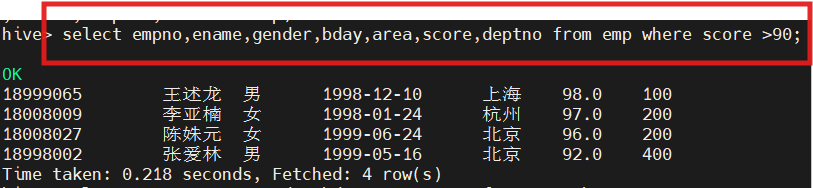
(8)查询成绩大于90分的所有学生
select empno,ename,gender,bday,area,score,deptno from emp where score >90;
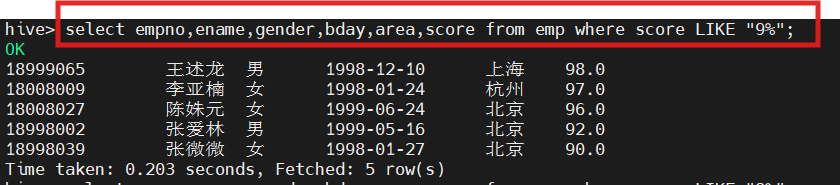
1.查询成绩以9开头的学生信息
selectempno,ename,gender,bday,area,score from emp where score LIKE '9%';
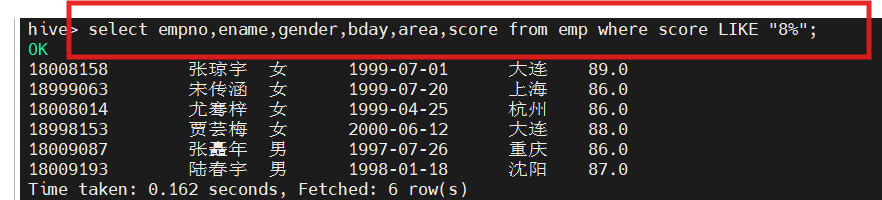
2.查询成绩中第二个数值为8的学生信息
select ename,area,score,deptno,scholarship from emp where score LIKE '_8%';
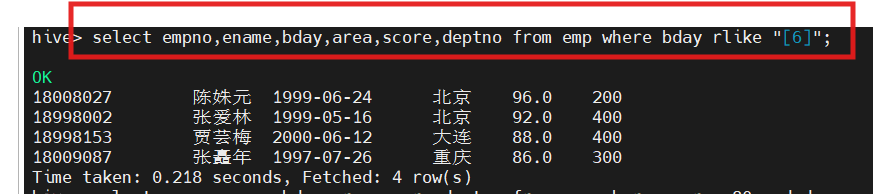
3.查询出生日期中含有6的学生信息,正则表达式仅限于字符串类型的字段
select empno,ename,bday,area,score,deptno from emp where bday RLIKE '6';
案例6-3 逻辑运算符应用
1.查询成绩大于80分,系别是300的学生信息
select empno,ename,bday,area,score,deptno
from emp
where score>80 and deptno=300;
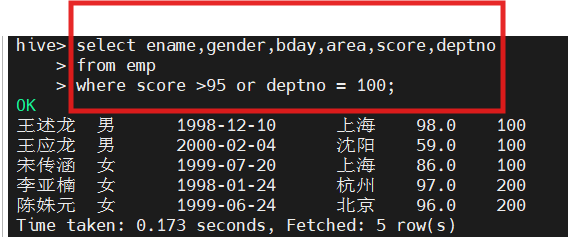
2.查询成绩大于95分,或者系别是100的学生信息
select ename,gender,bday,area,score,deptno from emp where score>95 or deptno=100;
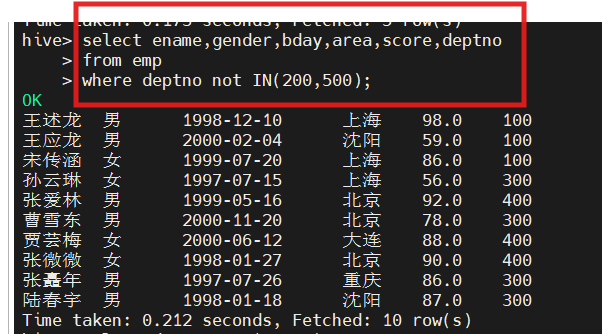
3.查询除系别200和系别500外的学生信息
hive(hivedwh)>select empno,ename,bday,area,score,deptno from emp where deptno not IN(200, 500);
案例6-4 Group By语句应用
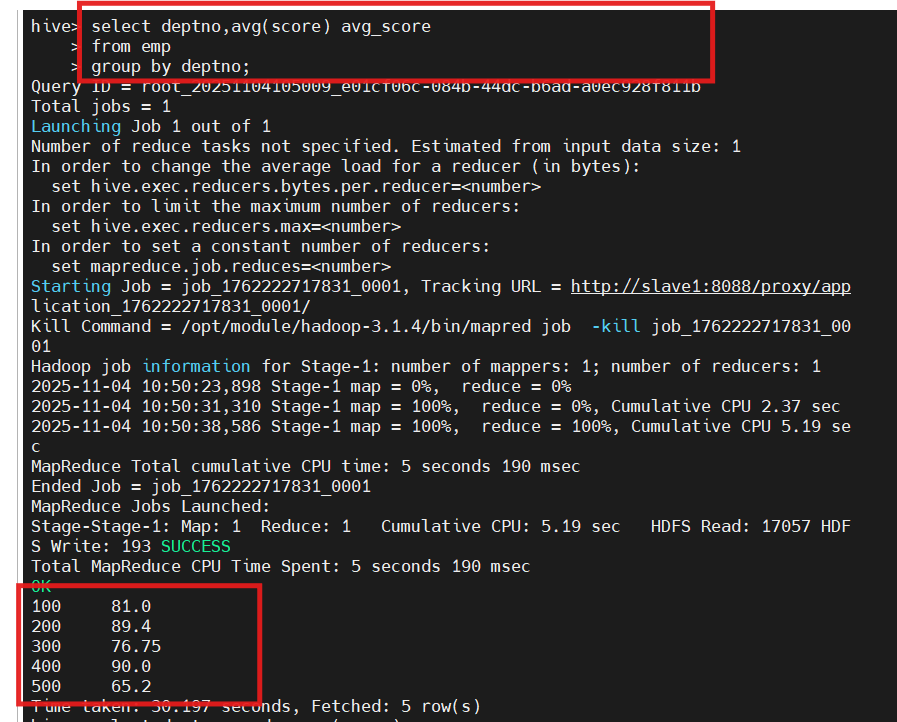
1.查询emp表每个部门的平均成绩
select deptno, avg(score) avg_score from emp group by deptno;
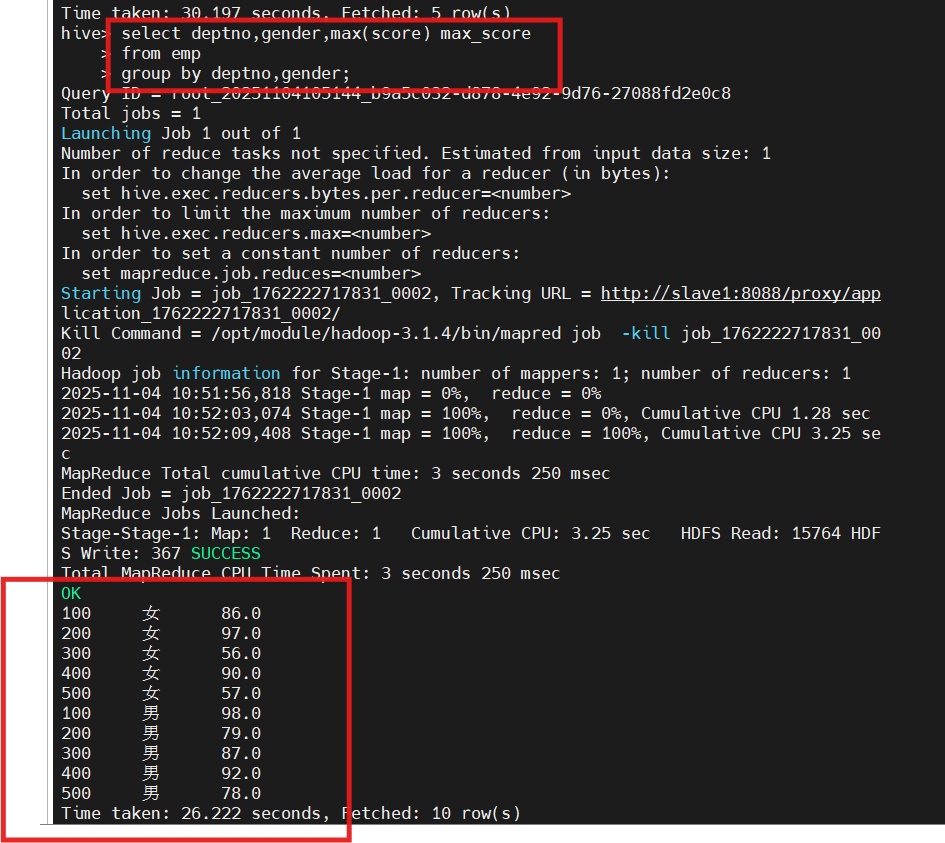
 2.查询emp表每个部门中男女性别的最好成绩
select deptno, gender, max(score) max_score from emp group by deptno, gender;
 Hive实例操作
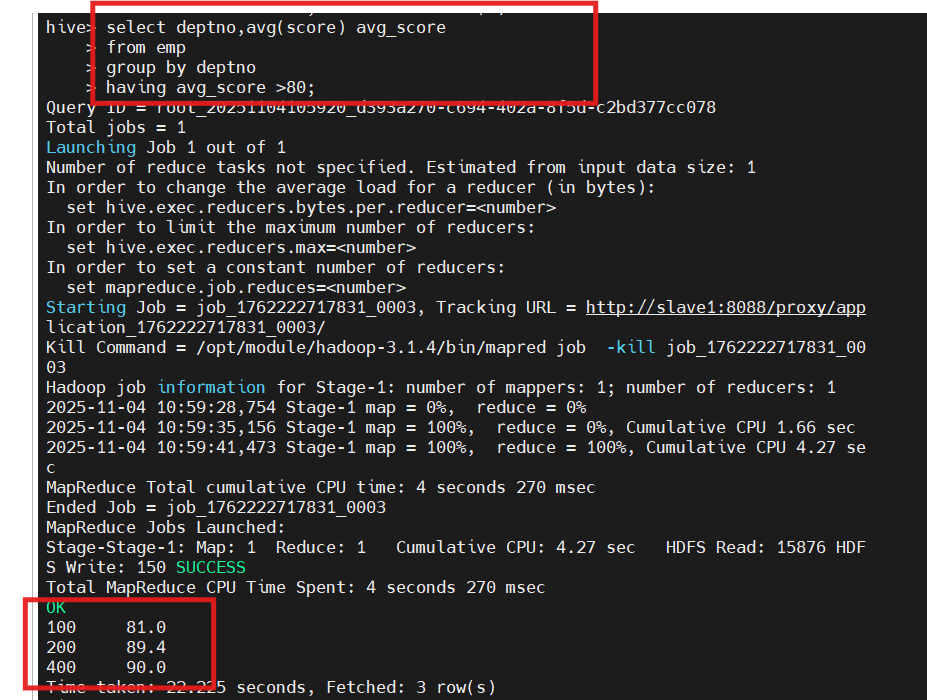
1.查询emp表中平均成绩大于80分的部门:
select deptno, avg(score) avg_score from emp group by deptno having avg_score > 80;
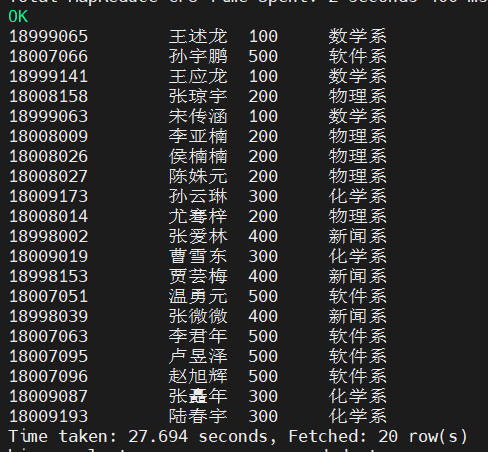
6.4.1 等值连接
SELECT e.empno, e.ename, d.deptno, d.deptname
FROM emp
e JOIN dept d ON e.deptno = d.deptno;

使用表的别名可以简化查询,还可以提高执行效率。 例如,合并dept表和emp表:
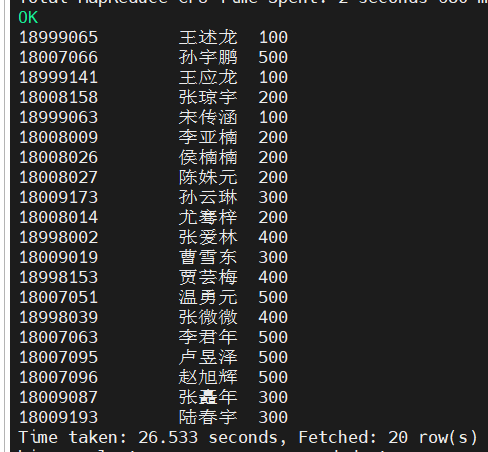
select e.empno, e.ename, d.deptno from emp e join dept d on e.deptno = d.deptno;

6.4.4 左外连接Left Outer Join
SELECT e.empno, e.ename, e.deptno
FROM emp
e LEFT SEMI JOIN dept d ON e.deptno = d.deptno;