Jenkins配置从节点 - Launch Agent
- 前言
-
- [一、主节点主动部署 agent.jar 配置从节点](#一、主节点主动部署 agent.jar 配置从节点)
-
- [1.1 Jenkins 部署](#1.1 Jenkins 部署)
- [1.2 新建凭据](#1.2 新建凭据)
- [1.3 新建从节点](#1.3 新建从节点)
- [1.4 节点网络通信 known_hosts 问题](#1.4 节点网络通信 known_hosts 问题)
前言
Jenkins 配置从节点,之前是手动在某一台机器上主动去部署 agent.jar 然后连接 Jenkins 主节点。遇到过一个问题:每次从节点机器重启之后,从节点上的环境变量就不好使了,就需要重启下 agent.jar 对应的服务才行。
一、主节点主动部署 agent.jar 配置从节点
这里使用的 Jenkins 版本为 Jenkins 2.543 版本,记录下部署遇到的问题;
1.1 Jenkins 部署
使用的 Jenkins 版本为 Jenkins 2.543 版本
bash
version: "3.1"
services:
  jenkins:
    image: jenkins/jenkins:2.534-jdk21
    container_name: jenkins-server
    hostname: jenkins-server
    restart: always
    deploy:
      resources:
        limits:
          cpus: '8'
          memory: 16G
    ports:
      - 8080:8080
      - 50000:50000
    volumes:
      - /home/soft/jenkins_home:/var/jenkins_home
      - /usr/local/maven/apache-maven-3.6.3:/usr/local/maven
      - /etc/localtime:/etc/localtime
    environment:
      - TZ=Asia/Shanghai
      - JAVA_OPTS=-Duser.timezone=Asia/Shanghai
由于是使用 Docker 部署的 Jenkins,所以这里首先遇到的问题就是文件夹权限的问题,Jenkins 容器内部是使用的 jenkins 这个用户来启动的,并且uid 为 1000,所以这里挂载 /var/jenkins_home 的宿主机的文件夹权限需要修改下:
bash
chown -R 1000:1000 /home/soft/jenkins_home否则会导致容器初始化失败。
初始化成功后,可以正常访问登录页,相较于 2.3 版本,页面布局和icon都有优化:

首席登录需要使用默认密码登录,默认密码需要进入容器内查看,登录成功后可修改自定义的密码。
接着是安装插件,直接安装社区推荐的插件即可。
1.2 新建凭据
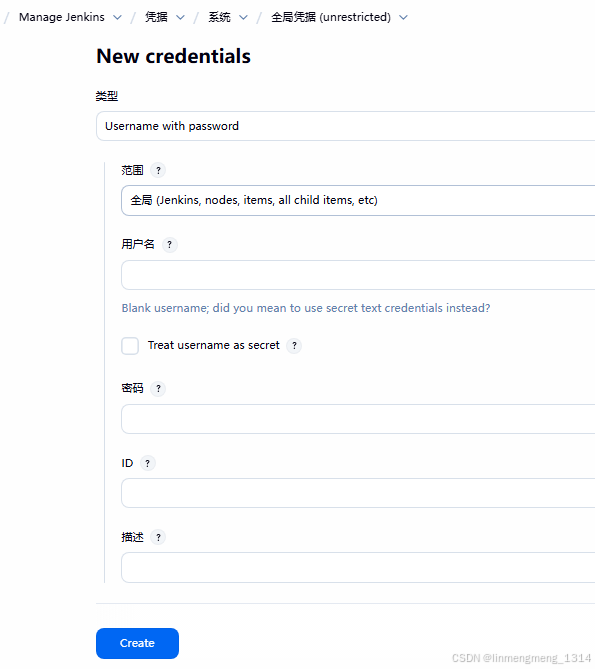
后面部署 agent 需要使用服务器的用户名密码,所以这里配置一个凭据,在【凭据管理】里面添加一个凭据,用户名和密码。

鼠标放置全局两个字旁边,可点击全局的下拉框,选择添加凭据。直接输入用户名、密码。最好设置一个描述,这样凭据多了也不会混乱。
1.3 新建从节点
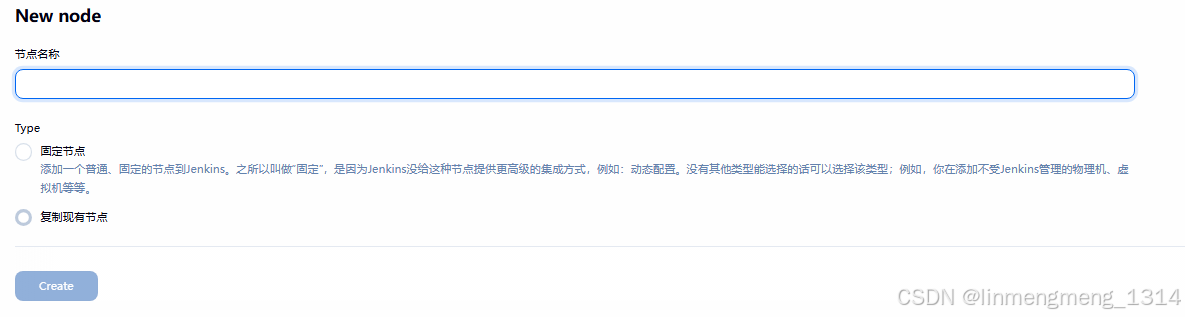
添加首个从节点时,这里选项只有 固定节点,没有复制现有节点,填写节点名称后进入下一步,这里节点名称可设置成ip,可以一眼知道这个从节点是谁,后面还能配置一个专属的 tag,流程运行时是依赖 tag 来选择节点的。
我这里设置节点名称为 node_104.5
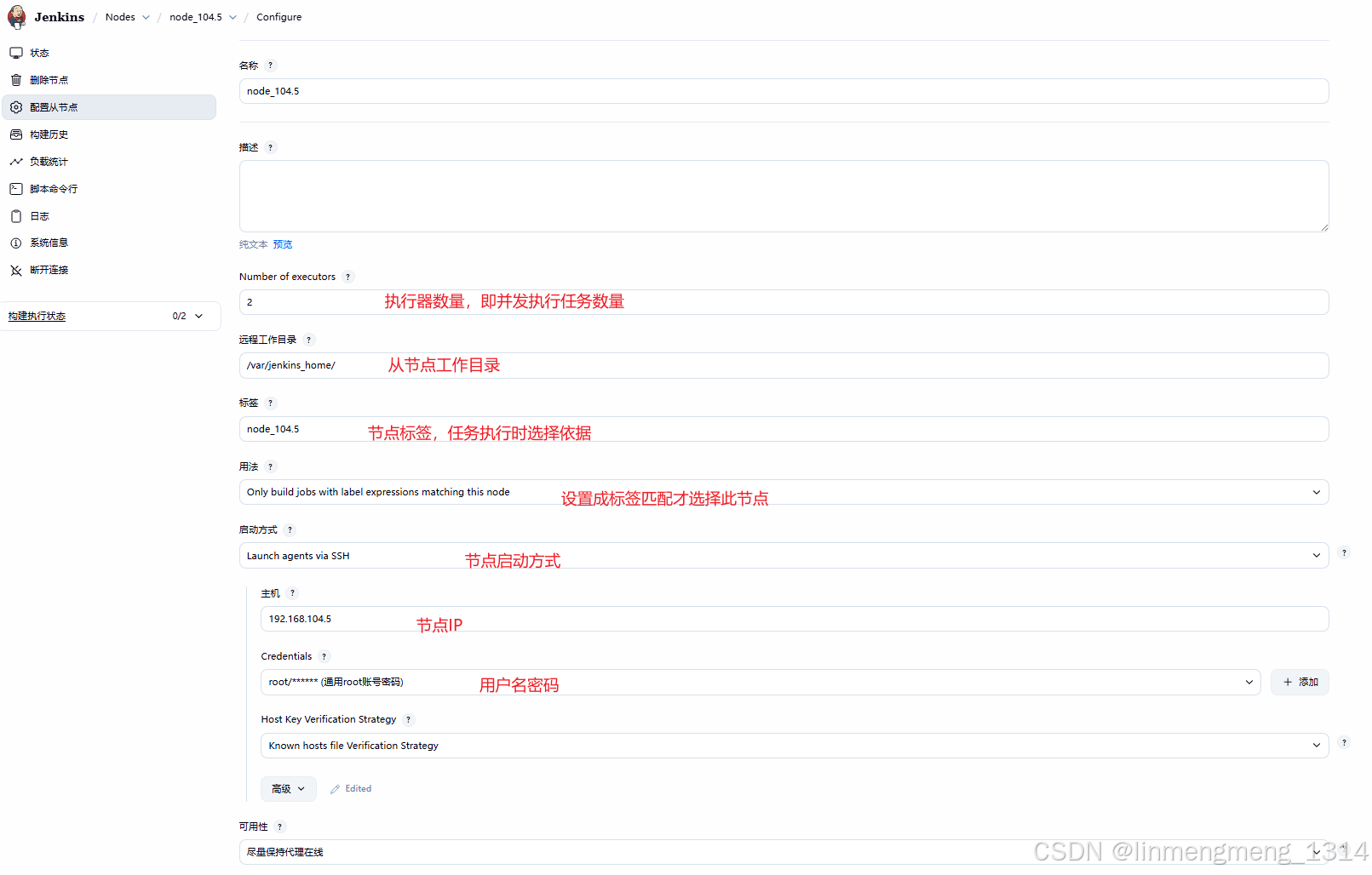
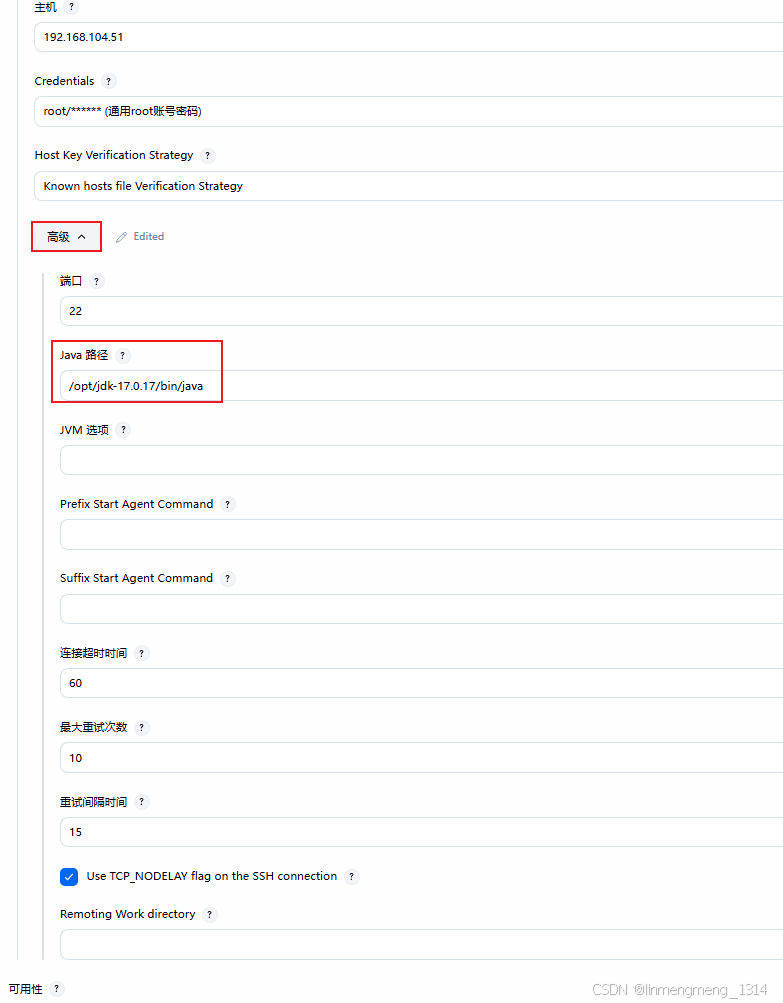
高级选项这里直接指定 Java路径,部署 agent.jar 时需要用到
这里使用用户名密码,这里还可以针对从节点单独配置环境变量:
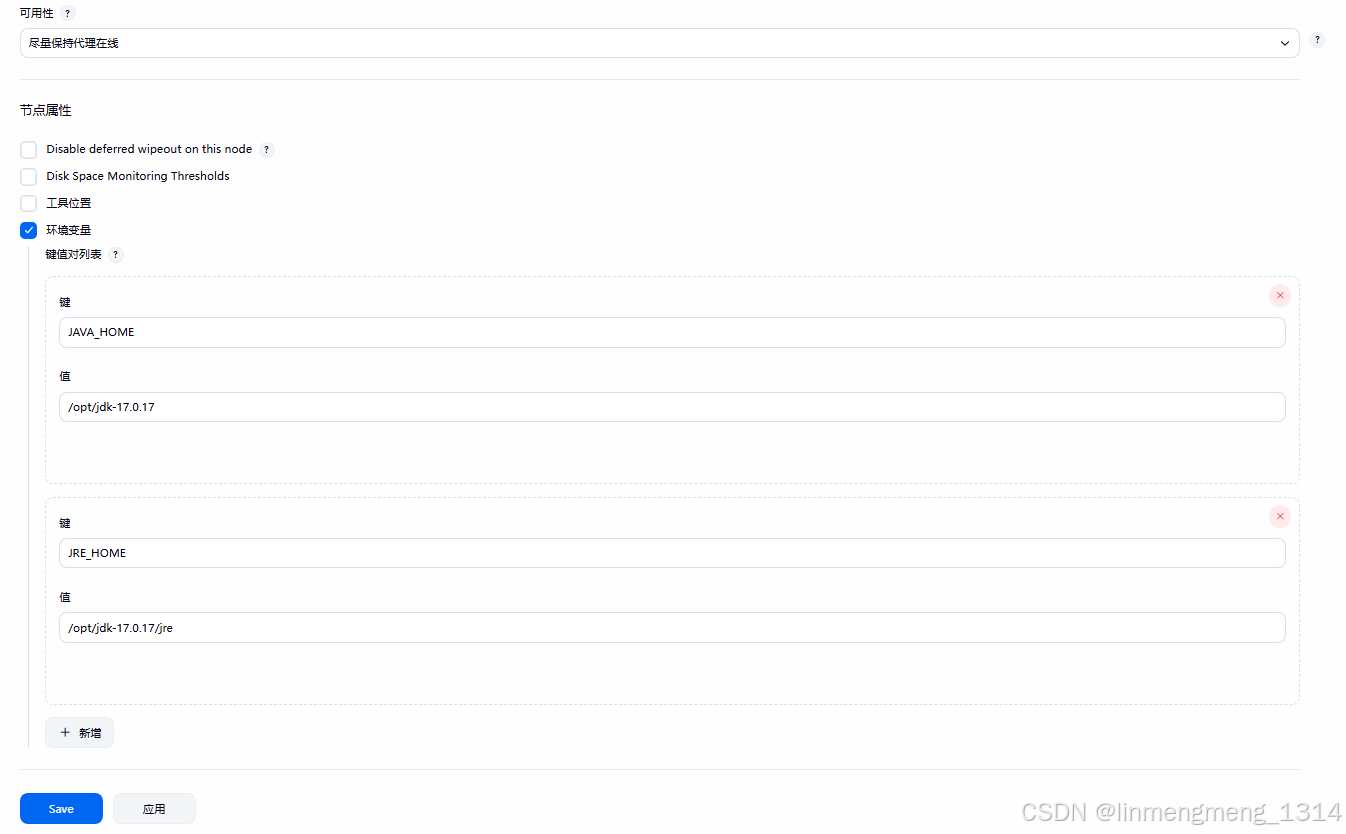
版本要求:Jenkins 2.534 版本,要求 jdk17 否则在下面部署时会报错。
bash
[11/07/25 11:36:19] [SSH] Starting agent process: cd "/var/jenkins_home" && /opt/jdk1.8.0_261/bin/java  -jar remoting.jar -workDir /var/jenkins_home -jar-cache /var/jenkins_home/remoting/jarCache
Error: A JNI error has occurred, please check your installation and try again
Exception in thread "main" java.lang.UnsupportedClassVersionError: hudson/remoting/Launcher has been compiled by a more recent version of the Java Runtime (class file version 61.0), this version of the Java Runtime only recognizes class file versions up to 52.0
	at java.lang.ClassLoader.defineClass1(Native Method)
	at java.lang.ClassLoader.defineClass(ClassLoader.java:756)
	at java.security.SecureClassLoader.defineClass(SecureClassLoader.java:142)
	at java.net.URLClassLoader.defineClass(URLClassLoader.java:468)
	at java.net.URLClassLoader.access$100(URLClassLoader.java:74)
	at java.net.URLClassLoader$1.run(URLClassLoader.java:369)
	at java.net.URLClassLoader$1.run(URLClassLoader.java:363)
	at java.security.AccessController.doPrivileged(Native Method)
	at java.net.URLClassLoader.findClass(URLClassLoader.java:362)
	at java.lang.ClassLoader.loadClass(ClassLoader.java:418)
	at sun.misc.Launcher$AppClassLoader.loadClass(Launcher.java:355)
	at java.lang.ClassLoader.loadClass(ClassLoader.java:351)
	at sun.launcher.LauncherHelper.checkAndLoadMain(LauncherHelper.java:601)
Agent JVM has terminated. Exit code=1
[11/07/25 11:36:19] Launch failed - cleaning up connection
[11/07/25 11:36:19] [SSH] Connection closed.
点击应用,进入节点部署 agent 页面。
配置完成应该就会自动部署 agent 了,如果没有部署,则点击右侧的 Launch Agent

1.4 节点网络通信 known_hosts 问题
首先是 SSH 访问从节点,所以会有一个 know_hosts 文件的更新 /var/jenkins_home/.ssh/known_hosts
异常日志:
bash
Warning: no key algorithms provided; JENKINS-42959 disabled
SSHLauncher{host='192.168.104.51', port=22, credentialsId='common-root-pwd', jvmOptions='', javaPath='/opt/jdk-17.0.17/bin/java', prefixStartSlaveCmd='', suffixStartSlaveCmd='', launchTimeoutSeconds=60, maxNumRetries=10, retryWaitTime=15, sshHostKeyVerificationStrategy=hudson.plugins.sshslaves.verifiers.KnownHostsFileKeyVerificationStrategy, tcpNoDelay=true, trackCredentials=true}
[11/08/25 14:02:03] [SSH] Opening SSH connection to 192.168.104.51:22.
Searching for 192.168.104.51 in /var/jenkins_home/.ssh/known_hosts
Searching for 192.168.104.51:22 in /var/jenkins_home/.ssh/known_hosts
[11/08/25 14:02:03] [SSH] WARNING: No entry currently exists in the Known Hosts file for this host. Connections will be denied until this new host and its associated key is added to the Known Hosts file.
Key exchange was not finished, connection is closed.
SSH Connection failed with IOException: "Key exchange was not finished, connection is closed.", retrying in 15 seconds. There are 10 more retries left.
Searching for 192.168.104.51 in /var/jenkins_home/.ssh/known_hosts
Searching for 192.168.104.51:22 in /var/jenkins_home/.ssh/known_hosts
[11/08/25 14:02:18] [SSH] WARNING: No entry currently exists in the Known Hosts file for this host. Connections will be denied until this new host and its associated key is added to the Known Hosts file.
Key exchange was not finished, connection is closed.
SSH Connection failed with IOException: "Key exchange was not finished, connection is closed.", retrying in 15 seconds. There are 9 more retries left.
Searching for 192.168.104.51 in /var/jenkins_home/.ssh/known_hosts
Searching for 192.168.104.51:22 in /var/jenkins_home/.ssh/known_hosts
[11/08/25 14:02:33] [SSH] WARNING: No entry currently exists in the Known Hosts file for this host. Connections will be denied until this new host and its associated key is added to the Known Hosts file.
Key exchange was not finished, connection is closed.
SSH Connection failed with IOException: "Key exchange was not finished, connection is closed.", retrying in 15 seconds. There are 8 more retries left.
Searching for 192.168.104.51 in /var/jenkins_home/.ssh/known_hosts
Searching for 192.168.104.51:22 in /var/jenkins_home/.ssh/known_hosts
[11/08/25 14:02:48] [SSH] WARNING: No entry currently exists in the Known Hosts file for this host. Connections will be denied until this new host and its associated key is added to the Known Hosts file.
Key exchange was not finished, connection is closed.
SSH Connection failed with IOException: "Key exchange was not finished, connection is closed.", retrying in 15 seconds. There are 7 more retries left.
Searching for 192.168.104.51 in /var/jenkins_home/.ssh/known_hosts
Searching for 192.168.104.51:22 in /var/jenkins_home/.ssh/known_hosts
[11/08/25 14:03:03] [SSH] WARNING: No entry currently exists in the Known Hosts file for this host. Connections will be denied until this new host and its associated key is added to the Known Hosts file.
可能是容器部署的 Jenkins ,涉及到挂载目录权限一类的,导致这里不会自动更新。
解决办法就是去 Jenkins 容器内手动 SSH 一下这个从节点。
bash
[root@data-source1 .ssh]# pwd
/home/soft/jenkins_home_new/.ssh
[root@data-source1 .ssh]#
[root@data-source1 .ssh]# ll
总用量 20
-rw-------. 1 jenkins jenkins 3243 11月  6 18:58 id_rsa
-rw-r--r--. 1 jenkins jenkins  744 11月  6 18:58 id_rsa.pub
-rw-------. 1 jenkins jenkins  364 11月  6 19:15 known_hosts
-rw-r--r--. 1 jenkins jenkins  175 11月  6 19:09 known_hosts_bak
-rw-r--r--. 1 jenkins jenkins  142 11月  6 19:15 known_hosts.old
[root@data-source1 .ssh]#
[root@data-source1 .ssh]#
[root@data-source1 .ssh]# cat known_hosts
|1|mpXRyGyNFntaDeENJMb9r5aW84c=|CmZ1E7GItJ6LMaTXUgjzkaYSmK0= ssh-ed25519 AAAAC3NzaC1lZDI1NTE5AAAAIJslaD5BZlgMowYStSb+VGDyAWncBGfZj38UI/gmv446
|1|T/BzTKNbCRGX0bYHfZ9Nl8uvXYQ=|ZVaJa83N/tbJH+MXEzrBGfMD3dY= ecdsa-sha2-nistp256 AAAAE2VjZHNhLXNoYTItbmlzdHAyNTYAAAAIbmlzdHAyNTYAAABBBNkwi8L0hHjcSV/scFAuf4XamqczLqRSi4KVfN1FnwuAmGrORWEENas8dBAaOArPheFmp7ZBPwaVznYnr24AxXA=
[root@data-source1 .ssh]#
进入容器内操作下SSH :
bash
jenkins@jenkins-server:~$ ssh root@192.168.104.51
The authenticity of host '192.168.104.51 (192.168.104.51)' can't be established.
ED25519 key fingerprint is SHA256:xyTtuuElV4g/sQePmVCIy/6Fg9CDbqkZ+FP8rURW+4k.
This key is not known by any other names.
Are you sure you want to continue connecting (yes/no/[fingerprint])? yes
Warning: Permanently added '192.168.104.51' (ED25519) to the list of known hosts.
root@192.168.104.51's password:

jenkins@jenkins-server:~$
我特意验证了下,没有输入密码,直接 Ctrl + C 停止掉了,目的是这一步: Warning: Permanently added '192.168.104.51' (ED25519) to the list of known hosts.
再次查看 know_hosts
bash
[root@data-source1 .ssh]# cat known_hosts
|1|mpXRyGyNFntaDeENJMb9r5aW84c=|CmZ1E7GItJ6LMaTXUgjzkaYSmK0= ssh-ed25519 AAAAC3NzaC1lZDI1NTE5AAAAIJslaD5BZlgMowYStSb+VGDyAWncBGfZj38UI/gmv446
|1|T/BzTKNbCRGX0bYHfZ9Nl8uvXYQ=|ZVaJa83N/tbJH+MXEzrBGfMD3dY= ecdsa-sha2-nistp256 AAAAE2VjZHNhLXNoYTItbmlzdHAyNTYAAAAIbmlzdHAyNTYAAABBBNkwi8L0hHjcSV/scFAuf4XamqczLqRSi4KVfN1FnwuAmGrORWEENas8dBAaOArPheFmp7ZBPwaVznYnr24AxXA=
|1|riR4LURMvPPzt45cSI9oaDqmLao=|/k9ztZtsQ6QK1fLTC2PkkYqZF0Y= ssh-ed25519 AAAAC3NzaC1lZDI1NTE5AAAAIMuVTJ6buHWsHyeM8wsqZ4jduDX4jCyf9MVSYSwcRYeV
[root@data-source1 .ssh]#
接着看下 从节点部署日志:
bash
[11/08/25 14:09:08] [SSH] Starting sftp client.
[11/08/25 14:09:08] [SSH] Copying latest remoting.jar...
[11/08/25 14:09:08] [SSH] Copied 1,398,155 bytes.
Expanded the channel window size to 4MB
[11/08/25 14:09:08] [SSH] Starting agent process: cd "/home/jenkins_home" && /opt/jdk-17.0.17/bin/java  -jar remoting.jar -workDir /home/jenkins_home -jar-cache /home/jenkins_home/remoting/jarCache
11月 08, 2025 2:09:09 下午 org.jenkinsci.remoting.engine.WorkDirManager initializeWorkDir
信息: Using /home/jenkins_home/remoting as a remoting work directory
11月 08, 2025 2:09:09 下午 org.jenkinsci.remoting.engine.WorkDirManager setupLogging
信息: Both error and output logs will be printed to /home/jenkins_home/remoting
<===[JENKINS REMOTING CAPACITY]===>channel started
Remoting version: 3345.v03dee9b_f88fc
Launcher: SSHLauncher
Communication Protocol: Standard in/out
This is a Unix agent
Agent successfully connected and online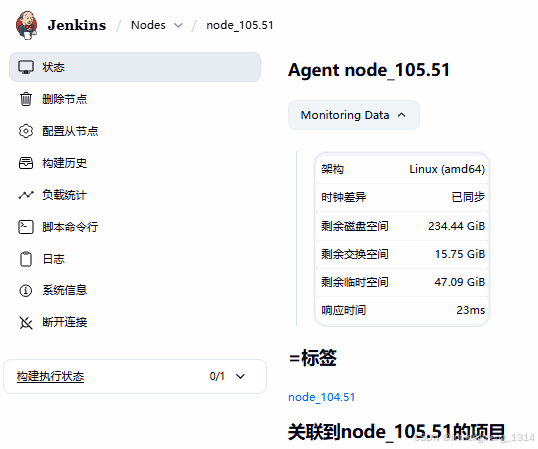
此时节点状态也正常显示了。
二、自定义部署 Agent.jar
在使用旧版本时,配置从节点是直接在 从节点上启动一个 agent.jar 服务:
bash
java -jar /var/jenkins_home/agent.jar -jnlpUrl http://192.168.104.107:8080/computer/node%5F104%2E5/jenkins-agent.jnlp -secret 663cd2d752be59aa2f0e788804b957165feaeaeedf91af5e4bcb6089c0205e75 -workDir /var/jenkins_home这种方式是以从节点视角出发,主动注册到主节点的。
不过我使用过程中,遇到过一个问题就是从节点关机重启后,需要手动执行下这个命令,配置的自动重启 Shell 脚本,虽然可以正常连接上主节点,但是执行任务时 读取不到配置的环境变量。