目标效果如下图
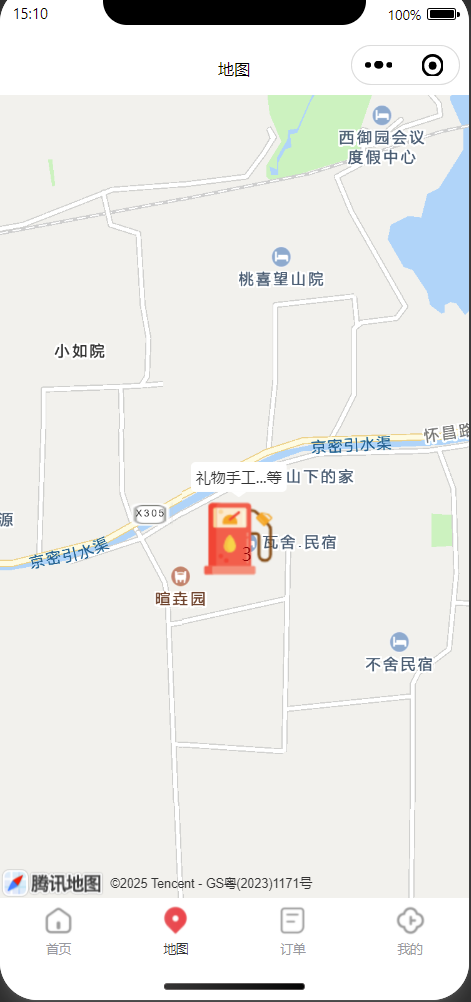
1、微信小程序原生语言开发
2、map组件聚合簇样式自定义
下面代码是我调研时候的调试数据,可做demo参考。
html
<map
  id="myMap"
  style="width: 100%; height: 100vh;"
  latitude="40.22429"
  longitude="116.43639"
  scale="{{scale}}"
>
</map>
javascript
const app = getApp();
Page({
  data: {
    scale: 16,
    markers: []
  },

  onReady() {
    const _this = this;
    this.mapCtx = wx.createMapContext('myMap', this); // 绑定this
    this.mapCtx.initMarkerCluster({
      gridSize: 50,              // 必须:聚合网格大小(像素,控制marker距离多近会聚合)
      minClusterSize: 2,         // 必须:最小聚合数量(默认2,即≥2个marker才会聚合)
      maxZoom: 20,               // 必须:超过该缩放级别后不聚合
      enableDefaultStyle: false, // 禁用默认聚合样式,使用自定义
      clusterMarker: {
        iconPath: '/image/abc.png',  // 网络图标记得在 downloadFile 合法域名中
        width: 64,                   // 图片尺寸最好和实际图片一致
        height: 64,
        anchor: { x: 0.5, y: 0.5 },
        zIndex: 999,                 // 提高层级,确保在普通标记上方
      },
      success(res) {
        _this.addMarkersToMap()
      },
      fail(err) {}
    });

  },
  // 监听聚合创建事件,兜底处理自定义聚合样式
  markerClusterCreateFn(){
    const _this = this;
    this.mapCtx.on('markerClusterCreate', (res) => {
      const clusters = res.clusters;
      const clusterMarkers = clusters.map(cluster => {
        const { center, clusterId, markerIds } = cluster;
        const count = markerIds.length; // 聚合点数量
        // 1. 找到聚合簇中第一个点位的完整信息(通过markerId匹配)
        const firstMarker = _this.data.markers.find(marker => marker.id === markerIds[0]);
        // 2. 提取第一个点位的label.content,没有则用默认文本
        const firstContent = firstMarker?.label?.content || '多个点位';
        // 3. 拼接聚合簇标题:第一个内容+...等X个
        const calloutContent = `${firstContent}...等`;
        return {
          ...center,
          clusterId, // 必须携带clusterId,确保聚合关联
          iconPath: '/image/abc.png',
          width: 64,
          height: 64,
          anchor: { x: 0.5, y: 0.5 },
          label: { // 聚合簇的自定义图标样式
            content: String(count), // 显示聚合数量
            color: '#900', // 文字颜色(白色更醒目)
            fontSize: 14, // 文字大小
            fontWeight: 'bold', // 文字加粗
            anchorX: 0.5, // 文字X轴锚点(居中)
            anchorY: 0.5, // 文字Y轴锚点(居中)
            bgColor: 'transparent', // 文字背景透明,避免遮挡图标
            padding: 2 // 文字内边距,优化显示
          },
          // callout 显示标题(聚合簇图标上方,可点击显示或常驻)
          callout: {
            content: calloutContent, // 自定义标题
            color: '#333',
            fontSize: 12,
            bgColor: '#fff', // 白色背景突出标题
            borderRadius: 4,
            padding: 4,
            display: 'ALWAYS', // 一直显示(可选 BYCLICK 点击显示)
            textAlign: 'center',
            anchorX: 0.5,
            anchorY: -1.2 // 标题在图标上方
          }
        };
      });
      // 添加自定义聚合标记
      if (clusterMarkers.length > 0) {
        this.mapCtx.addMarkers({
          markers: clusterMarkers,
          clear: false,
          success: () => {}
        });
      }
    });
  },
  addMarkersToMap(){
    const _this = this;
    // 标记点数组,方便调试的固定假数据
    const markersAll = [
      { id: 20, latitude: 40.22429, longitude: 116.43639,
        iconPath: '/image/orderSel.png',
        label:{
          anchorX: 8,
          anchorY: -25,
          bgColor: "#fff",
          borderRadius: 30,
          color: "#F09834",
          content: "礼物手工",
          fontSize: 11,
          padding: 2,
        },
        width: 34, height: 48, joinCluster: true, anchor: { x: 0.5, y: 1 } },
      { id: 21, latitude: 40.22429, longitude: 116.43629,
        iconPath: '/image/orderSel.png',
        label:{
          anchorX: 8,
          anchorY: -25,
          bgColor: "#fff",
          borderRadius: 30,
          color: "#F09834",
          content: "南山春日感官",
          fontSize: 11,
          padding: 2,
        },
        width: 34, height: 48, joinCluster: true, anchor: { x: 0.5, y: 1 } },
      { id: 23, latitude: 40.22429, longitude: 116.43659,
        iconPath: '/image/orderSel.png',
        label:{
          anchorX: 8,
          anchorY: -25,
          bgColor: "#fff",
          borderRadius: 30,
          color: "#F09834",
          content: "木作师资课",
          fontSize: 11,
          padding: 2,
        },
        width: 34, height: 48, joinCluster: true, anchor: { x: 0.5, y: 1 } },
    ]
    // 调用 addMarkers 添加
    this.mapCtx.addMarkers({
      markers: markersAll,
      clear: false,
      success: () => {
        console.log('标记添加成功');
      },
      fail: (err) => {
        console.error('标记添加失败', err);
      },
      complete: (e) => {
        console.log('标记添加成功或者失败都会触发', e);
      }
    })
    this.setData({
      markers: markersAll
    })
    _this.markerClusterCreateFn()
  }
})