前言
需要一个预编译sql 转 可执行sql的工具,需要将预编译的sql和参数一起组合成一条可执行sql脚本。
本文基于 sql-formatter.min.js 插件
代码实现
实现效果和示例
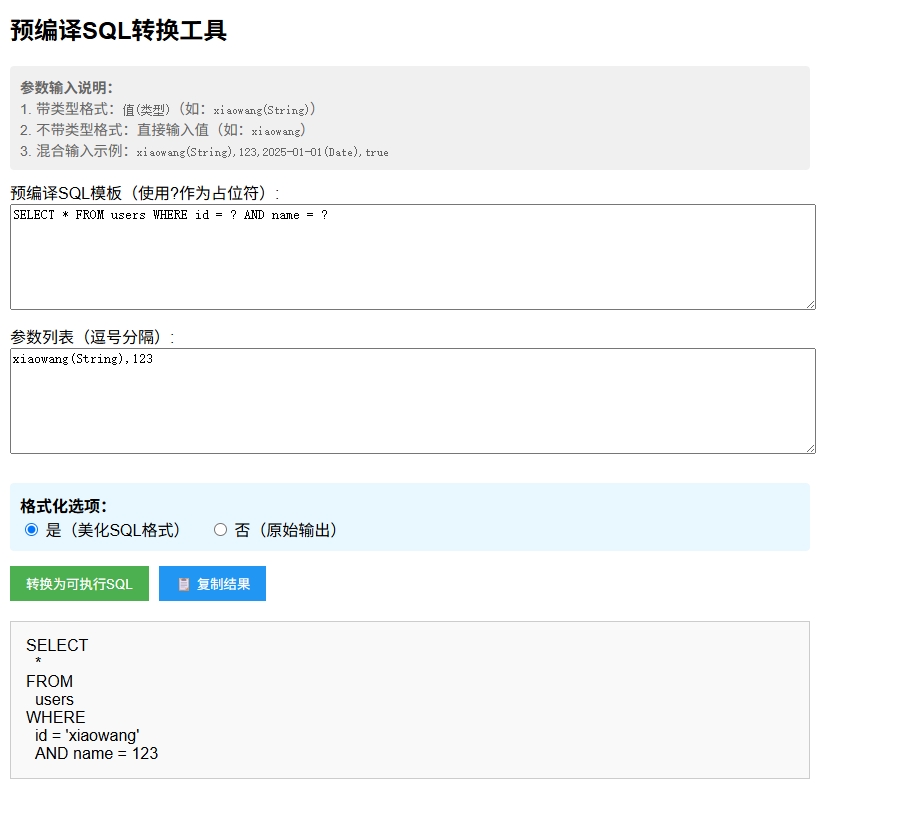
作用: 通过本工具可以有效的将预编译的sql 和参数 组合构建成可执行的sql语句,方便调试和查看。
代码全文:
html
<!DOCTYPE html>
<html>
<head>
<title>SQL预编译转换工具</title>
<style>
body { font-family: Arial, sans-serif; margin: 20px; }
.container { max-width: 800px; }
textarea { width: 100%; height: 100px; margin-bottom: 10px; }
.button-group {
display: flex;
gap: 10px;
margin: 15px 0;
}
button {
padding: 8px 16px;
background: #4CAF50;
color: white;
border: none;
cursor: pointer;
}
button:hover { background: #45a049; }
button:disabled { background: #cccccc; cursor: not-allowed; }
.result {
margin-top: 20px;
padding: 15px;
border: 1px solid #ccc;
white-space: pre-wrap;
background: #f9f9f9;
position: relative;
}
.error { color: red; }
.hint {
font-size: 0.9em;
color: #666;
margin: 10px 0;
padding: 10px;
background: #f0f0f0;
border-radius: 4px;
}
.radio-group {
margin: 15px 0;
padding: 10px;
background: #e9f7fe;
border-radius: 4px;
}
.copy-btn { background: #2196F3; }
.copy-btn:hover { background: #0b7dda; }
.format-option { margin-right: 15px; }
</style>
</head>
<body>
<div class="container">
<h2>预编译SQL转换工具</h2>
<div class="hint">
<strong>参数输入说明:</strong><br>
1. 带类型格式:<code>值(类型)</code>(如:<code>xiaowang(String)</code>)<br>
2. 不带类型格式:直接输入值(如:<code>xiaowang</code>)<br>
3. 混合输入示例:<code>xiaowang(String),123,2025-01-01(Date),true</code>
</div>
<label for="sqlTemplate">预编译SQL模板(使用?作为占位符):</label>
<textarea id="sqlTemplate" placeholder="例如:SELECT * FROM users WHERE id = ? AND name = ?">SELECT * FROM users WHERE id = ? AND name = ?</textarea>
<label for="params">参数列表(逗号分隔):</label>
<textarea id="params" placeholder="格式:参数1,参数2,... 示例: 带类型:xiaowang(String),123(Integer) 不带类型:xiaowang,123 混合:xiaowang(String),123,2025-01-01(Date)">xiaowang(String),123</textarea>
<div class="radio-group">
<strong>格式化选项:</strong><br>
<label class="format-option">
<input type="radio" name="format" value="true" checked>
是(美化SQL格式)
</label>
<label class="format-option">
<input type="radio" name="format" value="false">
否(原始输出)
</label>
</div>
<div class="button-group">
<button onclick="convertSQL()">转换为可执行SQL</button>
<button id="copyBtn" class="copy-btn" onclick="copyResult()" disabled>📋 复制结果</button>
</div>
<div class="result" id="result"></div>
</div>
<script src="https://cdnjs.cloudflare.com/ajax/libs/sql-formatter/2.3.3/sql-formatter.min.js"></script>
<script>
function convertSQL() {
const template = document.getElementById('sqlTemplate').value.trim();
const paramsInput = document.getElementById('params').value.trim();
const shouldFormat = document.querySelector('input[name="format"]:checked').value === 'true';
const resultDiv = document.getElementById('result');
const copyBtn = document.getElementById('copyBtn');
// 清除之前的结果
resultDiv.innerHTML = '';
copyBtn.disabled = true;
// 验证输入
if (!template) {
resultDiv.innerHTML = '<span class="error">错误:请输入SQL模板</span>';
return;
}
// 解析参数(支持带类型和不带类型)
const paramArray = paramsInput.split(',').map(param => param.trim().replace(/\s+/g, ''));
const params = [];
for (const param of paramArray) {
// 尝试解析带类型的参数
const typeMatch = param.match(/^(.+?)\((String|Integer|Date|Boolean)\)$/);
if (typeMatch) {
const value = typeMatch[1];
const type = typeMatch[2];
// 处理带类型的值
let processedValue;
switch (type) {
case 'String':
processedValue = `'${value.replace(/'/g, "''")}'`;
break;
case 'Integer':
if (!/^-?\d+$/.test(value)) {
resultDiv.innerHTML = `<span class="error">错误:非整数参数 "${param}"</span>`;
return;
}
processedValue = value;
break;
case 'Date':
// 简单验证日期格式(实际项目中可能需要更严格的验证)
if (!/^\d{4}-\d{2}-\d{2}$/.test(value)) {
resultDiv.innerHTML = `<span class="error">错误:日期格式应为YYYY-MM-DD "${value}"</span>`;
return;
}
processedValue = `'${value}'`;
break;
case 'Boolean':
processedValue = value.toLowerCase() === 'true' ? 'TRUE' : 'FALSE';
break;
default:
resultDiv.innerHTML = `<span class="error">错误:未知类型 "${type}"</span>`;
return;
}
params.push({ original: param, processed: processedValue });
} else {
// 处理不带类型的值(默认作为String处理)
let processedValue;
// 尝试自动检测类型
if (/^-?\d+$/.test(param)) {
// 数字
processedValue = param;
} else if (/^true|false$/i.test(param)) {
// 布尔值
processedValue = param.toLowerCase() === 'true' ? 'TRUE' : 'FALSE';
} else if (/^\d{4}-\d{2}-\d{2}$/.test(param)) {
// 日期
processedValue = `'${param}'`;
} else {
// 默认作为字符串
processedValue = `'${param.replace(/'/g, "''")}'`;
}
params.push({ original: param, processed: processedValue });
}
}
// 计算占位符数量
const placeholderCount = (template.match(/\?/g) || []).length;
// 验证参数数量
if (params.length !== placeholderCount) {
resultDiv.innerHTML = `<span class="error">错误:参数数量不匹配。需要 ${placeholderCount} 个参数,但提供了 ${params.length} 个</span>`;
return;
}
// 转换SQL
let sql = template;
params.forEach(param => {
sql = sql.replace('?', param.processed, 1);
});
// 格式化处理
if (shouldFormat && sqlFormatter) {
try {
sql = sqlFormatter.format(sql);
} catch (e) {
console.error("格式化错误:", e);
}
}
// 显示结果
resultDiv.textContent = sql;
copyBtn.disabled = false;
}
function copyResult() {
const resultDiv = document.getElementById('result');
const range = document.createRange();
range.selectNode(resultDiv);
window.getSelection().removeAllRanges();
window.getSelection().addRange(range);
try {
const successful = document.execCommand('copy');
const msg = successful ? '复制成功!' : '复制失败,请手动选择';
alert(msg);
} catch (err) {
alert('复制失败,请手动选择');
}
window.getSelection().removeAllRanges();
}
</script>
</body>
</html>