在工业物联网(IIoT)场景中,实时监控设备状态和能源消耗是提升生产效率的核心需求。本文将详细介绍如何在 IOT2050 设备(搭载 Debian 12 系统)上,完成两大监控系统的部署:基于 Nginx 的设备监控管理 HTML 静态页面 (负责可视化展示设备状态、工单数据)和**Asp.net Core 能源监控系统**(负责后端数据处理、能源趋势分析),实现从设备状态到能源消耗的全维度监控。
一、环境准备:IOT2050 基础配置
核心前提
- IOT2050 设备已安装 Debian 12 操作系统(64 位)
- 设备已联网,可通过 SSH 远程连接(推荐使用 Putty 或 Xshell)
- 本地开发环境:VS 2022(用于Asp.net Core 项目发布)、浏览器(用于测试访问)
第一步:安装 Nginx 服务器
Nginx 是轻量级高性能 Web 服务器,专为静态资源(HTML/CSS/JS)优化,是部署前端页面的首选。
-
更新系统软件包:
sudo apt update
-
安装 Nginx:
sudo apt install -y nginx
-
验证 Nginx 状态(显示
active (running)即为正常):sudo systemctl status nginx
-
若未启动,执行启动命令:
sudo systemctl start nginx
二、部署设备监控管理 HTML 页面
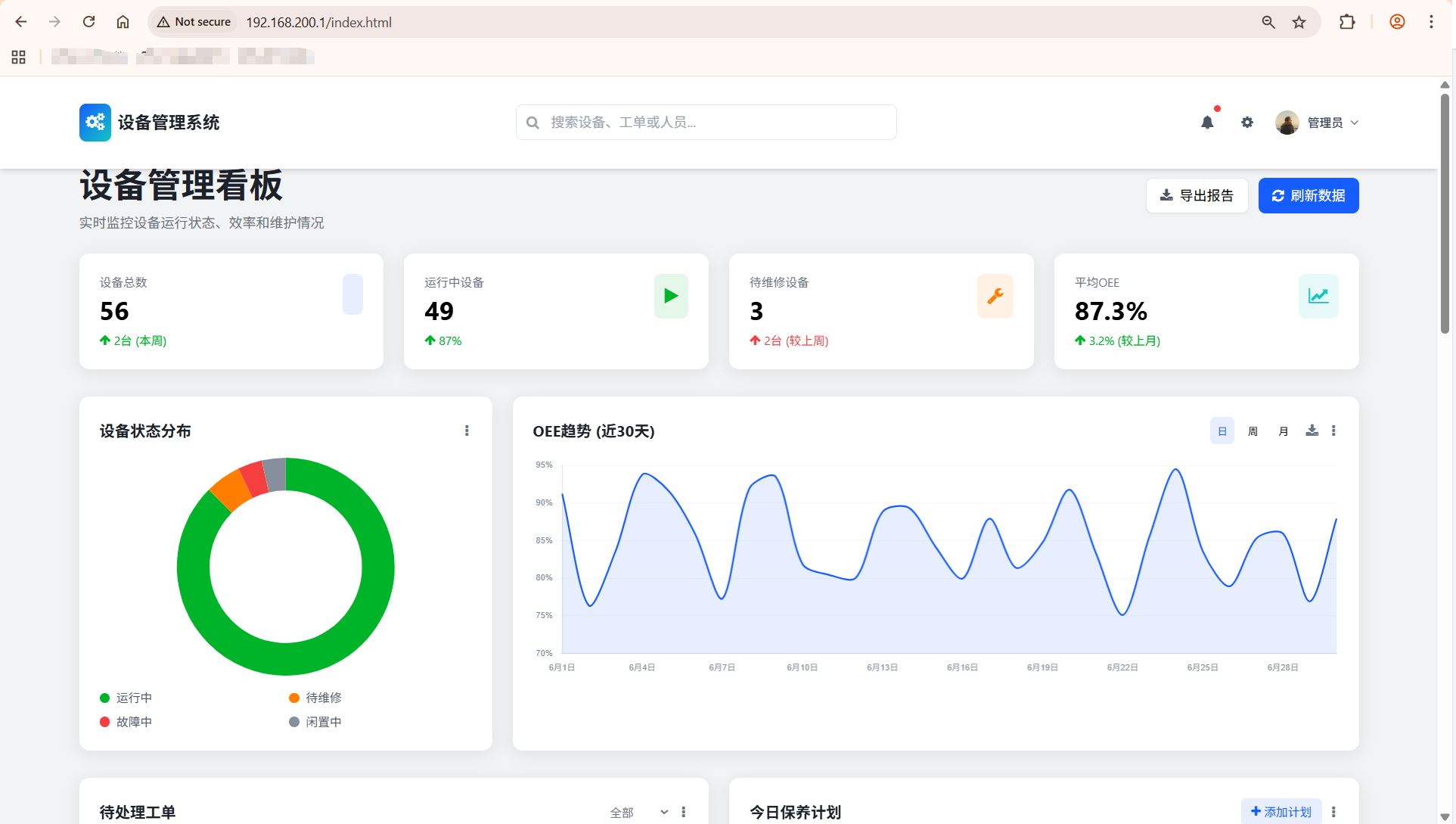
页面核心功能
该 HTML 页面基于 Tailwind CSS + Chart.js 开发,包含设备统计概览、状态分布图表、待处理工单、保养计划等模块,支持响应式布局,适配 IOT2050 本地显示和远程访问。
html
<!DOCTYPE html>
<html lang="zh-CN">
<head>
<meta charset="UTF-8">
<meta name="viewport" content="width=device-width, initial-scale=1.0">
<title>设备管理系统看板</title>
<!-- Tailwind CSS -->
<script src="https://cdn.tailwindcss.com"></script>
<!-- Font Awesome -->
<link href="https://cdn.jsdelivr.net/npm/font-awesome@4.7.0/css/font-awesome.min.css" rel="stylesheet">
<!-- Chart.js -->
<script src="https://cdn.jsdelivr.net/npm/chart.js@4.4.8/dist/chart.umd.min.js"></script>
<!-- Tailwind配置 -->
<script>
tailwind.config = {
theme: {
extend: {
colors: {
primary: '#165DFF',
secondary: '#0FC6C2',
success: '#00B42A',
warning: '#FF7D00',
danger: '#F53F3F',
info: '#86909C',
dark: '#1D2129',
light: '#F2F3F5'
},
fontFamily: {
inter: ['Inter', 'system-ui', 'sans-serif'],
},
animation: {
'fade-in': 'fadeIn 0.5s ease-in-out',
'slide-up': 'slideUp 0.5s ease-out',
'pulse-slow': 'pulse 3s cubic-bezier(0.4, 0, 0.6, 1) infinite',
},
keyframes: {
fadeIn: {
'0%': { opacity: '0' },
'100%': { opacity: '1' },
},
slideUp: {
'0%': { transform: 'translateY(20px)', opacity: '0' },
'100%': { transform: 'translateY(0)', opacity: '1' },
}
}
},
}
}
</script>
<!-- 自定义工具类 -->
<style type="text/tailwindcss">
@layer utilities {
.content-auto {
content-visibility: auto;
}
.scrollbar-hide {
-ms-overflow-style: none;
scrollbar-width: none;
}
.scrollbar-hide::-webkit-scrollbar {
display: none;
}
.card-shadow {
box-shadow: 0 4px 20px rgba(0, 0, 0, 0.08);
}
.hover-scale {
transition: transform 0.2s ease;
}
.hover-scale:hover {
transform: scale(1.02);
}
.gradient-bg {
background: linear-gradient(135deg, #165DFF 0%, #0FC6C2 100%);
}
}
</style>
<style>
/* 基础样式 */
body {
font-family: 'Inter', system-ui, sans-serif;
overflow-x: hidden;
}
/* 平滑滚动 */
html {
scroll-behavior: smooth;
}
/* 表格样式优化 */
.data-table th {
font-weight: 600;
text-transform: uppercase;
font-size: 0.75rem;
letter-spacing: 0.05em;
}
/* 进度条动画 */
.progress-bar {
transition: width 1s ease-in-out;
}
/* 卡片悬停效果 */
.stat-card {
transition: all 0.3s ease;
}
.stat-card:hover {
box-shadow: 0 10px 30px rgba(22, 93, 255, 0.15);
transform: translateY(-5px);
}
</style>
</head>
<body class="bg-light min-h-screen">
<!-- 顶部导航 -->
<header class="bg-white shadow-md fixed w-full top-0 z-50 transition-all duration-300" id="main-header">
<div class="container mx-auto px-4">
<div class="flex justify-between items-center py-4">
<!-- 左侧Logo -->
<div class="flex items-center space-x-2">
<div class="gradient-bg text-white p-2 rounded-lg">
<i class="fa fa-cogs text-xl"></i>
</div>
<h1 class="text-xl font-bold text-dark">设备管理系统</h1>
</div>
<!-- 中间搜索 -->
<div class="hidden md:block flex-1 max-w-md mx-8">
<div class="relative">
<input type="text" placeholder="搜索设备、工单或人员..."
class="w-full py-2 pl-10 pr-4 rounded-lg border border-gray-200 focus:outline-none focus:ring-2 focus:ring-primary/50 focus:border-primary">
<i class="fa fa-search absolute left-3 top-1/2 transform -translate-y-1/2 text-gray-400"></i>
</div>
</div>
<!-- 右侧工具栏 -->
<div class="flex items-center space-x-4">
<!-- 通知 -->
<button class="relative p-2 rounded-full hover:bg-gray-100 transition-colors">
<i class="fa fa-bell text-gray-600"></i>
<span class="absolute top-0 right-0 w-2 h-2 bg-danger rounded-full"></span>
</button>
<!-- 设置 -->
<button class="p-2 rounded-full hover:bg-gray-100 transition-colors">
<i class="fa fa-cog text-gray-600"></i>
</button>
<!-- 用户 -->
<div class="flex items-center space-x-2 cursor-pointer group">
<img src="https://picsum.photos/id/1005/200/200" alt="用户头像" class="w-8 h-8 rounded-full object-cover border-2 border-transparent group-hover:border-primary transition-all">
<span class="hidden md:inline text-sm font-medium text-gray-700">管理员</span>
<i class="fa fa-angle-down text-gray-500 group-hover:text-primary transition-colors"></i>
</div>
</div>
</div>
</div>
</header>
<!-- 主内容区域 -->
<main class="container mx-auto px-4 pt-24 pb-12">
<!-- 页面标题和统计概览 -->
<div class="mb-8">
<div class="flex flex-col md:flex-row justify-between items-start md:items-center mb-6">
<div>
<h2 class="text-[clamp(1.5rem,3vw,2.5rem)] font-bold text-dark">设备管理看板</h2>
<p class="text-gray-500 mt-1">实时监控设备运行状态、效率和维护情况</p>
</div>
<div class="flex space-x-3 mt-4 md:mt-0">
<button class="px-4 py-2 bg-white border border-gray-200 rounded-lg shadow-sm hover:bg-gray-50 transition-colors flex items-center">
<i class="fa fa-download mr-2 text-gray-600"></i>
<span>导出报告</span>
</button>
<button class="px-4 py-2 bg-primary text-white rounded-lg shadow-sm hover:bg-primary/90 transition-colors flex items-center">
<i class="fa fa-refresh mr-2"></i>
<span>刷新数据</span>
</button>
</div>
</div>
<!-- 状态卡片 -->
<div class="grid grid-cols-1 sm:grid-cols-2 lg:grid-cols-4 gap-6">
<!-- 设备总数 -->
<div class="stat-card bg-white rounded-xl p-6 card-shadow">
<div class="flex justify-between items-start">
<div>
<p class="text-gray-500 text-sm">设备总数</p>
<h3 class="text-3xl font-bold mt-1" id="total-equipment">0</h3>
<div class="flex items-center mt-2 text-success text-sm">
<i class="fa fa-arrow-up mr-1"></i>
<span>2台 (本周)</span>
</div>
</div>
<div class="bg-primary/10 p-3 rounded-lg">
<i class="fa fa-machine text-primary text-xl"></i>
</div>
</div>
</div>
<!-- 运行中设备 -->
<div class="stat-card bg-white rounded-xl p-6 card-shadow">
<div class="flex justify-between items-start">
<div>
<p class="text-gray-500 text-sm">运行中设备</p>
<h3 class="text-3xl font-bold mt-1" id="running-equipment">0</h3>
<div class="flex items-center mt-2 text-success text-sm">
<i class="fa fa-arrow-up mr-1"></i>
<span>87%</span>
</div>
</div>
<div class="bg-success/10 p-3 rounded-lg">
<i class="fa fa-play text-success text-xl"></i>
</div>
</div>
</div>
<!-- 待维修设备 -->
<div class="stat-card bg-white rounded-xl p-6 card-shadow">
<div class="flex justify-between items-start">
<div>
<p class="text-gray-500 text-sm">待维修设备</p>
<h3 class="text-3xl font-bold mt-1" id="maintenance-equipment">0</h3>
<div class="flex items-center mt-2 text-danger text-sm">
<i class="fa fa-arrow-up mr-1"></i>
<span>2台 (较上周)</span>
</div>
</div>
<div class="bg-warning/10 p-3 rounded-lg">
<i class="fa fa-wrench text-warning text-xl"></i>
</div>
</div>
</div>
<!-- 平均OEE -->
<div class="stat-card bg-white rounded-xl p-6 card-shadow">
<div class="flex justify-between items-start">
<div>
<p class="text-gray-500 text-sm">平均OEE</p>
<h3 class="text-3xl font-bold mt-1" id="average-oee">0%</h3>
<div class="flex items-center mt-2 text-success text-sm">
<i class="fa fa-arrow-up mr-1"></i>
<span>3.2% (较上月)</span>
</div>
</div>
<div class="bg-secondary/10 p-3 rounded-lg">
<i class="fa fa-line-chart text-secondary text-xl"></i>
</div>
</div>
</div>
</div>
</div>
<!-- 主要图表区域 -->
<div class="grid grid-cols-1 lg:grid-cols-3 gap-6 mb-8">
<!-- 设备状态分布 -->
<div class="lg:col-span-1 bg-white rounded-xl p-6 card-shadow">
<div class="flex justify-between items-center mb-4">
<h3 class="font-bold text-lg text-dark">设备状态分布</h3>
<div class="flex space-x-2">
<button class="p-1 rounded hover:bg-gray-100"><i class="fa fa-ellipsis-v text-gray-500"></i></button>
</div>
</div>
<div class="h-64 flex justify-center items-center">
<canvas id="equipment-status-chart"></canvas>
</div>
<div class="grid grid-cols-2 gap-2 mt-4">
<div class="flex items-center space-x-2">
<span class="w-3 h-3 rounded-full bg-success"></span>
<span class="text-sm text-gray-600">运行中</span>
</div>
<div class="flex items-center space-x-2">
<span class="w-3 h-3 rounded-full bg-warning"></span>
<span class="text-sm text-gray-600">待维修</span>
</div>
<div class="flex items-center space-x-2">
<span class="w-3 h-3 rounded-full bg-danger"></span>
<span class="text-sm text-gray-600">故障中</span>
</div>
<div class="flex items-center space-x-2">
<span class="w-3 h-3 rounded-full bg-info"></span>
<span class="text-sm text-gray-600">闲置中</span>
</div>
</div>
</div>
<!-- OEE趋势图 -->
<div class="lg:col-span-2 bg-white rounded-xl p-6 card-shadow">
<div class="flex justify-between items-center mb-4">
<h3 class="font-bold text-lg text-dark">OEE趋势 (近30天)</h3>
<div class="flex space-x-2">
<button class="px-2 py-1 text-xs rounded-md bg-primary/10 text-primary">日</button>
<button class="px-2 py-1 text-xs rounded-md hover:bg-gray-100">周</button>
<button class="px-2 py-1 text-xs rounded-md hover:bg-gray-100">月</button>
<button class="p-1 rounded hover:bg-gray-100 ml-2"><i class="fa fa-download text-gray-500"></i></button>
<button class="p-1 rounded hover:bg-gray-100"><i class="fa fa-ellipsis-v text-gray-500"></i></button>
</div>
</div>
<div class="h-64">
<canvas id="oee-trend-chart"></canvas>
</div>
</div>
</div>
<!-- 工单和计划区域 -->
<div class="grid grid-cols-1 lg:grid-cols-2 gap-6 mb-8">
<!-- 待处理工单 -->
<div class="bg-white rounded-xl p-6 card-shadow">
<div class="flex justify-between items-center mb-4">
<h3 class="font-bold text-lg text-dark">待处理工单</h3>
<div class="flex space-x-2">
<select class="text-sm border-none bg-transparent focus:outline-none focus:ring-0 text-gray-500">
<option>全部</option>
<option>维修工单</option>
<option>保养工单</option>
</select>
<button class="p-1 rounded hover:bg-gray-100"><i class="fa fa-ellipsis-v text-gray-500"></i></button>
</div>
</div>
<div class="overflow-x-auto">
<table class="data-table w-full">
<thead>
<tr class="border-b border-gray-100">
<th class="py-3 px-4 text-left text-gray-500">工单编号</th>
<th class="py-3 px-4 text-left text-gray-500">设备名称</th>
<th class="py-3 px-4 text-left text-gray-500">类型</th>
<th class="py-3 px-4 text-left text-gray-500">优先级</th>
<th class="py-3 px-4 text-left text-gray-500">截止日期</th>
</tr>
</thead>
<tbody id="pending-workorders">
<!-- 动态生成 -->
</tbody>
</table>
</div>
<div class="mt-4 text-center">
<button class="text-primary hover:text-primary/80 text-sm font-medium">查看全部工单 <i class="fa fa-angle-right ml-1"></i></button>
</div>
</div>
<!-- 今日保养计划 -->
<div class="bg-white rounded-xl p-6 card-shadow">
<div class="flex justify-between items-center mb-4">
<h3 class="font-bold text-lg text-dark">今日保养计划</h3>
<div class="flex space-x-2">
<button class="px-3 py-1 text-sm rounded-md bg-primary/10 text-primary flex items-center">
<i class="fa fa-plus mr-1"></i> 添加计划
</button>
<button class="p-1 rounded hover:bg-gray-100"><i class="fa fa-ellipsis-v text-gray-500"></i></button>
</div>
</div>
<div class="space-y-4" id="maintenance-schedule">
<!-- 动态生成 -->
</div>
<div class="mt-4 text-center">
<button class="text-primary hover:text-primary/80 text-sm font-medium">查看全部计划 <i class="fa fa-angle-right ml-1"></i></button>
</div>
</div>
</div>
<!-- 人员工作负荷区域 -->
<div class="bg-white rounded-xl p-6 card-shadow mb-8">
<div class="flex justify-between items-center mb-4">
<h3 class="font-bold text-lg text-dark">保养人员工作负荷</h3>
<div class="flex space-x-2">
<button class="px-2 py-1 text-xs rounded-md bg-primary text-white">本周</button>
<button class="px-2 py-1 text-xs rounded-md hover:bg-gray-100">本月</button>
<button class="p-1 rounded hover:bg-gray-100 ml-2"><i class="fa fa-download text-gray-500"></i></button>
<button class="p-1 rounded hover:bg-gray-100"><i class="fa fa-ellipsis-v text-gray-500"></i></button>
</div>
</div>
<div class="grid grid-cols-1 md:grid-cols-2 lg:grid-cols-4 gap-6">
<!-- 人员负荷卡片将动态生成 -->
<div id="personnel-load-container"></div>
</div>
</div>
<!-- 设备详情列表 -->
<div class="bg-white rounded-xl p-6 card-shadow">
<div class="flex justify-between items-center mb-6">
<h3 class="font-bold text-lg text-dark">设备运行详情</h3>
<div class="flex items-center space-x-4">
<div class="relative">
<input type="text" placeholder="搜索设备..."
class="py-2 pl-10 pr-4 rounded-lg border border-gray-200 focus:outline-none focus:ring-2 focus:ring-primary/50 focus:border-primary text-sm">
<i class="fa fa-search absolute left-3 top-1/2 transform -translate-y-1/2 text-gray-400 text-sm"></i>
</div>
<select class="text-sm border border-gray-200 rounded-lg py-2 px-3 focus:outline-none focus:ring-2 focus:ring-primary/50 focus:border-primary bg-white">
<option>全部状态</option>
<option>运行中</option>
<option>待维修</option>
<option>故障中</option>
<option>闲置中</option>
</select>
</div>
</div>
<div class="overflow-x-auto">
<table class="data-table w-full">
<thead>
<tr class="border-b border-gray-100">
<th class="py-3 px-4 text-left text-gray-500">设备编号</th>
<th class="py-3 px-4 text-left text-gray-500">设备名称</th>
<th class="py-3 px-4 text-left text-gray-500">位置</th>
<th class="py-3 px-4 text-left text-gray-500">状态</th>
<th class="py-3 px-4 text-left text-gray-500">OEE</th>
<th class="py-3 px-4 text-left text-gray-500">运行时长</th>
<th class="py-3 px-4 text-left text-gray-500">操作</th>
</tr>
</thead>
<tbody id="equipment-details">
<!-- 动态生成 -->
</tbody>
</table>
</div>
<div class="mt-6 flex justify-between items-center">
<div class="text-sm text-gray-500">显示 1-10 项,共 <span id="total-equipment-count">0</span> 项</div>
<div class="flex space-x-1">
<button class="w-8 h-8 flex items-center justify-center rounded-md border border-gray-200 text-gray-400 hover:border-primary hover:text-primary transition-colors">
<i class="fa fa-angle-left"></i>
</button>
<button class="w-8 h-8 flex items-center justify-center rounded-md bg-primary text-white">1</button>
<button class="w-8 h-8 flex items-center justify-center rounded-md border border-gray-200 hover:border-primary hover:text-primary transition-colors">2</button>
<button class="w-8 h-8 flex items-center justify-center rounded-md border border-gray-200 hover:border-primary hover:text-primary transition-colors">3</button>
<button class="w-8 h-8 flex items-center justify-center rounded-md border border-gray-200 hover:border-primary hover:text-primary transition-colors">
<i class="fa fa-angle-right"></i>
</button>
</div>
</div>
</div>
</main>
<!-- 页脚 -->
<footer class="bg-white border-t border-gray-200 py-4">
<div class="container mx-auto px-4">
<div class="flex flex-col md:flex-row justify-between items-center">
<div class="text-sm text-gray-500 mb-4 md:mb-0">© 2023 设备管理系统. 保留所有权利.</div>
<div class="flex space-x-4">
<a href="#" class="text-sm text-gray-500 hover:text-primary transition-colors">使用帮助</a>
<a href="#" class="text-sm text-gray-500 hover:text-primary transition-colors">隐私政策</a>
<a href="#" class="text-sm text-gray-500 hover:text-primary transition-colors">联系我们</a>
</div>
</div>
</div>
</footer>
<!-- 脚本 -->
<script>
// 模拟数据
const mockData = {
// 设备统计数据
stats: {
total: 56,
running: 49,
maintenance: 3,
fault: 2,
idle: 2,
averageOee: 87.3
},
// OEE趋势数据 (近30天)
oeeTrend: Array.from({length: 30}, (_, i) => ({
date: `6月${i+1}日`,
oee: 75 + Math.random() * 20
})),
// 待处理工单
pendingWorkorders: [
{ id: 'WO-20230615-001', equipment: '注塑机-001', type: '维修', priority: '高', deadline: '2023-06-16' },
{ id: 'WO-20230615-002', equipment: '冲压机-003', type: '保养', priority: '中', deadline: '2023-06-17' },
{ id: 'WO-20230615-003', equipment: '包装机-005', type: '维修', priority: '中', deadline: '2023-06-18' },
{ id: 'WO-20230615-004', equipment: '输送带-002', type: '保养', priority: '低', deadline: '2023-06-19' },
{ id: 'WO-20230615-005', equipment: '焊接机-007', type: '维修', priority: '高', deadline: '2023-06-16' }
],
// 今日保养计划
maintenanceSchedule: [
{ id: 'MS-20230615-001', equipment: '注塑机-001', time: '09:00', person: '张师傅', status: '已完成' },
{ id: 'MS-20230615-002', equipment: '冲压机-003', time: '11:30', person: '李师傅', status: '进行中' },
{ id: 'MS-20230615-003', equipment: '包装机-005', time: '14:00', person: '王师傅', status: '待开始' },
{ id: 'MS-20230615-004', equipment: '输送带-002', time: '16:30', person: '赵师傅', status: '待开始' }
],
// 保养人员工作负荷
personnelLoad: [
{ name: '张师傅', completed: 8, pending: 3, capacity: 15 },
{ name: '李师傅', completed: 6, pending: 5, capacity: 12 },
{ name: '王师傅', completed: 4, pending: 2, capacity: 10 },
{ name: '赵师傅', completed: 5, pending: 4, capacity: 12 }
],
// 设备运行详情
equipmentDetails: [
{ id: 'EQ-001', name: '注塑机-001', location: 'A车间-01', status: '运行中', oee: 92.5, runtime: '234h' },
{ id: 'EQ-002', name: '冲压机-001', location: 'B车间-02', status: '运行中', oee: 88.3, runtime: '198h' },
{ id: 'EQ-003', name: '冲压机-002', location: 'B车间-03', status: '故障中', oee: 0, runtime: '0h' },
{ id: 'EQ-004', name: '包装机-001', location: 'C车间-01', status: '运行中', oee: 90.1, runtime: '215h' },
{ id: 'EQ-005', name: '包装机-002', location: 'C车间-02', status: '待维修', oee: 76.5, runtime: '189h' },
{ id: 'EQ-006', name: '输送带-001', location: 'D车间-01', status: '运行中', oee: 85.7, runtime: '240h' },
{ id: 'EQ-007', name: '焊接机-001', location: 'E车间-01', status: '运行中', oee: 89.2, runtime: '176h' },
{ id: 'EQ-008', name: '焊接机-002', location: 'E车间-02', status: '闲置中', oee: 0, runtime: '0h' },
{ id: 'EQ-009', name: '车床-001', location: 'F车间-01', status: '运行中', oee: 91.8, runtime: '203h' },
{ id: 'EQ-010', name: '钻床-001', location: 'F车间-02', status: '待维修', oee: 78.3, runtime: '165h' }
]
};
// 更新统计数据
function updateStats() {
const { stats } = mockData;
document.getElementById('total-equipment').textContent = stats.total;
document.getElementById('running-equipment').textContent = stats.running;
document.getElementById('maintenance-equipment').textContent = stats.maintenance;
document.getElementById('average-oee').textContent = `${stats.averageOee}%`;
document.getElementById('total-equipment-count').textContent = mockData.equipmentDetails.length;
}
// 渲染设备状态图表
function renderEquipmentStatusChart() {
const { stats } = mockData;
const ctx = document.getElementById('equipment-status-chart').getContext('2d');
new Chart(ctx, {
type: 'doughnut',
data: {
labels: ['运行中', '待维修', '故障中', '闲置中'],
datasets: [{
data: [stats.running, stats.maintenance, stats.fault, stats.idle],
backgroundColor: ['#00B42A', '#FF7D00', '#F53F3F', '#86909C'],
borderWidth: 0,
hoverOffset: 5
}]
},
options: {
responsive: true,
maintainAspectRatio: false,
plugins: {
legend: {
display: false
},
tooltip: {
callbacks: {
label: function(context) {
const label = context.label || '';
const value = context.raw || 0;
const total = mockData.stats.total;
const percentage = Math.round((value / total) * 100);
return `${label}: ${value}台 (${percentage}%)`;
}
}
}
},
cutout: '70%'
}
});
}
// 渲染OEE趋势图表
function renderOeeTrendChart() {
const { oeeTrend } = mockData;
const ctx = document.getElementById('oee-trend-chart').getContext('2d');
new Chart(ctx, {
type: 'line',
data: {
labels: oeeTrend.map(item => item.date),
datasets: [{
label: 'OEE值',
data: oeeTrend.map(item => item.oee),
borderColor: '#165DFF',
backgroundColor: 'rgba(22, 93, 255, 0.1)',
borderWidth: 2,
tension: 0.3,
fill: true,
pointRadius: 0,
pointHoverRadius: 4,
pointBackgroundColor: '#165DFF',
pointHoverBackgroundColor: '#ffffff',
pointHoverBorderColor: '#165DFF',
pointHoverBorderWidth: 2
}]
},
options: {
responsive: true,
maintainAspectRatio: false,
interaction: {
mode: 'index',
intersect: false,
},
plugins: {
legend: {
display: false
},
tooltip: {
backgroundColor: 'rgba(255, 255, 255, 0.95)',
titleColor: '#1D2129',
bodyColor: '#86909C',
borderColor: 'rgba(0, 0, 0, 0.05)',
borderWidth: 1,
padding: 10,
boxPadding: 5,
usePointStyle: true,
callbacks: {
label: function(context) {
return `OEE: ${context.raw.toFixed(1)}%`;
}
}
}
},
scales: {
x: {
grid: {
display: false
},
ticks: {
maxRotation: 0,
autoSkip: true,
maxTicksLimit: 10,
color: '#86909C',
font: {
size: 10
}
}
},
y: {
beginAtZero: false,
min: 70,
grid: {
color: 'rgba(0, 0, 0, 0.03)'
},
ticks: {
color: '#86909C',
font: {
size: 10
},
callback: function(value) {
return value + '%';
}
}
}
}
}
});
}
// 渲染待处理工单
function renderPendingWorkorders() {
const container = document.getElementById('pending-workorders');
const { pendingWorkorders } = mockData;
container.innerHTML = '';
pendingWorkorders.forEach(order => {
const row = document.createElement('tr');
row.className = 'border-b border-gray-50 hover:bg-gray-50 transition-colors';
// 优先级样式
let priorityClass = '';
let priorityText = '';
switch(order.priority) {
case '高':
priorityClass = 'bg-danger/10 text-danger';
priorityText = '高';
break;
case '中':
priorityClass = 'bg-warning/10 text-warning';
priorityText = '中';
break;
case '低':
priorityClass = 'bg-success/10 text-success';
priorityText = '低';
break;
}
// 类型样式
let typeClass = '';
switch(order.type) {
case '维修':
typeClass = 'bg-warning/10 text-warning';
break;
case '保养':
typeClass = 'bg-primary/10 text-primary';
break;
}
row.innerHTML = `
<td class="py-3 px-4 text-sm font-medium">${order.id}</td>
<td class="py-3 px-4 text-sm">${order.equipment}</td>
<td class="py-3 px-4">
<span class="px-2 py-1 text-xs rounded-full ${typeClass}">${order.type}</span>
</td>
<td class="py-3 px-4">
<span class="px-2 py-1 text-xs rounded-full ${priorityClass}">${priorityText}</span>
</td>
<td class="py-3 px-4 text-sm">${order.deadline}</td>
`;
container.appendChild(row);
});
}
// 渲染今日保养计划
function renderMaintenanceSchedule() {
const container = document.getElementById('maintenance-schedule');
const { maintenanceSchedule } = mockData;
container.innerHTML = '';
maintenanceSchedule.forEach(schedule => {
const item = document.createElement('div');
item.className = 'flex items-center p-3 rounded-lg hover:bg-gray-50 transition-colors';
// 状态样式
let statusClass = '';
let statusIcon = '';
switch(schedule.status) {
case '已完成':
statusClass = 'bg-success/10 text-success';
statusIcon = 'fa-check';
break;
case '进行中':
statusClass = 'bg-primary/10 text-primary';
statusIcon = 'fa-spinner fa-spin';
break;
case '待开始':
statusClass = 'bg-gray-100 text-gray-500';
statusIcon = 'fa-clock-o';
break;
}
item.innerHTML = `
<div class="w-10 h-10 rounded-full bg-gray-100 flex items-center justify-center text-gray-500 mr-3">
<i class="fa fa-cog"></i>
</div>
<div class="flex-1">
<div class="text-sm font-medium">${schedule.equipment}</div>
<div class="text-xs text-gray-500 mt-1">${schedule.person} · ${schedule.time}</div>
</div>
<div class="w-8 h-8 rounded-full ${statusClass} flex items-center justify-center">
<i class="fa ${statusIcon}"></i>
</div>
`;
container.appendChild(item);
});
}
// 渲染人员工作负荷
function renderPersonnelLoad() {
const container = document.getElementById('personnel-load-container');
const { personnelLoad } = mockData;
container.innerHTML = '';
personnelLoad.forEach(person => {
const card = document.createElement('div');
const total = person.completed + person.pending;
const loadPercentage = (total / person.capacity) * 100;
// 负荷等级样式
let loadClass = '';
if (loadPercentage > 80) {
loadClass = 'text-danger';
} else if (loadPercentage > 60) {
loadClass = 'text-warning';
} else {
loadClass = 'text-success';
}
card.className = 'bg-white border border-gray-100 rounded-lg p-4 hover-scale';
card.innerHTML = `
<div class="flex justify-between items-center mb-3">
<div class="text-sm font-medium">${person.name}</div>
<div class="text-sm font-bold ${loadClass}">${loadPercentage.toFixed(0)}%</div>
</div>
<div class="w-full bg-gray-100 rounded-full h-2">
<div class="bg-primary h-2 rounded-full progress-bar" style="width: ${loadPercentage}%"></div>
</div>
<div class="flex justify-between mt-2 text-xs text-gray-500">
<div>已完成: <span class="font-medium text-success">${person.completed}</span></div>
<div>待处理: <span class="font-medium text-warning">${person.pending}</span></div>
<div>总容量: <span class="font-medium">${person.capacity}</span></div>
</div>
`;
container.appendChild(card);
});
}
// 渲染设备运行详情
function renderEquipmentDetails() {
const container = document.getElementById('equipment-details');
const { equipmentDetails } = mockData;
container.innerHTML = '';
equipmentDetails.forEach(equipment => {
const row = document.createElement('tr');
row.className = 'border-b border-gray-50 hover:bg-gray-50 transition-colors';
// 状态样式
let statusClass = '';
let statusText = '';
switch(equipment.status) {
case '运行中':
statusClass = 'bg-success/10 text-success';
statusText = '运行中';
break;
case '待维修':
statusClass = 'bg-warning/10 text-warning';
statusText = '待维修';
break;
case '故障中':
statusClass = 'bg-danger/10 text-danger';
statusText = '故障中';
break;
case '闲置中':
statusClass = 'bg-gray-100 text-gray-500';
statusText = '闲置中';
break;
}
// OEE样式
let oeeClass = '';
if (equipment.oee >= 90) {
oeeClass = 'text-success';
} else if (equipment.oee >= 75) {
oeeClass = 'text-warning';
} else if (equipment.oee > 0) {
oeeClass = 'text-danger';
}
row.innerHTML = `
<td class="py-3 px-4 text-sm font-medium">${equipment.id}</td>
<td class="py-3 px-4 text-sm">${equipment.name}</td>
<td class="py-3 px-4 text-sm">${equipment.location}</td>
<td class="py-3 px-4">
<span class="px-2 py-1 text-xs rounded-full ${statusClass}">${statusText}</span>
</td>
<td class="py-3 px-4 text-sm font-medium ${oeeClass}">${equipment.oee}%</td>
<td class="py-3 px-4 text-sm">${equipment.runtime}</td>
<td class="py-3 px-4">
<button class="text-primary hover:text-primary/80 mr-2"><i class="fa fa-eye"></i></button>
<button class="text-gray-500 hover:text-gray-700"><i class="fa fa-ellipsis-v"></i></button>
</td>
`;
container.appendChild(row);
});
}
// 页面滚动时头部导航栏效果
function handleScroll() {
const header = document.getElementById('main-header');
if (window.scrollY > 10) {
header.classList.add('py-2');
header.classList.remove('py-4');
} else {
header.classList.add('py-4');
header.classList.remove('py-2');
}
}
// 初始化页面
function initPage() {
// 更新统计数据
updateStats();
// 渲染图表
renderEquipmentStatusChart();
renderOeeTrendChart();
// 渲染列表数据
renderPendingWorkorders();
renderMaintenanceSchedule();
renderPersonnelLoad();
renderEquipmentDetails();
// 添加滚动事件监听
window.addEventListener('scroll', handleScroll);
// 添加卡片动画效果
const cards = document.querySelectorAll('.stat-card');
cards.forEach((card, index) => {
card.style.opacity = '0';
card.style.transform = 'translateY(20px)';
setTimeout(() => {
card.style.transition = 'opacity 0.5s ease, transform 0.5s ease';
card.style.opacity = '1';
card.style.transform = 'translateY(0)';
}, 100 * index);
});
}
// 页面加载完成后初始化
window.addEventListener('load', initPage);
</script>
</body>
</html>部署步骤
-
清理 Nginx 默认测试页面:
sudo rm /var/www/html/index.nginx-debian.html
-
上传 HTML 文件到 Nginx 根目录:
-
将本地的设备监控 HTML 文件(命名为
index.html)复制到 Nginx 默认根目录/var/www/html/ -
命令行上传(本地终端执行,替换用户名和服务器 IP):
scp /本地文件路径/index.html 用户名@IOT2050IP:/var/www/html/
-
示例:
scp /home/user/device-monitor/index.html root@192.168.200.1:/var/www/html/ -
重启 Nginx 生效配置:
sudo systemctl restart nginx
-
访问测试:
-
本地访问(IOT2050 自带屏幕):打开浏览器输入
http://localhost -
远程访问(同一局域网):输入
http://IOT2050IP(无需加端口,80 为 HTTP 默认端口) -
防火墙配置(可选,解决无法访问问题):
sudo ufw allow 80/tcp # 允许80端口外部访问
sudo ufw enable # 启用防火墙(若未启用)
sudo ufw status # 验证规则是否生效
页面效果预览
- 顶部导航:包含搜索、通知、用户中心功能
- 统计卡片:设备总数、运行中设备、待维修设备、平均 OEE
- 图表模块:设备状态分布饼图、30 天 OEE 趋势线图
- 数据列表:待处理工单、今日保养计划、设备运行详情
三、部署Asp.net Core 能源监控系统
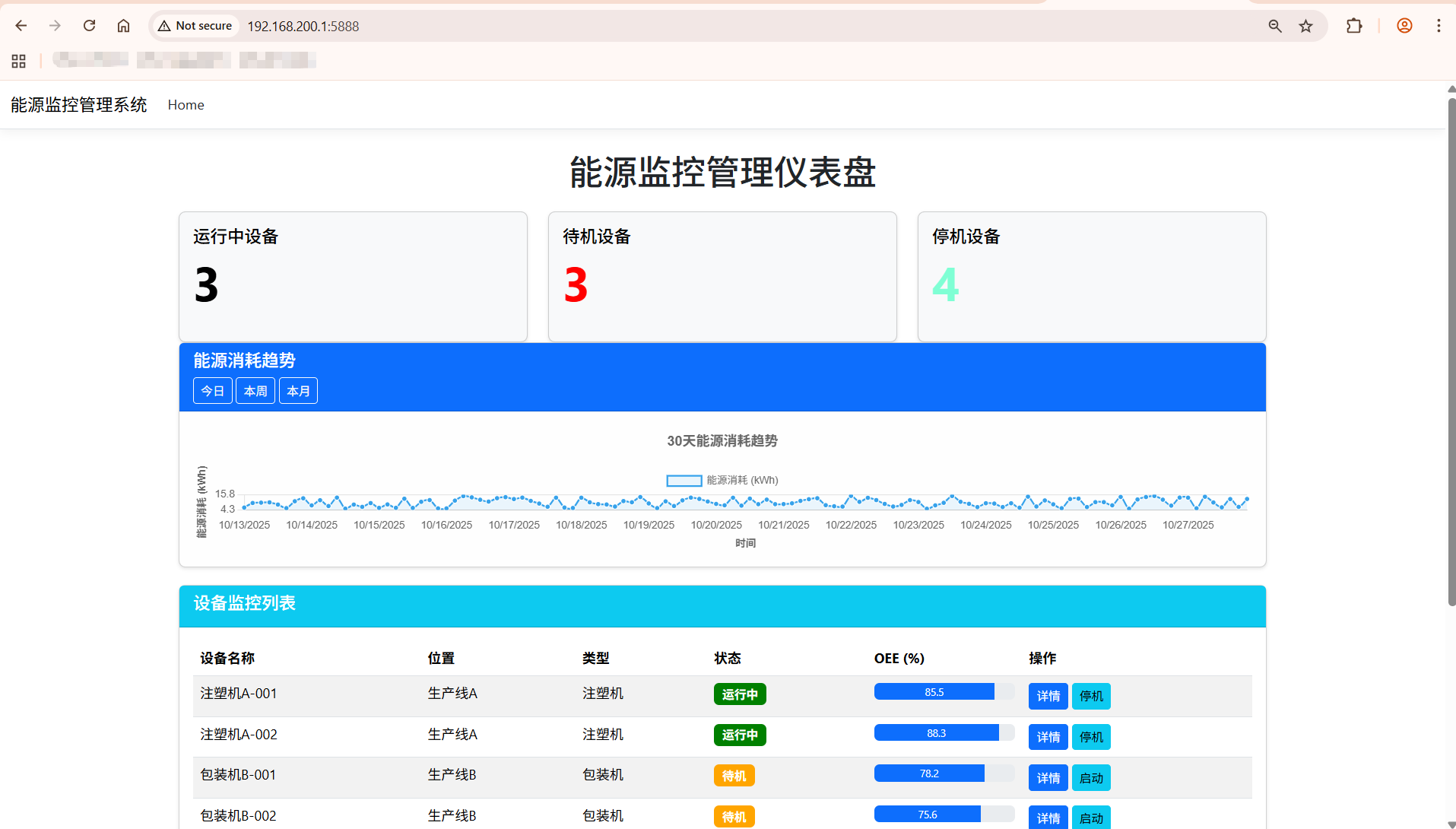
前端主页面代码
html
<!DOCTYPE html>
<html lang="zh-CN">
<head>
<meta charset="UTF-8">
<meta name="viewport" content="width=device-width, initial-scale=1.0">
<title>设备管理系统看板</title>
<!-- Tailwind CSS -->
<script src="https://cdn.tailwindcss.com"></script>
<!-- Font Awesome -->
<link href="https://cdn.jsdelivr.net/npm/font-awesome@4.7.0/css/font-awesome.min.css" rel="stylesheet">
<!-- Chart.js -->
<script src="https://cdn.jsdelivr.net/npm/chart.js@4.4.8/dist/chart.umd.min.js"></script>
<!-- Tailwind配置 -->
<script>
tailwind.config = {
theme: {
extend: {
colors: {
primary: '#165DFF',
secondary: '#0FC6C2',
success: '#00B42A',
warning: '#FF7D00',
danger: '#F53F3F',
info: '#86909C',
dark: '#1D2129',
light: '#F2F3F5'
},
fontFamily: {
inter: ['Inter', 'system-ui', 'sans-serif'],
},
animation: {
'fade-in': 'fadeIn 0.5s ease-in-out',
'slide-up': 'slideUp 0.5s ease-out',
'pulse-slow': 'pulse 3s cubic-bezier(0.4, 0, 0.6, 1) infinite',
},
keyframes: {
fadeIn: {
'0%': { opacity: '0' },
'100%': { opacity: '1' },
},
slideUp: {
'0%': { transform: 'translateY(20px)', opacity: '0' },
'100%': { transform: 'translateY(0)', opacity: '1' },
}
}
},
}
}
</script>
<!-- 自定义工具类 -->
<style type="text/tailwindcss">
@layer utilities {
.content-auto {
content-visibility: auto;
}
.scrollbar-hide {
-ms-overflow-style: none;
scrollbar-width: none;
}
.scrollbar-hide::-webkit-scrollbar {
display: none;
}
.card-shadow {
box-shadow: 0 4px 20px rgba(0, 0, 0, 0.08);
}
.hover-scale {
transition: transform 0.2s ease;
}
.hover-scale:hover {
transform: scale(1.02);
}
.gradient-bg {
background: linear-gradient(135deg, #165DFF 0%, #0FC6C2 100%);
}
}
</style>
<style>
/* 基础样式 */
body {
font-family: 'Inter', system-ui, sans-serif;
overflow-x: hidden;
}
/* 平滑滚动 */
html {
scroll-behavior: smooth;
}
/* 表格样式优化 */
.data-table th {
font-weight: 600;
text-transform: uppercase;
font-size: 0.75rem;
letter-spacing: 0.05em;
}
/* 进度条动画 */
.progress-bar {
transition: width 1s ease-in-out;
}
/* 卡片悬停效果 */
.stat-card {
transition: all 0.3s ease;
}
.stat-card:hover {
box-shadow: 0 10px 30px rgba(22, 93, 255, 0.15);
transform: translateY(-5px);
}
</style>
</head>
<body class="bg-light min-h-screen">
<!-- 顶部导航 -->
<header class="bg-white shadow-md fixed w-full top-0 z-50 transition-all duration-300" id="main-header">
<div class="container mx-auto px-4">
<div class="flex justify-between items-center py-4">
<!-- 左侧Logo -->
<div class="flex items-center space-x-2">
<div class="gradient-bg text-white p-2 rounded-lg">
<i class="fa fa-cogs text-xl"></i>
</div>
<h1 class="text-xl font-bold text-dark">设备管理系统</h1>
</div>
<!-- 中间搜索 -->
<div class="hidden md:block flex-1 max-w-md mx-8">
<div class="relative">
<input type="text" placeholder="搜索设备、工单或人员..."
class="w-full py-2 pl-10 pr-4 rounded-lg border border-gray-200 focus:outline-none focus:ring-2 focus:ring-primary/50 focus:border-primary">
<i class="fa fa-search absolute left-3 top-1/2 transform -translate-y-1/2 text-gray-400"></i>
</div>
</div>
<!-- 右侧工具栏 -->
<div class="flex items-center space-x-4">
<!-- 通知 -->
<button class="relative p-2 rounded-full hover:bg-gray-100 transition-colors">
<i class="fa fa-bell text-gray-600"></i>
<span class="absolute top-0 right-0 w-2 h-2 bg-danger rounded-full"></span>
</button>
<!-- 设置 -->
<button class="p-2 rounded-full hover:bg-gray-100 transition-colors">
<i class="fa fa-cog text-gray-600"></i>
</button>
<!-- 用户 -->
<div class="flex items-center space-x-2 cursor-pointer group">
<img src="https://picsum.photos/id/1005/200/200" alt="用户头像" class="w-8 h-8 rounded-full object-cover border-2 border-transparent group-hover:border-primary transition-all">
<span class="hidden md:inline text-sm font-medium text-gray-700">管理员</span>
<i class="fa fa-angle-down text-gray-500 group-hover:text-primary transition-colors"></i>
</div>
</div>
</div>
</div>
</header>
<!-- 主内容区域 -->
<main class="container mx-auto px-4 pt-24 pb-12">
<!-- 页面标题和统计概览 -->
<div class="mb-8">
<div class="flex flex-col md:flex-row justify-between items-start md:items-center mb-6">
<div>
<h2 class="text-[clamp(1.5rem,3vw,2.5rem)] font-bold text-dark">设备管理看板</h2>
<p class="text-gray-500 mt-1">实时监控设备运行状态、效率和维护情况</p>
</div>
<div class="flex space-x-3 mt-4 md:mt-0">
<button class="px-4 py-2 bg-white border border-gray-200 rounded-lg shadow-sm hover:bg-gray-50 transition-colors flex items-center">
<i class="fa fa-download mr-2 text-gray-600"></i>
<span>导出报告</span>
</button>
<button class="px-4 py-2 bg-primary text-white rounded-lg shadow-sm hover:bg-primary/90 transition-colors flex items-center">
<i class="fa fa-refresh mr-2"></i>
<span>刷新数据</span>
</button>
</div>
</div>
<!-- 状态卡片 -->
<div class="grid grid-cols-1 sm:grid-cols-2 lg:grid-cols-4 gap-6">
<!-- 设备总数 -->
<div class="stat-card bg-white rounded-xl p-6 card-shadow">
<div class="flex justify-between items-start">
<div>
<p class="text-gray-500 text-sm">设备总数</p>
<h3 class="text-3xl font-bold mt-1" id="total-equipment">0</h3>
<div class="flex items-center mt-2 text-success text-sm">
<i class="fa fa-arrow-up mr-1"></i>
<span>2台 (本周)</span>
</div>
</div>
<div class="bg-primary/10 p-3 rounded-lg">
<i class="fa fa-machine text-primary text-xl"></i>
</div>
</div>
</div>
<!-- 运行中设备 -->
<div class="stat-card bg-white rounded-xl p-6 card-shadow">
<div class="flex justify-between items-start">
<div>
<p class="text-gray-500 text-sm">运行中设备</p>
<h3 class="text-3xl font-bold mt-1" id="running-equipment">0</h3>
<div class="flex items-center mt-2 text-success text-sm">
<i class="fa fa-arrow-up mr-1"></i>
<span>87%</span>
</div>
</div>
<div class="bg-success/10 p-3 rounded-lg">
<i class="fa fa-play text-success text-xl"></i>
</div>
</div>
</div>
<!-- 待维修设备 -->
<div class="stat-card bg-white rounded-xl p-6 card-shadow">
<div class="flex justify-between items-start">
<div>
<p class="text-gray-500 text-sm">待维修设备</p>
<h3 class="text-3xl font-bold mt-1" id="maintenance-equipment">0</h3>
<div class="flex items-center mt-2 text-danger text-sm">
<i class="fa fa-arrow-up mr-1"></i>
<span>2台 (较上周)</span>
</div>
</div>
<div class="bg-warning/10 p-3 rounded-lg">
<i class="fa fa-wrench text-warning text-xl"></i>
</div>
</div>
</div>
<!-- 平均OEE -->
<div class="stat-card bg-white rounded-xl p-6 card-shadow">
<div class="flex justify-between items-start">
<div>
<p class="text-gray-500 text-sm">平均OEE</p>
<h3 class="text-3xl font-bold mt-1" id="average-oee">0%</h3>
<div class="flex items-center mt-2 text-success text-sm">
<i class="fa fa-arrow-up mr-1"></i>
<span>3.2% (较上月)</span>
</div>
</div>
<div class="bg-secondary/10 p-3 rounded-lg">
<i class="fa fa-line-chart text-secondary text-xl"></i>
</div>
</div>
</div>
</div>
</div>
<!-- 主要图表区域 -->
<div class="grid grid-cols-1 lg:grid-cols-3 gap-6 mb-8">
<!-- 设备状态分布 -->
<div class="lg:col-span-1 bg-white rounded-xl p-6 card-shadow">
<div class="flex justify-between items-center mb-4">
<h3 class="font-bold text-lg text-dark">设备状态分布</h3>
<div class="flex space-x-2">
<button class="p-1 rounded hover:bg-gray-100"><i class="fa fa-ellipsis-v text-gray-500"></i></button>
</div>
</div>
<div class="h-64 flex justify-center items-center">
<canvas id="equipment-status-chart"></canvas>
</div>
<div class="grid grid-cols-2 gap-2 mt-4">
<div class="flex items-center space-x-2">
<span class="w-3 h-3 rounded-full bg-success"></span>
<span class="text-sm text-gray-600">运行中</span>
</div>
<div class="flex items-center space-x-2">
<span class="w-3 h-3 rounded-full bg-warning"></span>
<span class="text-sm text-gray-600">待维修</span>
</div>
<div class="flex items-center space-x-2">
<span class="w-3 h-3 rounded-full bg-danger"></span>
<span class="text-sm text-gray-600">故障中</span>
</div>
<div class="flex items-center space-x-2">
<span class="w-3 h-3 rounded-full bg-info"></span>
<span class="text-sm text-gray-600">闲置中</span>
</div>
</div>
</div>
<!-- OEE趋势图 -->
<div class="lg:col-span-2 bg-white rounded-xl p-6 card-shadow">
<div class="flex justify-between items-center mb-4">
<h3 class="font-bold text-lg text-dark">OEE趋势 (近30天)</h3>
<div class="flex space-x-2">
<button class="px-2 py-1 text-xs rounded-md bg-primary/10 text-primary">日</button>
<button class="px-2 py-1 text-xs rounded-md hover:bg-gray-100">周</button>
<button class="px-2 py-1 text-xs rounded-md hover:bg-gray-100">月</button>
<button class="p-1 rounded hover:bg-gray-100 ml-2"><i class="fa fa-download text-gray-500"></i></button>
<button class="p-1 rounded hover:bg-gray-100"><i class="fa fa-ellipsis-v text-gray-500"></i></button>
</div>
</div>
<div class="h-64">
<canvas id="oee-trend-chart"></canvas>
</div>
</div>
</div>
<!-- 工单和计划区域 -->
<div class="grid grid-cols-1 lg:grid-cols-2 gap-6 mb-8">
<!-- 待处理工单 -->
<div class="bg-white rounded-xl p-6 card-shadow">
<div class="flex justify-between items-center mb-4">
<h3 class="font-bold text-lg text-dark">待处理工单</h3>
<div class="flex space-x-2">
<select class="text-sm border-none bg-transparent focus:outline-none focus:ring-0 text-gray-500">
<option>全部</option>
<option>维修工单</option>
<option>保养工单</option>
</select>
<button class="p-1 rounded hover:bg-gray-100"><i class="fa fa-ellipsis-v text-gray-500"></i></button>
</div>
</div>
<div class="overflow-x-auto">
<table class="data-table w-full">
<thead>
<tr class="border-b border-gray-100">
<th class="py-3 px-4 text-left text-gray-500">工单编号</th>
<th class="py-3 px-4 text-left text-gray-500">设备名称</th>
<th class="py-3 px-4 text-left text-gray-500">类型</th>
<th class="py-3 px-4 text-left text-gray-500">优先级</th>
<th class="py-3 px-4 text-left text-gray-500">截止日期</th>
</tr>
</thead>
<tbody id="pending-workorders">
<!-- 动态生成 -->
</tbody>
</table>
</div>
<div class="mt-4 text-center">
<button class="text-primary hover:text-primary/80 text-sm font-medium">查看全部工单 <i class="fa fa-angle-right ml-1"></i></button>
</div>
</div>
<!-- 今日保养计划 -->
<div class="bg-white rounded-xl p-6 card-shadow">
<div class="flex justify-between items-center mb-4">
<h3 class="font-bold text-lg text-dark">今日保养计划</h3>
<div class="flex space-x-2">
<button class="px-3 py-1 text-sm rounded-md bg-primary/10 text-primary flex items-center">
<i class="fa fa-plus mr-1"></i> 添加计划
</button>
<button class="p-1 rounded hover:bg-gray-100"><i class="fa fa-ellipsis-v text-gray-500"></i></button>
</div>
</div>
<div class="space-y-4" id="maintenance-schedule">
<!-- 动态生成 -->
</div>
<div class="mt-4 text-center">
<button class="text-primary hover:text-primary/80 text-sm font-medium">查看全部计划 <i class="fa fa-angle-right ml-1"></i></button>
</div>
</div>
</div>
<!-- 人员工作负荷区域 -->
<div class="bg-white rounded-xl p-6 card-shadow mb-8">
<div class="flex justify-between items-center mb-4">
<h3 class="font-bold text-lg text-dark">保养人员工作负荷</h3>
<div class="flex space-x-2">
<button class="px-2 py-1 text-xs rounded-md bg-primary text-white">本周</button>
<button class="px-2 py-1 text-xs rounded-md hover:bg-gray-100">本月</button>
<button class="p-1 rounded hover:bg-gray-100 ml-2"><i class="fa fa-download text-gray-500"></i></button>
<button class="p-1 rounded hover:bg-gray-100"><i class="fa fa-ellipsis-v text-gray-500"></i></button>
</div>
</div>
<div class="grid grid-cols-1 md:grid-cols-2 lg:grid-cols-4 gap-6">
<!-- 人员负荷卡片将动态生成 -->
<div id="personnel-load-container"></div>
</div>
</div>
<!-- 设备详情列表 -->
<div class="bg-white rounded-xl p-6 card-shadow">
<div class="flex justify-between items-center mb-6">
<h3 class="font-bold text-lg text-dark">设备运行详情</h3>
<div class="flex items-center space-x-4">
<div class="relative">
<input type="text" placeholder="搜索设备..."
class="py-2 pl-10 pr-4 rounded-lg border border-gray-200 focus:outline-none focus:ring-2 focus:ring-primary/50 focus:border-primary text-sm">
<i class="fa fa-search absolute left-3 top-1/2 transform -translate-y-1/2 text-gray-400 text-sm"></i>
</div>
<select class="text-sm border border-gray-200 rounded-lg py-2 px-3 focus:outline-none focus:ring-2 focus:ring-primary/50 focus:border-primary bg-white">
<option>全部状态</option>
<option>运行中</option>
<option>待维修</option>
<option>故障中</option>
<option>闲置中</option>
</select>
</div>
</div>
<div class="overflow-x-auto">
<table class="data-table w-full">
<thead>
<tr class="border-b border-gray-100">
<th class="py-3 px-4 text-left text-gray-500">设备编号</th>
<th class="py-3 px-4 text-left text-gray-500">设备名称</th>
<th class="py-3 px-4 text-left text-gray-500">位置</th>
<th class="py-3 px-4 text-left text-gray-500">状态</th>
<th class="py-3 px-4 text-left text-gray-500">OEE</th>
<th class="py-3 px-4 text-left text-gray-500">运行时长</th>
<th class="py-3 px-4 text-left text-gray-500">操作</th>
</tr>
</thead>
<tbody id="equipment-details">
<!-- 动态生成 -->
</tbody>
</table>
</div>
<div class="mt-6 flex justify-between items-center">
<div class="text-sm text-gray-500">显示 1-10 项,共 <span id="total-equipment-count">0</span> 项</div>
<div class="flex space-x-1">
<button class="w-8 h-8 flex items-center justify-center rounded-md border border-gray-200 text-gray-400 hover:border-primary hover:text-primary transition-colors">
<i class="fa fa-angle-left"></i>
</button>
<button class="w-8 h-8 flex items-center justify-center rounded-md bg-primary text-white">1</button>
<button class="w-8 h-8 flex items-center justify-center rounded-md border border-gray-200 hover:border-primary hover:text-primary transition-colors">2</button>
<button class="w-8 h-8 flex items-center justify-center rounded-md border border-gray-200 hover:border-primary hover:text-primary transition-colors">3</button>
<button class="w-8 h-8 flex items-center justify-center rounded-md border border-gray-200 hover:border-primary hover:text-primary transition-colors">
<i class="fa fa-angle-right"></i>
</button>
</div>
</div>
</div>
</main>
<!-- 页脚 -->
<footer class="bg-white border-t border-gray-200 py-4">
<div class="container mx-auto px-4">
<div class="flex flex-col md:flex-row justify-between items-center">
<div class="text-sm text-gray-500 mb-4 md:mb-0">© 2023 设备管理系统. 保留所有权利.</div>
<div class="flex space-x-4">
<a href="#" class="text-sm text-gray-500 hover:text-primary transition-colors">使用帮助</a>
<a href="#" class="text-sm text-gray-500 hover:text-primary transition-colors">隐私政策</a>
<a href="#" class="text-sm text-gray-500 hover:text-primary transition-colors">联系我们</a>
</div>
</div>
</div>
</footer>
<!-- 脚本 -->
<script>
// 模拟数据
const mockData = {
// 设备统计数据
stats: {
total: 56,
running: 49,
maintenance: 3,
fault: 2,
idle: 2,
averageOee: 87.3
},
// OEE趋势数据 (近30天)
oeeTrend: Array.from({length: 30}, (_, i) => ({
date: `6月${i+1}日`,
oee: 75 + Math.random() * 20
})),
// 待处理工单
pendingWorkorders: [
{ id: 'WO-20230615-001', equipment: '注塑机-001', type: '维修', priority: '高', deadline: '2023-06-16' },
{ id: 'WO-20230615-002', equipment: '冲压机-003', type: '保养', priority: '中', deadline: '2023-06-17' },
{ id: 'WO-20230615-003', equipment: '包装机-005', type: '维修', priority: '中', deadline: '2023-06-18' },
{ id: 'WO-20230615-004', equipment: '输送带-002', type: '保养', priority: '低', deadline: '2023-06-19' },
{ id: 'WO-20230615-005', equipment: '焊接机-007', type: '维修', priority: '高', deadline: '2023-06-16' }
],
// 今日保养计划
maintenanceSchedule: [
{ id: 'MS-20230615-001', equipment: '注塑机-001', time: '09:00', person: '张师傅', status: '已完成' },
{ id: 'MS-20230615-002', equipment: '冲压机-003', time: '11:30', person: '李师傅', status: '进行中' },
{ id: 'MS-20230615-003', equipment: '包装机-005', time: '14:00', person: '王师傅', status: '待开始' },
{ id: 'MS-20230615-004', equipment: '输送带-002', time: '16:30', person: '赵师傅', status: '待开始' }
],
// 保养人员工作负荷
personnelLoad: [
{ name: '张师傅', completed: 8, pending: 3, capacity: 15 },
{ name: '李师傅', completed: 6, pending: 5, capacity: 12 },
{ name: '王师傅', completed: 4, pending: 2, capacity: 10 },
{ name: '赵师傅', completed: 5, pending: 4, capacity: 12 }
],
// 设备运行详情
equipmentDetails: [
{ id: 'EQ-001', name: '注塑机-001', location: 'A车间-01', status: '运行中', oee: 92.5, runtime: '234h' },
{ id: 'EQ-002', name: '冲压机-001', location: 'B车间-02', status: '运行中', oee: 88.3, runtime: '198h' },
{ id: 'EQ-003', name: '冲压机-002', location: 'B车间-03', status: '故障中', oee: 0, runtime: '0h' },
{ id: 'EQ-004', name: '包装机-001', location: 'C车间-01', status: '运行中', oee: 90.1, runtime: '215h' },
{ id: 'EQ-005', name: '包装机-002', location: 'C车间-02', status: '待维修', oee: 76.5, runtime: '189h' },
{ id: 'EQ-006', name: '输送带-001', location: 'D车间-01', status: '运行中', oee: 85.7, runtime: '240h' },
{ id: 'EQ-007', name: '焊接机-001', location: 'E车间-01', status: '运行中', oee: 89.2, runtime: '176h' },
{ id: 'EQ-008', name: '焊接机-002', location: 'E车间-02', status: '闲置中', oee: 0, runtime: '0h' },
{ id: 'EQ-009', name: '车床-001', location: 'F车间-01', status: '运行中', oee: 91.8, runtime: '203h' },
{ id: 'EQ-010', name: '钻床-001', location: 'F车间-02', status: '待维修', oee: 78.3, runtime: '165h' }
]
};
// 更新统计数据
function updateStats() {
const { stats } = mockData;
document.getElementById('total-equipment').textContent = stats.total;
document.getElementById('running-equipment').textContent = stats.running;
document.getElementById('maintenance-equipment').textContent = stats.maintenance;
document.getElementById('average-oee').textContent = `${stats.averageOee}%`;
document.getElementById('total-equipment-count').textContent = mockData.equipmentDetails.length;
}
// 渲染设备状态图表
function renderEquipmentStatusChart() {
const { stats } = mockData;
const ctx = document.getElementById('equipment-status-chart').getContext('2d');
new Chart(ctx, {
type: 'doughnut',
data: {
labels: ['运行中', '待维修', '故障中', '闲置中'],
datasets: [{
data: [stats.running, stats.maintenance, stats.fault, stats.idle],
backgroundColor: ['#00B42A', '#FF7D00', '#F53F3F', '#86909C'],
borderWidth: 0,
hoverOffset: 5
}]
},
options: {
responsive: true,
maintainAspectRatio: false,
plugins: {
legend: {
display: false
},
tooltip: {
callbacks: {
label: function(context) {
const label = context.label || '';
const value = context.raw || 0;
const total = mockData.stats.total;
const percentage = Math.round((value / total) * 100);
return `${label}: ${value}台 (${percentage}%)`;
}
}
}
},
cutout: '70%'
}
});
}
// 渲染OEE趋势图表
function renderOeeTrendChart() {
const { oeeTrend } = mockData;
const ctx = document.getElementById('oee-trend-chart').getContext('2d');
new Chart(ctx, {
type: 'line',
data: {
labels: oeeTrend.map(item => item.date),
datasets: [{
label: 'OEE值',
data: oeeTrend.map(item => item.oee),
borderColor: '#165DFF',
backgroundColor: 'rgba(22, 93, 255, 0.1)',
borderWidth: 2,
tension: 0.3,
fill: true,
pointRadius: 0,
pointHoverRadius: 4,
pointBackgroundColor: '#165DFF',
pointHoverBackgroundColor: '#ffffff',
pointHoverBorderColor: '#165DFF',
pointHoverBorderWidth: 2
}]
},
options: {
responsive: true,
maintainAspectRatio: false,
interaction: {
mode: 'index',
intersect: false,
},
plugins: {
legend: {
display: false
},
tooltip: {
backgroundColor: 'rgba(255, 255, 255, 0.95)',
titleColor: '#1D2129',
bodyColor: '#86909C',
borderColor: 'rgba(0, 0, 0, 0.05)',
borderWidth: 1,
padding: 10,
boxPadding: 5,
usePointStyle: true,
callbacks: {
label: function(context) {
return `OEE: ${context.raw.toFixed(1)}%`;
}
}
}
},
scales: {
x: {
grid: {
display: false
},
ticks: {
maxRotation: 0,
autoSkip: true,
maxTicksLimit: 10,
color: '#86909C',
font: {
size: 10
}
}
},
y: {
beginAtZero: false,
min: 70,
grid: {
color: 'rgba(0, 0, 0, 0.03)'
},
ticks: {
color: '#86909C',
font: {
size: 10
},
callback: function(value) {
return value + '%';
}
}
}
}
}
});
}
// 渲染待处理工单
function renderPendingWorkorders() {
const container = document.getElementById('pending-workorders');
const { pendingWorkorders } = mockData;
container.innerHTML = '';
pendingWorkorders.forEach(order => {
const row = document.createElement('tr');
row.className = 'border-b border-gray-50 hover:bg-gray-50 transition-colors';
// 优先级样式
let priorityClass = '';
let priorityText = '';
switch(order.priority) {
case '高':
priorityClass = 'bg-danger/10 text-danger';
priorityText = '高';
break;
case '中':
priorityClass = 'bg-warning/10 text-warning';
priorityText = '中';
break;
case '低':
priorityClass = 'bg-success/10 text-success';
priorityText = '低';
break;
}
// 类型样式
let typeClass = '';
switch(order.type) {
case '维修':
typeClass = 'bg-warning/10 text-warning';
break;
case '保养':
typeClass = 'bg-primary/10 text-primary';
break;
}
row.innerHTML = `
<td class="py-3 px-4 text-sm font-medium">${order.id}</td>
<td class="py-3 px-4 text-sm">${order.equipment}</td>
<td class="py-3 px-4">
<span class="px-2 py-1 text-xs rounded-full ${typeClass}">${order.type}</span>
</td>
<td class="py-3 px-4">
<span class="px-2 py-1 text-xs rounded-full ${priorityClass}">${priorityText}</span>
</td>
<td class="py-3 px-4 text-sm">${order.deadline}</td>
`;
container.appendChild(row);
});
}
// 渲染今日保养计划
function renderMaintenanceSchedule() {
const container = document.getElementById('maintenance-schedule');
const { maintenanceSchedule } = mockData;
container.innerHTML = '';
maintenanceSchedule.forEach(schedule => {
const item = document.createElement('div');
item.className = 'flex items-center p-3 rounded-lg hover:bg-gray-50 transition-colors';
// 状态样式
let statusClass = '';
let statusIcon = '';
switch(schedule.status) {
case '已完成':
statusClass = 'bg-success/10 text-success';
statusIcon = 'fa-check';
break;
case '进行中':
statusClass = 'bg-primary/10 text-primary';
statusIcon = 'fa-spinner fa-spin';
break;
case '待开始':
statusClass = 'bg-gray-100 text-gray-500';
statusIcon = 'fa-clock-o';
break;
}
item.innerHTML = `
<div class="w-10 h-10 rounded-full bg-gray-100 flex items-center justify-center text-gray-500 mr-3">
<i class="fa fa-cog"></i>
</div>
<div class="flex-1">
<div class="text-sm font-medium">${schedule.equipment}</div>
<div class="text-xs text-gray-500 mt-1">${schedule.person} · ${schedule.time}</div>
</div>
<div class="w-8 h-8 rounded-full ${statusClass} flex items-center justify-center">
<i class="fa ${statusIcon}"></i>
</div>
`;
container.appendChild(item);
});
}
// 渲染人员工作负荷
function renderPersonnelLoad() {
const container = document.getElementById('personnel-load-container');
const { personnelLoad } = mockData;
container.innerHTML = '';
personnelLoad.forEach(person => {
const card = document.createElement('div');
const total = person.completed + person.pending;
const loadPercentage = (total / person.capacity) * 100;
// 负荷等级样式
let loadClass = '';
if (loadPercentage > 80) {
loadClass = 'text-danger';
} else if (loadPercentage > 60) {
loadClass = 'text-warning';
} else {
loadClass = 'text-success';
}
card.className = 'bg-white border border-gray-100 rounded-lg p-4 hover-scale';
card.innerHTML = `
<div class="flex justify-between items-center mb-3">
<div class="text-sm font-medium">${person.name}</div>
<div class="text-sm font-bold ${loadClass}">${loadPercentage.toFixed(0)}%</div>
</div>
<div class="w-full bg-gray-100 rounded-full h-2">
<div class="bg-primary h-2 rounded-full progress-bar" style="width: ${loadPercentage}%"></div>
</div>
<div class="flex justify-between mt-2 text-xs text-gray-500">
<div>已完成: <span class="font-medium text-success">${person.completed}</span></div>
<div>待处理: <span class="font-medium text-warning">${person.pending}</span></div>
<div>总容量: <span class="font-medium">${person.capacity}</span></div>
</div>
`;
container.appendChild(card);
});
}
// 渲染设备运行详情
function renderEquipmentDetails() {
const container = document.getElementById('equipment-details');
const { equipmentDetails } = mockData;
container.innerHTML = '';
equipmentDetails.forEach(equipment => {
const row = document.createElement('tr');
row.className = 'border-b border-gray-50 hover:bg-gray-50 transition-colors';
// 状态样式
let statusClass = '';
let statusText = '';
switch(equipment.status) {
case '运行中':
statusClass = 'bg-success/10 text-success';
statusText = '运行中';
break;
case '待维修':
statusClass = 'bg-warning/10 text-warning';
statusText = '待维修';
break;
case '故障中':
statusClass = 'bg-danger/10 text-danger';
statusText = '故障中';
break;
case '闲置中':
statusClass = 'bg-gray-100 text-gray-500';
statusText = '闲置中';
break;
}
// OEE样式
let oeeClass = '';
if (equipment.oee >= 90) {
oeeClass = 'text-success';
} else if (equipment.oee >= 75) {
oeeClass = 'text-warning';
} else if (equipment.oee > 0) {
oeeClass = 'text-danger';
}
row.innerHTML = `
<td class="py-3 px-4 text-sm font-medium">${equipment.id}</td>
<td class="py-3 px-4 text-sm">${equipment.name}</td>
<td class="py-3 px-4 text-sm">${equipment.location}</td>
<td class="py-3 px-4">
<span class="px-2 py-1 text-xs rounded-full ${statusClass}">${statusText}</span>
</td>
<td class="py-3 px-4 text-sm font-medium ${oeeClass}">${equipment.oee}%</td>
<td class="py-3 px-4 text-sm">${equipment.runtime}</td>
<td class="py-3 px-4">
<button class="text-primary hover:text-primary/80 mr-2"><i class="fa fa-eye"></i></button>
<button class="text-gray-500 hover:text-gray-700"><i class="fa fa-ellipsis-v"></i></button>
</td>
`;
container.appendChild(row);
});
}
// 页面滚动时头部导航栏效果
function handleScroll() {
const header = document.getElementById('main-header');
if (window.scrollY > 10) {
header.classList.add('py-2');
header.classList.remove('py-4');
} else {
header.classList.add('py-4');
header.classList.remove('py-2');
}
}
// 初始化页面
function initPage() {
// 更新统计数据
updateStats();
// 渲染图表
renderEquipmentStatusChart();
renderOeeTrendChart();
// 渲染列表数据
renderPendingWorkorders();
renderMaintenanceSchedule();
renderPersonnelLoad();
renderEquipmentDetails();
// 添加滚动事件监听
window.addEventListener('scroll', handleScroll);
// 添加卡片动画效果
const cards = document.querySelectorAll('.stat-card');
cards.forEach((card, index) => {
card.style.opacity = '0';
card.style.transform = 'translateY(20px)';
setTimeout(() => {
card.style.transition = 'opacity 0.5s ease, transform 0.5s ease';
card.style.opacity = '1';
card.style.transform = 'translateY(0)';
}, 100 * index);
});
}
// 页面加载完成后初始化
window.addEventListener('load', initPage);
</script>
</body>
</html>后端业务数据获取与统计代码
cs
using Microsoft.AspNetCore.Mvc;
using EnergyMonitorDashboard.Models;
using EnergyMonitorDashboard.Services;
using System.Diagnostics;

namespace EnergyMonitorDashboard.Controllers;

public class HomeController : Controller
{
    private readonly ILogger<HomeController> _logger;
    private readonly IEnergyMonitorService _energyService;

    public HomeController(ILogger<HomeController> logger, IEnergyMonitorService energyService)
    {
        _logger = logger;
        _energyService = energyService;
    }

    public async Task<IActionResult> Index()
    {
        // 初始化数据库
        await _energyService.InitializeDatabaseAsync();

        // 获取所有设备信息
        var devices = await _energyService.GetAllDevicesAsync();
        return View(devices);
    }

    public IActionResult Privacy()
    {
        return View();
    }

    [ResponseCache(Duration = 0, Location = ResponseCacheLocation.None, NoStore = true)]
    public IActionResult Error()
    {
        return View(new ErrorViewModel { RequestId = Activity.Current?.Id ?? HttpContext.TraceIdentifier });
    }

    // 获取设备详情
    public async Task<IActionResult> DeviceDetail(int id)
    {
        var device = await _energyService.GetDeviceByIdAsync(id);
        if (device == null)
        {
            return NotFound();
        }
        return View(device);
    }

    // 获取设备能源数据
    [HttpGet]
    public async Task<IActionResult> GetDeviceEnergyData(int deviceId, int days = 7)
    {
        var energyData = await _energyService.GetDeviceEnergyDataAsync(deviceId, days);
        return Json(energyData);
    }

    // 获取能源趋势数据
    [HttpGet]
    public async Task<IActionResult> GetDeviceEnergyTrend(int deviceId, string timeRange = "week")
    {
        var days = timeRange switch
        {
            "day" => 1,
            "week" => 7,
            "month" => 30,
            _ => 7
        };
        var trendData = await _energyService.GetDeviceEnergyDataAsync(deviceId, days);
        return Json(trendData);
    }

    // 更新设备状态
    [HttpPost]
    public async Task<IActionResult> UpdateDeviceStatus(int deviceId, string status, bool isActive)
    {
        await _energyService.UpdateDeviceStatusAsync(deviceId, status, isActive);
        return Ok(new { success = true });
    }

    // 获取设备统计数据
    [HttpGet]
    public async Task<IActionResult> GetDeviceStatistics(int deviceId)
    {
        var statistics = await _energyService.GetDeviceStatisticsAsync(deviceId);
        return Json(statistics);
    }

    // 获取总体能源趋势数据(所有设备)
    [HttpGet]
    public IActionResult GetEnergyTrend(string timeRange = "week")
    {
        _logger.LogInformation($"GetEnergyTrend API 被调用,timeRange: {timeRange}");

        var days = timeRange switch
        {
            "day" => 1,
            "week" => 7,
            "month" => 30,
            _ => 7
        };

        _logger.LogInformation($"获取{days}天的数据");

        // 直接生成测试数据,避免数据量过大
        var testData = GenerateTestTrendData(days);
        _logger.LogInformation($"生成的测试数据数量: {testData.Count}");

        // 限制返回的数据点数量,避免图表渲染问题
        int maxPoints = days == 1 ? 24 : days == 7 ? 56 : 120;
        var limitedData = testData.Take(maxPoints).ToList();
        _logger.LogInformation($"限制后的数据点数量: {limitedData.Count}");

        _logger.LogInformation("GetEnergyTrend API 返回数据成功");
        return Json(limitedData);
    }

    // 生成测试能源趋势数据
    private List<object> GenerateTestTrendData(int days)
    {
        var data = new List<object>();
        var random = new Random();
        var endDate = DateTime.Now;
        var startDate = endDate.AddDays(-days);
        var interval = days <= 1 ? TimeSpan.FromHours(1) : TimeSpan.FromHours(3);

        for (var date = startDate; date <= endDate; date += interval)
        {
            data.Add(new {
                timestamp = date.ToString("yyyy-MM-dd HH:mm:ss"),
                energyConsumption = Math.Round(random.NextDouble() * 10 + 5, 2)
            });
        }

        return data;
    }

    // 获取设备电压监控数据
    [HttpGet]
    public IActionResult GetDeviceVoltageData(int deviceId, int hours = 24)
    {
        _logger.LogInformation($"GetDeviceVoltageData API 被调用,deviceId: {deviceId}, hours: {hours}");

        // 生成测试电压数据
        var testData = GenerateTestVoltageData(hours);
        _logger.LogInformation($"生成的电压测试数据数量: {testData.Count}");

        return Json(testData);
    }

    // 获取设备温度监控数据
    [HttpGet]
    public IActionResult GetDeviceTemperatureData(int deviceId, int hours = 24)
    {
        _logger.LogInformation($"GetDeviceTemperatureData API 被调用,deviceId: {deviceId}, hours: {hours}");

        // 生成测试温度数据
        var testData = GenerateTestTemperatureData(hours);
        _logger.LogInformation($"生成的温度测试数据数量: {testData.Count}");

        return Json(testData);
    }

    // 生成测试电压数据
    private List<object> GenerateTestVoltageData(int hours)
    {
        var data = new List<object>();
        var random = new Random();
        var endTime = DateTime.Now;
        var startTime = endTime.AddHours(-hours);

        for (var time = startTime; time <= endTime; time += TimeSpan.FromMinutes(30))
        {
            // 模拟220V左右的电压值,带小幅波动
            double baseVoltage = 220;
            double fluctuation = (random.NextDouble() - 0.5) * 10; // -5V 到 +5V 的波动
            double voltage = baseVoltage + fluctuation;

            data.Add(new {
                timestamp = time.ToString("yyyy-MM-dd HH:mm:ss"),
                voltage = Math.Round(voltage, 2)
            });
        }

        return data;
    }

    // 生成测试温度数据
    private List<object> GenerateTestTemperatureData(int hours)
    {
        var data = new List<object>();
        var random = new Random();
        var endTime = DateTime.Now;
        var startTime = endTime.AddHours(-hours);

        for (var time = startTime; time <= endTime; time += TimeSpan.FromMinutes(30))
        {
            // 模拟30°C到50°C之间的设备温度
            double temperature = 30 + random.NextDouble() * 20;

            data.Add(new {
                timestamp = time.ToString("yyyy-MM-dd HH:mm:ss"),
                temperature = Math.Round(temperature, 2)
            });
        }

        return data;
    }

}
系统核心架构
- 后端:.net 9.0,提供设备数据查询、能源趋势计算、状态更新等 API
- 前端:基于 Razor 视图 + Chart.js,展示能源消耗趋势、设备监控列表、电压 / 温度数据
- 数据存储:支持 SQLite/MySQL(示例中使用测试数据,可对接真实数据库)
部署步骤
1. 本地发布Asp.net Core 应用
-
方式 1:命令行发布(进入项目根目录)
dotnet publish -c Release -o ./publish
-
方式 2:VS 2022 可视化发布
- 右键项目 → 发布 → 选择 "文件夹" 目标
- 配置发布模式为 "Release",选择输出路径
- 点击 "发布",生成
publish目录(包含应用 DLL、依赖文件)
2. 上传发布文件到 IOT2050
-
本地终端执行 SCP 命令,将
publish目录上传到 IOT2050 的应用目录(示例路径/home/root/energy/):scp -r ./publish 用户名@IOT2050IP:/home/root/energy/
3. 配置 systemd 服务(开机自启 + 崩溃重启)
直接运行dotnet 应用.dll仅适合测试,生产环境需用systemd管理服务,确保稳定性。
-
创建 systemd 服务文件:
sudo nano /etc/systemd/system/dotnet-energy.service
-
写入服务配置(按需修改路径和应用名):
[Unit]
Description=Asp.net Core 能源监控系统
After=network.target[Service]
User=root
WorkingDirectory=/home/root/energy/publish # 发布目录绝对路径
ExecStart=/usr/bin/dotnet /home/root/energy/publish/EnergyMonitorDashboard.dll # 应用DLL路径
Restart=always # 崩溃自动重启
RestartSec=5 # 重启间隔5秒
Environment=ASPNETCORE_ENVIRONMENT=Production # 生产环境
Environment=ASPNETCORE_URLS=http://*:5000 # 监听5000端口 -
启动并设置开机自启:
重新加载systemd配置(识别新服务)
sudo systemctl daemon-reload
启动服务
sudo systemctl start dotnet-energy.service
设置开机自启
sudo systemctl enable dotnet-energy.service
查看服务状态(验证是否启动成功)
sudo systemctl status dotnet-energy.service
4. 服务管理常用命令
sudo systemctl stop dotnet-energy.service    # 停止服务
sudo systemctl restart dotnet-energy.service # 重启服务
sudo journalctl -u dotnet-energy.service -f  # 实时查看服务日志(排查错误)
5. 访问能源监控系统
- 远程访问:
http://IOT2050IP:5000
核心功能说明
- 设备状态总览:运行中 / 待机 / 停机设备数量统计卡片
- 能源趋势图表:支持今日 / 本周 / 本月数据切换,可视化能源消耗变化
- 设备监控列表:显示设备名称、位置、状态、OEE 值,支持启动 / 停机操作
- 设备详情页:展示电压、温度实时数据(测试数据可替换为真实设备接口数据)
四、系统整合与优化(可选)
1. Nginx 反向代理(优化Asp.net Core 访问)
为了统一端口访问(避免输入 5000 端口),可配置 Nginx 反向代理Asp.net Core 应用:
-
编辑 Nginx 配置文件:
sudo nano /etc/nginx/sites-available/default
-
在
server块中添加反向代理规则:location /energy/ {
proxy_pass http://localhost:5000/;
proxy_set_header Host host; proxy_set_header X-Real-IP remote_addr;
} -
重启 Nginx:
sudo systemctl restart nginx
-
访问方式:
http://IOT2050IP:5000即可访问能源监控系统。
http://IOT2050IP/index.html访问设备监控 HTML 页面。
2. 数据对接真实设备(扩展方向)
- 设备监控 HTML:修改
script中的mockData,替换为 IOT2050 采集的真实设备数据(如通过 MQTT 订阅设备状态) - Asp.net Core 系统:将测试数据生成逻辑(
GenerateTestTrendData等方法)替换为数据库查询或设备接口调用,对接真实能源、电压、温度数据
五、总结
本文完成了 IOT2050 设备上两大监控系统的完整部署:
- 静态 HTML 页面:基于 Nginx 快速部署,专注设备状态可视化和工单管理
- Asp.net Core 应用:基于 systemd 稳定运行,提供能源数据计算和设备控制能力