两种模式
| 维度 | YAML Pipeline 模式 | Flink SQL 模式 |
|---|---|---|
| 开发方式 | 配置文件(YAML) | SQL 脚本 |
| 是否需要编码 | ❌ 无代码 | ❌ 无代码(声明式) |
| 依赖组件 | 需完整 flink-cdc 发行包 |
仅需 flink-sql-connector-mysql-cdc-*.jar |
| 提交方式 | $FLINK_CDC/bin/flink-cdc.sh conf.yaml |
$FLINK_HOME/bin/sql-client.sh -f job.sql |
| 运行模式 | 本地 MiniCluster(默认) 或 Application Mode(3.4+) | 必须提交到 Flink 集群(Session/Per-Job/Application) |
| Web UI 可见性 | ❌ 默认不可见 ✅ 3.4+ 集群模式可见 | ✅ 始终可见 |
| 作业生命周期管理 | ⚠️ 有限(kill 进程 / Savepoint) | ✅ 完整(Cancel / Savepoint / Resume) |
| 多表同步 | ✅ 支持(table-name: t1,t2) |
✅ 支持(需建多个源表 + UNION ALL 或分别 INSERT) |
| 字段过滤/转换 | ❌ 不支持(全字段透传) | ✅ 支持(SELECT col1, UPPER(col2) ...) |
| Join / Aggregation | ❌ 不支持 | ✅ 支持(窗口、维表关联等) |
| 调试友好性 | ✅ 简单快速 | ✅ SQL Client 支持交互式调试 |
| 生产适用性 | ⚠️ 适合轻量级、测试 | ✅ 强烈推荐用于生产环境 |
| 版本要求 | Flink CDC ≥ 2.3(集群模式需 ≥ 3.4) | Flink ≥ 1.13 + 对应 CDC JAR |
| 部署复杂度 | 中(需维护 flink-cdc 目录) | 低(只需放 JAR 到 lib/) |
YAML Pipeline 模式
Flink CDC部署
-
解压安装 flink-cdc-3.5.0-bin.tar.gz
tar -xzvf flink-cdc-3.5.0-bin.tar.gz -C /opt/module -
配置环境变量
bashsudo vim /etc/profile.d/myprofile.sh #设置 flink CDC 环境变量 export FLINK_CDC=/opt/module/flink-cdc-3.5.0 export PATH=$FLINK_CDC/bin:$PATH # 配置生效 source /etc/profile -
将连接器上载到lib
ph@mydoris:/opt/module/flink-cdc-3.5.0/lib$ ls -l  *pip*con*
-rw-rw-r-- 1 ph ph 40975122 Nov 16 10:05 flink-cdc-pipeline-connector-doris-3.5.0.jar
-rw-rw-r-- 1 ph ph 33183668 Nov 16 10:05 flink-cdc-pipeline-connector-iceberg-3.5.0.jar
-rw-rw-r-- 1 ph ph  5975969 Nov 16 10:05 flink-cdc-pipeline-connector-kafka-3.5.0.jar
-rw-rw-r-- 1 ph ph 21375378 Nov 16 10:05 flink-cdc-pipeline-connector-mysql-3.5.0.jar
Mysql 实时同步到 Kafka
数据库准备
-
mysql创建数据库
sql-- 创建数据库 CREATE DATABASE app_db; -- 数据库内至少要有一个表,后面才能启动CDC同步任务,否则报错 -- 创建 orders 表 CREATE TABLE `orders` ( `order_id` INT NOT NULL, `price` DECIMAL(10,2) NOT NULL, PRIMARY KEY (`order_id`) );
启动同步任务
创建整库同步任务配置文件
bash
vim $FLINK_CDC/conf/mysql-to-kafka.yaml
sql
################################################################################
# Description: Sync MySQL all tables to Kafka (as intermediate layer)
################################################################################
source:
  type: mysql
  hostname: mydoris
  port: 3306
  username: root
  password: Admin1234
  tables: app_db.\.*
  server-id: 5400-5404
  server-time-zone: Asia/Shanghai

sink:
  type: kafka
  topic: mysql-app-db-all    # 所有表写入一个 Topic
  properties.bootstrap.servers: mydoris:9092
  value.format: debezium-json

pipeline:
  name: MySQL-to-Kafka-CDC-Pipeline
  parallelism: 2
提交任务到 Flink Standalone cluster
sql
$FLINK_CDC//bin/flink-cdc.sh $FLINK_CDC//conf/mysql-to-kafka.yaml
Pipeline has been submitted to cluster.
Job ID: 7297b79ba93e5483f83cc60dca95b883
Job Description: MySQL-to-Kafka-CDC-Pipeline
查看作业
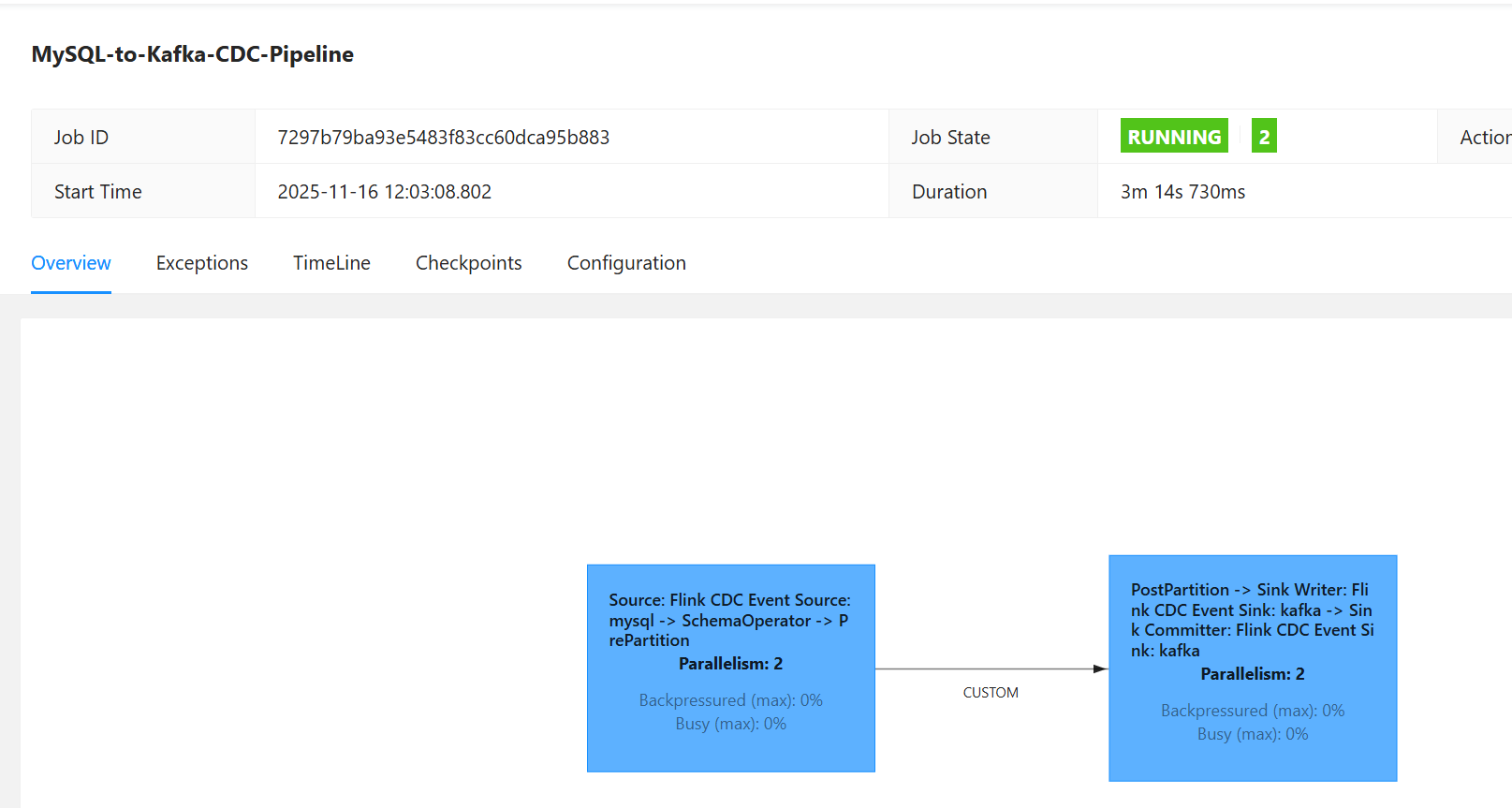
查看checkpoint
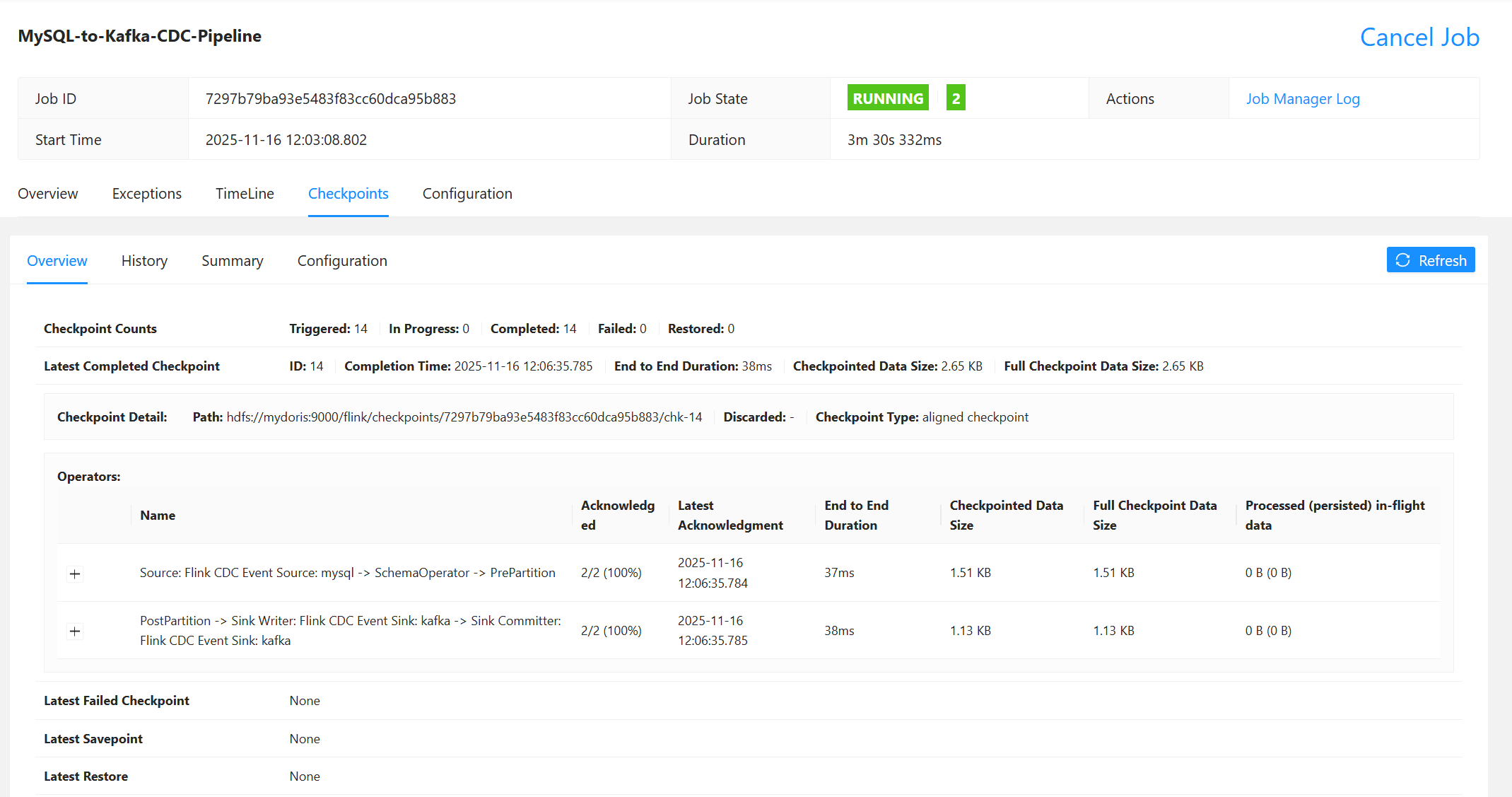
验证同步数据
验证同步数据
启用测试消费客户端
bash
$KAFKA_HOME/bin/kafka-console-consumer.sh \
  --bootstrap-server mydoris:9092 \
  --topic mysql-app-db-all \
  | jq
|----------------------------------------------------------------------------|----------------------------------------------------------------------------|----------------------------------------------------------------------------|
| 插入 | 更新 | 删除 |
| INSERT INTO `orders` (`order_id`, `price`) VALUES (27, 4.00); | UPDATE `orders` SET `price` = 5.00 WHERE `order_id` = 1; | DELETE FROM `orders` WHERE `order_id` = 27; |
| 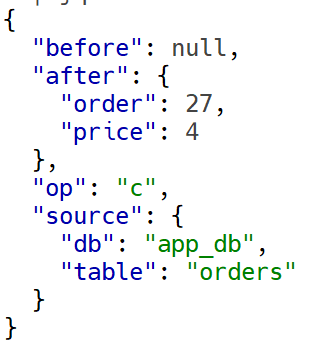 |
| 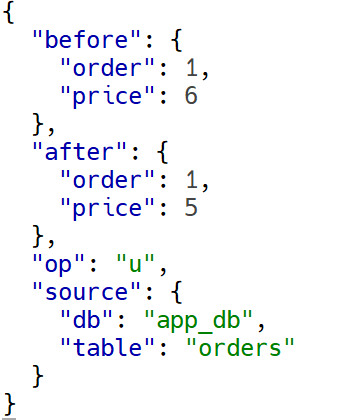 |
| 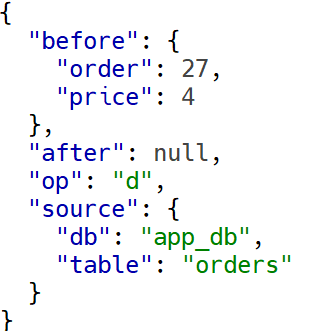 |
|
Mysql 实时同步到 Doris
数据库准备
-
doris中创建数据库
sqlcreate database app_db;
启动同步任务
-
创建整库同步任务配置文件:
bashvim $FLINK_CDC/conf/mysql-to-doris.yamlsql################################################################################ # Description: Sync MySQL all tables to Doris ################################################################################ source: type: mysql hostname: mydoris port: 3306 username: root password: Admin1234 tables: app_db.\.* server-id: 5400-5404 server-time-zone: Asia/Shanghai sink: type: doris fenodes: mydoris:8030 username: root password: "Admin1234" table.create.properties.light_schema_change: true table.create.properties.replication_num: 1 pipeline: name: Sync MySQL Database to Doris parallelism: 2 -
提交任务到 Flink Standalone cluster
sql$FLINK_CDC//bin/flink-cdc.sh $FLINK_CDC//conf/mysql-to-doris.yaml SLF4J: Class path contains multiple SLF4J bindings. SLF4J: Found binding in [jar:file:/opt/module/flink-1.19.3/lib/log4j-slf4j-impl-2.17.1.jar!/org/slf4j/impl/StaticLoggerBinder.class] SLF4J: Found binding in [jar:file:/opt/module/hadoop-3.3.6/share/hadoop/common/lib/slf4j-reload4j-1.7.36.jar!/org/slf4j/impl/StaticLoggerBinder.class] SLF4J: See http://www.slf4j.org/codes.html#multiple_bindings for an explanation. SLF4J: Actual binding is of type [org.apache.logging.slf4j.Log4jLoggerFactory] Pipeline has been submitted to cluster. Job ID: 2926ca3390225dee172cfed94a818191 Job Description: Sync MySQL Database to Doris -
查看作业(flink web ui)
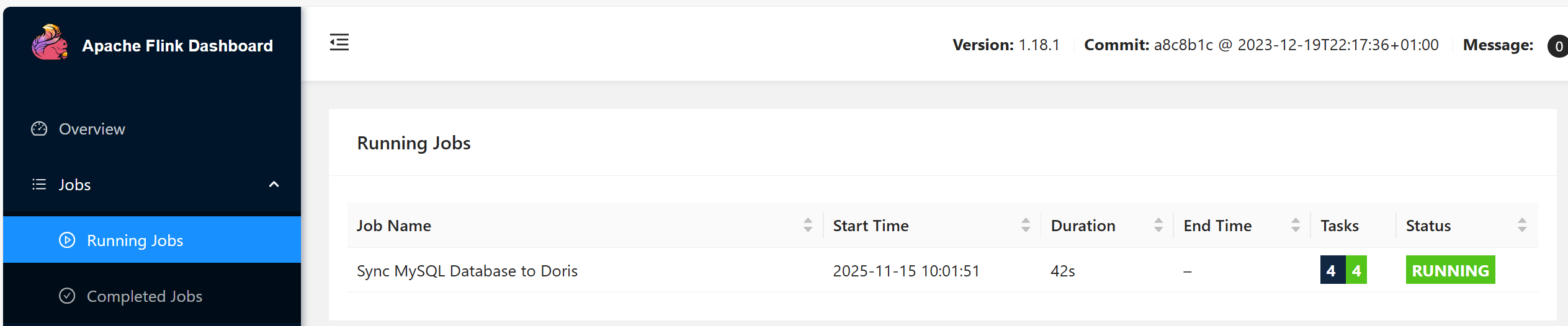
-
检查checkpoint
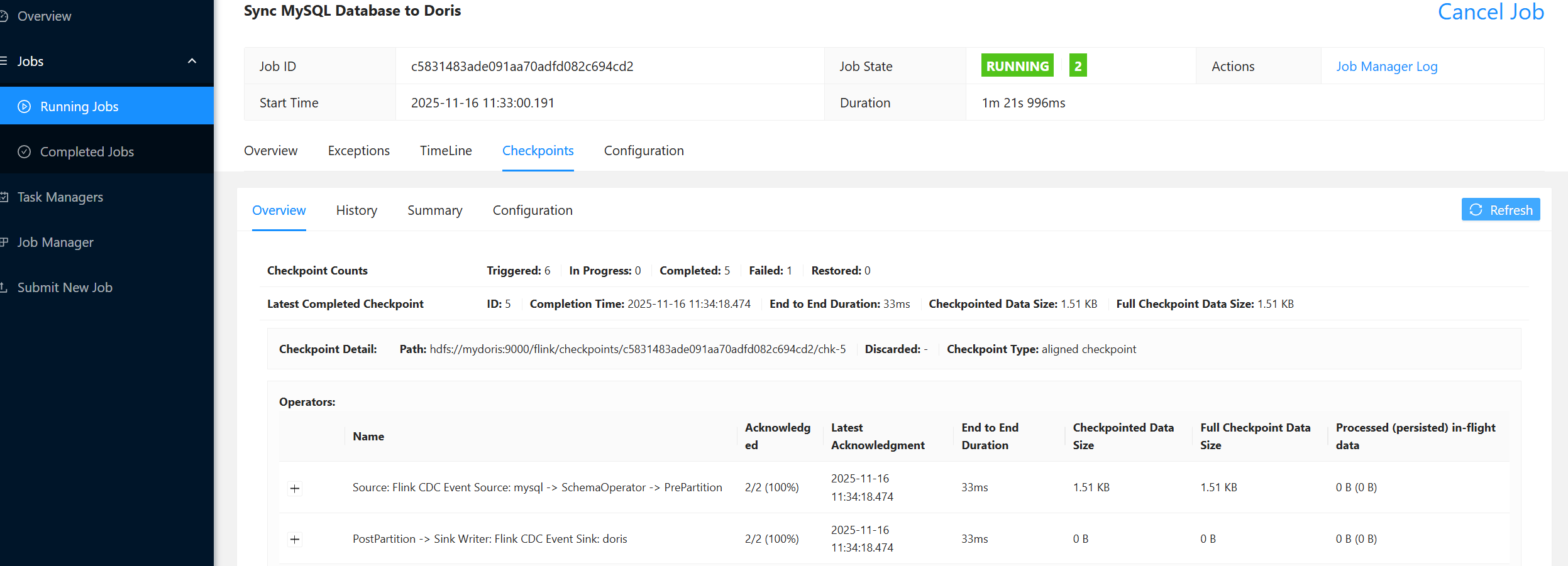
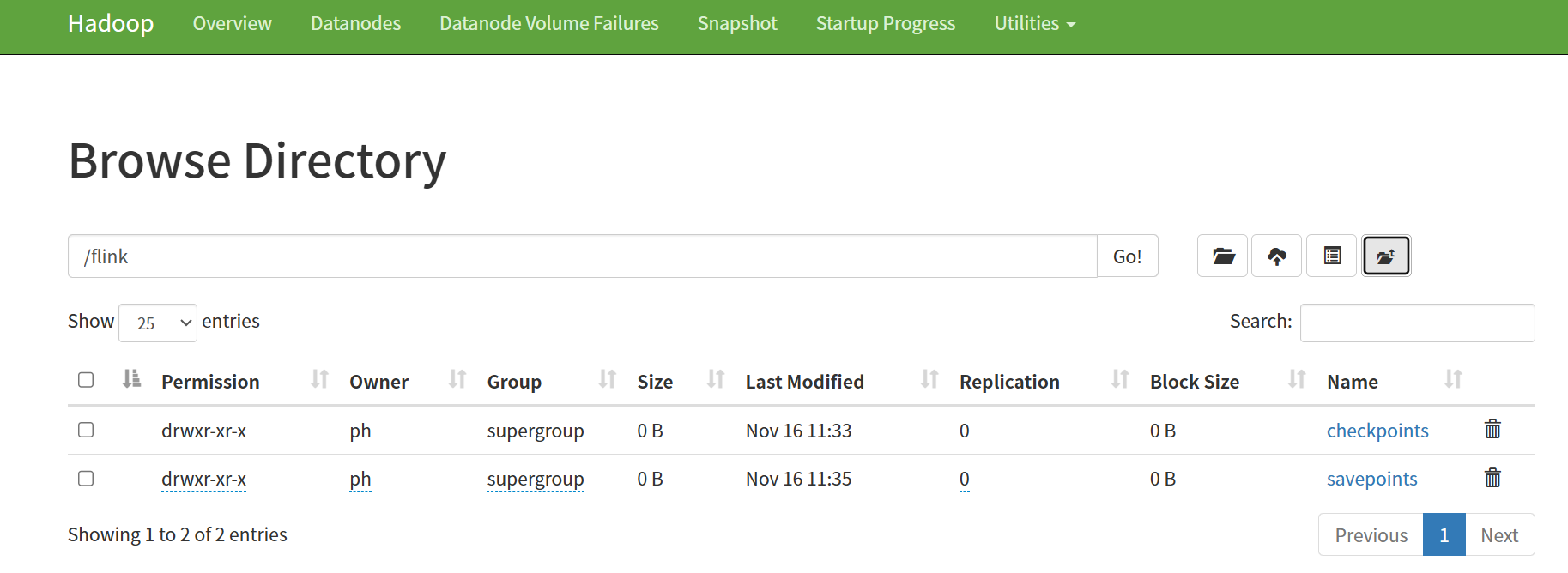
-
查看作业(cli)
bash$FLINK_HOME/bin/flink list ------------------ Running/Restarting Jobs ------------------- 16.11.2025 02:37:23 : 2926ca3390225dee172cfed94a818191 : Sync MySQL Database to Doris (RUNNING) -------------------------------------------------------------- -
查看日志

作业已经启动
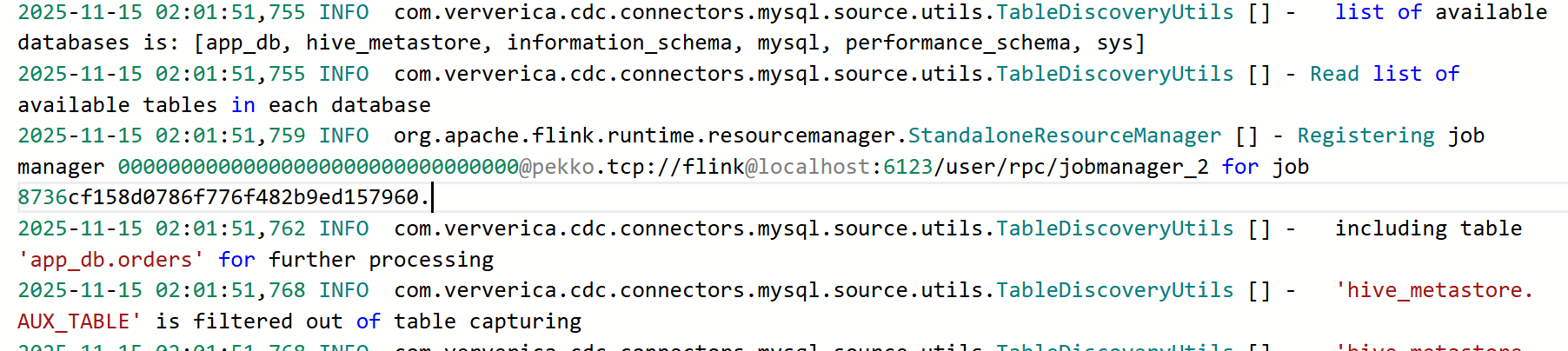
列出所有mysql数据库,过滤出要同步的表

将表结构同步到doris -
查看表
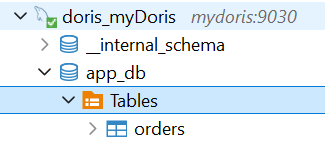 mysql表结构已同步至doris
SHOW CREATE TABLE app_db.orders ;sqlCREATE TABLE `orders` ( `order_id` int NULL, `price` decimal(10,2) NULL ) ENGINE=OLAP UNIQUE KEY(`order_id`) DISTRIBUTED BY HASH(`order_id`) BUCKETS AUTO PROPERTIES ( "replication_allocation" = "tag.location.default: 1", "min_load_replica_num" = "-1", "is_being_synced" = "false", "storage_medium" = "hdd", "storage_format" = "V2", "inverted_index_storage_format" = "V2", "enable_unique_key_merge_on_write" = "true", "light_schema_change" = "true", "disable_auto_compaction" = "false", "enable_single_replica_compaction" = "false", "group_commit_interval_ms" = "10000", "group_commit_data_bytes" = "134217728", "enable_mow_light_delete" = "false" );
验证同步数据
-
插入数据
sqlINSERT INTO `orders` (`order_id`, `price`) VALUES (1, 4.00);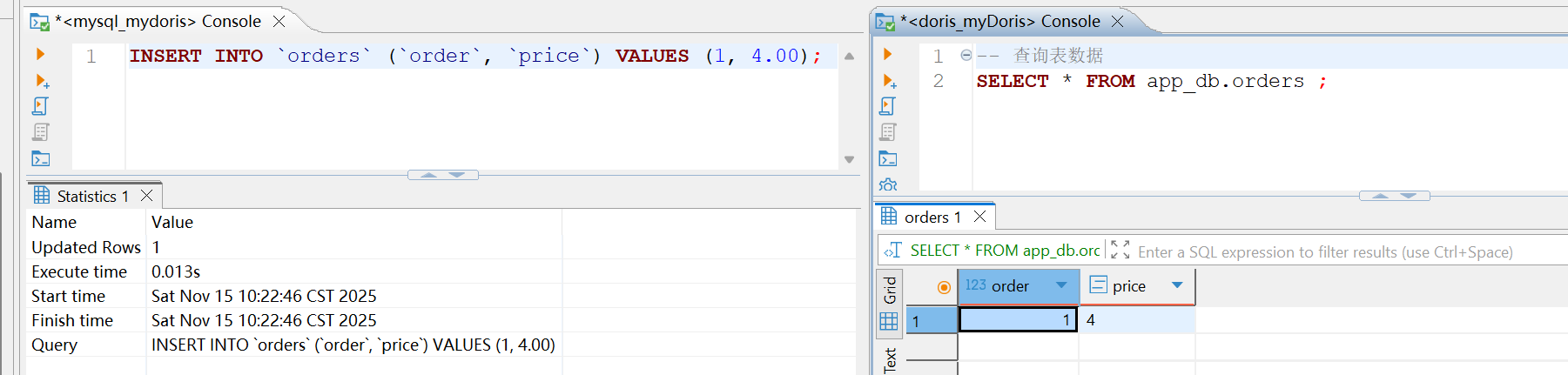
-
更新数据
sqlUPDATE `orders` SET `price` = 5.00 WHERE `order_id` = 1;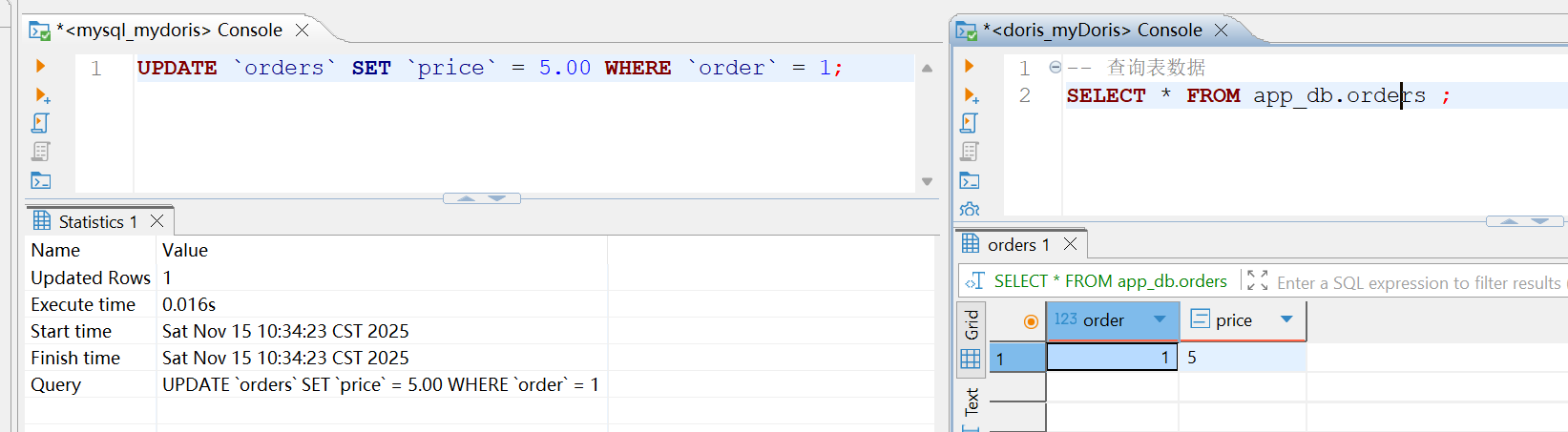
-
删除数据
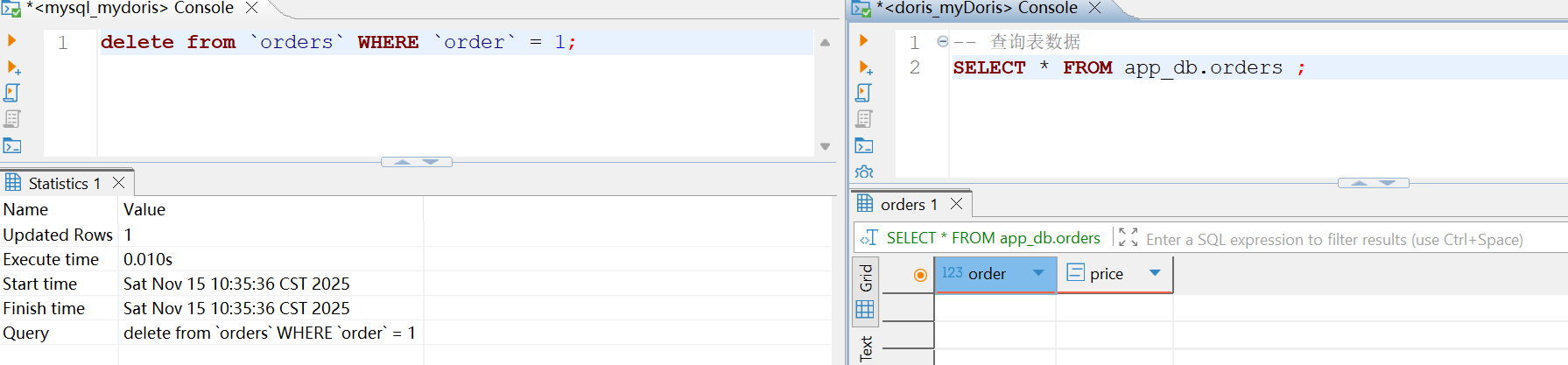
-
查看表已经同步
Flink SQL 模式
MySQL 到 Kafka
创建作业
sql
-- 创建 CDC 源表
CREATE TABLE orders_cdc (
    order_id INT,
    price DECIMAL(10,2),
    PRIMARY KEY (order_id ) NOT ENFORCED
) WITH (
    'connector' = 'mysql-cdc',
    'hostname' = 'mydoris',
    'port' = '3306',
    'username' = 'root',
    'password' = 'Admin1234',
    'database-name' = 'app_db',
    'table-name' = 'orders',
    'server-id' = '5400-5499',
    'server-time-zone' = 'Asia/Shanghai'
);

-- 创建 Kafka Sink 表
CREATE TABLE kafka_orders (
    order_id INT,
    price DECIMAL(10,2)
) WITH (
    'connector' = 'kafka',
    'topic' = 'app_db.orders',
    'properties.bootstrap.servers' = 'mydoris:9092',
    'format' = 'debezium-json'  -- 与 Doris Routine Load 兼容
);

-- 启动同步
INSERT INTO kafka_orders SELECT * FROM orders_cdc;
提交作业
bash
$FLINK_HOME/bin/sql-client.sh -f $FLINK_HOME/conf/mysql-to-kafka.sql

[INFO] Executing SQL from file.

Command history file path: /home/ph/.flink-sql-history
Flink SQL> -- 创建 CDC 源表
> CREATE TABLE orders_cdc (
>     order_id INT,
>     price DECIMAL(10,2),
>     PRIMARY KEY (order_id) NOT ENFORCED
> ) WITH (
>     'connector' = 'mysql-cdc',
>     'hostname' = 'mydoris',
>     'port' = '3306',
>     'username' = 'root',
>     'password' = 'Admin1234',
>     'database-name' = 'app_db',
>     'table-name' = 'orders',
>     'server-id' = '5400-5499',
>     'server-time-zone' = 'Asia/Shanghai'
> )[INFO] Execute statement succeed.

Flink SQL>
> -- 创建 Kafka Sink 表
> CREATE TABLE kafka_orders (
>     order_id INT,
>     price DECIMAL(10,2)
> ) WITH (
>     'connector' = 'kafka',
>     'topic' = 'app_db.orders',
>     'properties.bootstrap.servers' = 'mydoris:9092',
>     'format' = 'debezium-json'  -- 与 Doris Routine Load 兼容
> )[INFO] Execute statement succeed.

Flink SQL> [INFO] Submitting SQL update statement to the cluster...
[INFO] SQL update statement has been successfully submitted to the cluster:
Job ID: e7c7aaffdf46165bb0c7ef403f32cd1d


Flink SQL>
Shutting down the session...
done.
Mysql 到 Doris
说明:还不支持自动建表,需在Doris提前建表
创建作业
sql
-- 创建 CDC 源表
CREATE TABLE orders_cdc (
    order_id INT,
    price DECIMAL(10,2),
    PRIMARY KEY (order_id ) NOT ENFORCED
) WITH (
    'connector' = 'mysql-cdc',
    'hostname' = 'mydoris',
    'port' = '3306',
    'username' = 'root',
    'password' = 'Admin1234',
    'database-name' = 'app_db',
    'table-name' = 'orders',
    'server-id' = '5400-5499',
    'server-time-zone' = 'Asia/Shanghai'
);

-- 创建 Doris Sink 表(Doris 3.0.8 + Connector 25.1.0)
CREATE TABLE doris_orders (
    order_id INT,
    price DECIMAL(10,2)
) WITH (
    'connector' = 'doris',
    'fenodes' = 'mydoris:8030',
    'table.identifier' = 'app_db.orders',
    'username' = 'root',
    'password' = 'Admin1234',
    'sink.label-prefix' = 'flink_app_db_orders_308',
    'sink.enable-delete' = 'true',
    'sink.buffer-flush.interval' = '10s',        --
    'sink.buffer-flush.max-rows' = '100000',
    'sink.buffer-flush.max-bytes' = '10485760'   -- 可选:10MB
);
提交作业
bash
$FLINK_HOME/bin/sql-client.sh -f $FLINK_HOME/conf/mysql-to-doris.sql
[INFO] Executing SQL from file.

Command history file path: /home/ph/.flink-sql-history
Flink SQL> -- 创建 CDC 源表
> CREATE TABLE orders_cdc (
>     order_id INT,
>     price DECIMAL(10,2),
>     PRIMARY KEY (order_id) NOT ENFORCED
> ) WITH (
>     'connector' = 'mysql-cdc',
>     'hostname' = 'mydoris',
>     'port' = '3306',
>     'username' = 'root',
>     'password' = 'Admin1234',
>     'database-name' = 'app_db',
>     'table-name' = 'orders',
>     'server-id' = '5400-5499',
>     'server-time-zone' = 'Asia/Shanghai'
> )[INFO] Execute statement succeed.

Flink SQL>
> -- 创建 Doris Sink 表(Doris 3.0.8 + Connector 25.1.0)
> CREATE TABLE doris_orders (
>     order_id INT,
>     price DECIMAL(10,2)
> ) WITH (
>     'connector' = 'doris',
>     'fenodes' = 'mydoris:8030',
>     'table.identifier' = 'app_db.orders',
>     'username' = 'root',
>     'password' = 'Admin1234',
>     'sink.label-prefix' = 'flink_app_db_orders_308',
>     'sink.enable-delete' = 'true',
>     'sink.buffer-flush.interval' = '10s',        --
>     'sink.buffer-flush.max-rows' = '100000',
>     'sink.buffer-flush.max-bytes' = '10485760'   -- 可选:10MB
> )[INFO] Execute statement succeed.

Flink SQL> [INFO] Submitting SQL update statement to the cluster...
[INFO] SQL update statement has been successfully submitted to the cluster:
Job ID: 75c9f897cead849fe501d130d5a1b055


Flink SQL>
Shutting down the session...
done.
Mysql 到 Iceberg
创建作业
sql
-- 1. 创建 Iceberg Catalog(使用 Hive Metastore)
CREATE CATALOG iceberg_hive WITH (
    'type' = 'iceberg',
    'catalog-type' = 'hive',
    'uri' = 'thrift://mydoris:9083',               -- Hive Metastore 地址
    'warehouse' = 'hdfs://mydoris:9000/user/hive/warehouse', -- Iceberg 数据根目录
    'clients' = '5',                                      -- 可选:Hive 客户端池大小
    'property-version' = '1'
);

-- 2. 使用该 Catalog
USE CATALOG iceberg_hive;

-- 3. 创建数据库(如果不存在)
CREATE DATABASE IF NOT EXISTS app_db;

-- 4. 【可选】手动创建 Iceberg 表(推荐)
-- 如果不创建,Flink 会自动建表(但可能缺少主键/v2 格式)
CREATE TABLE IF NOT EXISTS app_db.orders (
    order_id INT,
    price DECIMAL(10,2),
    PRIMARY KEY (order_id) NOT ENFORCED
) WITH (
    'format-version' = '2',
    'write.upsert.enabled' = 'true',
    'write.format.default' = 'parquet'
);

-- 5. 创建 MySQL CDC 源表
USE CATALOG default_catalog;
USE default_database;

CREATE TABLE orders_cdc (
    order_id INT,
    price DECIMAL(10,2),
    PRIMARY KEY (order_id) NOT ENFORCED
) WITH (
    'connector' = 'mysql-cdc',
    'hostname' = 'mydoris',
    'port' = '3306',
    'username' = 'root',
    'password' = 'Admin1234',
    'database-name' = 'app_db',
    'table-name' = 'orders',
    'server-id' = '5400-5499',
    'server-time-zone' = 'Asia/Shanghai'
);

-- 6. 启动同步(写入 Iceberg)
提交作业
bash
$FLINK_HOME/bin/sql-client.sh -f $FLINK_HOME/conf/mysql-to-iceberg.sql
[INFO] Executing SQL from file.

Command history file path: /home/ph/.flink-sql-history
Flink SQL> -- 1. 创建 Iceberg Catalog(使用 Hive Metastore)
> CREATE CATALOG iceberg_hive WITH (
>     'type' = 'iceberg',
>     'catalog-type' = 'hive',
>     'uri' = 'thrift://mydoris:9083',               -- Hive Metastore 地址
>     'warehouse' = 'hdfs://mydoris:9000/user/hive/warehouse', -- Iceberg 数据根目录
>     'clients' = '5',                                      -- 可选:Hive 客户端池大小
>     'property-version' = '1'
> )[INFO] Execute statement succeed.

Flink SQL> [INFO] Execute statement succeed.

Flink SQL> [INFO] Execute statement succeed.

Flink SQL>
> -- 4. 【可选】手动创建 Iceberg 表(推荐)
> -- 如果不创建,Flink 会自动建表(但可能缺少主键/v2 格式)
> CREATE TABLE IF NOT EXISTS app_db.orders (
>     order_id INT,
>     price DECIMAL(10,2),
>     PRIMARY KEY (order_id) NOT ENFORCED
> ) WITH (
>     'format-version' = '2',
>     'write.upsert.enabled' = 'true',
>     'write.format.default' = 'parquet'
> )[INFO] Execute statement succeed.

Flink SQL> [INFO] Execute statement succeed.

Flink SQL> [INFO] Execute statement succeed.

Flink SQL>
> CREATE TABLE orders_cdc (
>     order_id INT,
>     price DECIMAL(10,2),
>     PRIMARY KEY (order_id) NOT ENFORCED
> ) WITH (
>     'connector' = 'mysql-cdc',
>     'hostname' = 'mydoris',
>     'port' = '3306',
>     'username' = 'root',
>     'password' = 'Admin1234',
>     'database-name' = 'app_db',
>     'table-name' = 'orders',
>     'server-id' = '5400-5499',
>     'server-time-zone' = 'Asia/Shanghai'
> )[INFO] Execute statement succeed.

Flink SQL> [INFO] Submitting SQL update statement to the cluster...
[INFO] SQL update statement has been successfully submitted to the cluster:
Job ID: c09197fa420dae7499def1a6ae386a24
作业启停
显示当前作业
sql
# 查询当前作业
$FLINK_HOME/bin/flink list

------------------ Running/Restarting Jobs -------------------
16.11.2025 07:41:13 : 0bfd330def2ba1de3a1d4ea873728d4a : insert-into_default_catalog.default_database.doris_orders (RUNNING)
--------------------------------------------------------------
No scheduled jobs.


# 停止当前作业
$FLINK_HOME/bin/flink stop 0bfd330def2ba1de3a1d4ea873728d4a

Suspending job "0bfd330def2ba1de3a1d4ea873728d4a" with a CANONICAL savepoint.
Triggering stop-with-savepoint for job 0bfd330def2ba1de3a1d4ea873728d4a.
Waiting for response...
Savepoint completed. Path: hdfs://mydoris:9000/flink/savepoints/savepoint-0bfd33-49b7d53ecc09

# 重启当前作业
修改 mysql-to-doris.sql 文件,在最前面添加
SET 'execution.savepoint.path' = 'hdfs://mydoris:9000/flink/savepoints/savepoint-0bfd33-49b7d53ecc09';
# 修改后,再重新提交作业
$FLINK_HOME/bin/sql-client.sh -f $FLINK_HOME/conf/mysql-to-doris.sql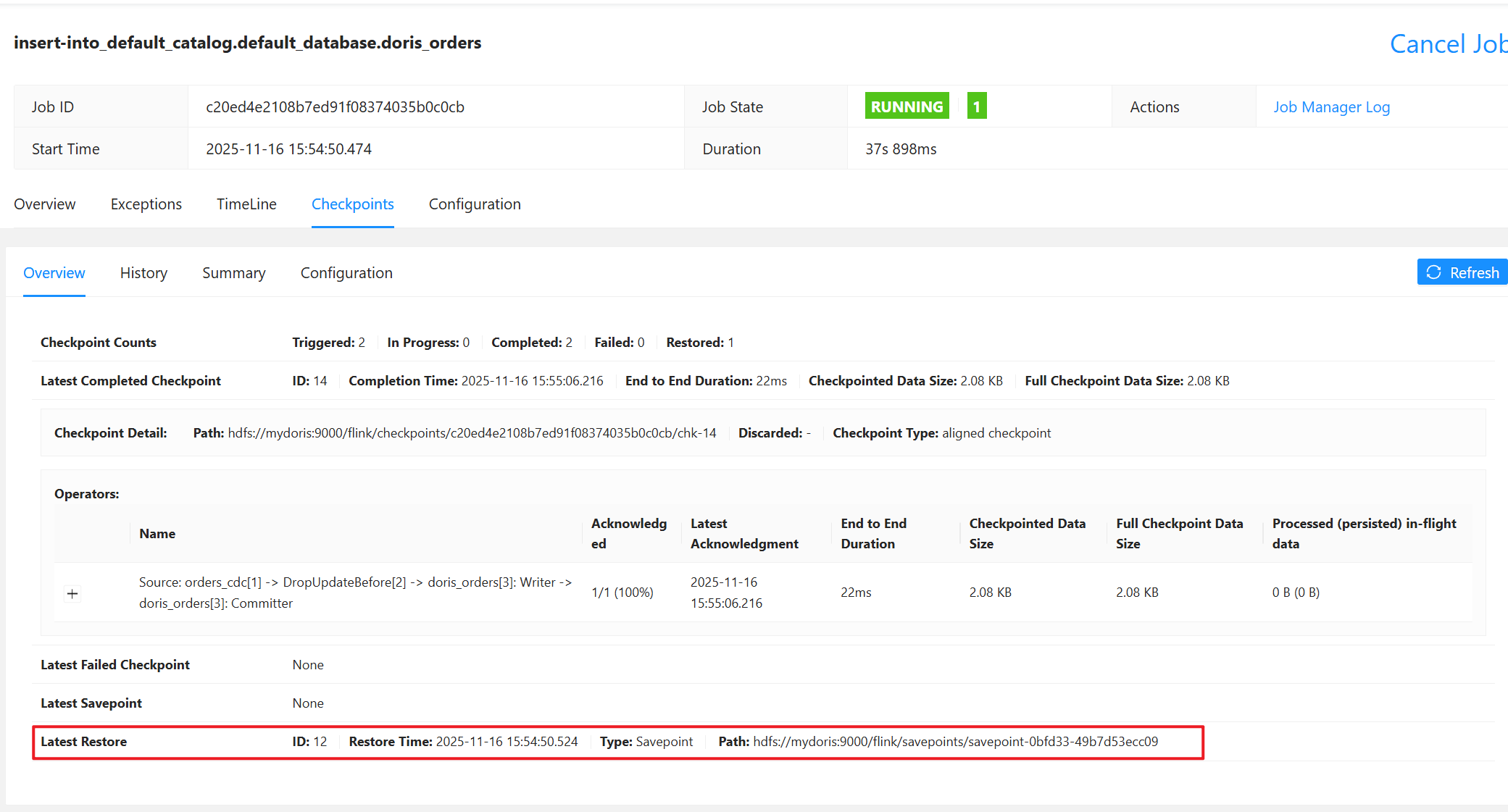
作业启动后查看恢复信息
Latest Restore ID: 12
Restore Time: 2025-11-16 15:54:50.524
Type: Savepoint
Path: hdfs://mydoris:9000/flink/savepoints/savepoint-0bfd33-49b7d53ecc09