前言
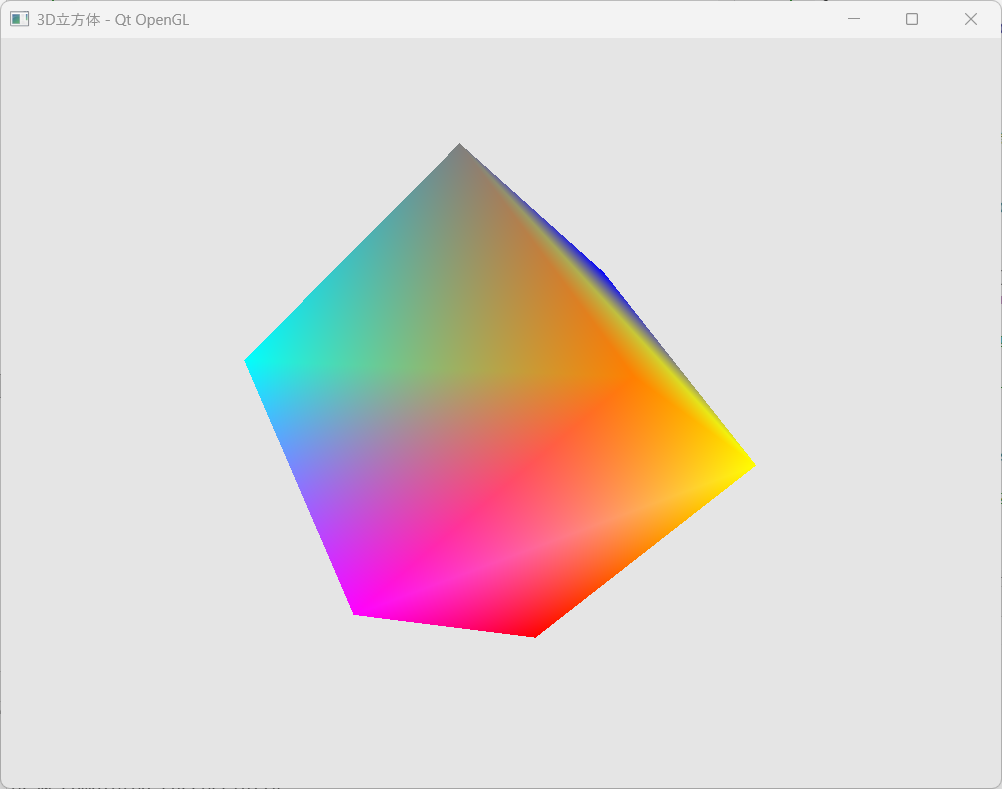
在现代图形应用开发中,3D 渲染技术已成为不可或缺的核心能力。Qt 框架作为跨平台应用开发的重要工具,其与 OpenGL 的深度集成为开发者提供了强大的图形渲染能力。本文将带领读者从零开始,逐步构建一个完整的 3D 彩色立方体应用,深入探讨 Qt 与 OpenGL 的协同工作机理。
概要
本指南详细记录了在 Qt 环境中开发 3D 图形应用的完整流程:
项目架构设计
-
精简项目结构,移除冗余文件
-
配置 CMake 构建系统,集成 OpenGL 模块
-
创建专用的 OpenGL 渲染组件
核心渲染实现
-
设计立方体顶点数据结构,包含位置与颜色信息
-
实现 GLSL 着色器程序,处理顶点变换与颜色插值
-
使用 VBO/VAO 管理图形数据
-
采用 glDrawArrays 进行简化渲染
技术要点解析
-
对比 glDrawArrays 与 glDrawElements 的适用场景
-
解决实际开发中的兼容性问题
-
优化资源管理与渲染性能
通过本指南,开发者将掌握在 Qt 环境中构建 3D 图形应用的关键技术,为开发更复杂的交互式 3D 应用奠定坚实基础。无论您是刚接触计算机图形学,还是希望将 Qt 与 OpenGL 结合使用,本文都将提供实用的技术指导和最佳实践。
项目创建与配置
新建Qt项目
使用Qt Creator创建一个新的CMake项目,选择Qt Widgets应用模板。名称为OpenGLCube
简化项目结构
移除自动生成的冗余文件,只保留核心文件:
-
删除
mainwindow.cpp,mainwindow.h,mainwindow.ui -
保留
main.cpp并修改为直接显示OpenGL窗口 -
添加
openglwidget.cpp和openglwidget.h
CMakeLists.txt 配置
在原有的CMake配置基础上,添加OpenGL相关模块依赖:
cmake_minimum_required(VERSION 3.16)
project(OpenGLCube VERSION 0.1 LANGUAGES CXX)

set(CMAKE_AUTOUIC ON)
set(CMAKE_AUTOMOC ON)
set(CMAKE_AUTORCC ON)
set(CMAKE_CXX_STANDARD 17)

find_package(Qt6 REQUIRED COMPONENTS Core Gui OpenGLWidgets)


qt_add_executable(OpenGLCube
    main.cpp
    openglwidget.h
    openglwidget.cpp
)

target_link_libraries(OpenGLCube PRIVATE
    Qt6::Core
    Qt6::Gui
    Qt6::OpenGLWidgets
)

qt_finalize_executable(OpenGLCube)
在 Qt Creator 中让项目目录体现 CMake 修改:
操作步骤:
1. 清除构建缓存
-
菜单栏:Build → Clear All (或 Clean Project)
-
或者删除
build目录
2. 重新运行 CMake
-
菜单栏:Build → Run CMake
-
或者右键项目 → Run CMake
3. 重新构建项目
-
菜单栏:Build → Build Project
-
快捷键:Ctrl+B
4. 刷新项目视图
-
在项目树中右键 → Refresh
-
或者按 F5
如果还不行:
5. 重新加载项目
-
关闭 Qt Creator
-
删除项目目录下的
.user文件 -
重新打开项目
6. 检查 CMake 输出
-
查看 Compile Output 窗口
-
确认 CMake 配置是否成功
验证修改:
修改 CMakeLists.txt 后,在项目树中应该能看到:
-
新增的源文件自动出现
-
删除的源文件自动消失
-
链接的库正确反映
这样项目目录就会与 CMakeLists.txt 内容保持同步了。
核心实现
OpenGLWidget 类设计
创建继承自 QOpenGLWidget 的自定义类,重写三个关键虚函数:
-
initializeGL()- 初始化OpenGL资源和状态 -
resizeGL()- 处理窗口大小变化 -
paintGL()- 执行渲染绘制
OpenGLWidget.h
cpp
#ifndef OPENGLWIDGET_H
#define OPENGLWIDGET_H

#include <QOpenGLWidget>
#include <QOpenGLFunctions>
#include <QOpenGLShaderProgram>
#include <QOpenGLBuffer>
#include <QOpenGLVertexArrayObject>
#include <QTimer>
#include <QVector3D>
#include <QMatrix4x4>  // 使用Qt的矩阵类

class OpenGLWidget : public QOpenGLWidget, protected QOpenGLFunctions
{
    Q_OBJECT

public:
    OpenGLWidget(QWidget *parent = nullptr);
    ~OpenGLWidget();

protected:
    void initializeGL() override;
    void resizeGL(int w, int h) override;
    void paintGL() override;

private slots:
    void updateAnimation();

private:
    QOpenGLShaderProgram *program;
    QOpenGLBuffer vbo;
    QOpenGLVertexArrayObject vao;
    //QOpenGLBuffer ebo;        // 元素缓冲对象(索引缓冲)
    GLuint ebo;
    QTimer *animationTimer;

    QMatrix4x4 projection;
    QMatrix4x4 view;
    QMatrix4x4 model;

    float rotationAngle = 0.0f;

    void setupCubeData();
    void setupShaders();
};

#endif
OpenGLWidget.cpp 提供了2个版本,一个是glDrawElement 方式,另一个是glDrawArray 方式。
glDrawArrays vs glDrawElements
glDrawArrays 优势
-
实现简单,无需索引数据
-
适合初学者理解顶点数据流
-
代码直观,调试方便
glDrawElements 优势
-
内存效率高,顶点数据可复用
-
减少重复顶点定义
-
更适合复杂模型
-
现代OpenGL推荐做法
遇到的问题
在实际开发中发现,使用Qt封装的 QOpenGLBuffer 用于EBO时在某些环境下可能出现兼容性问题。解决方案是改用原生OpenGL的 GLuint 来管理元素缓冲对象。
开发建议
-
从简单开始:先用 glDrawArrays 实现基础功能
-
逐步优化:待基础渲染稳定后,再考虑使用 glDrawElements 优化
-
注意资源管理:及时释放OpenGL资源,避免内存泄漏
-
兼容性考虑:使用兼容性Profile确保跨平台兼容
通过这个完整的开发流程,可以快速在Qt中创建出功能完整的3D彩色立方体应用。
OpenGLWidget.cpp(glDrawElement画图)
cpp
#include "openglwidget.h"
#include <QDebug>
#include <QTimer>
#include <QVector3D>
#include <QMatrix4x4>

// 8个唯一顶点
static const float vertices[] = {
    // 位置(XYZ)          // 颜色(RGB)
    // 前面4个顶点
    -0.5f, -0.5f,  0.5f,  1.0f, 0.0f, 0.0f,  // 0: 前左下,红
    0.5f, -0.5f,  0.5f,  0.0f, 1.0f, 0.0f,  // 1: 前右下,绿
    0.5f,  0.5f,  0.5f,  0.0f, 0.0f, 1.0f,  // 2: 前右上,蓝
    -0.5f,  0.5f,  0.5f,  1.0f, 1.0f, 0.0f,  // 3: 前左上,黄

    // 后面4个顶点
    -0.5f, -0.5f, -0.5f,  1.0f, 0.0f, 1.0f,  // 4: 后左下,紫
    0.5f, -0.5f, -0.5f,  0.0f, 1.0f, 1.0f,  // 5: 后右下,青
    0.5f,  0.5f, -0.5f,  0.5f, 0.5f, 0.5f,  // 6: 后右上,灰
    -0.5f,  0.5f, -0.5f,  1.0f, 0.5f, 0.0f   // 7: 后左上,橙
};

// 索引数据 - 12个三角形(36个索引)
static const unsigned int indices[] = {
    // 前面
    0, 1, 2,  0, 2, 3,
    // 后面
    5, 4, 7,  5, 7, 6,
    // 右面
    1, 5, 6,  1, 6, 2,
    // 左面
    4, 0, 3,  4, 3, 7,
    // 上面
    3, 2, 6,  3, 6, 7,
    // 下面
    4, 5, 1,  4, 1, 0
};

OpenGLWidget::OpenGLWidget(QWidget *parent)
    : QOpenGLWidget(parent), program(nullptr), rotationAngle(0.0f)
{
    animationTimer = new QTimer(this);
    connect(animationTimer, &QTimer::timeout, this, &OpenGLWidget::updateAnimation);
}

OpenGLWidget::~OpenGLWidget()
{
    makeCurrent();
    vao.destroy();
    vbo.destroy();
    if (ebo != 0) {
        glDeleteBuffers(1, &ebo);
    }
    //ebo.destroy();
    delete program;
    doneCurrent();
}

void OpenGLWidget::initializeGL()
{
    initializeOpenGLFunctions();
    glEnable(GL_DEPTH_TEST);

    qDebug() << "Initializing EBO cube...";
    setupShaders();
    setupCubeData();

    animationTimer->start(16);

    qDebug() << "EBO Cube initialized successfully";
    qDebug() << "Vertices: 8, Indices: 36";
}

void OpenGLWidget::setupShaders()
{
    program = new QOpenGLShaderProgram(this);

    // Vertex shader - use per-vertex colors
    const char* vertexShader =
        "#version 330 core\n"
        "layout (location = 0) in vec3 aPos;\n"
        "layout (location = 1) in vec3 aColor;\n"
        "out vec3 ourColor;\n"
        "uniform mat4 model;\n"
        "uniform mat4 view;\n"
        "uniform mat4 projection;\n"
        "void main()\n"
        "{\n"
        "    gl_Position = projection * view * model * vec4(aPos, 1.0);\n"
        "    ourColor = aColor;\n"
        "}\n";

    // Fragment shader
    const char* fragmentShader =
        "#version 330 core\n"
        "out vec4 FragColor;\n"
        "in vec3 ourColor;\n"
        "void main()\n"
        "{\n"
        "    FragColor = vec4(ourColor,1.0);\n"
        "}\n";

    if (!program->addShaderFromSourceCode(QOpenGLShader::Vertex, vertexShader)) {
        qDebug() << "Vertex shader error:" << program->log();
        return;
    }
    if (!program->addShaderFromSourceCode(QOpenGLShader::Fragment, fragmentShader)) {
        qDebug() << "Fragment shader error:" << program->log();
        return;
    }
    if (!program->link()) {
        qDebug() << "Shader link error:" << program->log();
        return;
    }

    qDebug() << "Shaders compiled and linked successfully";
}

void OpenGLWidget::setupCubeData()
{
    // Bind program before setting attributes
    program->bind();

    vao.create();
    vao.bind();

    // Setup VBO
    vbo.create();
    vbo.bind();
    vbo.allocate(vertices, sizeof(vertices));
    qDebug() << "VBO allocated:" << sizeof(vertices) << "bytes";

    // Setup EBO
    //ebo.create();
    //ebo.bind();
    //ebo.allocate(indices, sizeof(indices));
    // 🚨 3. 设置 EBO (手动原生 OpenGL API)
    glGenBuffers(1, &ebo); // 生成 EBO ID
    glBindBuffer(GL_ELEMENT_ARRAY_BUFFER, ebo); // 绑定 EBO
    glBufferData(GL_ELEMENT_ARRAY_BUFFER, sizeof(indices), indices, GL_STATIC_DRAW); // 分配数据

    qDebug() << "EBO allocated:" << sizeof(indices) << "bytes";

    // Position attribute
    program->enableAttributeArray(0);
    program->setAttributeBuffer(0, GL_FLOAT, 0, 3, 6 * sizeof(float));

    // Color attribute
    program->enableAttributeArray(1);
    program->setAttributeBuffer(1, GL_FLOAT, 3 * sizeof(float), 3, 6 * sizeof(float));

    vao.release();
    program->release();

    qDebug() << "Cube data setup complete";
}

void OpenGLWidget::resizeGL(int w, int h)
{
    glViewport(0, 0, w, h);
    projection.setToIdentity();
    projection.perspective(45.0f, float(w)/float(h), 0.1f, 100.0f);
    qDebug() << "Resize:" << w << "x" << h;
}

void OpenGLWidget::paintGL()
{
    // Test with bright background first
    glClearColor(0.9f, 0.9f, 0.9f, 1.0f); // Light gray background
    glClear(GL_COLOR_BUFFER_BIT | GL_DEPTH_BUFFER_BIT);

    if (!program || !program->isLinked()) {
        qDebug() << "Program not ready, skipping draw";
        return;
    }

    program->bind();
    vao.bind();

    // Set matrices
    program->setUniformValue("projection", projection);

    // Simple view - just move back
    view.setToIdentity();
    view.translate(0.0f, 0.0f, -3.0f);
    program->setUniformValue("view", view);

    // Simple rotation
    model.setToIdentity();
    model.rotate(rotationAngle, QVector3D(0.5f, 1.0f, 0.0f));
    rotationAngle += 1.0f;
    program->setUniformValue("model", model);

    qDebug() << "Drawing frame, rotation:" << rotationAngle;

    // Draw with EBO
    glDrawElements(GL_TRIANGLES, 36, GL_UNSIGNED_INT, 0);
    //glDrawArrays(GL_TRIANGLES, 0, 36);  // 用这个替代
    //glDrawElements(GL_TRIANGLES, 36, GL_UNSIGNED_INT, 0);

    // Check for OpenGL errors
    GLenum error = glGetError();
    if (error != GL_NO_ERROR) {
        qDebug() << "OpenGL draw error:" << error;
    } else {
        qDebug() << "Draw completed successfully";
    }

    vao.release();
    program->release();
}

void OpenGLWidget::updateAnimation()
{
    update();
}
OpenGLWidget.cpp(glDrawArray方式画图)
cpp
#include "openglwidget.h"
#include <QDebug>
#include <QTimer>
#include <QVector3D>
#include <QMatrix4x4>

// 立方体顶点数据:36个顶点(6个面 × 2个三角形 × 3个顶点)
static const float vertices[] = {
    // 位置(XYZ)          颜色(RGB)
    // 前面 (红色渐变)
    -0.5f, -0.5f,  0.5f,  1.0f, 0.0f, 0.0f,
    0.5f, -0.5f,  0.5f,  1.0f, 0.0f, 0.0f,
    0.5f,  0.5f,  0.5f,  1.0f, 0.0f, 0.0f,
    0.5f,  0.5f,  0.5f,  1.0f, 0.0f, 0.0f,
    -0.5f,  0.5f,  0.5f,  1.0f, 0.0f, 0.0f,
    -0.5f, -0.5f,  0.5f,  1.0f, 0.0f, 0.0f,

    // 后面 (绿色渐变)
    -0.5f, -0.5f, -0.5f,  0.0f, 1.0f, 0.0f,
    0.5f, -0.5f, -0.5f,  0.0f, 1.0f, 0.0f,
    0.5f,  0.5f, -0.5f,  0.0f, 1.0f, 0.0f,
    0.5f,  0.5f, -0.5f,  0.0f, 1.0f, 0.0f,
    -0.5f,  0.5f, -0.5f,  0.0f, 1.0f, 0.0f,
    -0.5f, -0.5f, -0.5f,  0.0f, 1.0f, 0.0f,

    // 左面 (蓝色渐变)
    -0.5f, -0.5f, -0.5f,  0.0f, 0.0f, 1.0f,
    -0.5f, -0.5f,  0.5f,  0.0f, 0.0f, 1.0f,
    -0.5f,  0.5f,  0.5f,  0.0f, 0.0f, 1.0f,
    -0.5f,  0.5f,  0.5f,  0.0f, 0.0f, 1.0f,
    -0.5f,  0.5f, -0.5f,  0.0f, 0.0f, 1.0f,
    -0.5f, -0.5f, -0.5f,  0.0f, 0.0f, 1.0f,

    // 右面 (黄色渐变)
    0.5f, -0.5f,  0.5f,  1.0f, 1.0f, 0.0f,
    0.5f, -0.5f, -0.5f,  1.0f, 1.0f, 0.0f,
    0.5f,  0.5f, -0.5f,  1.0f, 1.0f, 0.0f,
    0.5f,  0.5f, -0.5f,  1.0f, 1.0f, 0.0f,
    0.5f,  0.5f,  0.5f,  1.0f, 1.0f, 0.0f,
    0.5f, -0.5f,  0.5f,  1.0f, 1.0f, 0.0f,

    // 上面 (青色渐变)
    -0.5f,  0.5f,  0.5f,  0.0f, 1.0f, 1.0f,
    0.5f,  0.5f,  0.5f,  0.0f, 1.0f, 1.0f,
    0.5f,  0.5f, -0.5f,  0.0f, 1.0f, 1.0f,
    0.5f,  0.5f, -0.5f,  0.0f, 1.0f, 1.0f,
    -0.5f,  0.5f, -0.5f,  0.0f, 1.0f, 1.0f,
    -0.5f,  0.5f,  0.5f,  0.0f, 1.0f, 1.0f,

    // 下面 (紫色渐变)
    -0.5f, -0.5f, -0.5f,  1.0f, 0.0f, 1.0f,
    0.5f, -0.5f, -0.5f,  1.0f, 0.0f, 1.0f,
    0.5f, -0.5f,  0.5f,  1.0f, 0.0f, 1.0f,
    0.5f, -0.5f,  0.5f,  1.0f, 0.0f, 1.0f,
    -0.5f, -0.5f,  0.5f,  1.0f, 0.0f, 1.0f,
    -0.5f, -0.5f, -0.5f,  1.0f, 0.0f, 1.0f
};


OpenGLWidget::OpenGLWidget(QWidget *parent)
    : QOpenGLWidget(parent), program(nullptr), rotationAngle(0.0f)
{
    animationTimer = new QTimer(this);
    connect(animationTimer, &QTimer::timeout, this, &OpenGLWidget::updateAnimation);
}

OpenGLWidget::~OpenGLWidget()
{
    makeCurrent();
    vao.destroy();
    vbo.destroy();
    doneCurrent();
}

void OpenGLWidget::initializeGL()
{
    initializeOpenGLFunctions();
    glEnable(GL_DEPTH_TEST);

    qDebug() << "Initializing EBO cube...";
    setupShaders();
    setupCubeData();

    animationTimer->start(16);

    qDebug() << "EBO Cube initialized successfully";
    qDebug() << "Vertices: 8, Indices: 36";
}

void OpenGLWidget::setupShaders()
{
    program = new QOpenGLShaderProgram(this);

    // Vertex shader - use per-vertex colors
    const char* vertexShader =
        "#version 330 core\n"
        "layout (location = 0) in vec3 aPos;\n"
        "layout (location = 1) in vec3 aColor;\n"
        "out vec3 ourColor;\n"
        "uniform mat4 model;\n"
        "uniform mat4 view;\n"
        "uniform mat4 projection;\n"
        "void main()\n"
        "{\n"
        "    gl_Position = projection * view * model * vec4(aPos, 1.0);\n"
        "    ourColor = aColor;\n"
        "}\n";

    // Fragment shader
    const char* fragmentShader =
        "#version 330 core\n"
        "out vec4 FragColor;\n"
        "in vec3 ourColor;\n"
        "void main()\n"
        "{\n"
        "    FragColor = vec4(ourColor,1.0);\n"
        "}\n";

    if (!program->addShaderFromSourceCode(QOpenGLShader::Vertex, vertexShader)) {
        qDebug() << "Vertex shader error:" << program->log();
        return;
    }
    if (!program->addShaderFromSourceCode(QOpenGLShader::Fragment, fragmentShader)) {
        qDebug() << "Fragment shader error:" << program->log();
        return;
    }
    if (!program->link()) {
        qDebug() << "Shader link error:" << program->log();
        return;
    }

    qDebug() << "Shaders compiled and linked successfully";
}

void OpenGLWidget::setupCubeData()
{
    // Bind program before setting attributes
    program->bind();

    vao.create();
    vao.bind();

    // Setup VBO
    vbo.create();
    vbo.bind();
    vbo.allocate(vertices, sizeof(vertices));
    qDebug() << "VBO allocated:" << sizeof(vertices) << "bytes";

     // Position attribute
    program->enableAttributeArray(0);
    program->setAttributeBuffer(0, GL_FLOAT, 0, 3, 6 * sizeof(float));

    // Color attribute
    program->enableAttributeArray(1);
    program->setAttributeBuffer(1, GL_FLOAT, 3 * sizeof(float), 3, 6 * sizeof(float));

    vao.release();
    program->release();

    qDebug() << "Cube data setup complete";
}

void OpenGLWidget::resizeGL(int w, int h)
{
    glViewport(0, 0, w, h);
    projection.setToIdentity();
    projection.perspective(45.0f, float(w)/float(h), 0.1f, 100.0f);
    qDebug() << "Resize:" << w << "x" << h;
}

void OpenGLWidget::paintGL()
{
    // Test with bright background first
    glClearColor(0.9f, 0.9f, 0.9f, 1.0f); // Light gray background
    glClear(GL_COLOR_BUFFER_BIT | GL_DEPTH_BUFFER_BIT);

    if (!program || !program->isLinked()) {
        qDebug() << "Program not ready, skipping draw";
        return;
    }

    program->bind();
    vao.bind();

    // Set matrices
    program->setUniformValue("projection", projection);

    // Simple view - just move back
    view.setToIdentity();
    view.translate(0.0f, 0.0f, -3.0f);
    program->setUniformValue("view", view);

    // Simple rotation
    model.setToIdentity();
    model.rotate(rotationAngle, QVector3D(0.5f, 1.0f, 0.0f));
    rotationAngle += 1.0f;
    program->setUniformValue("model", model);

    qDebug() << "Drawing frame, rotation:" << rotationAngle;

    // Draw with EBO
    //glDrawElements(GL_TRIANGLES, 36, GL_UNSIGNED_INT, 0);
    glDrawArrays(GL_TRIANGLES, 0, 36);  // 用这个替代
    //glDrawElements(GL_TRIANGLES, 36, GL_UNSIGNED_INT, 0);

    // Check for OpenGL errors
    GLenum error = glGetError();
    if (error != GL_NO_ERROR) {
        qDebug() << "OpenGL draw error:" << error;
    } else {
        qDebug() << "Draw completed successfully";
    }

    vao.release();
    program->release();
}

void OpenGLWidget::updateAnimation()
{
    update();
}
辅助函数,其实就是main.cpp
main.cpp
cpp
#include <QApplication>
#include "openglwidget.h"

int main(int argc, char *argv[])
{
    QApplication app(argc, argv);

    OpenGLWidget widget;
    widget.resize(800, 600);
    widget.setWindowTitle("3D立方体 - Qt OpenGL");
    widget.show();

    return app.exec();
}
结语
通过本项目的完整实践,我们成功在 Qt 框架中构建了一个功能完善的 3D 彩色立方体应用。这个过程不仅展示了 Qt 与 OpenGL 的高效协同,更体现了现代图形编程的核心思想:用简洁的代码创造丰富的视觉体验。
技术收获
从项目配置到最终渲染,我们掌握了:
-
Qt OpenGL 组件的正确使用方法
-
3D 图形数据的组织与管理
-
着色器程序的编写与调试技巧
-
跨平台图形应用的构建流程
展望未来
这个彩色立方体只是一个起点。基于此技术基础,您可以进一步探索:
-
复杂 3D 模型的加载与渲染
-
真实感光照与材质系统
-
交互式相机控制系统
-
高级着色器特效开发
图形编程的世界充满无限可能,愿这个小小的立方体成为您探索 3D 图形世界的坚实基石。继续编码,继续创造,让想象在屏幕上绽放光彩!
技术之路,始于足下。每一个旋转的顶点,都是通向更广阔图形世界的阶梯。