一:生成密钥
private static final String ALGORITHM = "AES";
// 生成密钥
public static String generateKey() throws Exception {
KeyGenerator keyGen = KeyGenerator.getInstance(ALGORITHM);
// 初始化128位密钥
keyGen.init(128);
SecretKey secretKey = keyGen.generateKey();
return Base64.getEncoder().encodeToString(secretKey.getEncoded());
}
二:利用生成的密钥加密解密
public class SimpleAesUtil {
private static final String ALGORITHM = "AES";
private static String key="LKrFJ0OA8bYDCjIsPRju+A==";
// 加密
public static String encrypt(String data) throws Exception {
byte\[\] keyBytes = Base64.getDecoder().decode(key);
SecretKeySpec keySpec = new SecretKeySpec(keyBytes, ALGORITHM);
Cipher cipher = Cipher.getInstance(ALGORITHM);
cipher.init(Cipher.ENCRYPT_MODE, keySpec);
byte\[\] encryptedBytes = cipher.doFinal(data.getBytes());
return Base64.getEncoder().encodeToString(encryptedBytes);
}
// 解密
public static String decrypt(String encryptedData) throws Exception {
byte\[\] keyBytes = Base64.getDecoder().decode(key);
SecretKeySpec keySpec = new SecretKeySpec(keyBytes, ALGORITHM);
Cipher cipher = Cipher.getInstance(ALGORITHM);
cipher.init(Cipher.DECRYPT_MODE, keySpec);
byte\[\] decryptedBytes = cipher.doFinal(Base64.getDecoder().decode(encryptedData));
return new String(decryptedBytes);
}
public static void main(String\[\] args) throws Exception {
String originalText = "371502198906089802";
// 加密
String encrypted = encrypt(originalText);
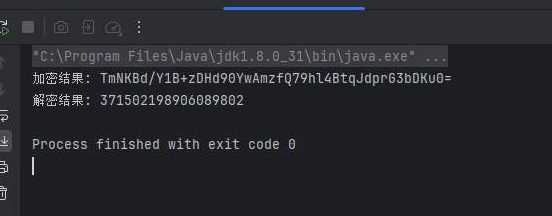
System.out.println("加密结果: " + encrypted);
// 解密
String decrypted = decrypt(encrypted);
System.out.println("解密结果: " + decrypted);
}
三:结果