一、练习环境拓扑图
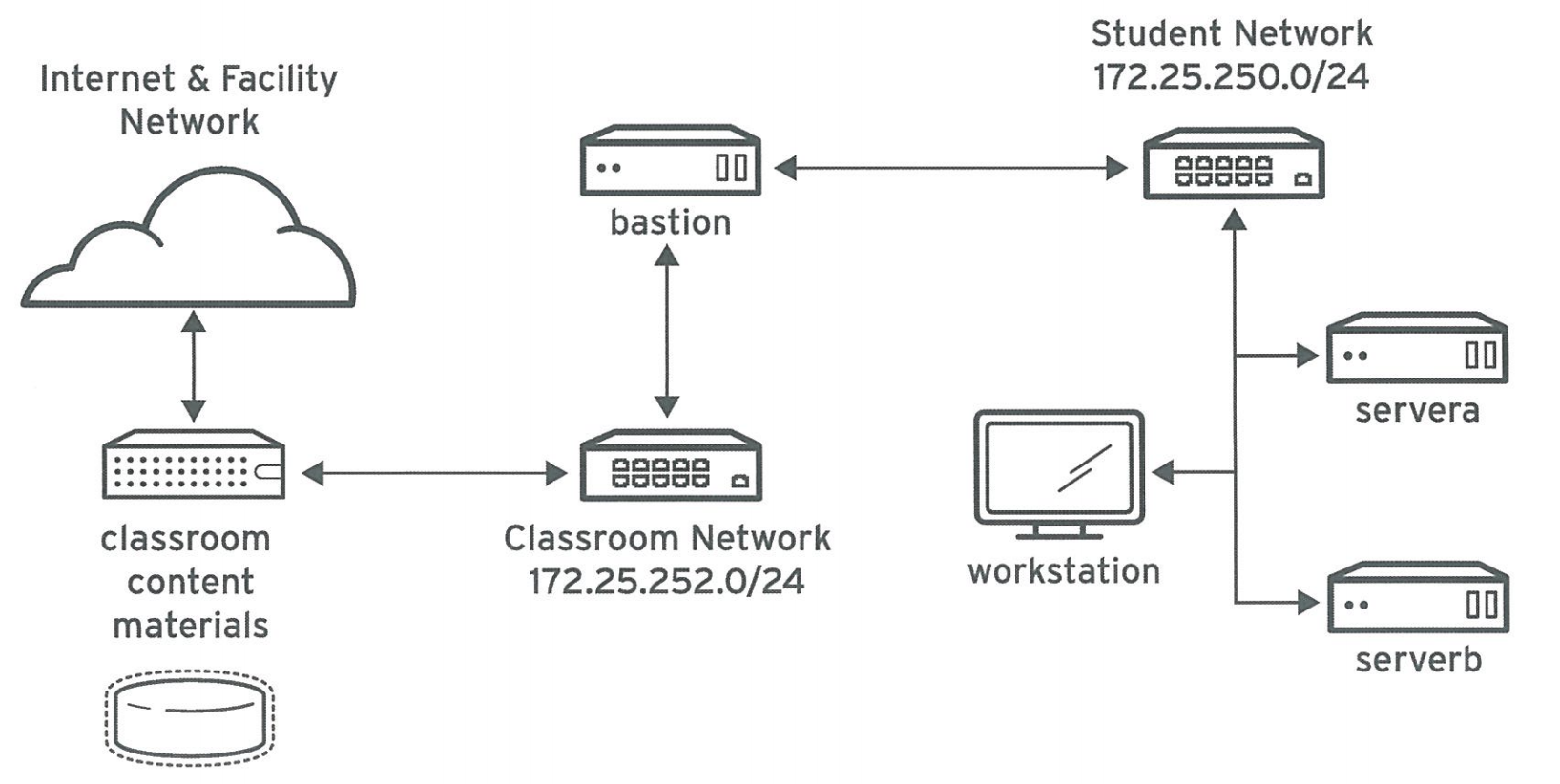
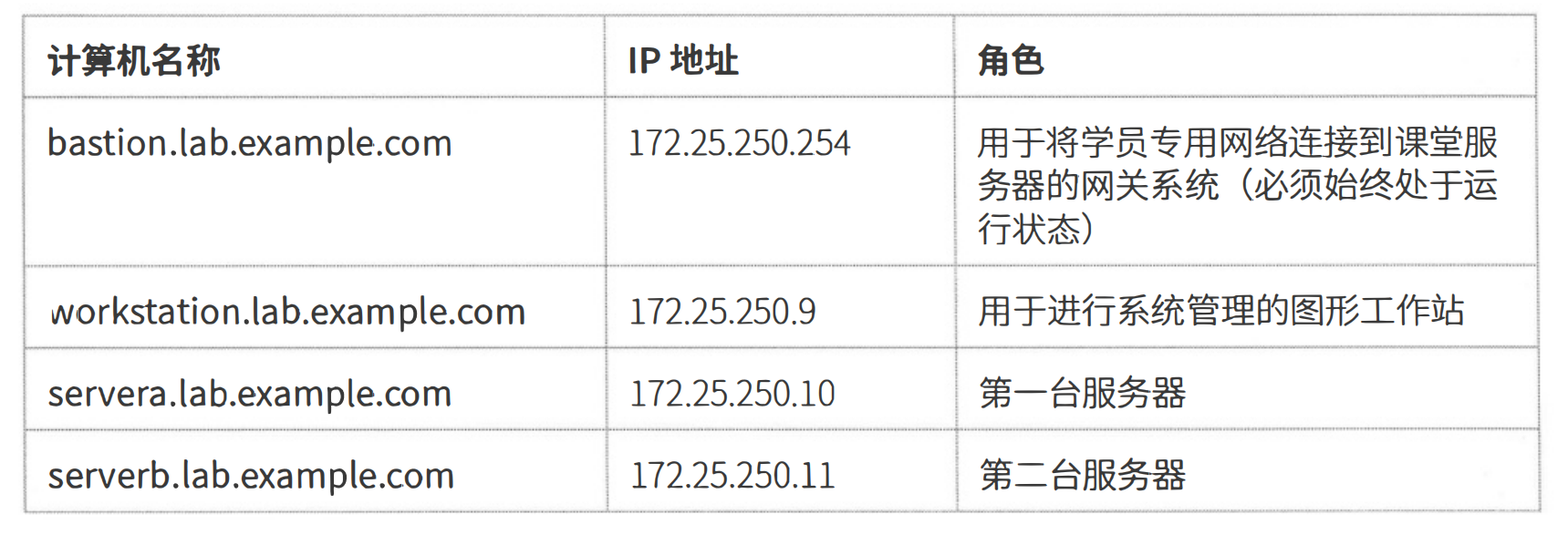
备注:
所有学员计算机系统都有一个标准用户帐户student , 其密码为student 。 所有学员系统的root 密码都是 redhat 。
二、操作练习环境具体命令
清空课程环境
sql
[kiosk@foundation0 ~]$ rht-clearcourse 0
Preparing to remove VMs on foundation0.ilt.example.com...
Using sudo to become root.
Using sudo to become root.
Powering off classroom..
Removing classroom.
Powering off bastion.
Removing bastion.
Powering off workstation.
Removing workstation.
Powering off utility.
Removing utility.
Powering off servera.
Removing servera.
Powering off serverb.
Removing serverb.
Warning: Permanently added 'foundation0.ilt.example.com,fe80::5114:c881:fa5b:2ae%ens192' (ECDSA) to the list of known hosts.
VMs removed from foundation0.ilt.example.com.
[kiosk@foundation0 ~]$
查看所有的课程环境镜像
sql
[kiosk@foundation0 ~]$ ll -h /content/manifests/
total 28K
-rwxrwxr-x. 1 root root 5.1K Oct  2  2020 RH124-RHEL8.2-1.r2020100106-ILT+RAV-7-en_US.icmf_quiesced
-rwxrwxr-x. 1 root root 5.1K Oct  3  2020 RH134-RHEL8.2-1.r2020100106-ILT+RAV-7-en_US.icmf
-rwxrwxr-x. 1 root root 5.1K Oct  3  2020 RH294-RHEL8.0-1.r2019062609-ILT+RAV-7-en_US.icmf_quiesced
-rwxrwxr-x. 1 root root 3.3K Nov 15  2020 RHCIfoundation-RHEL80-7.r2020092412-ILT-7-en_US.icmf
[kiosk@foundation0 ~]$
切换课程环境
sql
[kiosk@foundation0 ~]$ rht-setcourse rh124
ls: cannot access '/content/manifests/RH124-*.icmf': No such file or directory
INFO     Configuration file: /home/kiosk/.icrm/config.yml
INFO     Enabling on f0: RH124-RHEL8.2-1.r2020100106-ILT+RAV-7-en_US.icmf_quiesced
INFO     Quiescing on f0: RH134-RHEL8.2-1.r2020100106-ILT+RAV-7-en_US.icmf
INFO     Keeping: RHCIfoundation-RHEL80-7.r2020092412-ILT-7-en_US.icmf
INFO     Quiescing on f0: RH134-RHEL8.2-1.r2020100106-ILT+RAV-7-en_US.icmf
INFO     Uninstalling redhat-training-slides-RH134-RHEL8.2-en-1-20200928.noarch.rpm
INFO     Activating on f0: RH124-RHEL8.2-1.r2020100106-ILT+RAV-7-en_US.icmf_quiesced
INFO     Mounting /content/rhel8.2/x86_64/isos/rhel-8.2-x86_64-dvd.iso to /content/rhel8.2/x86_64/dvd
INFO     Mounting /content/rhel8.2/x86_64/extraisos/rhel-8.2-x86_64-additional-20200813.iso to /content/rhel8.2/x86_64/rhel8-additional
INFO     Mounting /content/rhel8.2/x86_64/extraisos/rhcsa-practice-20190306.iso to /content/rhel8.2/x86_64/rhcsa-practice
INFO     Installing /content/ucf/Packages/foundation0-rhcsa-8.2-1.r2020100106giteaab22d.noarch.rpm
INFO     Installing /content/ucf/Packages/redhat-training-slides-RH124-RHEL8.2-en-1-20200928.noarch.rpm
INFO     Renaming manifest RH124-RHEL8.2-1.r2020100106-ILT+RAV-7-en_US.icmf_quiesced
INFO     f0activate completed.
/content/rhel8.2/x86_64/vms /home/kiosk
/home/kiosk
Course set to rh124
[kiosk@foundation0 ~]$
查看环境中所有机器的状态
sql
[kiosk@foundation0 ~]$ rht-vmctl status all
bastion MISSING
workstation MISSING
utility MISSING
servera MISSING
serverb MISSING
[kiosk@foundation0 ~]$
开启、查看、重置某个机器的状态
sql
[kiosk@foundation0 ~]$ rht-vmctl start classroom
Starting classroom.
[kiosk@foundation0 ~]$ rht-vmctl status classroom
classroom RUNNING
[kiosk@foundation0 ~]$ rht-vmctl reset classroom
Are you sure you want to reset classroom? (y/n) y
Powering off classroom..
Resetting classroom.
Creating virtual machine disk overlay for rh124-classroom-vda.qcow2
Starting classroom.
[kiosk@foundation0 ~]$
开启环境中所有机器
sql
[kiosk@foundation0 ~]$ rht-vmctl start all
Starting bastion.
Starting workstation.
Downloading virtual machine definition file for utility.
############################################################################################################################################################### 100.0%
Downloading virtual machine disk image rh124-utility-vda.qcow2
############################################################################################################################################################### 100.0%
Creating virtual machine disk overlay for rh124-utility-vda.qcow2
Starting utility.
Starting servera.
Starting serverb.
[kiosk@foundation0 ~]$
再次查看环境中所有机器状态
sql
[kiosk@foundation0 ~]$ rht-vmctl status all
bastion RUNNING
workstation RUNNING
utility RUNNING
servera RUNNING
serverb RUNNING
[kiosk@foundation0 ~]$
三、练习环境登录验证
sql
[kiosk@foundation0 ~]$ ssh root@servera
Warning: Permanently added 'servera,172.25.250.10' (ECDSA) to the list of known hosts.
Web console: https://servera.lab.example.com:9090/ or https://172.25.250.10:9090/

This system is not registered to Red Hat Insights. See https://cloud.redhat.com/
To register this system, run: insights-client --register

Last login: Wed Jun 11 18:48:38 2025
[root@servera ~]#
[root@servera ~]# id
uid=0(root) gid=0(root) groups=0(root) context=unconfined_u:unconfined_r:unconfined_t:s0-s0:c0.c1023
[root@servera ~]#
[root@servera ~]# exit
logout
Connection to servera closed.
[kiosk@foundation0 ~]$
[kiosk@foundation0 ~]$ ssh student@servera
Web console: https://servera.lab.example.com:9090/ or https://172.25.250.10:9090/

This system is not registered to Red Hat Insights. See https://cloud.redhat.com/
To register this system, run: insights-client --register

Last login: Thu Jun 12 00:46:17 2025 from 172.25.250.9
[student@servera ~]$
[student@servera ~]$ id
uid=1000(student) gid=1000(student) groups=1000(student),10(wheel) context=unconfined_u:unconfined_r:unconfined_t:s0-s0:c0.c1023
[student@servera ~]$