效果图
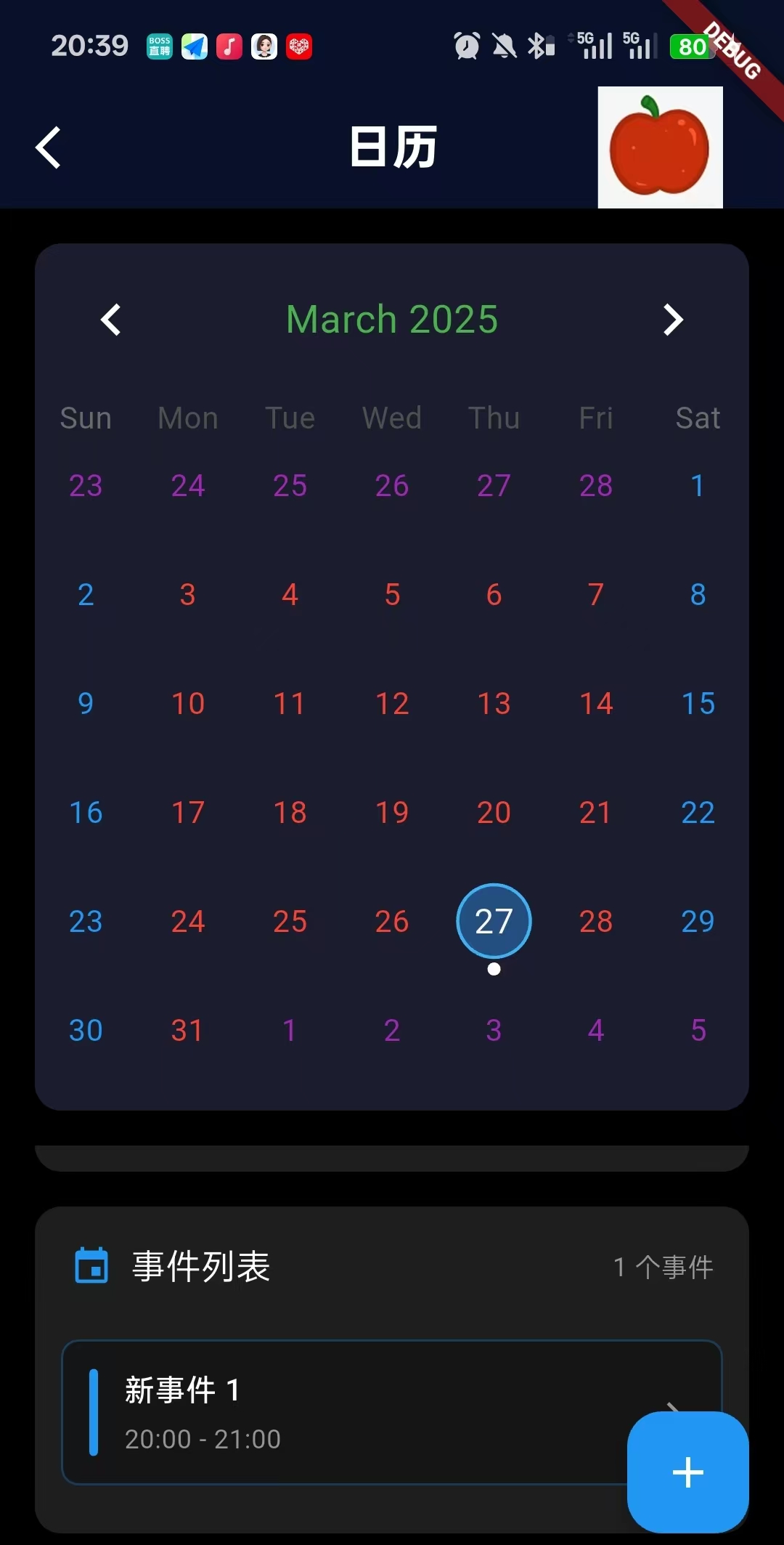
关键插件
Dart
table_calendar: ^3.2.0详细描述:这是一个日历,当用户选中某一天,然后点击右下角的蓝色加号,就能给这一天增加新事件。
关键点:
++1.初始化的时候,是怎么设置选中当天的UI的++
Dart
1._selectedDay = DateTime.now();把这个变量设置为今天

2.判断今天为选中状态
selectedDayPredicate: (day) {
      return isSameDay(_selectedDay, day);
    },


3.设置选中日期的UI
selectedDecoration: BoxDecoration(
        color: Color(0xFF3395F9).withOpacity(0.4),
        shape: BoxShape.circle,
        border: Border.all(color: Color(0xFF3FB0F1), width: 1.5),
      ),
选中UI的渲染流程
Dart
TableCalendar渲染 → 遍历所有可见日期 → 对每个日期调用selectedDayPredicate →
→ isSameDay(_selectedDay, day)比较 → 如果是同一天返回true →
→ TableCalendar应用selectedDecoration样式 → 显示蓝色选中圆圈
isSameDay 工具方法的比较逻辑
Dart
_selectedDay: 2024-01-15 14:30:25.123
当前遍历的day: 2024-01-15 00:00:00.000
↓
a.year(2024) == b.year(2024) ✓
a.month(1) == b.month(1) ✓
a.day(15) == b.day(15) ✓
↓
返回 true → 该日期显示为选中状态
时序图
Dart
时序图:
App启动
    ↓
HomePage Widget创建
    ↓
_HomePageState对象创建
    ↓
initState()执行
    │
    ├── _selectedDay = DateTime.now()  // 🎯 设置选中日期
    │
    └── super.initState()
    ↓
build()方法首次调用
    │
    ├── _buildCalendar()
    │   │
    │   ├── TableCalendar创建
    │   ├── selectedDayPredicate配置
    │   ├── 日历样式配置(selectedDecoration)
    │   └── 事件加载器配置
    │
    ├── _buildSelectedDateInfo()
    │   │
    │   ├── 读取_selectedDay
    │   ├── 格式化日期显示
    │   └── 显示星期几信息
    │
    └── _buildEventList()
        │
        ├── 读取_events[_selectedDay]
        └── 渲染事件列表或空状态
    ↓
UI渲染完成 → 用户看到当天日期被选中
++2.重新选中日期的UI是怎么实现的++
Dart
1.用户点击触发回调,然后更新UI
// 在 _buildCalendar() 中配置的点击回调
TableCalendar(
  onDaySelected: (selectedDay, focusedDay) {
    setState(() {
      _selectedDay = selectedDay; // 🎯 更新选中日期
      _focusedDay = focusedDay;   // 🎯 更新聚焦日期
    });
  },
)

2.日历组件重构
Widget _buildCalendar() {
  return TableCalendar(
    selectedDayPredicate: (day) {
      return isSameDay(_selectedDay, day); // 🎯 使用新的_selectedDay进行比较
    },
    // ... 其他配置
  );
}

3.然后是日期事件版面的更新
用户交互路径
Dart
用户点击日历上的其他日期 → TableCalendar检测点击 →
→ 调用onDaySelected回调 → 传入新的selectedDay和focusedDay
选中状态更新流程
Dart
setState() → build()重新调用 → _buildCalendar()重新执行 →
→ TableCalendar使用新的_selectedDay值 →
→ selectedDayPredicate对每个日期重新评估:
   - 旧选中日期: isSameDay(新日期, 旧日期) = false → 移除选中样式
   - 新选中日期: isSameDay(新日期, 新日期) = true → 应用选中样式
时序图
Dart
用户点击新日期
    ↓
TableCalendar.onDaySelected(selectedDay, focusedDay)
    ↓
setState(() {
  _selectedDay = selectedDay;  // 🎯 状态更新
  _focusedDay = focusedDay;
})
    ↓
_HomePageState重建
    ↓
build()方法重新执行
    │
    ├── _buildCalendar()
    │   │
    │   ├── selectedDayPredicate重新评估所有日期
    │   ├── 旧日期移除选中样式
    │   ├── 新日期应用选中样式
    │   └── 事件标记根据新日期更新
    │
    ├── _buildSelectedDateInfo()
    │   │
    │   ├── 读取新的_selectedDay
    │   ├── 更新日期显示文本
    │   ├── 更新星期几显示
    │   └── 更新事件数量徽章
    │
    └── _buildEventList()
        │
        ├── 读取_events[新_selectedDay]
        ├── 清空旧事件列表
        ├── 渲染新事件列表或空状态
        └── 更新事件数量显示
    ↓
UI完全更新 → 用户看到新日期的选中状态和对应事件
实现步骤
1.引入这个控件
Dart
import 'package:table_calendar/table_calendar.dart';2.设置一些必要参数:日历格式,今天,用户选中的日期,事件数据存储列表
Dart
  CalendarFormat _calendarFormat = CalendarFormat.month; //日历格式
  DateTime _focusedDay = DateTime.now(); //标记今天
  DateTime? _selectedDay; //存储用户所选择的日期

  //事件数据存储列表
  final Map<DateTime, List<Map<String, dynamic>>> _events = {};
3.初始化用户选中的日期为今天(软件一打开就能锁定当天的日期)
Dart
  @override
  void initState() {
    super.initState();
    _selectedDay = DateTime.now(); //初始设置选中日期为今天
  }
4.构建UI:标题栏
Dart
//标题栏
      appBar: AppBar(
        leading: IconButton(
            onPressed: () {
              Navigator.pop(context);
            },
            icon: const Icon(Icons.arrow_back_ios, color: Colors.white)
        ),
        title: Text(
          "日历",
          style: const TextStyle(
            color: Colors.white, fontWeight: FontWeight.bold,),
        ),
        centerTitle: true,
        backgroundColor: const Color(0xFF060618),
        actions: [
          Image.asset("assets/images/apple.png"),
          SizedBox(width: 28,),
        ],
      ),
5.具体页面架构:日历+选中日期+列表事件
Dart
body: Column(
        children: [
          // 日历组件(固定高度)
          Container(
            height: 430, // 固定高度
            child: _buildCalendar(),
          ),

          // 可滚动的内容区域(选中日期信息 + 事件列表)
          Expanded(
            child: SingleChildScrollView(
              physics: AlwaysScrollableScrollPhysics(),
              child: Column(
                children: [
                  SizedBox(height: 16),

                  // 选中日期信息
                  _buildSelectedDateInfo(),
                  SizedBox(height: 16),

                  // 事件列表
                  _buildEventList(),
                  SizedBox(height: 16),
                ],
              ),
            ),
          ),
        ],
      ),
6.添加事件的浮动组件
Dart
//添加事件的浮动组件
      floatingActionButton: FloatingActionButton(
        onPressed: _addEvent,
        child: Icon(Icons.add),
        backgroundColor: Colors.blue,
      ),
7.构建日历组件(*****重点):用一个container包裹,然后设置这个控件的UI
Dart
  // 构建日历组件
  Widget _buildCalendar() {
    return Container(
      margin: EdgeInsets.all(16),
      decoration: BoxDecoration(
        color: Color(0xFF1B1D2E),
        borderRadius: BorderRadius.circular(12),
      ),
      child: TableCalendar(
        firstDay: DateTime.utc(2024, 1, 1), //开始日期
        lastDay: DateTime.utc(2030, 12, 31), //结束日期
        focusedDay: _focusedDay,//告诉日历:请显示这个日期所在的月份
        calendarFormat: _calendarFormat, //设置日历格式
        rowHeight: 50, //行高

        //判断哪个日期应该被标记为"选中状态"
        selectedDayPredicate: (day) {
          return isSameDay(_selectedDay, day);
        },

        //当用户点击或选择某个日期时的回调
        onDaySelected: (selectedDay, focusedDay) {
          setState(() {
            _selectedDay = selectedDay; //更新选择日期:选中的一天变成用户点击的一天
            _focusedDay = focusedDay; //更新聚焦日期:确保新日期在视图内
          });
        },

        //处理页面切换
        onPageChanged: (focusedDay) {
          setState(() {
            _focusedDay = focusedDay;
          });
        },

        //加载事件数据
        eventLoader: (day) {
          return _events.containsKey(day) ? _events[day]! : [];
        },

        calendarStyle: CalendarStyle(
          defaultTextStyle: TextStyle(color: Colors.red), //工作日文字颜色
          weekendTextStyle: TextStyle(color: Colors.blue), //周末文字颜色
          //outsideDaysVisible: false,//非当前月份不可见
          outsideTextStyle: TextStyle(color: Colors.purple),//非当前月份文字颜色

          //选中日期样式
          selectedDecoration: BoxDecoration(
            color: Color(0xFF3395F9).withOpacity(0.4),//颜色
            shape: BoxShape.circle,//圆形
            border: Border.all(color:Color(0xFF3FB0F1),width:1.5),//边框颜色和宽度
          ),

          //今天日期样式
          todayDecoration: BoxDecoration(
            color: Colors.blue.withOpacity(0.3),//背景色
            shape: BoxShape.circle, //圆形
          ),

          //事件标记样式
          markerDecoration: BoxDecoration(
            color: Colors.white, //颜色
            shape: BoxShape.circle,//形状
          ),
          markerSize: 6, //大小
        ),

        headerStyle: HeaderStyle(
          formatButtonVisible: false, // 隐藏"月/周"视图切换按钮
          titleCentered: true, // 标题居中
          titleTextStyle: TextStyle(color: Colors.green, fontSize: 18),//标题文字颜色
          formatButtonTextStyle: TextStyle(color: Colors.white), //格式按钮文字颜色
          formatButtonDecoration: BoxDecoration(
            border: Border.all(color: Colors.blue), //格式按钮边框颜色
            borderRadius: BorderRadius.circular(8), //格式按钮圆角
          ),
          leftChevronIcon: Icon(Icons.chevron_left, color: Colors.white,size: 30,), //左箭头
          rightChevronIcon: Icon(Icons.chevron_right, color: Colors.white,size: 30,), //右箭头
        ),

        //自定义日期构建器
        calendarBuilders: CalendarBuilders(
          markerBuilder: (context, date, events) {
            if (events.isNotEmpty) { //如果该日期有事件
              return Positioned( //定位
                right: 0,
                left: 0,
                bottom: 0,
                child: Container(
                  width: 6,
                  height: 6,
                  decoration: BoxDecoration(
                    color: Colors.white, //白色圆点
                    shape: BoxShape.circle,
                  ),
                ),
              );
            }
            return null;
          },
        ),
      ),
    );
  }
8.构建选中日期的信息的UI
Dart
Widget _buildSelectedDateInfo() {

    //安全获取选中日期的事件列表
    final selectedEvents = _events[_selectedDay] ?? [];

    return Container(
      margin: EdgeInsets.symmetric(horizontal: 16),
      padding: EdgeInsets.all(16),
      decoration: BoxDecoration(
        color: Color(0xFF1E1E1E),
        borderRadius: BorderRadius.circular(12),
      ),
      child: Row(
        children: [
          Icon(Icons.calendar_today, color: Colors.blue, size: 24),
          SizedBox(width: 12),
          Expanded(
            child: Column(
              crossAxisAlignment: CrossAxisAlignment.start,
              children: [
                Text('选中日期', style: TextStyle(color: Colors.white54, fontSize: 12),),

                //具体日期
                Text(
                  _selectedDay != null
                      ? '${_selectedDay!.year}年${_selectedDay!.month}月${_selectedDay!.day}日'
                      : '未选择日期',
                  style: TextStyle(color: Colors.white, fontSize: 16),
                ),

                //周几
                Text(
                  _getWeekday(_selectedDay),
                  style: TextStyle(color: Colors.white54, fontSize: 12),
                ),
              ],
            ),
          ),


          if (selectedEvents.isNotEmpty) //选中列表不为空则显示这个UI
            Container(
              padding: EdgeInsets.symmetric(horizontal: 8, vertical: 4),
              decoration: BoxDecoration(
                color: Colors.orange,
                borderRadius: BorderRadius.circular(12),
              ),
              child: Text(
                '${selectedEvents.length}个事件',
                style: TextStyle(color: Colors.white, fontSize: 12),
              ),
            ),
        ],
      ),
    );
  }
9.构建事件列表
Dart
Widget _buildEventList() {

    //安全获取选中日期的事件列表
    final selectedEvents = _events[_selectedDay] ?? [];

    return Container(
      margin: EdgeInsets.symmetric(horizontal: 16),
      decoration: BoxDecoration(
        color: Color(0xFF1E1E1E),
        borderRadius: BorderRadius.circular(12),
      ),
      child: Column(
        crossAxisAlignment: CrossAxisAlignment.start,
        children: [
          Padding(
            padding: EdgeInsets.all(16),
            child: Row(
              children: [
                Icon(Icons.event, color: Colors.blue, size: 20),
                SizedBox(width: 8),
                Text(
                  '事件列表',
                  style: TextStyle(color: Colors.white, fontSize: 16),
                ),
                Spacer(),
                Text(
                  '${selectedEvents.length} 个事件',
                  style: TextStyle(color: Colors.white54, fontSize: 12),
                ),
              ],
            ),
          ),

          if (selectedEvents.isEmpty) //事件列表为空则显示这个UI
            Container(
              height: 140,
              padding: EdgeInsets.symmetric(vertical: 20),
              child: Center(
                child: Column(
                  mainAxisAlignment: MainAxisAlignment.center,
                  children: [
                    Icon(Icons.event_busy, color: Colors.white54, size: 40),
                    SizedBox(height: 8),
                    Text(
                      '这一天没有事件',
                      style: TextStyle(color: Colors.white54),
                    ),
                    SizedBox(height: 4),
                    Text(
                      '点击右下角 + 按钮添加事件',
                      style: TextStyle(color: Colors.white30, fontSize: 12),
                    ),
                  ],
                ),
              ),
            )
          else //列表部位空则显示这个UI
            Column(
              children: [
                ...selectedEvents.map((event) => _buildEventItem(event)).toList(),
                SizedBox(height: 16),
              ],
            ),
        ],
      ),
    );
  }
10.构建事件项(如果选中的日期有事件)
Dart
Widget _buildEventItem(Map<String, dynamic> event) {
    return Container(
      margin: EdgeInsets.symmetric(horizontal: 12, vertical: 6),
      padding: EdgeInsets.all(12),
      decoration: BoxDecoration(
        color: Colors.black.withOpacity(0.3),
        borderRadius: BorderRadius.circular(8),
        border: Border.all(color: (event['color'] as Color).withOpacity(0.3)),
      ),
      child: Row(
        children: [
          Container(
            width: 4,
            height: 40,
            decoration: BoxDecoration(
              color: event['color'] as Color,
              borderRadius: BorderRadius.circular(2),
            ),
          ),
          SizedBox(width: 12),
          Expanded(
            child: Column(
              crossAxisAlignment: CrossAxisAlignment.start,
              children: [
                Text(
                  event['title'] as String,
                  style: TextStyle(color: Colors.white, fontSize: 14, fontWeight: FontWeight.w500),
                ),
                SizedBox(height: 4),
                Text(
                  event['time'] as String,
                  style: TextStyle(color: Colors.white54, fontSize: 12),
                ),
              ],
            ),
          ),
          Icon(Icons.chevron_right, color: Colors.white54, size: 20),
        ],
      ),
    );
  }
11.添加事件功能
Dart
void _addEvent() {

    if (_selectedDay == null) return;//空安全检查

    // 创建新事件
    final newEvent = {
      'title': '新事件 ${(_events[_selectedDay]?.length ?? 0) + 1}', //标题
      'time': '${DateTime.now().hour.toString().padLeft(2, '0')}:00 - ${(DateTime.now().hour + 1).toString().padLeft(2, '0')}:00', //事件范围
      'color': Colors.primaries[_events.length % Colors.primaries.length], //事件颜色:使用Flutter预定义的主要颜色数组
    };

    //更新数据状态
    setState(() {
      if (_events.containsKey(_selectedDay)) {
        _events[_selectedDay]!.add(newEvent);//追加到现在列表
      } else {
        _events[_selectedDay!] = [newEvent];//创建新列表
      }
    });

    //底部小弹窗
    ScaffoldMessenger.of(context).showSnackBar(
      SnackBar(
        content: Text('事件已添加到 ${_getFormattedDate(_selectedDay)}'),
        backgroundColor: Colors.green,
        duration: Duration(seconds: 2),
      ),
    );
  }
12.工具方法:获取星期几
Dart
  String _getWeekday(DateTime? date) {
    if (date == null) return '';
    List<String> weekdays = ['周日', '周一', '周二', '周三', '周四', '周五', '周六'];
    return weekdays[date.weekday % 7];
  }
13.格式化日期
Dart
String _getFormattedDate(DateTime? date) {
    if (date == null) return '';
    return '${date.month}月${date.day}日';
  }
14.判断是否为同一天
Dart
bool isSameDay(DateTime? a, DateTime? b) {
    if (a == null || b == null) return false;
    return a.year == b.year && a.month == b.month && a.day == b.day;
  }
代码实例
Dart
import 'dart:async';
import 'package:flutter/cupertino.dart';
import 'package:flutter/material.dart';
import 'package:table_calendar/table_calendar.dart';

class HomePage extends StatefulWidget {
  const HomePage({super.key});

  @override
  State<StatefulWidget> createState() => _HomePageState();
}

class _HomePageState extends State<HomePage> with SingleTickerProviderStateMixin {

  CalendarFormat _calendarFormat = CalendarFormat.month; //日历格式
  DateTime _focusedDay = DateTime.now(); //标记今天
  DateTime? _selectedDay; //存储用户所选择的日期

  //事件数据存储列表
  final Map<DateTime, List<Map<String, dynamic>>> _events = {};


  @override
  void initState() {
    super.initState();
    _selectedDay = DateTime.now(); //初始设置选中日期为今天
  }

  @override
  Widget build(BuildContext context) {
    return Scaffold(
      backgroundColor: Colors.black,
      //标题栏
      appBar: AppBar(
        leading: IconButton(
            onPressed: () {
              Navigator.pop(context);
            },
            icon: const Icon(Icons.arrow_back_ios, color: Colors.white)
        ),
        title: Text(
          "日历",
          style: const TextStyle(
            color: Colors.white, fontWeight: FontWeight.bold,),
        ),
        centerTitle: true,
        backgroundColor: const Color(0xFF060618),
        actions: [
          Image.asset("assets/images/apple.png"),
          SizedBox(width: 28,),
        ],
      ),
      body: Column(
        children: [
          // 日历组件(固定高度)
          Container(
            height: 430, // 固定高度
            child: _buildCalendar(),
          ),

          // 可滚动的内容区域(选中日期信息 + 事件列表)
          Expanded(
            child: SingleChildScrollView(
              physics: AlwaysScrollableScrollPhysics(),
              child: Column(
                children: [
                  SizedBox(height: 16),

                  // 选中日期信息
                  _buildSelectedDateInfo(),
                  SizedBox(height: 16),

                  // 事件列表
                  _buildEventList(),
                  SizedBox(height: 16),
                ],
              ),
            ),
          ),
        ],
      ),

      //添加事件的浮动组件
      floatingActionButton: FloatingActionButton(
        onPressed: _addEvent,
        child: Icon(Icons.add),
        backgroundColor: Colors.blue,
      ),
    );
  }

  //=========================构建日历组件========================================
  Widget _buildCalendar() {
    return Container(
      margin: EdgeInsets.all(16),
      decoration: BoxDecoration(
        color: Color(0xFF1B1D2E),
        borderRadius: BorderRadius.circular(12),
      ),
      child: TableCalendar(
        firstDay: DateTime.utc(2024, 1, 1), //开始日期
        lastDay: DateTime.utc(2030, 12, 31), //结束日期
        focusedDay: _focusedDay,//告诉日历:请显示这个日期所在的月份
        calendarFormat: _calendarFormat, //设置日历格式
        rowHeight: 50, //行高

        //判断哪个日期应该被标记为"选中状态"
        selectedDayPredicate: (day) {
          return isSameDay(_selectedDay, day);
        },

        //当用户点击或选择某个日期时的回调
        onDaySelected: (selectedDay, focusedDay) {
          setState(() {
            _selectedDay = selectedDay; //更新选择日期:选中的一天变成用户点击的一天
            _focusedDay = focusedDay; //更新聚焦日期:确保新日期在视图内
          });
        },

        //处理页面切换
        onPageChanged: (focusedDay) {
          setState(() {
            _focusedDay = focusedDay;
          });
        },

        //加载事件数据
        eventLoader: (day) {
          return _events.containsKey(day) ? _events[day]! : [];
        },

        calendarStyle: CalendarStyle(
          defaultTextStyle: TextStyle(color: Colors.red), //工作日文字颜色
          weekendTextStyle: TextStyle(color: Colors.blue), //周末文字颜色
          //outsideDaysVisible: false,//非当前月份不可见
          outsideTextStyle: TextStyle(color: Colors.purple),//非当前月份文字颜色

          //选中日期样式
          selectedDecoration: BoxDecoration(
            color: Color(0xFF3395F9).withOpacity(0.4),//颜色
            shape: BoxShape.circle,//圆形
            border: Border.all(color:Color(0xFF3FB0F1),width:1.5),//边框颜色和宽度
          ),

          //今天日期样式
          todayDecoration: BoxDecoration(
            color: Colors.blue.withOpacity(0.3),//背景色
            shape: BoxShape.circle, //圆形
          ),

          //事件标记样式
          markerDecoration: BoxDecoration(
            color: Colors.white, //颜色
            shape: BoxShape.circle,//形状
          ),
          markerSize: 6, //大小
        ),

        headerStyle: HeaderStyle(
          formatButtonVisible: false, // 隐藏"月/周"视图切换按钮
          titleCentered: true, // 标题居中
          titleTextStyle: TextStyle(color: Colors.green, fontSize: 18),//标题文字颜色
          formatButtonTextStyle: TextStyle(color: Colors.white), //格式按钮文字颜色
          formatButtonDecoration: BoxDecoration(
            border: Border.all(color: Colors.blue), //格式按钮边框颜色
            borderRadius: BorderRadius.circular(8), //格式按钮圆角
          ),
          leftChevronIcon: Icon(Icons.chevron_left, color: Colors.white,size: 30,), //左箭头
          rightChevronIcon: Icon(Icons.chevron_right, color: Colors.white,size: 30,), //右箭头
        ),

        //自定义日期构建器
        calendarBuilders: CalendarBuilders(
          markerBuilder: (context, date, events) {
            if (events.isNotEmpty) { //如果该日期有事件
              return Positioned( //定位
                right: 0,
                left: 0,
                bottom: 0,
                child: Container(
                  width: 6,
                  height: 6,
                  decoration: BoxDecoration(
                    color: Colors.white, //白色圆点
                    shape: BoxShape.circle,
                  ),
                ),
              );
            }
            return null;
          },
        ),
      ),
    );
  }

  // ============================选中日期信息=====================================
  Widget _buildSelectedDateInfo() {

    //安全获取选中日期的事件列表
    final selectedEvents = _events[_selectedDay] ?? [];

    return Container(
      margin: EdgeInsets.symmetric(horizontal: 16),
      padding: EdgeInsets.all(16),
      decoration: BoxDecoration(
        color: Color(0xFF1E1E1E),
        borderRadius: BorderRadius.circular(12),
      ),
      child: Row(
        children: [
          Icon(Icons.calendar_today, color: Colors.blue, size: 24),
          SizedBox(width: 12),
          Expanded(
            child: Column(
              crossAxisAlignment: CrossAxisAlignment.start,
              children: [
                Text('选中日期', style: TextStyle(color: Colors.white54, fontSize: 12),),

                //具体日期
                Text(
                  _selectedDay != null
                      ? '${_selectedDay!.year}年${_selectedDay!.month}月${_selectedDay!.day}日'
                      : '未选择日期',
                  style: TextStyle(color: Colors.white, fontSize: 16),
                ),

                //周几
                Text(
                  _getWeekday(_selectedDay),
                  style: TextStyle(color: Colors.white54, fontSize: 12),
                ),
              ],
            ),
          ),


          if (selectedEvents.isNotEmpty) //选中列表不为空则显示这个UI
            Container(
              padding: EdgeInsets.symmetric(horizontal: 8, vertical: 4),
              decoration: BoxDecoration(
                color: Colors.orange,
                borderRadius: BorderRadius.circular(12),
              ),
              child: Text(
                '${selectedEvents.length}个事件',
                style: TextStyle(color: Colors.white, fontSize: 12),
              ),
            ),
        ],
      ),
    );
  }

  //===========================构建事件列表===================================
  Widget _buildEventList() {

    //安全获取选中日期的事件列表
    final selectedEvents = _events[_selectedDay] ?? [];

    return Container(
      margin: EdgeInsets.symmetric(horizontal: 16),
      decoration: BoxDecoration(
        color: Color(0xFF1E1E1E),
        borderRadius: BorderRadius.circular(12),
      ),
      child: Column(
        crossAxisAlignment: CrossAxisAlignment.start,
        children: [
          Padding(
            padding: EdgeInsets.all(16),
            child: Row(
              children: [
                Icon(Icons.event, color: Colors.blue, size: 20),
                SizedBox(width: 8),
                Text(
                  '事件列表',
                  style: TextStyle(color: Colors.white, fontSize: 16),
                ),
                Spacer(),
                Text(
                  '${selectedEvents.length} 个事件',
                  style: TextStyle(color: Colors.white54, fontSize: 12),
                ),
              ],
            ),
          ),

          if (selectedEvents.isEmpty) //事件列表为空则显示这个UI
            Container(
              height: 140,
              padding: EdgeInsets.symmetric(vertical: 20),
              child: Center(
                child: Column(
                  mainAxisAlignment: MainAxisAlignment.center,
                  children: [
                    Icon(Icons.event_busy, color: Colors.white54, size: 40),
                    SizedBox(height: 8),
                    Text(
                      '这一天没有事件',
                      style: TextStyle(color: Colors.white54),
                    ),
                    SizedBox(height: 4),
                    Text(
                      '点击右下角 + 按钮添加事件',
                      style: TextStyle(color: Colors.white30, fontSize: 12),
                    ),
                  ],
                ),
              ),
            )
          else //列表部位空则显示这个UI
            Column(
              children: [
                ...selectedEvents.map((event) => _buildEventItem(event)).toList(),
                SizedBox(height: 16),
              ],
            ),
        ],
      ),
    );
  }

  //==========================构建事件项========================================
  Widget _buildEventItem(Map<String, dynamic> event) {
    return Container(
      margin: EdgeInsets.symmetric(horizontal: 12, vertical: 6),
      padding: EdgeInsets.all(12),
      decoration: BoxDecoration(
        color: Colors.black.withOpacity(0.3),
        borderRadius: BorderRadius.circular(8),
        border: Border.all(color: (event['color'] as Color).withOpacity(0.3)),
      ),
      child: Row(
        children: [
          Container(
            width: 4,
            height: 40,
            decoration: BoxDecoration(
              color: event['color'] as Color,
              borderRadius: BorderRadius.circular(2),
            ),
          ),
          SizedBox(width: 12),
          Expanded(
            child: Column(
              crossAxisAlignment: CrossAxisAlignment.start,
              children: [
                Text(
                  event['title'] as String,
                  style: TextStyle(color: Colors.white, fontSize: 14, fontWeight: FontWeight.w500),
                ),
                SizedBox(height: 4),
                Text(
                  event['time'] as String,
                  style: TextStyle(color: Colors.white54, fontSize: 12),
                ),
              ],
            ),
          ),
          Icon(Icons.chevron_right, color: Colors.white54, size: 20),
        ],
      ),
    );
  }

  //==================================添加事件功能==============================
  void _addEvent() {

    if (_selectedDay == null) return;//空安全检查

    // 创建新事件
    final newEvent = {
      'title': '新事件 ${(_events[_selectedDay]?.length ?? 0) + 1}', //标题
      'time': '${DateTime.now().hour.toString().padLeft(2, '0')}:00 - ${(DateTime.now().hour + 1).toString().padLeft(2, '0')}:00', //事件范围
      'color': Colors.primaries[_events.length % Colors.primaries.length], //事件颜色:使用Flutter预定义的主要颜色数组
    };

    //更新数据状态
    setState(() {
      if (_events.containsKey(_selectedDay)) {
        _events[_selectedDay]!.add(newEvent);//追加到现在列表
      } else {
        _events[_selectedDay!] = [newEvent];//创建新列表
      }
    });

    //底部小弹窗
    ScaffoldMessenger.of(context).showSnackBar(
      SnackBar(
        content: Text('事件已添加到 ${_getFormattedDate(_selectedDay)}'),
        backgroundColor: Colors.green,
        duration: Duration(seconds: 2),
      ),
    );
  }

  // ============================工具方法:获取星期几===============================
  String _getWeekday(DateTime? date) {
    if (date == null) return '';
    List<String> weekdays = ['周日', '周一', '周二', '周三', '周四', '周五', '周六'];
    return weekdays[date.weekday % 7];
  }

  // ===========================工具方法:格式化日期===============================
  String _getFormattedDate(DateTime? date) {
    if (date == null) return '';
    return '${date.month}月${date.day}日';
  }

  // ==========================工具方法:判断是否为同一天===============================
  bool isSameDay(DateTime? a, DateTime? b) {
    if (a == null || b == null) return false;
    return a.year == b.year && a.month == b.month && a.day == b.day;
  }
}