引入依赖:
build.gradle.kts
    implementation ("com.squareup.okhttp3:okhttp:4.11.0")
    implementation ("com.google.code.gson:gson:2.10.1")
androidMainfest.xml文件配置
http明文允许:
<application

...
    android:usesCleartextTraffic="true"
允许网络连接:
<?xml version="1.0" encoding="utf-8"?>
<manifest xmlns:an  ...
    <uses-permission android:name="android.permission.INTERNET"/>
页面代码:
xml
<LinearLayout
    xmlns:android="http://schemas.android.com/apk/res/android"
    android:orientation="vertical"
    android:padding="24dp"
    android:gravity="center"
    android:layout_width="match_parent"
    android:layout_height="match_parent">

    <EditText
        android:id="@+id/etUsername"
        android:hint="用户名"
        android:layout_width="match_parent"
        android:layout_height="wrap_content"/>

    <EditText
        android:id="@+id/etPassword"
        android:hint="密码"
        android:inputType="textPassword"
        android:layout_width="match_parent"
        android:layout_height="wrap_content"/>

    <Button
        android:id="@+id/btnRegister"
        android:text="注册"
        android:layout_width="match_parent"
        android:layout_height="wrap_content"
        android:layout_marginTop="16dp"/>

    <TextView
        android:id="@+id/tvResult"
        android:text=""
        android:textColor="#FF0000"
        android:layout_width="wrap_content"
        android:layout_height="wrap_content"
        android:layout_marginTop="16dp"/>
</LinearLayout>
java代码:
package com.example.demo3.register;

import android.os.Bundle;
import android.widget.Button;
import android.widget.EditText;
import android.widget.TextView;
import android.widget.Toast;

import androidx.activity.EdgeToEdge;
import androidx.appcompat.app.AppCompatActivity;
import androidx.core.graphics.Insets;
import androidx.core.view.ViewCompat;
import androidx.core.view.WindowInsetsCompat;

import com.example.demo3.R;
import com.google.gson.Gson;

import java.io.IOException;
import java.util.Map;

import okhttp3.Call;
import okhttp3.Callback;
import okhttp3.MediaType;
import okhttp3.OkHttpClient;
import okhttp3.Request;
import okhttp3.RequestBody;
import okhttp3.Response;
public class register extends AppCompatActivity {
    private EditText etUsername, etPassword;
    private Button btnRegister;
    private TextView tvResult;

    private OkHttpClient client = new OkHttpClient();
    private Gson gson = new Gson();
    private static final String BASE_URL = "http://10.0.2.2:8080"; // 替换为后端地址
    private static final MediaType JSON = MediaType.parse("application/json; charset=utf-8");

    @Override
    protected void onCreate(Bundle savedInstanceState) {
        super.onCreate(savedInstanceState);
        setContentView(R.layout.activity_register);


        etUsername = findViewById(R.id.etUsername);
        etPassword = findViewById(R.id.etPassword);
        btnRegister = findViewById(R.id.btnRegister);
        tvResult = findViewById(R.id.tvResult);

        btnRegister.setOnClickListener(v -> registerUser());


    }

    private void registerUser() {
        String username = etUsername.getText().toString().trim();
        String password = etPassword.getText().toString().trim();

        if (username.isEmpty() || password.isEmpty()) {
            Toast.makeText(this, "用户名和密码不能为空", Toast.LENGTH_SHORT).show();
            return;
        }

        // 构建请求体 JSON
        User user = new User(username, password);
        String json = gson.toJson(user);
        RequestBody body = RequestBody.create(json, JSON);

        // 构建请求
        Request request = new Request.Builder()
                .url(BASE_URL + "/api/register")
                .post(body)
                .build();

        // 异步请求
        client.newCall(request).enqueue(new Callback() {
            @Override
            public void onFailure(Call call, IOException e) {
                runOnUiThread(() -> tvResult.setText("请求失败: " + e.getMessage()));
            }

            @Override
            public void onResponse(Call call, Response response) throws IOException {
                if (response.body() != null) {
                    String resStr = response.body().string();
                    Map<String, Object> resMap = gson.fromJson(resStr, Map.class);
                    runOnUiThread(() -> {
                        tvResult.setText(resMap.get("message").toString());
                    });
                }
            }
        });
    }

    // 用户类与后端一致
    static class User {

        private String username;
        private String password;

        public User(String username, String password) {
            this.username = username;
            this.password = password;
        }

        // Getter/Setter 可选


        public String getUsername() {
            return username;
        }

        public void setUsername(String username) {
            this.username = username;
        }

        public String getPassword() {
            return password;
        }

        public void setPassword(String password) {
            this.password = password;
        }

    }

}
在上面的代码中获取后端返回的数据的代码是:
在下面的代码返回的后端数据库数据,
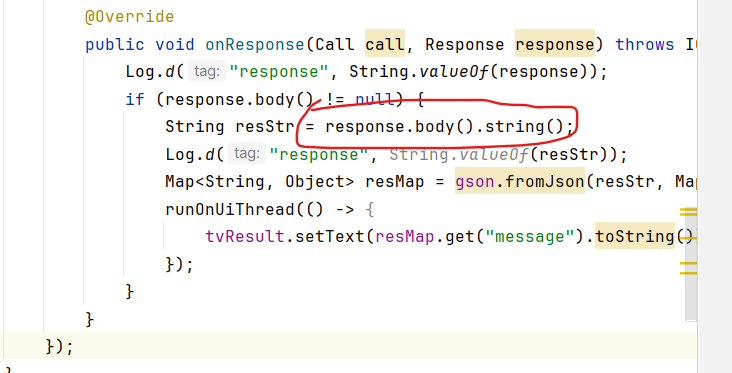
效果是

如果是上图的语句
Log.d("response", String.valueOf(response));则打印出来的是

,
配置:
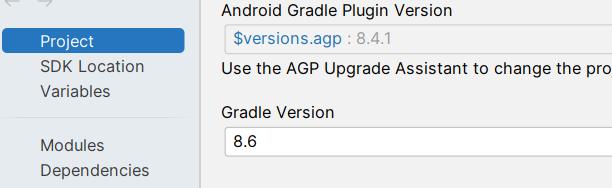
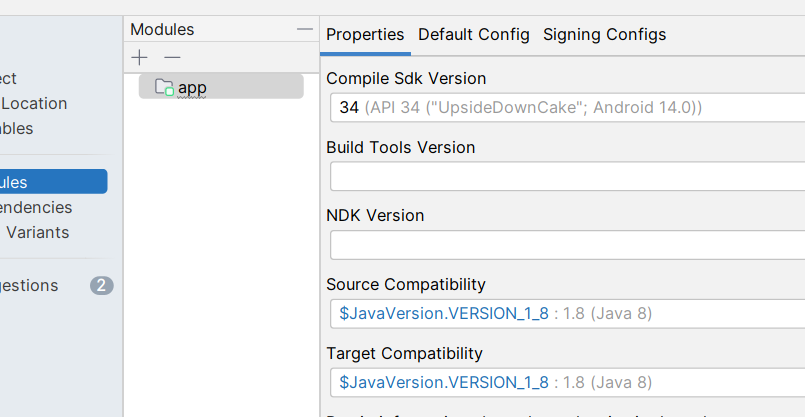
使用子包跳转页面时

后端接口的编写:
 @Autowired
    private UserRepository userRepository;

    // 注册接口
    @PostMapping("/register")
    public Map<String, Object> register(@RequestBody User user) {
        Map<String, Object> response = new HashMap<>();

        // 检查用户名是否已存在
        if (userRepository.existsByUsername(user.getUsername())) {
            response.put("code", 400);
            response.put("message", "用户名已存在");
            return response;
        }

        // 保存到数据库
        userRepository.save(user);

        response.put("code", 200);
        response.put("message", "注册成功");
        return response;
    }
欢迎关注微信公众号,码文狙击所