什么是 LangChain?
LangChain 是一个用于构建大语言模型(LLM)应用的开源框架,旨在让开发者能够轻松地将 LLM 与各种数据源、工具和服务集成。它提供了标准化的接口和丰富的工具链,让你可以快速构建智能应用。
LangChain 解决了什么问题?
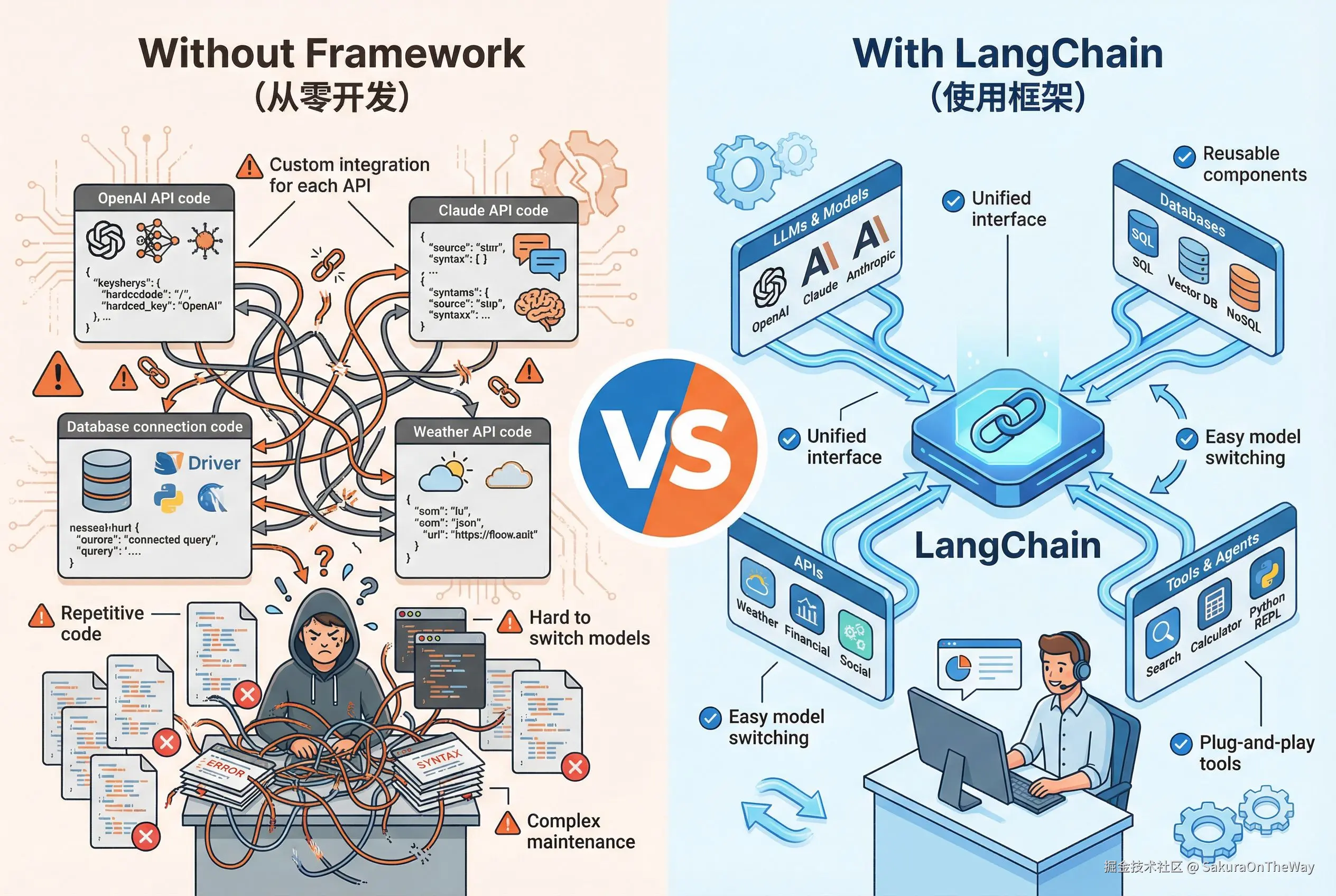
在 LangChain 出现之前,开发者在构建 LLM 应用时面临诸多挑战:
- 需要为每个项目编写重复的代码来管理不同的 API
- 难以实现复杂的多步骤处理流程
- 缺乏标准化的方式来管理对话记忆和上下文
- 与外部工具和数据库的集成过程繁琐
- 难以在不同的 LLM 提供商之间切换
LangChain 通过提供模块化的工具(如 Chains、Agents、Memory、Vector Stores 等),消除了直接 API 调用的复杂性,使工作流程更加结构化和实用。
LangChain的核心理念
- 数据感知(Data-aware) :连接语言模型与各种数据源,让 LLM 能够访问和处理外部数据
- 智能体能力(Agentic) :允许语言模型与环境交互,执行动作并根据结果做出决策
- 模块化与可组合性(Modularity & Composability) :这是 LangChain 架构的核心设计理念。框架提供多个独立的、可自由组合的组件,开发者可以像搭积木一样将它们组合起来,构建满足特定需求的应用
通过实例理解 LangChain 的价值
场景
用户问"上海今天天气怎么样"?
对比
- 不使用 LangChain:需要手写所有的集成和逻辑代码
- Step1: 调用LLM理解用户意图
typescript
import { config } from "npm:dotenv";
config();

// 0. 配置 DeepSeek API
const DEEPSEEK_API_KEY = process.parsed.DEEPSEEK_API_KEY;
const DEEPSEEK_API_BASE = "https://api.deepseek.com";

// 1. 手动构建 prompt
const userInput = "上海今天天气怎么样?";

const prompt = `
    你是一个智能助手,判断用户是否在查询天气。
    如果是,提取城市名称。

    用户问题:${userInput}

    请返回 JSON 格式:
    {"action": "query_weather", "city": "城市名称"}
`

// 3. 调用 DeepSeek API
// reference:
const response = await fetch(`${DEEPSEEK_API_BASE}/chat/completions`, {
  method: "POST",
  headers: {
    "Content-Type": "application/json",
    "Authorization": `Bearer ${DEEPSEEK_API_KEY}`
  },
  body: JSON.stringify({
    model: "deepseek-chat",
    messages: [
      { role: "system", content: "你是一个助手" },
      { role: "user", content: prompt }
    ]
  })
});

// 4. 解析 LLM 返回的结果
const llmOutput = data.choices[0].message.content;
const parsed = JSON.parse(llmOutput);
const city = parsed.city; // 提取出"上海"
console.log(`提取的城市名称: ${city}`); // 提取的城市名称: 上海- Step2: 调用天气API
typescript
// 5. 调用天气 API
const WEATHER_API_KEY = Deno.env.get("WEATHER_API_KEY");
const WEATHER_BASE_URL = `http://api.weatherapi.com/v1/current.json?key=${WEATHER_API_KEY}&q=${city}`;
const weatherResponse = await fetch(WEATHER_BASE_URL);
const weatherData = await weatherResponse.json();

// 6. 提取天气信息
const temperature = weatherData.current.temp_c;
const condition = weatherData.current.condition.text;- Step3: 再次调用 LLM 生成自然语言回答
typescript
// 7. 构建新的 prompt,让 LLM 把数据转成自然语言
const finalPrompt = `
    根据以下天气数据,生成一个友好的回答:
    城市:${city}
    温度:${temperature}°C
    天气:${condition}

    用户问题:${userInput}
`;

const finalResponse = await fetch(`${DEEPSEEK_API_BASE}/chat/completions`, {
  method: "POST",
  headers: {
    "Content-Type": "application/json",
    "Authorization": `Bearer ${DEEPSEEK_API_KEY}`
  },
  body: JSON.stringify({
    model: "deepseek-chat",
    messages: [
      { role: "system", content: "你是一个助手" },
      { role: "user", content: finalPrompt }
    ]
  })
});

const finalData = await finalResponse.json();
const answer = finalData.choices[0].message.content;
console.log(answer); // "上海今天天气不错哦! 当前温度是25°C,天气晴朗,适合外出游玩!"- 面临问题1: 如果要换成 OpenAI 会怎样? --- 重写所有的代码
- 面临问题2: 如何记录对话历史 --- 自己实现,如下
typescript
interface Message {
  role: string;
  content: string;
}

const conversationHistory: Message[] = [];

async function chat(userInput: string): Promise<string> {
  // 手动管理历史
  conversationHistory.push({ role: "user", content: userInput });

  // 每次调用都要传入完整历史
  const response = await fetch(`${DEEPSEEK_API_BASE}/chat/completions`, {
    method: "POST",
    headers: {
      "Content-Type": "application/json",
      "Authorization": `Bearer ${DEEPSEEK_API_KEY}`
    },
    body: JSON.stringify({
      model: "deepseek-chat",
      messages: conversationHistory
    })
  });

  const data = await response.json();
  const assistantReply = data.choices[0].message.content;
  conversationHistory.push({ role: "assistant", content: assistantReply });

  // 还要自己管理历史长度,防止超过 token 限制
  if (conversationHistory.length > 20) {
    conversationHistory.splice(0, conversationHistory.length - 20);
  }

  return assistantReply;
}- 使用 LangChain:简洁优雅的实现
typescript
import { ChatDeepSeek } from "npm:@langchain/deepseek";
import { ChatOpenAI } from "@langchain/openai";
import { config } from "npm:dotenv";
config();

// 1. 定义天气查询工具
const getWeather = async (city: string): Promise<string> => {
  const apiKey = process.env.WEATHER_API_KEY;
  const url = `http://api.weatherapi.com/v1/current.json?key=${apiKey}&q=${city}`;
  const response = await fetch(url);
  const data = await response.json();
  const temp = data.current.temp_c;
  const condition = data.current.condition.text;
  return `${city}的温度是${temp}°C,天气${condition}`;
};

// 2. 配置工具
const tools = [
  new DynamicTool({
    name: "Weather",
    description: "当用户询问天气时使用。输入应该是城市名称。",
    func: getWeather
  })
];

// 3. 配置 LLM:使用 OpenAI 的 ChatOpenAI 作为 agent 的模型(DeepSeek 可用于检索/工具)
const model = new ChatOpenAI({
    apiKey: process.env.OPENAI_API_KEY,
    modelName: "deepseek-chat",
    configuration: {
        baseURL: "https://api.deepseek.com/v1",
    },
    temperature: 0.1,
    model: "gpt-3.5-turbo",
});

// 4. 配置记忆(自动管理对话历史)
const memory = new InMemoryStore({
  memoryKey: "chat_history",
  returnMessages: true
});

// 5. 创建 Agent
const executor = await createAgent(
  model,
  tools,
  {
    agentType: "structured-chat-zero-shot-react-description",
    memory: memory,
    verbose: true,
  }
);

// 6. 使用
const response = await executor.invoke({
  input: "上海今天天气怎么样?"
});
console.log(response.output);

// 7. 继续对话(自动记住上下文)
const response2 = await executor.invoke({
  input: "那北京呢?"
});
console.log(response2.output);
总结
LangChain具有自主性,总结如下:
- 自动意图识别:Agent 分析用户问题,判断需要查询天气
- 自动参数提取:从"上海今天天气怎么样"中提取出城市名"上海"
- 自动工具调用 :调用你定义的
getWeather函数 - 自动结果整合:把工具返回的数据转成自然语言
- 自动记忆管理:记住对话历史,支持多轮对话
- 统一接口:切换 LLM 只需改一行代码