在大型项目中,为了更好地组织 CSS 变量(自定义属性)、主题切换,通常会将变量定义在单独的文件中,然后在需要的地方引入。这样可以实现全局变量的统一管理,同时保持代码的可维护性。以下是几种常见的实现方式:
css变量的使用方法
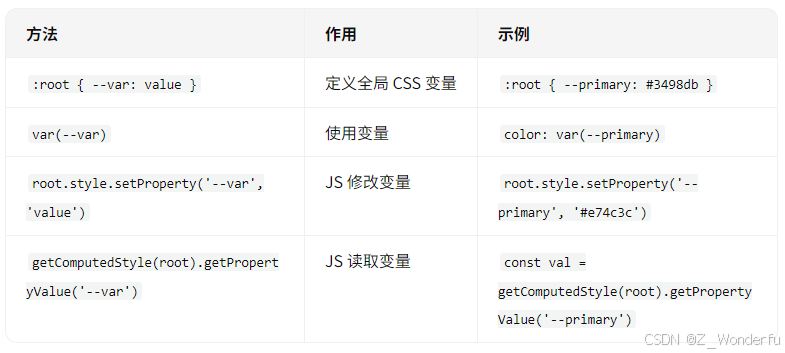
方法 1:使用 CSS 导入(@import)
(1)定义全局变量文件
创建一个 variables.css 文件,存放所有全局 CSS 变量:
css
/* variables.css */
:root {
  --primary-color: #3498db;
  --secondary-color: #2ecc71;
  --text-color: #333;
  --bg-color: #f5f5f5;
  --font-size: 16px;
  --border-radius: 4px;
}
(2)在其他 CSS 文件中引入
使用 @import 导入变量文件:
css
/* styles.css */
@import "./variables.css";

body {
  color: var(--text-color);
  background-color: var(--bg-color);
}

.button {
  background-color: var(--primary-color);
}
(3)在 HTML 中引入
html
<link rel="stylesheet" href="variables.css">
<link rel="stylesheet" href="styles.css">
⚠️ 注意:
@import会影响加载性能(阻塞渲染),建议在构建工具(如 Webpack、Vite)中处理。- 如果使用预处理器(如 Sass/Less),可以用
@use或@import(但 CSS 变量和预处理器变量不同)。
方法 2:使用 CSS Modules 或 CSS-in-JS(推荐)
如果使用现代前端工具(如 Webpack、Vite、React、Vue),可以更灵活地管理 CSS 变量。
(1)定义全局变量(JS/TS 管理)
在 JavaScript/TypeScript 中定义变量,然后动态注入到 :root:
javascript
// src/styles/theme.js
export const theme = {
  primary: "#3498db",
  secondary: "#2ecc71",
  text: "#333",
  bg: "#f5f5f5",
};

// 动态注入到 :root
function applyTheme(theme) {
  const root = document.documentElement;
  Object.keys(theme).forEach((key) => {
    root.style.setProperty(`--${key}`, theme[key]);
  });
}

applyTheme(theme);
(2)在组件中使用
css
/* 在任何 CSS 文件中都可以直接使用 */
.button {
  background-color: var(--primary);
  color: white;
}
✅ 优点:
- 变量可以在 JS 中动态计算(如从 API 获取主题配置)。
- 适用于 React、Vue、Angular 等框架。
方法 3:使用 PostCSS + postcss-custom-properties
如果使用 PostCSS,可以配置 postcss-custom-properties 插件,让 CSS 变量在构建时被处理。
(1)安装插件
bash
npm install postcss-custom-properties --save-dev(2)配置 postcss.config.js
javascript
module.exports = {
  plugins: [
    require("postcss-custom-properties")({
      importFrom: "src/styles/variables.css", // 指定变量文件
    }),
  ],
};
(3)定义变量文件
css
/* src/styles/variables.css */
:root {
  --primary-color: #3498db;
  --text-color: #333;
}
(4)在任意 CSS 文件中使用
css
.button {
  background: var(--primary-color);
  color: var(--text-color);
}
✅ 优点:
- 构建时处理,兼容旧浏览器(如 IE11)。
- 变量可以集中管理。
方法 4:使用 CSS Preprocessor(Sass/Less) + CSS 变量
如果使用 Sass/Less,可以结合 CSS 变量使用:
(1)定义 Sass/Less 变量
scss
// variables.scss
$primary: #3498db;
$text: #333;

:root {
  --primary-color: #{$primary};
  --text-color: #{$text};
}
(2)在 Sass 中使用
scss
@import "variables";

.button {
  background: var(--primary-color); // 使用 CSS 变量
  border: 1px solid $primary; // 使用 Sass 变量
}
✅ 优点:
- 兼顾 Sass/Less 的强大功能和 CSS 变量的动态性。
- 适用于传统项目迁移到 CSS 变量。
最佳实践总结
| 方法 | 适用场景 | 优点 | 缺点 |
|---|---|---|---|
@import |
纯 CSS 项目 | 简单直接 | 影响性能,阻塞渲染 |
| JS 动态注入 | React/Vue/JS 项目 | 动态可编程 | 需要 JS 管理 |
| PostCSS | 构建工具项目 | 兼容旧浏览器 | 需要额外配置 |
| Sass/Less + CSS 变量 | 传统项目迁移 | 结合预处理器优势 | 构建复杂 |
推荐方案
- 现代前端项目(React/Vue) → JS 动态注入(灵活可控)。
- 纯 CSS 项目 → PostCSS(兼容性好)。
- Sass/Less 项目 → 结合 CSS 变量(逐步迁移)。
最终示例(JS 动态注入 + CSS 变量)
(1)定义主题变量
javascript
// src/theme.js
export const lightTheme = {
  primary: "#3498db",
  text: "#333",
  bg: "#fff",
};

export const darkTheme = {
  primary: "#e74c3c",
  text: "#f0f0f0",
  bg: "#121212",
};

export function applyTheme(theme) {
  const root = document.documentElement;
  Object.keys(theme).forEach((key) => {
    root.style.setProperty(`--${key}`, theme[key]);
  });
}
(2)在组件中使用
css
/* global.css */
body {
  color: var(--text);
  background: var(--bg);
}

.button {
  background: var(--primary);
}
(3)切换主题
javascript
import { darkTheme, applyTheme } from "./theme";

// 切换到暗黑模式
document.getElementById("dark-mode-btn").addEventListener("click", () => {
  applyTheme(darkTheme);
});这样,你就可以在整个项目 中全局使用 CSS 变量,并动态调整它们! 🚀