store - models - app.js
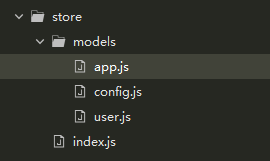
在index.js中引入app.js
js
import Vue from 'vue'
import Vuex from 'vuex'
import user from "./models/user";
import config from "./models/config";
import app from "./models/app";
Vue.use(Vuex)

export default new Vuex.Store({
  modules: {
    user,
    config,
    app
  }
})
app.js
js
// 应用主题(通用方法)
const applyTheme = (theme) => {
    localStorage.setItem('theme', theme);
    document.documentElement.setAttribute('data-theme', theme);
    return theme;
};

// 初始化时读取并应用主题
const initTheme = () => applyTheme(localStorage.getItem('theme') || 'light');

const state = {
    messageState: true, // 处理全局弹窗一次性不弹出多个错误弹窗
    theme: initTheme(), // 主题模式:light / dark(初始化时自动应用)
};
const mutations = {
    setMessageState(state) {
        state.messageState = ! state.messageState;
    },
    setTheme(state, theme) {
        state.theme = applyTheme(theme);
    },
    toggleTheme(state) {
        state.theme = applyTheme(state.theme === 'dark' ? 'light' : 'dark');
    }
};
const actions = {
};


export default  {
    state,
    actions,
    mutations
}
在assets里创建dark.less和theme.less,并且在index.less中引入
css
@import "./theme";
@import "./dark";
theme.less
css
:root{
	//定义正常模式的色值
	--000tofff:#000;
}
dark.less
css
:root[data-theme='dark']{
	//定义暗黑模式的色值
	--000tofff:#fff;
}
在样式中使用
css
.t{
	color:var(--000tofff);
}
切换正常、暗黑
js
change(){
	this.$store.commit('toggleTheme');
}