功能介绍:
-
四种预设风格:
-
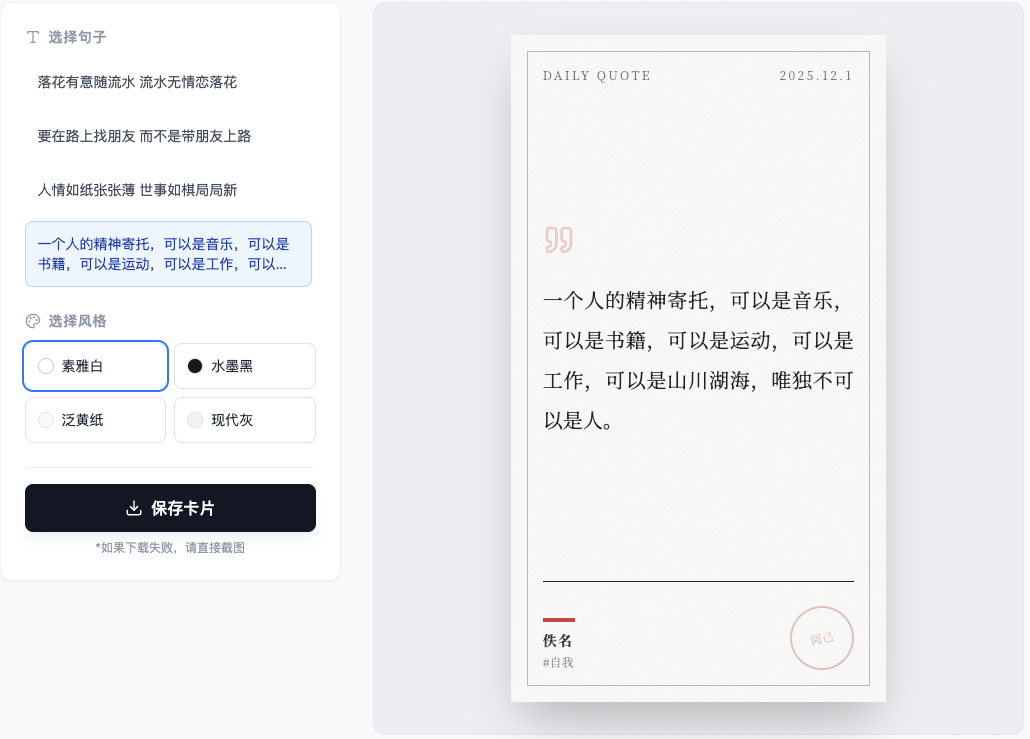
素雅白:极简主义,适合打印或清爽的排版。
-
水墨黑:深色模式,非常有质感,文字如月光般浮现。
-
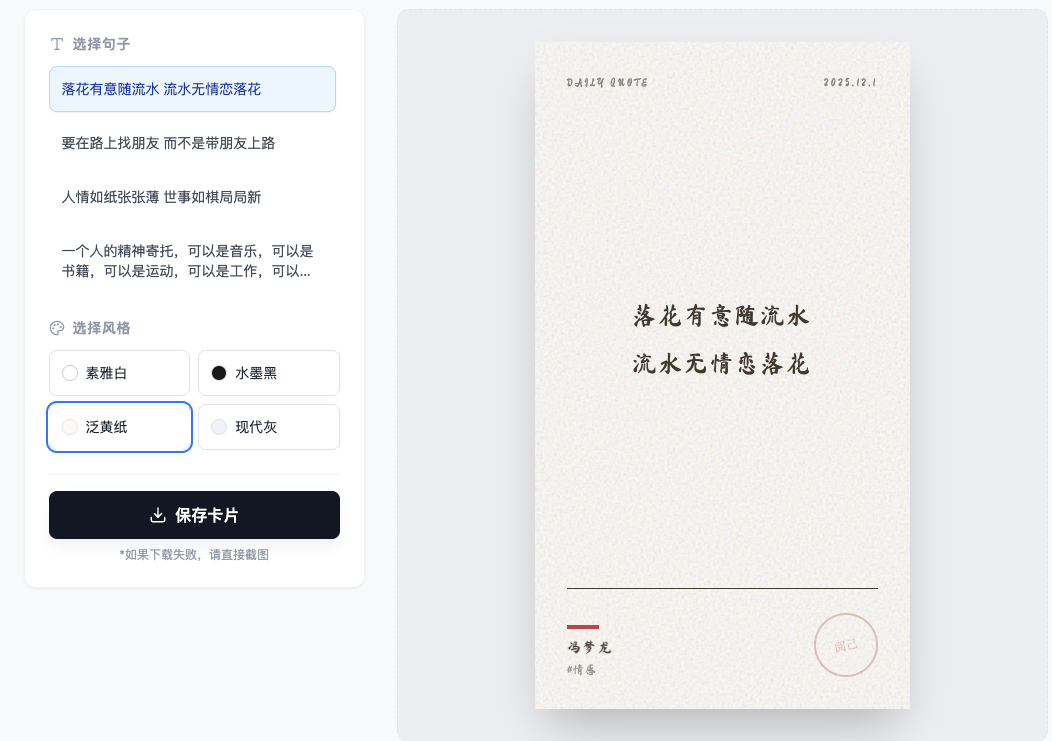
泛黄纸:使用了书法字体(马善政毛笔体),配合纸张纹理,非常适合古风句子(如第一句和第三句)。
-
现代灰:适合发朋友圈的现代感设计。
-
-
智能排版:
-
针对"落花有意..."和"人情如纸..."这种对仗工整的诗句,程序会自动采用竖排版(古籍风格)。
-
针对长难句(如最后一句),会自动调整为两端对齐,保证阅读舒适度。
-
-
保存:点击按钮即可生成高分辨率图片。
-
-
html
import React, { useState, useEffect, useRef } from 'react';
import { Download, Copy, Quote, Palette, Type, LayoutTemplate } from 'lucide-react';

const QuoteCardGenerator = () => {
  const [selectedQuoteIndex, setSelectedQuoteIndex] = useState(0);
  const [currentTheme, setCurrentTheme] = useState('zen');
  const cardRef = useRef(null);
  const [fontLoaded, setFontLoaded] = useState(false);

  const quotes = [
    {
      id: 1,
      text: "落花有意随流水\n流水无情恋落花",
      author: "冯梦龙",
      tag: "情感",
      layout: "vertical" // 竖排更适合这首诗
    },
    {
      id: 2,
      text: "要在路上找朋友\n而不是带朋友上路",
      author: "佚名",
      tag: "社交",
      layout: "center"
    },
    {
      id: 3,
      text: "人情如纸张张薄\n世事如棋局局新",
      author: "增广贤文",
      tag: "世态",
      layout: "vertical"
    },
    {
      id: 4,
      text: "一个人的精神寄托,可以是音乐,可以是书籍,可以是运动,可以是工作,可以是山川湖海,唯独不可以是人。",
      author: "佚名",
      tag: "自我",
      layout: "justify"
    }
  ];

  const themes = {
    zen: {
      name: "素雅白",
      bg: "bg-stone-50",
      text: "text-stone-800",
      accent: "text-red-700",
      border: "border-stone-800",
      font: "font-serif",
      texture: "opacity-10"
    },
    ink: {
      name: "水墨黑",
      bg: "bg-stone-900",
      text: "text-stone-200",
      accent: "text-stone-400",
      border: "border-stone-600",
      font: "font-serif",
      texture: "opacity-20"
    },
    paper: {
      name: "泛黄纸",
      bg: "bg-[#fdfbf7]",
      text: "text-[#4a4036]",
      accent: "text-[#8c7b6c]",
      border: "border-[#4a4036]",
      font: "font-serif", //实际上会加载书法字体
      texture: "opacity-50" // 模拟纸张
    },
    modern: {
      name: "现代灰",
      bg: "bg-gray-100",
      text: "text-gray-900",
      accent: "text-blue-600",
      border: "border-gray-300",
      font: "font-sans",
      texture: "opacity-0"
    }
  };

  useEffect(() => {
    // Load Fonts and html2canvas
    const link = document.createElement('link');
    link.href = 'https://fonts.googleapis.com/css2?family=Noto+Serif+SC:wght@300;400;700&family=Ma+Shan+Zheng&display=swap';
    link.rel = 'stylesheet';
    document.head.appendChild(link);

    const script = document.createElement('script');
    script.src = "https://html2canvas.hertzen.com/dist/html2canvas.min.js";
    script.onload = () => setFontLoaded(true);
    document.body.appendChild(script);

    return () => {
      document.head.removeChild(link);
      document.body.removeChild(script);
    };
  }, []);

  const handleDownload = async () => {
    if (!window.html2canvas || !cardRef.current) return;

    try {
      const canvas = await window.html2canvas(cardRef.current, {
        scale: 3, // Higher resolution
        backgroundColor: null,
        logging: false,
        useCORS: true
      });

      const link = document.createElement('a');
      link.download = `quote-card-${Date.now()}.png`;
      link.href = canvas.toDataURL('image/png');
      link.click();
    } catch (err) {
      console.error("Error generating image:", err);
      alert("生成图片失败,请尝试截图保存。");
    }
  };

  const currentQ = quotes[selectedQuoteIndex];
  const theme = themes[currentTheme];

  // Helper to determine font family based on theme
  const getFontFamily = () => {
    if (currentTheme === 'paper' || currentTheme === 'ink') return "'Ma Shan Zheng', cursive";
    if (currentTheme === 'zen') return "'Noto Serif SC', serif";
    return "'Noto Serif SC', serif";
  };

  return (
    <div className="min-h-screen bg-gray-50 text-gray-800 p-4 flex flex-col items-center font-sans">
      <header className="mb-6 text-center">
        <h1 className="text-2xl font-bold text-gray-800 flex items-center justify-center gap-2">
          <Quote size={20} /> 金句卡片工坊
        </h1>
        <p className="text-sm text-gray-500 mt-1">选择金句,生成你的专属卡片</p>
      </header>

      <div className="flex flex-col lg:flex-row gap-8 w-full max-w-5xl items-start justify-center">

        {/* Controls Section */}
        <div className="w-full lg:w-1/3 space-y-6 bg-white p-6 rounded-xl shadow-sm border border-gray-100">

          {/* Quote Selection */}
          <div>
            <h3 className="text-sm font-semibold text-gray-400 uppercase tracking-wider mb-3 flex items-center gap-2">
              <Type size={16} /> 选择句子
            </h3>
            <div className="space-y-2 max-h-60 overflow-y-auto pr-1">
              {quotes.map((q, idx) => (
                <button
                  key={q.id}
                  onClick={() => setSelectedQuoteIndex(idx)}
                  className={`w-full text-left p-3 rounded-lg text-sm transition-all border ${
                    selectedQuoteIndex === idx
                      ? 'bg-blue-50 border-blue-200 text-blue-800 shadow-sm'
                      : 'hover:bg-gray-50 border-transparent text-gray-600'
                  }`}
                >
                  <p className="line-clamp-2">{q.text}</p>
                </button>
              ))}
            </div>
          </div>

          {/* Theme Selection */}
          <div>
            <h3 className="text-sm font-semibold text-gray-400 uppercase tracking-wider mb-3 flex items-center gap-2">
              <Palette size={16} /> 选择风格
            </h3>
            <div className="grid grid-cols-2 gap-2">
              {Object.keys(themes).map((key) => (
                <button
                  key={key}
                  onClick={() => setCurrentTheme(key)}
                  className={`p-3 rounded-lg text-sm border transition-all flex items-center gap-2 ${
                    currentTheme === key
                      ? 'ring-2 ring-blue-500 ring-offset-1 border-transparent'
                      : 'border-gray-200 hover:border-gray-300'
                  }`}
                >
                  <div className={`w-4 h-4 rounded-full border ${themes[key].bg === 'bg-stone-50' ? 'bg-white border-gray-300' : themes[key].bg}`}></div>
                  {themes[key].name}
                </button>
              ))}
            </div>
          </div>

          {/* Actions */}
          <div className="pt-4 border-t border-gray-100">
             <button
              onClick={handleDownload}
              className="w-full py-3 bg-gray-900 hover:bg-gray-800 text-white rounded-lg flex items-center justify-center gap-2 font-medium transition-colors shadow-lg shadow-gray-200/50"
            >
              <Download size={18} /> 保存卡片
            </button>
            <p className="text-xs text-center text-gray-400 mt-2">
              *如果下载失败,请直接截图
            </p>
          </div>
        </div>

        {/* Preview Section */}
        <div className="flex-1 flex justify-center items-center min-h-[500px] w-full bg-gray-200/50 rounded-xl p-8 border border-gray-200 border-dashed">

          {/* The Card Itself */}
          <div
            ref={cardRef}
            className={`relative overflow-hidden shadow-2xl transition-all duration-500 flex flex-col ${theme.bg} ${theme.text}`}
            style={{
              width: '375px',
              height: '667px', // iPhone 8 dimensions (classic 16:9 ish)
              fontFamily: getFontFamily()
            }}
          >
            {/* Background Texture/Noise */}
            <div className={`absolute inset-0 pointer-events-none ${theme.texture}`}
                 style={{backgroundImage: `url("data:image/svg+xml,%3Csvg viewBox='0 0 200 200' xmlns='http://www.w3.org/2000/svg'%3E%3Cfilter id='noiseFilter'%3E%3CfeTurbulence type='fractalNoise' baseFrequency='0.65' numOctaves='3' stitchTiles='stitch'/%3E%3C/filter%3E%3Crect width='100%25' height='100%25' filter='url(%23noiseFilter)' opacity='0.5'/%3E%3C/svg%3E")`}}>
            </div>

            {/* Decorative Border for Ink/Zen themes */}
            {(currentTheme === 'zen' || currentTheme === 'ink') && (
               <div className={`absolute inset-4 border ${theme.border} opacity-30 pointer-events-none`}></div>
            )}

            {/* Content Container */}
            <div className="relative z-10 flex-1 flex flex-col p-8 h-full">

              {/* Header/Date */}
              <div className="flex justify-between items-start opacity-60 text-xs tracking-[0.2em] uppercase mb-8">
                <span>Daily Quote</span>
                <span>{new Date().toLocaleDateString('zh-CN').replace(/\//g, '.')}</span>
              </div>

              {/* Main Text Area */}
              <div className="flex-1 flex items-center justify-center">
                 <div className={`
                    w-full relative
                    ${currentQ.layout === 'vertical' ? 'writing-vertical-rl text-center h-[70%] flex flex-col flex-wrap gap-6 items-center justify-center leading-loose tracking-widest' : ''}
                    ${currentQ.layout === 'center' ? 'text-center' : ''}
                    ${currentQ.layout === 'justify' ? 'text-justify leading-loose' : ''}
                 `}>
                    {/* Decorative quote mark for modern layouts */}
                    {currentQ.layout !== 'vertical' && (
                      <Quote size={32} className={`mb-6 opacity-20 ${theme.accent} ${currentQ.layout === 'center' ? 'mx-auto' : ''}`} />
                    )}

                    <p className={`
                      ${currentQ.layout === 'vertical' ? 'text-2xl' : 'text-xl'}
                      leading-loose whitespace-pre-line font-medium
                    `}>
                      {currentQ.text}
                    </p>
                 </div>
              </div>

              {/* Footer/Author */}
              <div className="mt-8 pt-6 border-t border-current border-opacity-20 flex justify-between items-end">
                <div>
                   <div className={`w-8 h-1 ${theme.bg === 'bg-stone-900' ? 'bg-white' : 'bg-red-700'} mb-2 opacity-80`}></div>
                   <p className="text-sm font-bold tracking-widest opacity-90">{currentQ.author || "无名"}</p>
                   <p className="text-xs opacity-50 mt-1">#{currentQ.tag}</p>
                </div>

                {/* Stamp/Watermark */}
                <div className={`
                  w-16 h-16 border-2 rounded-full flex items-center justify-center opacity-80
                  ${theme.bg === 'bg-stone-900' ? 'border-stone-700 text-stone-700' : 'border-red-800/30 text-red-800/30'}
                `}>
                  <span className="text-xs transform -rotate-12 font-serif">阅己</span>
                </div>
              </div>

            </div>
          </div>
        </div>
      </div>
    </div>
  );
};

export default QuoteCardGenerator;