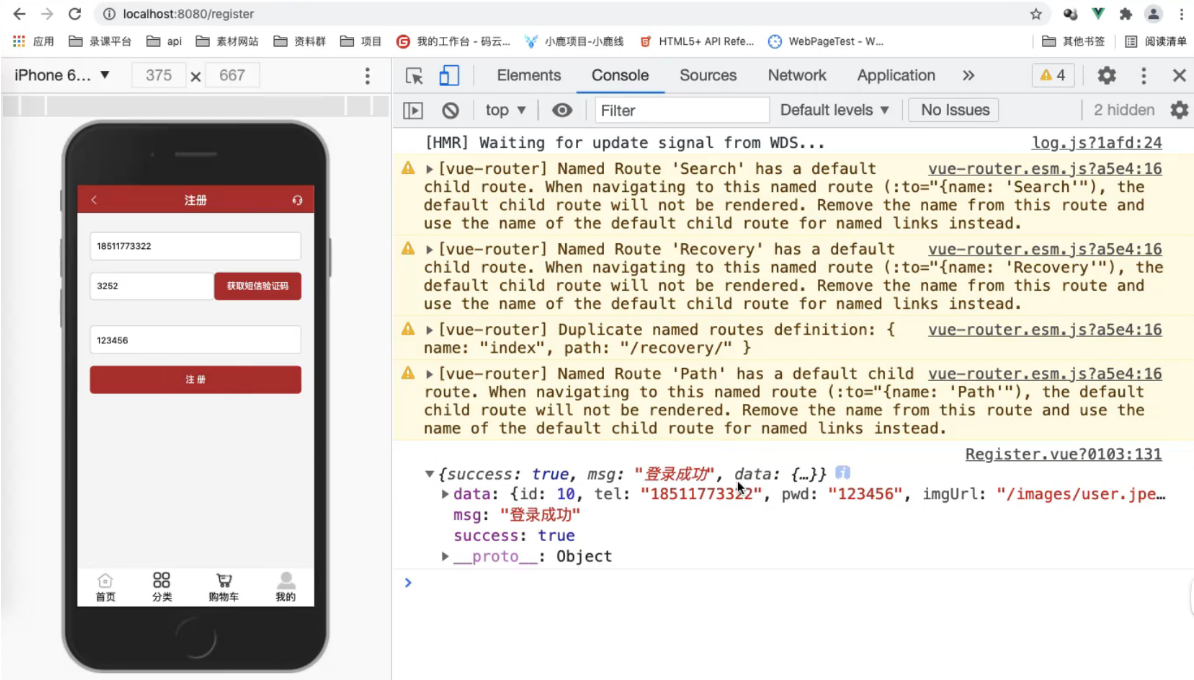
1, src/views/Register.vue
<template>
<div class="login container">
<Header>
<span>注册</span>
</Header>
<section>
<div class="login-tel">
<input type="text" v-model="userTel" placeholder="请输入手机号" pattern="[0-9]*" />
</div>
<div class="login-code">
<input type="text" v-model="userCode" placeholder="请输入验证码" pattern="[0-9]*" />
<button :disabled="disabled" @click="sendCode">{{codeMsg}}</button>
</div>
<div class="login-tel">
<input type="text" v-model="userPwd" placeholder="请设置密码" pattern="[0-9]*" />
</div>
<div class="login-btn" @click="register">注册</div>
</section>
<Tabbar></Tabbar>
</div>
</template>
<script>
import Tabbar from '@/components/common/Tabbar.vue'
import Header from '@/views/login/Header.vue'
import {
Toast
} from 'mint-ui';
import http from '@/common/api/request.js';
export default {
// 绑定数据和验证规则
data() {
return {
disabled: false,
userTel: '',
userPwd: '',
userCode: '',
// 验证规则
rules: {
// 验证手机号
userTel: {
rule: /^1[23456789]\d{9}$/,
msg: '手机号不能为空,并且是11位数字'
},
// 密码验证
userPwd: {
rule: /^\w{6,18}$/,
msg: '密码不能为空,并且要求6,18位字母数字'
}
},
// 验证倒计时
codeNum: 6,
codeMsg: '获取短信验证码',
code: '' // 将短信验证码存储起来 默认为空
}
},
components: {
Header,
Tabbar
},
methods: {
// 点击获取短信验证码按钮
sendCode() {
// 前端先验证
if (!this.validate('userTel')) return;
// 只要判断手机号正确就要发送一个请求
// 请求短信验证码接口
// 验证通过以后前端再发送请求,给后端验证
http.$axios({
url: '/api/code',
method: 'POST',
data: { // 前端向后端传递用户输入的数据-> 手机号
// 前端给后端传递手机号
phone: this.userTel
// password: this.userPwd
}
}).then(res => {
// 后端返回给前端的数据
// console.log(res);
if (res.success) {
// 将短信验证码存储起来
this.code = res.data
}
})
// 禁用按钮
this.disabled = true;
// 倒计时 定时器
let timer = setInterval(() => {
--this.codeNum;
this.codeMsg = `重新发送 ${this.codeNum}`;
}, 1000);
// 判断什么时候停止定时器 6秒时间
setTimeout(() => {
// 停止定时器
clearInterval(timer);
// 让倒计时恢复到6秒时间
this.codeNum = 6;
// 让按钮可用
this.disabled = false;
// 让文本还是显示 '获取短信验证码'
this.codeMsg = '获取短信验证码';
}, 6000)
},
// 注册 点击'快速注册'跳转到注册页面
goRegister() {
this.$router.push('/register')
},
// 密码登录 点击'密码登录'跳转到密码登录页面
goUserLogin() {
this.$router.push('/userLogin');
},
// 验证信息提示
validate(key) {
// key为 'userTel' 或者 'userPwd'
let bool = true;
if (!this.rules[key].rule.test(this[key])) {
// 提示信息 this.rules[key]=res
Toast(this.rules[key].msg);
bool = false;
return false;
}
return bool;
},
// 当用户点击 '注册'
register() {
// 前端先验证密码
if (!this.validate('userPwd')) return;
// 判断验证码是否正确
if (this.code != this.userCode) {
// Toast(this.rules[key].msg);
Toast('验证码不正确');
return
}
// alret(1);
// 接收到的验证码 和 用户输入的验证码相等,表示登录成功
if (this.code == this.userTel) {
// 证明用户输入的短信验证码是正确的==>发送请求,把用户存储到数据库中
// 请求短信验证码接口
// 验证通过以后前端再发送请求,给后端验证
// 如果正确进行注册
http.$axios({
url: '/api/register',
method: 'POST',
data: { // 前端向后端传递用户输入的数据-> 手机号
// 前端给后端传递手机号
phone: this.userTel,
pwd: this.userPwd
}
}).then(res => {
// 后端返回给前端的数据
// if (!res.success) return;
console.log(res);
})
}
}
}
}
</script>
<style scoped lang="scss">
section {
display: flex;
flex-direction: column;
align-items: center;
font-size: 14px;
background-color: #f5f5f5;
div {
margin: 30px 0;
width: 335px;
height: 44px;
}
.login-tel {
margin-top: 30px;
input {
width: 335px;
}
}
input {
box-sizing: border-box;
padding: 0 10px;
line-height: 44px;
background-color: #FFFFFF;
border: 1px solid #ccc;
border-radius: 6px;
}
.login-btn {
line-height: 44px;
text-align: center;
color: #fff;
background-color: #b0352f;
border-radius: 6px;
}
.login-code {
display: flex;
input {
flex: 1;
}
button {
padding: 0 20px;
line-height: 44px;
color: #fff;
background-color: #b0352f;
border: 0; // 去除默认边框
border-radius: 3px;
}
}
}
</style>
2, src/common/api/request.js
import {
Indicator
} from 'mint-ui'
import axios from 'axios'
import store from '@/store'
import router from '@/router'
import {
IndexAnchor
} from 'vant'
export default {
common: {
method: 'GET',
data: {},
params: {},
headers: {}
},
$axios(options = {}) {
options.method = options.method || this.common.method;
options.data = options.data || this.common.data;
options.params = options.params || this.common.params;
options.headers = options.headers || this.common.headers;
// 请求前==>显示加载中...
Indicator.open('加载中...');
// console.log(store.state.user.token);
// 是否为登录状态
if (options.headers.token) {
options.headers.token = store.state.user.token;
if (!options.headers.token) {
router.push('/login');
}
}
return axios(options).then(v => {
let data = v.data.data;
// 如果 token 过期,重新登录 判断 token 是否过期
if (data.code == 1000) {
Indicator.close();
return router.push('/login');
}
return new Promise((res, rej) => {
if (!v) return rej();
// 结束===>关闭加载
setTimeout(() => {
Indicator.close();
}, 500)
res(data);
})
})
}
}
3, server/db/userSql.js
// 验证数据库中的用户相关内容
const User = {
// 查询用户手机号 老师: 18511773322 17511557182
queryUserTel(option) {
return 'select * from users where tel = ' + option.userTel + '';
},
// 查询用户密码
queryUserPwd(option) {
return 'select * from users where (tel = ' + option.userTel + ') and pwd = ' + option.userPwd + '';
},
// 新增用户数据
insertData(option) {
// // 接收到的数据 前端传递给后端的数据
// let userTel = option.userTel;
// let userPwd = option.userPwd || '666666';
// // 引入 jsonwebtoken(token包)
// let jwt = require('jsonwebtoken');
// // 用户信息
// let payload = {
// tel: userTel
// };
// // 口令
// let secret = 'longchi.xyz';
// // 生成 Token 注意每一个用户的token都是不同的 且token是不能重复的
// let token = jwt.sign(payload, secret, {
// // 设置过期时间,他为一个Object,再给他添加三个参数
// // ,属性
// expiresIn: 60 // 秒
// });
// 解析 token
// let tokenObj = jwt.decode(token);
// console.log(tokenObj);
return 'insert into users (tel,pwd,imgurl,nickName,token) values(" ' + userTel + ' "," ' + userPwd +
' "," ' + imgurl + ' "," ' + nickName + ' "," ' + token + ' ")';
// return 'insert into users (tel,pwd,imgurl,nickName,token) values (" ' + userTel +
// ' "," ' + userPwd + ' ","/images/avatar.png","1","' + token + '")';
}
}
exports = module.exports = User;
4, server/routes/index.js
var express = require('express');
var router = express.Router();
var connection = require('../db/sql.js');
var user = require('../db/userSql.js');
var QcloudSms = require("qcloudsms_js");
let jwt = require('jsonwebtoken');
// 引入支付宝配置文件
const alipaySdk = require('../db/alipay.js');
const AlipayFormData = require('alipay-sdk/lib/form').default;
// 引入 axios
// import axios from 'axios';
const axios = require('axios');
// 判断过期时间 用当前时间 iat- 过期时间 exp
function getTimeToken(exp) {
// 获取当前的时间戳 将时间转为秒
let getTime = parseInt(new Date().getTime() / 1000);
// 判断时间是否过期
if (getTime - exp > 60) {
return true;
}
}
// const express = require('express');
const cors = require('cors');
const {
Result
} = require('element-ui');
const app = express();
app.use(express.json());
app.use(cors());
// const bodyParser = require('body-parser');
// app.use(bodyParser.json()); // 解析请求体
/* GET home page. */
router.get('/', function(req, res, next) {
res.render('index', {
title: 'Express'
});
});
// 解析json格式的数据,否则 post 请求中 req.body 为 undefined
app.use(express.json())
// 支付状态
router.post('/api/successPayment', function(req, res, next) {
// 拿到 token ,并且去解析
let token = req.headers.token;
// 解析 token
let tokenObj = jwt.decode(token);
// 拿到订单号
let out_trade_no = req.body.out_trade_no;
// 拿到
let trade_no = req.body.trade_no;
// console.log(out_trade_no, trade_no); // 拿不到值
// console.log(req.body); // 能拿到值
// res.send({
// data: {
// a: 1
// }
// })
// 支付宝配置
const formData = new AlipayFormData();
// 调用 setMethod 并传入 get,会返回可以跳转到支付页面的 url
formData.setMethod('get');
// 支付时信息
formData.addField('bizContent', {
out_trade_no,
trade_no
});
// 返回 promise
const result = alipaySdk.exec(
'alipay.trade.query', {}, {
formData: formData
},
);
// 后端请求支付宝
result.then(resData => {
//
axios({
method: 'GET',
url: resData
}).then(data => {
responseCode = data.data.alipay_trade_query_response;
if (responseCode.code == '10000') {
// 判断
switch (responseCode.trade_status) {
case 'WAIT_BUYER_PAY':
res.send({
data: {
code: 0,
data: {
msg: '支付宝有交易记录,没付款'
}
}
})
break;
case 'TRADE_CLOSE':
res.send({
data: {
code: 1,
data: {
msg: '交易关闭'
}
}
})
break;
case 'TRADE_FINISHED':
// 修改交易状态
// 查询当前用户
connection.query(`select * from users where tel=${tokenObj.tel}`,
function(error, results) {
// 用户id
let uId = results[0].id;
// 查询订单
connection.query(
`select * from store_order where uId=${uId} and order_id=${out_trade_no}`,
function(err, result) {
// 查询到订单号id
let id = result[0].id;
// 订单的状态修改掉 2=>3 即
connection.query(
`update store_order set order_status replace(order_status,'2','3') where id=${id}`,
function() {
res.send({
data: {
code: 2,
data: {
msg: '交易完成,用户确认收货,支付宝将货款转给商户'
}
}
})
}
)
}
)
})
break;
case 'TRADE_SUCCESS':
// 修改交易状态
// 查询当前用户
connection.query(`select * from users where tel=${tokenObj.tel}`,
function(error, results) {
// 用户id
let uId = results[0].id;
// 查询订单
connection.query(
`select * from store_order where uId=${uId} and order_id=${out_trade_no}`,
function(err, result) {
// 查询到订单号id
let id = result[0].id;
// 订单的状态修改掉 2=>3 即
connection.query(
`update store_order set order_status replace(order_status,'2','3') where id=${id}`,
function() {
res.send({
data: {
code: 2,
data: {
msg: '交易完成,用户确认收货,支付宝将货款转给商户'
}
}
})
}
)
}
)
})
break;
}
} else if (responseCode.code == '40004') {
res.send({
data: {
code: 4,
msg: '交易不存在'
}
})
}
}).catch(err => {
// 返回
res.send({
data: {
code: 50005,
msg: '交易失败',
err
}
})
})
})
})
// 发起支付 接口(后端)
router.post('/api/submitOrder', function(req, res, next) {
// 以下几个参数是前端给后端传的数据
// 订单号
let orderId = req.body.orderId;
// 商品总价
let price = req.body.price;
// 购买商品的名称
let name = req.body.name;
// 开始对接支付宝API(SDK)
const formData = new AlipayFormData();
// 调用 setMethod 并传入 get,会返回可以跳转到支付页面的 url
formData.setMethod('get');
// 支付时信息
// get method 需要确保 field 都是字符串
// 老师的
formData.addField('bizContent', {
// 订单号
outTradeNo: 'orderId',
// 写死的
productCode: 'FAST_INSTANT_TRADE_PAY',
// 商品总价格
totalAmount: price,
// 商品名称
subject: name
});
// 自己的
// formData.addField('bizContent', JSON.stringify({
// // 订单号
// outTradeNo: 'orderId',
// // 写死的
// productCode: 'FAST_INSTANT_TRADE_PAY',
// // 商品总价格
// totalAmount: price,
// // 商品名称
// subject: name
// }));
// 支付成功或者失败跳转链接
formData.addField('returnUrl', 'http://localhost:8080/payment');
// 返回 promise
const result = alipaySdk.exec(
'alipay.trade.page.pay', {}, {
formData: formData
},
);
// 对接支付宝成功,支付宝方返回的数据
result.then(resp => {
res.send({
data: {
code: 200,
success: true,
msg: '支付中',
paymentUrl: resp
}
})
})
})
// 修改订单状态 提交订单 后端接口
router.post('/api/submitOrder', function(req, res, next) {
// 拿到 token ,并且去解析
let token = req.headers.token;
let tokenObj = jwt.decode(token); // 解析
// 拿到订单号
let orderId = req.body.orderId;
// 拿到购物车选中的商品 id
let shopArr = req.body.shopArr;
// 查询当前用户
connection.query(`select * from users where tel=${tokenObj.tel}`, function(error, results) {
// 用户id
let uId = results[0].id;
// 查询当前用户对应的订单,然后将他的状态改变
connection.query(`select * from stroe_order where uId=${uId} and order_id=${orderId}`,
function(err, result) {
// 订单的数据库 id, 拿到对应订单的 id
let id = result[0].id;
// 修改订单状态 从 '1' 改为 '2'
connection.query(
`update store_order set order_status=replace(order_status,'1','2') where id=${id}`,
function(e, r) {
// 删除购物车数据
shopArr.forEach(v => {
// 删除操作 删除购物车表中的数据(注意!!!)
connection.query(`delete from goods_cart where id=${v}`,
function() {
})
})
res.send({
data: {
code: 200,
success: true
}
})
})
})
})
})
// 查询订单(后端)
router.post('/api/selectOrder', function(req, res, next) {
// 后端接收到前端传递的订单号 接收前端给后端的订单号
let order_id = req.body.orderId;
// 提交订单结束 后端给前端返回订单号数据
connection.query(
`select * from store_order where order_id='${orderId}'`,
function(err, result) {
// 返回
res.send({
data: {
success: true,
code: 200,
// 返回订单号 字符串
// data: result[0].order_id
// 返回数组
data: result
}
})
})
})
// 生成一个订单 接口
router.post('/api/addOrder', function(req, res, next) {
// 拿到 token ,并且去解析
let token = req.headers.token;
let tokenObj = jwt.decode(token); // 解析
// 前端给后端的数据
let goodsArr = req.body.arr;
// 生成订单号 order_id 这个字段 规则 时间戳 + 6 位随机数
function setTimeDateFmt(s) {
// 补零规则
return s < 10 ? '0' + s : s
}
// 生成订单号函数
function radomNumber() {
const now = new Date(); // 时间
let month = now.getMonth() + 1;
let day = now.getDate();
let hour = now.getHours();
let minutes = now.getMinutes();
let seconds = now.getSeconds();
month = setTimeDateFmt(month);
day = setTimeDateFmt(day);
hour = setTimeDateFmt(hour);
minutes = setTimeDateFmt(minutes);
seconds = setTimeDateFmt(seconds);
// 生成订单号
let orderCode = now.getFullYear().toString() + month.toString() + day + hour + minutes + seconds + (Math
.round(Math.random() * 1000000)).toString();
return orderCode;
}
/* 订单状态
未支付: 1
待支付: 2
支付成功: 3
支付失败: 4 | 0
*/
// 商品列表名称
let goodsName = [];
// 订单商品总金额
let goodsPrice = 0;
// 订单商品总数量
let goodsNum = 0;
// 订单号
let orderId = radomNumber();
// 将 goodsArr 进行遍历
goodsArr.forEach(v => {
goodsName.push(v.goods_name);
goodsPrice += v.goods_price * v.goods_num;
goodsNum += parseInt(v.goods_num);
})
// 查询当前用户
connection.query(`select * from users where tel=${tokenObj.tel}`, function(error, results) {
// 用户id
let uId = results[0].id;
// 存储
connection.query(
`insert into store_order (order_id,goods_name,goods_price,goods_num,order_status,uId) values ('${orderId}','${goodsName}','${goodsPrice}','${goodsNum}','1',${uId})`,
function() {
// 提交订单结束 后端给前端返回订单号数据
connection.query(
`select * from store_order where uId={uId} and order_id='${orderId}'`,
function(err, result) {
// 返回
res.send({
data: {
success: true,
code: 200,
// 返回订单号 字符串
// data: result[0].order_id
// 返回数组
data: result
}
})
})
}
)
})
})
// 删除收货地址 接口
router.post('/api/deleteAddress', function(req, res, next) {
// 后端获取前端发送请求的 id
let id = req.body.id;
// 后端发送给数据库=>删除的sql语句
connection.query(`delete from address where id = ${id}`, function(error, results) {
// 返回
res.send({
data: {
code: 200,
success: true,
msg: '删除成功'
}
})
})
})
// 修改收货地址 修改当前用户的收货地址接口
router.post('/api/updateAddress', function(req, res, next) {
// 拿到 token ,并且去解析
let token = req.headers.token;
let tokenObj = jwt.decode(token); // 解析
// 解析
let body = req.body;
// 拿到前端传递后端的新增用户的所有信息
let [id, name, tel, province, city, county, addressDetail, isDefault, areaCode, country,
postalCode
] = [
body.id,
body.name,
body.tel,
body.province,
body.city,
body.county,
body.addressDetail,
body.isDefault,
body.areaCode,
body.country,
body.postalCode
];
// 查询当前用户
connection.query(`select * from users where tel=${tokenObj.tel}`, function(error, results) {
// 用户id
let uId = results[0].id;
// 对应查询到 1 或者 0 查询之前有没有默认收货地址
connection.query(`select * from address where id=${uId} and isDefault=${isDefault}`,
function(err, result) {
if (result.length > 0) {
// 拿到当前用户的ID
let addressId = result[0].id;
// 修改 isDefault 的值
connection.query(
`update address isDefault=replace(isDefault,"1","0") where id=${addressId}`,
function(e, r) {
// 修改
let updateSql =
`update address set uId=?, name=?, tel=?, province=?, city=?, county=?, addressDetail=?, isDefault=?, areaCode=?, country=?,postalCode=? where id = ${addressId}`;
connection.query(updateSql, [uId, name, tel, province, city, county,
addressDetail, isDefault, areaCode, country, postalCode
], function(errors, resultss) {
// 返回
res.send({
data: {
code: 200,
success: true,
msg: '修改成功'
}
})
})
})
} else {
// 修改
let updateSql =
`update address set uId=?, name=?, tel=?, province=?, city=?, county=?, addressDetail=?, isDefault=?, areaCode=?, country=?,postalCode=? where id = ${addressId}`;
connection.query(updateSql, [uId, name, tel, province, city, county,
addressDetail, isDefault, areaCode, country, postalCode
], function(errors, resultss) {
// 返回
res.send({
data: {
code: 200,
success: true,
msg: '修改成功'
}
})
})
}
})
})
})
// 查询收货地址 查询当前用户的收货地址接口
router.post('/api/selectAddress', function(req, res, next) {
// 拿到 token ,并且去解析
let token = req.headers.token;
let tokenObj = jwt.decode(token); // 解析
// 查询当前用户
connection.query(`select * from users where tel=${tokenObj.tel}`, function(error, results) {
// 用户id
let uId = results[0].id;
// 查询对应表中的数据
connection.query(`select * from address where uId=${uId}`, function(err, result) {
// 返回
res.send({
data: {
code: 200,
success: true,
msg: '查询成功',
data: result
}
})
})
})
})
// 新增收货地址接口(后端)
router.post('/api/addAddress', function(req, res, next) {
// 拿到前端给后端传递的数据
// console.log(req.body);
// 拿到 token ,并且去解析
let token = req.headers.token;
let tokenObj = jwt.decode(token); // 解析
// 解析
let body = req.body;
// 拿到前端传递后端的新增用户的所有信息
let [name, tel, province, city, county, addressDetail, isDefault, areaCode, country, postalCode] = [
body.name,
body.tel,
body.province,
body.city,
body.county,
body.addressDetail,
body.isDefault,
body.areaCode,
body.country,
body.postalCode
];
// 拿到信息后我们要去数据库查询
// 查询当前用户
connection.query(`select * from users where tel=${tokenObj.tel}`, function(error, results) {
// 用户id
let uId = results[0].id;
// 判断
if (isDefault != 1) {
// 增加一条收货地址
connection.query(
`insert into address (uId,name,tel,province,city,county,addressDetail,isDefault,areaCode,country,postalCode) values ("${uId}","${name}","${tel}","${province}","${city}","${county}","${addressDetail}","${isDefault}","${areaCode}","${country}","${postalCode}")`,
function() {
res.send({
data: {
code: 200,
success: true,
msg: '收货地址添加成功'
}
})
})
} else {
// 查询 然后将其他所有地址的 isDefault 的值修改为0
connection.query(`select * from address where uId=&{uId} and isDefault=${isDefault}`,
function(err, result) {
// 判断
if (result.length > 0) {
// 获取 Id
let addressId = result[0].id;
// 修改 isDefault 的值
connection.query(
`update address set isDefault=replace(isDefault,"1","0") where uId=${addressId}`,
function() {
// 增加一条收货地址
connection.query(
`insert into address (uId,name,tel,province,city,county,addressDetail,isDefault,areaCode,country,postalCode) values ("${uId}","${name}","${tel}","${province}","${city}","${county}","${addressDetail}","${isDefault}","${areaCode}","${country}","${postalCode}")`,
function(e,
r) {
res.send({
data: {
code: 200,
success: true,
msg: '收货地址添加成功'
}
})
})
}
)
} else {
// 增加一条收货地址
connection.query(
`insert into address (uId,name,tel,province,city,county,addressDetail,isDefault,areaCode,country,postalCode) values ("${uId}","${name}","${tel}","${province}","${city}","${county}","${addressDetail}","${isDefault}","${areaCode}","${country}","${postalCode}")`,
function() {
res.send({
data: {
code: 200,
success: true,
msg: '收货地址添加成功'
}
})
})
}
})
}
})
})
// 修改购物车数据接口 (后端)
router.post('/api/updateNum', function(req, res, next) {
// 获取前端传递的 id和num
let id = req.body.id;
let changeNum = req.body.num;
// 查询当前商品的 id 号
connection.query(`select * from goods_cart where id=${id}`, function(error, results) {
// 原来数据库中商品的数量
let num = results[0].goods_num;
// 修改数据库中商品的数据量
connection.query(
`update goods_cart set goods_num=replace(goods_num,${num},${changeNum}) where id=${id});`,
function(err, result) {
// 发送数据
res.send({
data: {
code: 200,
success: true
// msg: '修改成功'
}
})
})
})
})
// 删除购物车数据接口(后端)
router.post('/api/deleteCart', function(req, res, next) {
// 接收前端给后端传递的id
let arrId = req.body.arrId;
for (let i = 0; i < arrId.length; i++) {
// 进入到sql语句,执行数据删除命令
connection.query(`delete from goods_cart where id=${arrId[i]}`, function(error, results) {
res.send({
data: {
code: 200,
success: true,
msg: '删除成功'
}
})
})
}
})
// 查询购物车数据接口(后端)
router.post('/api/selectCart', function(req, res, next) {
// 拿到 token ,并且去解析
let token = req.headers.token;
let tokenObj = jwt.decode(token); // 解析
// 查询用户
connection.query(`select * from users where tel=${tokenObj.tel}`, function(error, results) {
// 用户id
let uId = results[0].id;
// 查询购物车
connection.query(`select * from goods_cart where uId = ${uId}`, function(err, result) {
res.send({
data: {
code: 200,
success: true,
data: result
}
})
})
})
})
// 添加购物车数据接口
router.post('/api/addCart', function(req, res, next) {
// 后端接收前端的参数
let goodsId = req.body.goodsId;
// token
let token = req.headers.token;
let tokenObj = jwt.decode(token);
// 如果执行就证明 token 过期了, 判断 token 是否过期
if (getTimeToken(tokenObj.exp)) {
res.send({
data: {
code: 1000
}
})
}
// 查询用户
connection.query(`select * from users where tel=${tokenObj.tel}`, function(error, results) {
// console.log(results[0]);
// 用户id
let uId = results[0].id;
// 查询商品
connection.query(`select * from goods_list where id=${goodsId}`, function(err, result) {
// console.log(result[0]);
let goodsName = result[0].name;
let goodsPrice = result[0].price;
// let goodsNum = result[0].num;
let goodsImgUrl = result[0].imgUrl;
// 查询当前用户在这之前是否添加过本商品,如果有我们就做增加处理,
// 如果没有该商品,我们就做添加处理
connection.query(
`select * from goods_cart where uId=${uId} and goods_id=${goodsId}`,
function(e, r) {
// 判断当前用户之前是否添加过本商品到购物车
if (r.length > 0) {
let num = r[0].goods_num;
// 表示之前有添加该商品==>做增加处理 即替换处理
connection.query(
`update goods_cart set goods_num=replace(goods_num, ${num},${parseInt(num)+1}) where id=${r[0].id}`,
function(e, datas) {
// 返回
res.send({
data: {
code: 200,
success: true,
msg: '添加成功'
}
})
}
)
} else {
// 没有该商品==>做添加处理
// 添加购物车数据
connection.query(
`insert into goods_cart(uid,goods_id,goods_name,goods_price,goods_num,goods_imgUrl) values ("${uId}","${goodsId}","${goodsName}","${goodsPrice}","1","${goodsImgUrl}")`,
function() {
res.send({
data: {
code: 200,
success: true,
msg: '添加成功'
}
})
})
}
})
})
})
})
// 修改密码接口
router.post('/api/recovery', function(req, res, next) {
// 先接收前端传递给后端的数据
let params = {
userTel: req.body.phone,
userPwd: req.body.pwd
}
// 查询用户是否存在
connect.query(user.queryUserTel(params), function(error, results) {
// 先查询某一条数据在不在,在拿到该记录数的id,然后修改该条记录的密码
// 数据库的数据id 拿到用户id 某一条记录数id
let id = results[0].id;
let pwd = results[0].pwd;
// 修改用户密码
connection.query(
`uplate users set pwd=replace(pwd, "${pwd}","${params.userPwd}") where id = ${id}`,
function(err, results) {
res.send({
code: 200,
data: {
success: true,
msg: '修改成功'
}
})
})
})
})
// 查询用户是否存在
router.post('/api/selectUser', function(req, res, next) {
// 拿到前端传递的数据
let params = {
userTel: req.body.phone
}
// 查询用户是否存在
connect.query(user.queryUserTel(params), function(error, results) {
if (results.length > 0) {
res.send({
code: 200,
data: {
success: true
}
})
} else {
res.send({
code: 0,
data: {
success: false,
msg: '此用户不存在'
}
})
}
})
})
// 注册
router.post('/api/register', function(req, res, next) {
// 拿到前端传递的数据
let params = {
userTel: req.body.phone,
userPwd: req.body.pwd
}
// 查询用户是否存在
connect.query(user.queryUserTel(params), function(error, results) {
// 如果有错误就抛出错误
if (error) throw error;
// 判断用户是否存在
if (results.length > 0) {
// 用户存在,直接返回
res.send({
code: 200,
data: {
success: true,
msg: '登录成功',
data: results[0]
}
})
} else {
// 用户不存在,新增一条数据
connection.query(user.insertData(params), function(err, result) {
// 新增数据后,再把新增数据查询一下,看看有没有添加成功
connection.query(user.queryUserTel(params), function(e, r) {
// 用户存在,直接返回
res.send({
code: 200,
data: {
success: true,
msg: '登录成功',
data: r[0]
}
})
})
})
}
})
})
// 增加一个用户
router.post('/api/addUser', function(req, res, next) {
let params = {
userTel: req.body.phone
}
// let tel = {
// userTel: req.body.phone
// }
// 查询用户是否存在
connect.query(user.queryUserTel(params), function(error, results) {
// 如果有错误就抛出错误
if (error) throw error;
// 判断用户是否存在
if (results.length > 0) {
// 用户存在,直接返回
res.send({
code: 200,
data: {
success: true,
msg: '登录成功',
data: results[0]
}
})
} else {
// 用户不存在,新增一条数据
connection.query(user.insertData(params), function(err, result) {
// 新增数据后,再把新增数据查询一下,看看有没有添加成功
connection.query(user.queryUserTel(params), function(e, r) {
// 用户存在,直接返回
res.send({
code: 200,
data: {
success: true,
msg: '登录成功',
data: r[0]
}
})
})
})
}
})
})
// 请求短信验证码接口
router.post('/api/code', function(req, res, next) {
// 后端接收前端发送的手机号
let tel = req.body.phone;
// 短信应用SDK AppID
// var appid = 1400187558; // 老师的
var appid = 1400979236; // 自己的 SDK AppID是1400开头 1400979236 1400009099
// 短信应用SDK AppKey
// var appkey = "9ff91d87c2cd7cd0ea762f141975d1df37481d48700d70ac37470aefc60f9bad";
var appkey = "10fd4851f4228eb21e670ee72fe932f2"; // 自己的
// var appkey = "dc9dc3391896235ddc2325685047edc7"; // 老师的
// 需要发送短信的手机号码
// var phoneNumbers = ["18017927192", "15300935233"];
var phoneNumbers = [tel]
// 短信模板ID,需要在短信应用中申请
var templateId = 285590; // 老师的 NOTE: 这里的模板ID`7839`只是一个示例,真实的模板ID需要在短信控制台中申请
// 签名
var smsSign = "三人行慕课"; // NOTE: 这里的签名只是示例,请使用真实的已申请的签名, 签名参数使用的是`签名内容`,而不是`签名ID`
// 实例化QcloudSms
var qcloudsms = QcloudSms(appid, appkey);
// 设置请求回调处理, 这里只是演示,用户需要自定义相应处理回调
function callback(err, ress, resData) {
if (err) {
console.log("err: ", err);
} else {
res.send({
code: 200,
data: {
success: true,
data: ress.req.body.params[0]
}
})
// console.log("request data: ", ress.req);
// console.log("response data: ", resData);
}
}
// 指定模板ID单发短信
var ssender = qcloudsms.SmsSingleSender();
// 这个变量 params 就是往手机上发送的短信
var params = [Math.floor(Math.random() * (9999 - 1000)) + 1000];
ssender.sendWithParam(86, phoneNumbers[0], templateId,
params, smsSign, "", "", callback); // 签名参数不能为空串
})
// 登录接口 /api/login
router.post('/api/login', function(req, res, next) {
	// 后端要接收前端传递过来的值(数据)
	let params = {
		userTel: req.body.userTel,
		userPwd: req.body.userPwd
	};


	// 接收到的数据  前端传递给后端的数据
	// 每次登录后都新生成一个 token
	// let userTel = option.userTel;
	// let userPwd = option.userPwd || '666666';
	let userTel = params.userTel;
	let userPwd = params.userPwd || '666666';


	// 引入 jsonwebtoken(token包)
	let jwt = require('jsonwebtoken');

	// 用户信息
	let payload = {
		tel: userTel
	};

	// 口令
	let secret = 'longchi.xyz';

	// 生成 Token 注意每一个用户的token都是不同的 且token是不能重复的
	let token = jwt.sign(payload, secret, {
		// 设置过期时间,他为一个Object,再给他添加三个参数
		// 属性
		expiresIn: 60 // 秒 过期时间
	});

	// 查询数据库中用户手机号是否存在
	connection.query(user.queryUserTel(params), function(error, results) {
		// 判断手机号存在是否存在
		if (results.length > 0) {

			// 记录的 id
			let id = results[0].id;

			//手机号存在
			connection.query(user.queryUserPwd(params), function(err, result) {
				//判断手机号和密码
				if (result.length > 0) {
					// 替换 token 每次登录以后, token 重新记录一遍
					connection.query(`update users set token='${token}' where id=${id}`,
						function() {
							// 手机号和密码都对
							res.send({
								code: 200,
								data: {
									success: true,
									msg: '登录成功',
									data: result[0]
								}
							})
						})
				} else {
					// 密码不对
					res.send({
						code: 302,
						data: {
							success: false,
							msg: '密码不正确'
						}
					})
				}
			})
		} else {
			// 手机号不存在
			res.send({
				code: 301,
				data: {
					success: false,
					msg: '手机号不存在'
				}
			})
		}
	})
})
// 查询商品id的数据接口
router.get('/api/goods/id', function(req, res, next) {
// 获取 前端给后端传递的 id 号
let id = req.query.id;
// 查询数据库
connection.query(`select * from goods_list where id=${id}`, function(error, results) {
if (error) throw error;
res.json({
code: 0,
// data: results // 后端给前端返回的数据为数组,需要解析
data: results[0] // 后端给前端返回的数据为对象
})
})
// connection.query(`select * from space_store where id= '+id+'`, function(error, results) {
// if (error) throw error;
// res.json({
// code: 0,
// // data: results // 后端给前端返回的数据为数组,需要解析
// data: results[0] // 后端给前端返回的数据为对象
// })
// })
})
// 分类的接口
router.get('/api/goods/list', function(req, res, next) {
res.send({
code: 0,
data: [{
// 一级
id: 0,
name: '推荐',
data: [{
// 二级
id: 0,
name: '推荐',
list: [{
// 三级
id: 0,
name: '紫砂壶',
imgUrl: '/images/teapot.png'
}, {
// 三级
id: 1,
name: '铁观音',
imgUrl: '/images/tieguanyin.png'
}, {
// 三级
id: 2,
name: '金骏眉',
imgUrl: '/images/jinjunmei.png'
}, {
// 三级
id: 3,
name: '武夷岩茶',
imgUrl: '/images/wuyiyancha.png'
}, {
// 三级
id: 4,
name: '龙井',
imgUrl: '/images/longjing.png'
}, {
// 三级
id: 5,
name: '云南滇红',
imgUrl: '/images/yunnandianhong.png'
}, {
// 三级
id: 6,
name: '建盏',
imgUrl: '/images/jianzhan.png'
}, {
// 三级
id: 7,
name: '功夫茶具',
imgUrl: '/images/gonghuchaju.png'
}, {
// 三级
id: 8,
name: '紫砂壶',
imgUrl: '/images/teapot.png'
}]
}]
}, {
// 一级
id: 1,
name: '新品',
data: [{
// 二级
id: 1,
name: '新品',
list: [{
// 三级
id: 0,
name: '紫砂壶',
imgUrl: '/images/teapot.png'
}, {
// 三级
id: 1,
name: '铁观音',
imgUrl: '/images/tieguanyin.png'
}, {
// 三级
id: 2,
name: '金骏眉',
imgUrl: '/images/jinjunmei.png'
}, {
// 三级
id: 3,
name: '武夷岩茶',
imgUrl: '/images/wuyiyancha.png'
}, {
// 三级
id: 4,
name: '龙井',
imgUrl: '/images/longjing.png'
}, {
// 三级
id: 5,
name: '云南滇红',
imgUrl: '/images/yunnandianhong.png'
}, {
// 三级
id: 6,
name: '建盏',
imgUrl: '/images/jianzhan.png'
}, {
// 三级
id: 7,
name: '功夫茶具',
imgUrl: '/images/gonghuchaju.png'
}, {
// 三级
id: 8,
name: '紫砂壶',
imgUrl: '/images/teapot.png'
}]
}]
}, {
// 一级
id: 2,
name: '习茶',
data: [{
// 二级
id: 2,
name: '习茶',
list: [{
// 三级
id: 0,
name: '紫砂壶',
imgUrl: '/images/teapot.png'
}, {
// 三级
id: 1,
name: '铁观音',
imgUrl: '/images/tieguanyin.png'
}, {
// 三级
id: 2,
name: '金骏眉',
imgUrl: '/images/jinjunmei.png'
}, {
// 三级
id: 3,
name: '武夷岩茶',
imgUrl: '/images/wuyiyancha.png'
}, {
// 三级
id: 4,
name: '龙井',
imgUrl: '/images/longjing.png'
}, {
// 三级
id: 5,
name: '云南滇红',
imgUrl: '/images/yunnandianhong.png'
}, {
// 三级
id: 6,
name: '建盏',
imgUrl: '/images/jianzhan.png'
}, {
// 三级
id: 7,
name: '功夫茶具',
imgUrl: '/images/gonghuchaju.png'
}, {
// 三级
id: 8,
name: '紫砂壶',
imgUrl: '/images/teapot.png'
}]
}]
}, {
// 一级
id: 3,
name: '绿茶',
data: [{
// 二级
id: 3,
name: '绿茶',
list: [{
// 三级
id: 0,
name: '紫砂壶',
imgUrl: '/images/teapot.png'
}, {
// 三级
id: 1,
name: '铁观音',
imgUrl: '/images/tieguanyin.png'
}, {
// 三级
id: 2,
name: '金骏眉',
imgUrl: '/images/jinjunmei.png'
}, {
// 三级
id: 3,
name: '武夷岩茶',
imgUrl: '/images/wuyiyancha.png'
}, {
// 三级
id: 4,
name: '龙井',
imgUrl: '/images/longjing.png'
}, {
// 三级
id: 5,
name: '云南滇红',
imgUrl: '/images/yunnandianhong.png'
}, {
// 三级
id: 6,
name: '建盏',
imgUrl: '/images/jianzhan.png'
}, {
// 三级
id: 7,
name: '功夫茶具',
imgUrl: '/images/gonghuchaju.png'
}, {
// 三级
id: 8,
name: '紫砂壶',
imgUrl: '/images/teapot.png'
}]
}]
}, {
// 一级
id: 4,
name: '乌龙茶',
data: [{
// 二级
id: 4,
name: '乌龙茶',
list: [{
// 三级
id: 0,
name: '紫砂壶',
imgUrl: '/images/teapot.png'
}, {
// 三级
id: 1,
name: '铁观音',
imgUrl: '/images/tieguanyin.png'
}, {
// 三级
id: 2,
name: '金骏眉',
imgUrl: '/images/jinjunmei.png'
}, {
// 三级
id: 3,
name: '武夷岩茶',
imgUrl: '/images/wuyiyancha.png'
}, {
// 三级
id: 4,
name: '龙井',
imgUrl: '/images/longjing.png'
}, {
// 三级
id: 5,
name: '云南滇红',
imgUrl: '/images/yunnandianhong.png'
}, {
// 三级
id: 6,
name: '建盏',
imgUrl: '/images/jianzhan.png'
}, {
// 三级
id: 7,
name: '功夫茶具',
imgUrl: '/images/gonghuchaju.png'
}, {
// 三级
id: 8,
name: '紫砂壶',
imgUrl: '/images/teapot.png'
}]
}]
}, {
// 一级
id: 5,
name: '红茶',
data: [{
// 二级
id: 5,
name: '红茶',
list: [{
// 三级
id: 0,
name: '紫砂壶',
imgUrl: '/images/teapot.png'
}, {
// 三级
id: 1,
name: '铁观音',
imgUrl: '/images/tieguanyin.png'
}, {
// 三级
id: 2,
name: '金骏眉',
imgUrl: '/images/jinjunmei.png'
}, {
// 三级
id: 3,
name: '武夷岩茶',
imgUrl: '/images/wuyiyancha.png'
}, {
// 三级
id: 4,
name: '龙井',
imgUrl: '/images/longjing.png'
}, {
// 三级
id: 5,
name: '云南滇红',
imgUrl: '/images/yunnandianhong.png'
}, {
// 三级
id: 6,
name: '建盏',
imgUrl: '/images/jianzhan.png'
}, {
// 三级
id: 7,
name: '功夫茶具',
imgUrl: '/images/gonghuchaju.png'
}, {
// 三级
id: 8,
name: '紫砂壶',
imgUrl: '/images/teapot.png'
}]
}]
}, {
// 一级
id: 6,
name: '白茶',
data: [{
// 二级
id: 6,
name: '白茶',
list: [{
// 三级
id: 0,
name: '紫砂壶',
imgUrl: '/images/teapot.png'
}, {
// 三级
id: 1,
name: '铁观音',
imgUrl: '/images/tieguanyin.png'
}, {
// 三级
id: 2,
name: '金骏眉',
imgUrl: '/images/jinjunmei.png'
}, {
// 三级
id: 3,
name: '武夷岩茶',
imgUrl: '/images/wuyiyancha.png'
}, {
// 三级
id: 4,
name: '龙井',
imgUrl: '/images/longjing.png'
}, {
// 三级
id: 5,
name: '云南滇红',
imgUrl: '/images/yunnandianhong.png'
}, {
// 三级
id: 6,
name: '建盏',
imgUrl: '/images/jianzhan.png'
}, {
// 三级
id: 7,
name: '功夫茶具',
imgUrl: '/images/gonghuchaju.png'
}, {
// 三级
id: 8,
name: '紫砂壶',
imgUrl: '/images/teapot.png'
}]
}]
}, {
// 一级
id: 7,
name: '普洱茶',
data: [{
// 二级
id: 7,
name: '普洱茶',
list: [{
// 三级
id: 0,
name: '紫砂壶',
imgUrl: '/images/teapot.png'
}, {
// 三级
id: 1,
name: '铁观音',
imgUrl: '/images/tieguanyin.png'
}, {
// 三级
id: 2,
name: '金骏眉',
imgUrl: '/images/jinjunmei.png'
}, {
// 三级
id: 3,
name: '武夷岩茶',
imgUrl: '/images/wuyiyancha.png'
}, {
// 三级
id: 4,
name: '龙井',
imgUrl: '/images/longjing.png'
}, {
// 三级
id: 5,
name: '云南滇红',
imgUrl: '/images/yunnandianhong.png'
}, {
// 三级
id: 6,
name: '建盏',
imgUrl: '/images/jianzhan.png'
}, {
// 三级
id: 7,
name: '功夫茶具',
imgUrl: '/images/gonghuchaju.png'
}, {
// 三级
id: 8,
name: '紫砂壶',
imgUrl: '/images/teapot.png'
}]
}]
}, {
// 一级
id: 8,
name: '花茶',
data: [{
// 二级
id: 8,
name: '花茶',
list: [{
// 三级
id: 0,
name: '紫砂壶',
imgUrl: '/images/teapot.png'
}, {
// 三级
id: 1,
name: '铁观音',
imgUrl: '/images/tieguanyin.png'
}, {
// 三级
id: 2,
name: '金骏眉',
imgUrl: '/images/jinjunmei.png'
}, {
// 三级
id: 3,
name: '武夷岩茶',
imgUrl: '/images/wuyiyancha.png'
}, {
// 三级
id: 4,
name: '龙井',
imgUrl: '/images/longjing.png'
}, {
// 三级
id: 5,
name: '云南滇红',
imgUrl: '/images/yunnandianhong.png'
}, {
// 三级
id: 6,
name: '建盏',
imgUrl: '/images/jianzhan.png'
}, {
// 三级
id: 7,
name: '功夫茶具',
imgUrl: '/images/gonghuchaju.png'
}, {
// 三级
id: 8,
name: '紫砂壶',
imgUrl: '/images/teapot.png'
}]
}]
}, {
// 一级
id: 9,
name: '茶具',
data: [{
// 二级
id: 9,
name: '茶具',
list: [{
// 三级
id: 0,
name: '紫砂壶',
imgUrl: '/images/teapot.png'
}, {
// 三级
id: 1,
name: '铁观音',
imgUrl: '/images/tieguanyin.png'
}, {
// 三级
id: 2,
name: '金骏眉',
imgUrl: '/images/jinjunmei.png'
}, {
// 三级
id: 3,
name: '武夷岩茶',
imgUrl: '/images/wuyiyancha.png'
}, {
// 三级
id: 4,
name: '龙井',
imgUrl: '/images/longjing.png'
}, {
// 三级
id: 5,
name: '云南滇红',
imgUrl: '/images/yunnandianhong.png'
}, {
// 三级
id: 6,
name: '建盏',
imgUrl: '/images/jianzhan.png'
}, {
// 三级
id: 7,
name: '功夫茶具',
imgUrl: '/images/gonghuchaju.png'
}, {
// 三级
id: 8,
name: '紫砂壶',
imgUrl: '/images/teapot.png'
}]
}]
}, {
// 一级
id: 10,
name: '手艺',
data: [{
// 二级
id: 10,
name: '手艺',
list: [{
// 三级
id: 0,
name: '紫砂壶',
imgUrl: '/images/teapot.png'
}, {
// 三级
id: 1,
name: '铁观音',
imgUrl: '/images/tieguanyin.png'
}, {
// 三级
id: 2,
name: '金骏眉',
imgUrl: '/images/jinjunmei.png'
}, {
// 三级
id: 3,
name: '武夷岩茶',
imgUrl: '/images/wuyiyancha.png'
}, {
// 三级
id: 4,
name: '龙井',
imgUrl: '/images/longjing.png'
}, {
// 三级
id: 5,
name: '云南滇红',
imgUrl: '/images/yunnandianhong.png'
}, {
// 三级
id: 6,
name: '建盏',
imgUrl: '/images/jianzhan.png'
}, {
// 三级
id: 7,
name: '功夫茶具',
imgUrl: '/images/gonghuchaju.png'
}, {
// 三级
id: 8,
name: '紫砂壶',
imgUrl: '/images/teapot.png'
}]
}]
}]
})
})
// 查询商品数据接口 后端写接口
router.get('/api/goods/shopList', function(req, res, next) {
// 前端给后端的数据 拿到前端发过来的数据
// let searchName = req.query.searchName;
let [searchName, orderName] = Object.keys(req.query);
let [name, order] = Object.values(req.query);
// console.log(searchName, orderName, name, order);
// console.log('results');
// 查询数据库表
connection.query('select * from goods_list where name like "%' + name +
'%" order by "+orderName+" "+order+" ',
function(error,
results) {
console.log('results');
res.send({
code: 0,
data: results
})
})
})
// 首页推荐的数据 0==> 推荐 1==> 第一塀数据
router.get('/api/index_list/0/data/1', function(req, res, next) {
res.send({
code: 0,
data: {
topBar: [{
id: 0,
label: '推荐'
}, {
id: 1,
label: '大红袍'
}, {
id: 2,
label: '铁观音'
}, {
id: 3,
label: '绿茶'
}, {
id: 4,
label: '普洱'
}, {
id: 5,
label: '茶具'
}, {
id: 6,
label: '花茶'
}, {
id: 7,
label: '红茶'
}, {
id: 8,
label: '设计'
}, ],
// 这是我们的swiper
data: [{ // 这是swiper数据
id: 0,
type: 'swiperList',
data: [{
id: 1,
imgUrl: './images/swiper4.png'
}, {
id: 2,
imgUrl: './images/swiper5.png'
}, {
id: 3,
imgUrl: './images/swiper6.png'
}],
}, { // 这是Icons数据
id: 1,
type: 'iconsList',
data: [{
id: 1,
title: '自饮茶',
imgUrl: './images/icons1.png'
}, {
id: 2,
title: '茶具',
imgUrl: './images/icons2.png'
}, {
id: 3,
title: '茶礼盒',
imgUrl: './images/icons3.png'
}, {
id: 4,
title: '领取福利',
imgUrl: './images/icons4.png'
}, {
id: 5,
title: '官方验证',
imgUrl: './images/icons5.png'
}],
}, { // 爆款推荐
id: 2,
type: 'recommendList',
data: [{
id: 1,
name: '龙井1号铁观音250g',
content: '鲜爽甘醇 口粮首先',
price: '68',
imgUrl: './images/recommend2.png'
}, {
id: 2,
name: '龙井2号铁观音250g',
content: '鲜爽甘醇 口粮首先',
price: '58',
imgUrl: './images/recommend2.png'
}]
}, {
// 猜你喜欢
id: 3,
type: 'likeList',
data: [{
id: 1,
imgUrl: './images/like8.png',
name: '建盏茶具套装 红色芝麻毫 12件套',
price: 199,
}, {
id: 2,
imgUrl: './images/like9.png',
name: '建盏茶具套装 红色芝麻毫 12件套',
price: 299,
}, {
id: 3,
imgUrl: './images/like10.png',
name: '建盏茶具套装 红色芝麻毫 12件套',
price: 399,
}, {
id: 4,
imgUrl: './images/like11.png',
name: '建盏茶具套装 红色芝麻毫 12件套',
price: 499,
}, {
id: 5,
imgUrl: './images/like8.png',
name: '建盏茶具套装 红色芝麻毫 12件套',
price: 599,
}, {
id: 6,
imgUrl: './images/like8.png',
name: '建盏茶具套装 红色芝麻毫 12件套',
price: 699,
}, {
id: 7,
imgUrl: './images/like8.png',
name: '建盏茶具套装 红色芝麻毫 12件套',
price: 799,
}, {
id: 8,
imgUrl: './images/like8.png',
name: '建盏茶具套装 红色芝麻毫 12件套',
price: 899,
}, {
id: 9,
imgUrl: './images/like8.png',
name: '建盏茶具套装 红色芝麻毫 12件套',
price: 999,
}, {
id: 10,
imgUrl: './images/like10.png',
name: '建盏茶具套装 红色芝麻毫 12件套',
price: 1099,
}, {
id: 11,
imgUrl: './images/like11.png',
name: '建盏茶具套装 红色芝麻毫 12件套',
price: 1199,
}]
}]
}
})
});
// 首页大红袍的数据 1==> 大红袍 1==> 第一塀数据
router.get('/api/index_list/1/data/1', function(req, res, next) {
res.send({
code: 0,
data: {
data: [{
id: 1,
type: 'adList',
data: [{
id: 1,
imgUrl: './images/dhp.png'
}]
}, {
// 猜你喜欢
id: 2,
type: 'likeList',
data: [{
id: 1,
imgUrl: './images/like8.png',
name: '建盏茶具套装 红色芝麻毫 12件套',
price: 299,
}, {
id: 2,
imgUrl: './images/like8.png',
name: '建盏茶具套装 红色芝麻毫 12件套',
price: 299,
}, {
id: 3,
imgUrl: './images/like8.png',
name: '建盏茶具套装 红色芝麻毫 12件套',
price: 299,
}]
}]
}
})
});
// 首页铁观音的数据 2==> 铁观音 1==> 第一塀数据
router.get('/api/index_list/2/data/1', function(req, res, next) {
res.send({
code: 0,
data: {
data: [{
id: 1,
type: 'adList',
data: [{
id: 1,
imgUrl: './images/tieguanyin1.png'
}]
}, { // 这是Icons数据
id: 3,
type: 'iconsList',
data: [{
id: 1,
title: '自饮茶',
imgUrl: './images/icons1.png'
}, {
id: 2,
title: '茶具',
imgUrl: './images/icons2.png'
}, {
id: 3,
title: '茶礼盒',
imgUrl: './images/icons3.png'
}, {
id: 4,
title: '领取福利',
imgUrl: './images/icons4.png'
}, {
id: 5,
title: '官方验证',
imgUrl: './images/icons5.png'
}]
}, {
// 猜你喜欢
id: 2,
type: 'likeList',
data: [{
id: 1,
imgUrl: './images/like8.png',
name: '建盏茶具套装 红色芝麻毫 12件套',
price: 299,
}, {
id: 2,
imgUrl: './images/like8.png',
name: '建盏茶具套装 红色芝麻毫 12件套',
price: 299,
}, {
id: 3,
imgUrl: './images/like8.png',
name: '建盏茶具套装 红色芝麻毫 12件套',
price: 299,
}]
}]
}
})
});
// 首页绿茶的数据 3==> 绿茶 1==> 第一塀数据
router.get('/api/index_list/3/data/1', function(req, res, next) {
res.send({
code: 0,
data: {
data: [{
id: 1,
type: 'adList',
data: [{
id: 1,
imgUrl: './images/green_tea.png'
}]
}, { // 这是Icons数据
id: 3,
type: 'iconsList',
data: [{
id: 1,
title: '自饮茶',
imgUrl: './images/icons1.png'
}, {
id: 2,
title: '茶具',
imgUrl: './images/icons2.png'
}, {
id: 3,
title: '茶礼盒',
imgUrl: './images/icons3.png'
}, {
id: 4,
title: '领取福利',
imgUrl: './images/icons4.png'
}, {
id: 5,
title: '官方验证',
imgUrl: './images/icons5.png'
}]
}, {
// 猜你喜欢
id: 2,
type: 'likeList',
data: [{
id: 1,
imgUrl: './images/like8.png',
name: '建盏茶具套装 红色芝麻毫 12件套',
price: 299,
}, {
id: 2,
imgUrl: './images/like8.png',
name: '建盏茶具套装 红色芝麻毫 12件套',
price: 299,
}, {
id: 3,
imgUrl: './images/like8.png',
name: '建盏茶具套装 红色芝麻毫 12件套',
price: 299,
}]
}]
}
})
});
// 首页普洱的数据 4==> 普洱 1==> 第一塀数据
router.get('/api/index_list/4/data/1', function(req, res, next) {
res.send({
code: 0,
data: {
data: [{
id: 1,
type: 'adList',
data: [{
id: 1,
imgUrl: './images/puer.png'
}]
}, { // 这是Icons数据
id: 3,
type: 'iconsList',
data: [{
id: 1,
title: '自饮茶',
imgUrl: './images/icons1.png'
}, {
id: 2,
title: '茶具',
imgUrl: './images/icons2.png'
}, {
id: 3,
title: '茶礼盒',
imgUrl: './images/icons3.png'
}, {
id: 4,
title: '领取福利',
imgUrl: './images/icons4.png'
}, {
id: 5,
title: '官方验证',
imgUrl: './images/icons5.png'
}]
}, {
// 猜你喜欢
id: 2,
type: 'likeList',
data: [{
id: 1,
imgUrl: './images/like8.png',
name: '建盏茶具套装 红色芝麻毫 12件套',
price: 299,
}, {
id: 2,
imgUrl: './images/like8.png',
name: '建盏茶具套装 红色芝麻毫 12件套',
price: 299,
}, {
id: 3,
imgUrl: './images/like8.png',
name: '建盏茶具套装 红色芝麻毫 12件套',
price: 299,
}]
}]
}
})
});
// 首页茶具的数据 5==> 茶具 1==> 第一塀数据
router.get('/api/index_list/5/data/1', function(req, res, next) {
res.send({
code: 0,
data: {
data: [{
id: 1,
type: 'adList',
data: [{
id: 1,
imgUrl: './images/tea_sets.png'
}]
}, { // 这是Icons数据
id: 3,
type: 'iconsList',
data: [{
id: 1,
title: '自饮茶',
imgUrl: './images/icons1.png'
}, {
id: 2,
title: '茶具',
imgUrl: './images/icons2.png'
}, {
id: 3,
title: '茶礼盒',
imgUrl: './images/icons3.png'
}, {
id: 4,
title: '领取福利',
imgUrl: './images/icons4.png'
}, {
id: 5,
title: '官方验证',
imgUrl: './images/icons5.png'
}]
}, {
// 猜你喜欢
id: 2,
type: 'likeList',
data: [{
id: 1,
imgUrl: './images/like8.png',
name: '建盏茶具套装 红色芝麻毫 12件套',
price: 299,
}, {
id: 2,
imgUrl: './images/like8.png',
name: '建盏茶具套装 红色芝麻毫 12件套',
price: 299,
}, {
id: 3,
imgUrl: './images/like8.png',
name: '建盏茶具套装 红色芝麻毫 12件套',
price: 299,
}]
}]
}
})
});
// 首页花茶的数据 6==> 花茶 1==> 第一塀数据
router.get('/api/index_list/6/data/1', function(req, res, next) {
res.send({
code: 0,
data: {
data: [{
id: 1,
type: 'adList',
data: [{
id: 1,
imgUrl: './images/scented.png'
}]
}, { // 这是Icons数据
id: 3,
type: 'iconsList',
data: [{
id: 1,
title: '自饮茶',
imgUrl: './images/icons1.png'
}, {
id: 2,
title: '茶具',
imgUrl: './images/icons2.png'
}, {
id: 3,
title: '茶礼盒',
imgUrl: './images/icons3.png'
}, {
id: 4,
title: '领取福利',
imgUrl: './images/icons4.png'
}, {
id: 5,
title: '官方验证',
imgUrl: './images/icons5.png'
}]
}, {
// 猜你喜欢
id: 2,
type: 'likeList',
data: [{
id: 1,
imgUrl: './images/like8.png',
name: '建盏茶具套装 红色芝麻毫 12件套',
price: 299,
}, {
id: 2,
imgUrl: './images/like8.png',
name: '建盏茶具套装 红色芝麻毫 12件套',
price: 299,
}, {
id: 3,
imgUrl: './images/like8.png',
name: '建盏茶具套装 红色芝麻毫 12件套',
price: 299,
}]
}]
}
})
});
// 首页红茶的数据 7==> 红茶 1==> 第一塀数据
router.get('/api/index_list/7/data/1', function(req, res, next) {
res.send({
code: 0,
data: {
data: [{
id: 1,
type: 'adList',
data: [{
id: 1,
imgUrl: './images/jinjunmei.png'
}]
}, { // 这是Icons数据
id: 3,
type: 'iconsList',
data: [{
id: 1,
title: '自饮茶',
imgUrl: './images/icons1.png'
}, {
id: 2,
title: '茶具',
imgUrl: './images/icons2.png'
}, {
id: 3,
title: '茶礼盒',
imgUrl: './images/icons3.png'
}, {
id: 4,
title: '领取福利',
imgUrl: './images/icons4.png'
}, {
id: 5,
title: '官方验证',
imgUrl: './images/icons5.png'
}]
}, {
// 猜你喜欢
id: 2,
type: 'likeList',
data: [{
id: 1,
imgUrl: './images/like8.png',
name: '建盏茶具套装 红色芝麻毫 12件套',
price: 299,
}, {
id: 2,
imgUrl: './images/like8.png',
name: '建盏茶具套装 红色芝麻毫 12件套',
price: 299,
}, {
id: 3,
imgUrl: './images/like8.png',
name: '建盏茶具套装 红色芝麻毫 12件套',
price: 299,
}]
}]
}
})
});
// 首页设计的数据 8==> 设计 1==> 第一塀数据
router.get('/api/index_list/8/data/1', function(req, res, next) {
res.send({
code: 0,
data: {
data: [{
id: 1,
type: 'adList',
data: [{
id: 1,
imgUrl: './images/design.png'
}]
}, { // 这是Icons数据
id: 3,
type: 'iconsList',
data: [{
id: 1,
title: '自饮茶',
imgUrl: './images/icons1.png'
}, {
id: 2,
title: '茶具',
imgUrl: './images/icons2.png'
}, {
id: 3,
title: '茶礼盒',
imgUrl: './images/icons3.png'
}, {
id: 4,
title: '领取福利',
imgUrl: './images/icons4.png'
}, {
id: 5,
title: '官方验证',
imgUrl: './images/icons5.png'
}]
}, {
// 猜你喜欢
id: 2,
type: 'likeList',
data: [{
id: 1,
imgUrl: './images/like8.png',
name: '建盏茶具套装 红色芝麻毫 12件套',
price: 299,
}, {
id: 2,
imgUrl: './images/like8.png',
name: '建盏茶具套装 红色芝麻毫 12件套',
price: 299,
}, {
id: 3,
imgUrl: './images/like8.png',
name: '建盏茶具套装 红色芝麻毫 12件套',
price: 299,
}]
}]
}
})
});
// // 监听端口
// app.listen(3000, () => {
// console.log('服务启动成功,端口为3000')
// })
module.exports = router;