进程间通信分类
管道
System V进程间通信
POSIX进程间通信
管道
匿名管道
命名管道
System V IPC
System V 消息队列
System V 共享内存
System V 信号量
POSIX IPC
消息队列
共享内存
信号量
互斥量
条件变量
读写锁
管道
是Unix中最古老的进程间通信的形式。
把从一个进程连接到另一个进程的一个数据流称为一个"管道"。
匿名管道
#include <unistd.h>
功能:创建一个匿名管道
int pipe(int fd[2]);
参数:
fd:文件描述符数组,其中fd[0]表示读端,fd[1]表示写端。
返回值:成功返回0,失败返回-1,错误码被设置。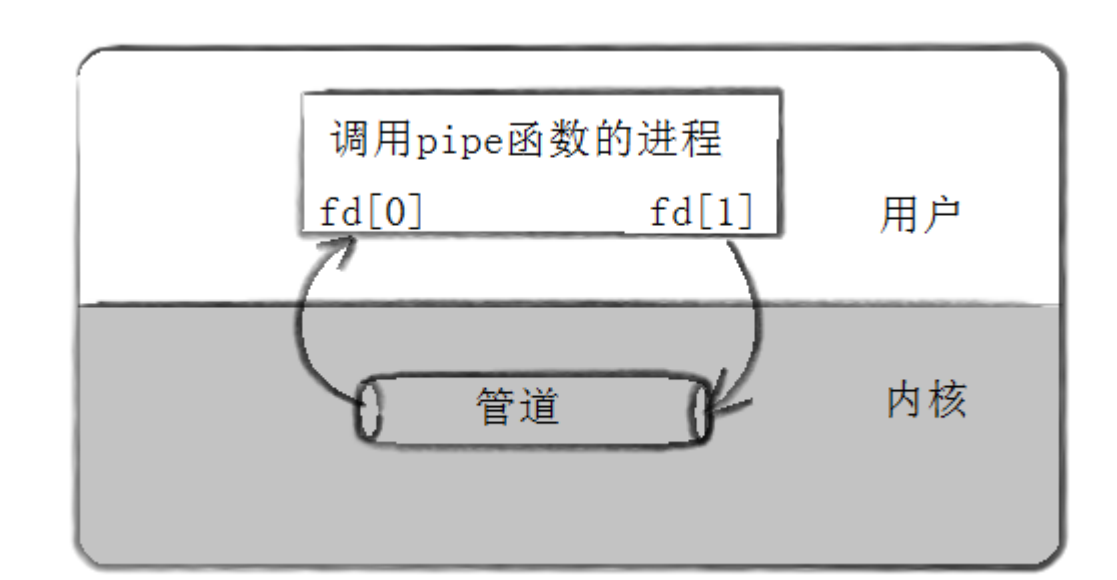
cpp
#include <iostream>
#include <cstdio>
#include <string>
#include <cstdlib>
#include <cstring>
#include <unistd.h>
#include <sys/types.h>
#include <sys/wait.h>

#define N 2
#define NUM 1024

using namespace std;

void Writer(int wfd)
{
    string s="hello,I am a child";
    pid_t self=getpid();
    int number=0;

    char buffer[NUM];
    while(true)
    {
        sleep(1);
        buffer[0]=0;//字符串清空
        snprintf(buffer,sizeof(buffer),"%s-%d-%d",s.c_str(),self,number++);
        cout<<buffer<<endl;
        //发送/写入给父进程
        write(wfd,buffer,strlen(buffer));
    }
}

void Reader(int rfd)
{
    char buffer[NUM];
    while(true)
    {
        buffer[0]=0;
        ssize_t n=read(rfd,buffer,sizeof(buffer));
        if(n>0)
        {
            buffer[n]=0;
            cout<<"father get a message["<<getpid()<<"]#"<<buffer<<endl;
        }
        else if(n==0)
        {
            cout<<"father process read file done!"<<endl;
            break;
        }
        else break;
    }
}
int main()
{
    int pipefd[N]={0};
    int n=pipe(pipefd);
    if(n<0) return 1;

    pid_t id=fork();
    if(id<0)
    {
        return 2;
    }
    else if(id==0)
    {
        //child
        close(pipefd[0]);//关闭读
        //IPC code
        Writer(pipefd[1]);

        close(pipefd[1]);
        exit(0);
    }
    //father
    close(pipefd[1]);
    Reader(pipefd[0]);
    pid_t rid=waitpid(id,nullptr,0);
    if(rid<0)
    return 3;
    close(pipefd[0]);
    sleep(5);
    return 0;
}
注意:
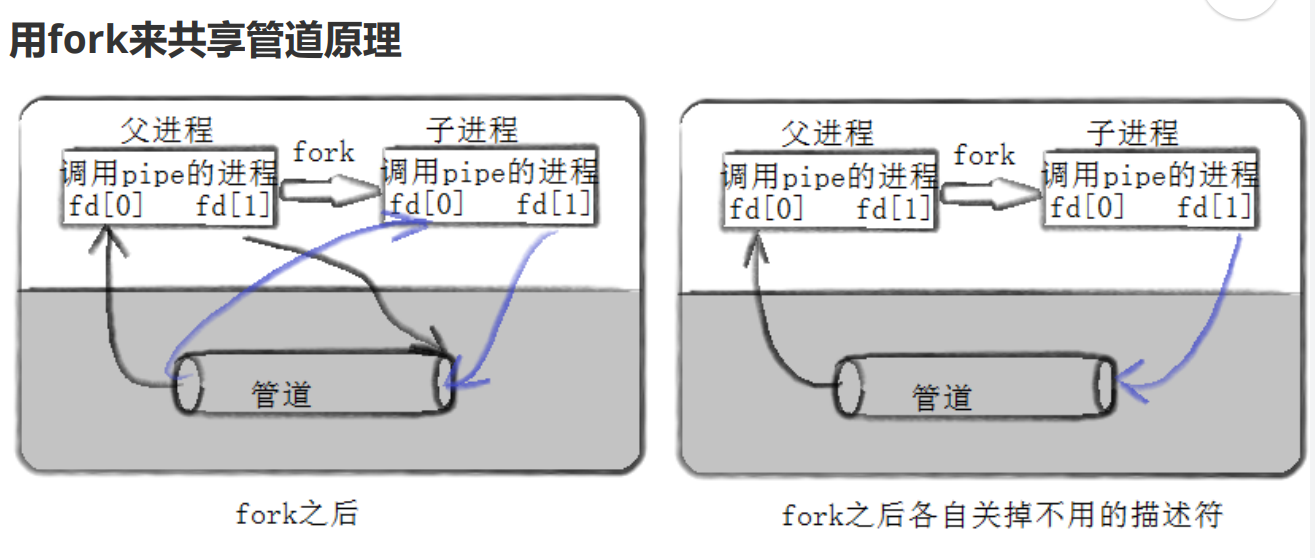
管道就是文件(内存级文件)
特点:
1.用管道通信时,通信的进程间需要有血缘关系,常用于父子。
2.单向通行。
3.父子进程是会进程协同的。同步与互斥------保护管道文件的数据安全。
4.管道是面向字节流的。
5.管道是基于文件的。而文件的生命周期是随进程的。
管道中的四种情况:
1.读写端正常,管道如果为空,读端就要阻塞。
2.读写端正常,管道如果被写满,写端就要阻塞。
3.读端正常,写端关闭,读端就会读到0,表示读到了管道文件的结尾,不会被阻塞。
4.写端正常写入,读端关闭了,操作系统要通过信号杀掉正在写入的进程。
命名管道
可用于毫不相关的进程间通信。
创建一个命名管道:
mkfifo filename也可以从程序里创建:
int mkfifo(const char* filename,mode_t mode);
 int n=mkfifo(FIFO_FILE,0664);
匿名管道和命名管道的区别:
1.匿名管道由pipe函数创建并打开。
2.命名管道由mkfifo函数创建,打开用open
3.FIFO和pipe唯一区别是它们创建和打开的方式不同,一旦这些过程完成后,它们具有相同的语义。
例子:
common.hpp
cpp
#pragma once
#include <iostream>
#include <string>
#include <cerrno>
#include <cstring>
#include <cstdlib>
#include <sys/types.h>
#include <sys/stat.h>
#include <unistd.h>
#include <fcntl.h>

#define FIFO_FILE "./myfifo"
#define MODE 0664

enum
{
    FIFO_CREATE_ERR = 1,
    FIFO_DELETE_ERR,
    FIFO_OPEN_ERR
};

class Init
{
public:
    Init()
    {
        //创建管道
        int n=mkfifo(FIFO_FILE,MODE);
        if(n==-1)
        {
            perror("mkfifo");
            exit(FIFO_CREATE_ERR);
        }
    }
    ~Init()
    {
        int m=unlink(FIFO_FILE);
        if(m==-1)
        {
            perror("unlink");
            exit(FIFO_DELETE_ERR);
        }
    }
};
cpp
#include "common.hpp"
#include "log.hpp"
using namespace std;

// 管理管道文件
int main()
{
    Init init;
    Log log;
    log.Enable(Onefile);
    // 打开管道
    int fd = open(FIFO_FILE, O_RDONLY); // 等待写入方打开后自己才会打开并向后执行
    // 所以open可能会阻塞。
    if (fd < 0)
    {
        log(Fatal, "error string:%s,error code:%d", strerror(errno), errno);
        exit(FIFO_OPEN_ERR);
    }
    while(true)
    {
        char buffer[1024]={0};
        int x=read(fd,buffer,sizeof(buffer));
        if(x>0)
        {
            buffer[x]=0;
            cout<<"client say# "<<buffer<<endl;
        }
        else if(x==0)
        {
            log(Debug,"client quit,me too!,error string:%s,errno code:%d",strerror(errno),errno);
            break;
        }
        else break;
    }
    close(fd);//关闭管道
    return 0;
}
cpp
#include "common.hpp"
using namespace std;
int main()
{
    int fd=open(FIFO_FILE,O_WRONLY);
    if(fd<0)
    {
        perror("open");
        exit(FIFO_OPEN_ERR);
    }
    cout<<"client open file done"<<endl;
    string line;
    while(true)
    {
        cout<<"Please Enter@ ";
        getline(cin,line);
        write(fd,line.c_str(),line.size());
    }
    close(fd);
    return 0;
}
log.hpp
cpp
#include <iostream>
#include <time.h>
#include <stdarg.h>
#include <sys/types.h>
#include <sys/stat.h>
#include <fcntl.h>
#include <unistd.h>
#include <stdlib.h>

#define SIZE 1024
#define Info 0
#define Debug 1
#define Warning 2
#define Error 3
#define Fatal 4

#define Screen 1
#define Onefile 2
#define Classfile 3

#define LogFile "log.txt"

class Log
{
public:
    Log()
    {
        printMethod = Screen;
        path = "./log/";
    }
    void Enable(int method)
    {
        printMethod = method;
    }
    std::string levelToString(int level)
    {
        switch (level)
        {
        case Info:
            return "Info";
        case Debug:
            return "Debug";
        case Warning:
            return "Warning";
        case Error:
            return "Error";
        case Fatal:
            return "Fatal";
        default:
            return "None";
        }
    }
    void printLog(int level, const std::string &logtxt)
    {
        switch (printMethod)
        {
        case Screen:
            std::cout << logtxt << std::endl;
            break;
        case Onefile:
            printOneFile(LogFile, logtxt);
            break;
        case Classfile:
            printClassFile(level, logtxt);
            break;
        default:
            break;
        }
    }
    void printOneFile(const std::string& logname,const std::string& logtxt)
    {
        std::string _logname=path+logname;
        int fd=open(_logname.c_str(),O_WRONLY|O_CREAT|O_APPEND,0666);
        if(fd<0) return;
        write(fd,logtxt.c_str(),logtxt.size());
        close(fd);
    }
    void printClassFile(int level,const std::string& logtxt)
    {
        std::string filename=LogFile;
        filename+=".";
        filename+=levelToString(level);
        printOneFile(filename,logtxt);
    }
    ~Log()
    {}
    void operator()(int level,const char* format,...)
    {
        time_t t=time(nullptr);
        struct tm* ctime=localtime(&t);
        char leftbuffer[SIZE];
        snprintf(leftbuffer,sizeof(leftbuffer),"[%s][%d-%d-%d %d:%d:%d]",levelToString(level).c_str(),
        ctime->tm_year+1900,ctime->tm_mon+1,ctime->tm_mday,ctime->tm_hour,
        ctime->tm_min,ctime->tm_sec);
        va_list s;
        va_start(s,format);
        char rightbuffer[SIZE];
        vsnprintf(rightbuffer,sizeof(rightbuffer),format,s);
        va_end(s);
        //格式:默认部分+自定义部分
        char logtxt[SIZE*2];
        snprintf(logtxt,sizeof(logtxt),"%s %s\n",leftbuffer,rightbuffer);
        printLog(level,logtxt);
    }
private:
    int printMethod;
    std::string path;
};