一、下载安装包
提前或者找一台能连外网的电脑先去官网下载安装包
官方下载地址https://www.oceanbase.com/softwarecenter
推荐下载OceanBase All in One版本
二、拷贝至服务器上
下载完成后拷贝至服务器上。
三、运行安装命令
1.解压包
bash
#提前切入到存放压缩文件的路径下,依次执行下面的命令
tar -xzf oceanbase-all-in-one-4.4.1_20251020.el7.x86_64.tar.gz
cd oceanbase-all-in-one/bin/
./install.sh
source ~/.oceanbase-all-in-one/bin/env.sh
2.修改配置文件
bash
#进入配置文件目录下
cd ~/.oceanbase-all-in-one/obd/usr/obd/example
#查看官方提供的配置文件清单
ls
能看到大概有这些配置文件

官方对于配置文件的用途做了如下说明:
小规格开发模式,适用于个人设备(内存不低于 8 GB)
本地单机部署配置样例:mini-local-example.yaml
单机部署配置样例:mini-single-example.yaml
单机部署 + ODP 配置样例:mini-single-with-obproxy-example.yaml
分布式部署 + ODP 配置样例:mini-distributed-with-obproxy-example.yaml
分布式部署 + ODP + OCP Express 配置样例:default-components-min.yaml
分布式部署全部组件:all-components-min.yaml
专业开发模式,适用于高配置 ECS 或物理服务器(可用资源不低于 16 核 64 GB)
本地单机部署配置样例:local-example.yaml
单机部署配置样例:single-example.yaml
单机部署 + ODP 配置样例:single-with-obproxy-example.yaml
分布式部署 + ODP 配置样例:distributed-with-obproxy-example.yaml
分布式部署 + ODP + OCP Express 配置样例:default-components.yaml
分布式部署全部组件:all-components.yaml
具体配置项说明 可点击https://www.oceanbase.com/docs/community-obd-cn-1000000001881971
bash
#这里我们选择本地部署的小型配置文件 适合8G内存以上的配置的服务器
vi mini-local-example.yaml
bash
oceanbase-ce:
  servers:
    # Please don't use hostname, only IP can be supported
  - 127.0.0.1
  global:
    #  The working directory for OceanBase Database. OceanBase Database is started under this directory. This is a required field.
    home_path: /root/observer
    # The directory for data storage. The default value is $home_path/store.
    # data_dir: /data
    # The directory for clog, ilog, and slog. The default value is the same as the data_dir value.
    # redo_dir: /redo
    # Starting from observer version 4.2, the network selection for the observer is based on the 'local_ip' parameter, and the 'devname' parameter is no longer mandatory.
    # If the 'local_ip' parameter is set, the observer will first use this parameter for the configuration, regardless of the 'devname' parameter.
    # If only the 'devname' parameter is set, the observer will use the 'devname' parameter for the configuration.
    # If neither the 'devname' nor the 'local_ip' parameters are set, the 'local_ip' parameter will be automatically assigned the IP address configured above.
    # devname: eth0
    mysql_port: 2881 # External port for OceanBase Database. The default value is 2881. DO NOT change this value after the cluster is started.
    rpc_port: 2882 # Internal port for OceanBase Database. The default value is 2882. DO NOT change this value after the cluster is started.
    obshell_port: 2886 # Operation and maintenance port for Oceanbase Database. The default value is 2886. This parameter is valid only when the version of oceanbase-ce is 4.2.2.0 or later.
    zone: zone1
    cluster_id: 1
    # please set memory limit to a suitable value which is matching resource.
    memory_limit: 6G # The maximum running memory for an observer
    system_memory: 1G # The reserved system memory. system_memory is reserved for general tenants. The default value is 30G.
    datafile_size: 2G # Size of the data file.
    datafile_next: 2G # the auto extend step. Please enter an capacity, such as 2G
    datafile_maxsize: 20G # the auto extend max size. Please enter an capacity, such as 20G
oceanbase-ce:
  servers:
    # Please don't use hostname, only IP can be supported
  - 127.0.0.1
  global:
    #  The working directory for OceanBase Database. OceanBase Database is started under this directory. This is a required field.
    home_path: /root/observer
    # The directory for data storage. The default value is $home_path/store.
    # data_dir: /data
    # The directory for clog, ilog, and slog. The default value is the same as the data_dir value.
    # redo_dir: /redo
    # Starting from observer version 4.2, the network selection for the observer is based on the 'local_ip' parameter, and the 'devname' parameter
is no longer mandatory.
    # If the 'local_ip' parameter is set, the observer will first use this parameter for the configuration, regardless of the 'devname' parameter.
    # If only the 'devname' parameter is set, the observer will use the 'devname' parameter for the configuration.
    # If neither the 'devname' nor the 'local_ip' parameters are set, the 'local_ip' parameter will be automatically assigned the IP address configured above.
    # devname: eth0
    mysql_port: 2881 # External port for OceanBase Database. The default value is 2881. DO NOT change this value after the cluster is started.
    rpc_port: 2882 # Internal port for OceanBase Database. The default value is 2882. DO NOT change this value after the cluster is started.
    obshell_port: 2886 # Operation and maintenance port for Oceanbase Database. The default value is 2886. This parameter is valid only when the version of oceanbase-ce is 4.2.2.0 or later.
    zone: zone1
    cluster_id: 1
    # please set memory limit to a suitable value which is matching resource.
    memory_limit: 6G # The maximum running memory for an observer
    system_memory: 1G # The reserved system memory. system_memory is reserved for general tenants. The default value is 30G.
    datafile_size: 2G # Size of the data file.
    datafile_next: 2G # the auto extend step. Please enter an capacity, such as 2G
    datafile_maxsize: 20G # the auto extend max size. Please enter an capacity, such as 20G
    log_disk_size: 14G # The size of disk space used by the clog files.
    cpu_count: 4
    production_mode: false
    enable_syslog_wf: false # Print system logs whose levels are higher than WARNING to a separate log file. The default value is true.
    max_syslog_file_count: 4 # The maximum number of reserved log files before enabling auto recycling. The default value is 0.

    #***************************上面根据自己机器配置设置*********
    #***************************下面的推荐设置***************
    #修改登录密码
    root_password: a12345678. # root user password, can be empty
    #修改数据库实例名
    appname: myoceanbase
    #设置开机自启动
    enable_auto_start: true
如果后面修改过配置需要执行
bash
obd cluster reload myoceanbase如果数据库服务没启动可以
bash
obd cluster start myoceanbasePS:如果启动报错
bash
[ERROR] OBD-1007: (127.0.0.1) The value of the ulimit parameter "open files" must not be less than 20000 (Current value: 1024), Please execute `echo -e "* soft nofile 20000\n* hard nofile 20000" >> /etc/security/limits.d/nofile.conf` as root in 127.0.0.1. if it dosen't work, please check whether UsePAM is yes in /etc/ssh/sshd_config.执行命令
bash
#修改配置文件
echo -e "* soft nofile 20000\n* hard nofile 20000" >> /etc/security/limits.d/nofile.conf
#重启sshd
systemctl restart sshd
#再启动oceanbase数据库
obd cluster start myoceanbase
四、链接测试
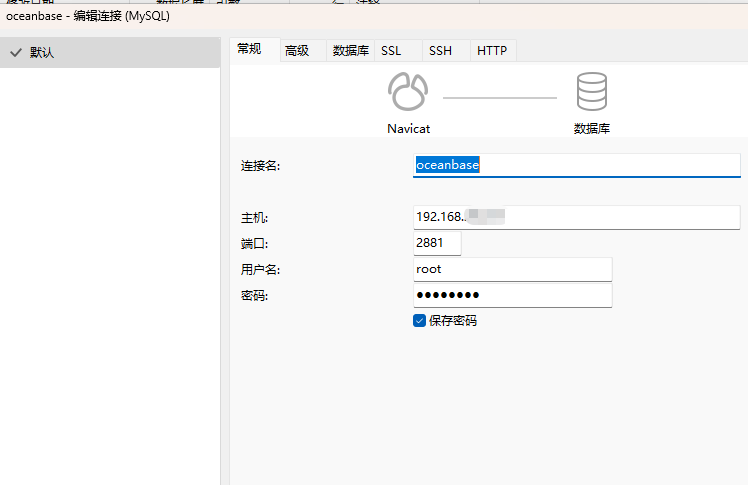
我使用的是navicat,选择mysql链接方式,测试连接通过。