git常用操作

1. 查看暂存区内容

git status

git status 的输出会清晰地分为几个部分:

Changes to be committed: (将被提交的变更)

  • 这部分就是您的暂存区内容。 列在这里的文件表示它们已经被 git add,等待下一次 git commit

Changes not staged for commit: (尚未暂存的变更)

  • 这部分列出了您已经修改、但还没有 git add 的文件。

Untracked files: (未跟踪的文件)

  • 这部分是项目中新创建的、Git 还从未管理过的文件。
复制代码
(base) root@...# git status
On branch main
Your branch is up to date with 'origin/main'.

Changes to be committed:
  (use "git restore --staged <file>..." to unstage)
        modified:   README.md         <-- 这个文件在暂存区
        new file:   new_feature.py    <-- 这个新文件也在暂存区

Changes not staged for commit:
  (use "git add <file>..." to update what will be committed)
  (use "git restore <file>..." to discard changes in working directory)
        modified:   config.yaml       <-- 这个文件被修改了,但未暂存

Untracked files:
  (use "git add <file>..." to include in what will be committed)
        temp.log                      <-- 这个文件是全新的,未被跟踪

2. 查看暂存区里的文件具体修改了哪些代码行

git diff --staged

  • --- 开头的行代表旧文件(来自上次提交)。
  • +++ 开头的行代表新文件(来自暂存区)。
  • - (通常是红色) 开头的行表示被删除的内容。
  • + (通常是绿色) 开头的行表示被添加的内容。
复制代码
diff --git a/README.md b/README.md
index 3b18e51..5a13240 100644
--- a/README.md
+++ b/README.md
@@ -1,3 +1,4 @@
 # RK_series Project
 This is a project for RK series development.
-Initial version.
+
+Version 1.1, with new features.
3. 清空暂存区

复制代码
# 把暂存区恢复到干净状态
git reset

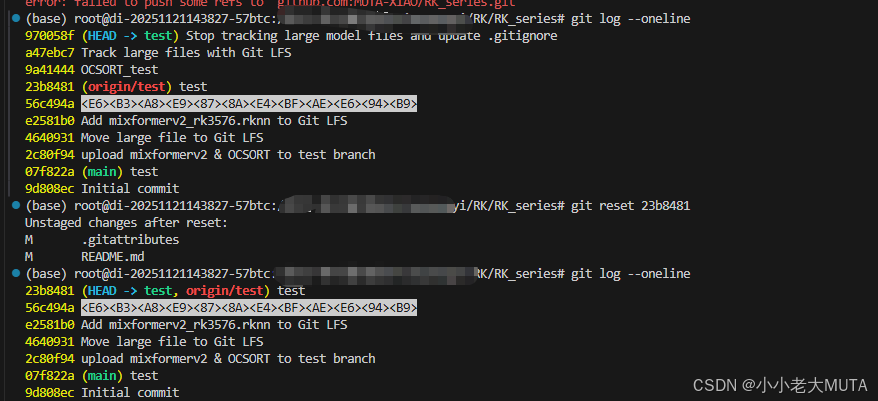
4. 查看最近的提交历史,撤销

git log --oneline

git reset

复制代码
# 查看最近的提交历史,找到添加大文件之前的那个提交的 commit hash
git log --oneline

# 假设添加大文件之前的那个提交是 a1b2c3d
# 我们要撤销它之后的所有提交
git reset a1b2c3d

# 或者,如果您确定只搞砸了最近一次提交,可以简单地:
git reset HEAD~1

成功地将 test 分支的"指针"(HEAD)移回到了 23b8481 这个提交上。这个提交是远程仓库 origin/test 的最新版本。所有在它之后的提交(9a41444, a47ebc7, 970058f)都已经被撤销了。

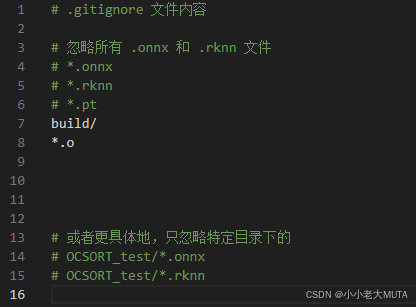
5. 忽略上传指定文件

在项目目录下新建 .gitignore 文件:

然后先add .gitignore ,再add .要传的文件夹,git会自动跳过这个文件夹下所有的.onnx 和 .rknn 和 .pt。

6. win到linux换行符警告

  • CRLF :Windows 系统使用的换行符,表示回车符(\r)和换行符(\n)的组合。
  • LF :Unix 和 Linux 系统使用的换行符,仅表示换行符(\n)。

git config --global core.autocrlf true

设置为 true (Windows 上使用 CRLF,但提交时转换为 LF

相关推荐
Unity粉末状在校生1 天前
Git解决fatal: Could not read from remote repository.的问题
git
少年攻城狮1 天前
Obsidian系列---【如何使用obsidian同步到git?】
git
do better myself1 天前
网站源码如何部署和加入GIT仓库的
git
爱学英语的程序员1 天前
Git 提交 LF will be replaced by CRLF the next time Git touches it 报错
git
qq_339191141 天前
服务器git pull每次都要输入密码,linux 设置git登录,linux设置git只输入一次账户密码
git
一颗小行星!1 天前
快速理解 Git submodule
git
A-Jie-Y2 天前
Git基础-核心概念与常用命令
git
夜珀2 天前
Git基础修炼手册:在AtomGit上玩转版本控制
git
golang学习记2 天前
Zed IDE官宣新招:Git Graph 正式支持!
ide·git
要记得喝水2 天前
适用于 Git Bash 的脚本,批量提交和推送多个仓库的修改
git·elasticsearch·bash