推荐阅读列表:
LLM之Agent(三十三)|AI Agents(二):从零开始构建Agent
LLM之Agent(三十四)|AI Agents(三):AI Agents框架介绍
LLM之Agent(三十五)|AI Agents(四):AI Agent类型
一、理解智能体系统
随着人工智能驱动的自动化技术的日益普及,在深入了解agent架构之前,理解Workflows和Agents之间的区别至关重要。
现代智能体系统的核心在于两种基本的自动化范式:
- 工作流 ------结构化的、 基于规则的自动化流程, 其结果是预先定义的。
- 智能体 ------动态的、能够根据上下文适应不同场景的决策系统 。
为什么这对智能体系统很重要?
在构建复杂的Agent架构之前,了解何时使用Workflows而不是Agent至关重要。 Workflows最适合用于静态的、重复性的过程而Agent则是理想的选择动态的多步骤推理任务适应能力至关重要。
二、Agents Vs Workflows
Agent的定义有多种。一些人将Agent定义为完全自主的系统,它们能够长时间独立运行,并使用各种工具来完成复杂的任务。另一些人则认为是遵循预定义工作流程的规范性的实现方式。
Anthropic将所有这些都归类为Agent系统 ,但对Workflows和Agent做出了关键区分:
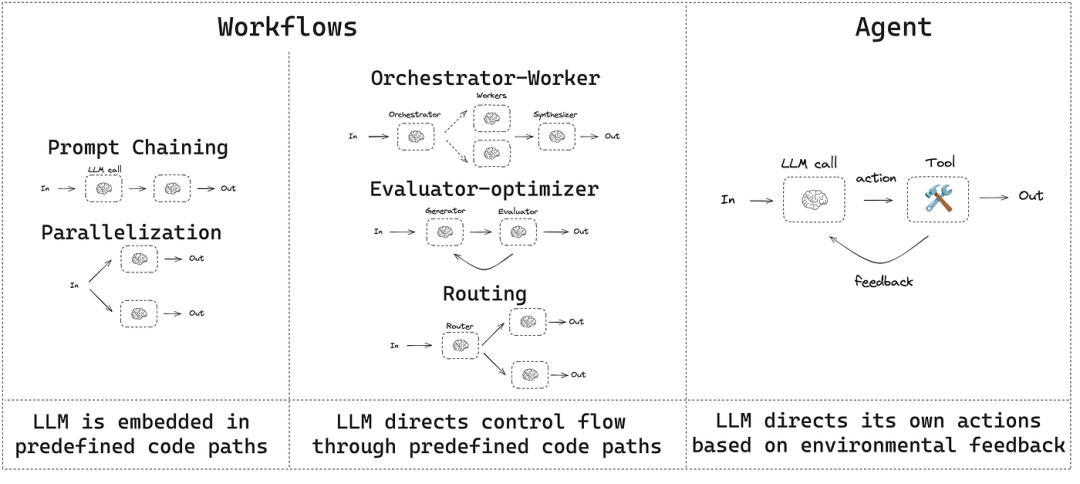
- Workflows是指通过预定义的代码路径来协调 LLM 和工具的系统。
- Agents是指 LLM 动态地指导自身流程和工具使用,从而保持对完成任务方式的控制的系统。
示例 1:
把它想象成烹饪:
工作流程就像严格按照食谱一步一步来一样。
Agent就像厨师,根据食材和最佳口味,当场决定如何烹饪菜肴。
示例2:
电子商务系统中的售后自动化是一个经典的流程:用户购买产品。
系统会自动发送一封包含订单详情的电子邮件 。
整个过程严格按照预先设计的步骤进行, 没有任何偏差 。
从本质上讲, 工作流程是确定性的 ------它们遵循线性的、可预测的执行路径。
相比之下, 智能体以适应性的方式运行,实时决定使用哪些工具以及生成什么输出 。
设想一下,一位拥有 LLM的客户支持agent :
- 它可以使用 "创建支持工单"、"提取订单历史记录"或"发放退款"等工具。
- Agent不会遵循预定义的路径,而是根据用户请求决定使用哪个工具。
- 行动流程并非预先设定 ------智能体动态地选择最佳方法 。
与workflows不同, Agent是非确定性的 ------它们会根据给定的输入实时做出选择以实现结果。具体如下图所示:
2.1 何时(以及何时不)使用Agent
在使用 LLM 开发应用程序时,最好从最简单的实现方式入手,仅在必要时才逐步引入增加复杂性。由于Agent系统通常会以更高的延迟和成本为代价,换取更高的任务性能,因此评估这种权衡是否合理至关重要。
当任务复杂性较高时,我们可以使用workflows的可预测性和一致性优点来解决流程固定的任务,而智能体则更适合需要大规模灵活性和模型驱动决策的场景。然而,对于许多应用而言,通过检索和上下文示例来优化单个 LLM 调用通常就足够了。
2.2 何时以及如何使用框架
有很多框架可以简化智能体系统的开发,其中包括:
- LangChain 的 LangGraph ;
- Amazon Bedrock 的 AI Agent 框架 ;
- Rivet ,一个拖放式 GUI LLM 工作流程构建器;
- Vellum 是另一个用于构建和测试复杂工作流程的 GUI 工具。
这些框架简化了诸如调用 LLM、定义和解析工具以及链接调用等标准底层任务,使用户更容易上手agent系统。然而,这些框架通常会做一些功能的抽象,会掩盖底层的提示和响应,从而增加调试难度。此外,这些框架有时候使用起来比较复杂,实际上更简单的设置就足够了。
这里建议开发者首先直接使用 LLM API,因为许多场景只需几行代码即可实现。如果选择使用框架,请务必彻底理解其底层代码,因为对框架内部运作方式的错误理解是导致错误的常见原因。
三、构建Agent系统
在本节中,我们将探讨生产环境中常用的智能体系统模式。我们将从基础构建模块------增强型 LLM------入手,逐步增加复杂性,从简单的组合式工作流到自主智能体。
3.1 环境设置
可以使用任何支持结构化输出和工具调用的聊天模型。下面,我们将展示如何安装软件包、设置 API 密钥以及测试 Anthropic 的结构化输出/工具调用功能。
import os
import getpass
from langchain_anthropic import ChatAnthropic
def _set_env(var: str):
    if not os.environ.get(var):
        os.environ[var] = getpass.getpass(f"{var}: ")
_set_env("ANTHROPIC_API_KEY")
llm = ChatAnthropic(model="claude-3-5-sonnet-latest")
3.2 增强LLM
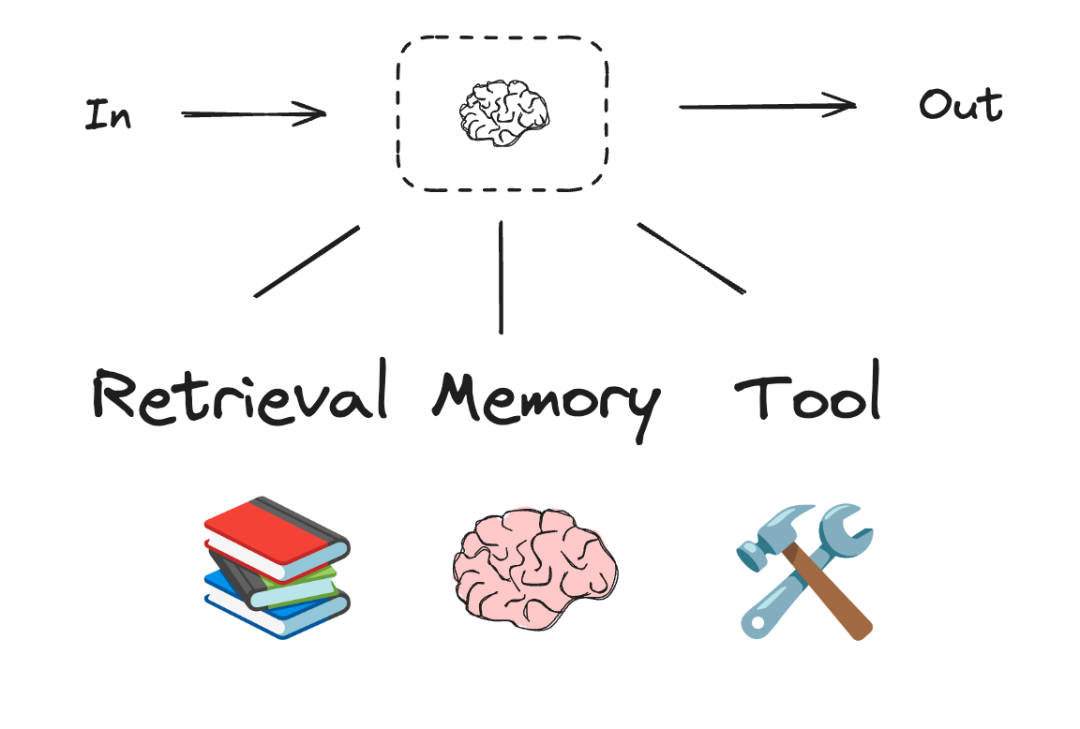
智能体系统的基本构建模块是LLM,可以使用检索、工具和记忆等增强功能。我们目前的模型能够主动利用这些功能------生成自身的搜索查询、选择合适的工具,并确定要保留哪些信息。
在本文的剩余部分,我们将假设每个 LLM 调用都可以访问这些增强功能。
# Schema for structured output
from pydantic import BaseModel, Field
class SearchQuery(BaseModel):
    search_query: str = Field(None, description="Query that is optimized web search.")
    justification: str = Field(
        None, description="Why this query is relevant to the user's request."
    )
# Augment the LLM with schema for structured output
structured_llm = llm.with_structured_output(SearchQuery)
# Invoke the augmented LLM
output = structured_llm.invoke("How does Calcium CT score relate to high cholesterol?")
# Define a tool
def multiply(a: int, b: int) -> int:
    return a * b
# Augment the LLM with tools
llm_with_tools = llm.bind_tools([multiply])
# Invoke the LLM with input that triggers the tool call
msg = llm_with_tools.invoke("What is 2 times 3?")
# Get the tool call
msg.tool_calls
四、Workflow
4.1 Prompt Chaining
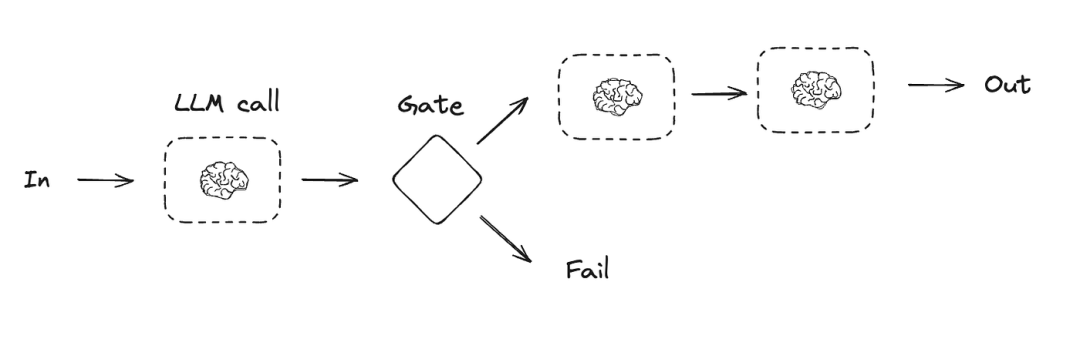
在提示链中,每个 LLM 调用都会处理前一个调用的输出。
提示链将任务分解为一系列步骤,其中每个 LLM 调用都会处理前一个调用的输出。您可以对任何中间步骤添加程序化检查(参见下图中的"门"),以确保流程仍在按计划进行。
此workflow非常适合任务可以轻松且清晰地分解为固定子任务的情况,其主要目标是通过简化每次 LLM 调用,以牺牲延迟为代价来换取更高的准确率。
提示链的用途示例:
- 撰写营销文案,然后将其翻译成另一种语言。
- 先写出文档大纲,检查大纲是否符合特定标准,然后根据大纲撰写文档。
from typing_extensions import TypedDict
from langgraph.graph import StateGraph, START, END
from IPython.display import Image, display
# Graph state
class State(TypedDict):
    topic: str
    joke: str
    improved_joke: str
    final_joke: str
# Nodes
def generate_joke(state: State):
    """First LLM call to generate initial joke"""
    msg = llm.invoke(f"Write a short joke about {state['topic']}")
    return {"joke": msg.content}
def check_punchline(state: State):
    """Gate function to check if the joke has a punchline"""
    # Simple check - does the joke contain "?" or "!"
    if "?" in state["joke"] or "!" in state["joke"]:
        return "Fail"
    return "Pass"
def improve_joke(state: State):
    """Second LLM call to improve the joke"""
    msg = llm.invoke(f"Make this joke funnier by adding wordplay: {state['joke']}")
    return {"improved_joke": msg.content}
def polish_joke(state: State):
    """Third LLM call for final polish"""
    msg = llm.invoke(f"Add a surprising twist to this joke: {state['improved_joke']}")
    return {"final_joke": msg.content}
# Build workflow
workflow = StateGraph(State)
# Add nodes
workflow.add_node("generate_joke", generate_joke)
workflow.add_node("improve_joke", improve_joke)
workflow.add_node("polish_joke", polish_joke)
# Add edges to connect nodes
workflow.add_edge(START, "generate_joke")
workflow.add_conditional_edges(
    "generate_joke", check_punchline, {"Fail": "improve_joke", "Pass": END}
)
workflow.add_edge("improve_joke", "polish_joke")
workflow.add_edge("polish_joke", END)
# Compile
chain = workflow.compile()
# Show workflow
display(Image(chain.get_graph().draw_mermaid_png()))
# Invoke
state = chain.invoke({"topic": "cats"})
print("Initial joke:")
print(state["joke"])
print("\n--- --- ---\n")
if "improved_joke" in state:
    print("Improved joke:")
    print(state["improved_joke"])
    print("\n--- --- ---\n")
    print("Final joke:")
    print(state["final_joke"])
else:
    print("Joke failed quality gate - no punchline detected!")
4.2 并行化
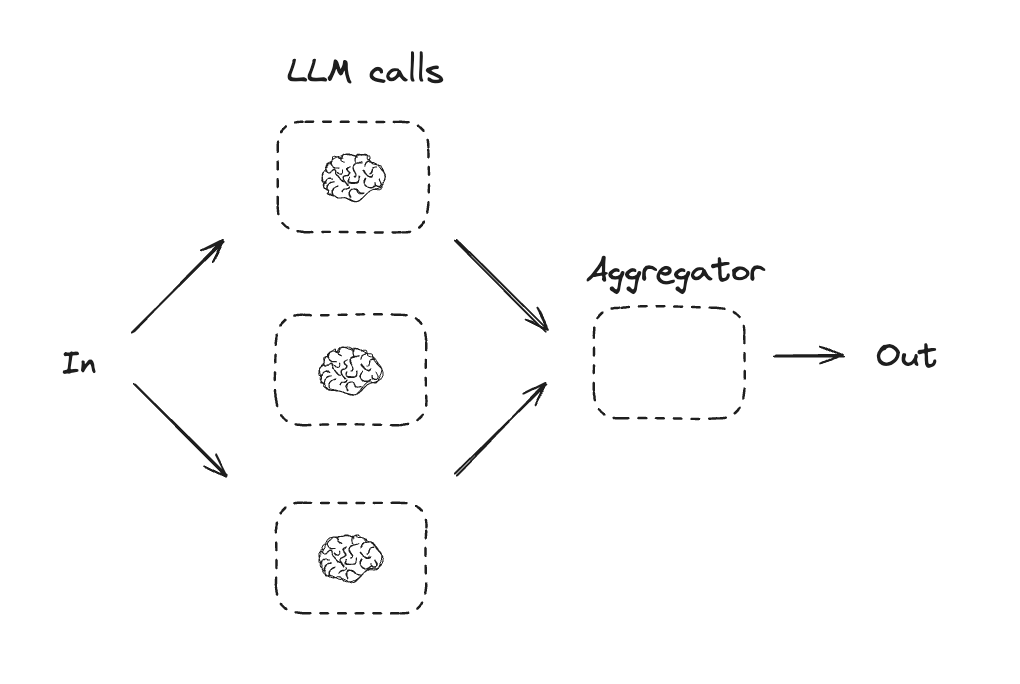
通过并行化,LLM 可以同时处理一项任务:
LLM有时可以同时处理同一任务,并通过程序自动汇总其输出。这种工作流程(即并行化)主要体现在两个方面:
分段: 将一项任务分解成多个并行运行的独立子任务。 投票: 多次运行同一任务以获得不同的输出结果。
当拆分后的子任务可以并行处理以提高速度,或者需要从多个角度或多次尝试以获得更高置信度的结果时,并行化非常有效。对于涉及多个方面的复杂任务,如果每个方面都由单独的 LLM 调用来处理,则 LLM 通常表现更佳,这样可以集中精力关注每个特定方面。
并行化的一些应用示例:
分段:
实现防护机制,其中一个模型实例处理用户查询,而另一个模型实例则负责筛选不当内容或请求。这种方法通常比让同一个 LLM 调用同时处理防护机制和核心响应性能更好。
自动评估 LLM 性能,其中每次 LLM 调用都会评估模型在给定提示下的性能的不同方面。
投票:
对一段代码进行漏洞审查,可以使用多个不同的提示会审查代码,并在发现问题时标记代码。
评估给定内容是否不当,通过多个提示评估不同方面或要求不同的投票阈值来平衡误报和漏报。
# Graph state
class State(TypedDict):
    topic: str
    joke: str
    story: str
    poem: str
    combined_output: str
# Nodes
def call_llm_1(state: State):
    """First LLM call to generate initial joke"""
    msg = llm.invoke(f"Write a joke about {state['topic']}")
    return {"joke": msg.content}
def call_llm_2(state: State):
    """Second LLM call to generate story"""
    msg = llm.invoke(f"Write a story about {state['topic']}")
    return {"story": msg.content}
def call_llm_3(state: State):
    """Third LLM call to generate poem"""
    msg = llm.invoke(f"Write a poem about {state['topic']}")
    return {"poem": msg.content}
def aggregator(state: State):
    """Combine the joke and story into a single output"""
    combined = f"Here's a story, joke, and poem about {state['topic']}!\n\n"
    combined += f"STORY:\n{state['story']}\n\n"
    combined += f"JOKE:\n{state['joke']}\n\n"
    combined += f"POEM:\n{state['poem']}"
    return {"combined_output": combined}
# Build workflow
parallel_builder = StateGraph(State)
# Add nodes
parallel_builder.add_node("call_llm_1", call_llm_1)
parallel_builder.add_node("call_llm_2", call_llm_2)
parallel_builder.add_node("call_llm_3", call_llm_3)
parallel_builder.add_node("aggregator", aggregator)
# Add edges to connect nodes
parallel_builder.add_edge(START, "call_llm_1")
parallel_builder.add_edge(START, "call_llm_2")
parallel_builder.add_edge(START, "call_llm_3")
parallel_builder.add_edge("call_llm_1", "aggregator")
parallel_builder.add_edge("call_llm_2", "aggregator")
parallel_builder.add_edge("call_llm_3", "aggregator")
parallel_builder.add_edge("aggregator", END)
parallel_workflow = parallel_builder.compile()
# Show workflow
display(Image(parallel_workflow.get_graph().draw_mermaid_png()))
# Invoke
state = parallel_workflow.invoke({"topic": "cats"})
print(state["combined_output"])
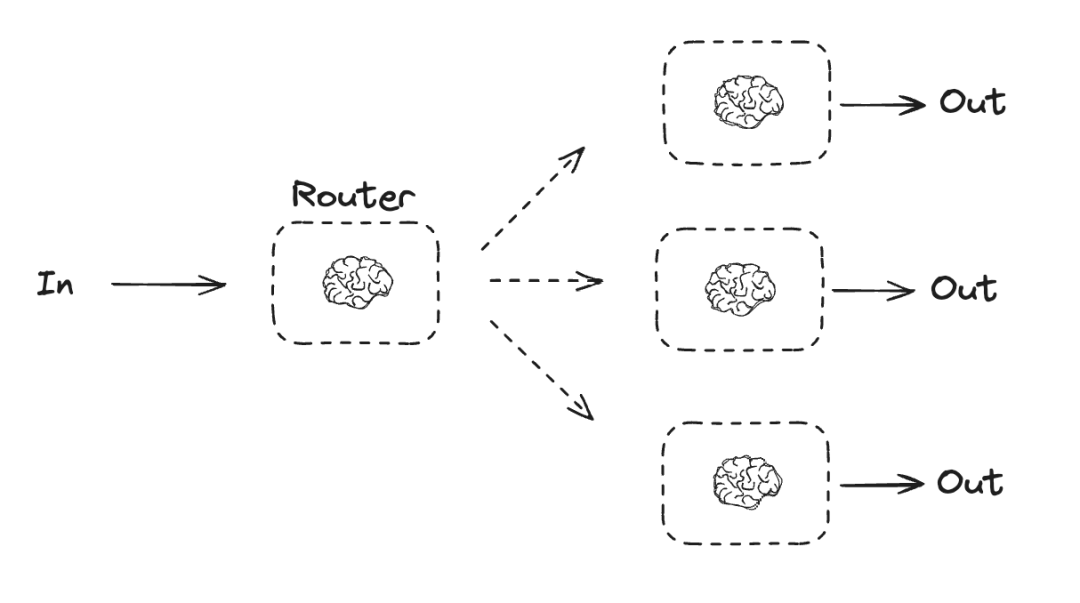
4.3 路由
路由功能会对输入进行分类,并将其引导至后续任务。正如 Anthropic 博客中所述:
路由机制对输入进行分类,并将其导向特定的后续任务。这种工作流程实现了关注点分离,并能构建更具针对性的提示。如果没有这种工作流程,针对一种输入进行优化可能会影响对其他输入的性能。
路由适用于复杂的任务,这些任务有不同的类别,最好分开处理,并且可以通过 LLM 或更传统的分类模型/算法准确地进行分类。
路由功能的应用示例:
- 将不同类型的客户服务查询(一般问题、退款请求、技术支持)导向不同的下游流程、提示和工具。
- 将简单/常见的问题路由到 Claude 3.5 Haiku 等较小的型号,将困难/不寻常的问题路由到 Claude 3.5 Sonnet 等功能更强大的型号,以优化成本和速度。
from typing_extensions import Literal
from langchain_core.messages import HumanMessage, SystemMessage
# Schema for structured output to use as routing logic
class Route(BaseModel):
    step: Literal["poem", "story", "joke"] = Field(
        None, description="The next step in the routing process"
    )
# Augment the LLM with schema for structured output
router = llm.with_structured_output(Route)
# State
class State(TypedDict):
    input: str
    decision: str
    output: str
# Nodes
def llm_call_1(state: State):
    """Write a story"""
    result = llm.invoke(state["input"])
    return {"output": result.content}
def llm_call_2(state: State):
    """Write a joke"""
    result = llm.invoke(state["input"])
    return {"output": result.content}
def llm_call_3(state: State):
    """Write a poem"""
    result = llm.invoke(state["input"])
    return {"output": result.content}
def llm_call_router(state: State):
    """Route the input to the appropriate node"""
    # Run the augmented LLM with structured output to serve as routing logic
    decision = router.invoke(
        [
            SystemMessage(
                content="Route the input to story, joke, or poem based on the user's request."
            ),
            HumanMessage(content=state["input"]),
        ]
    )
    return {"decision": decision.step}
# Conditional edge function to route to the appropriate node
def route_decision(state: State):
    # Return the node name you want to visit next
    if state["decision"] == "story":
        return "llm_call_1"
    elif state["decision"] == "joke":
        return "llm_call_2"
    elif state["decision"] == "poem":
        return "llm_call_3"
# Build workflow
router_builder = StateGraph(State)
# Add nodes
router_builder.add_node("llm_call_1", llm_call_1)
router_builder.add_node("llm_call_2", llm_call_2)
router_builder.add_node("llm_call_3", llm_call_3)
router_builder.add_node("llm_call_router", llm_call_router)
# Add edges to connect nodes
router_builder.add_edge(START, "llm_call_router")
router_builder.add_conditional_edges(
    "llm_call_router",
    route_decision,
    {  # Name returned by route_decision : Name of next node to visit
        "llm_call_1": "llm_call_1",
        "llm_call_2": "llm_call_2",
        "llm_call_3": "llm_call_3",
    },
)
router_builder.add_edge("llm_call_1", END)
router_builder.add_edge("llm_call_2", END)
router_builder.add_edge("llm_call_3", END)
# Compile workflow
router_workflow = router_builder.compile()
# Show the workflow
display(Image(router_workflow.get_graph().draw_mermaid_png()))
# Invoke
state = router_workflow.invoke({"input": "Write me a joke about cats"})
print(state["output"])
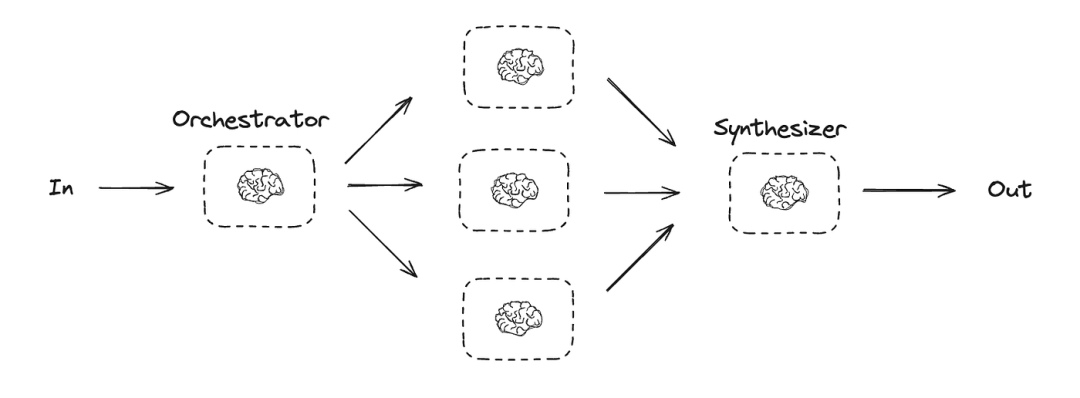
4.4 Orchestrator-Worker
在 Orchestrator-worker 模式下,Orchestrator 会将任务分解,并将每个子任务委派给 Worker,最后Orchestrator再汇总所有Worker的结果。
此工作流程非常适合难以预测所需子任务的复杂任务(例如,在编码过程中,需要修改的文件数量以及每个文件的修改性质可能取决于具体任务)。虽然其拓扑结构与并行化类似,但关键区别在于其灵活性------子任务并非预先定义,而是由协调器根据具体输入确定。
Orchestrator-worker的用途示例:
- 每次都会对多个文件进行复杂更改的编码产品。
- 搜索任务是指从多个来源收集和分析信息,以查找可能的相关信息。
from typing import Annotated, List
import operator
# Schema for structured output to use in planning
class Section(BaseModel):
    name: str = Field(
        description="Name for this section of the report.",
    )
    description: str = Field(
        description="Brief overview of the main topics and concepts to be covered in this section.",
    )
class Sections(BaseModel):
    sections: List[Section] = Field(
        description="Sections of the report.",
    )
# Augment the LLM with schema for structured output
planner = llm.with_structured_output(Sections)
在 LangGraph 中创建 Worker
由于Orchestrator-worker节点工作流很常见,LangGraph 提供了 Send API 来支持这种模式 。它允许用户动态创建工作节点,并向每个节点发送特定的输入。每个工作节点都有自己的状态,所有工作节点的输出都会写入一个共享的状态键 ,编排器图可以访问该状态键。这使得编排器能够访问所有工作节点的输出,并将它们合成为最终输出。如下所示,我们遍历一个节列表,并将每个节 Send 到一个工作节点。更多文档请参见(https://langchain-ai.github.io/langgraph/how-tos/map-reduce/)和(https://langchain-ai.github.io/langgraph/concepts/low_level/#send) 。
from langgraph.constants import Send
# Graph state
class State(TypedDict):
topic: str # Report topic
sections: list[Section] # List of report sections
completed_sections: Annotated[
list, operator.add
] # All workers write to this key in parallel
final_report: str # Final report
# Worker state
class WorkerState(TypedDict):
section: Section
completed_sections: Annotated[list, operator.add]
# Nodes
def orchestrator(state: State):
"""Orchestrator that generates a plan for the report"""
# Generate queries
report_sections = planner.invoke(
[
SystemMessage(content="Generate a plan for the report."),
HumanMessage(content=f"Here is the report topic: {state['topic']}"),
]
)
return {"sections": report_sections.sections}
def llm_call(state: WorkerState):
"""Worker writes a section of the report"""
# Generate section
section = llm.invoke(
[
SystemMessage(
content="Write a report section following the provided name and description. Include no preamble for each section. Use markdown formatting."
),
HumanMessage(
content=f"Here is the section name: {state['section'].name} and description: {state['section'].description}"
),
]
)
# Write the updated section to completed sections
return {"completed_sections": [section.content]}
def synthesizer(state: State):
"""Synthesize full report from sections"""
# List of completed sections
completed_sections = state["completed_sections"]
# Format completed section to str to use as context for final sections
completed_report_sections = "\n\n---\n\n".join(completed_sections)
return {"final_report": completed_report_sections}
# Conditional edge function to create llm_call workers that each write a section of the report
def assign_workers(state: State):
"""Assign a worker to each section in the plan"""
# Kick off section writing in parallel via Send() API
return [Send("llm_call", {"section": s}) for s in state["sections"]]
# Build workflow
orchestrator_worker_builder = StateGraph(State)
# Add the nodes
orchestrator_worker_builder.add_node("orchestrator", orchestrator)
orchestrator_worker_builder.add_node("llm_call", llm_call)
orchestrator_worker_builder.add_node("synthesizer", synthesizer)
# Add edges to connect nodes
orchestrator_worker_builder.add_edge(START, "orchestrator")
orchestrator_worker_builder.add_conditional_edges(
"orchestrator", assign_workers, ["llm_call"]
)
orchestrator_worker_builder.add_edge("llm_call", "synthesizer")
orchestrator_worker_builder.add_edge("synthesizer", END)
# Compile the workflow
orchestrator_worker = orchestrator_worker_builder.compile()
# Show the workflow
display(Image(orchestrator_worker.get_graph().draw_mermaid_png()))
# Invoke
state = orchestrator_worker.invoke({"topic": "Create a report on LLM scaling laws"})
from IPython.display import Markdown
Markdown(state["final_report"])4.5 Evaluator-Optimizer
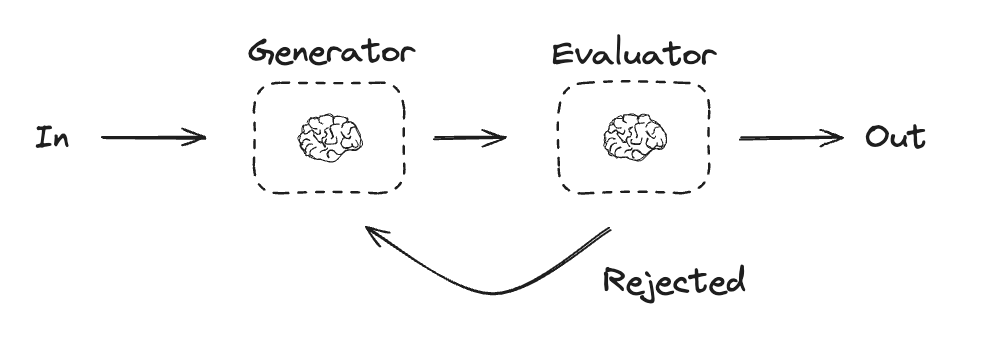
在评估器-优化器工作流程中,一个 LLM 生成响应,而另一个则提供评估和反馈,形成一个循环。
当评估标准明确,且迭代改进能够带来可衡量的价值时,此工作流程尤为有效。良好的匹配度体现在两个方面:首先,当人提出反馈意见时,LLM 的响应能够得到显著改进;其次,LLM 能够提供此类反馈。这类似于人类作家在撰写一篇精炼文章时所经历的迭代写作过程。
评估器-优化器的一些应用示例:
- 文学翻译中存在一些译者(LLM)可能无法立即捕捉到的细微差别,但评估者(LLM)可以提供有用的批评意见。
- 复杂的搜索任务,需要多轮搜索和分析才能收集到全面的信息,评估人员决定是否有必要进行进一步的搜索。
# Graph state
class State(TypedDict):
    joke: str
    topic: str
    feedback: str
    funny_or_not: str
# Schema for structured output to use in evaluation
class Feedback(BaseModel):
    grade: Literal["funny", "not funny"] = Field(
        description="Decide if the joke is funny or not.",
    )
    feedback: str = Field(
        description="If the joke is not funny, provide feedback on how to improve it.",
    )
# Augment the LLM with schema for structured output
evaluator = llm.with_structured_output(Feedback)
# Nodes
def llm_call_generator(state: State):
    """LLM generates a joke"""
    if state.get("feedback"):
        msg = llm.invoke(
            f"Write a joke about {state['topic']} but take into account the feedback: {state['feedback']}"
        )
    else:
        msg = llm.invoke(f"Write a joke about {state['topic']}")
    return {"joke": msg.content}
def llm_call_evaluator(state: State):
    """LLM evaluates the joke"""
    grade = evaluator.invoke(f"Grade the joke {state['joke']}")
    return {"funny_or_not": grade.grade, "feedback": grade.feedback}
# Conditional edge function to route back to joke generator or end based upon feedback from the evaluator
def route_joke(state: State):
    """Route back to joke generator or end based upon feedback from the evaluator"""
    if state["funny_or_not"] == "funny":
        return "Accepted"
    elif state["funny_or_not"] == "not funny":
        return "Rejected + Feedback"
# Build workflow
optimizer_builder = StateGraph(State)
# Add the nodes
optimizer_builder.add_node("llm_call_generator", llm_call_generator)
optimizer_builder.add_node("llm_call_evaluator", llm_call_evaluator)
# Add edges to connect nodes
optimizer_builder.add_edge(START, "llm_call_generator")
optimizer_builder.add_edge("llm_call_generator", "llm_call_evaluator")
optimizer_builder.add_conditional_edges(
    "llm_call_evaluator",
    route_joke,
    {  # Name returned by route_joke : Name of next node to visit
        "Accepted": END,
        "Rejected + Feedback": "llm_call_generator",
    },
)
# Compile the workflow
optimizer_workflow = optimizer_builder.compile()
# Show the workflow
display(Image(optimizer_workflow.get_graph().draw_mermaid_png()))
# Invoke
state = optimizer_workflow.invoke({"topic": "Cats"})
print(state["joke"])
五、Agent
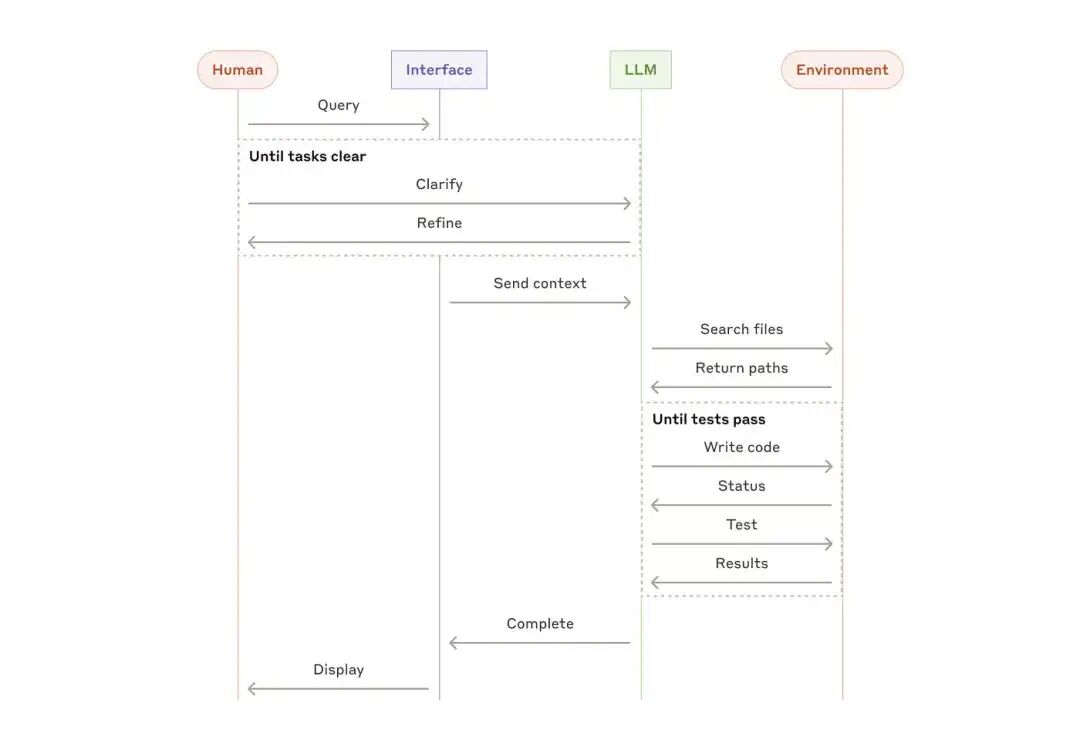
智能体通常是通过LLM基于环境反馈在一个循环中执行动作(通过工具调用)来实现的。
智能体可以处理复杂的任务,但它们的实现通常很简单。它们通常只是基于环境反馈循环使用工具的LLM。因此,清晰周全地设计工具集及其文档至关重要。
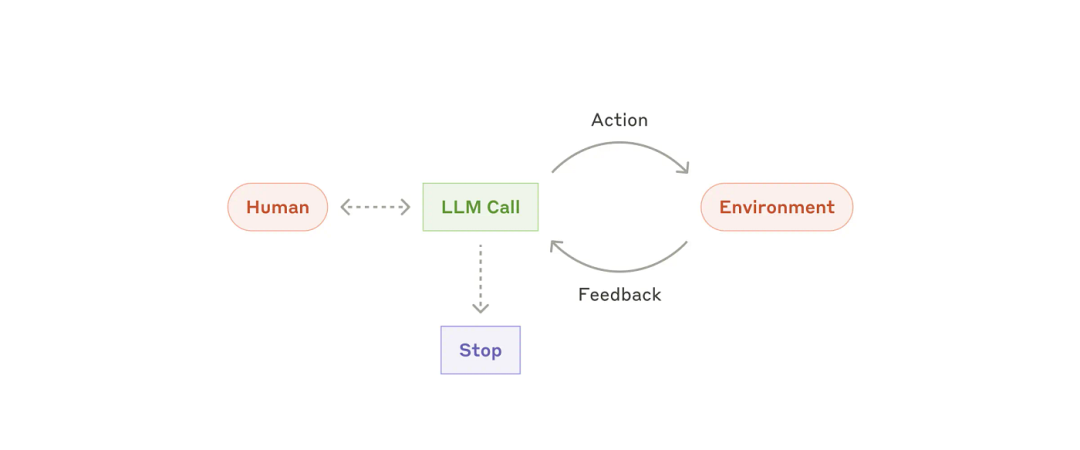
智能体适用于难以预测或无法预测所需步骤数,且无法预先设定固定路径的开放式问题。LLM 可能需要运行很多回合,因此您必须对其决策有一定的信任度。智能体的自主性使其成为在可信环境中扩展任务的理想选择。
智能体的自主性意味着更高的成本,以及潜在的错误累积风险。建议在沙盒环境中进行大量测试,并辅以适当的防护措施。
智能体的例子:
- 用于解决 SWE-bench 任务的编码代理,这些任务涉及根据任务描述对多个文件进行编辑;
- computer use,Claude 使用计算机来完成任务。
from langchain_core.tools import tool
# Define tools
@tool
def multiply(a: int, b: int) -> int:
    """Multiply a and b.
    Args:
        a: first int
        b: second int
    """
    return a * b
@tool
def add(a: int, b: int) -> int:
    """Adds a and b.
    Args:
        a: first int
        b: second int
    """
    return a + b
@tool
def divide(a: int, b: int) -> float:
    """Divide a and b.
    Args:
        a: first int
        b: second int
    """
    return a / b
# Augment the LLM with tools
tools = [add, multiply, divide]
tools_by_name = {tool.name: tool for tool in tools}
llm_with_tools = llm.bind_tools(tools)
六、AI Agents 和 Agentic Workflows组合使用
AI Agents 和 Agentic Workflows是互补的,可以集成起来以实现最佳结果,尤其是在复杂的现实世界应用中:
- 增强自动化 :AI agents自主处理特定任务,而Workflows将这些任务协调成一个连贯、精简的流程。
- 可扩展性 :在结构化的Workflows中组合多个 AI agents,使组织能够高效地扩展运营规模,减少人工投入,并提高生产力。
- 韧性和适应性 :虽然单个AI agents可以应对局部变化,但Workflows会动态调整总体流程,以符合战略目标或适应外部干扰。
例如:制造业中的集成AI agents和Workflows
在智能制造系统中:
- AI agents监控设备性能、预测维护需求并优化生产计划。
- Workflow负责原材料采购、生产排序、质量保证和物流,确保从原材料到产品交付的无缝过渡。
七、结论
在LLM应用领域,成功的关键不在于构建最复杂的系统,而在于构建最符合自身需求的系统。从简单的提示入手,通过全面的评估进行优化,只有在简单的解决方案无法满足需求时,才添加多步骤的智能体系统。
在实现智能体时,尽量遵循三个核心原则:
-
保持代理程序设计的简洁性。
-
通过明确展示代理的规划步骤来提高透明度。
-
通过详尽的工具文档和测试,精心设计代理-计算机接口 (ACI)。
Agent框架可以帮助用户快速入门,但随着项目进入生产环境,请适当减少抽象层的使用,尽量使用基本组件进行构建。遵循这些原则,你可以创建功能强大、可靠、易于维护且深受用户信赖的Agent系统。