一、windows 安装 composer 报SSL错误的问题
因为想使用 composer 更新一下扩展程序包,以精减一下系统,但这次竟然在 Windows11 上安装 Composer 时出现错误,错误如下:
bash
The Composer installer script was not successful [exit code 1].

OpenSSL failed with a 'certificate verify failed' error. This indicates a problem with the Certificate Authority file(s) on your system, which either cannot be found or may be out of date.

Script Output:
The "https://getcomposer.org/versions" file could not be downloaded: SSL operation failed with code 1. OpenSSL Error messages:
error:04091068:rsa routines:INT_RSA_VERIFY:bad signature
error:0D0C5006:asn1 encoding routines:ASN1_item_verify:EVP lib
error:14090086:SSL routines:ssl3_get_server_certificate:certificate verify failed
Failed to enable crypto
failed to open stream: operation failed
根据提示来看是证书的问题,我本地是PHP7.0,启动了openssl扩展,运行正常。除了上面这个错误之外,我在本地执行curl 服务端时也是报一个和 ssl 相关的问题,看起来这两个有关系。
但我已经通过 http://curl.haxx.se/docs/caextract.html 下载证书,在 php.ini 配置中已经配置好了 openssl.cafile 路径等多个路径,在命令行中输出数组也进行验证确实已加载,在curl的时候通过指定 cafile 路径也能看到加载了这个证书文件,但提示证书已过期或失效。可就是在本地执行 curl 远程 https 的时候出现报错,放服务器上执行就正常。ssl报错的内容如下:
bash
[Composer\Downloader\TransportException]
The "https://packagist.org/packages.json" file could not be downloaded: SSL
operation failed with code 1. OpenSSL Error messages:
error:14090086:SSL routines:SSL3_GET_SERVER_CERTIFICATE:certificate verify
failed
Failed to enable crypto
failed to open stream: operation failed
都说是没有安装CA证书导致,但我已更新windows系统上的 openssl,并且在 php 扩展中尝试了几个版本的 php_openssl.dll 文件。php_openssl.dll 文件的下载地址保存在下方:
 https://www.mypcrun.com/file-info-page/php-openssl-dll/
如需要尝试切换可使用。另外 openssl 安装的话可从以下地址下载。安装 openssl : https://slproweb.com/products/Win32OpenSSL.html 。我就不再尝试了,目前是在服务器上执行是没有问题的,本地就显示一下要请求的数据验证即可。我本地 windows11 上在 php7 环境中使用 CURL 时报错内容记录一下 Error: error:04091068:rsa routines:INT_RSA_VERIFY:bad signature
bash
PS E:\06.php\bot> php www/index.php stat test
*   Trying 117.135.156.58...
* TCP_NODELAY set
* Connected to qyapi.weixin.qq.com (117.135.156.58) port 443 (#0)
* ALPN, offering http/1.1
* Cipher selection: ALL:!EXPORT:!EXPORT40:!EXPORT56:!aNULL:!LOW:!RC4:@STRENGTH
* successfully set certificate verify locations:
*   CAfile: E:/middle/Visual-NMP-x64/Bin/PHP/php-7.0.13-nts-Win32-VC14-x64/extras/ssl/cert.pem
  CApath: none
* error:04091068:rsa routines:INT_RSA_VERIFY:bad signature
* Curl_http_done: called premature == 1
* Closing connection 0
2025-11-18 15:19:53 yesterday: CURL Error: error:04091068:rsa routines:INT_RSA_VERIFY:bad signature
PS E:\06.php\bot
二、Windows11上CMD命令下中文总乱码的问题解决
我的本地电脑上 Windows 11 版本,在 CMD 中执行一些程序输出比如 JAVA、php时总是出现中文乱码,之前在其设置里进行了各种测试也未见效。除了使用cmd之外,我也常用git本地端,相对CMD更好用,在GIT本地端上可以进行各种编码等文本设置,但我深度了所有的设置项,都没有把问题解决。
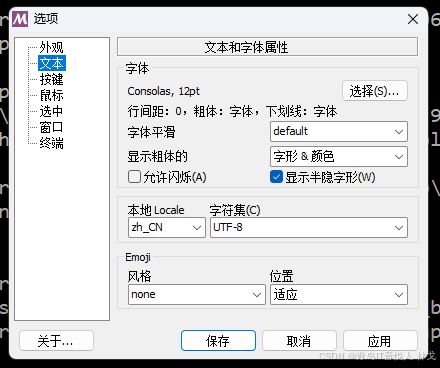
在进行了各项尝试、寻找答案后,终于在一处地方找到了解决方案,亲测有效。需要进入windows11的系统设置-》时间和语言-》语言和区域,如下图所示,将Beta版:使用Unicode UTF-8提供全球语言支持。将这项选中,看来默认就是这里没有选中导致 CMD中根本不支持UTF8,截图如下所示:
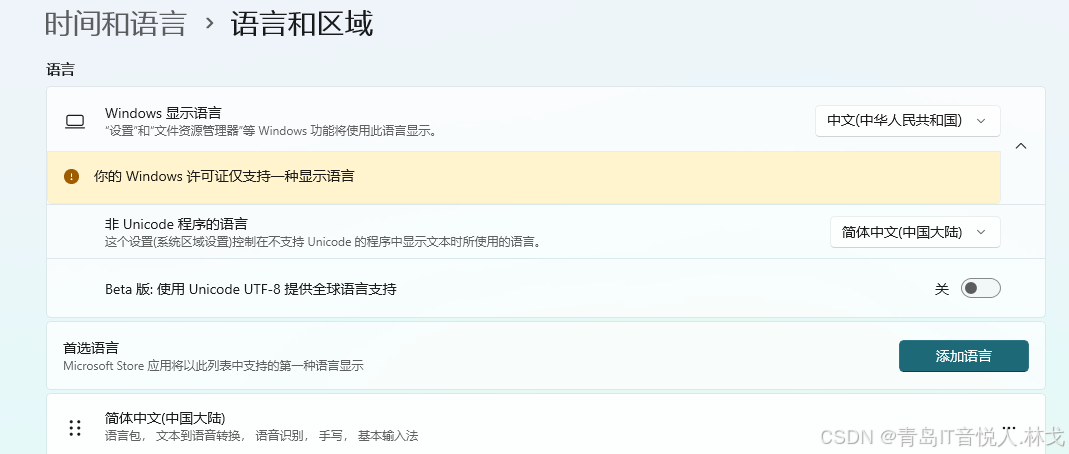
在进行上述修改之后,必须要重启 CMD 或在新的 CMD 窗口中执行。此时我再进入CMD命令行中,执行 chcp 切换一下编码,果然就成功了。记住两个常用的语言编码值。UTF8:65001, GBK:936。进入CMD后使用 chcp 65001 命令和 chcp 936命令分别设置当前CMD命令行中编码,使用 chcp 命令查看当前编码。
三、IDEA双击没有反应 Error opening zip file or JAR manifest missing : jetbra\ja-
最近本地电脑IDEA突然就不好使了,双击没有反应,执行 idea.bat 发现提示:Error opening zip file or JAR manifest missing : F:\1.����洢\Idea\jetbra\ja-netfilter.jar Error occurred during initialization of VM agent library failed to init: instrument。错误内容如下:
PS C:\IDEA2024.1.6\bin> ./idea.bat
Error opening zip file or JAR manifest missing : F:\1.����洢\Idea\jetbra\ja-netfilter.jar
Error occurred during initialization of VM
agent library failed to init: instrument
PS C:\IDEA2024.1.6\bin>
考虑到最近对电脑的修改,除了更新了一下系统注是进行了文章第二段的修改,启用了 UTF8编码,推测很可能是这里导致的,因为我这里的文件夹名称使用了中文,极可能是这里的中文编码变了之后变成了乱码,导致加载 ja-netfilter.jar 文件失败。于是便回撤了"Beta版:使用Unicode UTF-8提供全球语言支持"这项设置,将其关闭,果真生效。于是就想有必要把这里的中文路径名更换一下。查看到我的系统配置中 vm 文件路径均是如此:
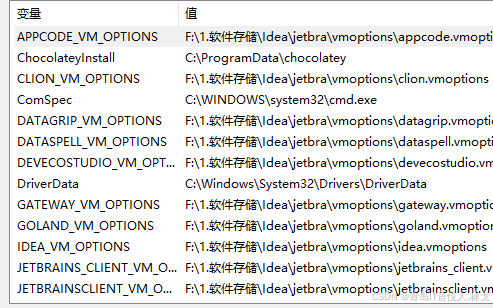
于是将上面的这些中文路径全都进行了替换,并将文章二这段再开始 beta选项,重启电脑后也正常了,问题得到解决。