
在前几篇已经对 Vue2 转 Vue3 做了一个简单了解的过程,本篇就来讲关于 Vue2 到 Vue3 中的父子通信的变化如何的,那么在此之前附上关于 Vue2 中父子通信的篇目,可供读者参阅:
Vue2 父子通信 : 父传子 ------ props | [子传父 ------ emit](https://blog.csdn.net/weixin_52203618/article/details/127560737 "子传父 —— emit")
父传子
在 Vue2 中通过属性绑定的方式,使用props接收实现父传子:
html
<!-- Vue2 -->
--------------------- 父组件start ---------------------

<template>
    <div>
        <child :mytitle="mytitle"><child>
    </div>
</template>
<script>
export default {
    components:{
        child
    },
    data(){
        return{
            mytitle:'第一章'
        }
    }
}
</script>

--------------------- 父组件end -----------------------

--------------------- 子组件start ---------------------

<template>
    <div>
        子组件
        {{ mytitle }}
    </div>
</template>
<script>
export default {
    props:['mytitle'],
    mounted () {
        console.log(this.mytitle)
    }
}
</script>

--------------------- 子组件end -----------------------
以上这块内容实现父传子想必很熟悉了,在前面知道了 Vue2 是通过实例来的 ,所以 this 指向实例并不会有任何问题,而 Vue3 不是通过new类,构造函数而是通过调用函数的方式,所以使用 this 会出现错误,在这之前就讲过了,但props在页面中的显示没有任何问题,问题在于在js操作当中如何能够拿到它才是关键;
html
<!-- App.vue -->
<template>
    <div>
        <childhooks :mytitle="mytitle"></childhooks>
    </div>
</template>

<script>
import { reactive, toRefs } from 'vue'
import childhooks from './components/ChildHooks'
export default {
  components: {
    childhooks
  },
  setup () {
    const state = reactive({
      mytitle: '第一章'
    })
    return { ...toRefs(state) }
  }
}
</script>
html
<!-- ChildHooks -->
<template>
    <div>
        子组件 - {{ mytitle }}
    </div>
</template>

<script>
export default {
  props: ['mytitle']
}
</script>
通过props接收参数 mytitle 在页面上直接来显示显然并没有太大的问题,但在 js 中如何来操作呢?可以如下这样来操作一下:
html
<!-- ChildHooks -->
<template>
    <div>
        子组件 - {{ mytitle }}
        <p>titleName - {{ titleName }}</p>
    </div>
</template>

<script>
import { reactive, toRefs } from 'vue'
export default {
  props: ['mytitle'],
  setup (props) {
    console.log('props', props)
    console.log('props.mytitle', props.mytitle)
    const state = reactive({
      titleName: props.mytitle + ' 第一节'
    })
    return { ...toRefs(state) }
  }
}
</script>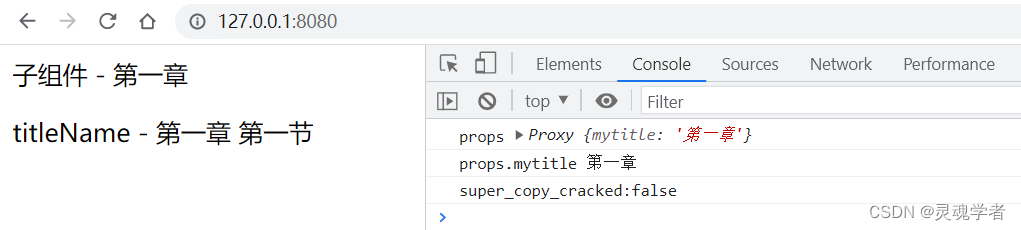
以上这块就是 Vue3 中的父传子了,可以知道的是props传值是正常的,就是在 js 中处理props 中的参数不再是 Vue2 中的 this ;下面来继续看子传父:
子传父
子传父通过$emit,通过事件绑定的方式来完成的,其实如果有了解 Vue2 的子传父基础之上理解的话,拙略的可以理解为换个方式实现;下面来直接上代码:
html
<!-- App.vue -->
<template>
    <div>
        <childhooks @myEmit="sayName"></childhooks>
    </div>
</template>

<script>
import { reactive, toRefs } from 'vue'
import childhooks from './components/ChildHooks'
export default {
  components: {
    childhooks
  },
  setup () {
    const state = reactive({
      myname: '李白'
    })
    const sayName = (age) => {
      console.log('父组件 ------', state.myname, age)
    }
    return { ...toRefs(state), sayName }
  }
}
</script>
html
<!-- ChildHooks.vue -->
<template>
    <div style="border:1px solid green">
        <p>子组件</p>
        <button @click="handleClick">点击触发</button>
    </div>
</template>

<script>
import { reactive, toRefs } from 'vue'
export default {
  setup (props, { emit }) {
    const state = reactive({
      age: 18
    })
    const handleClick = () => {
      emit('myEmit', state.age)
    }
    return { ...toRefs(state), handleClick }
  }
}
</script>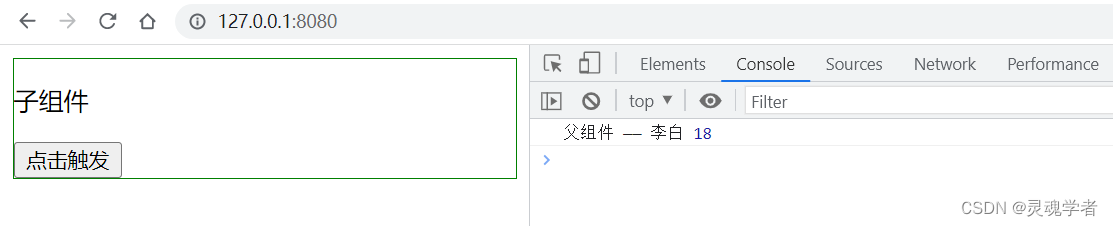
通过这个例子显然可以一下就了解知道它的大概内容了,以上的这块内容就是 Vue3 中的父子通信了,对于 Vue3 中的父子通信并没有向之前的 Vue2 单独的一块一块拿出来,主要是在理解和掌握 Vue2 的基础上,对于 Vue3 的内容可以做一个比较的学习,这样一来更能够加快和理解里面的内容!那么本篇就到此结束,感谢大家的支持,下期再见!!!
