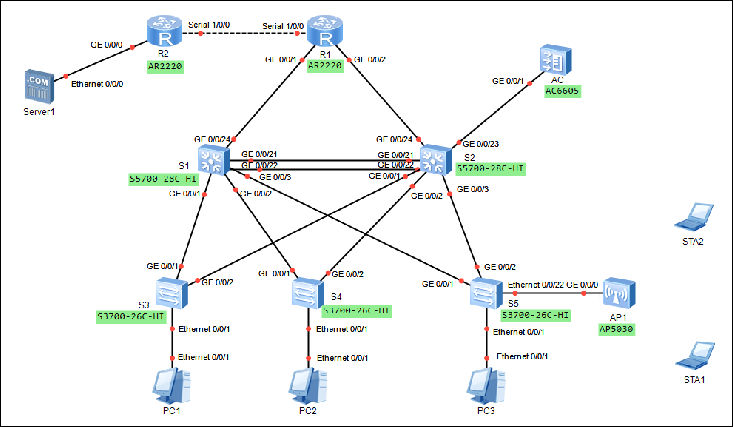
园区网络综合实训网络拓扑图
设备说明表
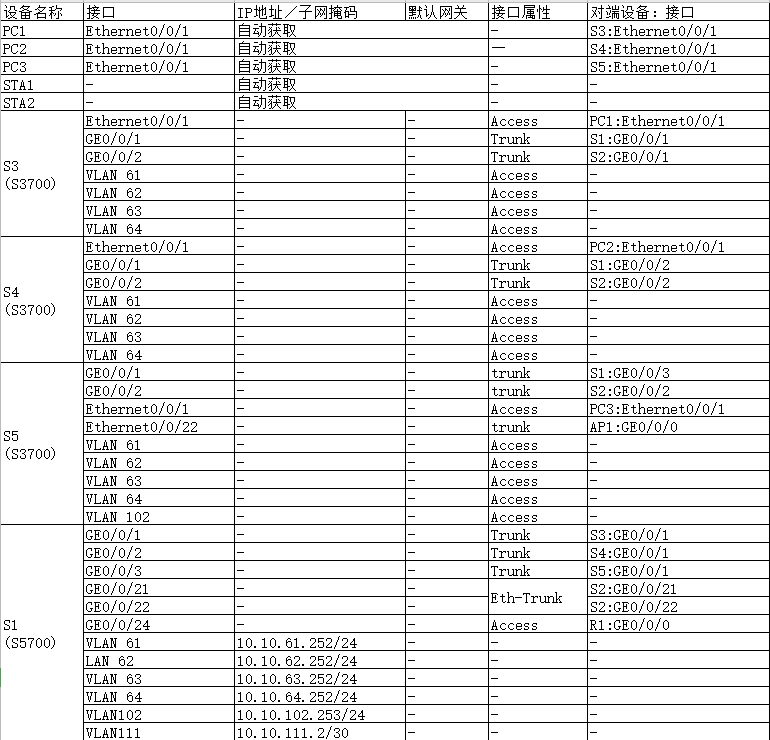
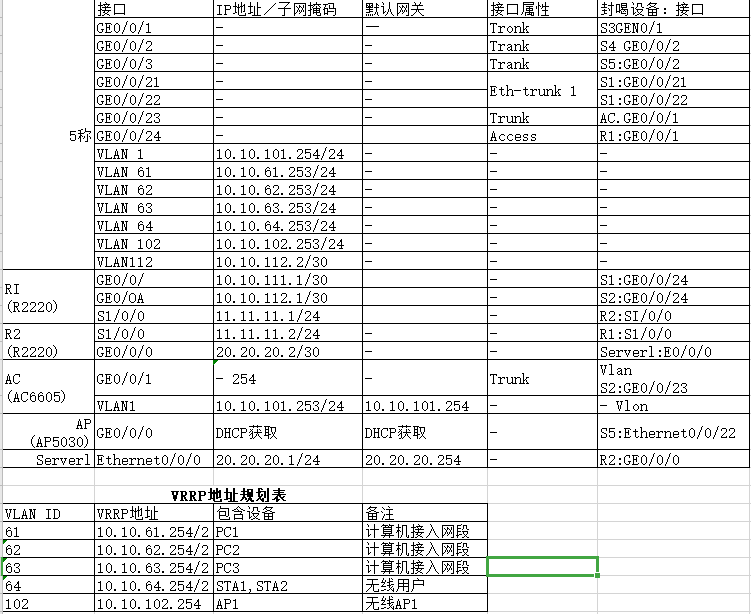
具体要求如下:
(1)根据网络拓扑图添加相应的设备,路由器之间使用Serial串口线,其他连线全部使用直通线连接所有设备,标明所连接的接口名称。
(2)开启所有的路由器、服务器和计算机。
(3)该企业内网S1和S2核心交换机互为备份,实现链路聚合,设备冗余设计,核心交换机通过路由器R1与互联网连通。
(4)路由器R1与路由器R2通过PPP链路连接,启用PPP协议的CHAP认证功能,路由器R2为认证方,路由器R1被认证方,用户名使用路由器名称,认证加密类型密钥为:123456。
(5)路由器R1与路由器R2之间不配置路由协议,可通过默认路由配置实现网络通信。
(6)路由器R1上配置NAT地址转换,使内部计算机能访问互联网服务器Server1。
(7)所有VLAN的网关在核心交换机上实现,S1和S2核心交换机与路由器R1通过OSPF实现路由互通,认证模式和秘钥采用md5 1 ciper gd。
(8)在S1和S2核心交换机上分别配置DHCP服务,实现高可用的DHCP服务器双机热备,使得客户端都可以动态获取正确的IP地址。
(9)在S1和S2核心交换机启用VRRP协议,并且配置使VLAN 61、VLAN 62数据流默认通过S1转发,VLAN 63、VLAN 64数据流默认通过S2转发。
(10)整个网络启用MSTP多生成树,设置S1作为生成树实例1的根,配置VLAN 61、VLAN 62参与生成树实例1,配置S2作为生成树实例2的根,配置VLAN 63、VLAN 64参与生成树实例2。 (11)S3、S4和S5交换机作为接入层交换机,分别连接VLAN 61、VLAN 62、VLAN 63虚拟局域网。
(12)无线AC控制器连接到S2核心交换机的GE0/0/23端口上,无线控制参数自定义。VLAN 64是无线局域网业务网段,通过AP1与S5的Ethernet0/0/22端口连接。使得无线客户端可以动态获取正确的IP地址,并能访问互联网服务器Server1。
任务实施:
1、交换机的基础配置
S3:
sysname S3
undo info-center enable
vlan batch 61 to 64
interface Ethernet0/0/1
port link-type access
port default vlan 61
interface GigabitEthernet0/0/1
port link-type trunk
port trunk allow-pass vlan 61 to 64
interface GigabitEthernet0/0/2
port link-type trunk
port trunk allow-pass vlan 61 to 64
S4:
sysname S4
undo info-center enable
vlan batch 61 to 64
interface Ethernet0/0/1
port link-type access
port default vlan 62
interface GigabitEthernet0/0/1
port link-type trunk
port trunk allow-pass vlan 61 to 64
interface GigabitEthernet0/0/2
port link-type trunk
port trunk allow-pass vlan 61 to 64
S5:
sysname S5
undo info-center enable
vlan batch 61 to 64 102
interface Ethernet0/0/1
port link-type access
port default vlan 63
interface Ethernet0/0/22
port link-type trunk
port trunk pvid vlan 102
port trunk allow-pass vlan 64 102
interface GigabitEthernet0/0/1
port link-type trunk
port trunk allow-pass vlan 61 to 64 102
interface GigabitEthernet0/0/2
port link-type trunk
port trunk allow-pass vlan 61 to 64 102
S1:
sysname S1
undo info-center enable
vlan batch 61 to 64 102 111
interface GigabitEthernet0/0/1
port link-type trunk
port trunk allow-pass vlan 61 to 64
interface GigabitEthernet0/0/2
port link-type trunk
port trunk allow-pass vlan 61 to 64
interface GigabitEthernet0/0/3
port link-type trunk
port trunk allow-pass vlan 61 to 64 102
interface GigabitEthernet0/0/24
port link-type access
port default vlan 111
interface Vlanif61
ip address 10.10.61.252 255.255.255.0
interface Vlanif62
ip address 10.10.62.252 255.255.255.0
interface Vlanif63
ip address 10.10.63.252 255.255.255.0
interface Vlanif64
ip address 10.10.64.252 255.255.255.0
interface Vlanif102
ip address 10.10.102.252 255.255.255.0
interface Vlanif111
ip address 10.10.111.2 255.255.255.252
S2:
sysname S2
undo info-center enable
vlan batch 61 to 64 102 112
interface GigabitEthernet0/0/1
port link-type trunk
port trunk allow-pass vlan 61 to 64
interface GigabitEthernet0/0/2
port link-type trunk
port trunk allow-pass vlan 61 to 64
interface GigabitEthernet0/0/3
port link-type trunk
port trunk allow-pass vlan 61 102
interface GigabitEthernet0/0/23
port link-type trunk
port trunk allow-pass vlan 64 102
interface GigabitEthernet0/0/24
port link-type access
port default vlan 112
interface Vlanif1
ip address 10.10.101.254 255.255.255.0
interface Vlanif61
ip address 10.10.61.253 255.255.255.0
interface Vlanif62
ip address 10.10.62.253 255.255.255.0
interface Vlanif63
ip address 10.10.63.253 255.255.255.0
interface Vlanif64
ip address 10.10.64.253 255.255.255.0
interface Vlanif102
ip address 10.10.102.253 255.255.255.0
interface Vlanif112
ip address 10.10.112.2 255.255.255.252
2、交换机的Eth-Trunk 配置
S1:
interface Eth-Trunk1
port link-type trunk
port trunk allow-pass vlan 61 to 64 102
interface GigabitEthernet0/0/21
eth-trunk 1
interface GigabitEthernet0/0/22
eth-trunk 1
S2:
interface Eth-Trunk1
port link-type trunk
port trunk allow-pass vlan 61 to 64 102
interface GigabitEthernet0/0/21
eth-trunk 1
interface GigabitEthernet0/0/22
eth-trunk 1
3、交换机的MSTP配置
S1:
stp instance 1 priority 4096
stp instance 2 priority 0
stp region-configuration
region-name test
revision-level 1
instance 1 vlan 61 to 62
instance 2 vlan 63 to 64 102
active region-configuration
S2:
stp instance 1 priority 0
stp instance 2 priority 4096
stp region-configuration
region-name test
revision-level 1
instance 1 vlan 61 to 62
instance 2 vlan 63 to 64 102
active region-configuration
S3:
stp region-configuration
region-name test
revision-level 1
instance 1 vlan 61 to 62
instance 2 vlan 63 to 64
active region-configuration
S4:
stp region-configuration
region-name test
revision-level 1
instance 1 vlan 61 to 62
instance 2 vlan 63 to 64
active region-configuration
S5:
stp region-configuration
region-name test
revision-level 1
instance 1 vlan 61 to 62
instance 2 vlan 63 to 64 102
active region-configuration
4、在交换机上配置DHCP服务
S1:
dhcp enable
ip pool ap-vlan102
gateway-list 10.10.102.254
network 10.10.102.0 mask 255.255.255.0
excluded-ip-address 10.10.102.252 10.10.102.253
dns-list 114.114.114.144
option 43 sub-option 3 ascii 10.10.101.253
ip pool vlan61
gateway-list 10.10.61.254
network 10.10.61.0 mask 255.255.255.0
excluded-ip-address 10.10.61.252 10.10.61.253
dns-list 114.114.114.144
ip pool vlan62
gateway-list 10.10.62.254
network 10.10.62.0 mask 255.255.255.0
excluded-ip-address 10.10.62.252 10.10.62.253
dns-list 114.114.114.144
ip pool vlan63
gateway-list 10.10.63.254
network 10.10.63.0 mask 255.255.255.0
excluded-ip-address 10.10.63.252 10.10.63.253
dns-list 114.114.114.144
ip pool vlan64
gateway-list 10.10.64.254
network 10.10.64.0 mask 255.255.255.0
excluded-ip-address 10.10.64.252 10.10.64.253
dns-list 114.114.114.144
S2:
dhcp enable
ip pool ap-vlan102
gateway-list 10.10.102.254
network 10.10.102.0 mask 255.255.255.0
excluded-ip-address 10.10.102.252 10.10.102.253
dns-list 114.114.114.144
option 43 sub-option 3 ascii 10.10.101.253
ip pool vlan61
gateway-list 10.10.61.254
network 10.10.61.0 mask 255.255.255.0
excluded-ip-address 10.10.61.252 10.10.61.253
dns-list 114.114.114.144
ip pool vlan62
gateway-list 10.10.62.254
network 10.10.62.0 mask 255.255.255.0
excluded-ip-address 10.10.62.252 10.10.62.253
dns-list 114.114.114.144
ip pool vlan63
gateway-list 10.10.63.254
network 10.10.63.0 mask 255.255.255.0
excluded-ip-address 10.10.63.252 10.10.63.253
dns-list 114.114.114.144
ip pool vlan64
gateway-list 10.10.64.254
network 10.10.64.0 mask 255.255.255.0
excluded-ip-address 10.10.64.252 10.10.64.253
dns-list 114.114.114.144
5、交换机的VRRP配置
S1:(提示:IP地址前面基础配置已经配置过)
interface Vlanif61
ip address 10.10.61.252 255.255.255.0
vrrp vrid 61 virtual-ip 10.10.61.254
vrrp vrid 61 priority 120
vrrp vrid 61 track interface GigabitEthernet0/0/24 reduced 30
dhcp select global
interface Vlanif62
ip address 10.10.62.252 255.255.255.0
vrrp vrid 62 virtual-ip 10.10.62.254
vrrp vrid 62 priority 120
vrrp vrid 62 track interface GigabitEthernet0/0/24 reduced 30
dhcp select global
interface Vlanif63
ip address 10.10.63.252 255.255.255.0
vrrp vrid 63 virtual-ip 10.10.63.254
dhcp select global
interface Vlanif64
ip address 10.10.64.252 255.255.255.0
vrrp vrid 64 virtual-ip 10.10.64.254
dhcp select global
interface Vlanif102
ip address 10.10.102.252 255.255.255.0
dhcp select global
S2:
interface Vlanif61
ip address 10.10.61.253 255.255.255.0
vrrp vrid 61 virtual-ip 10.10.61.254
dhcp select global
interface Vlanif62
ip address 10.10.62.253 255.255.255.0
vrrp vrid 62 virtual-ip 10.10.62.254
dhcp select global
interface Vlanif63
ip address 10.10.63.253 255.255.255.0
vrrp vrid 63 virtual-ip 10.10.63.254
vrrp vrid 63 priority 120
vrrp vrid 63 track interface GigabitEthernet0/0/24 reduced 30
dhcp select global
interface Vlanif64
ip address 10.10.64.253 255.255.255.0
vrrp vrid 64 virtual-ip 10.10.64.254
vrrp vrid 64 priority 120
vrrp vrid 64 track interface GigabitEthernet0/0/24 reduced 30
dhcp select global
interface Vlanif102
ip address 10.10.102.253 255.255.255.0
vrrp vrid 102 virtual-ip 10.10.102.254
vrrp vrid 102 priority 120
vrrp vrid 102 track interface GigabitEthernet0/0/24 reduced 30
dhcp select global
6、交换机的路由配置
S1:
ospf 1
area 0.0.0.0
authentication-mode md5 1 cipher 0kS7<~]PR2G%*%)tS)cGV6+#
network 10.10.111.0 0.0.0.3
network 10.10.61.0 0.0.0.255
network 10.10.62.0 0.0.0.255
network 10.10.63.0 0.0.0.255
network 10.10.64.0 0.0.0.255
network 10.10.102.0 0.0.0.255
S2:
ospf 1
area 0.0.0.0
authentication-mode md5 1 cipher Vf05+'x/};sPddVIN=17:8<#
network 10.10.112.0 0.0.0.3
network 10.10.61.0 0.0.0.255
network 10.10.62.0 0.0.0.255
network 10.10.63.0 0.0.0.255
network 10.10.64.0 0.0.0.255
network 10.10.102.0 0.0.0.255
7、路由器的基本配置
R1:
sysname R1
interface Serial1/0/0
ip address 11.11.11.1 255.255.255.252
interface GigabitEthernet0/0/1
ip address 10.10.111.1 255.255.255.252
interface GigabitEthernet0/0/2
ip address 10.10.112.1 255.255.255.252
R2:
sysname R2
interface Serial1/0/0
ip address 11.11.11.2 255.255.255.252
interface GigabitEthernet0/0/0
ip address 20.20.20.254 255.255.255.0
8、路由器的PPP配置
R1:(PPP被认证方)
interface Serial1/0/0
link-protocol ppp
ppp chap user R1
ppp chap password cipher 123456
R2:(PPP认证方)
interface Serial1/0/0
link-protocol ppp
ppp authentication-mode chap
local-user r1 password cipher 123456
local-user r1 service-type ppp
9、路由器的路由和NAT配置
R1:
ip route-static 0.0.0.0 0.0.0.0 Serial1/0/0
ospf 1
default-route-advertise always
area 0.0.0.0
authentication-mode md5 1 cipher %%|A4iLF%{t7R&w2JGZNA5j>v+%%
network 10.10.111.0 0.0.0.3
network 10.10.112.0 0.0.0.3
acl 2000
rule permit source 10.10.0.0 0.0.255.255
interface Serial1/0/0
nat outbound 2000
10、查询无线AP的MAC地址
AP:
<ap>dis sys
System Information
===============================================
Serial Number :
System Time : 2025-12-03 07:46:12
System Up time : 1hour 28min 28sec
System Name : ap
Country Code : CN
MAC Address : 00:e0:fc:88:78:c0
11、无线控制器AC的配置
(1)基本配置
sysname AC
interface Vlanif1
ip address 10.10.101.253 255.255.255.0
interface GigabitEthernet0/0/1
port link-type trunk
port trunk allow-pass vlan 2 to 4094
ip route-static 0.0.0.0 0.0.0.0 10.10.101.254
(2)配置AP上线