功能一、一次只能搜索一个图例
效果一:
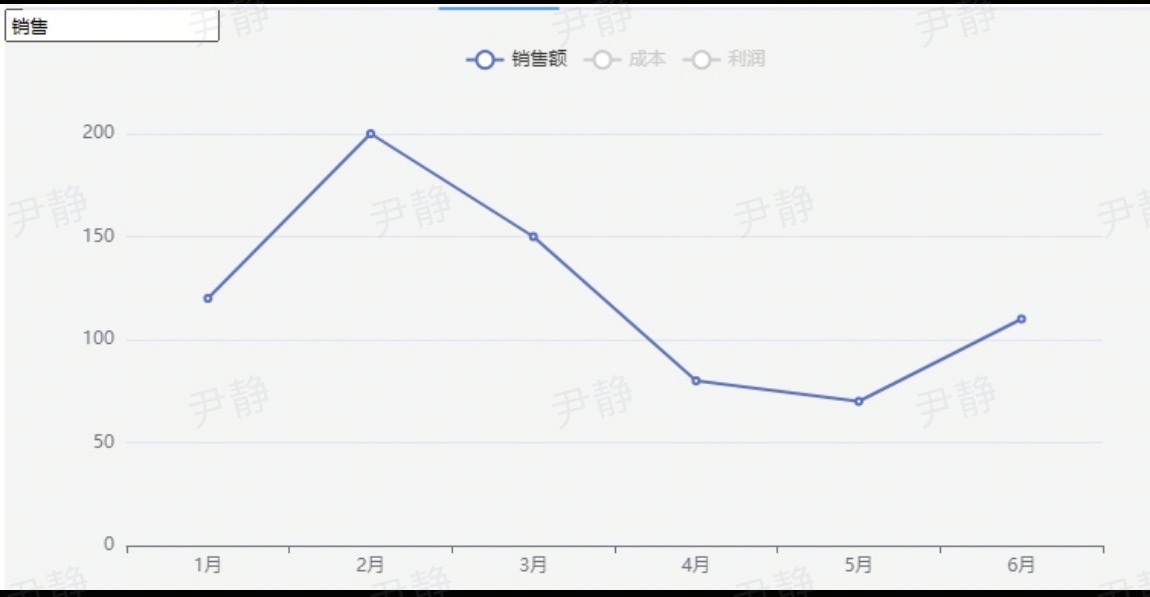
代码:
<template>
  <div class="chart-container">
    <input
      v-model="searchKeyword"
      placeholder="输入关键词搜索图例"
      @input="handleSearch"
    />
    <!-- 确保 ref 名称正确且元素存在 -->
    <div ref="chart" style="width: 800px; height: 400px;"></div>
  </div>
</template>

<script>
// 正确引入 echarts
import * as echarts from 'echarts';

export default {
  data() {
    return {
      searchKeyword: '',
      chartInstance: null, // 存储图表实例
      option: {
        legend: {
          data: ['销售额', '成本', '利润'],
          selected: {} // 初始化 selected 对象
        },
        xAxis: { type: 'category', data: ['1月', '2月', '3月', '4月', '5月', '6月'] },
        yAxis: { type: 'value' },
        series: [
          { name: '销售额', type: 'line', data: [120, 200, 150, 80, 70, 110] },
          { name: '成本', type: 'line', data: [80, 120, 100, 60, 50, 90] },
          { name: '利润', type: 'line', data: [40, 80, 50, 20, 20, 20] }
        ]
      }
    };
  },
  mounted() {
    // 确保在 mounted 钩子中初始化图表
    this.initChart();
  },
  beforeDestroy() {
    // 销毁图表实例
    if (this.chartInstance) {
      this.chartInstance.dispose();
    }
  },
  methods: {
    initChart() {
      // 确保 DOM 元素已渲染
      if (this.$refs.chart) {
        // 初始化图表
        this.chartInstance = echarts.init(this.$refs.chart);
        // 设置默认选中所有图例
        this.option.legend.selected = this.option.legend.data.reduce((acc, name) => {
          acc[name] = true;
          return acc;
        }, {});
        // 渲染图表
        this.chartInstance.setOption(this.option);
      } else {
        console.error('DOM 元素未找到,请检查 ref="chart"');
      }
    },
    handleSearch() {
      const keyword = this.searchKeyword.trim().toLowerCase();
      const newSelected = this.option.legend.data.reduce((acc, name) => {
        acc[name] = name.toLowerCase().includes(keyword);
        return acc;
      }, {});
      // 更新图例显隐状态
      this.chartInstance.setOption({
        legend: { selected: newSelected }
      });
    }
  }
};
</script>
功能二、一次可以搜索多个图例,以英文逗号分隔
效果展示:
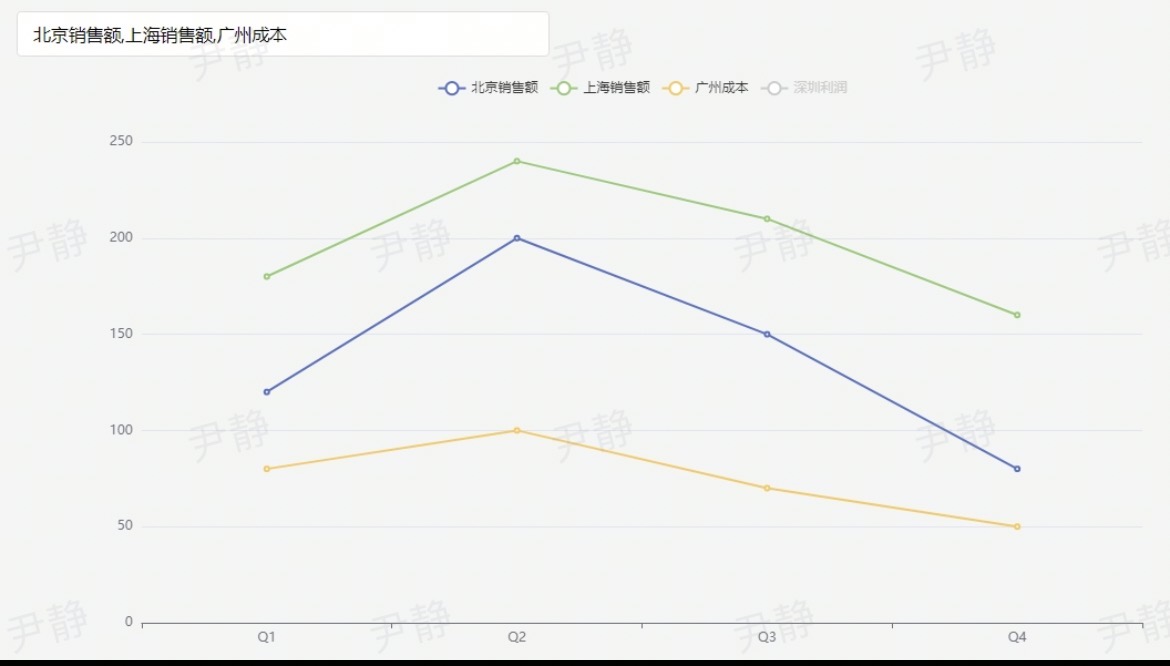
代码:
<template>
  <div class="chart-container">
    <input
      v-model="searchKeywords"
      placeholder="请输入图例名称,多个关键词以英文逗号分隔"
      class="search-input"
      @input="handleSearch"
    />
    <div ref="chart" class="chart"></div>
  </div>
</template>

<script>
import * as echarts from 'echarts';

export default {
  data() {
    return {
      searchKeywords: '',      // 搜索关键词(支持逗号分隔)
      chartInstance: null,     // ECharts 实例
      baseOption: {            // 图表基础配置
        legend: {
          data: ['北京销售额', '上海销售额', '广州成本', '深圳利润'],
          selected: {}
        },
        xAxis: { type: 'category', data: ['Q1', 'Q2', 'Q3', 'Q4'] },
        yAxis: { type: 'value' },
        series: [
          { name: '北京销售额', type: 'line', data: [120, 200, 150, 80] },
          { name: '上海销售额', type: 'line', data: [180, 240, 210, 160] },
          { name: '广州成本', type: 'line', data: [80, 100, 70, 50] },
          { name: '深圳利润', type: 'line', data: [40, 80, 60, 30] }
        ]
      }
    };
  },
  mounted() {
    this.initChart();
  },
  beforeDestroy() {
    if (this.chartInstance) {
      this.chartInstance.dispose();
    }
  },
  methods: {
    // 初始化图表
    initChart() {
      this.chartInstance = echarts.init(this.$refs.chart);
      // 默认全部显示
      const initialSelected = this.baseOption.legend.data.reduce((acc, name) => {
        acc[name] = true;
        return acc;
      }, {});
      this.baseOption.legend.selected = initialSelected;
      this.chartInstance.setOption(this.baseOption);
    },

    // 处理搜索输入(支持逗号分隔多个关键词)
    handleSearch() {
      // 分割关键词并处理格式
      const keywords = this.searchKeywords
        .split(',')
        .map(k => k.trim().toLowerCase())
        .filter(k => k !== '');

      // 生成新的 selected 对象(任一关键词匹配即显示)
      const newSelected = this.baseOption.legend.data.reduce((acc, name) => {
        const nameLower = name.toLowerCase();
        acc[name] = keywords.length === 0 || keywords.some(k => nameLower.includes(k));
        return acc;
      }, {});

      // 更新图表
      this.chartInstance.setOption({
        legend: { selected: newSelected }
      });
    }
  }
};
</script>

<style scoped>
.chart-container {
  width: 1000px;
  margin: 20px auto;
}
.search-input {
  width: 400px;
  padding: 8px 12px;
  margin-bottom: 15px;
  border: 1px solid #ddd;
  border-radius: 4px;
  font-size: 14px;
}
.chart {
  width: 100%;
  height: 500px;
}
</style>