欢迎大家加入开源鸿蒙跨平台开发者社区,一起共建开源鸿蒙跨平台生态。
概述
提醒管理系统用于帮助用户记住重要的事项,如保养提醒、检查提醒等。本文将详细讲解如何在Cordova&OpenHarmony框架中实现一个完整的提醒管理系统,包括提醒创建、显示和完成标记。
提醒数据结构
提醒包含内容、到期日期、状态等信息。
javascript
const reminder = {
    id: 1,
    vehicleId: 1,
    content: '检查轮胎气压',
    type: 'maintenance',
    dueDate: '2024-03-20',
    status: 'pending',
    priority: 'high'
};
这个数据结构定义了提醒的基本属性。vehicleId用于关联到特定的车辆,content是提醒的具体内容,type表示提醒类型,dueDate记录到期日期,status表示提醒的状态(待处理、已完成等),priority表示优先级。这样的结构设计使得我们可以灵活地管理各种提醒。
提醒列表展示
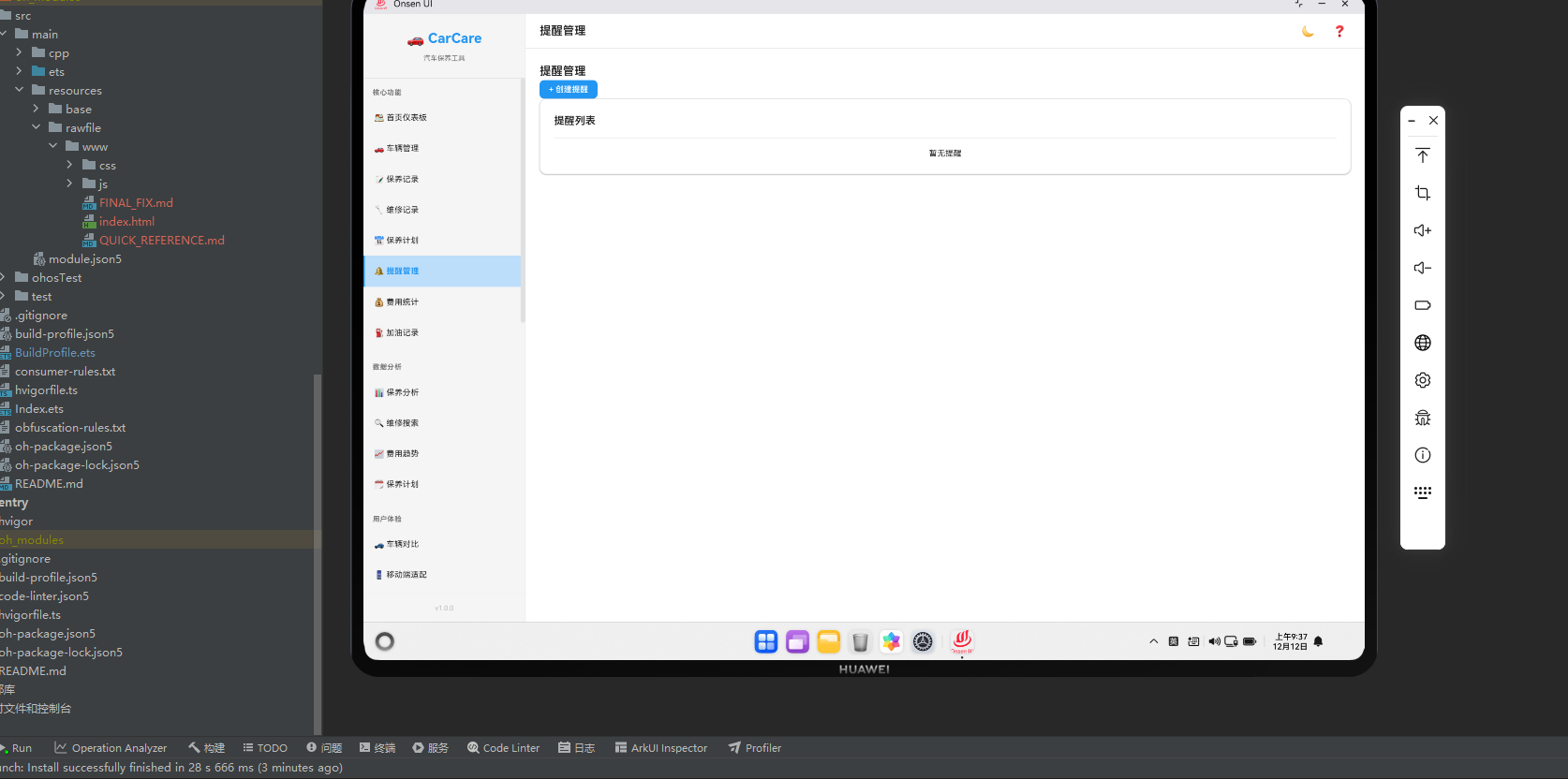
提醒管理页面需要展示所有的提醒,并按照优先级和到期日期进行排序。
javascript
async renderReminders() {
    const reminders = await db.getAll('reminders');
    const sorted = reminders.sort((a, b) => {
        const priorityOrder = { high: 0, medium: 1, low: 2 };
        return priorityOrder[a.priority] - priorityOrder[b.priority];
    });

    return `
        <div class="reminders-container">
            <div class="page-header">
                <h2 class="page-title">提醒管理</h2>
                <button class="btn btn-primary" onclick="app.showAddReminderModal()">+ 创建提醒</button>
            </div>
            <div class="card">
                <div class="card-header">
                    <h3 class="card-title">提醒列表</h3>
                </div>
                <div class="card-body">
                    ${sorted.map(reminder => \`
                        <div class="list-item">
                            <div class="list-item-content">
                                <div class="list-item-title">\${reminder.content || reminder.type}</div>
                                <div class="list-item-subtitle">
                                    \${Utils.formatDate(reminder.dueDate)} -
                                    <span class="badge \${reminder.status === 'completed' ? 'badge-success' : 'badge-warning'}">
                                        \${reminder.status === 'completed' ? '已完成' : '待处理'}
                                    </span>
                                </div>
                            </div>
                        </div>
                    \`).join('') || '<p class="text-center">暂无提醒</p>'}
                </div>
            </div>
        </div>
    `;
}
这段代码展示了如何从数据库中获取所有提醒并将其渲染为列表。我们首先按照优先级对提醒进行排序,确保高优先级的提醒显示在前面。然后,我们使用map方法遍历提醒数组并生成HTML。每个提醒都显示其内容、到期日期和状态。在Cordova框架中,这种排序和渲染方式是标准做法。
创建提醒
用户需要能够创建新的提醒。
javascript
showAddReminderModal() {
    const modalHTML = `
        <div class="modal">
            <div class="modal-content">
                <h3>创建提醒</h3>
                <form id="addReminderForm">
                    <input type="text" placeholder="提醒内容" id="content" required>
                    <select id="type" required>
                        <option value="">选择提醒类型</option>
                        <option value="maintenance">保养提醒</option>
                        <option value="inspection">检查提醒</option>
                        <option value="payment">支付提醒</option>
                        <option value="other">其他</option>
                    </select>
                    <input type="date" id="dueDate" required>
                    <select id="priority" required>
                        <option value="low">低优先级</option>
                        <option value="medium" selected>中优先级</option>
                        <option value="high">高优先级</option>
                    </select>
                    <button type="submit" class="btn btn-primary">创建</button>
                    <button type="button" class="btn btn-secondary" onclick="app.closeModal()">取消</button>
                </form>
            </div>
        </div>
    `;
    document.getElementById('modalContainer').innerHTML = modalHTML;
}
这段代码展示了如何创建一个添加提醒的模态框。模态框包含了提醒内容、类型、到期日期和优先级等输入字段。用户可以根据自己的需要创建不同的提醒。在Cordova应用中,这种模态框设计是标准做法。
提醒数据保存
当用户提交表单后,我们需要将提醒保存到数据库中。
javascript
async saveReminder(formData) {
    const reminder = {
        vehicleId: this.currentVehicleId,
        content: formData.content,
        type: formData.type,
        dueDate: formData.dueDate,
        status: 'pending',
        priority: formData.priority
    };

    await db.add('reminders', reminder);
    this.renderPage('reminders');
}
这段代码展示了如何将用户创建的提醒保存到数据库。首先,我们从表单数据中提取各个字段,然后创建一个提醒对象。接着,我们使用db.add方法将提醒添加到数据库中。最后,我们重新渲染提醒管理页面。这种处理流程在Cordova应用中非常常见。
标记提醒完成
用户需要能够标记提醒为已完成。
javascript
async markReminderComplete(reminderId) {
    const reminder = await db.get('reminders', reminderId);
    reminder.status = 'completed';
    reminder.completedDate = new Date().toISOString().split('T')[0];

    await db.update('reminders', reminder);
    this.renderPage('reminders');
}
这段代码展示了如何标记一个提醒为已完成。首先,我们从数据库中获取指定的提醒,然后将其状态更新为"已完成"。接着,我们记录完成的日期。最后,我们将更新后的提醒保存到数据库中。这种处理流程在Cordova应用中非常常见。
删除提醒
用户需要能够删除不需要的提醒。
javascript
async deleteReminder(reminderId) {
    if (confirm('确定要删除这个提醒吗?')) {
        await db.delete('reminders', reminderId);
        this.renderPage('reminders');
    }
}
这段代码展示了如何删除一个提醒。首先,我们显示一个确认对话框,确保用户确实想要删除该提醒。如果用户确认,我们就从数据库中删除该提醒,然后重新渲染提醒管理页面。这种删除流程在Cordova应用中非常常见。
提醒通知
系统需要在提醒到期时通知用户。
javascript
async checkReminderNotifications() {
    const reminders = await db.getAll('reminders');
    const today = new Date().toISOString().split('T')[0];

    const dueReminders = reminders.filter(reminder =>
        reminder.dueDate === today && reminder.status === 'pending'
    );

    dueReminders.forEach(reminder => {
        this.showNotification(reminder.content, reminder.type);
    });
}

showNotification(title, message) {
    if ('Notification' in window) {
        new Notification(title, {
            body: message,
            icon: '/images/notification-icon.png'
        });
    }
}
这段代码展示了如何实现提醒通知功能。我们首先获取所有提醒,然后过滤出今天到期且未完成的提醒。对于每个到期的提醒,我们使用Notification API显示一个通知。这种通知机制在Cordova应用中非常常见,它帮助用户及时了解重要事项。
提醒统计
系统需要统计提醒的各种数据。
javascript
async getReminderStats() {
    const reminders = await db.getAll('reminders');

    const stats = {
        total: reminders.length,
        pending: reminders.filter(r => r.status === 'pending').length,
        completed: reminders.filter(r => r.status === 'completed').length,
        overdue: reminders.filter(r => {
            const daysUntil = Utils.daysBetween(new Date(), r.dueDate);
            return daysUntil < 0 && r.status === 'pending';
        }).length
    };

    return stats;
}
这段代码展示了如何计算提醒的统计数据。我们计算总提醒数、待处理提醒数、已完成提醒数和逾期提醒数。这种统计功能在Cordova应用中非常常见,它帮助用户了解提醒的整体情况。
OpenHarmony中的提醒管理
在OpenHarmony系统中,提醒管理需要通过Cordova插件与原生系统进行交互。
typescript
export function SetCordovaProtocolUrl(url:string) {
  cordova.SetCordovaProtocolUrl(url);
}
这段ArkTS代码展示了如何在OpenHarmony系统中设置Cordova协议URL。通过SetCordovaProtocolUrl函数,我们可以配置Cordova应用的协议URL,用于处理特定的请求。这种机制在OpenHarmony系统中非常重要,它使得Cordova应用能够与原生系统进行深度集成。
总结
提醒管理系统是Cordova&OpenHarmony应用的重要功能。通过合理的数据结构设计、提醒创建和通知机制,我们可以创建一个功能完整、用户体验良好的提醒系统。在OpenHarmony系统中,通过Cordova框架的集成,我们可以充分利用原生系统的特性。