WebSocket
一、聊天技术介绍
有在线聊天、或者消息推送功能的项目
追求开发速度+低成本:自己实现聊天服务器、使用WebSocket
追求性能+保密:自己实现,netty
追求开发速度+性能:第三方
聊天房间:IM(环信、网易云信)
推送:SSE
1、Netty
-
异步事件驱动
-
支持多种网络协议
-
适用于高性能和高并发场景
2、WebSocket
-
单个TCP连接
-
实时双向通道,客户端和服务端可以互相发送消息
-
专门为了Web应用设计
3、SSE
-
基于HTTP的服务器推送技术
-
服务器向客户单向推送
-
更简单、更轻量级
二、SpringBoot + WebSocket
1、为什么要用WebSocket
-
如果需要实现即时通讯功能,就需要服务器向客户端推送消息,建立双向通道。
-
WebSocket是建立在TCP协议之上的,实现比较容易。
-
请求建立在HTTP协议之上,不容易被屏蔽
-
数据格式轻量,性能开销小。
-
可以发送文本(JSON字符串和普通字符串)
-
可以发送二进制数据(音频、图片等)
-
容易与SpringBoot集成
-
简化开发,在不知道底层网络原理的情况下,一样使用WebSocket
-
被大多数浏览器原生支持
2、搭建环境
- 引入依赖
仅仅在mobile-api中引入
        <dependency>
            <groupId>org.springframework.boot</groupId>
            <artifactId>spring-boot-starter-websocket</artifactId>
</dependency>- 创建配置类
@Configuration
public class WebSocketConfig {
    //Bean注册,自动注册@ServerEndpoint注解的生命
    //Web socket Endpoint  端点
    //让端点注册成为Bean
    @Bean
    public ServerEndpointExporter serverEndpointExporter(){
        return new ServerEndpointExporter();
    }
}- 获取Bean的工具类
使用这个工具类,可以在Spring容器外部,获取Bean对象
import org.springframework.beans.BeansException;
import org.springframework.context.ApplicationContext;
import org.springframework.context.ApplicationContextAware;
import org.springframework.stereotype.Component;
@Component
public class SpringContextUtil implements ApplicationContextAware {
private static ApplicationContext context;
@Override
public void setApplicationContext(ApplicationContext applicationContext) throws BeansException {
//在SpringBoot项目启动的时候执行,传入的参数是Spring的容器对象
context = applicationContext;
}
public static <T> T getBean(Class<T> beanClass){
return context.getBean(beanClass);
}
}- 测试接口
package com.javasm.qingqing.websocket;
import jakarta.websocket.*;
import jakarta.websocket.server.ServerEndpoint;
import org.springframework.stereotype.Component;
import java.io.IOException;
import java.nio.ByteBuffer;
@Component
@ServerEndpoint("/test/socket")
public class TestSocket {
//import jakarta.websocket.Session;
//连接成功之后,执行的方法
@OnOpen
public void open(Session session){
//如果想接收二进制数据,需要再单独设置一下二进制数据的缓冲区,
//如果不设置是无法接收文件的
session.setMaxBinaryMessageBufferSize(1024 * 1024 * 100);
System.out.println("==========获取连接========="+session);
}
//连接关闭之后,执行的方法
@OnClose
public void close(Session session){
System.out.println("----------关闭连接-----------"+session);
}
//产生异常之后,执行的
@OnError
public void error(Throwable throwable){
try {
throw throwable;
} catch (Throwable e) {
e.printStackTrace();
}
}
//接收到客户端消息之后,执行
//这个方法是主要的处理消息的方法
@OnMessage
public void replyMessage(Session session,String message) throws IOException {
//处理文本消息
//接收到消息之后,可以保存到数据库,也可以发送给其他客户端
session.getBasicRemote().sendText("Echo:"+message);
}
@OnMessage
public void handleBinaryMessage(Session session,byte[] bytes) throws IOException {
//处理二进制消息
session.getBasicRemote().sendBinary(ByteBuffer.wrap(bytes));
}
}3、测试
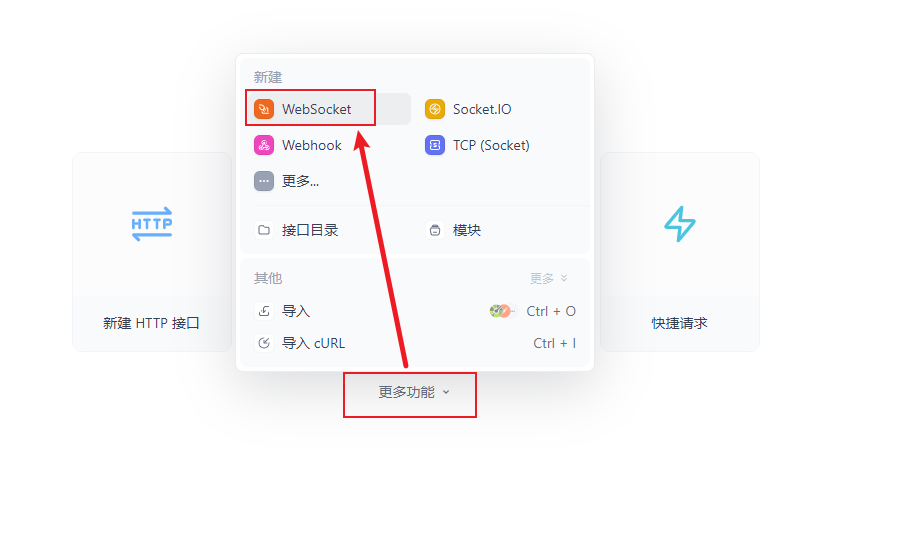
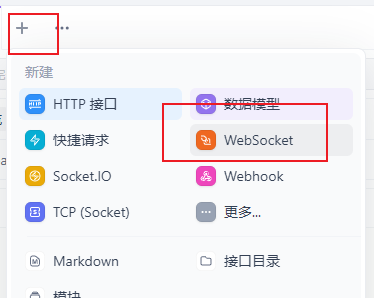
- 输入地址

- 发送消息

三、案例:多人聊天室
1、实现思路

2、WebSocket
package com.javasm.qingqing.room.websocket;
import com.alibaba.fastjson2.JSON;
import com.alibaba.fastjson2.JSONObject;
import com.javasm.qingqing.common.utils.SpringContextUtil;
import com.javasm.qingqing.room.vo.MessageVo;
import com.javasm.qingqing.webuser.entity.WebUserInfo;
import com.javasm.qingqing.webuser.service.WebUserInfoService;
import jakarta.websocket.OnClose;
import jakarta.websocket.OnMessage;
import jakarta.websocket.OnOpen;
import jakarta.websocket.Session;
import jakarta.websocket.server.PathParam;
import jakarta.websocket.server.ServerEndpoint;
import org.springframework.stereotype.Component;
import javax.swing.*;
import java.io.IOException;
import java.util.Map;
import java.util.Set;
import java.util.concurrent.ConcurrentHashMap;
import java.util.concurrent.CopyOnWriteArraySet;
@Component
@ServerEndpoint("/room/multiuser/{roomId}/{uid}")
public class RoomSocket {
//被观察者 Map<roomId,Set<当前房间里,所有人的Session信息>>
private static Map<String, Set<Session>> roomMap = new ConcurrentHashMap<>(8);
@OnOpen
public void enterRoom(@PathParam("roomId") String roomId,
@PathParam("uid") String uid,
Session session){
//每次连接进来的新用户,新的客户端,session对象都是新的。
//并且连接不断开的情况下,session对象是不变的
//每次用户进入房间,都会默认执行这个方法
//当前房间,所有的Session集合
Set<Session> set = roomMap.get(roomId);
if (set == null){
//内部使用ReentrantLock 和 复制比数组机制,所有的修改都是线程安全的
set = new CopyOnWriteArraySet<>();
//set不可能是null
roomMap.put(roomId,set);
}
set.add(session);
}
@OnClose
public void closeRoom(@PathParam("roomId") String roomId,
@PathParam("uid") String uid,
Session session){
//离开了
if (roomMap.containsKey(roomId)){
roomMap.get(roomId).remove(session);
}
}
@OnMessage
public void replyMessage(@PathParam("roomId") String roomId,
@PathParam("uid") String uid,
Session session,String message){
//message json 对象
String msg = "";
try {
JSONObject jsonObject = JSONObject.parse(message);
Object str = jsonObject.get("msg");
if (str != null){
msg = str.toString();//用户传入的消息
}
} catch (Exception e) {
//如果用户传入的不是json数据,可能产生异常
e.printStackTrace();
}
//获取到用户信息
WebUserInfo userInfo = getWebUserInfoService().getById(uid);
String jsonMessage = "";
if (userInfo != null){
//尽量不要传输无用的信息
//、需要协议号--通过协议号来区分当前返回的信息是做什么的
MessageVo vo = new MessageVo();
vo.setAgreement(1001);
vo.setPic(userInfo.getHeadPic());
vo.setNickname(userInfo.getNickname());
vo.setUid(userInfo.getUid());
vo.setMessage(msg);
jsonMessage = JSON.toJSONString(vo);
}
sendMessage(roomId, jsonMessage);
}
private void sendMessage(String roomId, String jsonMessage) {
//获取当前房间里所有人
Set<Session> sessionSet = roomMap.get(roomId);
try {
if (sessionSet != null){
for (Session s : sessionSet){
s.getBasicRemote().sendText(jsonMessage);
}
}
} catch (IOException e) {
e.printStackTrace();
throw new RuntimeException(e);
}
}
//这里通过@Resource可能无法获取Bean对象,所以 通过工具获取
private WebUserInfoService getWebUserInfoService(){
return SpringContextUtil.getBean(WebUserInfoService.class);
}
}
3、Socket连接工具JS
let webSocket;
export default {
//初始化socket连接
initWebSocket(url){
let baseUrl = import.meta.env.VITE_APP_WebSocket_BASE_API;
///room/mws://127.0.0.1:8080ultiuser/{roomId}/{uid}
if ('WebSocket' in window){
//判断当前浏览器是否支持WebSocket
webSocket = new webSocket(baseUrl + url);
}
//连接WebSocket,在客户端发生的事情
webSocket.onopen = function (){
console.log("连接成功!")
}
//当连接关闭的时候,执行的方法
webSocket.onclose = function (){
console.log("断开 连接")
}
window.onbeforeunload = function (){
//当页面刷新的时候,主动关闭连接
webSocket.close(3000,"关闭");
}
},
getWebSocket(){
return webSocket;
}
}4、页面
<template>
<Top/>
<div class="container-fluid main-content-wrapper">
<div class="row">
<div class="col-lg-6 col-md-12">
<div class="prism-player" id="player-content"></div>
</div>
<div class="col-lg-6 col-md-12">
<div class="all-messages-body">
<div class="messages-chat-container">
<div class="chat-content" id="chat-content"></div>
<div class="chat-list-footer">
<div class="d-flex align-items-center">
<div class="btn-box d-flex align-items-center me-3">
</div>
<div class="col-lg-9">
<input type="text" class="form-control" placeholder="输入消息..." v-model="input_msg">
</div>
<div class="col-lg-2 offset-md-1">
<button type="button" class="btn btn-success" @click="sendMessage">
<i class="bi bi-send"></i> 发送
</button>
</div>
</div>
</div>
</div>
</div>
</div>
</div>
</div>
<Footer/>
</template>
<script setup>
import {onMounted, ref} from "vue";
import socket from "@/utils/socket.js";
import Top from "@/components/common/Top.vue";
import Footer from "@/components/common/Footer.vue";
import Aliplayer from 'aliyun-aliplayer';
import 'aliyun-aliplayer/build/skins/default/aliplayer-min.css';
//登录用户信息
import UserStore from "@/stores/UserStore.js";
//房间id
import {useRoute} from "vue-router";
//当前登录用户的uid
let uid = UserStore().userModel.uid;
//浏览器参数中,获取id的值
let roomId = useRoute().query.id;
//发送的消息内容
let input_msg = ref("")
//连接聊天服务器
let webSocket;
let initWebSocket = () => {
let url = "/room/multiuser/" + roomId + "/" + uid;
socket.initWebSocket(url);
webSocket = socket.getWebSocket();
//接收服务端传入的消息
webSocket.onmessage = e => printMessage(e.data);
}
let printMessage = (msg) => {
/**
* {
* "agreement": 1001,
* "message": "我是路人并",
* "nickname": "命命",
* "pic": "http://cd.ray-live.cn/imgs/headpic/pic_550.jpg",
* "uid": 3017
* }
*/
let msgObj = JSON.parse(msg);
//协议号
let agreement = msgObj.agreement
switch (agreement) {
case 1001:
//1001号协议是聊天
//发送信息的人的uid
let msg_uid = msgObj.uid;
//用户头像
let pic = msgObj.pic;
//消息的内容
let message = msgObj.message;
//默认不是我的
let chat_mine = "";
if (msg_uid == uid){
chat_mine = "chat-right";
}
let html = '<div class="chat '+chat_mine+'">\n' +
' <div class="chat-avatar">\n' +
' <a class="d-inline-block">\n' +
' <img src="'+pic+'" width="50" height="50"\n' +
' class="rounded-circle" alt="image">\n' +
' </a>\n' +
' </div>\n' +
' <div class="chat-body">\n' +
' <div class="chat-message">\n' +
' <p>'+message+'</p>\n' +
' </div>\n' +
' </div>\n' +
' </div>\n' +
' </div>'
console.log(html)
document.getElementById("chat-content").insertAdjacentHTML("beforeend",html);
break;
}
}
let sendMessage = () => {
let param = {
"msg": input_msg.value
}
webSocket.send(JSON.stringify(param));
//清空聊天框
input_msg.value = "";
}
let initVideo = () => {
//使用阿里云,直播播放器
const player = new Aliplayer({
license: {
domain: "ai.dxvideo.cn", // 申请 License 时填写的域名
key: "7P8qS3EB6NRiFZu2M7665aac16fe54f2483f9032c03d94d29" // 申请成功后,在控制台可以看到 License Key
},
"id": "player-content",
"source": "http://cd.ray-live.cn/video/overwatch/mei.mp4",//流地址
"width": "100%",
"height": "600px",
"autoplay": true,
"isLive": false,//true 直播 false录播
"rePlay": false,
"playsinline": true,
"preload": true,
"controlBarVisibility": "hover",
"useH5Prism": true
}, function (player) {
console.log("The player is created");
}
);
}
onMounted(() => {
initVideo();
initWebSocket();
})
//document.getElementById("").insertAdjacentHTML("beforeend", html) ;
</script>
<style scoped>
</style>