这是一个用来实现图片标注的vue插件,在网上搜索类似插件vue-picture-bd-marker时下载安装会报错解决不了,于是选择了这一款插件 ui-picture-bd-marker
参考文档:
https://github.com/sunshengfei/ui-picture-bd-marker
https://www.jianshu.com/p/4dc54799c0e3
首先在项目中安装,会在node_modules中看到该依赖
npm install ui-picture-bd-marker -D二次封装为component,组件名为VMarker:
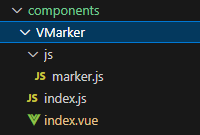
js文件marker.js中的代码:
javascript
'use strict'
import {
  BdAIMarker,
  positionP2S
} from 'ui-picture-bd-marker'

export default class PictureMarker {
  constructor(parentEl, draftEl, configs) {
    this.marker = this._makeMarker(parentEl, draftEl, configs)
  }

  _makeMarker = (parentEl, draftEl, configs) => {
    return new BdAIMarker(
      parentEl,
      draftEl,
      null,
      configs)
  }

  updateConfig = (configs) => {
    this.marker.setConfigOptions(configs)
  }

  getMarker = () => {
    return this.marker;
  }

  // 打标签
  setTag = (tag = {}) => {
    this.marker.setTag(tag)
  }

  // 渲染数据,数据格式如下
  // {
  //     tag: '009_X0918', //require
  //     tagName:'Diamond',//require
  //     pos:2,//自定义属性 ... +
  //     position: { //require
  //       x: 350,
  //       y: 306,
  //       x1: 377,
  //       y1: 334,
  //     },
  //   }
  renderData = (data, wihe) => {
    this.marker.renderData(data, wihe)
  }

  // 获取数据
  getData = () => {
    return this.marker.dataSource()
  }

  // 清空数据
  clearData = () => {
    this.marker.clearAll()
  }

  // 数据参照 renderData 参数
  mapDataPercent2Real = (dataArray, baseW, baseH) => {
    return dataArray.map(item => {
      item.position = positionP2S(item.position, baseW, baseH)
      return item
    })
  }
}
index.js中的代码:
javascript
import AIMarker from './index.vue'
AIMarker.install = Vue => Vue.component(AIMarker.name, AIMarker);
export default AIMarker;
index.vue中的代码:
这里主要实现了矩形框选标注功能,博主这里的需求是根绝操作栏来显示不同操作由currentIcon来控制,如果不需要可自行删除相关代码;点击标注框右击会显示提示框选择不同标签,标注框也会根据标签不同而显示不同颜色边框和标注内容;此外,还增加了滚轮缩放画面、拖拽图片等功能。
html
<template>
  <div class="vmr-ai-panel" :loading="loading" :class="rootClass">
    <div class="vmr-g-image"
      id="draggable" style="position: relative; overflow: hidden;"
      @wheel.prevent="handleWheel($event)"
      @mousedown="mouseDown"
      @mousemove="mouseMove"
      @mouseup="mouseUp">
      <img class="vmr-ai-raw-image"
        id="imgArea"
        :src="currentBaseImage"
        @load="onImageLoad"
        style="display: block; position: absolute; user-select: none; "
       >
      <div class="annotate vmr-ai-raw-image-mask" style="user-select: none; position: absolute; cursor: crosshair; left: 0px; top: 0;">
        <div class="draft" style="position: absolute;user-select: none;display: none;background-color: rgba(1,0,0,0.5);"></div>
      </div>
      <!-- 选择标签 -->
      <div class="editDiv" v-show="isShowTagDia">
        <div class="title">
          <span>请选择标签</span>
          <i class="el-icon-close" @click="closeEditDiv"></i>
        </div>
        <div class="tags">
          <div class="tag" v-for="(item,index) in tagList" :key="index" @click="changeTag('tag', item)">
            <img src="@/assets/img/datasetManage/tag.png" alt="">
            <span>{{ item.name }}</span>
          </div>
        </div>
      </div>
    </div>
  </div>
</template>
<script>
import PictureMarker from "./js/marker";
import "ui-picture-bd-marker/styles/bdmarker.scss";
const empImg = `data:image/png;base64,iVBORw0KGgoAAAANSUhEUgAAAAwAAAAMCAIAAADZF8uwAAAAGUlEQVQYV2M4gwH+YwCGIasIUwhT25BVBADtzYNYrHvv4gAAAABJRU5ErkJggg==`;
export default {
  name: "vue-ai-marker",
  props: {
    readOnly: Boolean,
    imgUrl: String,
    uniqueKey: [String, Number],
    width: [String, Number],
    ratio: {
      default: 16 / 9,
      type: Number
    },
    currentIcon:{
      type:Number,
      default:1
    },
    tagList:{
      type:Array
    }
  },
  watch: {
    imgUrl: function(n, o) {
      this.currentBaseImage = n;
    },
    width: function(n, o) {
      this.__updateFrame();
    },
    readOnly: function(n, o) {
      this.options.options = {
        ...this.options.options,
        editable: !n
      };
      if (this.marker) {
        this.marker.updateConfig(this.options);
      }
    },
    ratio: function(n, o) {
      if (n) {
        this.wratioh = n;
        this.__updateFrame();
      }
    },
  },
  data() {
    return {
      emptyImg: empImg,
      options: void 0,
      currentBaseImage: void 0,
      rootClass: "",
      key: "",
      wratioh: this.ratio,
      loading: true,
      scale:1,

      startX:0,
      startY:0,
      endX:0,
      endY:0,
      offsetX:0,
      offsetY:0,
      spaceKeyPressed:false,  //是否按下空格
      isCanDrag:false,   //是否允许拖拽

      currentText:"",
      currentAnno:"",
      currentTag: -1,

      isShowTagDia:false,   //是否显示提示框
      myDiaW: 200/910,  //用来判断标注框的位置是否在画面外
      myDiaH: 240/550,
    };
  },
  beforeMount() {
    this.key = this.uniqueKey;
    this.rootClass = this.uniqueKey ? `pannel-${this.uniqueKey}` : void 0;
  },
  mounted() {
    var that = this;
    this.__updateFrame();
    document.addEventListener('keydown', this.handleKeydown);
    document.addEventListener('keyup', this.handleKeyup);
    //点击画面其他位置,标注提示框关闭
    document.getElementsByClassName("vmr-g-image")[0].addEventListener("click", function(event) {
      let overlay = document.getElementsByClassName("editDiv")[0];
      if(!overlay.contains(event.target)){
        that.isShowTagDia = false;
      }
    })
  },
  beforeDestroy() {
    document.removeEventListener('keydown', this.handleKeydown);
    document.removeEventListener('keyup', this.handleKeyup);
    // document.getElementsByClassName("vmr-g-image")[0].removeEventListener("click");
  },
  created() {
    let self = this;
    this.options = {
      options: {
        blurOtherDots: true,
        blurOtherDotsShowTags: true,
        editable: this.readOnly ? false : true,
        trashPositionStart: 1
      },
      onDataRendered: self.onDataRendered,
      onUpdated: self.onUpdated,
      onDrawOne: self.onDrawOne,
      onAnnoSelected: self.onAnnoSelected,    //选中标注事件
      onAnnoAdded: self.onAnnoAdded,        //新增标注事件
      onAnnoRemoved: self.onAnnoRemoved,        //标注删除事件
      onAnnoContextMenu: self.onAnnoContextMenu,  //标注右击事件
      onSelect: self.onSelect
    };
    if (/^.+$/.test(this.imgUrl)) {
      this.currentBaseImage = this.imgUrl;
    } else {
      this.currentBaseImage = this.emptyImg;
    }
    this.$nextTick(function() {
      self.__initMarker();
      self.$emit("vmarker:onReady", self.key);
    });
  },
  activated() {
    this.rootClass = `pannel-${this.key}`;
    this.$emit("vmarker:onReady", this.key);
  },
  methods: {
    //空格+鼠标左键实现画面拖动
    mouseDown(event) {
      if(this.currentIcon !== 7) return;
      if(event.button === 0 && this.spaceKeyPressed){
        this.isCanDrag = true;
        this.startX = event.clientX;
        this.startY = event.clientY;
      }else{
        this.isCanDrag = false;
      }
    },
    mouseMove(event){
      if(this.currentIcon !== 7) return;
      if(event.button === 0 && this.spaceKeyPressed){
        if(this.isCanDrag){
          this.offsetX = event.clientX - this.startX;
          this.offsetY = event.clientY - this.startY;
          document.getElementById('draggable').style.transform = `translate(${this.offsetX}px, ${this.offsetY}px) scale(${this.scale})`;
        }
      }else{
        this.isCanDrag = false;
      }
    },
    mouseUp(event){
      if(this.isCanDrag){
        this.isCanDrag = false;
      }
    },
    handleKeydown(event) {
      if (event.key === ' ') { // 空格键的键码是 ' '
        this.$emit("setReadOnly", true)
        this.spaceKeyPressed = true;
      }
    },
    handleKeyup(event) {
      if (event.key === ' ') { // 空格键的键码是 ' '
        this.spaceKeyPressed = false;
        // 释放时停止拖动(如果需要)
        this.isCanDrag = false;
      }
    },
    // 滚动缩放
    handleWheel(event) {
      const zoomable = document.getElementById('draggable');
      if(event.deltaY < 0){ //放大
          this.scale = this.scale + 0.1;
      }else{
          if(this.scale > 0.1){
              this.scale = this.scale - 0.1
          }else{
              this.scale = 0.1;
              return;
          }
      }
      zoomable.style.transform = `translate(${this.offsetX}px, ${this.offsetY}px) scale(${this.scale})`;
      event.preventDefault(); // 阻止默认行为,比如页面滚动
    },
    getMarker() {
      return this.marker;
    },
    __updateFrame() {
      let root = this.$el;
      if (!root) {
        return;
      }

      let width = this.width;
      if (!this.width) {
        width = "100%";
      }
      root.style.width = width.endsWith("%") ? width : parseInt(width) + "px";
      root.style.height = root.clientWidth / this.wratioh + "px";
      root
        .querySelectorAll(
          ".vmr-g-image,.vmr-ai-raw-image,.vmr-ai-raw-image-mask"
        )
        .forEach(element => {
          element.style.width = root.style.width;
          element.style.height =
            parseInt(root.clientWidth) / this.wratioh + "px";
        });
    },
    __initMarker() {
      let self = this;
      let root = this.$el;
      if (!root) {
        return;
      }
      self.marker = new PictureMarker(
        root.querySelector(`.annotate`), //box
        root.querySelector(`.draft `), //draft
        self.options
      );
    },
    onImageLoad(e) {
      let rawData = {
        rawW: e.target.naturalWidth,
        rawH: e.target.naturalHeight,
        currentW: e.target.offsetWidth,
        currentH: e.target.offsetHeight
      };
      if (!this.currentBaseImage.startsWith("data")) {
        this.$emit("vmarker:onImageLoad", rawData, this.key);
      }
      this.loading = false;
    },
    //marker
    onAnnoSelected(value, el) {
      if(this.readOnly) return;
      this.currentAnno = value;
      let myDia = null;
      this.isShowTagDia = true;
      myDia = document.getElementsByClassName("editDiv")[0];
      this.setDiaPosition(value, myDia)
      this.$emit("vmarker:onAnnoSelected", value, el);
    },
    onAnnoAdded(value,el) {
      if(value.pos){
        this.isShowTagDia = false;
        return
      }
      let myDiv = null;
      this.isShowTagDia = true;
       myDiv = document.getElementsByClassName("editDiv")[0];
      this.setDiaPosition(value, myDiv)
      this.$emit("vmarker:onAnnoAdded", value, el)
    },
    onAnnoRemoved(data,el){
      console.log(data)
    },
    onAnnoContextMenu(data, el, text){
      if(this.readOnly) return;
      this.currentTag = this.currentAnno.tag;
      let myDiv = null;
      myDiv = document.getElementsByClassName("editDiv")[0];
      this.isShowTagDia = true;
      this.setDiaPosition(this.currentAnno, myDiv)
    },
    onDataRendered() {
      this.$emit("vmarker:onDataRendered", this.key);
    },
    onUpdated(data) {
      if(this.spaceKeyPressed) return;
      this.$emit("vmarker:onUpdated", data, this.key);
    },
    onDrawOne(data, currentMovement) {
      this.$emit("vmarker:onDrawOne", data, this.key);
    },
    onSelect(data) {
      this.$emit("vmarker:onAnnoSelected", data, this.key);
    },
    changeTag(type, tagItem){
      this.$emit("editAnno", type, tagItem);
    },
    removeAnno(){
      this.$emit("removeAnno");
      this.isShowTagDia = false;
    },
    setDiaPosition(value, myDia){
      if(100 - Number(value.position.x1.split("%")[0]) < this.myDiaW *100){
        myDia.style.left = value.position.x;
        myDia.style.marginLeft = "-210px";
      }else{
        myDia.style.left = value.position.x1;
        myDia.style.marginLeft = "10px";
      }
      if(100 - Number(value.position.y.split("%")[0]) < this.myDiaH *100){
        myDia.style.top = (1 - this.myDiaH)*100 + "%" ;
        console.log((1 - this.myDiaH)*100 + "%")
      }else{
        myDia.style.top = value.position.y;
      }
    },
    closeEditDiv(){
      this.isShowTagDia = false;
    },
    dispatchEvent(event, data) {
      if (this.marker) {
        return this.marker[event](data);
      }
    },
    renderData(data, wh) {
      if (this.marker) {
        this.marker.renderData(data, wh);
      }
    },
    clearData() {
      if (this.marker) {
        this.marker.clearData();
      }
    },
    setTag(tag) {
      if (this.marker) {
        this.marker.setTag(tag);
      }
    },
    renderer(imageUrl) {
      this.currentBaseImage = this.imgUrl = imageUrl;
    }
  }
};
</script>
<style lang="scss" scoped>
$opImageWidth: 600px;
$gulp: 10px;
.vmr-ai-panel {
  background: #3e3e3e;
  width: 100%;
  height: 100% !important;
  display: flex;
  flex-direction: row;
  align-items: center;
  height: auto; // $gulp * 2;
  .vmr-g-image,
  .vmr-ai-raw-image,
  .vmr-ai-raw-image-mask {
    // width: $opImageWidth;
    // height: round($opImageWidth * 9 / 16);
    width: 100%;
    height: 100% !important;
  }
  .editDiv,.editDiv1{
    // display: none;
    position: absolute;
    width: 200px;
    height: 240px;
    margin-left: 10px;
    border: 1px solid #ccc;
    background: #fff;
    flex-direction: column;
    z-index: 999;
    .title{
      display: flex;
      justify-content: space-between;
      align-items: center;
      background: #eee;
      color:#000;
      padding: 6px;
    }
    .tags{
      height: 200px;
      overflow-y: scroll;
      .tag{
        margin: 4px;
        padding: 2px;
        display: flex;
        align-items: center;
        border: 1px solid #eee;
        border-radius: 2px;
        font-size: 12px;
        cursor: pointer;
        img{
          width: 14px;
          height: 14px;
          margin-right: 4px;
          margin-left: 4px;
        }
      }
      .tag:hover{
        border-color: #249DFF;
      }
    }
    .textDes{
      height: 168px;
      .el-textarea{
        width: 93%;
        margin: 4px;
        padding: 4px;
      }
    }
    .delBtn{
      margin: 4px;
      height: 30px;
      line-height: 30px;
      border: 1px solid #eee;
      text-align: center;
      cursor: pointer;
    }
    .delBtn:hover {
      border-color: #249DFF;
    }
  }
}
</style>
在具体页面中应用
html
<VMarker
  ref="aiPanel-editor"
  class="ai-observer"
  v-bind:uniqueKey="'dsadsahdjklsaj'"
  :ratio="4/3"
  :img-url="imgUrl" (图片路径)
  :read-only="isReadOnly" (是否只读)
  @vmarker:onUpdated="onUpdated"   (标注更新时触发)
  @vmarker:onImageLoad="onImageLoad"  (图片加载时触发)
  @vmarker:onDrawOne="onDrawOne"
  @vmarker:onReady="onReady"        (标注加载完毕时触发)
  @vmarker:onAnnoSelected="onAnnoSelected"  (选中某个标注时触发)
  @vmarker:onAnnoAdded="onAnnoAdded"    (新增某个标注时触发)
  @click.native="changeBack"    (点击事件)
/>
具体操作写在对应的方法中,这里就不在赘述。
主要是介绍一些使用方法:
清除标注:this.$refs'aiPanel-editor'.getMarker().clearData();
获取标注:this.$refs'aiPanel-editor'.getMarker().getData();
渲染标注:this.$refs'aiPanel-editor'.getMarker().renderData(renderArr);
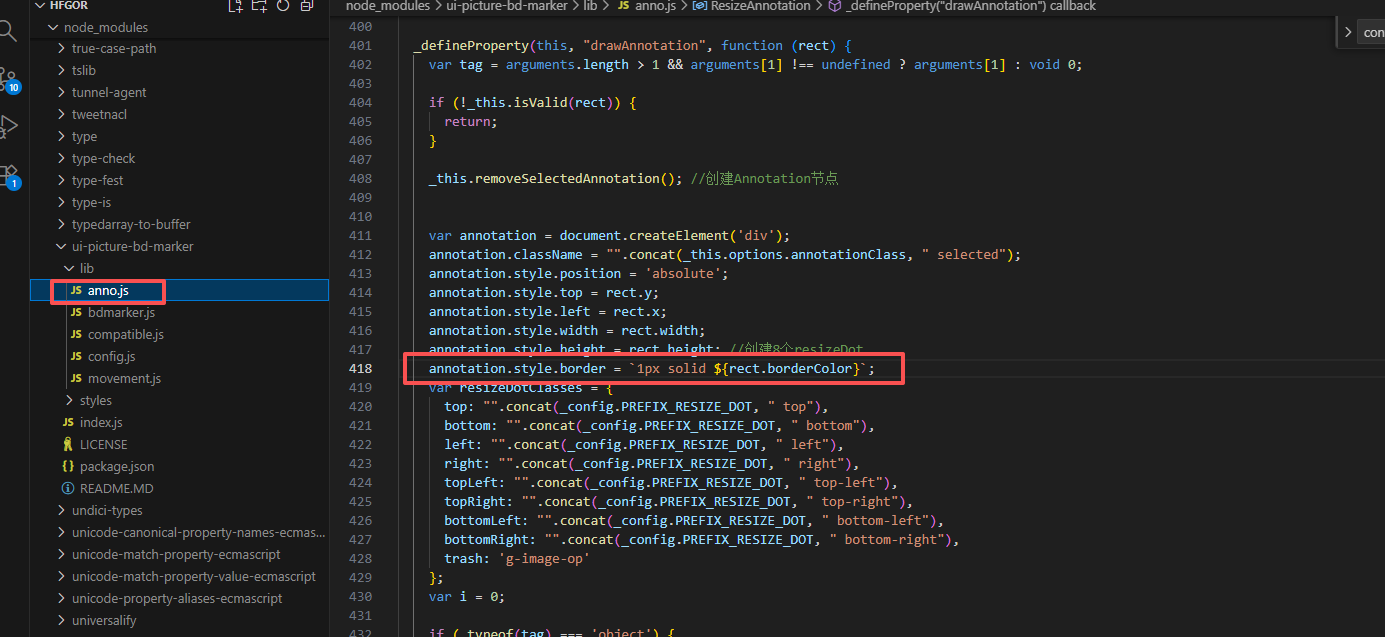
有些功能还涉及到修改源码,例如修改标注框的颜色,在渲染标注框时将颜色字段一同传入即可
 修改标签提示语
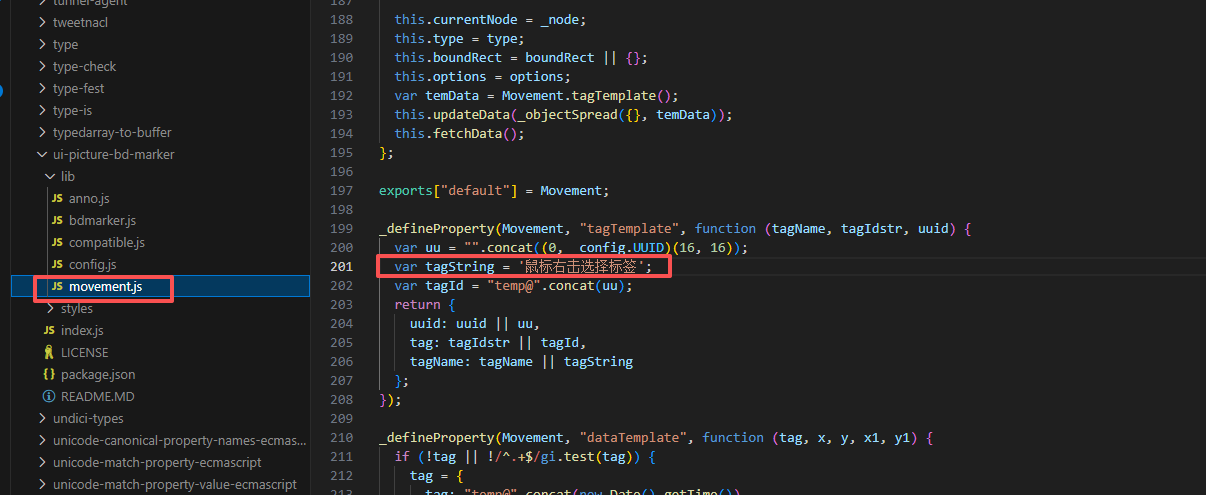 都可以根据自己的不同需求来修改源码
如有问题,欢迎留言讨论~