<!DOCTYPE html>
<html lang="zh-CN">

<head>
    <meta charset="UTF-8">
    <title>可编辑span</title>
    <style>
        .text-editor {
            font-size: 16px;
            line-height: 24px;
            color: #333;
            padding: 12px 16px;
            border: 1px solid #e5e7eb;
            border-radius: 8px;
            width: 600px;
            margin: 20px auto;
            word-break: break-all;
        }

        .editable-span {
            display: inline-block;
            padding: 2px 4px;
            margin: 0 2px;
            margin-top: 2px;
            border-radius: 4px;
            background-color: #f5f7fa;
            border: 1px solid #e0e6ed;
            white-space: pre-wrap;
            max-width: 100%;
            outline: none;
            caret-color: #165dff;
            min-width: 20px;
        }

        .editable-span[data-empty="true"] {
            color: #999;
        }

        .editable-span:focus {
            border-color: #165dff;
            box-shadow: 0 0 0 2px rgba(22, 93, 255, 0.1);
            background-color: #fff;
        }
    </style>
</head>

<body>
    <div class="text-editor" id="editorContainer">
        生成一首
        <span class="editable-span" contenteditable="true" data-placeholder="周杰伦风格"></span>
        的
        <span class="editable-span" contenteditable="true" data-placeholder="民谣"></span>
        歌曲,主题是
        <span class="editable-span" contenteditable="true" data-placeholder="故乡"></span>
    </div>

    <button style="margin: 0 auto; display: block;" onclick="getFullText()">获取完整文本</button>
    <p id="result" style="text-align: center; margin-top: 10px;"></p>

    <script>
        document.addEventListener('DOMContentLoaded', () => {
            const editor = document.getElementById('editorContainer');
            const result = document.getElementById('result');
            const spans = Array.from(editor.querySelectorAll('.editable-span'));

            spans.forEach(initSpan);
            window.getFullText = () => collectText(editor, result);

            function initSpan(span) {
                applyPlaceholder(span);
                span.addEventListener('focus', () => removePlaceholder(span));
                span.addEventListener('blur', () => applyPlaceholder(span));
                span.addEventListener('input', () => {
                    resize(span);
                    if (!span.textContent.trim()) {
                        span.removeAttribute('data-empty');
                    }
                });
            }

            function applyPlaceholder(span) {
                if (span.textContent.trim()) {
                    span.removeAttribute('data-empty');
                    resize(span);
                    return;
                }
                span.textContent = span.dataset.placeholder ?? '';
                span.dataset.empty = 'true';
                resize(span);
                span.dataset.placeholderWidth = span.style.width;
            }

            function removePlaceholder(span) {
                if (span.dataset.empty === 'true') {
                    span.textContent = '';
                    span.removeAttribute('data-empty');
                    if (span.dataset.placeholderWidth) {
                        span.style.width = span.dataset.placeholderWidth;
                    } else {
                        resize(span);
                    }
                }
            }

            function resize(span) {
                span.style.width = 'auto';
                span.style.width = `${span.scrollWidth + 8}px`;
            }

            function collectText(container, outputNode) {
                const content = Array.from(container.childNodes)
                    .map(node => {
                        if (node.nodeType === Node.TEXT_NODE) {
                            return node.textContent.trim();
                        }
                        if (node.classList?.contains('editable-span')) {
                            return node.dataset.empty === 'true'
                                ? node.dataset.placeholder || ''
                                : node.textContent.trim();
                        }
                        return '';
                    })
                    .join('');

                outputNode.textContent = `完整文本:${content}`;
                return content;
            }
        });
    </script>
</body>

</html>
效果如下: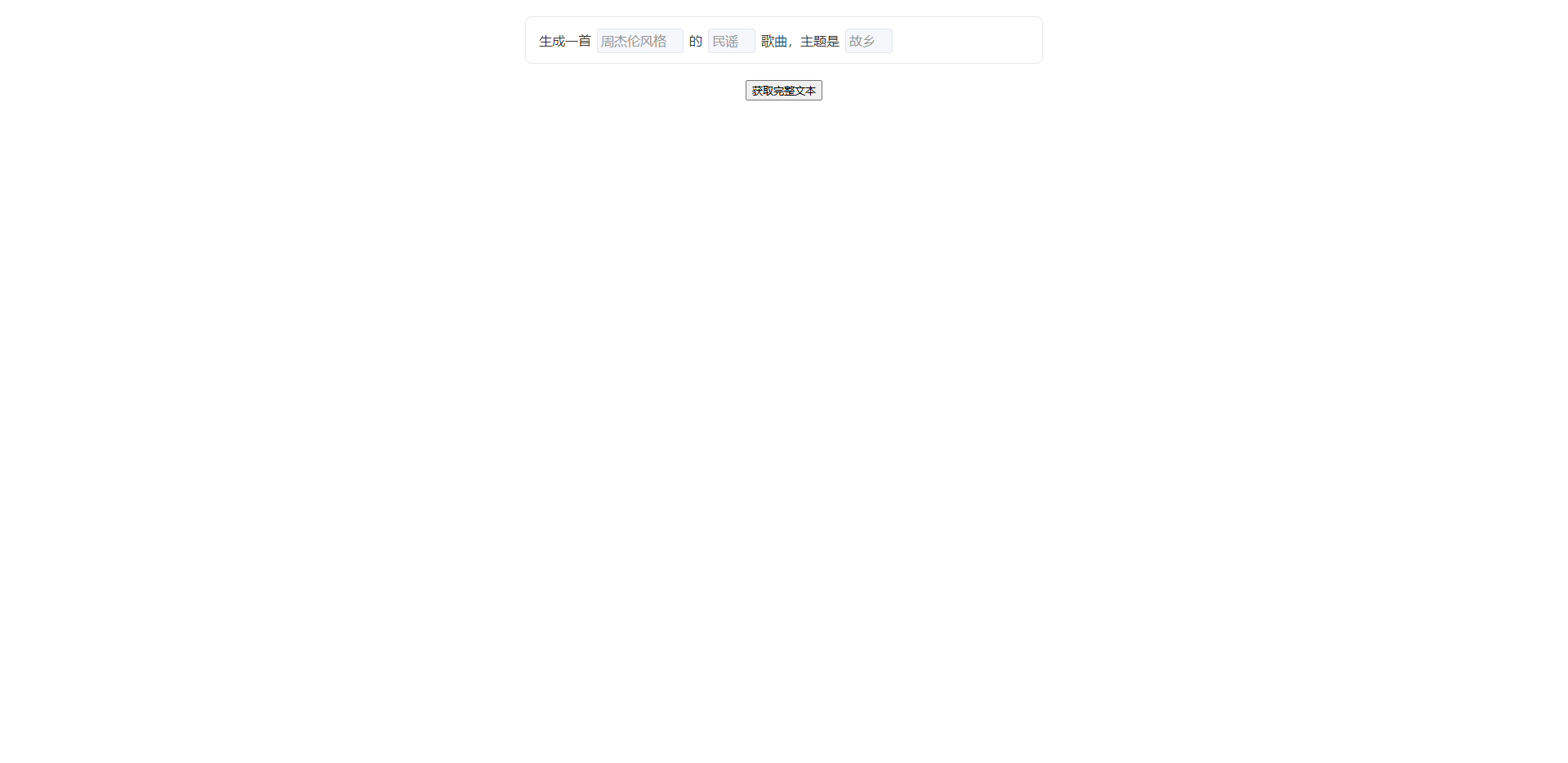
react组件版本:
import React, { forwardRef, useEffect, useImperativeHandle, useRef, useState, useCallback } from 'react';
import styles from './index.module.less'

interface Props {
  initialContent?: Array<string | { placeholder: string; value?: string; id?: string }>;
  onTextChange?: (text: string) => void;
  onFieldChange?: (fieldId: string | number, value: string, fieldIndex: number) => void;
  onFocus?: (fieldId?: string | number, fieldIndex?: number) => void;
  onBlur?: (fieldId?: string | number, fieldIndex?: number) => void;
  /** 回车键回调,当按下回车时触发 */
  onEnter?: () => void;
  containerStyle?: React.CSSProperties;
  containerItemStyle?: React.CSSProperties;
  /** 标题文本 */
  title?: string;
  /** 标题样式 */
  titleStyle?: React.CSSProperties;
  shouldReset?: boolean;
}

interface Methods {
  getFullText: () => string;
  getFieldValue: (fieldId: string | number) => string;
  getAllFieldValues: () => Record<string, string>;
  setContent: (content: Array<string | { placeholder: string; value?: string; id?: string }>) => void;
  setFieldValue: (fieldId: string | number, value: string) => void;
  clearContent: () => void;
  focusField: (fieldId: string | number) => void;
}

const SmartTextArea = forwardRef<Methods, Props>((props, ref) => {
  const {
    initialContent = [
      '生成一首',
      { placeholder: '周杰伦风格', id: 'style' },
      '的',
      { placeholder: '民谣', id: 'genre' },
      '歌曲,主题是',
      { placeholder: '故乡', id: 'theme' }
    ],
    onTextChange,
    onFieldChange,
    onFocus,
    onBlur,
    onEnter,
    containerStyle,
    containerItemStyle,
    title = 'ai写作', // 默认标题
    titleStyle,
    shouldReset
  } = props;

  const editorContainer = useRef<HTMLDivElement>(null);
  const fieldMap = useRef<Map<string | number, HTMLSpanElement>>(new Map());
  const [isFocused, setIsFocused] = useState(false);
  const [activeFieldId, setActiveFieldId] = useState<string | number | null>(null);
  const initialContentRef = useRef(initialContent);

  // 创建标题元素
  const createTitleElement = useCallback(() => {
    const titleSpan = document.createElement('span');
    titleSpan.textContent = title;
    titleSpan.className = styles.title;
    Object.assign(titleSpan.style, {
      display: 'inline-block',
      fontWeight: '600',
      color: '#9DA2A4',
      whiteSpace: 'nowrap',
      ...titleStyle
    });
    return titleSpan;
  }, [title, titleStyle]);

  // 简单的初始化函数
  const initEditor = useCallback(() => {
    if (!editorContainer.current) return;

    const editor = editorContainer.current;
    editor.innerHTML = '';

    // 添加标题到最前面
    const titleElement = createTitleElement();
    editor.appendChild(titleElement);

    // 添加内容
    initialContent.forEach((item, index) => {
      if (typeof item === 'string') {
        const textNode = document.createTextNode(item);
        editor.appendChild(textNode);
      } else {
        const span = document.createElement('span');
        const fieldId = item.id || index;

        // 设置span属性
        span.setAttribute('contenteditable', 'true');
        span.setAttribute('data-placeholder', item.placeholder);
        span.setAttribute('data-field-id', fieldId.toString());
        span.setAttribute('data-field-index', index.toString());
        span.classList.add('editable-span');

        // 设置样式
        Object.assign(span.style, {
          display: 'inline-block',
          fontWeight: '500',
          backgroundColor: "rgba(78, 110, 242, 0.09)",
          color: '#4e6ef2',
          padding: '0 5px',
          margin: '0 5px',
          borderRadius: '4px',
          whiteSpace: 'pre-wrap',
          maxWidth: '100%',
          minWidth: 'fit-content',
          outline: 'none',
          transition: 'all 0.2s ease',
          ...containerItemStyle
        });

        // 设置初始内容
        if (item.value) {
          span.textContent = item.value;
        } else {
          span.textContent = item.placeholder;
          span.setAttribute('data-empty', 'true');
        }

        // 聚焦事件处理
        const handleFocus = (e: FocusEvent) => {
          const target = e.target as HTMLSpanElement;
          const fieldId = target.getAttribute('data-field-id') || index;
          const fieldIndex = parseInt(target.getAttribute('data-field-index') || index.toString());

          // 更新状态
          setIsFocused(true);
          setActiveFieldId(fieldId);

          // 移除占位符
          if (target.getAttribute('data-empty') === 'true') {
            target.textContent = '';
            target.removeAttribute('data-empty');
          }

          // 触发聚焦回调
          onFocus?.(fieldId, fieldIndex);
        };

        // 失焦事件处理
        const handleBlur = (e: FocusEvent) => {
          const target = e.target as HTMLSpanElement;
          const fieldId = target.getAttribute('data-field-id') || index;
          const fieldIndex = parseInt(target.getAttribute('data-field-index') || index.toString());

          // 更新状态
          setIsFocused(false);
          setActiveFieldId(null);

          // 应用占位符
          if (!target.textContent?.trim()) {
            target.textContent = item.placeholder;
            target.setAttribute('data-empty', 'true');
          }

          // 触发失焦回调
          onBlur?.(fieldId, fieldIndex);
        };

        // 输入事件处理
        const handleInput = (e: Event) => {
          const target = e.target as HTMLSpanElement;
          resizeSpan(target);

          if (target.textContent?.trim()) {
            target.removeAttribute('data-empty');
          } else {
            target.setAttribute('data-empty', 'true');
          }

          if (onFieldChange) {
            const fieldId = target.getAttribute('data-field-id') || index;
            const fieldIndex = parseInt(target.getAttribute('data-field-index') || index.toString());
            onFieldChange(fieldId, target.textContent?.trim() || '', fieldIndex);
          }

          collectText();
        };

        // 键盘事件处理
        const handleKeyDown = (e: KeyboardEvent) => {
          if (e.key === 'Enter') {
            e.preventDefault(); // 阻止默认换行行为

            // 检查是否有内容,如果有则触发 onEnter 回调
            // 使用 setTimeout 确保在输入事件处理完成后再检查文本
            setTimeout(() => {
              const fullText = collectText();
              if (fullText.trim() && onEnter) {
                onEnter();
              }
            }, 0);
          }
        };

        // 添加事件监听
        span.addEventListener('focus', handleFocus);
        span.addEventListener('blur', handleBlur);
        span.addEventListener('input', handleInput);
        span.addEventListener('keydown', handleKeyDown);

        editor.appendChild(span);
        fieldMap.current.set(fieldId, span);
        resizeSpan(span);

        // 返回清理函数
        return () => {
          span.removeEventListener('focus', handleFocus);
          span.removeEventListener('blur', handleBlur);
          span.removeEventListener('input', handleInput);
          span.removeEventListener('keydown', handleKeyDown);
          fieldMap.current.delete(fieldId);
        };
      }
    });

    collectText();
  }, [initialContent, onFieldChange, onFocus, onBlur, onEnter, containerItemStyle, createTitleElement]);

  // 调整span宽度
  const resizeSpan = (span: HTMLSpanElement) => {
    span.style.width = 'auto';
    const newWidth = Math.max(span.scrollWidth + 8, 20);
    span.style.width = `${newWidth}px`;
  };

  // 收集完整文本(排除标题)
  const collectText = () => {
    if (!editorContainer.current) return '';

    const content = Array.from(editorContainer.current.childNodes)
      .filter(node => {
        // 过滤掉标题元素
        if (node.nodeType === Node.ELEMENT_NODE) {
          const element = node as HTMLElement;
          return !element.classList.contains(styles.title);
        }
        return true;
      })
      .map(node => {
        if (node.nodeType === Node.TEXT_NODE) {
          return node.textContent || '';
        }
        if (node.nodeType === Node.ELEMENT_NODE) {
          const element = node as HTMLElement;
          if (element.classList.contains('editable-span')) {
            return element.getAttribute('data-empty') === 'true'
              ? element.getAttribute('data-placeholder') || ''
              : element.textContent || '';
          }
          return element.textContent || '';
        }
        return '';
      })
      .join('');

    onTextChange?.(content);
    return content;
  };

  // 聚焦到特定字段
  const focusField = useCallback((fieldId: string | number) => {
    const span = fieldMap.current.get(fieldId);
    if (span) {
      span.focus();

      // 将光标移动到文本末尾
      const range = document.createRange();
      const selection = window.getSelection();
      range.selectNodeContents(span);
      range.collapse(false); // 移动到末尾
      selection?.removeAllRanges();
      selection?.addRange(range);
    }
  }, []);

  // 暴露的方法
  const getFullText = () => collectText();

  const getFieldValue = (fieldId: string | number) => {
    const span = fieldMap.current.get(fieldId);
    if (!span) return '';
    return span.getAttribute('data-empty') === 'true'
      ? span.getAttribute('data-placeholder') || ''
      : span.textContent || '';
  };

  const getAllFieldValues = () => {
    const result: Record<string, string> = {};
    fieldMap.current.forEach((span, fieldId) => {
      result[fieldId.toString()] = span.getAttribute('data-empty') === 'true'
        ? span.getAttribute('data-placeholder') || ''
        : span.textContent || '';
    });
    return result;
  };

  const setContent = useCallback((content: Array<string | { placeholder: string; value?: string; id?: string }>) => {
    if (!editorContainer.current) return;

    const editor = editorContainer.current;
    editor.innerHTML = '';

    // 重新添加标题
    const titleElement = createTitleElement();
    editor.appendChild(titleElement);

    // 重新构建内容
    content.forEach((item, index) => {
      if (typeof item === 'string') {
        const textNode = document.createTextNode(item);
        editor.appendChild(textNode);
      } else {
        const span = document.createElement('span');
        const fieldId = item.id || index;

        // 设置span属性
        span.setAttribute('contenteditable', 'true');
        span.setAttribute('data-placeholder', item.placeholder);
        span.setAttribute('data-field-id', fieldId.toString());
        span.classList.add('editable-span');

        // 设置样式
        Object.assign(span.style, {
          display: 'inline-block',
          fontWeight: '500',
          backgroundColor: "rgba(78, 110, 242, 0.09)",
          color: '#4e6ef2',
          padding: '5px',
          margin: '0 5px',
          borderRadius: '4px',
          whiteSpace: 'pre-wrap',
          maxWidth: '100%',
          minWidth: '20px',
          outline: 'none',
          ...containerItemStyle
        });

        // 设置初始内容
        if (item.value) {
          span.textContent = item.value;
        } else {
          span.textContent = item.placeholder;
          span.setAttribute('data-empty', 'true');
        }

        editor.appendChild(span);
        fieldMap.current.set(fieldId, span);
        resizeSpan(span);
      }
    });

    // 收集文本
    setTimeout(() => collectText(), 10);
  }, [createTitleElement, containerItemStyle]);

  const setFieldValue = (fieldId: string | number, value: string) => {
    const span = fieldMap.current.get(fieldId);
    if (span) {
      span.textContent = value;
      if (value.trim()) {
        span.removeAttribute('data-empty');
      } else {
        span.setAttribute('data-empty', 'true');
      }
      resizeSpan(span);
      collectText();
    }
  };

  const clearContent = () => {
    setContent(initialContent);
  };

  useImperativeHandle(ref, () => ({
    getFullText,
    getFieldValue,
    getAllFieldValues,
    setContent,
    setFieldValue,
    clearContent,
    focusField
  }));

  useEffect(() => {
    // console.log('执行initEditor>>>>', initEditor);
    // console.log('执行initialContent>>>>', initialContent);
    // console.log('执行shouldReset>>>>', shouldReset);
    if (shouldReset) {
      const cleanup = initEditor();
      return cleanup;
    } else {
      // 当 shouldReset 为 false 时,只更新 ref,不重新初始化
      // 注意:不要在这里更新 initialContentRef,避免触发不必要的重新渲染
      // initialContentRef.current = initialContent;
    }
  }, [initEditor, shouldReset]); // 移除 initialContent 依赖,避免不必要的重新初始化

  return (
    <div style={{ display: 'flex', alignItems: 'center' }}>
      <div
        ref={editorContainer}
        style={{
          display: 'flex',
          alignItems: 'center',
          flexWrap: 'wrap',
          fontSize: '16px',
          // maxWidth: '45vw',
          wordBreak: 'break-all',
          marginLeft: '5px',
          ...containerStyle
        }}
      ></div>
    </div>
  );
});

SmartTextArea.displayName = 'SmartTextArea';
export default SmartTextArea;
父组件使用(差的变量和方法自定义):
				 <SmartTextArea
                        key={type}
                        ref={editorRef}
                        initialContent={initialContent}
                        onFieldChange={handleFieldChange}
                        shouldReset={shouldReset}
                        onFocus={handleFocus}
                        onEnter={fetchEventData}
                        containerItemStyle={containerItemStyle}
                    />