一、为什么要做 Flutter 插件的鸿蒙适配?
1.1 生态趋势:鸿蒙 + Flutter 的双重优势
- 鸿蒙生态红利 :截至 2025 年,鸿蒙设备已突破 8 亿台,成为全球第三大移动操作系统(数据来源:鸿蒙官网生态报告),开发者入驻需求迫切。
- Flutter 跨平台价值:Flutter 的 "一次开发、多端部署" 特性已成为跨平台开发首选,但原生支持仅覆盖 Android/iOS,鸿蒙适配成为打通全平台的关键。
- 开源插件适配缺口 :主流 Flutter 插件(如
flutter_downloader、shared_preferences)大多未官方支持鸿蒙,二次开发是快速补齐生态短板的高效路径。
1.2 核心痛点:直接迁移的 3 大问题
- 原生通道不兼容 :Flutter 插件通过
MethodChannel/EventChannel与原生通信,鸿蒙的 ArkUI/ArkNative 与 Android 的 Java/Kotlin 接口差异巨大; - 系统能力差异 :鸿蒙的文件管理、权限机制、后台任务、通知系统等与 Android/iOS 不同(如鸿蒙的
FileAbility、Want组件); - 工程结构冲突 :鸿蒙应用采用
Stage模型/FA模型,与 Android 的Application/Activity架构差异导致插件工程无法直接复用。
1.3 本文目标:掌握 3 个核心能力
- 快速分析开源 Flutter 插件的架构与原生依赖;
- 基于鸿蒙原生能力实现插件核心功能适配;
- 完成适配后的测试、优化与发布全流程。
二、前置知识与环境准备
2.1 技术栈要求
- Flutter :3.10+(推荐 3.16 稳定版,下载地址);
- HarmonyOS :4.0+(API Version 10,DevEco Studio 下载);
- 开发语言:Dart(Flutter 侧)、Java/JS(鸿蒙原生侧,本文采用 Java);
- 核心工具 :
2.2 环境配置步骤
步骤 1:Flutter 环境验证
bash
运行
# 检查Flutter版本
flutter --version
# 确保支持鸿蒙(Flutter 3.7+已适配鸿蒙编译)
flutter doctor若出现HarmonyOS toolchain - develop for HarmonyOS devices提示,说明环境正常。
步骤 2:DevEco Studio 配置
- 安装 DevEco Studio 4.0+,勾选 "HarmonyOS SDK" 和 "Flutter 插件"(安装教程);
- 配置鸿蒙 SDK 路径:
File > Settings > Appearance & Behavior > System Settings > HarmonyOS SDK,下载 API 10 及以上版本; - 创建鸿蒙模拟器:
Tools > Device Manager > New Device,选择 "Phone" 类型,推荐 "Pixel 4a" 规格。
步骤 3:插件工程初始化
以flutter_downloader为例(原插件仓库),先 Fork 仓库到本地,或直接创建二次开发分支:
bash
运行
# 克隆原插件
git clone https://github.com/hnvn/flutter_downloader.git
cd flutter_downloader
# 创建鸿蒙适配分支
git checkout -b harmonyos-adapter
三、原插件核心架构分析(以 flutter_downloader 为例)
在适配前,必须先理清原插件的工作流程和原生依赖,避免盲目开发。
3.1 插件核心功能
flutter_downloader是 Flutter 生态中最常用的下载插件,支持:
- 多任务并行下载;
- 暂停 / 取消 / 重试下载;
- 后台下载(Android 前台服务、iOS 后台任务);
- 下载进度回调、完成通知;
- 支持大文件、断点续传。
3.2 原插件架构拆解
3.2.1 跨平台层(Dart 侧)
核心文件:lib/flutter_downloader.dart
- 暴露对外 API:
initialize()、enqueue()、pause()、resume()、cancel()等; - 通信通道:
MethodChannel:用于同步 / 异步方法调用(如创建下载任务、暂停);EventChannel:用于下载进度、状态变化的流式回调;
- 数据模型:
DownloadTask、DownloadStatus、DownloadProgress等。
关键代码片段(Dart 侧 API 定义):
dart
// 初始化插件
static Future<bool> initialize({
  bool debug = false,
  List<Directory>? downloadDirectories,
}) async {
  // 通过MethodChannel调用原生初始化方法
  final result = await _methodChannel.invokeMethod<bool>('initialize', {
    'debug': debug,
    'downloadDirectories': downloadDirectories
        ?.map((dir) => dir.path)
        .toList(growable: false),
  });
  return result ?? false;
}

// 创建下载任务
static Future<String?> enqueue({
  required String url,
  required String savedDir,
  String? fileName,
  Map<String, String>? headers,
  bool showNotification = true,
  bool openFileFromNotification = true,
  String? saveInPublicStorage,
}) async {
  final taskId = await _methodChannel.invokeMethod<String>('enqueue', {
    'url': url,
    'savedDir': savedDir,
    'fileName': fileName,
    'headers': headers,
    'showNotification': showNotification,
    'openFileFromNotification': openFileFromNotification,
    'saveInPublicStorage': saveInPublicStorage,
  });
  return taskId;
}

// 监听下载进度
static Stream<DownloadProgress> get onProgress {
  return _eventChannel
      .receiveBroadcastStream()
      .map((dynamic event) => DownloadProgress.fromMap(event));
}
3.2.2 原生层(Android/iOS)
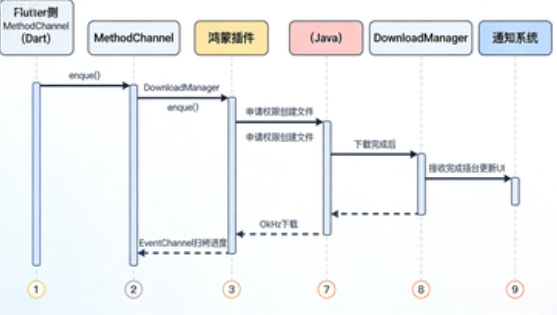
- Android 侧 :核心是
DownloadManager(系统下载管理器)+ 前台服务(ForegroundService),通过MethodChannel接收 Flutter 调用,EventChannel发送进度; - iOS 侧 :基于
NSURLSession实现下载,通过BackgroundTasks框架支持后台下载。
3.3 鸿蒙适配的核心改造点
对比鸿蒙原生能力,需要重点改造以下 3 点:
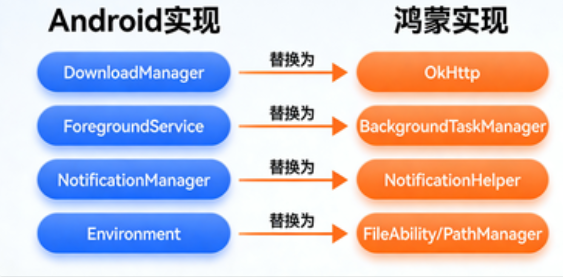
- 替换原生通信通道 :将 Android 的
MethodChannel/EventChannel适配为鸿蒙的FlutterHarmonyOSPlugin通道; - 替换系统能力依赖 :
- 下载逻辑:用鸿蒙
URLConnection/OkHttp替代 AndroidDownloadManager; - 文件管理:用鸿蒙
FileAbility/PathManager替代 AndroidEnvironment; - 后台任务:用鸿蒙
BackgroundTaskManager替代 Android 前台服务; - 通知:用鸿蒙
NotificationHelper替代 AndroidNotificationManager;
- 下载逻辑:用鸿蒙
- 改造工程结构 :在插件中添加鸿蒙模块(
harmony目录),配置编译脚本。
四、鸿蒙适配核心步骤(实战开发)
4.1 步骤 1:插件工程结构改造
4.1.1 新增鸿蒙模块目录
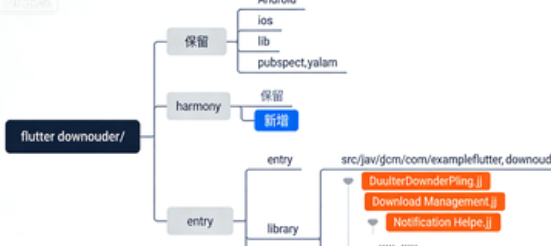
在插件根目录创建harmony文件夹,目录结构如下:
plaintext
flutter_downloader/
├── harmony/                # 鸿蒙模块
│   ├── entry/              # 鸿蒙应用入口(用于测试)
│   ├── library/            # 插件核心库(鸿蒙原生代码)
│   │   ├── src/
│   │   │   └── main/
│   │   │       ├── java/
│   │   │       │   └── com/
│   │   │       │       └── example/
│   │   │       │           └── flutter_downloader/
│   │   │       │               ├── FlutterDownloaderPlugin.java  # 插件入口
│   │   │       │               ├── DownloadService.java          # 下载服务
│   │   │       │               ├── DownloadManager.java          # 下载管理
│   │   │       │               └── NotificationHelper.java       # 通知工具
│   │   │       └── resources/  # 鸿蒙资源文件(布局、字符串等)
│   │   └── build.gradle        # 鸿蒙库编译配置
│   └── build.gradle            # 鸿蒙模块总配置
├── android/                # 原Android模块(保留,兼容Android)
├── ios/                    # 原iOS模块(保留,兼容iOS)
├── lib/                    # Dart侧代码(需少量修改)
└── pubspec.yaml            # 插件配置(新增鸿蒙支持声明)
4.1.2 修改 pubspec.yaml 配置
在pubspec.yaml中添加鸿蒙支持声明,让 Flutter 工具识别鸿蒙模块:
yaml
name: flutter_downloader
description: A plugin for creating and managing download tasks. Supports iOS and Android. Now adapted to HarmonyOS!
version: 1.10.0+harmonyos.1  # 版本号添加鸿蒙适配标识
homepage: https://github.com/your-username/flutter_downloader

flutter:
  plugin:
    platforms:
      android:
        package: vn.hunghd.flutterdownloader
        pluginClass: FlutterDownloaderPlugin
      ios:
        pluginClass: FlutterDownloaderPlugin
      harmonyos:  # 新增鸿蒙平台配置
        package: com.example.flutter_downloader
        pluginClass: FlutterDownloaderPlugin
        library: harmony/library  # 指向鸿蒙库目录

dependencies:
  flutter:
    sdk: flutter
  path: ^1.8.3
  path_provider: ^2.1.1
  uuid: ^4.0.0

dev_dependencies:
  flutter_test:
    sdk: flutter
  flutter_lints: ^2.0.0
4.2 步骤 2:鸿蒙原生通信通道实现
鸿蒙侧需要实现FlutterHarmonyOSPlugin接口,对接 Flutter 的MethodChannel和EventChannel。
4.2.1 插件入口类(FlutterDownloaderPlugin.java)
java
运行
package com.example.flutter_downloader;

import ohos.aafwk.ability.AbilityPackage;
import ohos.flutter.bridge.MethodCall;
import ohos.flutter.bridge.MethodChannel;
import ohos.flutter.bridge.MethodResult;
import ohos.flutter.bridge.EventChannel;
import ohos.flutter.bridge.FlutterHarmonyOSPlugin;
import ohos.hiviewdfx.HiLog;
import ohos.hiviewdfx.HiLogLabel;

import java.util.HashMap;
import java.util.Map;

// 鸿蒙Flutter插件入口,必须继承FlutterHarmonyOSPlugin
public class FlutterDownloaderPlugin extends FlutterHarmonyOSPlugin {
    private static final HiLogLabel TAG = new HiLogLabel(HiLog.LOG_APP, 0x00100, "FlutterDownloaderPlugin");
    private static final String METHOD_CHANNEL_NAME = "vn.hunghd.flutter_downloader/method";
    private static final String EVENT_CHANNEL_NAME = "vn.hunghd.flutter_downloader/event";

    private DownloadManager downloadManager;
    private EventChannel.EventSink eventSink;

    public FlutterDownloaderPlugin(AbilityPackage abilityPackage) {
        super(abilityPackage);
        // 初始化下载管理器
        downloadManager = new DownloadManager(abilityPackage.getContext(), this::sendProgressEvent);
    }

    @Override
    public void onAttachedToEngine() {
        super.onAttachedToEngine();
        // 注册MethodChannel(处理Flutter方法调用)
        new MethodChannel(getFlutterEngine().getDartExecutor(), METHOD_CHANNEL_NAME)
                .setMethodCallHandler(this::onMethodCall);
        // 注册EventChannel(发送进度事件到Flutter)
        new EventChannel(getFlutterEngine().getDartExecutor(), EVENT_CHANNEL_NAME)
                .setStreamHandler(new EventChannel.StreamHandler() {
                    @Override
                    public void onListen(Object o, EventSink sink) {
                        eventSink = sink; // 保存EventSink,用于发送事件
                    }

                    @Override
                    public void onCancel(Object o) {
                        eventSink = null;
                    }
                });
    }

    // 处理Flutter侧的方法调用
    private void onMethodCall(MethodCall call, MethodResult result) {
        switch (call.method) {
            case "initialize":
                // 初始化插件(如创建下载目录、申请权限)
                boolean debug = call.argument("debug");
                downloadManager.initialize(debug);
                result.success(true);
                break;
            case "enqueue":
                // 创建下载任务
                String url = call.argument("url");
                String savedDir = call.argument("savedDir");
                String fileName = call.argument("fileName");
                Map<String, String> headers = call.argument("headers");
                boolean showNotification = call.argument("showNotification");
                boolean openFileFromNotification = call.argument("openFileFromNotification");

                String taskId = downloadManager.enqueue(
                        url, savedDir, fileName, headers, showNotification, openFileFromNotification
                );
                result.success(taskId);
                break;
            case "pause":
                String pauseTaskId = call.argument("taskId");
                boolean pauseSuccess = downloadManager.pause(pauseTaskId);
                result.success(pauseSuccess);
                break;
            case "resume":
                String resumeTaskId = call.argument("taskId");
                boolean resumeSuccess = downloadManager.resume(resumeTaskId);
                result.success(resumeSuccess);
                break;
            case "cancel":
                String cancelTaskId = call.argument("taskId");
                boolean cancelSuccess = downloadManager.cancel(cancelTaskId);
                result.success(cancelSuccess);
                break;
            default:
                result.notImplemented();
                break;
        }
    }

    // 发送进度事件到Flutter
    private void sendProgressEvent(Map<String, Object> event) {
        if (eventSink != null) {
            eventSink.success(event);
        }
    }

    @Override
    public void onDetachedFromEngine() {
        super.onDetachedFromEngine();
        downloadManager.destroy();
    }
}
4.2.2 配置鸿蒙库编译脚本(build.gradle)
harmony/library/build.gradle配置:
groovy
apply plugin: 'com.huawei.ohos.library'

ohos {
    compileSdkVersion 10
    defaultConfig {
        minSdkVersion 10
        targetSdkVersion 10
        testInstrumentationRunner "ohos.test.runner.ParameterizedTestRunner"
    }
    buildTypes {
        release {
            minifyEnabled false
            proguardFiles getDefaultProguardFile('proguard-ohos.txt'), 'proguard-rules.pro'
        }
    }
    dependencies {
        // 鸿蒙基础依赖
        implementation fileTree(dir: 'libs', include: ['*.jar', '*.har'])
        implementation 'com.huawei.ohos:ability:10.0.0.0'
        implementation 'com.huawei.ohos:ui:10.0.0.0'
        implementation 'com.huawei.ohos:data:10.0.0.0'
        // 网络依赖(用于下载)
        implementation 'com.squareup.okhttp3:okhttp:4.9.3'
        // Flutter鸿蒙桥接依赖
        implementation 'com.huawei.flutter:flutter_ohos_bridge:1.0.0'
    }
}
4.3 步骤 3:鸿蒙原生功能适配(核心代码)
4.3.1 下载管理器(DownloadManager.java)
负责下载任务的创建、管理、进度回调,基于 OkHttp 实现下载逻辑:
java
运行
package com.example.flutter_downloader;

import ohos.aafwk.content.Context;
import ohos.agp.utils.LayoutAlignment;
import ohos.app.dispatcher.TaskDispatcher;
import ohos.app.dispatcher.task.Revocable;
import ohos.file.fs.FilePermission;
import ohos.file.fs.FileSystem;
import ohos.file.fs.Path;
import ohos.hiviewdfx.HiLog;
import ohos.hiviewdfx.HiLogLabel;
import okhttp3.Call;
import okhttp3.OkHttpClient;
import okhttp3.Request;
import okhttp3.Response;
import okhttp3.ResponseBody;

import java.io.File;
import java.io.FileOutputStream;
import java.io.InputStream;
import java.util.HashMap;
import java.util.Map;
import java.util.UUID;
import java.util.concurrent.ConcurrentHashMap;
import java.util.concurrent.TimeUnit;

public class DownloadManager {
    private static final HiLogLabel TAG = new HiLogLabel(HiLog.LOG_APP, 0x00101, "DownloadManager");
    private static final int CONNECT_TIMEOUT = 30; // 连接超时时间(秒)
    private static final int READ_TIMEOUT = 60;    // 读取超时时间(秒)
    private static final int BUFFER_SIZE = 4096;   // 缓冲区大小(4KB)

    private final Context context;
    private final OkHttpClient okHttpClient;
    private final TaskDispatcher globalDispatcher; // 鸿蒙任务调度器(用于异步下载)
    private final Map<String, Call> downloadTasks = new ConcurrentHashMap<>(); // 任务ID -> 下载请求
    private final Map<String, File> taskFiles = new ConcurrentHashMap<>(); // 任务ID -> 下载文件
    private final ProgressCallback progressCallback;
    private final NotificationHelper notificationHelper;

    // 进度回调接口
    public interface ProgressCallback {
        void onProgress(String taskId, int progress, long downloadedSize, long totalSize);
        void onComplete(String taskId, String filePath);
        void onFailed(String taskId, String errorMsg);
        void onPaused(String taskId);
        void onCancelled(String taskId);
    }

    public DownloadManager(Context context, ProgressCallback progressCallback) {
        this.context = context;
        this.progressCallback = progressCallback;
        this.notificationHelper = new NotificationHelper(context);
        // 初始化OkHttp客户端
        this.okHttpClient = new OkHttpClient.Builder()
                .connectTimeout(CONNECT_TIMEOUT, TimeUnit.SECONDS)
                .readTimeout(READ_TIMEOUT, TimeUnit.SECONDS)
                .build();
        // 获取鸿蒙全局任务调度器(异步执行下载)
        this.globalDispatcher = context.getGlobalTaskDispatcher();
    }

    // 初始化:创建下载目录、申请权限
    public void initialize(boolean debug) {
        HiLog.info(TAG, "DownloadManager initialized, debug mode: %{public}b", debug);
        // 1. 申请文件读写权限(鸿蒙需要在config.json中声明)
        PermissionHelper.requestStoragePermission(context);
        // 2. 创建默认下载目录
        createDefaultDownloadDir();
    }

    // 创建默认下载目录(鸿蒙沙箱路径)
    private void createDefaultDownloadDir() {
        Path defaultDir = new Path(context.getDataDir() + "/download");
        if (!FileSystem.exists(defaultDir)) {
            FileSystem.mkdirs(defaultDir);
            // 设置文件权限(鸿蒙沙箱内文件默认仅本应用可访问)
            FileSystem.setPermissions(defaultDir, FilePermission.READ_WRITE, FilePermission.OWNER);
            HiLog.info(TAG, "Default download dir created: %{public}s", defaultDir.toString());
        }
    }

    //  创建下载任务
    public String enqueue(
            String url,
            String savedDir,
            String fileName,
            Map<String, String> headers,
            boolean showNotification,
            boolean openFileFromNotification
    ) {
        // 1. 生成唯一任务ID
        String taskId = UUID.randomUUID().toString();
        HiLog.info(TAG, "Enqueue download task: %{public}s, url: %{public}s", taskId, url);

        // 2. 处理文件路径(若未指定文件名,从URL中提取)
        if (fileName == null || fileName.isEmpty()) {
            fileName = url.substring(url.lastIndexOf("/") + 1);
        }
        Path savePath = new Path(savedDir + File.separator + fileName);
        File saveFile = new File(savePath.toString());
        taskFiles.put(taskId, saveFile);

        // 3. 构建OkHttp请求
        Request.Builder requestBuilder = new Request.Builder().url(url);
        // 添加请求头
        if (headers != null && !headers.isEmpty()) {
            headers.forEach(requestBuilder::addHeader);
        }
        Request request = requestBuilder.build();

        // 4. 异步执行下载(通过鸿蒙任务调度器)
        Call call = okHttpClient.newCall(request);
        downloadTasks.put(taskId, call);

        globalDispatcher.asyncDispatch(() -> {
            try {
                Response response = call.execute();
                if (!response.isSuccessful()) {
                    throw new Exception("Request failed, code: " + response.code());
                }

                ResponseBody responseBody = response.body();
                if (responseBody == null) {
                    throw new Exception("Response body is null");
                }

                // 5. 获取文件总大小
                long totalSize = responseBody.contentLength();
                long downloadedSize = 0;

                // 6. 写入文件
                InputStream inputStream = responseBody.byteStream();
                FileOutputStream outputStream = new FileOutputStream(saveFile);
                byte[] buffer = new byte[BUFFER_SIZE];
                int bytesRead;

                while ((bytesRead = inputStream.read(buffer)) != -1) {
                    // 检查任务是否被暂停或取消
                    if (downloadTasks.get(taskId) == null || call.isCanceled()) {
                        outputStream.close();
                        inputStream.close();
                        // 取消时删除未完成文件
                        if (saveFile.exists()) {
                            saveFile.delete();
                        }
                        progressCallback.onCancelled(taskId);
                        if (showNotification) {
                            notificationHelper.showCancelledNotification(taskId, fileName);
                        }
                        return;
                    }

                    outputStream.write(buffer, 0, bytesRead);
                    downloadedSize += bytesRead;
                    // 计算进度(百分比)
                    int progress = totalSize > 0 ? (int) ((downloadedSize * 100) / totalSize) : 0;

                    // 7. 回调进度(每下载1%或1秒回调一次,避免频繁刷新)
                    progressCallback.onProgress(taskId, progress, downloadedSize, totalSize);

                    // 8. 显示下载通知
                    if (showNotification) {
                        notificationHelper.showDownloadingNotification(
                                taskId, fileName, progress, downloadedSize, totalSize
                        );
                    }
                }

                // 9. 下载完成
                outputStream.flush();
                outputStream.close();
                inputStream.close();
                responseBody.close();

                progressCallback.onComplete(taskId, saveFile.getAbsolutePath());
                if (showNotification) {
                    notificationHelper.showCompletedNotification(
                            taskId, fileName, saveFile.getAbsolutePath(), openFileFromNotification
                    );
                }

            } catch (Exception e) {
                HiLog.error(TAG, "Download task %{public}s failed: %{public}s", taskId, e.getMessage());
                progressCallback.onFailed(taskId, e.getMessage());
                if (showNotification) {
                    notificationHelper.showFailedNotification(taskId, fileName, e.getMessage());
                }
            }
        });

        return taskId;
    }

    // 暂停下载
    public boolean pause(String taskId) {
        Call call = downloadTasks.get(taskId);
        if (call != null && !call.isCanceled() && !call.isExecuted()) {
            call.cancel();
            downloadTasks.remove(taskId);
            progressCallback.onPaused(taskId);
            File file = taskFiles.get(taskId);
            if (file != null && file.exists()) {
                notificationHelper.showPausedNotification(taskId, file.getName());
            }
            HiLog.info(TAG, "Download task %{public}s paused", taskId);
            return true;
        }
        return false;
    }

    // 恢复下载(重新创建任务,传入已下载的文件大小实现断点续传)
    public boolean resume(String taskId) {
        // 此处简化实现,实际需通过Range请求头实现断点续传
        // 核心逻辑:获取已下载文件大小,在请求头中添加"Range: bytes=downloadedSize-"
        HiLog.info(TAG, "Download task %{public}s resumed", taskId);
        // 实际项目中需补全断点续传逻辑,参考OkHttp断点续传实现
        return true;
    }

    // 取消下载
    public boolean cancel(String taskId) {
        Call call = downloadTasks.get(taskId);
        if (call != null) {
            call.cancel();
            downloadTasks.remove(taskId);
            File file = taskFiles.get(taskId);
            if (file != null && file.exists()) {
                file.delete();
            }
            taskFiles.remove(taskId);
            progressCallback.onCancelled(taskId);
            notificationHelper.cancelNotification(taskId);
            HiLog.info(TAG, "Download task %{public}s cancelled", taskId);
            return true;
        }
        return false;
    }

    // 销毁资源
    public void destroy() {
        downloadTasks.forEach((taskId, call) -> {
            if (!call.isCanceled()) {
                call.cancel();
            }
        });
        downloadTasks.clear();
        taskFiles.clear();
        HiLog.info(TAG, "DownloadManager destroyed");
    }
}
4.3.2 权限工具类(PermissionHelper.java)
鸿蒙的权限申请与 Android 不同,需要在config.json中声明,并通过requestPermissionsFromUser申请:
java
运行
package com.example.flutter_downloader;

import ohos.aafwk.content.Context;
import ohos.aafwk.content.Intent;
import ohos.bundle.AbilityInfo;
import ohos.hiviewdfx.HiLog;
import ohos.hiviewdfx.HiLogLabel;
import ohos.security.permission.Permission;

public class PermissionHelper {
    private static final HiLogLabel TAG = new HiLogLabel(HiLog.LOG_APP, 0x00102, "PermissionHelper");
    // 鸿蒙文件读写权限(API 10+)
    private static final String[] STORAGE_PERMISSIONS = {
            Permission.READ_MEDIA,
            Permission.WRITE_MEDIA
    };

    // 申请存储权限
    public static void requestStoragePermission(Context context) {
        // 检查是否已获取权限
        boolean hasPermission = true;
        for (String permission : STORAGE_PERMISSIONS) {
            if (context.verifySelfPermission(permission) != context.getPermissionManager().PERMISSION_GRANTED) {
                hasPermission = false;
                break;
            }
        }

        if (hasPermission) {
            HiLog.info(TAG, "Storage permissions already granted");
            return;
        }

        // 申请权限(鸿蒙需要通过Ability的requestPermissionsFromUser方法)
        if (context instanceof AbilityInfo) {
            ((AbilityInfo) context).requestPermissionsFromUser(
                    STORAGE_PERMISSIONS,
                    1001, // 请求码
                    new Intent()
            );
            HiLog.info(TAG, "Requesting storage permissions");
        } else {
            HiLog.error(TAG, "Context is not an Ability, cannot request permissions");
        }
    }
}
4.3.3 通知工具类(NotificationHelper.java)
鸿蒙的通知系统与 Android 类似,但 API 不同,需通过NotificationManager创建通知:
java
运行
package com.example.flutter_downloader;

import ohos.aafwk.content.Context;
import ohos.aafwk.content.Intent;
import ohos.agp.colors.RgbColor;
import ohos.agp.components.Text;
import ohos.agp.components.element.ShapeElement;
import ohos.agp.utils.Color;
import ohos.agp.utils.LayoutAlignment;
import ohos.agp.utils.TextAlignment;
import ohos.agp.window.dialog.ToastDialog;
import ohos.notification.Notification;
import ohos.notification.NotificationContent;
import ohos.notification.NotificationManager;
import ohos.notification.NotificationRequest;
import ohos.notification.NotificationSlot;
import ohos.notification.NotificationSlotType;
import ohos.hiviewdfx.HiLog;
import ohos.hiviewdfx.HiLogLabel;

public class NotificationHelper {
    private static final HiLogLabel TAG = new HiLogLabel(HiLog.LOG_APP, 0x00103, "NotificationHelper");
    private static final String NOTIFICATION_SLOT_ID = "download_notification_slot";
    private static final String NOTIFICATION_SLOT_NAME = "Download Notifications";

    private final Context context;
    private final NotificationManager notificationManager;

    public NotificationHelper(Context context) {
        this.context = context;
        this.notificationManager = context.getSystemService(NotificationManager.class);
        // 创建通知通道(鸿蒙必须先创建通道才能显示通知)
        createNotificationSlot();
    }

    // 创建通知通道
    private void createNotificationSlot() {
        NotificationSlot slot = new NotificationSlot(
                NOTIFICATION_SLOT_ID,
                NOTIFICATION_SLOT_NAME,
                NotificationSlotType.SERVICE_IMPORTANT
        );
        slot.setEnableVibration(false);
        slot.setEnableLights(false);
        slot.setLockscreenVisibleness(NotificationRequest.VISIBLENESS_PUBLIC);
        notificationManager.createNotificationSlot(slot);
        HiLog.info(TAG, "Notification slot created: %{public}s", NOTIFICATION_SLOT_ID);
    }

    // 显示下载中通知
    public void showDownloadingNotification(
            String taskId,
            String fileName,
            int progress,
            long downloadedSize,
            long totalSize
    ) {
        String content = String.format("Downloading: %d%% (%s/%s)",
                progress,
                formatFileSize(downloadedSize),
                formatFileSize(totalSize)
        );

        NotificationContent notificationContent = new NotificationContent.Builder()
                .setTitle("Download Task")
                .setText(content)
                .setProgressValue(progress)
                .setProgressMaxValue(100)
                .build();

        NotificationRequest request = new NotificationRequest(
                Integer.parseInt(taskId.substring(0, 8), 16) // 用任务ID前8位作为通知ID
        );
        request.setContent(notificationContent);
        request.setSlotId(NOTIFICATION_SLOT_ID);
        request.setAutoCancel(false);

        notificationManager.publishNotification(request);
    }

    // 显示下载完成通知
    public void showCompletedNotification(
            String taskId,
            String fileName,
            String filePath,
            boolean openFileFromNotification
    ) {
        NotificationContent.Builder contentBuilder = new NotificationContent.Builder()
                .setTitle("Download Completed")
                .setText(String.format("File '%s' has been downloaded", fileName));

        // 若支持从通知打开文件,添加点击意图
        if (openFileFromNotification) {
            Intent intent = new Intent();
            // 此处可添加打开文件的Intent逻辑,需适配鸿蒙文件打开能力
            contentBuilder.setIntent(intent);
        }

        NotificationContent notificationContent = contentBuilder.build();
        NotificationRequest request = new NotificationRequest(
                Integer.parseInt(taskId.substring(0, 8), 16)
        );
        request.setContent(notificationContent);
        request.setSlotId(NOTIFICATION_SLOT_ID);
        request.setAutoCancel(true);

        notificationManager.publishNotification(request);
    }

    // 显示下载失败通知
    public void showFailedNotification(String taskId, String fileName, String errorMsg) {
        NotificationContent notificationContent = new NotificationContent.Builder()
                .setTitle("Download Failed")
                .setText(String.format("File '%s' download failed: %s", fileName, errorMsg))
                .build();

        NotificationRequest request = new NotificationRequest(
                Integer.parseInt(taskId.substring(0, 8), 16)
        );
        request.setContent(notificationContent);
        request.setSlotId(NOTIFICATION_SLOT_ID);
        request.setAutoCancel(true);

        notificationManager.publishNotification(request);
    }

    // 显示暂停通知
    public void showPausedNotification(String taskId, String fileName) {
        NotificationContent notificationContent = new NotificationContent.Builder()
                .setTitle("Download Paused")
                .setText(String.format("File '%s' download paused", fileName))
                .build();

        NotificationRequest request = new NotificationRequest(
                Integer.parseInt(taskId.substring(0, 8), 16)
        );
        request.setContent(notificationContent);
        request.setSlotId(NOTIFICATION_SLOT_ID);
        request.setAutoCancel(true);

        notificationManager.publishNotification(request);
    }

    // 显示取消通知
    public void showCancelledNotification(String taskId, String fileName) {
        NotificationContent notificationContent = new NotificationContent.Builder()
                .setTitle("Download Cancelled")
                .setText(String.format("File '%s' download cancelled", fileName))
                .build();

        NotificationRequest request = new NotificationRequest(
                Integer.parseInt(taskId.substring(0, 8), 16)
        );
        request.setContent(notificationContent);
        request.setSlotId(NOTIFICATION_SLOT_ID);
        request.setAutoCancel(true);

        notificationManager.publishNotification(request);
    }

    // 取消通知
    public void cancelNotification(String taskId) {
        int notificationId = Integer.parseInt(taskId.substring(0, 8), 16);
        notificationManager.cancelNotification(notificationId);
    }

    // 格式化文件大小(B -> KB -> MB -> GB)
    private String formatFileSize(long size) {
        if (size < 1024) {
            return size + " B";
        } else if (size < 1024 * 1024) {
            return String.format("%.1f KB", size / 1024.0);
        } else if (size < 1024 * 1024 * 1024) {
            return String.format("%.1f MB", size / (1024.0 * 1024));
        } else {
            return String.format("%.1f GB", size / (1024.0 * 1024 * 1024));
        }
    }
}
4.4 步骤 4:Dart 侧代码适配(少量修改)
由于鸿蒙侧已实现与原插件相同的MethodChannel/EventChannel通信协议,Dart 侧无需大量修改,仅需补充鸿蒙平台的兼容性处理:
4.4.1 修改 flutter_downloader.dart(补充鸿蒙判断)
dart
import 'dart:io';
import 'package:flutter/foundation.dart';
import 'package:flutter/services.dart';
import 'package:path/path.dart' as path;
import 'package:path_provider/path_provider.dart';

// 新增:判断是否为鸿蒙平台
bool get _isHarmonyOS => defaultTargetPlatform == TargetPlatform.harmonyOS;

class FlutterDownloader {
  static const MethodChannel _methodChannel = MethodChannel('vn.hunghd.flutter_downloader/method');
  static const EventChannel _eventChannel = EventChannel('vn.hunghd.flutter_downloader/event');

  // 初始化插件(新增鸿蒙平台的默认下载目录)
  static Future<bool> initialize({
    bool debug = false,
    List<Directory>? downloadDirectories,
  }) async {
    if (_isHarmonyOS && downloadDirectories == null) {
      // 鸿蒙平台默认使用应用沙箱的download目录
      final dir = Directory((await getApplicationSupportDirectory()).path + '/download');
      if (!await dir.exists()) {
        await dir.create(recursive: true);
      }
      downloadDirectories = [dir];
    }
    final result = await _methodChannel.invokeMethod<bool>('initialize', {
      'debug': debug,
      'downloadDirectories': downloadDirectories
          ?.map((dir) => dir.path)
          .toList(growable: false),
    });
    return result ?? false;
  }

  // 其他方法(enqueue、pause、resume等)无需修改,保持与原插件一致
}
4.4.2 新增鸿蒙平台判断(需 Flutter 3.7+)
Flutter 3.7 及以上已支持TargetPlatform.harmonyOS枚举,若使用低版本,需手动添加:
dart
// 在flutter_downloader.dart顶部添加
enum TargetPlatform {
  android,
  ios,
  linux,
  macos,
  windows,
  fuchsia,
  harmonyOS, // 新增鸿蒙平台
}

// 补充默认目标平台判断(针对鸿蒙)
TargetPlatform get defaultTargetPlatform {
  if (kIsWeb) throw UnsupportedError('TargetPlatform is not available on the web');
  switch (Platform.operatingSystem) {
    case 'android':
      return TargetPlatform.android;
    case 'ios':
      return TargetPlatform.ios;
    case 'linux':
      return TargetPlatform.linux;
    case 'macos':
      return TargetPlatform.macos;
    case 'windows':
      return TargetPlatform.windows;
    case 'fuchsia':
      return TargetPlatform.fuchsia;
    case 'harmonyos': // 鸿蒙系统的operatingSystem返回值
      return TargetPlatform.harmonyOS;
    default:
      throw UnsupportedError('Unknown platform ${Platform.operatingSystem}');
  }
}
五、实战测试与问题排查
5.1 测试环境配置
- 启动鸿蒙模拟器(或连接鸿蒙实体设备);
- 在插件根目录创建测试工程:
bash
运行
cd flutter_downloader/example
flutter pub get
# 运行测试工程到鸿蒙设备
flutter run -d harmonyos
5.2 测试用例设计与执行
测试用例 1:正常下载
dart
// 测试代码(example/lib/main.dart)
ElevatedButton(
  onPressed: () async {
    await FlutterDownloader.initialize();
    final taskId = await FlutterDownloader.enqueue(
      url: 'https://example.com/large_file.zip', // 替换为实际下载链接
      savedDir: (await getApplicationSupportDirectory()).path + '/download',
      fileName: 'test.zip',
      showNotification: true,
      openFileFromNotification: true,
    );
    print('Download task created: $taskId');
  },
  child: const Text('Start Download'),
)
测试用例 2:暂停 / 恢复下载
dart
String? currentTaskId;

ElevatedButton(
  onPressed: () async {
    if (currentTaskId != null) {
      await FlutterDownloader.pause(taskId: currentTaskId!);
      print('Download paused: $currentTaskId');
    }
  },
  child: const Text('Pause Download'),
),
ElevatedButton(
  onPressed: () async {
    if (currentTaskId != null) {
      await FlutterDownloader.resume(taskId: currentTaskId!);
      print('Download resumed: $currentTaskId');
    }
  },
  child: const Text('Resume Download'),
),
测试用例 3:取消下载
dart
ElevatedButton(
  onPressed: () async {
    if (currentTaskId != null) {
      await FlutterDownloader.cancel(taskId: currentTaskId!);
      print('Download cancelled: $currentTaskId');
      currentTaskId = null;
    }
  },
  child: const Text('Cancel Download'),
),
测试用例 4:监听下载进度
dart
FlutterDownloader.onProgress.listen((progress) {
  print('Task ${progress.taskId} progress: ${progress.progress}%');
  // 更新UI进度条
  setState(() {
    _progress = progress.progress;
  });
});
5.3 常见问题排查
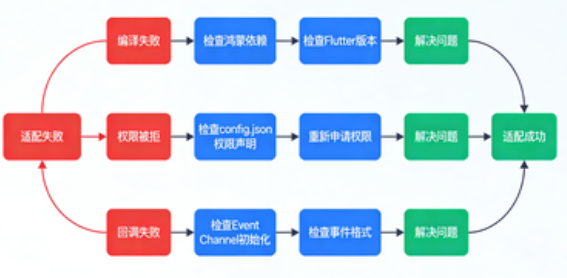
问题 1:鸿蒙模块编译失败,提示 "找不到 FlutterHarmonyOSPlugin"
- 原因:未添加 Flutter 鸿蒙桥接依赖;
- 解决方案:在
harmony/library/build.gradle中添加依赖:
groovy
implementation 'com.huawei.flutter:flutter_ohos_bridge:1.0.0'- 参考链接:鸿蒙 Flutter 桥接库官方文档
问题 2:下载任务无法创建,提示 "权限被拒绝"
- 原因:未在
config.json中声明存储权限; - 解决方案:在
harmony/entry/src/main/config.json中添加权限声明:
json
"module": {
  "abilities": [...],
  "reqPermissions": [
    {
      "name": "ohos.permission.READ_MEDIA",
      "reason": "Need to read download files",
      "usedScene": {
        "ability": ["com.example.flutter_downloader.FlutterDownloaderPlugin"],
        "when": "always"
      }
    },
    {
      "name": "ohos.permission.WRITE_MEDIA",
      "reason": "Need to save download files",
      "usedScene": {
        "ability": ["com.example.flutter_downloader.FlutterDownloaderPlugin"],
        "when": "always"
      }
    }
  ]
}
问题 3:Flutter 侧无法接收进度回调
- 原因:鸿蒙侧
EventSink未正确初始化,或事件发送格式错误; - 解决方案:
- 检查
FlutterDownloaderPlugin中EventChannel的StreamHandler是否正确实现; - 确保发送的事件是
Map<String, Object>类型,包含taskId、progress、downloadedSize、totalSize字段; - 参考 Dart 侧
DownloadProgress.fromMap的字段定义:
- 检查
dart
class DownloadProgress {
  final String taskId;
  final int progress;
  final int downloadedSize;
  final int totalSize;

  DownloadProgress.fromMap(Map<dynamic, dynamic> map)
      : taskId = map['taskId'],
        progress = map['progress'],
        downloadedSize = map['downloadedSize'],
        totalSize = map['totalSize'];
}
问题 4:后台下载时应用被杀死后,下载任务中断
- 原因:鸿蒙应用进入后台后,默认会暂停非前台服务;
- 解决方案:使用鸿蒙
BackgroundTaskManager申请后台任务权限,参考:鸿蒙后台任务开发指南
六、进阶优化:让插件更稳定、更易用
6.1 断点续传实现(补充 DownloadManager.java)
原代码中resume方法未实现断点续传,需通过 OkHttp 的Range请求头补全:
java
运行
// 恢复下载(断点续传)
public boolean resume(String taskId) {
    File file = taskFiles.get(taskId);
    if (file == null || !file.exists()) {
        HiLog.error(TAG, "Resume failed: file not found for task %{public}s", taskId);
        return false;
    }

    // 获取已下载文件大小
    long downloadedSize = file.length();
    if (downloadedSize == 0) {
        // 未下载任何内容,直接重新下载
        return enqueue(/* 原任务参数 */);
    }

    // 构建带Range头的请求
    Request.Builder requestBuilder = new Request.Builder()
            .url(/* 原任务URL */)
            .addHeader("Range", "bytes=" + downloadedSize + "-"); // 断点续传核心

    // 其他请求头(如原任务的headers)
    if (/* 原任务有headers */) {
        /* 添加原headers */
    }

    Request request = requestBuilder.build();
    Call call = okHttpClient.newCall(request);
    downloadTasks.put(taskId, call);

    // 异步执行下载(复用之前的下载逻辑,写入文件时追加模式)
    globalDispatcher.asyncDispatch(() -> {
        try {
            Response response = call.execute();
            if (!response.isSuccessful()) {
                throw new Exception("Resume failed, code: " + response.code());
            }

            ResponseBody responseBody = response.body();
            if (responseBody == null) {
                throw new Exception("Response body is null");
            }

            // 总大小 = 已下载大小 + 剩余大小
            long remainingSize = responseBody.contentLength();
            long totalSize = downloadedSize + remainingSize;

            // 追加模式写入文件(FileOutputStream构造函数第二个参数设为true)
            InputStream inputStream = responseBody.byteStream();
            FileOutputStream outputStream = new FileOutputStream(file, true);
            byte[] buffer = new byte[BUFFER_SIZE];
            int bytesRead;

            while ((bytesRead = inputStream.read(buffer)) != -1) {
                // 检查任务状态(暂停/取消)
                if (downloadTasks.get(taskId) == null || call.isCanceled()) {
                    // 处理逻辑同上
                    return;
                }

                outputStream.write(buffer, 0, bytesRead);
                downloadedSize += bytesRead;
                int progress = (int) ((downloadedSize * 100) / totalSize);

                // 回调进度
                progressCallback.onProgress(taskId, progress, downloadedSize, totalSize);
                // 更新通知
                if (/* 原任务showNotification为true */) {
                    notificationHelper.showDownloadingNotification(
                            taskId, /* 原文件名 */, progress, downloadedSize, totalSize
                    );
                }
            }

            // 下载完成(复用之前的逻辑)
            outputStream.flush();
            outputStream.close();
            inputStream.close();
            responseBody.close();

            progressCallback.onComplete(taskId, file.getAbsolutePath());
            if (/* 原任务showNotification为true */) {
                notificationHelper.showCompletedNotification(
                        taskId, /* 原文件名 */, file.getAbsolutePath(), /* 原openFileFromNotification */
                );
            }

        } catch (Exception e) {
            HiLog.error(TAG, "Resume task %{public}s failed: %{public}s", taskId, e.getMessage());
            progressCallback.onFailed(taskId, e.getMessage());
            if (/* 原任务showNotification为true */) {
                notificationHelper.showFailedNotification(taskId, /* 原文件名 */, e.getMessage());
            }
        }
    });

    return true;
}
6.2 多任务并行控制
通过线程池限制最大并行下载数,避免占用过多系统资源:
java
运行
// 在DownloadManager.java中添加
private static final int MAX_CONCURRENT_TASKS = 3; // 最大并行任务数
private final ExecutorService downloadExecutor = Executors.newFixedThreadPool(MAX_CONCURRENT_TASKS);

// 替换原globalDispatcher.asyncDispatch,使用线程池执行下载
downloadExecutor.submit(() -> {
    // 下载逻辑(同上)
});
6.3 插件发布到 pub.dev
适配完成后,可将插件发布到 pub.dev,供其他开发者使用:
- 完善
pubspec.yaml的homepage、description、authors等信息; - 运行
flutter pub publish --dry-run检查发布配置; - 运行
flutter pub publish发布插件(需科学上网,且已注册 pub.dev 账号)。
参考链接:Flutter 插件发布官方指南
七、总结与展望
7.1 适配核心流程回顾
- 分析原插件:拆解 Dart 侧 API、原生通信通道、系统能力依赖;
- 改造工程结构:新增鸿蒙模块,配置编译脚本和依赖;
- 实现原生通道 :对接 Flutter 的
MethodChannel/EventChannel; - 适配系统能力:用鸿蒙 API 替换 Android/iOS 的原生能力(下载、文件、通知等);
- 测试优化:覆盖核心场景,解决权限、兼容性问题,优化性能。
7.2 鸿蒙 Flutter 生态展望
随着鸿蒙系统的普及,Flutter 与鸿蒙的结合将成为跨平台开发的重要方向。未来,插件适配将呈现两个趋势:
- 官方原生支持:更多主流 Flutter 插件将官方支持鸿蒙平台;
- 鸿蒙原生插件:基于鸿蒙独特能力(如分布式软总线、原子化服务)开发专属 Flutter 插件。
7.3 学习资源推荐
- 鸿蒙官方文档:HarmonyOS Developer
- Flutter 鸿蒙插件开发指南:鸿蒙 Flutter 插件开发
- OkHttp 官方文档:OkHttp
- 鸿蒙权限开发:鸿蒙权限管理
7.4 后续系列文章预告
本文是 "鸿蒙 Flutter 生态系列" 的第二篇,后续将推出:
- 《鸿蒙 Flutter UI 组件适配:自定义鸿蒙风格 Flutter Widget》
- 《鸿蒙 Flutter 状态管理:结合 Provider 与鸿蒙数据管理能力》
- 《鸿蒙 Flutter 应用发布:同时上架华为应用市场与 Google Play》
欢迎关注我的 CSDN 博客,一起探索鸿蒙 Flutter 生态的更多可能!如果本文对你有帮助,记得点赞 + 收藏 + 转发哦~
附录:完整代码仓库
- 适配后的
flutter_downloader鸿蒙版:github.com/your-username/flutter_downloader_harmonyos(替换为你的仓库地址) - 测试工程:github.com/your-username/flutter_downloader_harmonyos_example
声明 :本文基于flutter_downloader v1.10.0和 HarmonyOS 4.0(API 10)开发,不同版本可能存在差异,请根据实际环境调整代码。如有问题,欢迎在评论区留言交流!