目录
1.2.添加session会话管理WebSocketSessionHolder
1.3.添加建立session会话连接到会话管理及监听下线MapSessionWebSocketHandlerDecorator
1.4.添加断开session会话连接前请求处理UserAttributeHandshakeInterceptor
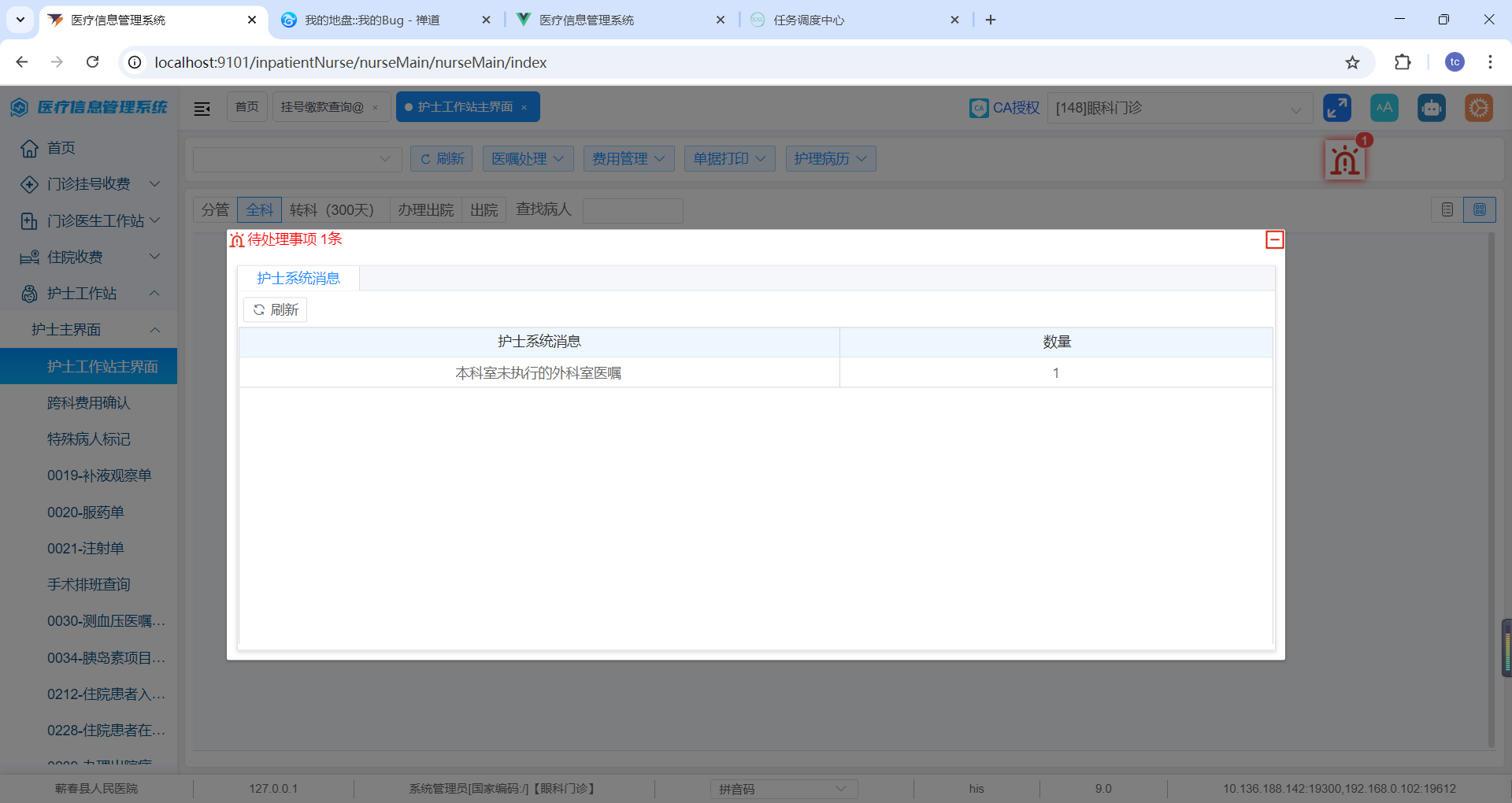
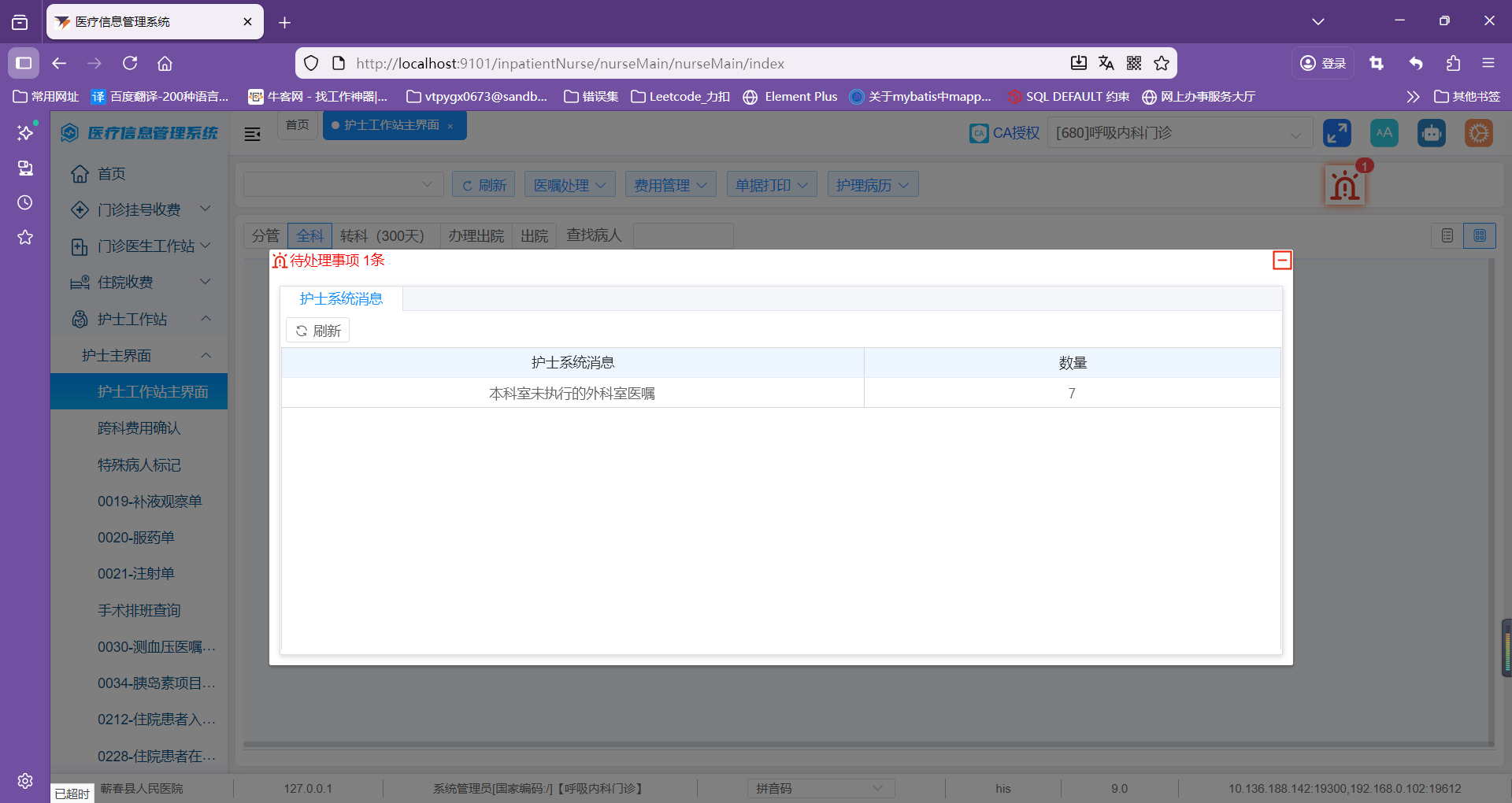
1.6xxljob定时任务推送后展示的消息(同一用户同一科室不同电脑展示)
[1.7.1引入xxl job依赖](#1.7.1引入xxl job依赖)
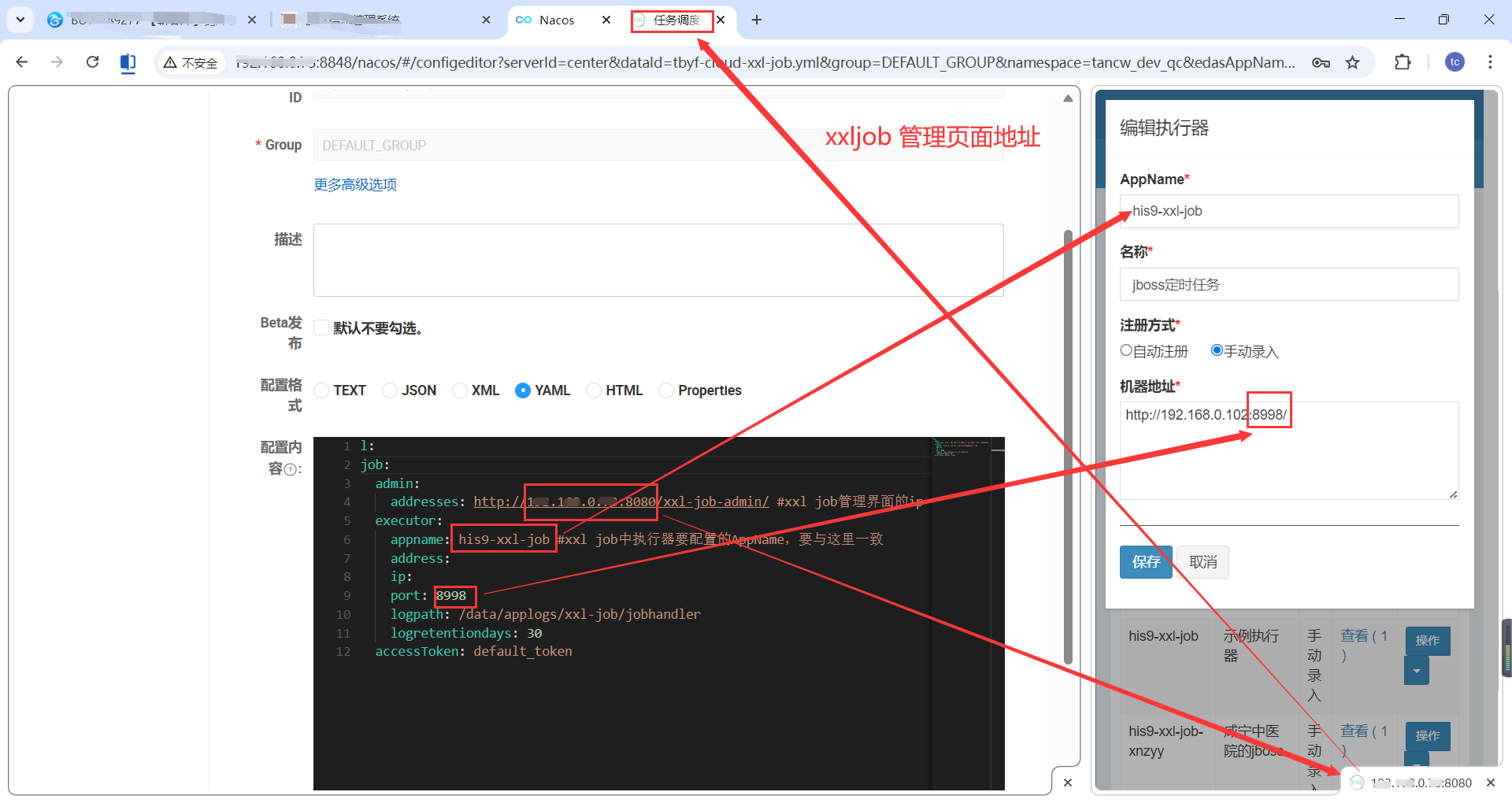
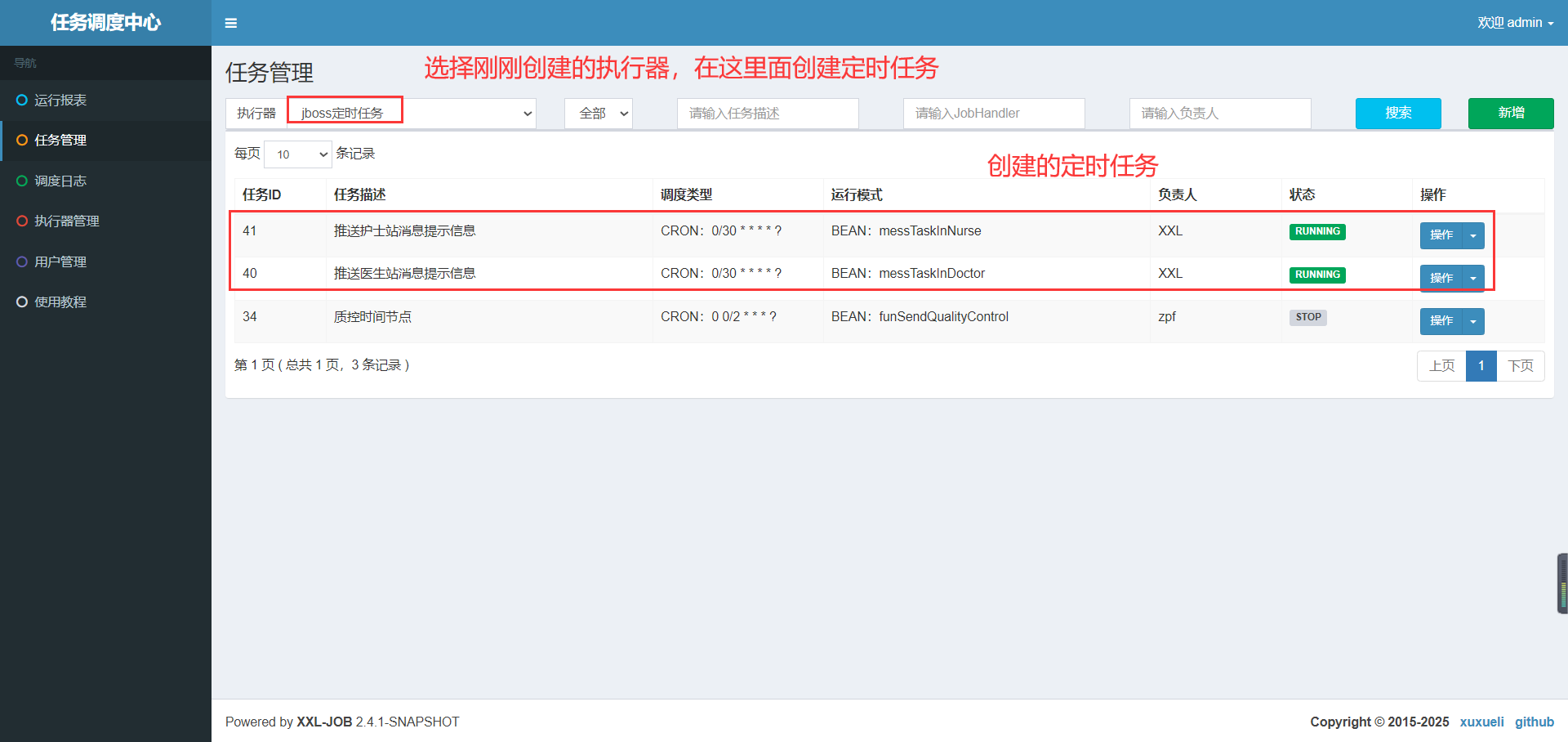
[1.7.3xxl job配置说明](#1.7.3xxl job配置说明)
2.3接收到消息处理方法(这里不唯一根据自己业务逻辑来处理)
1.后端:
1.1引入依赖
bash
<!-- 引入websocket依赖 -->
        <dependency>
          <groupId>com.pig4cloud.plugin</groupId>
          <artifactId>websocket-spring-boot-starter</artifactId>
          <version>${websocket-spring-boot-starter.version}</version>
        </dependency>
1.2.添加session会话管理WebSocketSessionHolder
java
package com.pig4cloud.plugin.websocket.holder;

import org.springframework.web.socket.WebSocketSession;

import java.util.Collection;
import java.util.List;
import java.util.Map;
import java.util.Set;
import java.util.concurrent.ConcurrentHashMap;
import java.util.stream.Collectors;

public final class WebSocketSessionHolder {
    private static final Map<String, WebSocketSession> USER_SESSION_MAP = new ConcurrentHashMap();

    private WebSocketSessionHolder() {
    }

    public static void addSession(Object sessionKey, String sessionId, WebSocketSession session) {
        USER_SESSION_MAP.put(sessionKey.toString() + ":" + sessionId, session);
    }

    public static void removeSession(Object sessionKey, String sessionId) {
        USER_SESSION_MAP.remove(sessionKey.toString() + ":" + sessionId);
    }

    public static List<WebSocketSession> getSession(Object sessionKey) {
        return getMatchingKeys(USER_SESSION_MAP, sessionKey + ":");
    }

    public static Collection<WebSocketSession> getSessions() {
        return USER_SESSION_MAP.values();
    }

    public static Set<String> getSessionKeys() {
        return USER_SESSION_MAP.keySet();
    }

    /**
     * 获取匹配的keys *
     * 因当前系统允许多地同账号登录  所以需要兼容多地登录同账号都能接受到消息 *
     *
     * @param map     USER_SESSION_MAP
     * @param keyword addSession时是拼接的sessionKey + ":" + sessionId
     * @return List<WebSocketSession>
     */
    public static List<WebSocketSession> getMatchingKeys(Map<String, WebSocketSession> map, String keyword) {
        return map.keySet().stream()
                .filter(key -> key.contains(keyword)) // 你可以使用 contains, startsWith, endsWith 等
                .map(map::get).collect(Collectors.toList());
    }
}
map.keySet().stream()
.filter(key -> key.contains(keyword)) // 你可以使用 contains, startsWith, endsWith 等
.map(map::get).collect(Collectors.toList());
.map(map::get)用到了lmabda表达式的方法引用,就是在拿参数做操作,
map::get相当于写法val -> map.get(val)
方法引用事例:
java
package MethodReference02;

/*
    需求:
        1、定义一个接口(Printable):里面定义一个抽象方法:void printInt(int i);
        2、定义一个测试类(PrintableDemo),在测试类中提供两个方法
            一个方法是:usePrintable(Printable p)
            一个方法是主方法,在主方法中调用usePrintable方法
 */
public class PrintableDemo {
    public static void main(String[] args) {
        usePrintable((int i) -> {
            System.out.println(i);
        });

        usePrintable(i -> System.out.println(i));

        usePrintable(System.out::println);
    }

    private static void usePrintable(Printable p) {
        p.printInt(12345);
    }
}
1.3.添加建立session会话连接到会话管理及监听下线MapSessionWebSocketHandlerDecorator
java
package com.pig4cloud.plugin.websocket.holder;


import com.tbyf.common.security.service.TokenService;
import com.tbyf.system.api.model.LoginUser;
import lombok.extern.slf4j.Slf4j;
import org.springframework.beans.factory.annotation.Autowired;
import org.springframework.web.socket.CloseStatus;
import org.springframework.web.socket.WebSocketHandler;
import org.springframework.web.socket.WebSocketSession;
import org.springframework.web.socket.handler.WebSocketHandlerDecorator;
import org.springframework.web.util.UriComponentsBuilder;

import java.util.Map;
import java.util.Objects;

/**
 * 系统允许一个账号多地登录 *
 * 为了适应同时登录都可以收到消息 重写添加sessionId *
 */
@Slf4j
public class MapSessionWebSocketHandlerDecorator extends WebSocketHandlerDecorator {

    @Autowired
    private TokenService tokenService;

    private final SessionKeyGenerator sessionKeyGenerator;

    public MapSessionWebSocketHandlerDecorator(WebSocketHandler delegate, SessionKeyGenerator sessionKeyGenerator) {
        super(delegate);
        this.sessionKeyGenerator = sessionKeyGenerator;
    }

    public void afterConnectionEstablished(final WebSocketSession session) throws Exception {
        Object sessionKey = this.sessionKeyGenerator.sessionKey(session);
        WebSocketSessionHolder.addSession(sessionKey, session.getId(), session);
    }

    public void afterConnectionClosed(final WebSocketSession session, CloseStatus closeStatus) throws Exception {
        Map<String, String> queryParams = UriComponentsBuilder.fromUri(Objects.requireNonNull(session.getUri()))
                .build()
                .getQueryParams()
                .toSingleValueMap();
        LoginUser loginUser = tokenService.getLoginUser(queryParams);
        log.warn("用户名:{}下线了, webSocket token is {}", loginUser.getUsername(), loginUser.getToken());
        Object sessionKey = this.sessionKeyGenerator.sessionKey(session);
        WebSocketSessionHolder.removeSession(sessionKey, session.getId());
    }
}
1.4.添加断开session会话连接前请求处理UserAttributeHandshakeInterceptor
java
package com.pig4cloud.plugin.websocket.custom;

import com.tbyf.common.core.exception.ServiceException;
import com.tbyf.common.security.service.TokenService;
import com.tbyf.system.api.model.LoginUser;
import lombok.extern.slf4j.Slf4j;
import org.springframework.beans.factory.annotation.Autowired;
import org.springframework.http.server.ServerHttpRequest;
import org.springframework.http.server.ServerHttpResponse;
import org.springframework.web.socket.WebSocketHandler;
import org.springframework.web.socket.server.HandshakeInterceptor;
import org.springframework.web.util.UriComponentsBuilder;

import java.util.Map;

@Slf4j
public class UserAttributeHandshakeInterceptor implements HandshakeInterceptor {

    @Autowired
    private TokenService tokenService;

    public UserAttributeHandshakeInterceptor() {
    }

    public boolean beforeHandshake(ServerHttpRequest request, ServerHttpResponse response, WebSocketHandler wsHandler, Map<String, Object> attributes) throws Exception {
        // 获取请求的 URI 并解析查询参数
        Map<String, String> queryParams = UriComponentsBuilder.fromUri(request.getURI())
                .build()
                .getQueryParams()
                .toSingleValueMap();
        LoginUser loginUser = tokenService.getLoginUser(queryParams);
        if(loginUser == null){
            throw new ServiceException("登录状态已过期");
        }
        attributes.put("USER_KEY_ATTR_NAME", loginUser.getUsername());
        log.warn("用户名:{}上线了, webSocket token is {}", loginUser.getUsername(), loginUser.getToken());
        return true;
    }

    public void afterHandshake(ServerHttpRequest request, ServerHttpResponse response, WebSocketHandler wsHandler, Exception exception) {
    }
}
1.5.后端消息发送
java
package com.tbyf.system.controller;

import com.alibaba.fastjson2.JSONObject;
import com.pig4cloud.plugin.websocket.config.WebSocketMessageSender;
import com.pig4cloud.plugin.websocket.holder.WebSocketSessionHolder;
import com.tbyf.common.core.exception.ServiceException;
import com.tbyf.common.core.utils.StringUtils;
import com.tbyf.common.core.web.domain.AjaxResult;
import com.tbyf.common.security.annotation.InnerAuth;
import com.tbyf.system.api.model.LoginUser;
import com.tbyf.system.api.model.MessageModel;
import com.tbyf.system.service.ISysUserOnlineService;
import io.swagger.annotations.ApiOperation;
import lombok.AllArgsConstructor;
import lombok.extern.slf4j.Slf4j;
import org.springframework.beans.factory.annotation.Autowired;
import org.springframework.util.CollectionUtils;
import org.springframework.web.bind.annotation.PostMapping;
import org.springframework.web.bind.annotation.RequestBody;
import org.springframework.web.bind.annotation.RequestMapping;
import org.springframework.web.bind.annotation.RestController;
import org.springframework.web.socket.TextMessage;
import org.springframework.web.socket.WebSocketSession;

import java.io.IOException;
import java.util.Collection;
import java.util.List;

/**
 * <p>
 * 发送消息
 * </p>
 *
 * @author Lisy
 * @since 2020-05-29
 */
@Slf4j
@RestController
@AllArgsConstructor
@RequestMapping("/msg")
public class MessageSendController {

    @Autowired
    private ISysUserOnlineService userOnlineService;

    /**
     * 通知消息
     */
    @InnerAuth
    @ApiOperation("通知消息")
    @PostMapping("/sendMsg")
    public AjaxResult sendMsg(@RequestBody MessageModel messageModel) {
        if (StringUtils.isEmpty(messageModel.getUserName())) {
            throw new ServiceException("用户名不能为空");
        }
        this.sendMsg(messageModel.getUserName(), JSONObject.toJSONString(messageModel));
        return AjaxResult.success(Boolean.TRUE);
    }

    /**
     * 通知消息
     */
    @InnerAuth
    @ApiOperation("向所有的session发送消息")
    @PostMapping("/sendAllSessionMsg")
    public AjaxResult sendAllSessionMsg() {
        String msg = "这是测试消息";
        Collection<WebSocketSession> sessions = WebSocketSessionHolder.getSessions();
        if (CollectionUtils.isEmpty(sessions)) {
            log.error("当前没有用户连接websocket");
            throw new ServiceException("当前没有用户连接websocket");
        }
        for (WebSocketSession session : sessions) {
            Object userName = session.getAttributes().get("USER_KEY_ATTR_NAME");
            if (session == null) {
                log.error("[send] session 为 null");
            } else if (!session.isOpen()) {
                log.error("[send] session 已经关闭");
            } else {
                try {
                    session.sendMessage(new TextMessage(msg));
                    log.error("[send] user({}) 发送消息({})成功", new Object[]{userName, msg});
                } catch (IOException var3) {
                    log.error("[send] user({}) 发送消息({}) 异常", new Object[]{userName, msg, var3});
                }
            }
        }
        return AjaxResult.success(Boolean.TRUE);
    }
    // (9.0使用的这个发送消息)
    private void sendMsg(String userName, String message) {

        boolean send = WebSocketMessageSender.send(userName, message);
        if (send) {
            log.error("发送消息成功!接收人:{}", userName);
        } else {
            log.error("发送消息失败!接收人:{}", userName);
        }
    }

    /**
     * 向所有符合科室的session发送消息(9.0使用的这个发送消息)
     */
    @InnerAuth
    @ApiOperation("向所有符合科室的session发送消息")
    @PostMapping("/sendAllDeptMsg")
    public AjaxResult sendAllDeptMsg(@RequestBody MessageModel messageModel) {
        if (StringUtils.isEmpty(messageModel.getOrgCode())) {
            throw new ServiceException("机构编码不能为空");
        }
        List<LoginUser> userList = userOnlineService.onlineUser(messageModel.getOrgCode());
        userList.stream().filter(user -> StringUtils.equals(user.getDeptCode(), messageModel.getDeptCode()))
                .forEach(user -> {
                    String userName = user.getUsername();
                    sendMsg(userName, JSONObject.toJSONString(messageModel));
                });
        return AjaxResult.success(Boolean.TRUE);
    }
}
// (9.0使用的这个发送消息)
private void sendMsg(String userName, String message) {
boolean send = WebSocketMessageSender.send(userName, message);
if (send) {
log.error("发送消息成功!接收人:{}", userName);
} else {
log.error("发送消息失败!接收人:{}", userName);
}
}
/*** 向所有符合科室的session发送消息**(9.0使用的这个发送消息)**
*/
@InnerAuth
@ApiOperation("向所有符合科室的session发送消息")
@PostMapping("/sendAllDeptMsg")
public AjaxResult sendAllDeptMsg(@RequestBody MessageModel messageModel) {
if (StringUtils.isEmpty(messageModel.getOrgCode())) {
throw new ServiceException("机构编码不能为空");
}
List<LoginUser> userList = userOnlineService.onlineUser(messageModel.getOrgCode());
userList.stream().filter(user -> StringUtils.equals(user.getDeptCode(), messageModel.getDeptCode()))
.forEach(user -> {
String userName = user.getUsername();
sendMsg(userName, JSONObject.toJSONString(messageModel));
});
return AjaxResult.success(Boolean.TRUE);
}
}
java
package com.pig4cloud.plugin.websocket.config;

import com.alibaba.nacos.common.utils.CollectionUtils;
import com.fasterxml.jackson.core.JsonProcessingException;
import com.fasterxml.jackson.databind.ObjectMapper;
import com.pig4cloud.plugin.websocket.holder.WebSocketSessionHolder;
import com.pig4cloud.plugin.websocket.message.JsonWebSocketMessage;
import com.pig4cloud.plugin.websocket.util.SpringBeanContextHolder;
import org.slf4j.Logger;
import org.slf4j.LoggerFactory;
import org.springframework.web.socket.TextMessage;
import org.springframework.web.socket.WebSocketSession;

import java.io.IOException;
import java.util.Collection;
import java.util.Iterator;
import java.util.List;

public class WebSocketMessageSender {
    private static final Logger log = LoggerFactory.getLogger(WebSocketMessageSender.class);

    public WebSocketMessageSender() {
    }

    public static void broadcast(String message) {
        Collection<WebSocketSession> sessions = WebSocketSessionHolder.getSessions();
        Iterator var2 = sessions.iterator();

        while (var2.hasNext()) {
            WebSocketSession session = (WebSocketSession) var2.next();
            send(session, message);
        }

    }
    // 9.0 使用的这个推送消息
    public static boolean send(Object sessionKey, String message) {
        List<WebSocketSession> sessions = WebSocketSessionHolder.getSession(sessionKey);
        if (CollectionUtils.isEmpty(sessions)) {
            log.info("[send] 当前 sessionKey:{} 对应 session 不在本服务中", sessionKey);
            return false;
        } else {
            sessions.forEach(session -> send(session, message));
            return Boolean.TRUE;
        }
    }

    public static void send(WebSocketSession session, JsonWebSocketMessage message) {
        ObjectMapper mapper = (ObjectMapper) SpringBeanContextHolder.getBean(ObjectMapper.class);

        try {
            send(session, mapper.writeValueAsString(message));
        } catch (JsonProcessingException var4) {
            throw new RuntimeException(var4);
        }
    }

    public static boolean send(WebSocketSession session, String message) {
        if (session == null) {
            log.error("[send] session 为 null");
            return false;
        } else if (!session.isOpen()) {
            log.error("[send] session 已经关闭");
            return false;
        } else {
            try {
                session.sendMessage(new TextMessage(message));
                return true;
            } catch (IOException var3) {
                log.error("[send] session({}) 发送消息({}) 异常", new Object[]{session, message, var3});
                return false;
            }
        }
    }
}
9.0使用的这个方法推送消息
send(Object sessionKey, String message) {}
java
package com.tbyf.system.controller;

import com.pig4cloud.plugin.websocket.config.WebSocketMessageSender;
import com.pig4cloud.plugin.websocket.holder.WebSocketSessionHolder;
import com.tbyf.common.core.exception.ServiceException;
import com.tbyf.common.core.web.domain.AjaxResult;
import io.swagger.annotations.ApiOperation;
import lombok.AllArgsConstructor;
import lombok.extern.slf4j.Slf4j;
import org.springframework.util.CollectionUtils;
import org.springframework.web.bind.annotation.PostMapping;
import org.springframework.web.bind.annotation.RequestMapping;
import org.springframework.web.bind.annotation.RestController;
import org.springframework.web.socket.TextMessage;
import org.springframework.web.socket.WebSocketSession;

import java.io.IOException;
import java.util.Collection;

/**
 * <p>
 * 发送任务消息
 * </p>
 *
 * @author Lisy
 * @since 2020-05-29
 */
@Slf4j
@RestController
@AllArgsConstructor
@RequestMapping("/msg")
public class MessageSendController {


    /**
     * 通知消息
     */
    @ApiOperation("通知消息")
    @RequestMapping("/sendMsg")
    public AjaxResult sendMedicine() {
        this.sendMsg("SYS", "hello world");
        return AjaxResult.success();
    }

    /**
     * 通知消息
     */
    @ApiOperation("向所有的session发送消息")
    @PostMapping("/sendAllSessionMsg")
    public AjaxResult sendAllSessionMsg() {
        String msg = "这是测试消息";
        Collection<WebSocketSession> sessions = WebSocketSessionHolder.getSessions();
        if (CollectionUtils.isEmpty(sessions)) {
            log.error("当前没有用户连接websocket");
            throw new ServiceException("当前没有用户连接websocket");
        }
        for (WebSocketSession session : sessions) {
            Object userName = session.getAttributes().get("USER_KEY_ATTR_NAME");
            if (session == null) {
                log.error("[send] session 为 null");
            } else if (!session.isOpen()) {
                log.error("[send] session 已经关闭");
            } else {
                try {
                    session.sendMessage(new TextMessage(msg));
                    log.error("[send] user({}) 发送消息({})成功", new Object[]{userName, msg});
                } catch (IOException var3) {
                    log.error("[send] user({}) 发送消息({}) 异常", new Object[]{userName, msg, var3});
                }
            }
        }
        return AjaxResult.success();
    }

    private void sendMsg(String userName, String message) {

        boolean send = WebSocketMessageSender.send(userName, message);
        if (send) {
            log.error("发送消息成功!接收人:{}", userName);
        } else {
            log.error("发送消息失败!接收人:{}", userName);
        }
    }

}
流程:
1.启动时会调用
MapSessionWebSocketHandlerDecorator的构造器
2.建立websocket连接时会调用
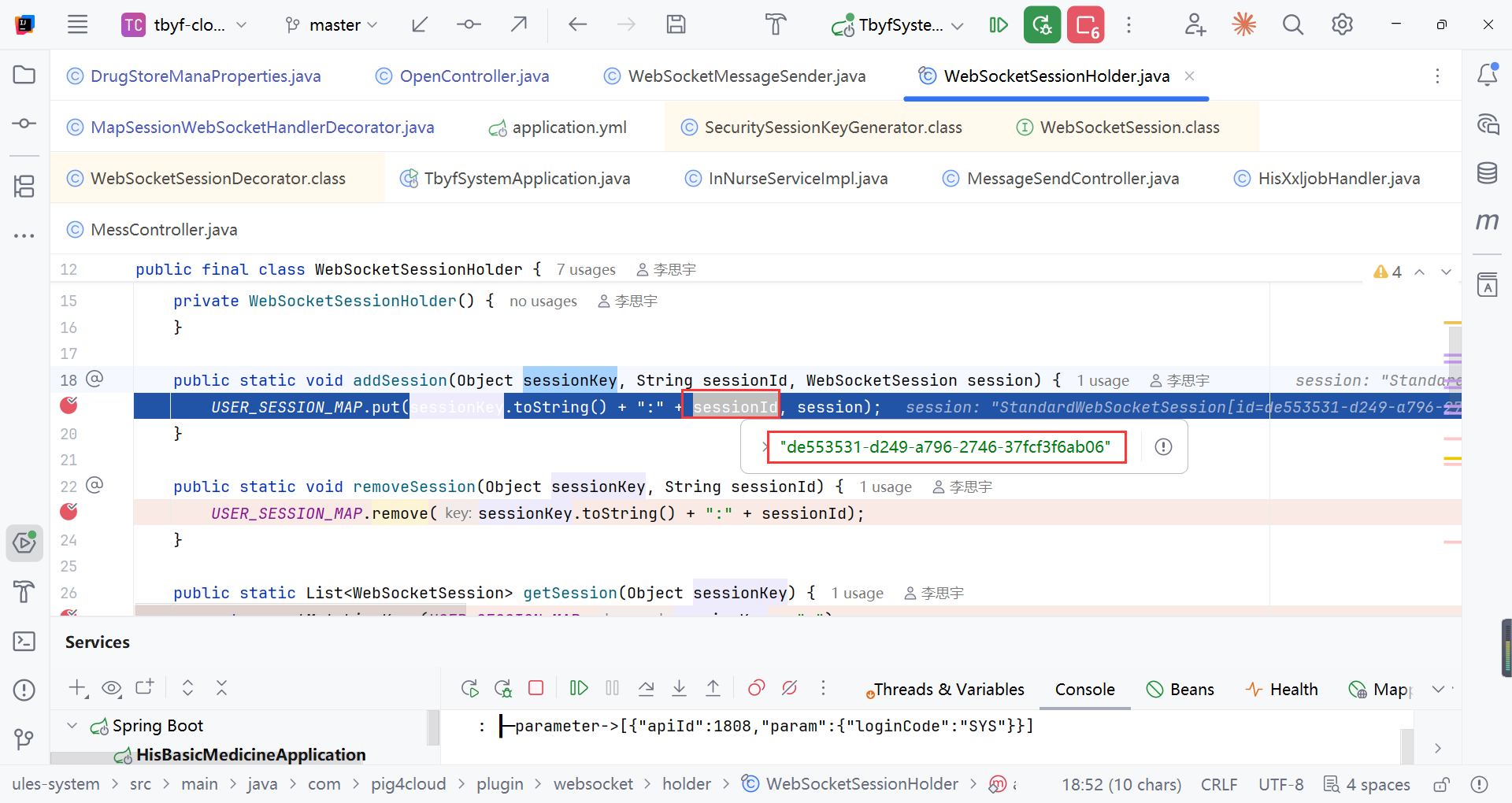
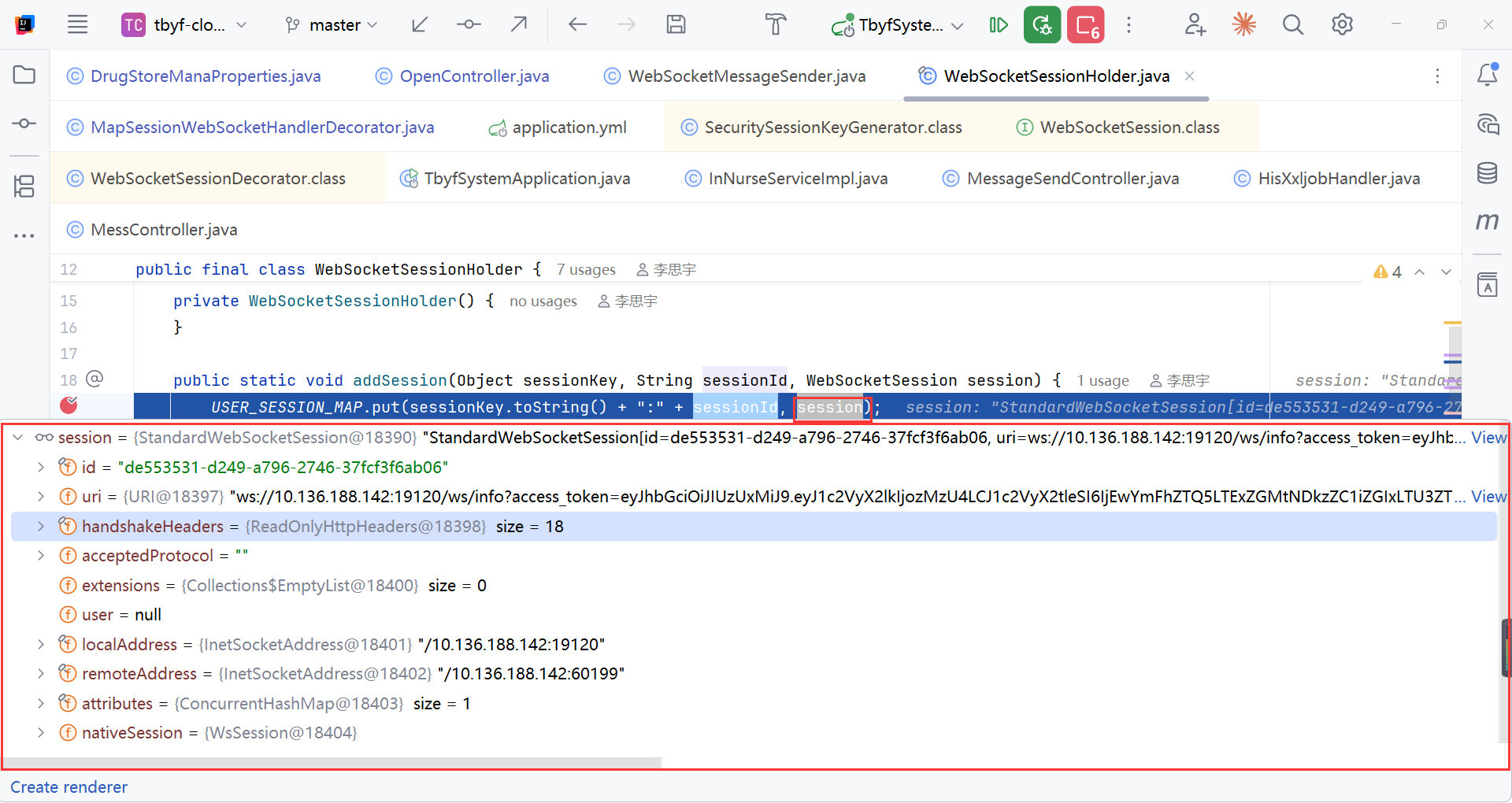
MapSessionWebSocketHandlerDecorator.afterConnectionEstablished方法
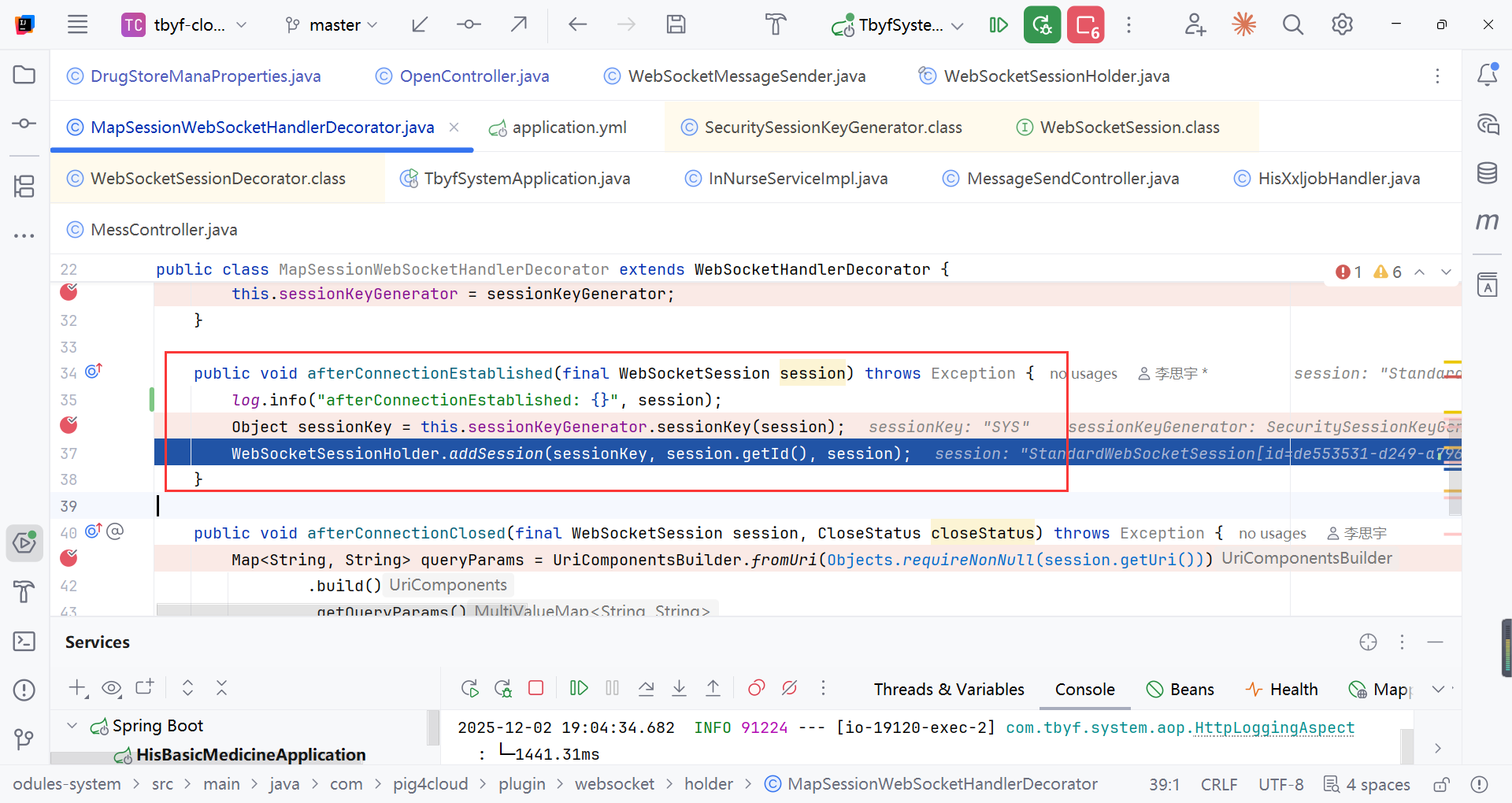
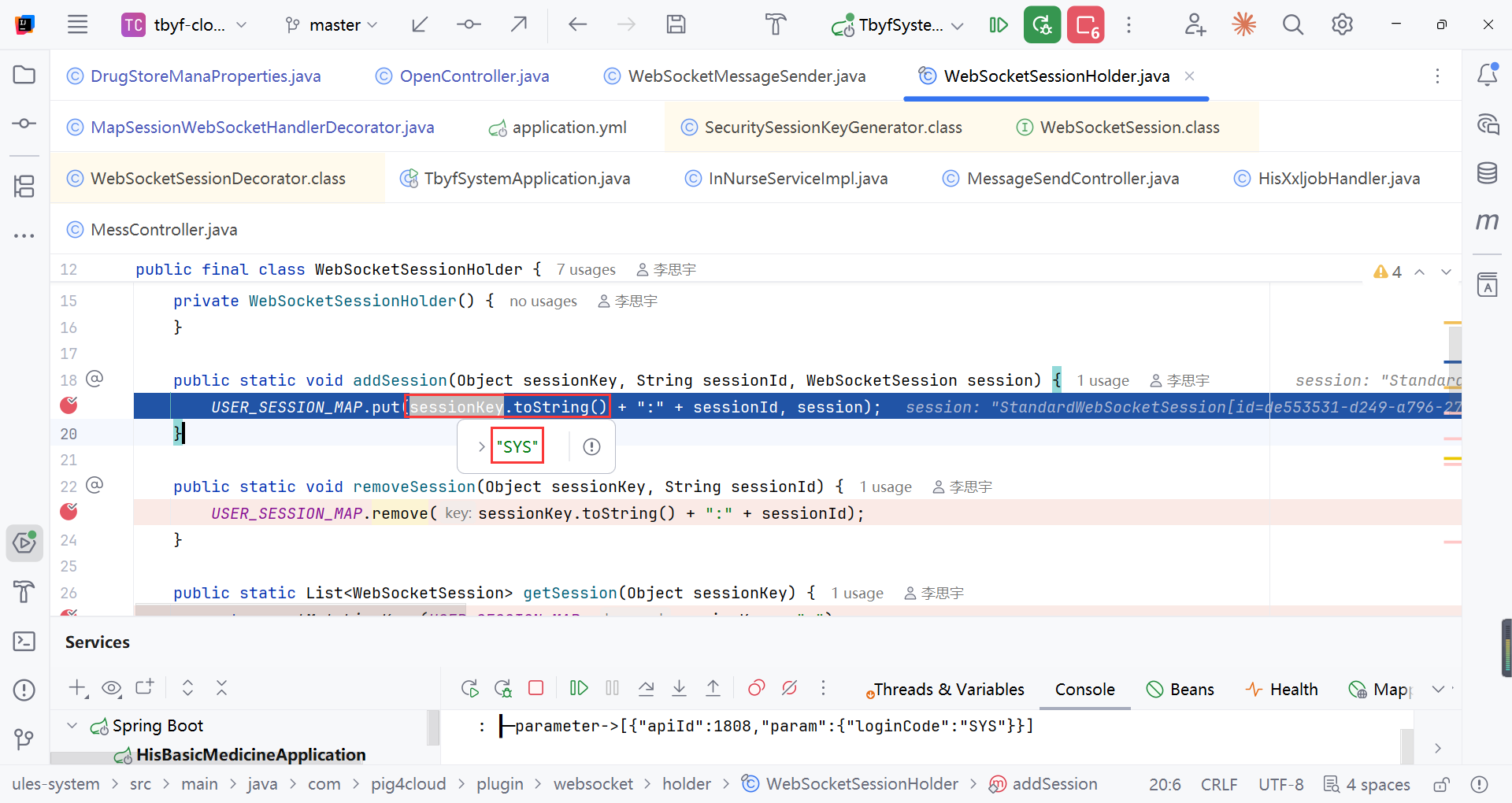
存方到自定义的USER_SESSION_MAP集合中
参数1:sessionKey 就是用户名,
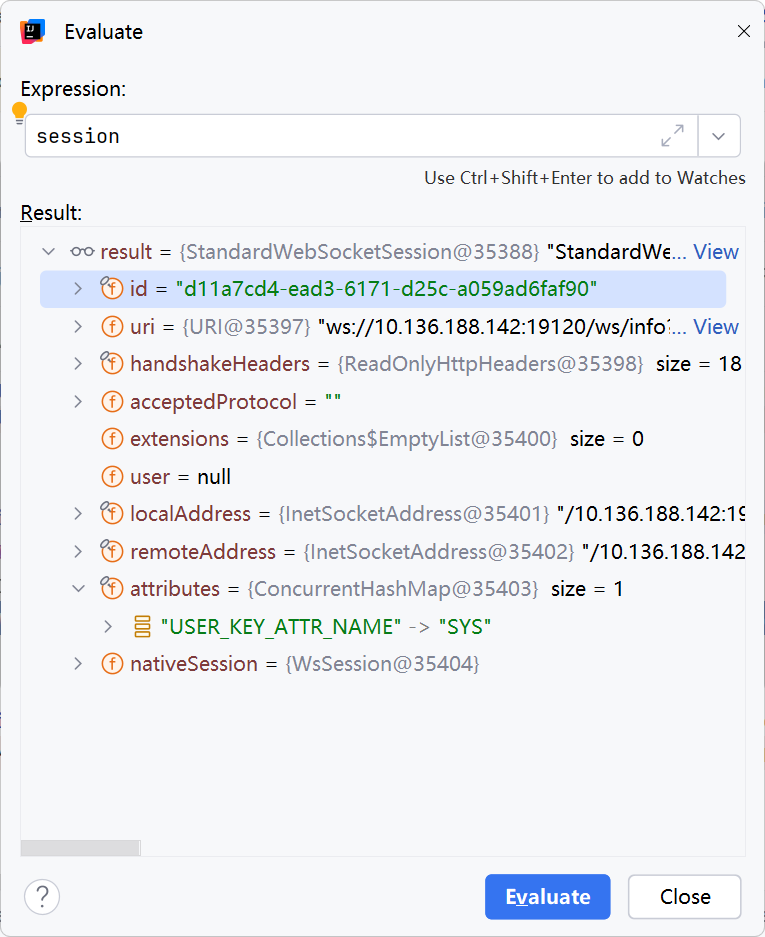
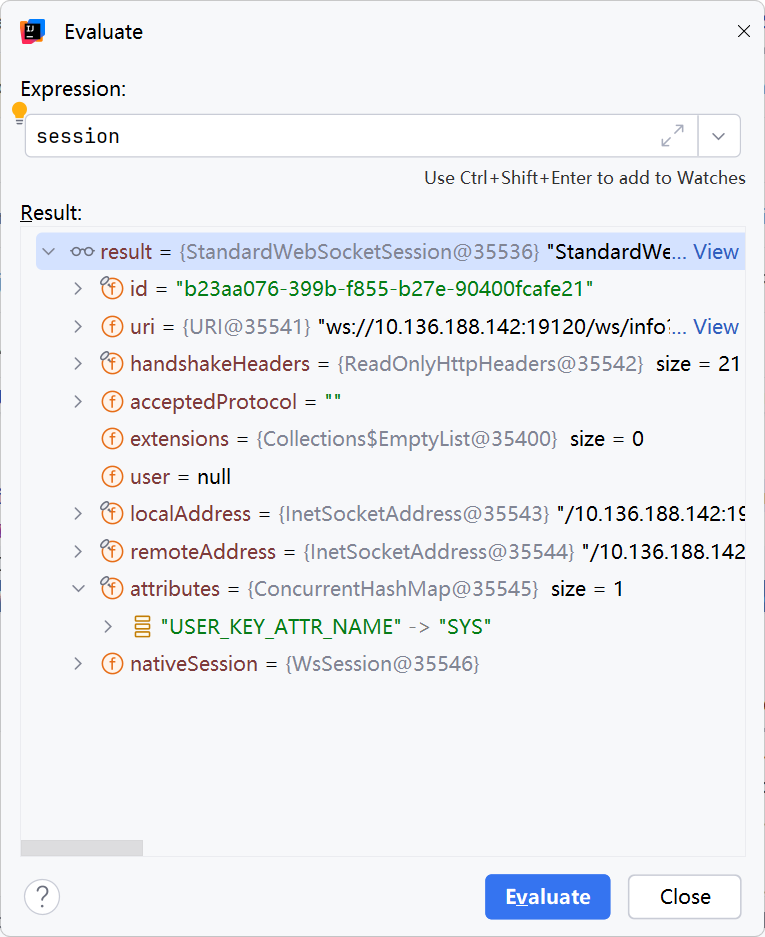
参数2:sessionId就是SESSION的id用于区分同一用户账号多地登录它的sessionKey 是一样的(比如同一个SYS账号多台电脑登录),用于同一用户同一科室但是不同电脑登录
参数3:session信息
模拟同一用户不同电脑同一科室登录
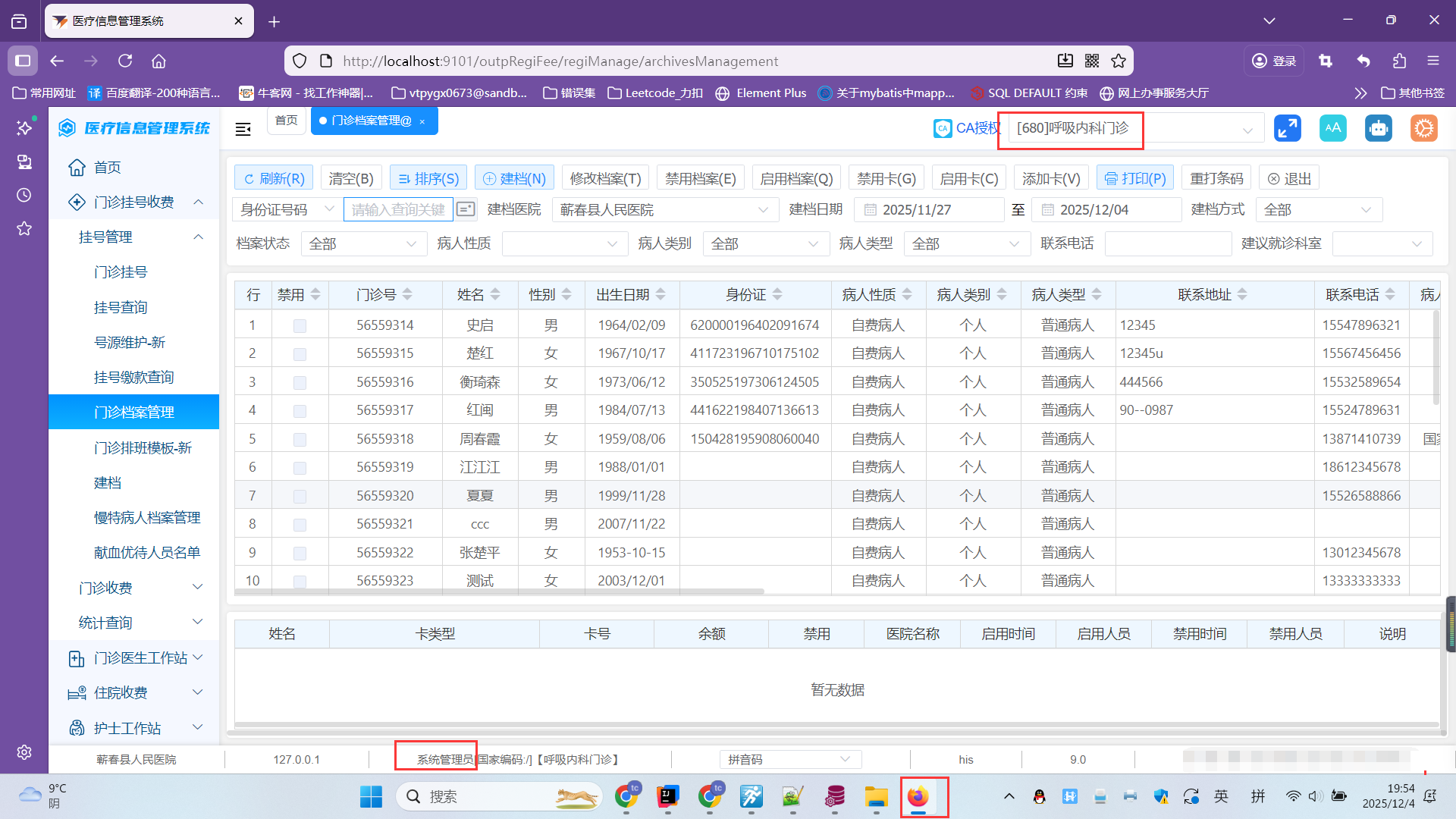
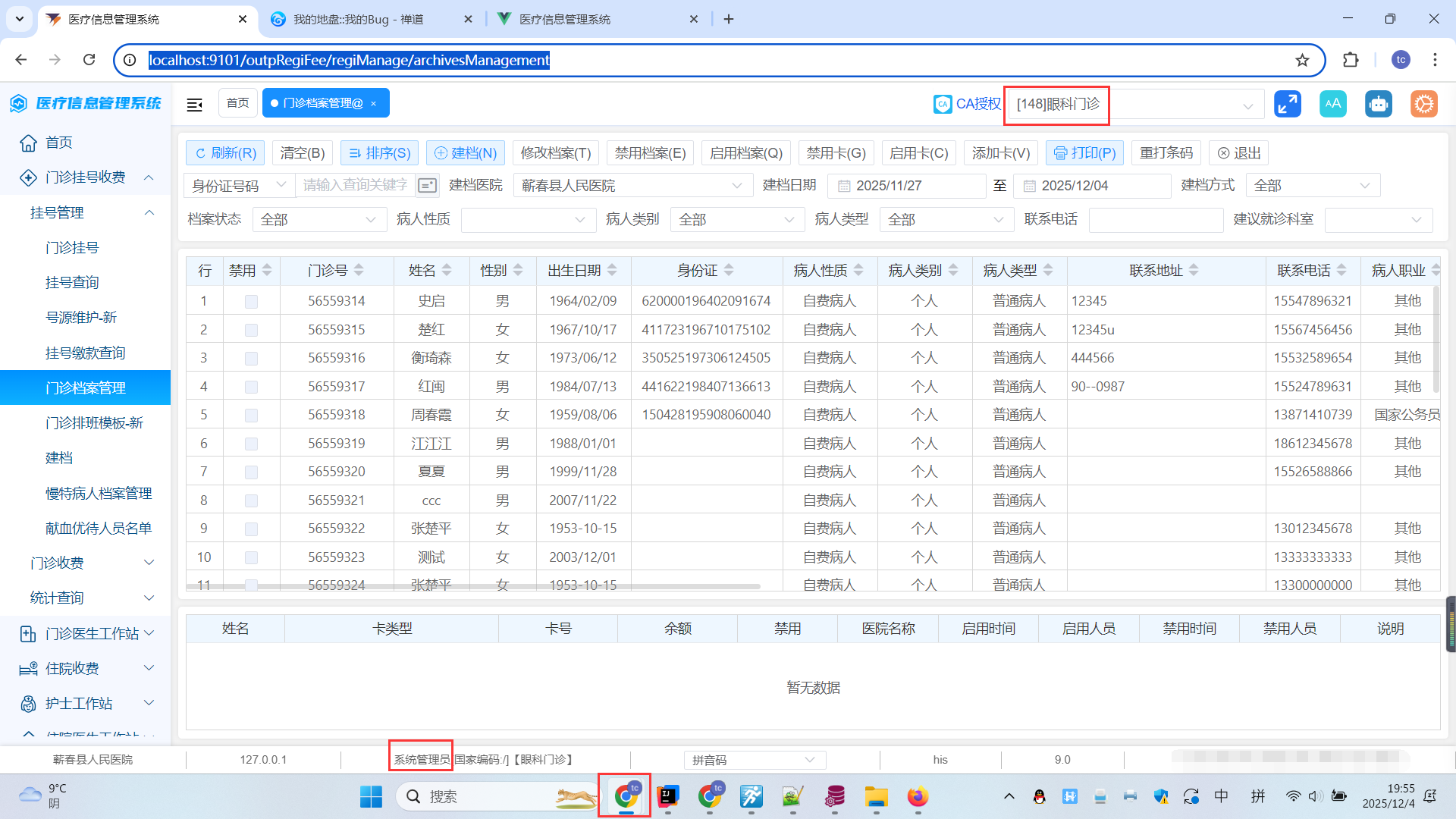
1.6xxljob定时任务推送后展示的消息(同一用户同一科室不同电脑展示)
1.7引入XXLJOB流程
1.7.1引入xxl job依赖
bash
<!--xxl-job-->
        <dependency>
            <groupId>com.xuxueli</groupId>
            <artifactId>xxl-job-core</artifactId>
            <version>2.3.0</version>
        </dependency>
1.7.2application.yml中添加
bash
xxl:
  job:
    admin:
      addresses: http://your ip:8080/xxl-job-admin/ #xxl job管理界面的ip
    executor:
      appname: his9-xxl-job #xxl job中执行器要配置的AppName,要与这里一致
      address:
      ip:
      port: 8998
      logpath: /data/applogs/xxl-job/jobhandler
      logretentiondays: 30
    accessToken: default_token
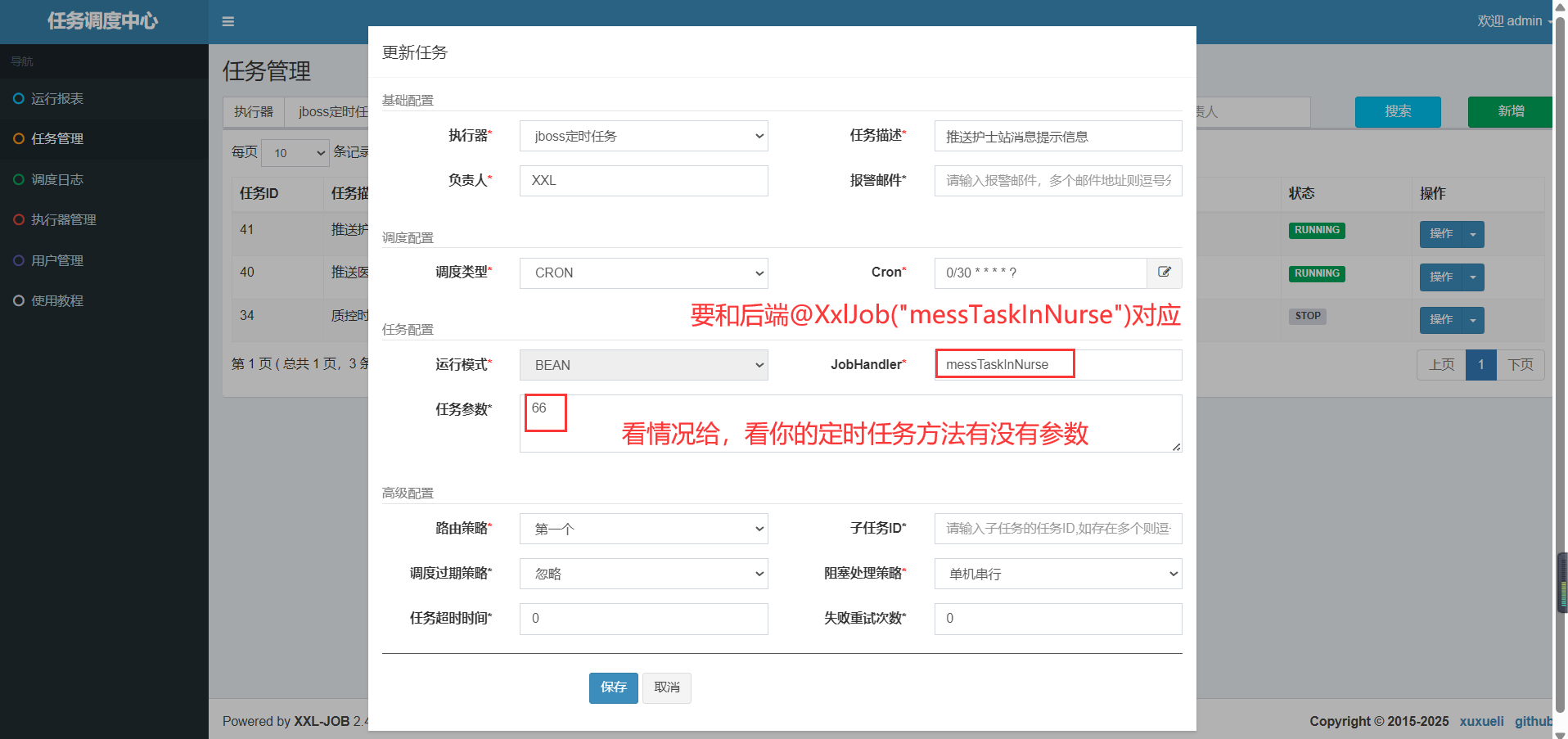
1.7.3xxl job配置说明
2.前端:
2.1在你想要建立连接的页面created中添加连接
javascript
created() {
    //连接Websocket
    var domain = window.location.host;
    //domain = '192.168.60.45:19100';
    var WSS_URL = `ws://${domain}/system/ws/info?access_token=${getToken()}`
    console.log("WSS_URL",WSS_URL)
    setURL(WSS_URL)
    //websocket连接失败导致node崩溃解决方案:
    //https://blog.csdn.net/qq_36577699/article/details/130559531
    createSocket()
    window.addEventListener('onmessageWS', this.handleMessage)
    this.$bus.$on("onmessageWS", this.handleMessage)

  }
2.2websocket.js处理连接及断开重连
javascript
import {getToken} from '@/utils/auth'
import eventBus from '@/utils/eventBus.js'
let Socket = ''
var timer = null
var WSS_URL = null
// 建立连接
export function setURL(url) {
	WSS_URL = url
}
export function createSocket() {
	var domain = window.location.host;
	//console.log(WSS_URL)
	if (!Socket) {
		Socket = new WebSocket(WSS_URL)
		// const WebSocketProxy = new Proxy(WebSocket, {
		// 	construct: function(target, arg) {
		// 		try {
		// 			return new target(...arg)
		// 		} catch (error) {
		// 			return error
		// 		}
		// 	}
		// })
		// Socket = new WebSocketProxy(WSS_URL);
		Socket.onopen = onopenWS
		Socket.onmessage = onmessageWS
		Socket.onerror = onerrorWS
		Socket.onclose = oncloseWS
	} else {
		console.log('websocket已连接')
	}
}
// 打开WS之后发送心跳
export function onopenWS() {
	console.log('Websocket connect success')
	timer = setInterval(() => {
		try {
			Socket.send("/test");
		} catch (err) {
			console.log("断开了:" + err);
			createSocket();
		}
	}, 5 * 60 * 1000);


}
// 连接失败重连
export function onerrorWS(e) {
	console.log(e)
	Socket.close()
	// createSocket() //重连
}
// WS数据接收统一处理
export function onmessageWS(message) {
	eventBus.$emit('onmessageWS', message)
}
/**发送数据
 1. @param eventType
 */
export function sendWSPush(eventTypeArr) {
	const obj = {
		appId: 'airShip',
		cover: 0,
		event: eventTypeArr
	}
	if (Socket !== null && Socket.readyState === 3) {
		Socket.close()
		createSocket() //重连
	} else if (Socket.readyState === 1) {
		Socket.send(JSON.stringify(obj))
	} else if (Socket.readyState === 0) {
		setTimeout(() => {
			Socket.send(JSON.stringify(obj))
		}, 3000)
	}
}
export function oncloseWS(e) {
	clearInterval(timer)
	console.log('websocket已断开', e)
}
2.3接收到消息处理方法(这里不唯一根据自己业务逻辑来处理)
javascript
handleMessage(message) {
      var deptCode = this.$store.state.user.deptCode
      var orgCode = this.$store.state.user.orgCode
      var userName = this.$store.state.user.userInfo.userName
      try {
        let info = JSON.parse(message.data)
        let infoList = JSON.parse(info.msg)
        //消息面向机构进行筛选
        if (info.orgCode != orgCode) return
        //消息面向科室进行筛选
        if (info.type == 'dept') {
          if (info.deptCode == deptCode) {
            if (info.windowType == 'nurse') this.nurerDeptList = infoList
            if (info.windowType == 'doctor') {
              this.doctorDeptList = infoList.map(item => {
                return {
                  ...item,
                  TYPE: 'dept'
                }
              })
            }
          }
        }
        //消息面向个人进行筛选
        else if (info.type == 'ry') {
          if (info.userName == userName) {
            if (info.windowType == 'nurse') this.nurseUserList = infoList
            if (info.windowType == 'doctor') {
              this.doctorUserList = infoList.map(item => {
                return {
                  ...item,
                  TYPE: 'ry'
                }
              })
            }
          }
        }

        if (info.windowType == 'nurse') {
          // console.log(this.nurerDeptList)
          this.nurseList = this.nurseUserList.concat(this.nurerDeptList)
          // console.log(this.nurseList)
        } else if (info.windowType == 'doctor') {
          this.doctorList = this.doctorUserList.concat(this.doctorDeptList)
        }
      } catch (e) {
        // console.log('error:', e)
        // console.log(message)
      }
      // this.$nextTick(() => {
      //   document.querySelector('.black-red').style.animation = 'none';
      // })
    },