SSE 流式输出 Markdown 实时渲染问题解决方案
在开发 AI 对话功能时,我遇到了一个棘手的问题:使用 fetch + ReadableStream 实现 SSE 流式输出后,AI 返回的 Markdown 格式内容(标题、换行、列表等)全部挤在一起,无法正确渲染。
之前采用之前的原生 EventSource 实时渲染正常,就是因为它自动处理了所有 SSE 规范。但是原生 EventSource 存在一些问题,他没办法携带请求头,意味着我们需要在路径拼接token传递给后端人员,但是这样在网站开发规范中将token暴露是相当危险且不正确的做法,于是本文将该方法改进记录使用 fetch + ReadableStream出现问题的排查过程和最终的解决方案。
背景
MindCampus 项目的 AI 对话模块采用以下技术栈:
- 后端:Spring Boot 3.x + Spring AI Alibaba + DashScope(通义千问)
- 前端:Vue 3 + Uni-app + ua-markdown 组件
- 通信方式:SSE (Server-Sent Events) 流式传输
AI 返回的内容包含丰富的 Markdown 格式,如:
markdown
## 你好!

我是 AI 助手,很高兴为你服务。

### 我可以帮你:
1. 解答问题
2. 提供建议
3. 倾听心声
但实际渲染出来却是这样的:
## 你好!我是 AI 助手,很高兴为你服务。### 我可以帮你:1. 解答问题2. 提供建议3. 倾听心声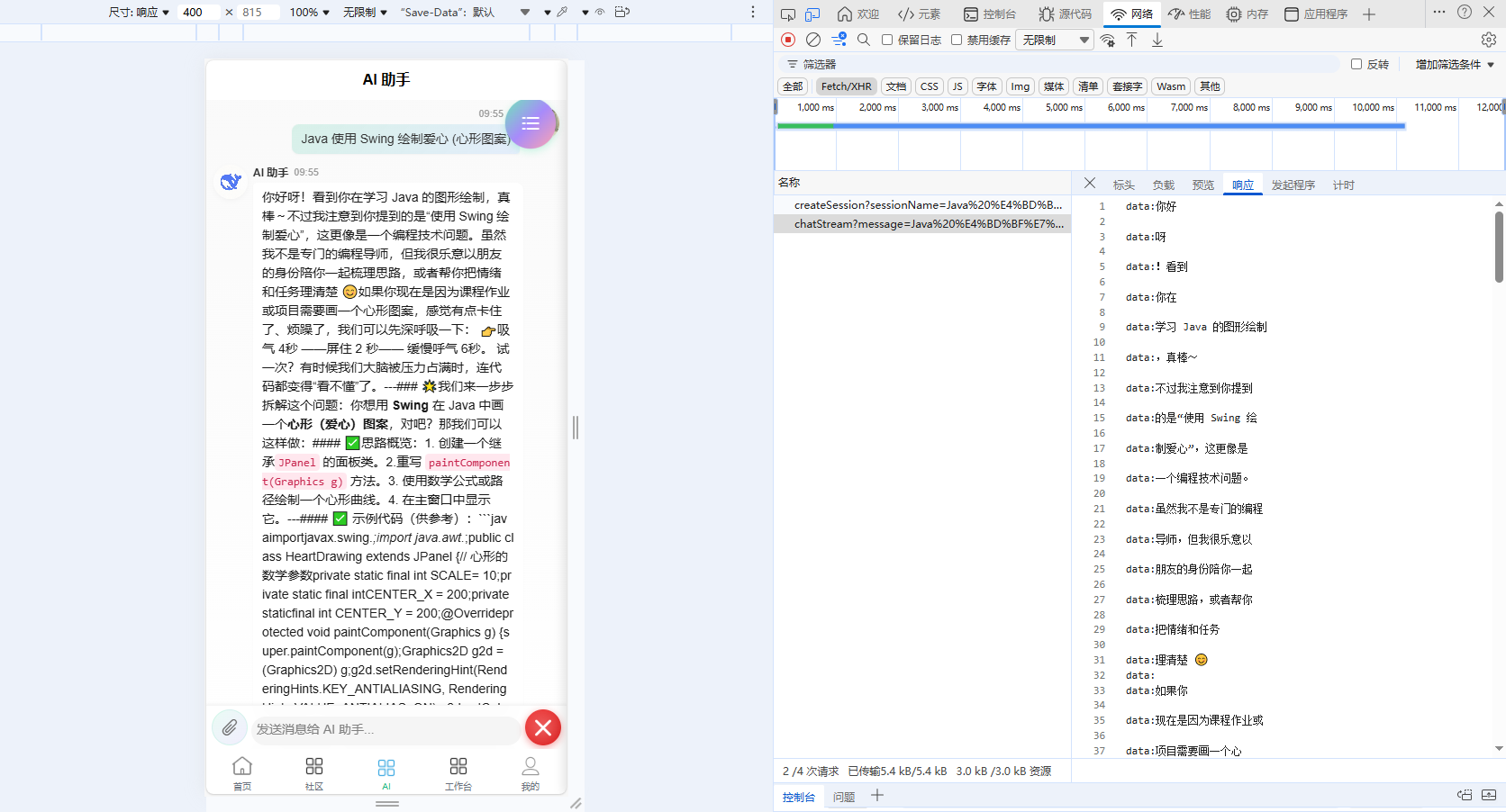
所有内容挤成一团,换行符完全丢失。
问题分析
后端 SSE 实现
首先查看后端的 SSE 流式输出代码:
java
// AiChatStreamServiceImpl.java
public Flux<ServerSentEvent<String>> generateStreamResponse(String message, Long sessionId, Long userId) {
    // ...
    return dashScopeChatClient.prompt()
            .user(message)
            .system(SYSTEM_PROMPT)
            .advisors(a -> a.param(ChatMemory.CONVERSATION_ID, sessionId))
            .stream()
            .content()
            .takeWhile(data -> isStreaming.get())
            .map(content -> {
                aiResponse.append(content);
                return ServerSentEvent.<String>builder()
                        .data(content)  // 每个 token 作为独立的 SSE 事件发送
                        .build();
            })
            .concatWith(Flux.just(ServerSentEvent.<String>builder()
                    .data("\u0003")  // ETX 结束标记
                    .build()));
}
后端代码看起来没问题,每个 AI 返回的 token 都通过 ServerSentEvent 发送。
前端原始代码
问题出在前端的 SSE 解析逻辑:
第一个问题:H5 端的 fetch + ReadableStream 实现方式问题
查看非 H5 端(小程序)的代码:
javascript
// api/ai.js - 原始的小程序端代码(有问题)
requestTask.onChunkReceived((res) => {
  const decoder = new TextDecoder('utf-8')
  const text = decoder.decode(res.data)

  const lines = text.split('\n')
  for (const line of lines) {
    if (line.startsWith('data:')) {
      const data = line.substring(5).trim()  // 问题1:使用 trim() 移除空白
      if (data && data !== ':heartbeat') {   // 问题2:空字符串被过滤
        fullContent += data
        onMessage(data, fullContent)
      }
    }
  }
})
这里有两个严重问题:
- 使用
.trim()移除了首尾空白,包括换行符 - 空字符串被
if (data && ...)过滤掉
SSE 格式的秘密
要理解问题的根源,需要了解 SSE 格式规范。根据 SSE 规范:
当数据包含换行符时,会被拆分为多个
data:行,客户端应该用\n将它们重新连接。
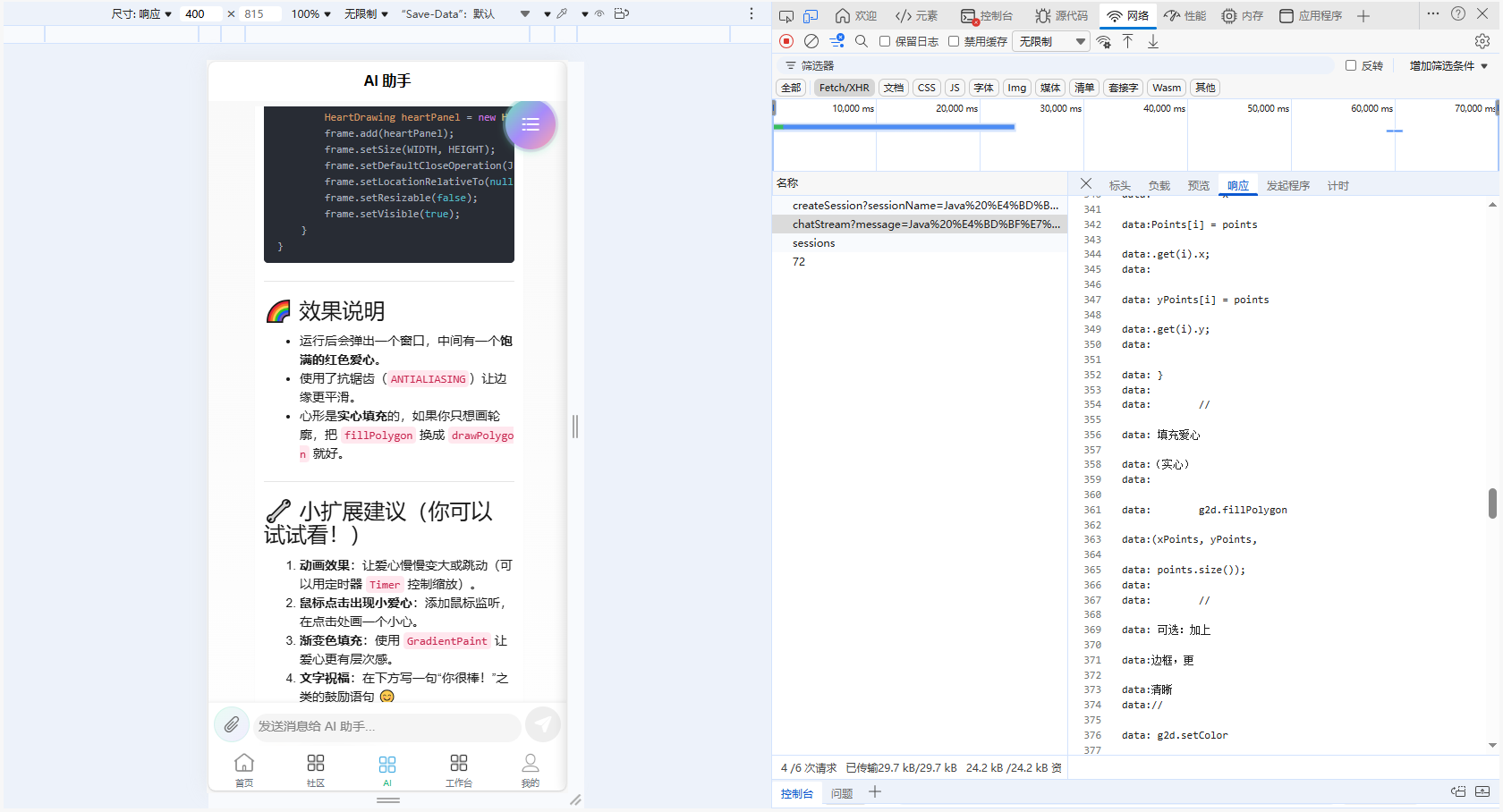
例如,当 AI 返回 "你好\n我是AI" 时:
# 后端发送的 SSE 格式
data:你好
data:
data:我是AI
注意中间那个空的 data: 行!它代表一个换行符。
但我们的代码把空的 data: 行过滤掉了,所以换行符丢失了!
SSE 事件的边界
另一个关键点是 SSE 事件之间用空行分隔:
data:第一个事件的数据
                        ← 空行,表示第一个事件结束
data:第二个事件的数据
                        ← 空行,表示第二个事件结束
同一个事件可以有多个 data: 行,它们应该用 \n 连接:
data:Hello
data:World
                        ← 空行,事件结束
# 客户端应该得到 "Hello\nWorld"
解决方案
核心思路
- 不使用
.trim(),保留空白字符 - 收集同一 SSE 事件的所有
data:行 - 遇到空行时,将收集的行用
\n连接 - 使用 buffer 处理跨 chunk 的不完整行
H5 端完整实现
javascript
// api/ai.js - 修复后的 H5 端代码
fetch(url, {
  method: 'GET',
  headers: {
    'Authorization': token ? 'Bearer ' + token : '',
    'Accept': 'text/event-stream',
    'Cache-Control': 'no-cache'
  },
  signal: abortController.signal
})
.then(response => {
  if (!response.ok) {
    throw new Error(`HTTP error! status: ${response.status}`)
  }

  const reader = response.body.getReader()
  const decoder = new TextDecoder('utf-8')
  let buffer = ''              // 处理跨 chunk 的不完整行
  let eventDataLines = []      // 收集同一 SSE 事件的所有 data 行

  function processChunk({ done, value }) {
    if (done) {
      // 处理最后可能残留的事件数据
      if (eventDataLines.length > 0) {
        const content = eventDataLines.join('\n')
        if (content && !content.includes(END_MARKER)) {
          fullContent += content
          onMessage(content, fullContent)
        }
      }
      onComplete(fullContent)
      return
    }

    // 解码并追加到 buffer
    const text = decoder.decode(value, { stream: true })
    buffer += text

    // 按行分割
    const lines = buffer.split('\n')
    buffer = lines.pop() || ''  // 保留最后一行(可能不完整)

    for (const line of lines) {
      // 移除 Windows 换行符的 \r
      const cleanLine = line.endsWith('\r') ? line.slice(0, -1) : line

      if (cleanLine.startsWith('data:')) {
        // 关键:不使用 trim(),保留空白
        const data = cleanLine.substring(5)

        // 检查结束标记
        if (data === END_MARKER || data.includes(END_MARKER)) {
          // 先处理之前收集的数据
          if (eventDataLines.length > 0) {
            const content = eventDataLines.join('\n')
            fullContent += content
            onMessage(content, fullContent)
            eventDataLines = []
          }
          onComplete(fullContent)
          return
        }

        // 收集 data 行(包括空字符串,因为空字符串表示换行!)
        eventDataLines.push(data)

      } else if (cleanLine === '') {
        // 空行 = SSE 事件结束
        if (eventDataLines.length > 0) {
          // 将同一事件的多个 data 行用换行符连接
          const content = eventDataLines.join('\n')
          eventDataLines = []

          if (content !== ':heartbeat') {
            fullContent += content
            onMessage(content, fullContent)
          }
        }
      }
    }

    // 继续读取
    return reader.read().then(processChunk)
  }

  return reader.read().then(processChunk)
})
.catch(error => {
  if (error.name === 'AbortError') {
    console.log('请求被中断')
    onComplete(fullContent)
  } else {
    console.error('Fetch 错误:', error)
    onError(error)
  }
})
小程序端实现
javascript
// api/ai.js - 修复后的小程序端代码
let chunkBuffer = ''           // 处理跨 chunk 的不完整行
let chunkEventDataLines = []   // 收集同一 SSE 事件的所有 data 行

requestTask.onChunkReceived((res) => {
  try {
    const decoder = new TextDecoder('utf-8')
    const text = decoder.decode(res.data)
    chunkBuffer += text

    const lines = chunkBuffer.split('\n')
    chunkBuffer = lines.pop() || ''

    for (const line of lines) {
      const cleanLine = line.endsWith('\r') ? line.slice(0, -1) : line

      if (cleanLine.startsWith('data:')) {
        const data = cleanLine.substring(5)  // 不使用 trim()

        if (data === END_MARKER || data.includes(END_MARKER)) {
          if (chunkEventDataLines.length > 0) {
            const content = chunkEventDataLines.join('\n')
            fullContent += content
            onMessage(content, fullContent)
            chunkEventDataLines = []
          }
          onComplete(fullContent)
          return
        }

        chunkEventDataLines.push(data)

      } else if (cleanLine === '') {
        if (chunkEventDataLines.length > 0) {
          const content = chunkEventDataLines.join('\n')
          chunkEventDataLines = []

          if (content !== ':heartbeat') {
            fullContent += content
            onMessage(content, fullContent)
          }
        }
      }
    }
  } catch (error) {
    console.error('解析分块数据错误:', error)
  }
})
数据流转示例
让我们用一个具体例子来理解修复后的处理流程:
场景:AI 返回 "你好\n我是AI"
后端 SSE 输出:
data:你好
data:

data:我是AI
前端处理过程:
| 步骤 | 读取的行 | eventDataLines | 操作 | fullContent |
|---|---|---|---|---|
| 1 | data:你好 |
["你好"] |
收集 | "" |
| 2 | data: |
["你好", ""] |
收集(空字符串也收集!) | "" |
| 3 | `` (空行) | [] |
连接:"你好" + "\n" + "" = "你好\n" |
"你好\n" |
| 4 | data:我是AI |
["我是AI"] |
收集 | "你好\n" |
| 5 | `` (空行) | [] |
连接:"我是AI" |
"你好\n我是AI" |
最终 fullContent = "你好\n我是AI",换行符被正确保留!
关键点总结
1. 不要使用 .trim()
javascript
// 错误
const data = line.substring(5).trim()

// 正确
const data = line.substring(5)
2. 不要过滤空字符串
javascript
// 错误
if (data && data !== ':heartbeat') { ... }

// 正确
eventDataLines.push(data)  // 空字符串也要收集
3. 正确处理 SSE 事件边界
javascript
// 空行表示一个 SSE 事件结束
if (cleanLine === '') {
  // 将收集的 data 行用换行符连接
  const content = eventDataLines.join('\n')
  eventDataLines = []
  fullContent += content
}
4. 使用 buffer 处理跨 chunk 数据
javascript
buffer += text
const lines = buffer.split('\n')
buffer = lines.pop() || ''  // 最后一行可能不完整,留到下次处理
前端 Markdown 渲染
修复 SSE 解析后,前端的 ua-markdown 组件就能正确渲染 Markdown 了:
vue
<template>
  <view class="message-body">
    <!-- AI消息使用 markdown 解析 -->
    <ua-markdown
      v-if="msg.role === 'assistant' && msg.content"
      :source="msg.content"
      :showLine="false"
    />
    <!-- 用户消息直接显示文本 -->
    <text v-else-if="msg.role === 'user'">{{ msg.content }}</text>
  </view>
</template>
ua-markdown 组件基于 markdown-it 库,支持:
- 标题 (h1-h6)
- 段落和换行
- 代码块(带语法高亮)
- 列表 (ul, ol)
- 引用
- 表格
- 链接
写在最后
这个问题的根源在于对 SSE 格式规范理解不够深入。SSE 看似简单,但其中关于多行数据和事件边界的处理容易被忽略。
希望这篇文章能帮助遇到类似问题的开发者。记住:
在 SSE 中,空的
data:行不是无效数据,而是换行符的表示!
本文记录于 MindCampus 毕设项目开发过程中,2024年12月,如果对你有帮助不妨留一个赞