创建数据库
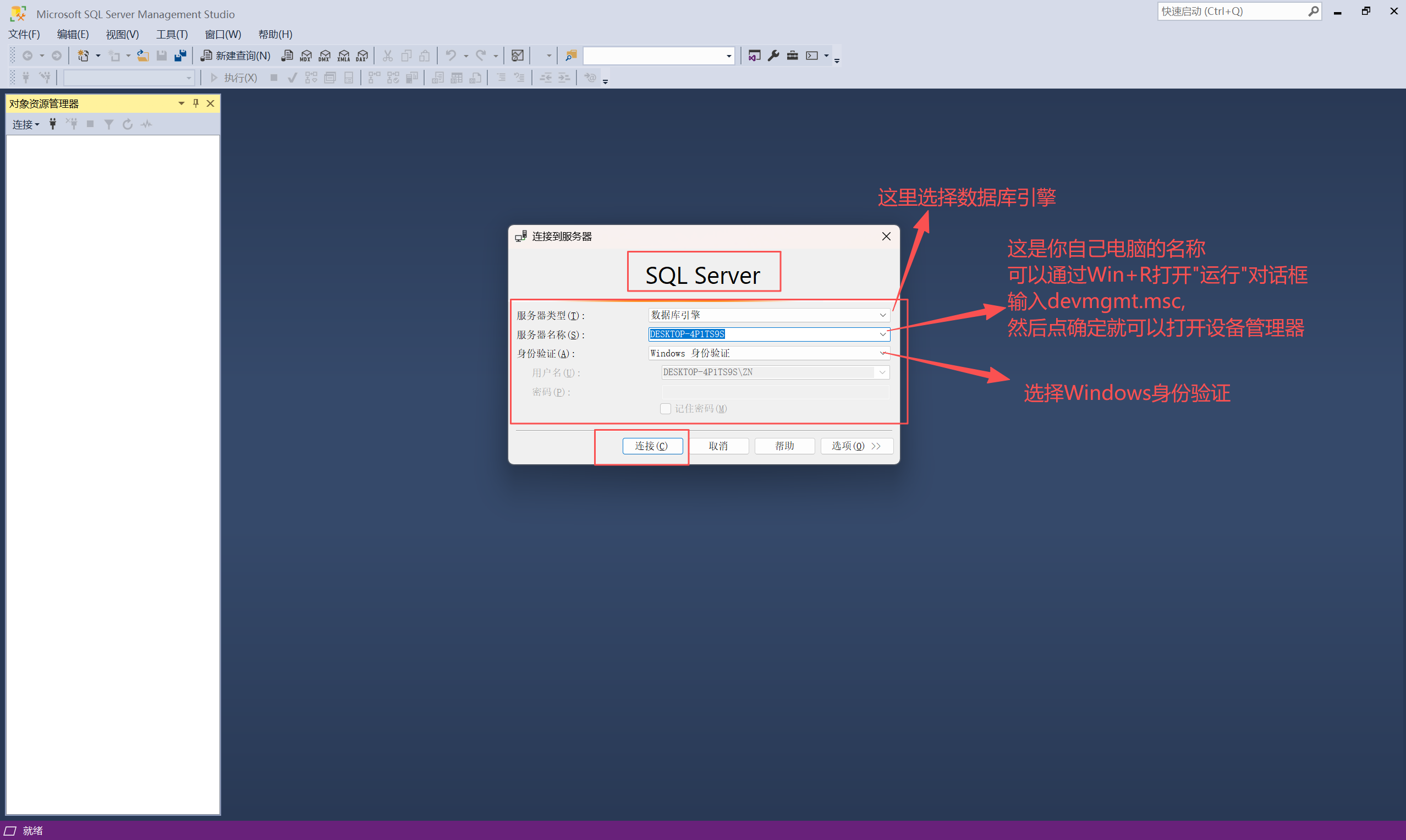
1.输入登录信息
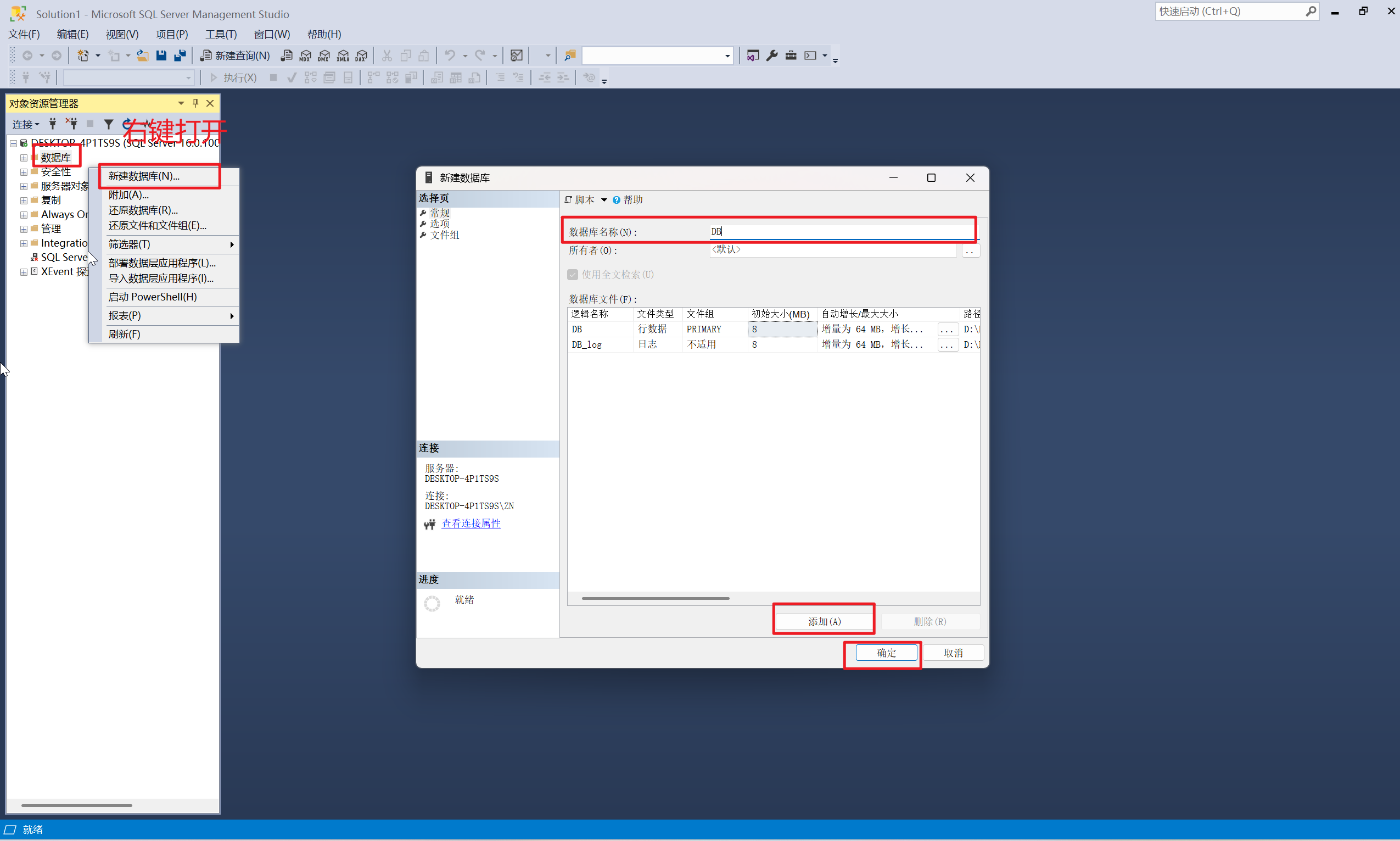
2.新建数据库
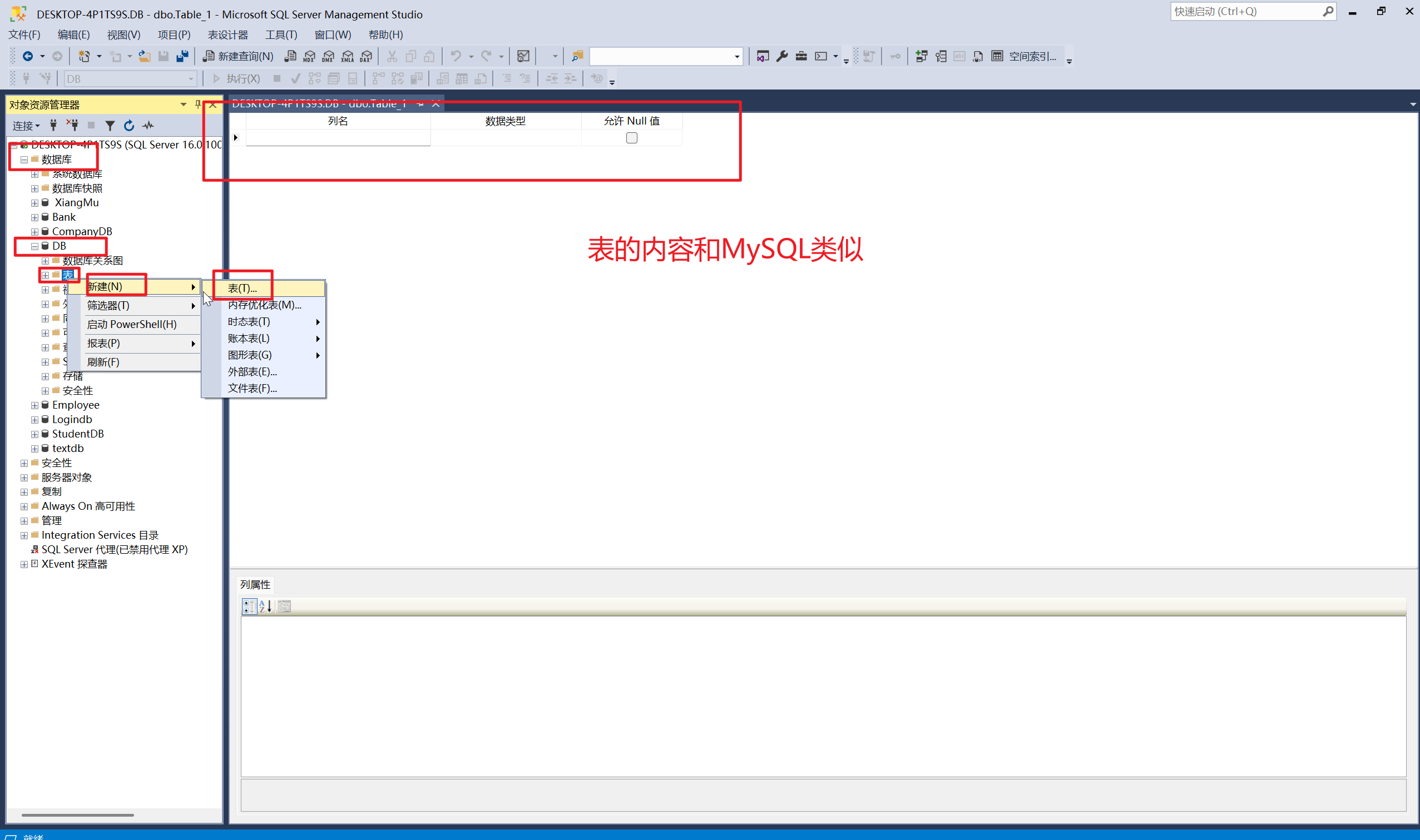
3.新建表
4.设置表中的格式
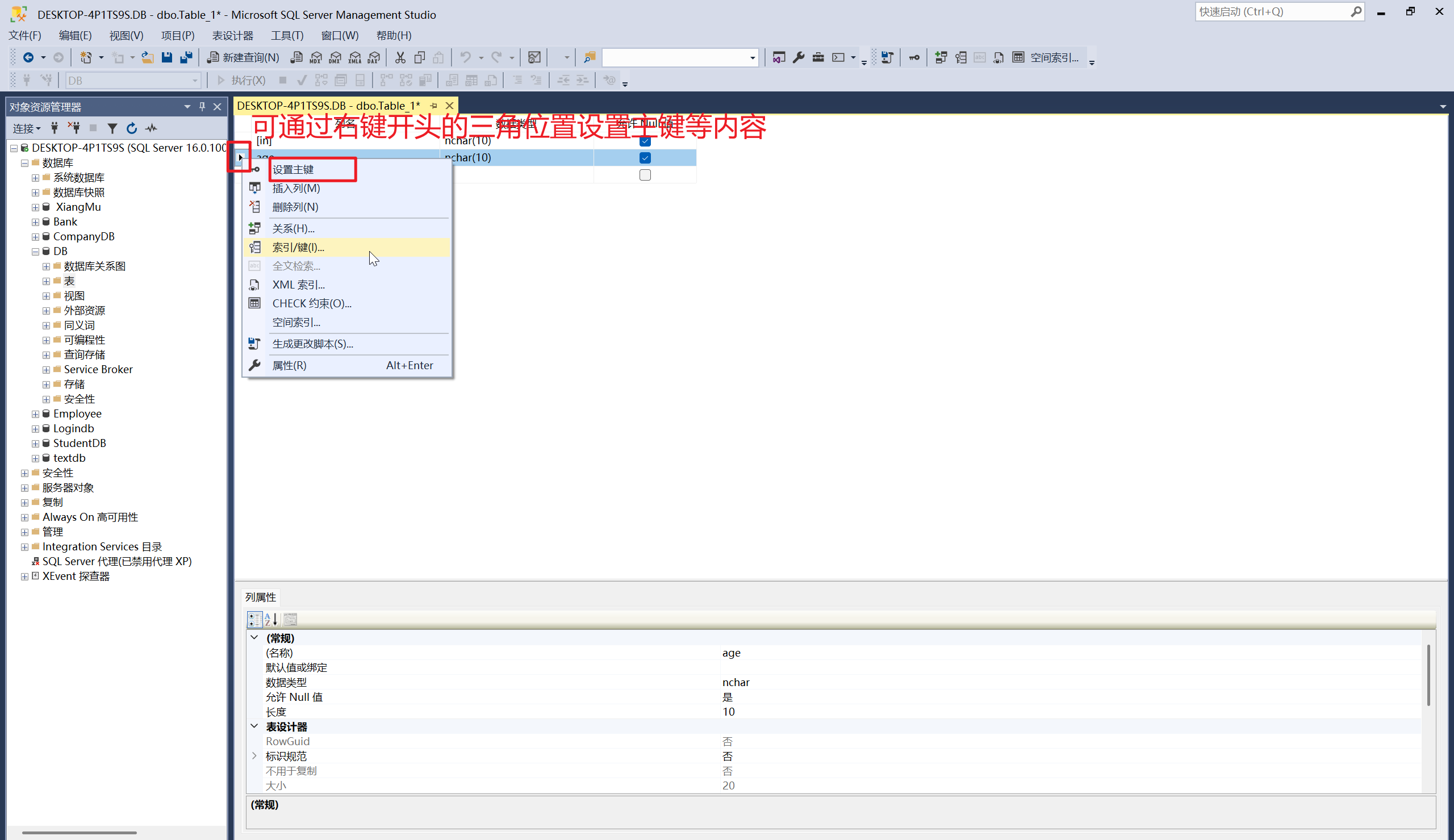
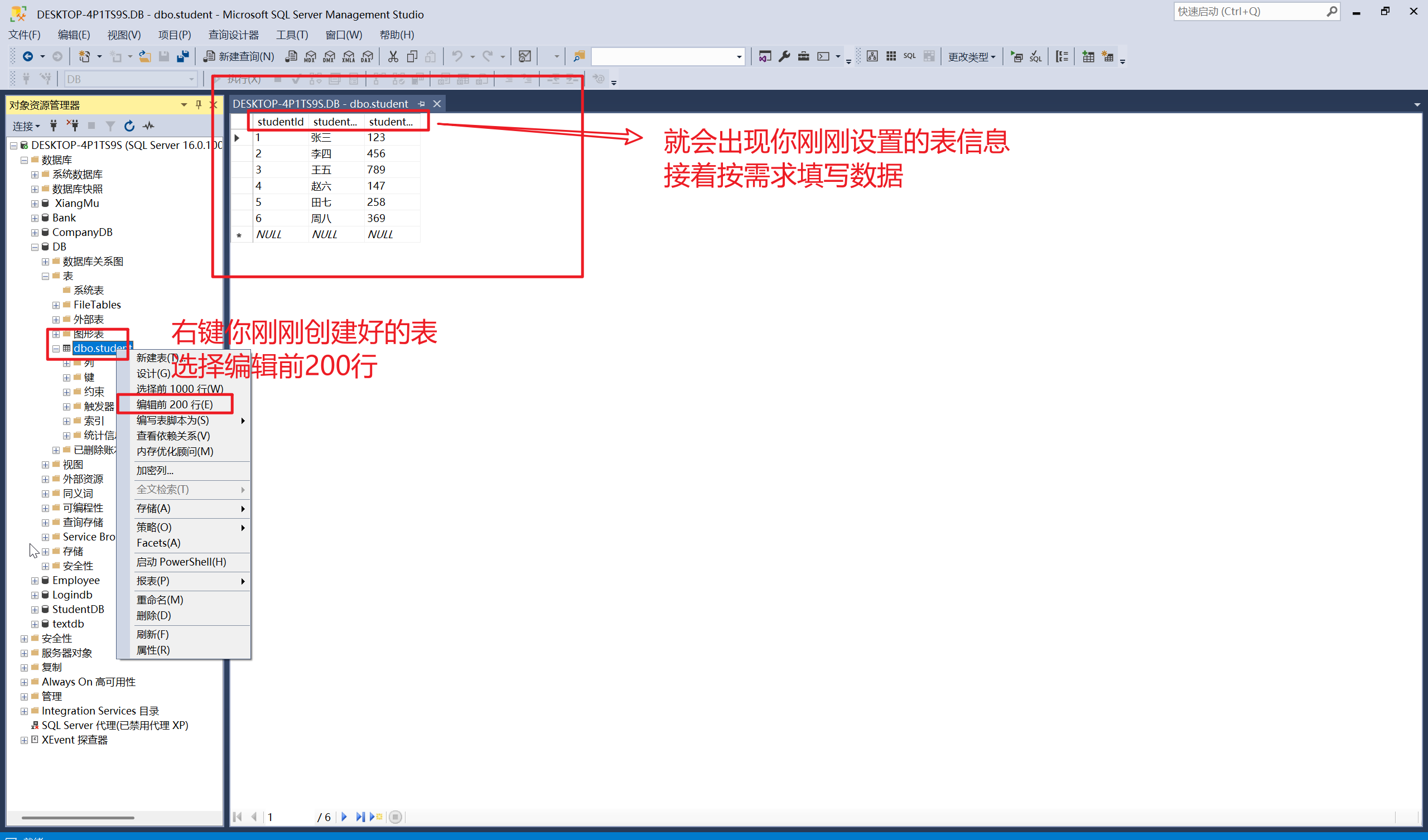
5.编辑表
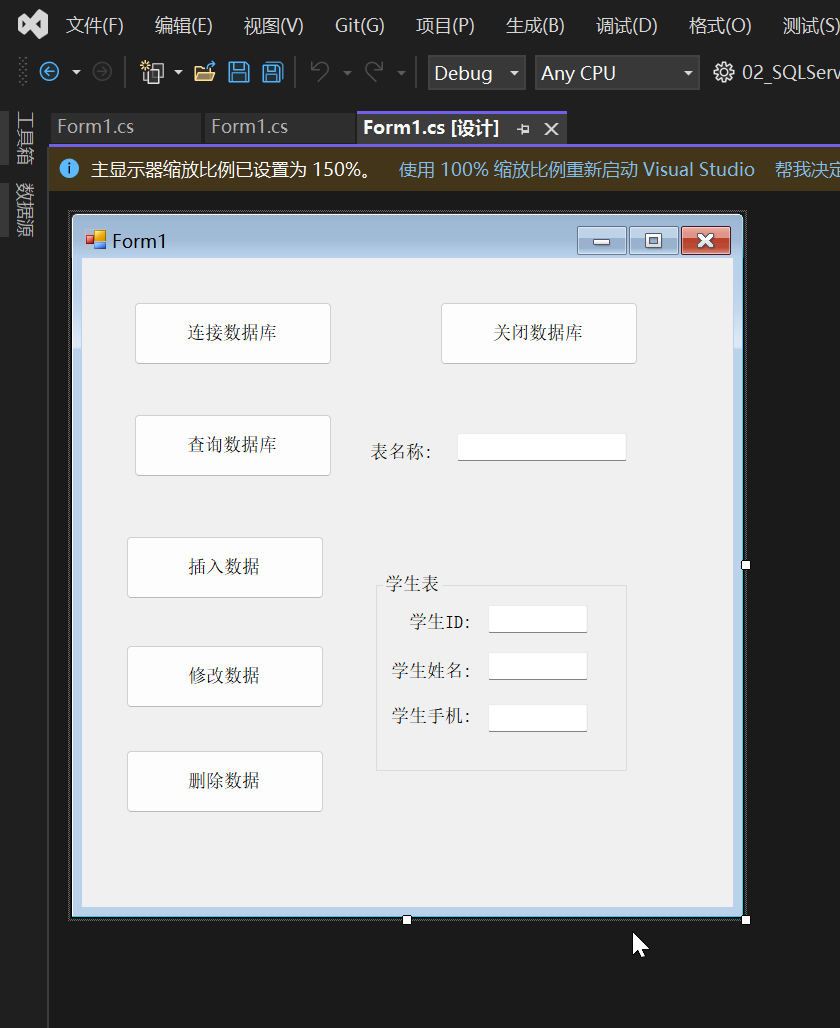
创建 Winform 项目并设计界面
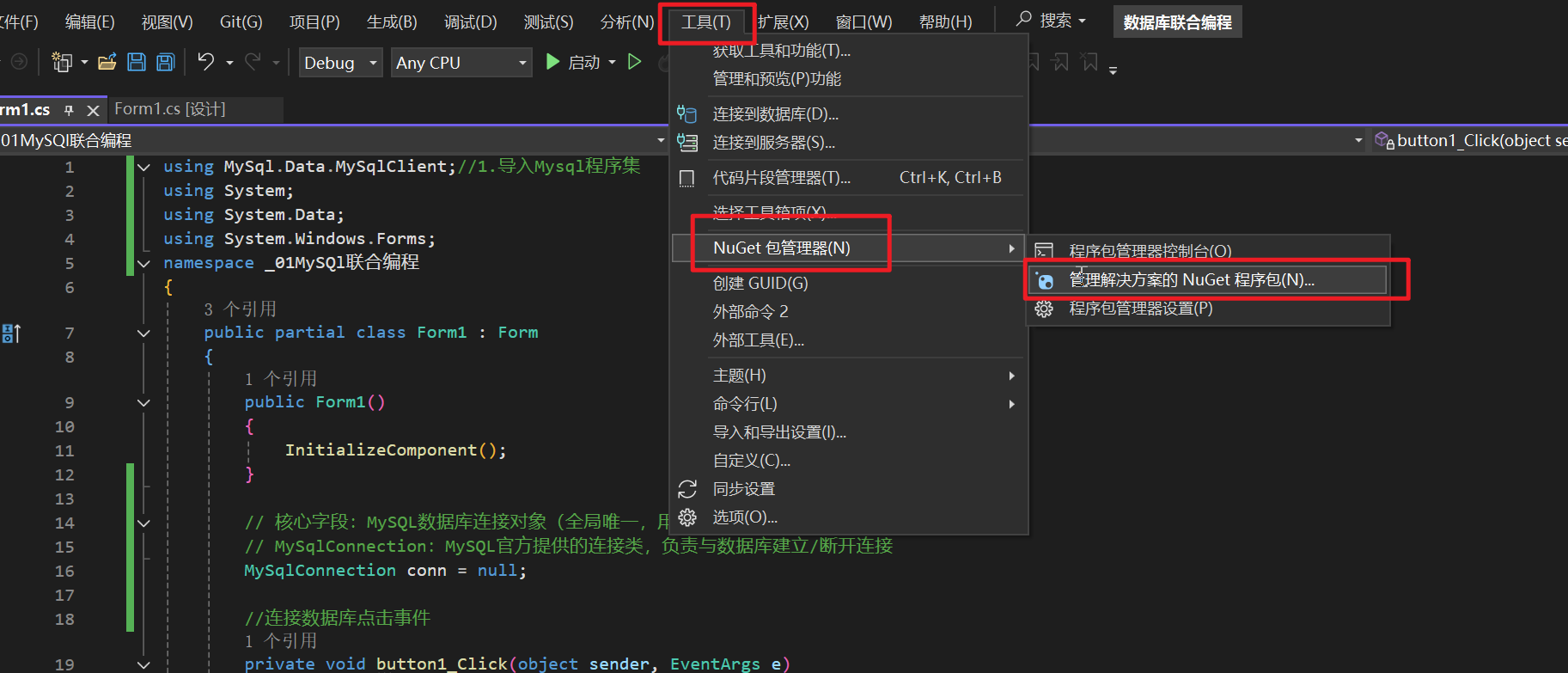
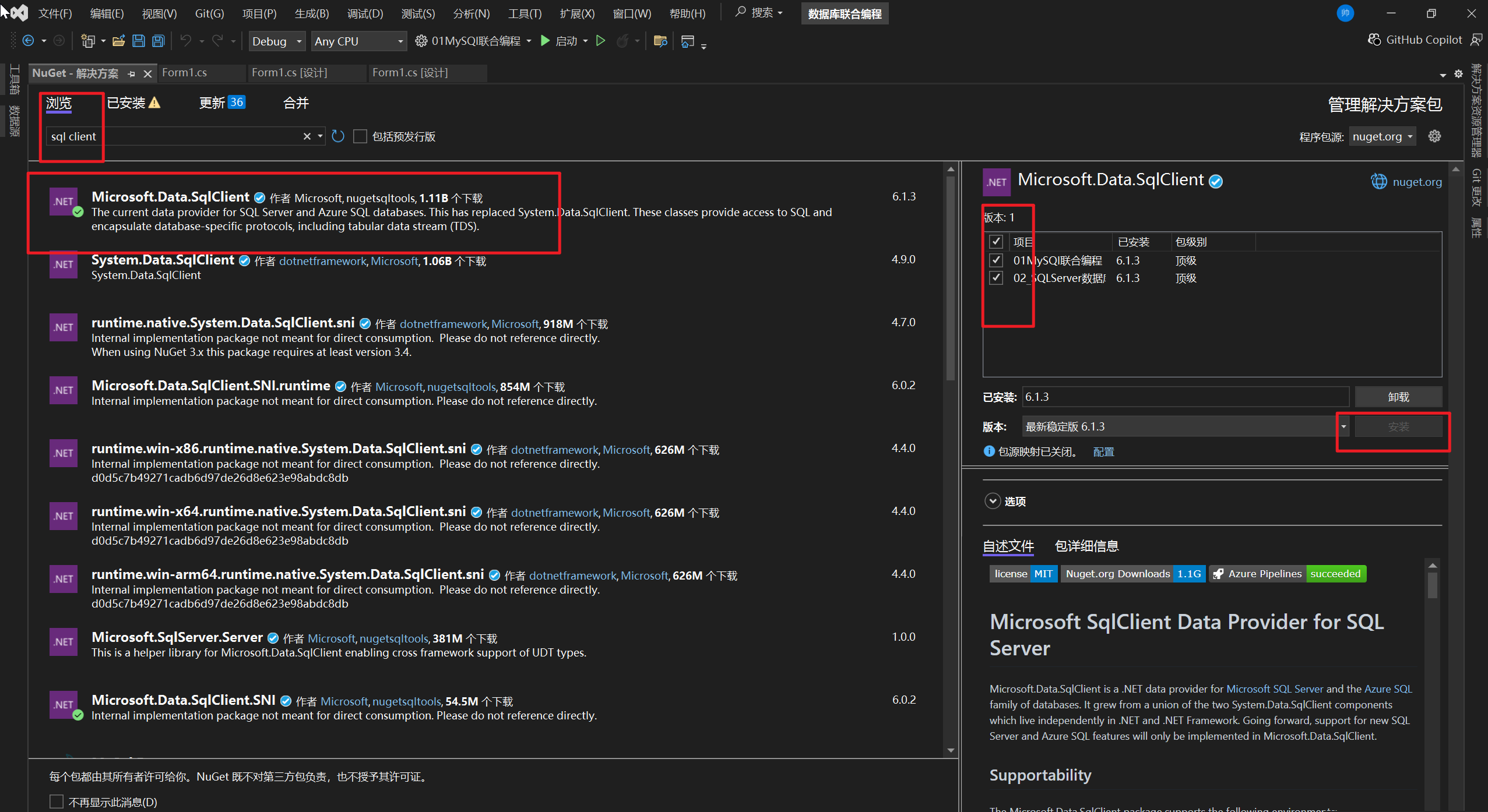
添加SQL Server程序集
编写代码实现切换逻辑
cs
using System;
using System.Data;// 引入数据操作基础类库
using System.Data.SqlClient;//引入SQLServer程序集类库
using System.Windows.Forms;

namespace _02_SQLServer数据库
{
    public partial class Form1 : Form
    {
        public Form1()
        {
            InitializeComponent();
        }

        // 核心字段:SQL Server数据库连接对象(全局唯一,供整个窗体的数据库交互共享)
        // SqlConnection:SQL Server官方提供的连接类,专门负责与SQL Server建立/断开网络连接
        SqlConnection conn = null;

        //连接数据库
        private void button1_Click(object sender, EventArgs e)
        {
            //定义一个连接数据库所需的信息
            // Server:SQL Server服务器名(此处为本地服务器DESKTOP-4P1TS9S,远程服务器填IP/服务器名)
            // Database:要操作的目标数据库名(必须是SQL Server中已存在的数据库,此处为DB)
            // Trusted_Connection=true:使用Windows身份验证(集成身份验证,无需输入账号密码)
            string connStr = "Server=DESKTOP-4P1TS9S;Database=DB;Trusted_Connection=true"; ;
            try
            {
                //实例化连接对像: 传入连接字符串初始化连接配置
                conn = new SqlConnection(connStr);
                //打开数据库
                conn.Open();

                //判断连接状态:ConnectionState.Open表示连接成功
                if (conn.State == ConnectionState.Open)
                {
                    MessageBox.Show("SQL Server连接成功");
                    // 连接成功后,启用"关闭连接"和"查询"按钮(初始为禁用状态)
                    button2.Enabled = true;
                    button3.Enabled = true;
                }
                else
                {
                    MessageBox.Show("SQL Server连接失败");
                }
            }
            catch (Exception ex)
            {
                MessageBox.Show("SQL Server连接失败" + ex.Message);
            }
        }

        //关闭数据库
        private void button2_Click(object sender, EventArgs e)
        {
            try
            {
                //先判断连接对象是否为空
                if (conn == null)
                {
                    MessageBox.Show("SQL Server未连接数据库");
                }
                else
                {
                    //关闭数据库连接
                    conn.Close();
                    // 判断连接状态:ConnectionState.Closed表示关闭成功
                    if (conn.State == ConnectionState.Closed)
                    {
                        MessageBox.Show("SQL Server关闭成功");
                        // 关闭成功后,禁用"关闭连接"和"查询"按钮
                        button2.Enabled = false;
                        button3.Enabled = false;
                    }
                    else
                    {
                        MessageBox.Show("SQL Server关闭失败");
                    }
                }
            }
            catch (Exception ex)
            {
                MessageBox.Show("SQL Server关闭失败" + ex.Message);
            }
        }

        //查询数据库
        private void button3_Click(object sender, EventArgs e)
        {
            try
            {
                //获取用户输入的表名
                string tableName = textBox1.Text;

                //构建查询SQL语句:select * from 表名(查询表中所有数据)
                string sql = "select * from " + tableName;

                //使用的工具类 SqlCommand 来实现查询数据库记录信息
                SqlCommand sqlCommand = new SqlCommand(sql, conn);

                SqlDataReader dataReader = sqlCommand.ExecuteReader();

                string str = "";
                //通过while循环成行读取
                while (dataReader.Read())
                {
                    for (int i = 0; i < dataReader.FieldCount; i++)
                    {
                        str += dataReader[i].ToString() + "\t";

                    }
                    str += "\n";
                }
                MessageBox.Show(str);
                dataReader.Close();
            }
            catch (Exception ex)
            {
                MessageBox.Show("SQL Server查询失败" + ex.Message);
            }
        }

        //窗体加载事件
        private void Form1_Load(object sender, EventArgs e)
        {
            // 初始状态禁用"关闭连接"和"查询"按钮
            button2.Enabled = false;
            button3.Enabled = false;
        }


        //插入数据
        private void button4_Click(object sender, EventArgs e)
        {
            try
            {
                //获取用户输入信息
                string tableName = textBox1.Text;//目标表名
                string id = textBox2.Text;//学生id
                string name = textBox3.Text;//学生姓名
                string phone = textBox4.Text;//学生手机号

                //insert 增加数据
                //insert into 表名(列名1,列名2,列名3....)values(值1,值2,值3....)
                //构建sql语句
                string sql = "insert into " + tableName + " (studentId, studentName, studentPhone) " + "values (" + id + ", \'" + name + "\', " + phone + ")";
                //执行插入操作
                //使用的工具类 SqlCommand 来实现查询数据库记录信息
                SqlCommand sqlCommand = new SqlCommand(sql, conn);
                int number = sqlCommand.ExecuteNonQuery();
                //判断插入结果:受影响行数>0表示插入成功
                if (number > 0)
                {
                    MessageBox.Show("数据插入成功");
                }
                else
                {
                    MessageBox.Show("数据插入失败");
                }
            }

            catch (Exception ex)
            {
                // 捕获插入异常:
                // 1. 主键冲突(id已存在);2. 字段类型不匹配(如age输入非数字);
                // 3. 字符串未加单引号;4. 字段数量与值数量不匹配等
                MessageBox.Show("数据插入失败" + ex.Message);
            }
        }

        //修改数据
        private void button5_Click(object sender, EventArgs e)
        {
            try
            {
                //获取用户输入信息
                string tableName = textBox1.Text;//目标表名
                string id = textBox2.Text;//学生id
                string name = textBox3.Text;//学生姓名
                string phone = textBox4.Text;//学生手机号

                //update 修改数据
                //update 表名 set 列1 = 值1,列2 = 值2 where 条件
                //构建sql语句
                string sql = "update " + tableName + " set studentName=\'" + name + "\', studentPhone=" + phone + " where studentId=" + id;

                //执行插入操作
                //使用的工具类 SqlCommand 来实现查询数据库记录信息
                SqlCommand sqlCommand = new SqlCommand(sql, conn);
                int number = sqlCommand.ExecuteNonQuery();

                //判断修改结果
                if (number > 0)
                {
                    MessageBox.Show("数据修改成功");
                }
                else
                {
                    MessageBox.Show("数据修改失败");
                }
            }

            catch (Exception ex)
            {
                // 捕获插入异常:
                // 1. 主键冲突(id已存在);2. 字段类型不匹配(如age输入非数字);
                // 3. 字符串未加单引号;4. 字段数量与值数量不匹配等
                MessageBox.Show("数据修改失败" + ex.Message);
            }
        }
        //删除数据
        private void button6_Click(object sender, EventArgs e)
        {
            try
            {
                //获取用户输入信息
                string tableName = textBox1.Text;//目标表名
                string id = textBox2.Text;//学生id
                string name = textBox3.Text;//学生姓名
                string phone = textBox4.Text;//学生手机号

                // delete 删除数据
                // delete from 表名 where 条件

                //构建sql语句
                string sql = "delete from " + tableName + " where studentId=" + id;

                //执行插入操作
                //使用的工具类 SqlCommand 来实现查询数据库记录信息
                SqlCommand sqlCommand = new SqlCommand(sql, conn);
                int number = sqlCommand.ExecuteNonQuery();

                //判断修改结果
                if (number > 0)
                {
                    MessageBox.Show("数据删除成功");
                }
                else
                {
                    MessageBox.Show("数据删除失败");
                }
            }

            catch (Exception ex)
            {
                MessageBox.Show("数据删除失败" + ex.Message);
            }
        }
    }
}
效果演示
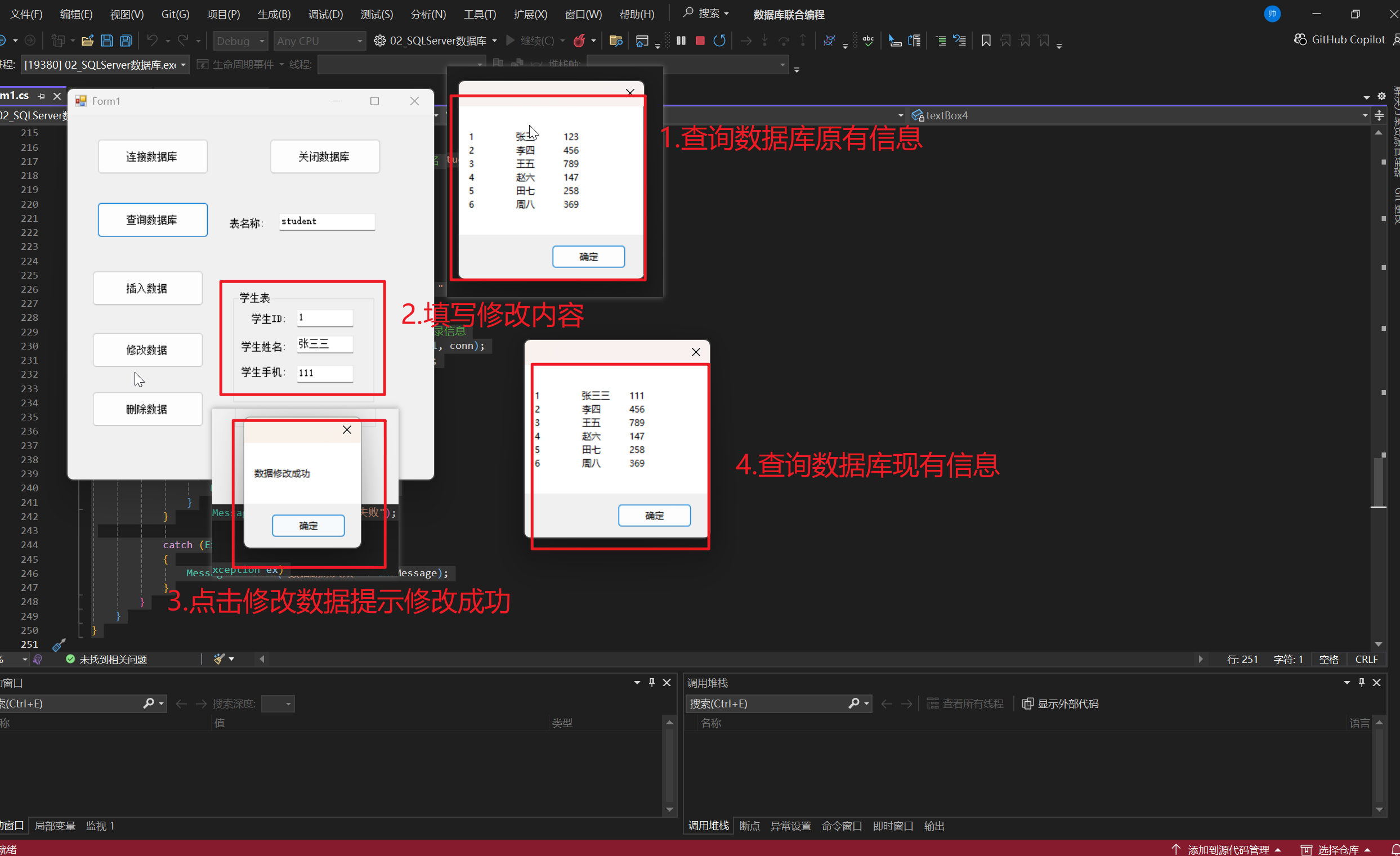
希望对大家有所帮助。感谢大家的关注和点赞。