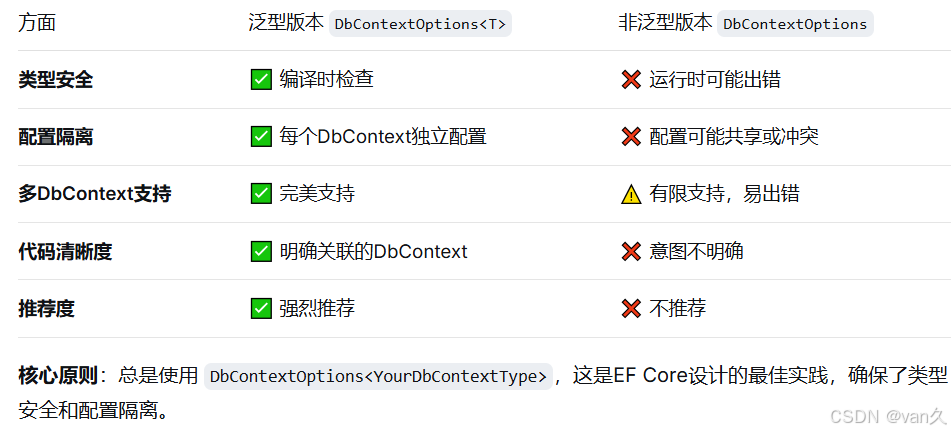
🔍 两种写法的区别
cs
// 写法1:泛型版本(推荐)
public AppDbContext(DbContextOptions<AppDbContext> options)
    : base(options)
{
}

// 写法2:非泛型版本
public AppDbContext(DbContextOptions options)
    : base(options)
{
}
🎯 为什么推荐泛型版本
1. 类型安全
cs
// 假设你有多个DbContext
public class AppDbContext : DbContext { }
public class LogDbContext : DbContext { }

// 泛型版本:编译器确保配置对应正确的DbContext
builder.Services.AddDbContext<AppDbContext>(options =>
{
    options.UseSqlServer("AppDbConnection");
});

builder.Services.AddDbContext<LogDbContext>(options =>
{
    options.UseSqlServer("LogDbConnection");
});

// 依赖注入时:类型安全
public MyService(AppDbContext appDb, LogDbContext logDb)
{
    // 每个DbContext获得自己的配置
}
2. 独立的配置隔离
cs
// Program.cs 配置
builder.Services.AddDbContext<AppDbContext>(options =>
{
    options.UseSqlServer("Server=appdb;Database=AppDb;");
    options.EnableSensitiveDataLogging();  // 只为AppDbContext启用
    options.UseQueryTrackingBehavior(QueryTrackingBehavior.NoTracking);
});

builder.Services.AddDbContext<LogDbContext>(options =>
{
    options.UseSqlServer("Server=logdb;Database=LogDb;");
    options.UseLoggerFactory(myLoggerFactory);  // 不同的日志配置
});

// 非泛型版本的问题:配置会共享或冲突
3. 支持多个数据库提供程序
cs
// 同一个应用使用不同数据库
builder.Services.AddDbContext<AppDbContext>(options =>
{
    options.UseSqlServer("SQL Server连接字符串");
});

builder.Services.AddDbContext<CacheDbContext>(options =>
{
    options.UseSqlite("SQLite连接字符串");
});

builder.Services.AddDbContext<AnalyticsDbContext>(options =>
{
    options.UseNpgsql("PostgreSQL连接字符串");
});
📊 深入理解泛型参数
泛型的工作原理
cs
// DbContextOptions<TContext> 的定义
public class DbContextOptions<TContext> : DbContextOptions
    where TContext : DbContext
{
    // 继承自非泛型版本,添加了类型信息
}

// 依赖注入容器中的注册
// 1. 注册泛型类型
services.AddDbContext<AppDbContext>(); // 注册为 DbContextOptions<AppDbContext>

// 2. 构造函数需要匹配的类型
// 正确:接收 DbContextOptions<AppDbContext>
public AppDbContext(DbContextOptions<AppDbContext> options)

// 错误:如果写成非泛型版本
public AppDbContext(DbContextOptions options) // 可能接收错误的配置
ASP.NET Core 依赖注入的工作方式
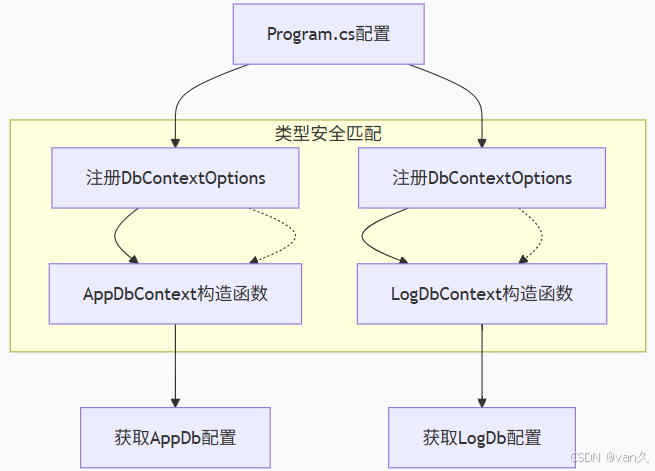
🔧 实际场景示例
场景1:多租户应用
cs
// 每个租户有自己的数据库
public class Tenant1DbContext : DbContext
{
    public Tenant1DbContext(DbContextOptions<Tenant1DbContext> options)
        : base(options)
    {
    }
}

public class Tenant2DbContext : DbContext
{
    public Tenant2DbContext(DbContextOptions<Tenant2DbContext> options)
        : base(options)
    {
    }
}

// 配置不同的数据库连接
builder.Services.AddDbContext<Tenant1DbContext>(options =>
    options.UseSqlServer("Tenant1Connection"));

builder.Services.AddDbContext<Tenant2DbContext>(options =>
    options.UseSqlServer("Tenant2Connection"));

// 使用时各自独立
public class Tenant1Service
{
    public Tenant1Service(Tenant1DbContext db)  // 获取Tenant1的配置
    {
        // 连接到Tenant1的数据库
    }
}
场景2:读写分离
cs
// 读数据库(只读副本)
public class ReadDbContext : DbContext
{
    public ReadDbContext(DbContextOptions<ReadDbContext> options)
        : base(options)
    {
    }
}

// 写数据库(主库)
public class WriteDbContext : DbContext
{
    public WriteDbContext(DbContextOptions<WriteDbContext> options)
        : base(options)
    {
    }
}

// 不同配置
builder.Services.AddDbContext<ReadDbContext>(options =>
{
    options.UseSqlServer("ReadReplicaConnection");

    //UseQueryTrackingBehavior:用于控制EF Core如何跟踪查询结果中的实体
    //QueryTrackingBehavior.NoTracking :不要跟踪查询结果中的实体,对于只读操作或大量数据的查询非常有用,因为它可以显著提高性能并减少内存使用。
    options.UseQueryTrackingBehavior(QueryTrackingBehavior.NoTracking);
});

builder.Services.AddDbContext<WriteDbContext>(options =>
{
    options.UseSqlServer("PrimaryConnection");
    options.EnableRetryOnFailure();  // 写操作需要重试机制
});
场景3:功能拆分
cs
// 用户管理模块
public class UserDbContext : DbContext
{
    public UserDbContext(DbContextOptions<UserDbContext> options)
        : base(options)
    {
    }
}

// 订单管理模块
public class OrderDbContext : DbContext
{
    public OrderDbContext(DbContextOptions<OrderDbContext> options)
        : base(options)
    {
    }
}

// 库存管理模块
public class InventoryDbContext : DbContext
{
    public InventoryDbContext(DbContextOptions<InventoryDbContext> options)
        : base(options)
    {
    }
}
⚠️ 非泛型版本的问题
问题1:配置冲突
cs
// 错误示例
public class AppDbContext : DbContext
{
    public AppDbContext(DbContextOptions options)  // 非泛型
        : base(options)
    {
    }
}

public class LogDbContext : DbContext
{
    public LogDbContext(DbContextOptions options)  // 非泛型
        : base(options)
    {
    }
}

// 配置
builder.Services.AddDbContext<AppDbContext>(options =>
    options.UseSqlServer("AppDb"));

builder.Services.AddDbContext<LogDbContext>(options =>
    options.UseSqlite("LogDb"));

// ❌ 问题:两个DbContext都接收到最后一个配置
// LogDbContext可能错误地使用SQL Server连接
问题2:运行时异常
cs
public class MyService
{
    public MyService(AppDbContext appDb, LogDbContext logDb)
    {
        // 运行时可能抛出异常:
        // "无法解析 DbContextOptions<AppDbContext> 类型的服务"
        // 或者配置不正确
    }
}
🛠️ 为什么可以继承基类
DbContext 基类的定义
cs
public class DbContext
{
    // 有两个构造函数重载
    public DbContext() { }

    public DbContext(DbContextOptions options) { }

    // 注意:基类接受非泛型版本
    // 子类用泛型版本,这是兼容的
}
类型转换的兼容性
cs
// DbContextOptions<T> 继承自 DbContextOptions
DbContextOptions<AppDbContext> specificOptions = ...;
DbContextOptions baseOptions = specificOptions;  // 向上转型,安全

// 所以可以:
public AppDbContext(DbContextOptions<AppDbContext> options)
    : base(options)  // 传递给基类的非泛型参数
{
    // 这是安全的,因为 DbContextOptions<T> : DbContextOptions
}
📝 实际使用建议
1. 标准用法(推荐)
cs
public class ApplicationDbContext : DbContext
{
    public ApplicationDbContext(DbContextOptions<ApplicationDbContext> options)
        : base(options)
    {
    }

    // 其他配置...
}
2. 使用接口或基类的情况
cs
// 如果有多个DbContext共享配置
public interface IAppDbContext { }

public class SqlAppDbContext : DbContext, IAppDbContext
{
    public SqlAppDbContext(DbContextOptions<SqlAppDbContext> options)
        : base(options)
    {
    }
}

// 注册
builder.Services.AddDbContext<SqlAppDbContext>(options =>
    options.UseSqlServer(connectionString));

//AddScoped 方法用于将服务添加到依赖注入容器中,并指定该服务的生命周期为 Scoped。
//Scoped 生命周期意味着每次请求的开始时,一个新的服务实例会被创建,并在该请求结束时被销毁。
builder.Services.AddScoped<IAppDbContext>(provider =>
    provider.GetRequiredService<SqlAppDbContext>());
3. 工厂模式创建DbContext
cs
public class DynamicDbContext : DbContext
{
    public DynamicDbContext(DbContextOptions<DynamicDbContext> options)
        : base(options)
    {
    }

    // 动态配置连接字符串
    protected override void OnConfiguring(DbContextOptionsBuilder optionsBuilder)
    {
        if (!optionsBuilder.IsConfigured)
        {
            var connectionString = GetConnectionStringFromSomewhere();
            optionsBuilder.UseSqlServer(connectionString);
        }
    }
}
🔄 与Java Spring Boot对比
java
// Java Spring Data JPA的类似概念
@Configuration
public class DatabaseConfig {

    @Bean
    @Primary
    @ConfigurationProperties(prefix = "spring.datasource.app")
    public DataSource appDataSource() {
        return DataSourceBuilder.create().build();
    }

    @Bean
    @ConfigurationProperties(prefix = "spring.datasource.log")
    public DataSource logDataSource() {
        return DataSourceBuilder.create().build();
    }

    @Bean
    @Primary
    public LocalContainerEntityManagerFactoryBean appEntityManager(
            EntityManagerFactoryBuilder builder,
            @Qualifier("appDataSource") DataSource dataSource) {
        return builder
            .dataSource(dataSource)
            .packages("com.example.app.models")
            .persistenceUnit("app")
            .build();
    }

    @Bean
    public LocalContainerEntityManagerFactoryBean logEntityManager(
            EntityManagerFactoryBuilder builder,
            @Qualifier("logDataSource") DataSource dataSource) {
        return builder
            .dataSource(dataSource)
            .packages("com.example.log.models")
            .persistenceUnit("log")
            .build();
    }
}

// C# 使用泛型类型,Java 使用 @Qualifier 注解
// 两者都实现了配置的隔离和类型安全
💡 记忆技巧
-
"T for Type" - 泛型参数 T 代表具体的 DbContext 类型
-
"一个萝卜一个坑" - 每个 DbContext 类型有自己的配置
-
"门当户对" -
DbContextOptions<AppDbContext>只能用于AppDbContext
❓ 常见问题
Q: 如果我只用一个DbContext,可以用非泛型版本吗?
A: 技术上可以,但不推荐。即使只有一个DbContext,也应该使用泛型版本,因为:
-
保持一致性
-
未来可能添加更多DbContext
-
更清晰的代码意图
Q: 泛型版本和非泛型版本可以混用吗?
A: 可以,但不推荐。基类构造函数接受非泛型版本,但子类应该使用泛型版本以确保类型安全。
Q: 如果我需要动态创建DbContext怎么办?
A : 使用 DbContextOptions<T> 工厂模式:
cs
public class DynamicDbContextFactory
{
    private readonly IServiceProvider _serviceProvider;

    public DynamicDbContextFactory(IServiceProvider serviceProvider)
    {
        _serviceProvider = serviceProvider;
    }

    public T CreateDbContext<T>(string connectionString) where T : DbContext
    {
        var optionsBuilder = new DbContextOptionsBuilder<T>();
        optionsBuilder.UseSqlServer(connectionString);

        // 创建实例
        return (T)Activator.CreateInstance(typeof(T), optionsBuilder.Options);
    }
}
📚 总结