说明
-
RT-Thread : 5.2.0
-
LVGL 9.5
-
BSP : qemu-vexpress-a9
默认 LVGL LV_LOG_USER 没有输出,想对接到 RT-Thread 的控制台输出 rt_kprinf
LVGL 的 LOG开启
- LVGL 的
lv_conf.h中,配置设置如下,如果没有就添加
c
#define LV_USE_LOG                  1
#define LV_LOG_LEVEL LV_LOG_LEVEL_USER- 等级
LV_LOG_LEVEL_USER说明LV_LOG_USER可以输出
注册 LVGL log 输出的 callback
lv_log_register_print_cb可以设置 LVGL 的打印回调函数,回调函数中,采用rt_kprintf输出即可
c
void rtt_log_cb(lv_log_level_t level, const char * buf)
{
    rt_kprintf(buf);
}

void lv_user_gui_init(void)
{
    lv_log_register_print_cb(rtt_log_cb);
    lv_example_button_1();
}
测试示例
c
#include <stdint.h>
#include <stdio.h>
#include <rtthread.h>
#include <lvgl.h>

void rtt_log_cb(lv_log_level_t level, const char * buf)
{
    rt_kprintf(buf);
}

static void event_handler(lv_event_t * e)
{
    lv_event_code_t code = lv_event_get_code(e);

    if(code == LV_EVENT_CLICKED) {
        LV_LOG_USER("Clicked");
    }
    else if(code == LV_EVENT_VALUE_CHANGED) {
        LV_LOG_USER("Toggled");
    }
}

void lv_example_button_1(void)
{
    lv_obj_t * label;

    lv_obj_t * btn1 = lv_button_create(lv_screen_active());
    lv_obj_add_event_cb(btn1, event_handler, LV_EVENT_ALL, NULL);
    lv_obj_align(btn1, LV_ALIGN_CENTER, 0, -40);
    lv_obj_remove_flag(btn1, LV_OBJ_FLAG_PRESS_LOCK);

    label = lv_label_create(btn1);
    lv_label_set_text(label, "Button");
    lv_obj_center(label);

    lv_obj_t * btn2 = lv_button_create(lv_screen_active());
    lv_obj_add_event_cb(btn2, event_handler, LV_EVENT_ALL, NULL);
    lv_obj_align(btn2, LV_ALIGN_CENTER, 0, 40);
    lv_obj_add_flag(btn2, LV_OBJ_FLAG_CHECKABLE);
    lv_obj_set_height(btn2, LV_SIZE_CONTENT);

    label = lv_label_create(btn2);
    lv_label_set_text(label, "Toggle");
    lv_obj_center(label);
}

void lv_user_gui_init(void)
{
    lv_log_register_print_cb(rtt_log_cb);
    lv_example_button_1();
}

int main(void)
{
    rt_kprintf("Hello RT-Thread!\n");

    return 0;
}
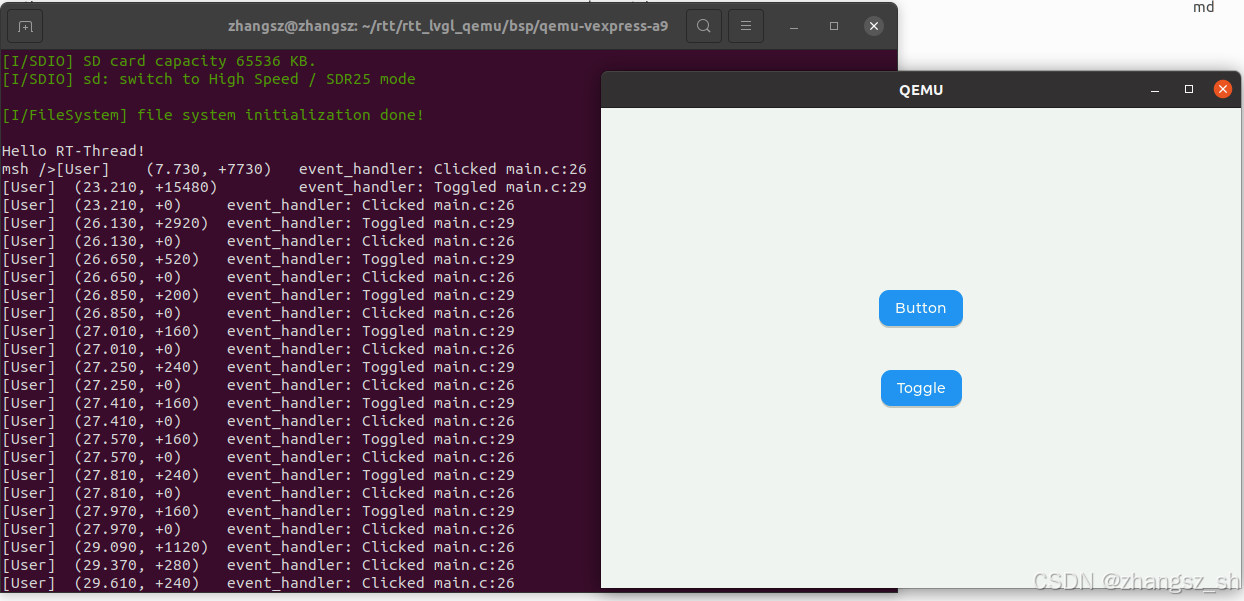
输出效果
- LVGL 的 LOG 通过 RT-Thread 默认的 rt_kprintf 打印