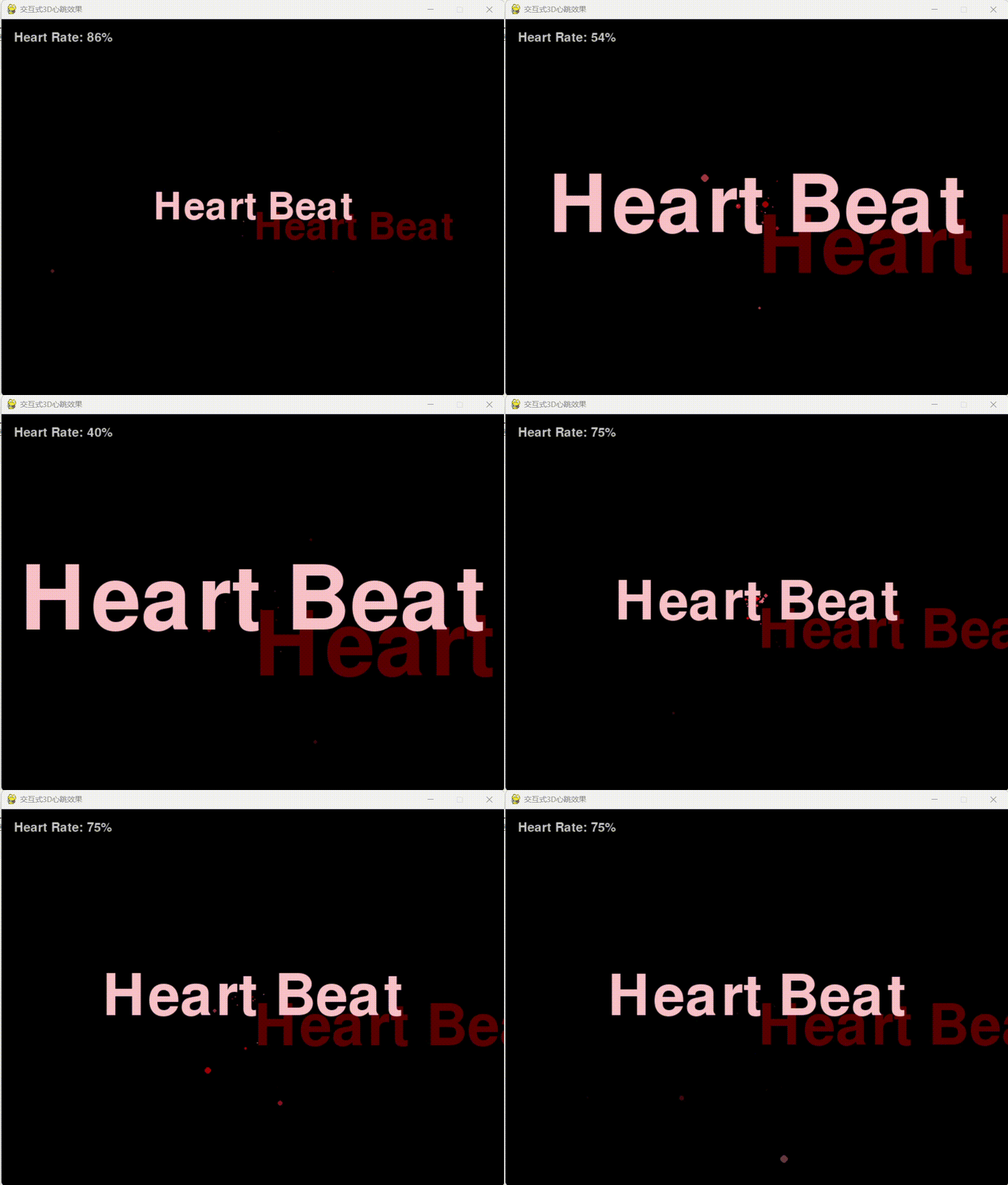
import pygame
import sys
import math
import random
import cv2
import mediapipe as mp
import numpy as np

# 初始化mediapipe手部检测
mp_hands = mp.solutions.hands
mp_drawing = mp.solutions.drawing_utils
hands = mp_hands.Hands(static_image_mode=False, max_num_hands=1, min_detection_confidence=0.7)

def get_hand_landmarks(image):
    """获取手部关键点"""
    try:
        # 转换为RGB格式
        rgb_image = cv2.cvtColor(image, cv2.COLOR_BGR2RGB)
        results = hands.process(rgb_image)
        if results.multi_hand_landmarks:
            return results.multi_hand_landmarks[0]
    except Exception as e:
        print(f"手部检测出错: {e}")
    return None

pygame.init()

# 设置屏幕
screen_width, screen_height = 800, 600
screen = pygame.display.set_mode((screen_width, screen_height))
pygame.display.set_caption('交互式3D心跳效果')

# 文本设置
font_size = 30
font = pygame.font.Font(None, font_size)
text = "Heart Beat"
initial_font_size = 30

# 粒子类
class Particle:
    def __init__(self, x, y, z, color=(255, 0, 0)):
        self.x = x
        self.y = y
        self.z = z
        self.color = color
        # 限制粒子大小
        self.size = random.randint(1, 4)
        # 初始速度,模拟心跳向外扩散
        angle = random.uniform(0, 2 * math.pi)
        direction = random.uniform(0, math.pi)
        speed = random.uniform(1.5, 5)
        self.vx = speed * math.sin(direction) * math.cos(angle)
        self.vy = speed * math.sin(direction) * math.sin(angle)
        self.vz = speed * math.cos(direction)
        self.life = 1.0  # 生命值,从1开始衰减
        # 缩短生命周期以加快粒子消失
        self.decay = random.uniform(0.02, 0.04)
        self.gravity = random.uniform(0.05, 0.15)

    def update(self):
        # 更新位置
        self.x += self.vx
        self.y += self.vy
        self.z += self.vz

        # 添加重力效果
        self.vy += self.gravity

        # 空气阻力
        self.vx *= 0.98
        self.vy *= 0.98
        self.vz *= 0.98

        # 减少生命值
        self.life -= self.decay

        # 根据Z轴距离调整大小和透明度
        self.size = max(0, self.life * random.uniform(1, 4))

    def draw(self, surface, camera_z=50):
        # 3D到2D的投影
        if camera_z - self.z > 0:
            scale = camera_z / (camera_z - self.z)
            screen_x = int(self.x * scale + screen_width // 2)
            screen_y = int(self.y * scale + screen_height // 2)
            # 限制最大绘制尺寸
            size = min(6, max(1, int(self.size * scale)))

            # 根据生命值调整透明度
            alpha = int(self.life * 255)
            color_with_alpha = (*self.color, alpha)

            # 创建带有透明度的粒子
            particle_surface = pygame.Surface((size*2, size*2), pygame.SRCALPHA)
            pygame.draw.circle(particle_surface, color_with_alpha, (size, size), size)
            surface.blit(particle_surface, (screen_x - size, screen_y - size))

    def is_alive(self):
        return self.life > 0

# 粒子系统类
class ParticleSystem:
    def __init__(self):
        self.particles = []
        self.last_beat_time = 0
        self.beat_interval = 1200  # 心跳间隔(毫秒)- 增加以减少心跳频率
        self.beat_intensity = 0.5  # 心跳强度 (0-1)
        self.colors = [(255, 0, 0), (255, 50, 50), (255, 100, 100), (255, 150, 150)]
        self.max_particles = 60  # 降低最大粒子数量限制,防止内存溢出

    def update_beat_intensity(self, intensity):
        self.beat_intensity = max(0.1, min(1.0, intensity))
        # 心跳强度影响心跳间隔
        self.beat_interval = int(1800 - (self.beat_intensity * 700))  # 增加基础间隔时间

    def update(self, current_time):
        # 检查是否需要触发心跳
        if current_time - self.last_beat_time > self.beat_interval:
            self.trigger_heartbeat()
            self.last_beat_time = current_time

        # 更新所有粒子
        for particle in self.particles[:]:
            particle.update()
            if not particle.is_alive():
                self.particles.remove(particle)

        # 确保粒子总数不超过最大值
        if len(self.particles) > self.max_particles:
            # 优先保留较新的粒子(假设存活时间短表示较新)
            self.particles = sorted(self.particles, key=lambda p: p.life, reverse=True)[:self.max_particles]

    def trigger_heartbeat(self):
        # 根据心跳强度生成粒子(大幅减少数量)
        max_new_particles = int(10 + self.beat_intensity * 15)  # 大幅减少粒子生成数量
        available_slots = max(0, self.max_particles - len(self.particles))
        num_particles = min(max_new_particles, available_slots)
        center_x, center_y = 0, 0

        # 生成心形图案的粒子分布
        for _ in range(num_particles):
            # 使用心形参数方程生成点
            t = random.uniform(0, 2 * math.pi)
            r = random.uniform(0.6, 1.0) * self.beat_intensity

            # 心形参数方程
            x = 16 * (math.sin(t) ** 3) * r
            y = -(13 * math.cos(t) - 5 * math.cos(2*t) - 2 * math.cos(3*t) - math.cos(4*t)) * r
            z = random.uniform(-8, 8)  # 减少Z轴范围

            # 添加一些随机性
            x += random.uniform(-1.5, 1.5)  # 减少随机性
            y += random.uniform(-1.5, 1.5)

            # 选择颜色
            color = random.choice(self.colors)

            # 创建粒子
            self.particles.append(Particle(x, y, z, color))

    def draw(self, surface):
        # 进一步限制绘制的粒子数量以提高性能
        max_draw_particles = min(40, len(self.particles))

        # 按Z轴排序,远处的先画
        sorted_particles = sorted(self.particles[:max_draw_particles], key=lambda p: p.z, reverse=True)
        for particle in sorted_particles:
            particle.draw(surface)

# 主循环
def main():
    global font_size  # 使用全局font_size变量
    cap = cv2.VideoCapture(0)
    clock = pygame.time.Clock()

    # 初始化粒子系统
    particle_system = ParticleSystem()
    last_hand_distance = 0.1  # 上次检测的手距离
    smooth_factor = 0.2  # 平滑因子

    while cap.isOpened():
        for event in pygame.event.get():
            if event.type == pygame.QUIT:
                cap.release()
                cv2.destroyAllWindows()
                pygame.quit()
                sys.exit()

        success, frame = cap.read()
        if not success:
            break

        hand_landmarks = get_hand_landmarks(frame)
        current_time = pygame.time.get_ticks()

        if hand_landmarks:
            # 检测手的距离用于缩放文字和控制心跳强度
            try:
                thumb_tip = hand_landmarks.landmark[mp_hands.HandLandmark.THUMB_TIP]
                index_tip = hand_landmarks.landmark[mp_hands.HandLandmark.INDEX_FINGER_TIP]
                distance = math.sqrt((thumb_tip.x - index_tip.x)**2 + (thumb_tip.y - index_tip.y)**2)

                # 平滑处理距离变化
                last_hand_distance = last_hand_distance * (1 - smooth_factor) + distance * smooth_factor

                # 根据距离调整文字大小
                font_size = max(30, min(200, int(initial_font_size + last_hand_distance * 1000)))

                # 根据距离调整心跳强度(距离越小,强度越大)
                beat_intensity = 1.0 - min(0.9, last_hand_distance * 3)
                particle_system.update_beat_intensity(beat_intensity)

                # 可选:在视频帧上绘制手部关键点
                rgb_frame = cv2.cvtColor(frame, cv2.COLOR_BGR2RGB)
                mp_drawing.draw_landmarks(rgb_frame, hand_landmarks, mp_hands.HAND_CONNECTIONS)
                frame = cv2.cvtColor(rgb_frame, cv2.COLOR_RGB2BGR)
            except Exception as e:
                print(f"处理手部数据时出错: {e}")

        # 更新粒子系统
        particle_system.update(current_time)

        # 清空屏幕
        screen.fill((0, 0, 0))

        # 绘制粒子效果
        particle_system.draw(screen)

        # 动态调整字体大小并绘制心跳文本
        time = current_time / 1000
        scale = int(10 * math.sin(time * 2) + 15)
        scaled_font = pygame.font.Font(None, font_size + scale)
        text_surface = scaled_font.render(text, True, (255, 200, 200))

        # 创建文本矩形
        text_rect = text_surface.get_rect(center=(screen_width // 2, screen_height // 2))

        # 添加文字阴影效果
        shadow_surface = scaled_font.render(text, True, (100, 0, 0))
        screen.blit(shadow_surface, (text_rect.centerx + 2, text_rect.centery + 2))

        # 绘制主文本
        screen.blit(text_surface, text_rect)

        # 显示当前心跳强度
        intensity_text = f"Heart Rate: {int(particle_system.beat_intensity * 100)}%"
        intensity_surface = font.render(intensity_text, True, (200, 200, 200))
        screen.blit(intensity_surface, (20, 20))

        # 更新屏幕
        pygame.display.flip()
        clock.tick(30)

    cap.release()

if __name__ == "__main__":
    main()