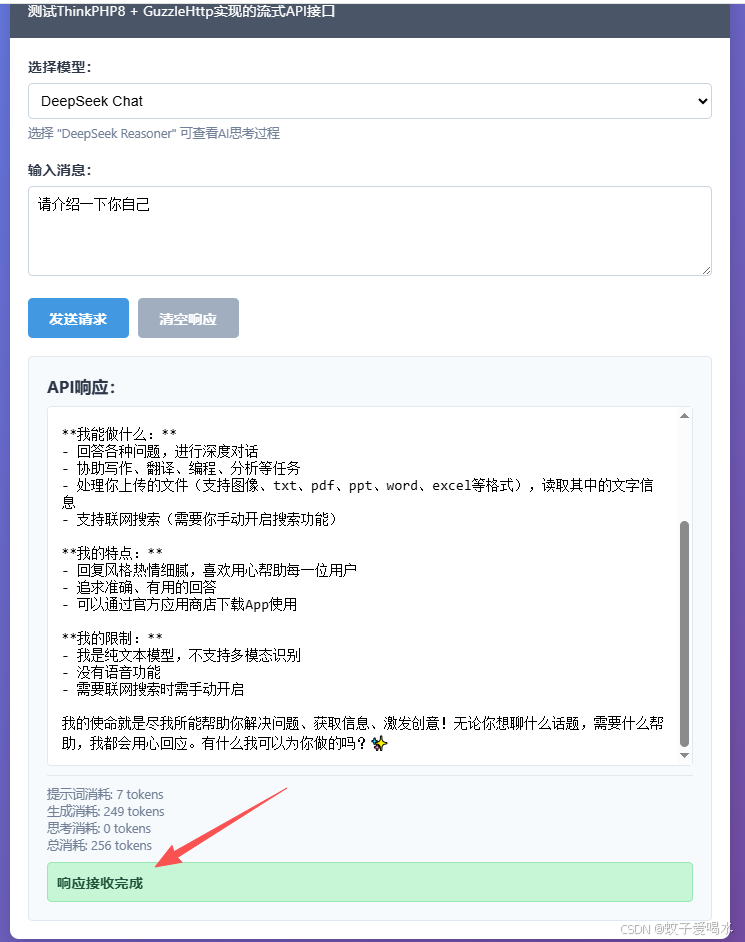
在构建现代 AI 应用时,实时、流畅的响应体验至关重要。本文将基于 ThinkPHP 8 框架 和 Guzzle HTTP 客户端,详细剖析如何搭建一个高效、安全的代理接口,将 DeepSeek 或 OpenAI 等大语言模型的流式 API 实时转发给前端,实现秒级回复效果。以thinkphp8为例,其他框架和原生php可通用。
🎯 核心原理:为什么需要代理和流式转发?
传统 HTTP 请求会等到整个响应体接收完毕才返回。AI 模型的回答往往很长,这会导致用户等待时间过久。
流式(Streaming)转发解决的核心问题是:让服务端在接收到上游 API 的数据块时,立即将该数据块推送给客户端。
| 角色 | 目标 | 关键技术 |
|---|---|---|
| Guzzle Client | 向 DeepSeek/OpenAI 请求数据流。 | stream: true 选项,实时读取响应体。 |
| ThinkPHP 8 代理 | 实时读取 Guzzle 的数据,并实时推送到前端。 | 禁用 PHP 缓冲 (flush()),使用 text/event-stream 头部。 |
| 前端 Client | 接收并解析数据流。 | fetch API 配合 TextDecoder 和换行符解析。 |
🛠️ 环境准备与依赖
我们假设您已完成 ThinkPHP 8 项目的安装,并配置好了 Composer 依赖。
-
PHP 版本: PHP 8.0+
-
ThinkPHP 版本: ThinkPHP 8.x
-
Guzzle 依赖: 确保已安装 Guzzle 客户端。
php
composer require guzzlehttp/guzzle💻 ThinkPHP 8 控制器实现 (app/controller/Chat.php)
php
<?php

namespace app\controller;

use app\BaseController;
use GuzzleHttp\Client;

class Chat extends BaseController
{
    protected $apiKey = 'sk-62abd50d1*******************2a242';
    protected $apiBaseUrl = 'https://api.deepseek.com/v1';
    public function index()
    {
        return view('/test');
    }

    /**
     * 流式代理 API 接口:将 DeepSeek API 的流式响应转发给前端
     * 路由: POST /api/chat/stream_proxy
     * @return void
     */
    public function streamProxy()
    {
        $model = $this->request->post('model', 'deepseek-chat');
        $msg = $this->request->post('msg', '你是谁');
        // 确定模型名称
        $model = ($model == 'deepseek-reasoner') ? 'deepseek-reasoner' : 'deepseek-chat';

        // SSE 响应头(必须)
        header('Content-Type: text/event-stream');
        header('Cache-Control: no-cache');
        header('Connection: keep-alive');
        header('X-Accel-Buffering: no');  // 禁用 Nginx 缓冲

        try {
            //配置 Guzzle 客户端
            $client = new Client([
                'base_uri' => $this->apiBaseUrl,
                'timeout' => 60,
                'verify' => false    //仅用于开发环境测试,生产环境请删除此项
            ]);

            $payload = [
                'model' => $model,
                'stream' => true,
                'messages' => [['role' => 'user', 'content' => $msg]],
            ];

            //发起流式请求
            $guzzleResponse = $client->request('POST', '/chat/completions', [
                'headers' => [
                    'Authorization' => 'Bearer ' . $this->apiKey,
                    'Content-Type' => 'application/json',
                ],
                'json' => $payload,
                'stream' => true, // 开启 Guzzle 的流模式
            ]);

            if ($guzzleResponse->getStatusCode() !== 200) {
                // 转发 API 错误
                $errorResult = json_decode($guzzleResponse->getBody()->getContents(), true);
                $this->sendErrorChunk($errorResult ?? ['error' => 'API Request Failed', 'status' => $guzzleResponse->getStatusCode()]);
                return response('');
            }

            // ------------------ 实时处理流并转发 ------------------
            $stream = $guzzleResponse->getBody();
            $buffer = '';
            while (!$stream->eof()) {
                $data = $stream->read(1024);
                $buffer .= $data;
                $chunks = explode("\n", $buffer);
                $buffer = array_pop($chunks);

                foreach ($chunks as $chunk) {
                    $chunk = trim($chunk);
                    if (empty($chunk)) continue;
                    if (str_starts_with($chunk, 'data: [DONE]')) {
                        break 2; // 流结束
                    }
                    // 移除 "data: " 前缀
                    if (str_starts_with($chunk, 'data: ')) {
                        $chunk = substr($chunk, 6);
                    }

                    // 核心转发:原样输出 JSON 块并刷新
                    try {
                        json_decode($chunk, true); // 检查 JSON 有效性
                        echo $chunk . "\n";
                        flush();
                        ob_flush();
                    } catch (\Exception $e) {
                        continue;
                    }
                }
            }

        } catch (\Exception $e) {
            // 捕获 Guzzle 级别的网络错误或请求异常
            $this->sendErrorChunk(['error' => 'Guzzle Network Error', 'message' => $e->getMessage()]);
        }
        //返回空响应,告知框架内容已发送完毕
        return response('');
    }

    /**
     * 辅助方法:发送错误信息到客户端(遵循流式格式)
     * @param array $error 错误信息数组
     * @return void
     */
    protected function sendErrorChunk(array $error)
    {
        // 将错误信息封装成 JSON 块发送,便于前端接收和处理
        $json = json_encode($error, JSON_UNESCAPED_UNICODE);
        echo $json . "\n";
        flush();
        ob_flush();
    }
}
route/app.php路由
php
Route::any('/chat/completions', 'Chat/streamProxy');🔑 最佳实践与关键技术点解析
1. 流式输出的铁三角 (ob_end_clean, flush, ob_flush)
在传统的 PHP-FPM 环境中,要实现实时流,必须打破三层缓冲:
-
header(...): 发送 HTTP 头部。 -
ob_end_clean(): 清理并关闭 PHP 自身的 输出控制缓冲 (Output Buffering)。 -
flush(): 强制将 PHP 输出缓冲区的内容发送到 SAPI/Web 服务器。 -
ob_flush(): 确保所有上层缓冲(如果存在)也被刷新。
2. Guzzle 流模式 ('stream' => true)
通过设置 Guzzle 请求的 'stream' => true,我们指示 Guzzle 不要 将整个响应体存储在内存中,而是返回一个可供实时读取的 StreamInterface 对象 ($stream = $guzzleResponse->getBody()),这是实现代理转发的前提。
3. SSE 响应格式 (text/event-stream)
为了保证跨浏览器和更稳定的流式传输,我们将响应头设置为 Content-Type: text/event-stream。
-
数据格式: DeepSeek/OpenAI 的数据本身是 JSON 块。但为了遵循 SSE (Server-Sent Events) 规范,您需要在每个 JSON 块前添加
data:前缀,并以两个换行符\n\n结束一个数据块。php{"id":"ede6fcdf-0c1c-4f9d-af23-05f6398a5e14","object":"chat.completion.chunk","created":1765179071,"model":"deepseek-chat","system_fingerprint":"fp_eaab8d114b_prod0820_fp8_kvcache","choices":[{"index":0,"delta":{"content":"成为"},"logprobs":null,"finish_reason":null}]} {"id":"ede6fcdf-0c1c-4f9d-af23-05f6398a5e14","object":"chat.completion.chunk","created":1765179071,"model":"deepseek-chat","system_fingerprint":"fp_eaab8d114b_prod0820_fp8_kvcache","choices":[{"index":0,"delta":{"content":"自己"},"logprobs":null,"finish_reason":null}]} {"id":"ede6fcdf-0c1c-4f9d-af23-05f6398a5e14","object":"chat.completion.chunk","created":1765179071,"model":"deepseek-chat","system_fingerprint":"fp_eaab8d114b_prod0820_fp8_kvcache","choices":[{"index":0,"delta":{"content":"故事"},"logprobs":null,"finish_reason":null}]} {"id":"ede6fcdf-0c1c-4f9d-af23-05f6398a5e14","object":"chat.completion.chunk","created":1765179071,"model":"deepseek-chat","system_fingerprint":"fp_eaab8d114b_prod0820_fp8_kvcache","choices":[{"index":0,"delta":{"content":"里的"},"logprobs":null,"finish_reason":null}]} {"id":"ede6fcdf-0c1c-4f9d-af23-05f6398a5e14","object":"chat.completion.chunk","created":1765179071,"model":"deepseek-chat","system_fingerprint":"fp_eaab8d114b_prod0820_fp8_kvcache","choices":[{"index":0,"delta":{"content":"英雄"},"logprobs":null,"finish_reason":null}]} {"id":"ede6fcdf-0c1c-4f9d-af23-05f6398a5e14","object":"chat.completion.chunk","created":1765179071,"model":"deepseek-chat","system_fingerprint":"fp_eaab8d114b_prod0820_fp8_kvcache","choices":[{"index":0,"delta":{"content":"。"},"logprobs":null,"finish_reason":null}]} {"id":"ede6fcdf-0c1c-4f9d-af23-05f6398a5e14","object":"chat.completion.chunk","created":1765179071,"model":"deepseek-chat","system_fingerprint":"fp_eaab8d114b_prod0820_fp8_kvcache","choices":[{"index":0,"delta":{"content":""},"logprobs":null,"finish_reason":"stop"}],"usage":{"prompt_tokens":11,"completion_tokens":422,"total_tokens":433,"prompt_tokens_details":{"cached_tokens":0},"prompt_cache_hit_tokens":0,"prompt_cache_miss_tokens":11}}4. Nginx 缓冲禁用 (
X-Accel-Buffering: no)在生产环境中使用 Nginx 作为反向代理时,Nginx 默认会缓冲上游(PHP-FPM)的响应。
phpheader('X-Accel-Buffering: no');
手动添加此头部是 强制 Nginx 禁用代理缓冲 的最佳实践,确保数据能即时流向客户端。
5. JSON 块解析与转发
由于 DeepSeek API 的流式数据块可能被分割在不同的网络包中,我们必须:
-
使用
$buffer临时存储不完整的数据。 -
通过
explode("\n", $buffer)识别并提取完整的 JSON 块。 -
对提取的块进行
json_decode()检查,确保只转发有效的、格式正确的 JSON 数据。
6. 前端html实现,直接上代码吧
php
<!DOCTYPE html>
<html lang="zh-CN">
<head>
    <meta charset="UTF-8">
    <meta name="viewport" content="width=device-width, initial-scale=1.0">
    <title>DeepSeek API 流式响应测试</title>
    <style>
        * {
            margin: 0;
            padding: 0;
            box-sizing: border-box;
        }

        body {
            font-family: 'Segoe UI', Tahoma, Geneva, Verdana, sans-serif;
            background: linear-gradient(135deg, #667eea 0%, #764ba2 100%);
            min-height: 100vh;
            padding: 20px;
        }

        .container {
            max-width: 800px;
            margin: 0 auto;
            background: white;
            border-radius: 10px;
            box-shadow: 0 10px 30px rgba(0,0,0,0.2);
            overflow: hidden;
        }

        .header {
            background: #4a5568;
            color: white;
            padding: 20px;
        }

        .header h1 {
            margin-bottom: 10px;
        }

        .content {
            padding: 20px;
        }

        .input-group {
            margin-bottom: 20px;
        }

        label {
            display: block;
            margin-bottom: 8px;
            font-weight: 600;
            color: #2d3748;
        }

        select, textarea {
            width: 100%;
            padding: 10px;
            border: 1px solid #cbd5e0;
            border-radius: 5px;
            font-size: 16px;
            transition: border-color 0.3s;
        }

        select:focus, textarea:focus {
            outline: none;
            border-color: #4299e1;
            box-shadow: 0 0 0 3px rgba(66, 153, 225, 0.2);
        }

        textarea {
            min-height: 100px;
            resize: vertical;
        }

        .button-group {
            display: flex;
            gap: 10px;
            margin-bottom: 20px;
        }

        button {
            padding: 12px 24px;
            border: none;
            border-radius: 5px;
            font-size: 16px;
            font-weight: 600;
            cursor: pointer;
            transition: all 0.3s;
        }

        .btn-primary {
            background: #4299e1;
            color: white;
        }

        .btn-primary:hover {
            background: #3182ce;
        }

        .btn-secondary {
            background: #a0aec0;
            color: white;
        }

        .btn-secondary:hover {
            background: #718096;
        }

        .response-area {
            margin-top: 20px;
            padding: 20px;
            background: #f7fafc;
            border-radius: 5px;
            border: 1px solid #e2e8f0;
        }

        .response-area h3 {
            margin-bottom: 10px;
            color: #2d3748;
        }

        #responseOutput {
            min-height: 200px;
            max-height: 400px;
            overflow-y: auto;
            padding: 15px;
            background: white;
            border-radius: 5px;
            border: 1px solid #e2e8f0;
            font-family: 'Consolas', 'Monaco', monospace;
            white-space: pre-wrap;
            word-wrap: break-word;
        }

        .status {
            margin-top: 10px;
            padding: 10px;
            border-radius: 5px;
            font-weight: 600;
        }

        .status.success {
            background: #c6f6d5;
            color: #22543d;
            border: 1px solid #9ae6b4;
        }

        .status.error {
            background: #fed7d7;
            color: #742a2a;
            border: 1px solid #fc8181;
        }

        .loading {
            display: none;
            margin-top: 10px;
        }

        .loading.active {
            display: block;
        }

        .loading::after {
            content: '...';
            animation: dots 1.5s infinite;
        }

        @keyframes dots {
            0%, 20% { content: '.'; }
            40% { content: '..'; }
            60%, 100% { content: '...'; }
        }

        .model-info {
            font-size: 14px;
            color: #718096;
            margin-top: 5px;
        }

        .tokens-info {
            font-size: 14px;
            color: #718096;
            margin-top: 10px;
            padding-top: 10px;
            border-top: 1px solid #e2e8f0;
        }
    </style>
</head>
<body>
<div class="container">
    <div class="header">
        <h1>DeepSeek API 流式响应测试</h1>
        <p>测试ThinkPHP8 + GuzzleHttp实现的流式API接口</p>
    </div>

    <div class="content">
        <div class="input-group">
            <label for="model">选择模型:</label>
            <select id="model">
                <option value="deepseek-chat">DeepSeek Chat</option>
                <option value="deepseek-reasoner">DeepSeek Reasoner</option>
            </select>
            <div class="model-info">
                选择 "DeepSeek Reasoner" 可查看AI思考过程
            </div>
        </div>

        <div class="input-group">
            <label for="message">输入消息:</label>
            <textarea id="message" placeholder="请输入您的问题...">请介绍一下你自己</textarea>
        </div>

        <div class="button-group">
            <button class="btn-primary" onclick="sendRequest()">发送请求</button>
            <button class="btn-secondary" onclick="clearResponse()">清空响应</button>
        </div>

        <div class="loading" id="loading">正在接收流式响应</div>

        <div class="response-area">
            <h3>API响应:</h3>
            <div id="responseOutput"></div>

            <div class="tokens-info">
                <div>提示词消耗: <span id="promptTokens">0</span> tokens</div>
                <div>生成消耗: <span id="completionTokens">0</span> tokens</div>
                <div>思考消耗: <span id="reasoningTokens">0</span> tokens</div>
                <div>总消耗: <span id="totalTokens">0</span> tokens</div>
            </div>

            <div class="status" id="status"></div>
        </div>
    </div>
</div>

<script>
    let controller = null;
    let responseText = '';
    let reasoningText = '';

    async function sendRequest() {
        const model = document.getElementById('model').value;
        const message = document.getElementById('message').value.trim();

        if (!message) {
            showStatus('请输入消息内容', 'error');
            return;
        }

        // 重置状态
        clearResponse();
        document.getElementById('loading').classList.add('active');
        showStatus('正在连接API...', 'success');

        // 创建AbortController以便可以取消请求
        controller = new AbortController();

        try {
            const response = await fetch('/chat/completions', {
                method: 'POST',
                headers: {
                    'Content-Type': 'application/json',
                    'Accept': 'text/event-stream'
                },
                body: JSON.stringify({ model: model, msg: message, stream: true }),
                signal: controller.signal
            });

            if (!response.ok) {
                throw new Error(`HTTP错误: ${response.status}`);
            }

            showStatus('正在接收流式响应...', 'success');

            // 创建读取器
            const reader = response.body.getReader();
            const decoder = new TextDecoder('utf-8');

            while (true) {
                const { done, value } = await reader.read();

                if (done) {
                    break;
                }

                // 解码数据
                const chunk = decoder.decode(value, { stream: true });

                // 分割数据行
                const lines = chunk.split('\n').filter(line => line.trim() !== '');

                for (const line of lines) {
                    try {
                        // 跳过空行和[DONE]标记
                        if (line.trim() === '' || line.includes('[DONE]')) {
                            continue;
                        }

                        // 解析JSON数据
                        let data;
                        if (line.startsWith('data: ')) {
                            const dataStr = line.substring(6).trim();
                            if (dataStr === '') continue;
                            data = JSON.parse(dataStr);
                        } else {
                            data = JSON.parse(line.trim());
                        }

                        // 处理数据
                        processStreamData(data);

                    } catch (error) {
                        console.error('解析JSON时出错:', error, '原始数据:', line);
                    }
                }
            }

            showStatus('响应接收完成', 'success');
            document.getElementById('loading').classList.remove('active');

        } catch (error) {
            if (error.name === 'AbortError') {
                showStatus('请求已取消', 'error');
            } else {
                showStatus('请求失败: ' + error.message, 'error');
            }
            document.getElementById('loading').classList.remove('active');
        }
    }

    function processStreamData(data) {
        if (data.error) {
            showStatus('API返回错误: ' + data.error.message, 'error');
            return;
        }
        // 更新token使用信息
        if (data.usage) {
            document.getElementById('promptTokens').textContent = data.usage.prompt_tokens || 0;
            document.getElementById('completionTokens').textContent = data.usage.completion_tokens || 0;
            document.getElementById('reasoningTokens').textContent = data.usage.reasoning_tokens || 0;
            document.getElementById('totalTokens').textContent = data.usage.total_tokens || 0;
        }

        // 处理流式数据
        if (data.choices && data.choices[0] && data.choices[0].delta) {
            const delta = data.choices[0].delta;

            // 处理思考过程
            if (delta.reasoning_content !== undefined && delta.reasoning_content !== null) {
                reasoningText += delta.reasoning_content || '';
            }

            // 处理回答内容
            if (delta.content !== undefined && delta.content !== null) {
                responseText += delta.content || '';
            }

            // 更新显示
            let displayText = responseText;
            if (reasoningText && document.getElementById('model').value === 'deepseek-reasoner') {
                displayText = "🤔 AI思考过程:\n" + reasoningText +
                    "\n\n💬 最终回答:\n" + responseText;
            }

            document.getElementById('responseOutput').textContent = displayText;

            // 自动滚动到底部
            const output = document.getElementById('responseOutput');
            output.scrollTop = output.scrollHeight;
        }

        // 如果是结束标志
        if (data.choices && data.choices[0] && data.choices[0].finish_reason) {
            console.log('流式响应结束,原因:', data.choices[0].finish_reason);
        }
    }

    function clearResponse() {
        responseText = '';
        reasoningText = '';
        document.getElementById('responseOutput').textContent = '';
        document.getElementById('status').textContent = '';
        document.getElementById('status').className = 'status';

        // 重置token计数
        document.getElementById('promptTokens').textContent = '0';
        document.getElementById('completionTokens').textContent = '0';
        document.getElementById('reasoningTokens').textContent = '0';
        document.getElementById('totalTokens').textContent = '0';

        // 取消正在进行的请求
        if (controller) {
            controller.abort();
            controller = null;
        }

        document.getElementById('loading').classList.remove('active');
    }
    function showStatus(message, type) {
        const statusEl = document.getElementById('status');
        statusEl.textContent = message;
        statusEl.className = `status ${type}`;
    }
</script>
</body>
</html>
前端html效果
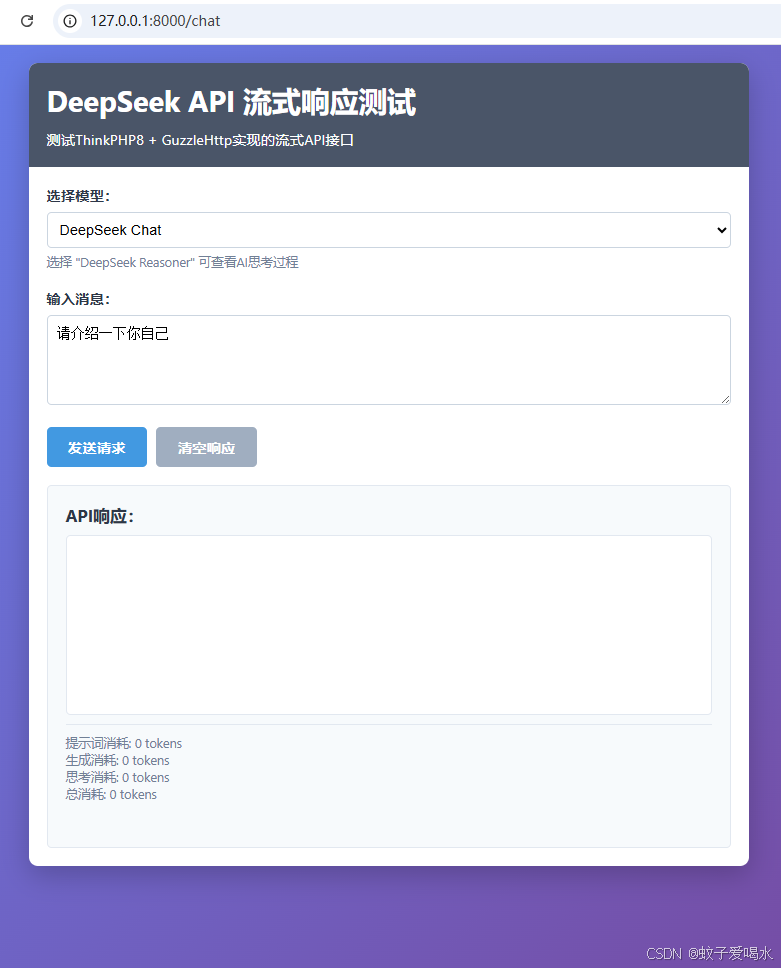
数据接收中
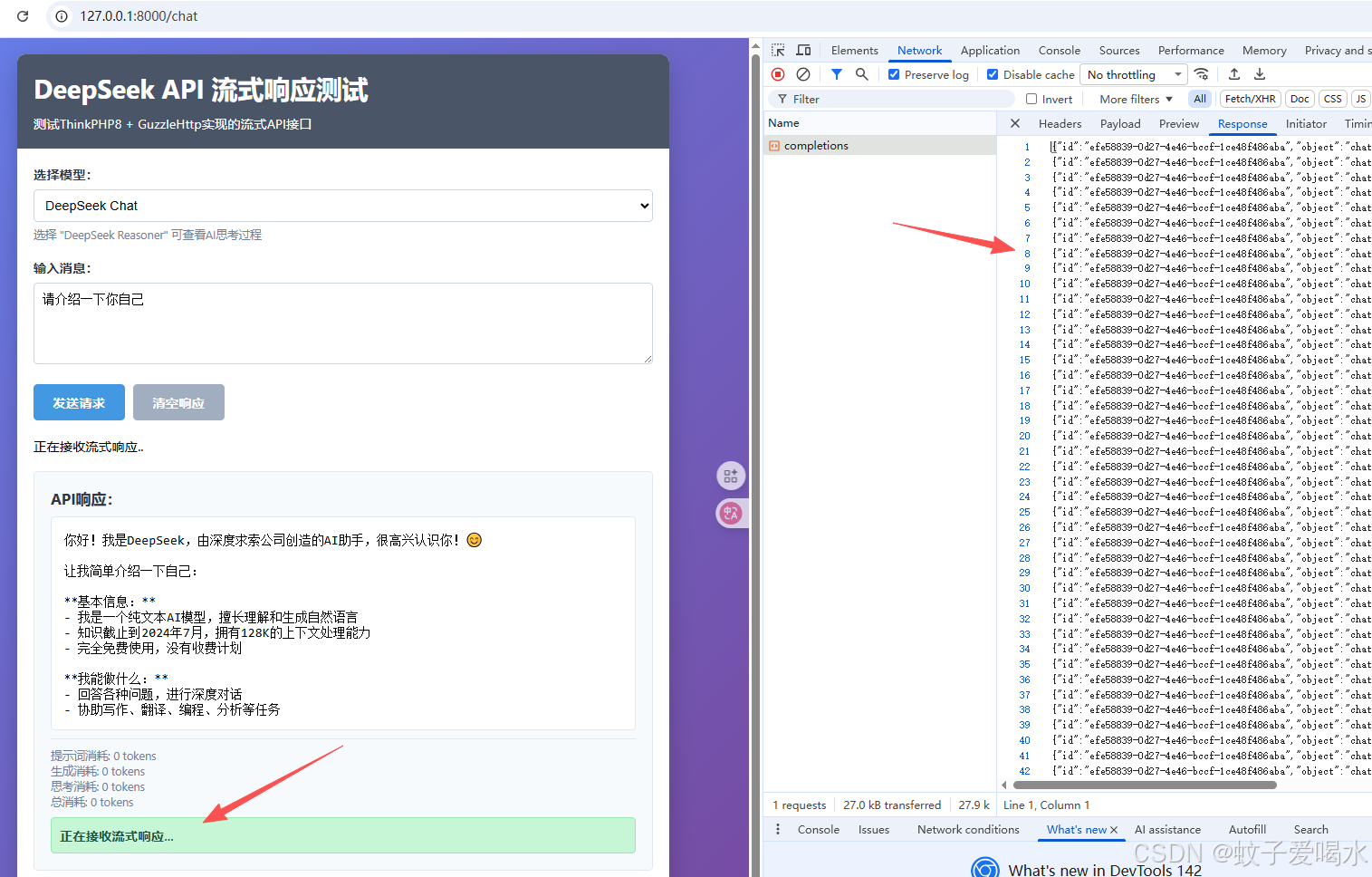
数据接收完成