前言
QT进行摄像头相关的开发,除了可以使用自带的多媒体模块,以及opencv(前面已经分享相关博文),还可以用专注底层细节的音视频处理工具ffmpeg。
需要说明的是QT多媒体模块、opencv、ffmpeg这3者虽然都可以播放视频,但是它们专注的领域是不一样的:
- QT多媒体模块:快速构建 GUI 应用,集成播放、录音等基础功能;
- opencv:图像专业处理,比如图片裁剪、人脸识别、图文识别等;
- ffmpeg:底层音视频处理库,实现编解码、转码、滤镜、流媒体、格式封装等专业处理。
在对硬件有要求的条件下,用ffmpeg才能实现极致优化(低延迟等),opencv在图片处理上非常厉害,在视频播放上不一定很全面,项目对fps有高要求时,需要结合ffmpeg库进行开发。
效果图
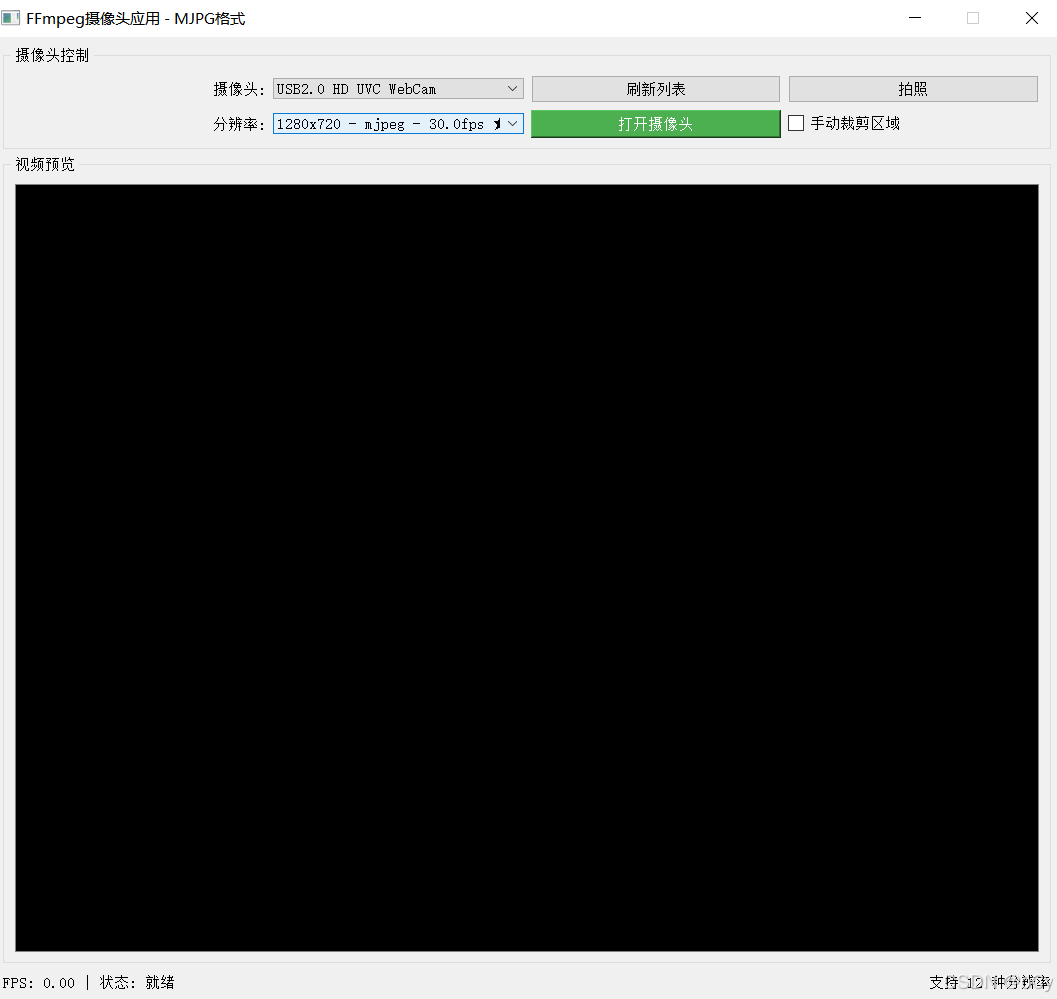
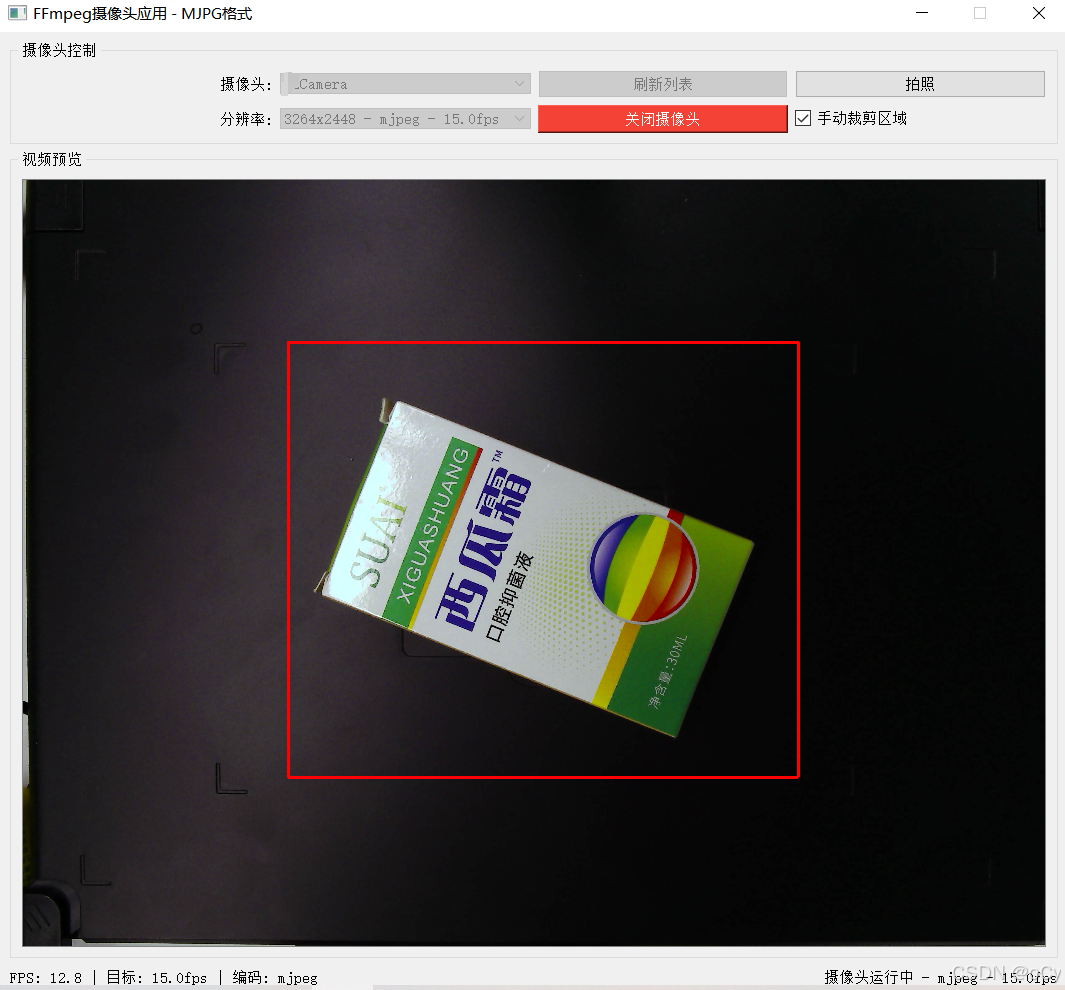
ffmpeg工具
安装
官网地址:https://www.ffmpeg.org/download.html#build-windows
window版本下载链接 (如果不生效,可能是最新版本更新了,按照以下步骤进官网下载)
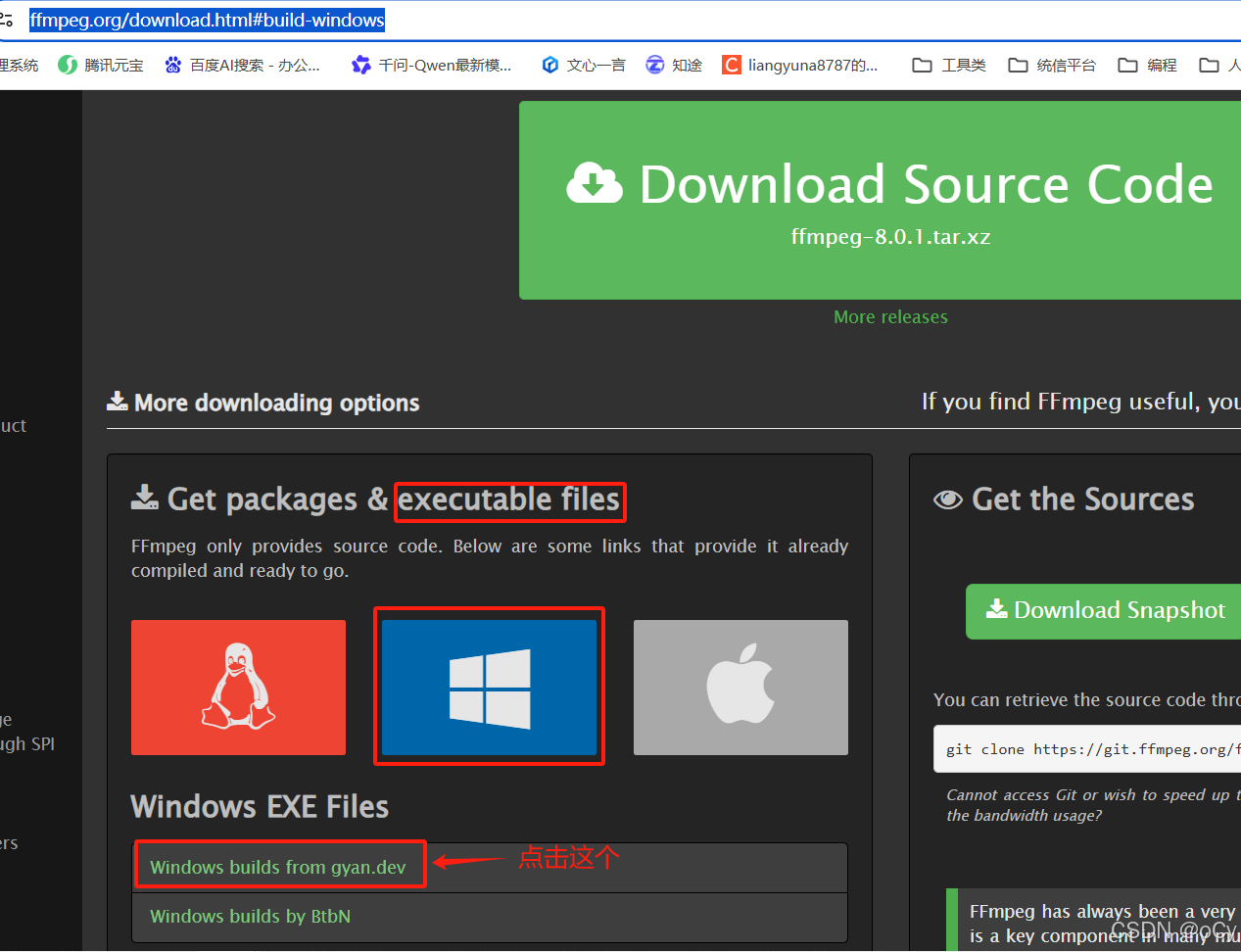
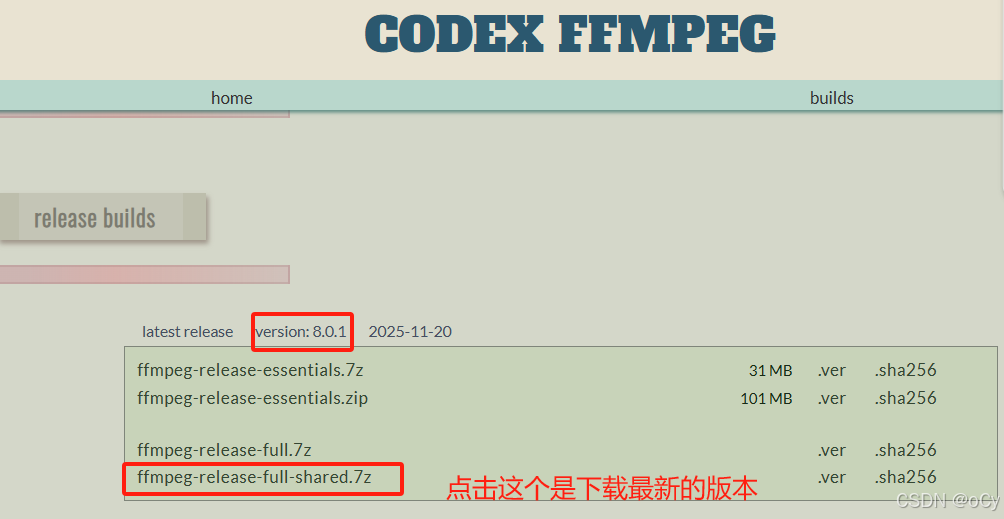
解压到任意目录下
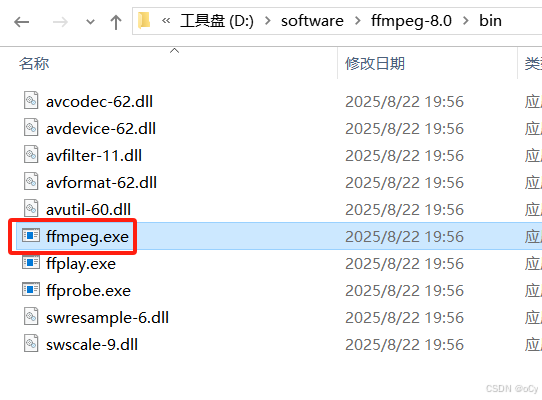
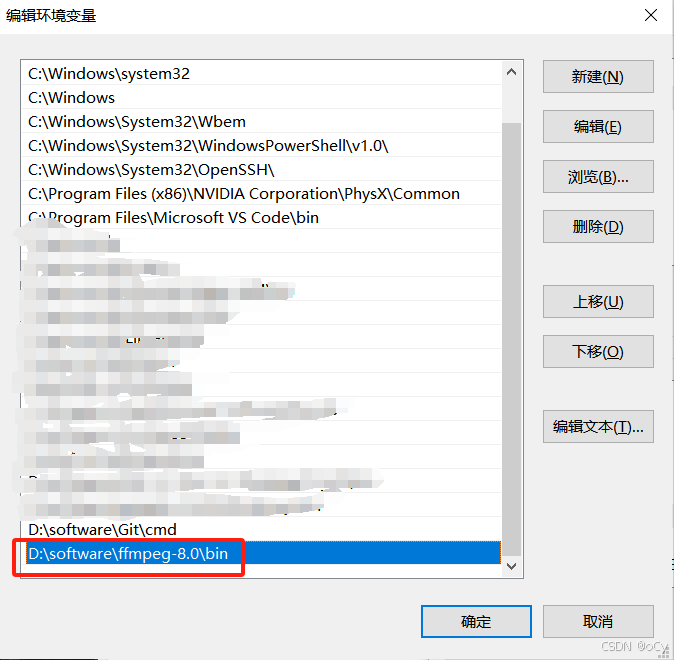
解压后,在bin目录中可以看到执行文件ffmpeg.exe,把路径加入到系统环境变量中就可以在cmd命令行窗口中直接输入命令使用了
常用命令
1、查看摄像头清单
ffmpeg -list_devices true -f dshow -i dummy
video表示摄像头,audio表示麦克风
2、查看指定摄像头的分辨率、像素格式、fps
ffplay -f dshow -list_options true -i video="xxCamera"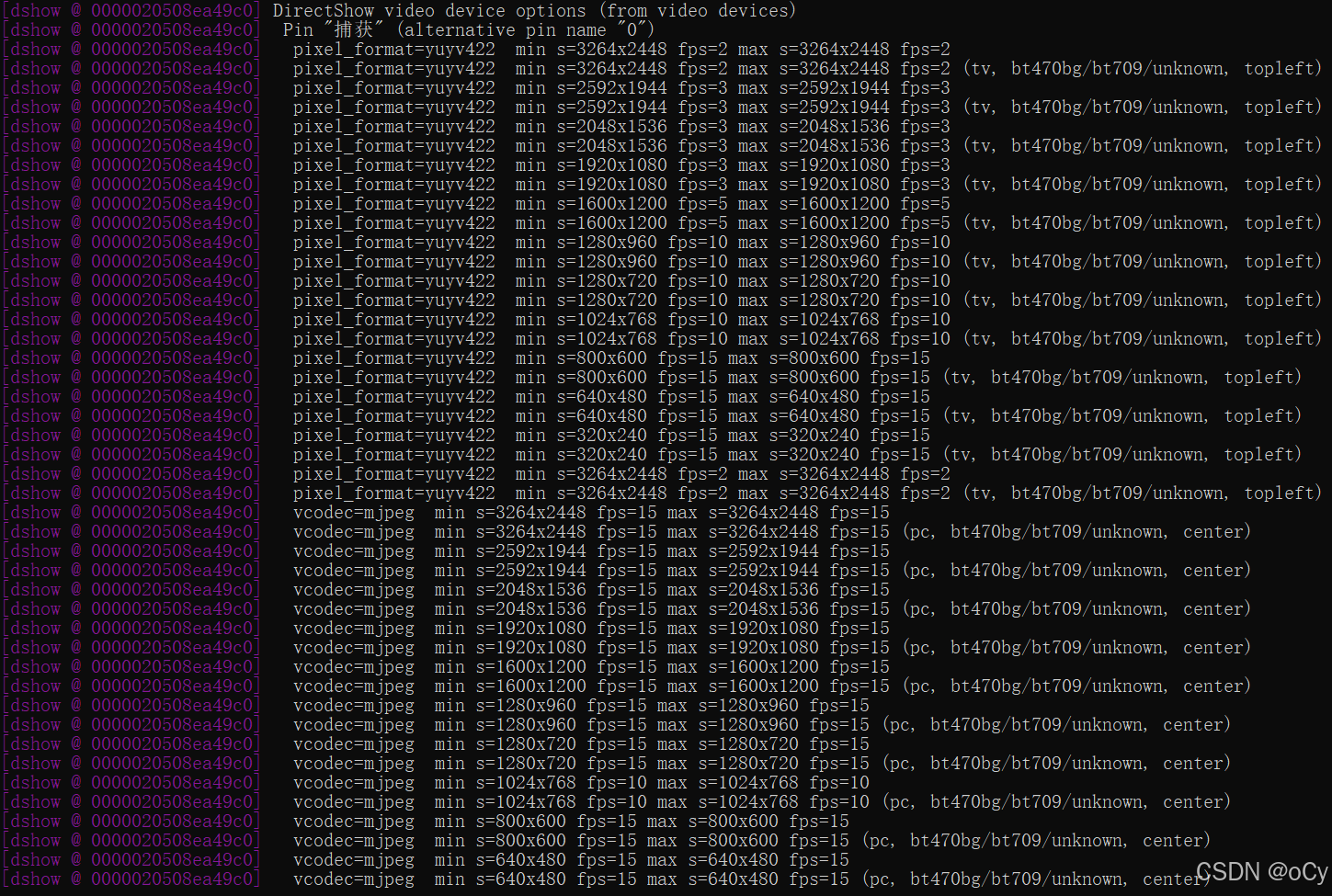
pixel_format=yuyv422  min s=3264x2448 fps=2 max s=3264x2448 fps=2
//yuyv422是像素格式
//3264x2448 是分辨率
//fps=2 最大支持的fps值为2,不能超过2

vcodec=mjpeg  min s=3264x2448 fps=15 max s=3264x2448 fps=15
//mjpeg是像素格式
//3264x2448 是分辨率
//fps=15 最大支持的fps值为15,不能超过15
从以上可看出YUYV格式下,最大FPS为2,而MJPEG格式下,最大FPS为15,以下是对比
| 特性 | YUYV格式 | MJPEG(MJPG)格式 |
|---|---|---|
| 压缩方式 | 无压缩,原始像素格式 | 帧内压缩,每帧独立JPEG编码 |
| 数据量 | 非常大(每像素16位) | 中等(压缩比1/10~1/20) |
| 带宽需求 | 高(如1920×1080@30fps约1Gbps) | 较低(同分辨率约48-120Mbps) |
| 解码需求 | 无需解码,直接使用 | 需要CPU/GPU解压JPEG |
| 帧独立性 | 不适用 | 每帧独立,便于随机访问和丢包恢复 |
| 画质 | 高,保留完整细节 | 有压缩损失,可能出现马赛克 |
3、打开摄像头测试
打开摄像头默认情况下是以无压缩方式(YUYV)获取图像,想要提高FPS就要指定MJPEG格式/15fps。以下两条命令分别为2fps和15fps的显示效果,可以明显感觉出2fps的画面有明显的延时顿挫感
ffplay -f dshow -video_size 3264x2448 -framerate 2 -i video="xxCamera" -fflags nobuffer -flags low_delay -framedrop -vf "scale=960:720"
ffplay -f dshow -video_size 3264x2448 -framerate 15 -i video="xxLCamera" -fflags nobuffer -flags low_delay -framedrop -vf "scale=960:720"
QT加入ffmpeg库
以上安装ffmpeg的目录中已经包含相应的动态库和静态库
1、修改.pro配置
以上面ffmpeg安装目录D:\software\ffmpeg-8.0为例,下面是.pro文件想要加入的配置信息
# FFmpeg 路径
FFMPEG_DIR = D:\software\ffmpeg-8.0

INCLUDEPATH += $$FFMPEG_DIR/include

LIBS += -L$$FFMPEG_DIR/bin \        # MinGW 需要链接 .dll(运行时),但 .a 在 lib/
        -L$$FFMPEG_DIR/lib \
        -lavcodec \
        -lavformat \
        -lavutil \
        -lswscale \
        -lswresample \
        -lavfilter
如果希望使用.pri方式(前面的opencv也是使用.pri方式,方便后面打包),以下是在ffmpeg目录下新建的ffmpeg.pri文件内容:
FFMPEG_ROOT = $$PWD
INCLUDEPATH += $$FFMPEG_ROOT/include

LIBS += -L$$FFMPEG_ROOT/bin \
        -L$$FFMPEG_ROOT/lib \
        -lavutil \                  #核心工具库
        -lavdevice \                #输入输出设备库
        -lavcodec \                 #编解码库
        -lavformat \                #件格式和协议库
        -lswscale \                 #将图像进行格式转换
        -lswresample \              #用于音频重采样,可以对数字音频进行声道数、数据格式、采样率等多种基本信息的转换
        -lavfilter                  #音视频滤镜库

win32 {
    FFMPEG_DLL_PATH = $$FFMPEG_ROOT/bin
    INSTALL_DIR = $$OUT_PWD/install

    # Step 1: 清空并重新创建 install 目录
    QMAKE_POST_BUILD += $$QMAKE_MKDIR $$shell_path($$INSTALL_DIR) $$escape_expand(\\n\\t)
    #QMAKE_POST_BUILD += $$QMAKE_DEL_FILE $$shell_path($$INSTALL_DIR/*) $$escape_expand(\\n\\t)

    # Step 2: 只复制 FFmpeg DLL 文件
    QMAKE_POST_BUILD += $$QMAKE_COPY $$shell_path($$FFMPEG_DLL_PATH/avutil-60.dll) $$shell_path($$INSTALL_DIR) $$escape_expand(\\n\\t)
    QMAKE_POST_BUILD += $$QMAKE_COPY $$shell_path($$FFMPEG_DLL_PATH/avdevice-62.dll) $$shell_path($$INSTALL_DIR) $$escape_expand(\\n\\t)
    QMAKE_POST_BUILD += $$QMAKE_COPY $$shell_path($$FFMPEG_DLL_PATH/avcodec-62.dll) $$shell_path($$INSTALL_DIR) $$escape_expand(\\n\\t)
    QMAKE_POST_BUILD += $$QMAKE_COPY $$shell_path($$FFMPEG_DLL_PATH/avformat-62.dll) $$shell_path($$INSTALL_DIR) $$escape_expand(\\n\\t)
    QMAKE_POST_BUILD += $$QMAKE_COPY $$shell_path($$FFMPEG_DLL_PATH/swscale-9.dll) $$shell_path($$INSTALL_DIR) $$escape_expand(\\n\\t)
    QMAKE_POST_BUILD += $$QMAKE_COPY $$shell_path($$FFMPEG_DLL_PATH/swresample-6.dll) $$shell_path($$INSTALL_DIR) $$escape_expand(\\n\\t)
    QMAKE_POST_BUILD += $$QMAKE_COPY $$shell_path($$FFMPEG_DLL_PATH/avfilter-11.dll) $$shell_path($$INSTALL_DIR) $$escape_expand(\\n\\t)

    # Step 3: 只复制 .exe 文件
    CONFIG(debug, debug|release) {
        EXE_FILE = $$OUT_PWD/debug/$${TARGET}.exe
    } else {
        EXE_FILE = $$OUT_PWD/release/$${TARGET}.exe
    }

    # 确保只复制 .exe 文件
    QMAKE_POST_BUILD += $$QMAKE_COPY $$shell_path($$EXE_FILE) $$shell_path($$INSTALL_DIR) $$escape_expand(\\n\\t)
}

HEADERS +=

SOURCES +=
然后在工程文件.pro中加入以下两个内容:
TARGET = ffmpegtest   #生成的执行文件名称,一定要在文件开头位置加上


include(D:\software\ffmpeg-8.0\ffmpeg.pri)   #pri文件的觉得路径,在文件的末尾位置加上
2、简单的测试
在QT下面的main.cpp中加入以下代码,查看ffmpeg的版本(注意:ffmpeg库是C语言实现的,需要extern "C"进行引用)
#include "mainwindow.h"

#include <QApplication>
#include <iostream>
extern "C" {
#include <libavcodec/avcodec.h>
#include <libavformat/avformat.h>
}

int main(int argc, char *argv[])
{
    // 打印 FFmpeg 版本
    std::cout << "FFmpeg version: " << av_version_info() << std::endl;
    QApplication a(argc, argv);
    MainWindow w;
    w.show();
    return a.exec();
}
打印信息如下,即说明引用正常
FFmpeg version: 8.0-full_build-www.gyan.dev功能讲解
本篇分享功能包括:显示/刷新摄像头和分辨率,摄像头打开/关闭,对图像进行绘画、缩放、拍照,以及显示打开的格式、实时FPS等功能。
ffmpeg接口
ffmpeg常用接口
| FFmpeg 库 | 用途 | 常用接口 | 是否在你的项目中使用 |
|---|---|---|---|
libavutil |
工具库(内存、数学、日志、像素格式等) | av_malloc, av_free, av_strerror, av_image_get_buffer_size, av_get_pix_fmt_name |
✅ 是 |
libavdevice |
输入/输出设备(摄像头、屏幕捕获等) | avdevice_register_all |
✅ 是 |
libavformat |
容器格式 & 协议(MP4, RTSP, DSHOW 等) | avformat_open_input, avformat_find_stream_info, av_read_frame, avformat_close_input |
✅ 是 |
libavcodec |
编解码器(H.264, MJPEG, VP9 等) | avcodec_find_decoder, avcodec_alloc_context3, avcodec_open2, avcodec_send_packet, avcodec_receive_frame |
✅ 是 |
libswscale |
图像缩放 & 格式转换(YUV ↔ RGB) | sws_getContext, sws_scale, sws_freeContext |
✅ 是 |
libswresample |
音频重采样(声道、采样率转换) | swr_init, swr_convert |
❌ 否(无音频) |
libavfilter |
音视频滤镜(裁剪、旋转、加水印等) | avfilter_graph_create, av_buffersrc_add_frame |
❌ 否(未使用) |
关键模块及接口
| 步骤 | 目标 | 使用的 FFmpeg 库 | 关键接口 |
|---|---|---|---|
| 1. 初始化设备支持 | 注册输入设备(如 Windows 的 dshow) |
libavdevice |
avdevice_register_all() |
| 2. 打开摄像头设备 | 以指定参数(分辨率、帧率、编码)打开摄像头 | libavformat + libavdevice |
avformat_open_input() |
| 3. 查找并初始化解码器 | 获取视频流信息,创建解码上下文 | libavcodec |
avcodec_find_decoder(), avcodec_alloc_context3(), avcodec_parameters_to_context(), avcodec_open2() |
| 4. 读取与解码帧 | 循环读取数据包 → 解码为原始图像帧 | libavformat + libavcodec |
av_read_frame(), avcodec_send_packet(), avcodec_receive_frame() |
| 5. 图像格式转换与缩放 | 将 YUV/其他格式转为 RGB,并缩放到显示尺寸 | libswscale |
sws_getContext(), sws_scale() |
函数流程图
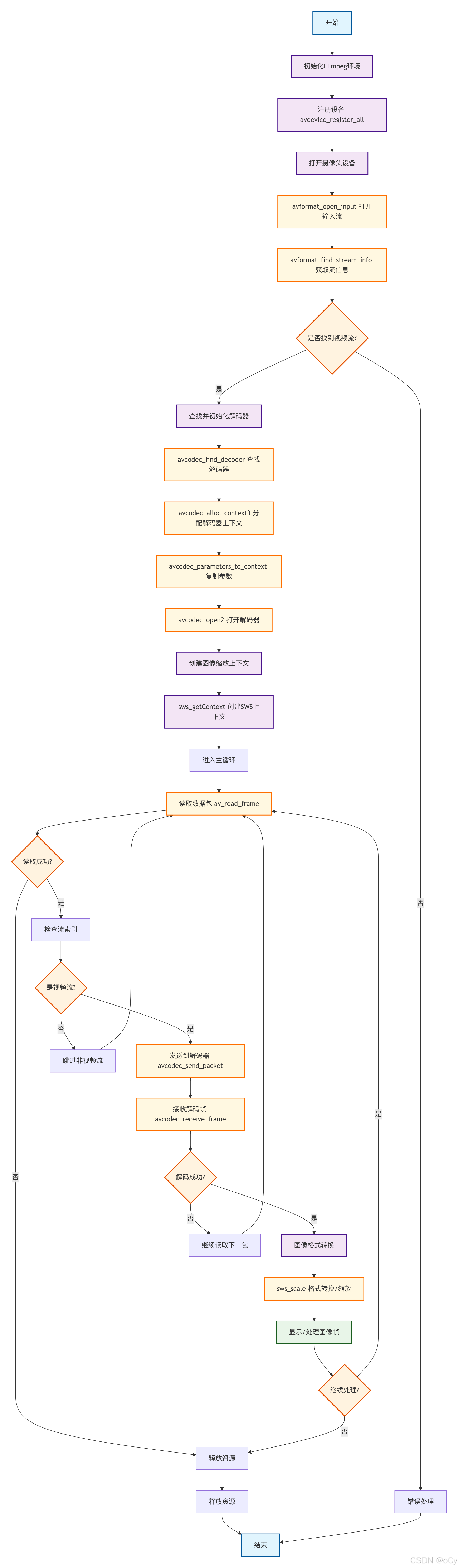
-
初始化 FFmpeg
avdevice_register_all():注册所有输入输出设备,使得 FFmpeg 能够识别和操作这些设备。
注意:ffmpeg库接口可获取到设备的基础信息,无法直接获取到详细的分辨率、格式、fps等信息。
-
打开摄像头设备
avformat_open_input():以指定参数(如分辨率、帧率)打开摄像头设备。avformat_find_stream_info():获取视频流信息,这对于正确设置解码器上下文是必要的。(一个媒体内容可能不仅仅是视频流,当前是只获取视频流)
-
查找并初始化解码器
avcodec_find_decoder():根据编码 ID 查找合适的解码器。avcodec_alloc_context3():为选定的解码器分配解码上下文。avcodec_parameters_to_context():将流参数复制到解码上下文中。avcodec_open2():打开解码器准备进行解码工作。
-
循环读取数据包
av_read_frame():从媒体文件中读取下一帧(对于实时流,比如摄像头,这将返回下一个可用的数据包)。- 在此步骤中,如果读取的数据包属于视频流,则调用:
avcodec_send_packet():发送数据包给解码器。avcodec_receive_frame():接收已解码的帧。
- 在此步骤中,如果读取的数据包属于视频流,则调用:
-
图像格式转换与缩放
sws_getContext():创建用于图像格式转换和/或尺寸调整的 SwsContext。sws_scale():执行实际的格式转换和/或尺寸调整操作。
-
显示或处理图像帧
- 将转换后的图像帧显示在 Qt 界面上或其他进一步处理。
源码实现
//mainwindow.h
#ifndef MAINWINDOW_H
#define MAINWINDOW_H
#include <QMainWindow>
#include <QTimer>
#include <QPixmap>
#include <QImage>
#include <QElapsedTimer>
#include <QCameraInfo>
#include <QList>
#include <QSize>
#include <QMutex>
#include <QDateTime>
#include <QStandardPaths>
#include "metatypes.h"
// FFmpeg 头文件(C 风格)
extern "C" {
#include <libavcodec/avcodec.h>
#include <libavformat/avformat.h>
#include <libavdevice/avdevice.h>
#include <libswscale/swscale.h>
#include <libavutil/avutil.h>
#include <libavutil/imgutils.h>
}
// 前向声明
namespace Ui {
class MainWindow;
}
class MainWindow : public QMainWindow
{
Q_OBJECT
public:
explicit MainWindow(QWidget *parent = nullptr);
~MainWindow();
protected:
// 事件过滤器:处理 videoLabel 的鼠标和滚轮事件
bool eventFilter(QObject *obj, QEvent *event) override;
private slots:
void refreshCameraList();
void toggleCamera();
void updateFrame();
void onCameraSelectionChanged(int index);
void onResolutionsReady(const QList<CameraCapability> &resolutionInfos);
void on_btnCapture_clicked(); // 拍照按钮槽函数
private:
// 鼠标事件处理(手动裁剪)
void handleMousePressEvent(QMouseEvent *event);
void handleMouseMoveEvent(QMouseEvent *event);
void handleMouseReleaseEvent(QMouseEvent *event);
// 核心私有函数
void setupConnections();
void updateCameraButtonState();
bool openCameraWithBestParams(const QString &cameraName, const QString &resolution, const QString &codec, double fps);
void openCamera();
void closeCamera();
QList<CameraCapability> getCameraCapabilities(const QString &cameraName);
void populateResolutionComboBox(const QList<CameraCapability> &resolutionInfos);
void startCapabilityDetection(const QString &cameraName);
QString getCodecName(AVCodecID codecId);
QString getPixelFormatName(AVPixelFormat pixFmt);
void applyZoom(); // 应用缩放和绘制矩形
// UI 指针
Ui::MainWindow *ui;
// 定时器(用于帧更新)
QTimer *timer;
// 摄像头列表
QList<CameraInfo> cameraList;
// FFmpeg 相关变量
AVFormatContext *formatContext = nullptr;
AVCodecContext *codecContext = nullptr;
const AVCodec *videoCodec = nullptr;
AVDictionary *options = nullptr;
SwsContext *swsContext = nullptr; // 用于显示缩放
SwsContext *highResSwsCtx = nullptr; // 用于保存原始帧(YUV → RGB)
AVFrame *frame = nullptr; // 原始解码帧
AVFrame *rgbFrame = nullptr; // 显示用 RGB 帧
uint8_t *rgbBuffer = nullptr; // 显示缓冲区
int rgbBufferSize = 0;
int videoStreamIndex = -1;
bool isCameraOpened = false;
// FPS 计算
int frameCount = 0;
QElapsedTimer fpsTimer;
double currentFps = 0.0;
// 当前摄像头信息
CameraInfo currentCamera;
QString currentCodec;
double currentMaxFps;
// 视频显示尺寸(固定)
const int videoDisplayWidth = 1024;
const int videoDisplayHeight = 768;
// 图像数据(用于保存)
QImage latestHighResFrame; // 原始高分辨率 RGB 图像(用于拍照)
mutable QMutex frameMutex; // 线程安全锁
// 手动裁剪相关
bool isManualCropMode = false; // 是否启用手动裁剪
bool isDrawingRect = false; // 是否正在拖拽
QPoint rectStart;
QPoint rectEnd;
QRect manualCropRect; // 最终确认的裁剪矩形(在 videoLabel 坐标系中)
// 缩放相关
double currentZoomFactor = 1.0;
QPixmap originalDisplayPixmap; // 原始未缩放的显示 pixmap
};
#endif // MAINWINDOW_H
//mainwindow.cpp
// Qt核心模块
#include "mainwindow.h" // 主窗口头文件
#include "ui_mainwindow.h" // UI自动生成的头文件
#include "cameraprobing.h" // 摄像头探测模块
// Qt GUI组件
#include <QLabel> // 标签控件
#include <QComboBox> // 下拉选择框
#include <QPushButton> // 按钮控件
#include <QMessageBox> // 消息对话框
#include <QDebug> // 调试输出
#include <QApplication> // 应用程序对象
#include <QDesktopWidget> // 桌面窗口管理
#include <QCheckBox> // 复选框
#include <QFileDialog> // 文件对话框
#include <QDir> // 目录操作
#include <QPainter> // 绘图工具
#include <QWheelEvent> // 滚轮事件
#include <QMouseEvent> // 鼠标事件
#include <QStandardPaths> // 标准路径
#include <QtConcurrent> // 并发编程
// FFmpeg C接口(多媒体处理)
extern "C" {
#include <libavcodec/avcodec.h> // 编解码器
#include <libavformat/avformat.h> // 格式处理
#include <libavdevice/avdevice.h> // 设备输入
#include <libswscale/swscale.h> // 图像缩放
#include <libavutil/avutil.h> // 工具函数
#include <libavutil/imgutils.h> // 图像工具
#include <libavutil/opt.h> // 选项设置
}
MainWindow::MainWindow(QWidget *parent)
: QMainWindow(parent)
, ui(new Ui::MainWindow)
{
ui->setupUi(this);
// 初始化 FFmpeg 帧
frame = av_frame_alloc();
// 居中窗口
QDesktopWidget *desktop = QApplication::desktop();
move((desktop->width() - width()) / 2, (desktop->height() - height()) / 2);
// 注册设备驱动(如 dshow)
avdevice_register_all();
// 创建定时器(用于读取帧)
timer = new QTimer(this);
connect(timer, &QTimer::timeout, this, &MainWindow::updateFrame);
// 设置信号槽连接
setupConnections();
// 固定 videoLabel 尺寸,并安装事件过滤器以捕获鼠标/滚轮
ui->videoLabel->setFixedSize(videoDisplayWidth, videoDisplayHeight);
ui->videoLabel->setMouseTracking(true);
ui->videoLabel->installEventFilter(this);
// 初始刷新摄像头列表
QTimer::singleShot(100, this, &MainWindow::refreshCameraList);
fpsTimer.start();// 启动FPS计时器
}
MainWindow::~MainWindow()
{
closeCamera();
delete ui;
}
void MainWindow::setupConnections()
{
// 摄像头控制
connect(ui->refreshButton, &QPushButton::clicked, this, &MainWindow::refreshCameraList);
connect(ui->cameraToggleButton, &QPushButton::clicked, this, &MainWindow::toggleCamera);
connect(ui->cameraComboBox, QOverload<int>::of(&QComboBox::currentIndexChanged),
this, &MainWindow::onCameraSelectionChanged);
// 手动裁剪复选框
connect(ui->manualCropCheckBox, &QCheckBox::toggled, this, [this](bool checked) {
isManualCropMode = checked;// 设置裁剪模式标志
ui->videoLabel->setCursor(checked ? Qt::CrossCursor : Qt::ArrowCursor);
if (!checked) {
// 清除矩形并重绘
manualCropRect = QRect();
isDrawingRect = false;
applyZoom();
}
});
// 拍照按钮
connect(ui->captureButton, &QPushButton::clicked, this, &MainWindow::on_btnCapture_clicked);
}
//摄像头状态更新
void MainWindow::updateCameraButtonState()
{
if (isCameraOpened) {
// 摄像头已打开状态
ui->cameraToggleButton->setText("关闭摄像头");
ui->cameraToggleButton->setStyleSheet("QPushButton { background-color: #f44336; color: white; }");
} else {
// 摄像头已关闭状态
ui->cameraToggleButton->setText("打开摄像头");
ui->cameraToggleButton->setStyleSheet("QPushButton { background-color: #4CAF50; color: white; }");
}
}
//获取编解码器信息
QString MainWindow::getCodecName(AVCodecID codecId)
{
const char* name = avcodec_get_name(codecId);
return name ? QString(name) : "unknown";
}
// 获取像素格式名称
QString MainWindow::getPixelFormatName(AVPixelFormat pixFmt)
{
const char* name = av_get_pix_fmt_name(pixFmt);
return name ? QString(name) : "unknown";
}
//摄像头关闭
void MainWindow::closeCamera()
{
timer->stop();// 停止定时器
// 释放 FFmpeg 资源
if (swsContext) {
sws_freeContext(swsContext);
swsContext = nullptr;
}
if (highResSwsCtx) {
sws_freeContext(highResSwsCtx);
highResSwsCtx = nullptr;
}
if (codecContext) {
avcodec_free_context(&codecContext);
codecContext = nullptr;
}
if (formatContext) {
avformat_close_input(&formatContext);
formatContext = nullptr;
}
if (options) {
av_dict_free(&options);
options = nullptr;
}
if (frame) {
av_frame_free(&frame);
frame = nullptr;
}
if (rgbFrame) {
av_frame_free(&rgbFrame);
rgbFrame = nullptr;
}
if (rgbBuffer) {
av_free(rgbBuffer);
rgbBuffer = nullptr;
}
isCameraOpened = false;
updateCameraButtonState();
// 启用控件
ui->cameraComboBox->setEnabled(true);
ui->resolutionComboBox->setEnabled(true);
ui->refreshButton->setEnabled(true);
// 更新 UI 状态
ui->videoLabel->setText("摄像头已关闭");
ui->fpsLabel->setText("FPS: 0.00 | 状态: 已关闭");
ui->statusLabel->setText("摄像头已关闭");
qDebug() << "摄像头已关闭";
}
bool MainWindow::openCameraWithBestParams(const QString &cameraName, const QString &resolution, const QString &codec, double fps)
{
// 清理之前的选项
if (options) {
av_dict_free(&options);
options = nullptr;
}
// 设置输入参数
av_dict_set(&options, "video_size", resolution.toUtf8().constData(), 0);
av_dict_set(&options, "framerate", QString::number(fps, 'f', 0).toUtf8().constData(), 0);
if (!codec.isEmpty() && codec != "auto") {
av_dict_set(&options, "vcodec", codec.toUtf8().constData(), 0);
}
// 优化延迟和缓冲设置
av_dict_set(&options, "fflags", "nobuffer", 0);
av_dict_set(&options, "flags", "low_delay", 0);
av_dict_set(&options, "framedrop", "1", 0);
av_dict_set(&options, "rtbufsize", "2M", 0);
// 分配格式上下文
formatContext = avformat_alloc_context();
if (!formatContext) {
qDebug() << "无法分配 format context";
return false;
}
// 查找 DirectShow 输入格式(Windows)
const AVInputFormat *inputFormat = av_find_input_format("dshow");
if (!inputFormat) {
QMessageBox::warning(this, "错误", "未找到 dshow 输入格式");
return false;
}
QString deviceName = "video=" + cameraName;
qDebug() << "尝试打开摄像头:" << deviceName;
int result = avformat_open_input(&formatContext, deviceName.toUtf8().constData(), inputFormat, &options);
if (result < 0) {
char error[1024];
av_strerror(result, error, sizeof(error));
qDebug() << "打开摄像头失败:" << error;
return false;
}
if (avformat_find_stream_info(formatContext, nullptr) < 0) {
QMessageBox::warning(this, "错误", "无法获取流信息");
return false;
}
// 查找视频流
videoStreamIndex = -1;
for (unsigned int i = 0; i < formatContext->nb_streams; ++i) {
if (formatContext->streams[i]->codecpar->codec_type == AVMEDIA_TYPE_VIDEO) {
videoStreamIndex = i;
break;
}
}
if (videoStreamIndex == -1) {
QMessageBox::warning(this, "错误", "未找到视频流");
return false;
}
// 获取解码器参数并查找解码器
AVCodecParameters *codecPar = formatContext->streams[videoStreamIndex]->codecpar;
videoCodec = avcodec_find_decoder(codecPar->codec_id);
if (!videoCodec ) {
QMessageBox::warning(this, "错误", "未找到合适的解码器");
return false;
}
// 分配解码器上下文
codecContext = avcodec_alloc_context3(videoCodec);
if (!codecContext) {
qDebug() << "无法分配 codec context";
return false;
}
// 将参数复制到解码器上下文
if (avcodec_parameters_to_context(codecContext, codecPar) < 0) {
QMessageBox::warning(this, "错误", "无法设置解码器参数");
return false;
}
// 打开解码器
AVDictionary *codecOpts = nullptr;
av_dict_set(&codecOpts, "threads", "auto", 0);
if (avcodec_open2(codecContext, videoCodec, &codecOpts) < 0) {
QMessageBox::warning(this, "错误", "无法打开解码器");
av_dict_free(&codecOpts);
return false;
}
av_dict_free(&codecOpts);
qDebug() << "成功打开摄像头";
return true;
}
//打开摄像头
void MainWindow::openCamera()
{
if (isCameraOpened) return;// 防止重复打开
// 检查摄像头选择
if (ui->cameraComboBox->currentIndex() < 0 || cameraList.isEmpty()) {
QMessageBox::warning(this, "错误", "请先选择摄像头");
return;
}
if (ui->resolutionComboBox->currentIndex() < 0) {
QMessageBox::warning(this, "错误", "请先选择分辨率");
return;
}
// 获取选中的分辨率信息
QVariant var = ui->resolutionComboBox->currentData();
CameraCapability selectedInfo;
if (var.isValid()) {
selectedInfo = var.value<CameraCapability>();
} else {
selectedInfo = CameraCapability(QSize(640, 480), "mjpeg", 30.0);
qWarning() << "使用默认分辨率";
}
// 构建参数
QString resolution = QString("%1x%2").arg(selectedInfo.resolution.width()).arg(selectedInfo.resolution.height());
QString cameraName = cameraList[ui->cameraComboBox->currentIndex()].name;
currentCodec = selectedInfo.codec;
currentMaxFps = selectedInfo.maxFps;
ui->statusLabel->setText("正在初始化摄像头...");
QApplication::processEvents();
// 尝试打开摄像头
if (!openCameraWithBestParams(cameraName, resolution, selectedInfo.codec, selectedInfo.maxFps)) {
ui->statusLabel->setText("打开摄像头失败");
QMessageBox::warning(this, "错误", QString("无法打开摄像头 %1").arg(cameraName));
return;
}
// 创建显示用的缩放上下文(YUV → RGB,1024x768)
swsContext = sws_getContext(
codecContext->width, codecContext->height, codecContext->pix_fmt,
videoDisplayWidth, videoDisplayHeight, AV_PIX_FMT_RGB24,
SWS_FAST_BILINEAR, nullptr, nullptr, nullptr
);
if (!swsContext) {
QMessageBox::warning(this, "错误", "无法创建显示缩放上下文");
closeCamera();
return;
}
// 创建高分辨率保存用的缩放上下文(YUV → RGB,原始尺寸)
highResSwsCtx = sws_getContext(
codecContext->width, codecContext->height, codecContext->pix_fmt,
codecContext->width, codecContext->height, AV_PIX_FMT_RGB24,
SWS_BILINEAR, nullptr, nullptr, nullptr
);
if (!highResSwsCtx) {
QMessageBox::warning(this, "警告", "无法创建高分辨率缩放上下文,拍照可能受影响");
}
// 分配显示缓冲区
rgbBufferSize = av_image_get_buffer_size(AV_PIX_FMT_RGB24, videoDisplayWidth, videoDisplayHeight, 1);
rgbBuffer = (uint8_t*)av_malloc(rgbBufferSize);
if (!rgbBuffer) {
QMessageBox::warning(this, "错误", "无法分配 RGB 缓冲区");
closeCamera();
return;
}
// 分配RGB帧
rgbFrame = av_frame_alloc();
if (!rgbFrame) {
QMessageBox::warning(this, "错误", "无法分配 RGB 帧");
closeCamera();
return;
}
// 填充图像数组
if (av_image_fill_arrays(rgbFrame->data, rgbFrame->linesize, rgbBuffer, AV_PIX_FMT_RGB24,
videoDisplayWidth, videoDisplayHeight, 1) < 0) {
QMessageBox::warning(this, "错误", "无法填充图像数组");
closeCamera();
return;
}
// 启动摄像头
isCameraOpened = true;
frameCount = 0;
fpsTimer.restart();
updateCameraButtonState();
// 禁用相关控件
ui->cameraComboBox->setEnabled(false);
ui->resolutionComboBox->setEnabled(false);
ui->refreshButton->setEnabled(false);
// 计算定时器间隔并启动
int timerInterval = qMax(1, (int)(1000.0 / currentMaxFps));
timer->start(timerInterval);
ui->videoLabel->setText("正在初始化视频流...");
ui->statusLabel->setText(QString("摄像头运行中 - %1 - %2fps").arg(currentCodec).arg(currentMaxFps, 0, 'f', 1));
}
//摄像头切换
void MainWindow::toggleCamera()
{
if (isCameraOpened) {
closeCamera();
} else {
openCamera();
}
}
//刷新摄像头
void MainWindow::refreshCameraList()
{
if (isCameraOpened) closeCamera();// 先关闭已打开的摄像头
// 清空UI列表
ui->cameraComboBox->clear();
ui->resolutionComboBox->clear();
cameraList.clear();
ui->statusLabel->setText("正在检测摄像头...");
// 获取可用摄像头列表
QList<QString> cameraNames = CameraProbing::getAvailableCameras();
if (cameraNames.isEmpty()) {
QList<QCameraInfo> cameras = QCameraInfo::availableCameras();
if (cameras.isEmpty()) {
ui->statusLabel->setText("未检测到摄像头");
ui->cameraComboBox->addItem("未找到摄像头");
return;
}
for (const QCameraInfo &info : cameras) {
CameraInfo cam;
cam.name = info.description().replace(QRegExp("[\\\\/:]"), "");
cam.description = info.description();
cam.deviceName = info.deviceName();
cam.isDefault = (info == QCameraInfo::defaultCamera());
cameraList.append(cam);
ui->cameraComboBox->addItem(cam.description + (cam.isDefault ? " (默认)" : ""));
}
} else {
for (const QString &name : cameraNames) {
CameraInfo cam;
cam.name = name;
cam.description = name;
cam.deviceName = name;
cam.isDefault = (&name == &cameraNames.first());
cameraList.append(cam);
ui->cameraComboBox->addItem(name + (cam.isDefault ? " (默认)" : ""));
}
}
ui->statusLabel->setText(QString("发现 %1 个摄像头").arg(cameraList.size()));
if (!cameraList.isEmpty()) {
ui->cameraComboBox->setCurrentIndex(0);
onCameraSelectionChanged(0);
}
}
void MainWindow::onCameraSelectionChanged(int index)
{
if (index >= 0 && index < cameraList.size()) {
currentCamera = cameraList[index];
startCapabilityDetection(currentCamera.name);// 开始探测摄像头能力
}
}
void MainWindow::startCapabilityDetection(const QString &cameraName)
{
ui->statusLabel->setText("探测摄像头能力...");
auto future = QtConcurrent::run([this, cameraName]() {
CameraProbing prober;
return prober.probeCameraCapabilities(cameraName);
});
// 创建监视器处理异步结果
QFutureWatcher<QList<CameraCapability>> *watcher = new QFutureWatcher<QList<CameraCapability>>(this);
connect(watcher, &QFutureWatcher<QList<CameraCapability>>::finished, this, [this, watcher]() {
onResolutionsReady(watcher->result());
watcher->deleteLater();
});
watcher->setFuture(future);
}
void MainWindow::onResolutionsReady(const QList<CameraCapability> &infos)
{
populateResolutionComboBox(infos);// 填充分辨率下拉框
ui->statusLabel->setText(QString("支持 %1 种分辨率").arg(infos.size()));
}
void MainWindow::populateResolutionComboBox(const QList<CameraCapability> &infos)
{
ui->resolutionComboBox->clear();
if (infos.isEmpty()) {
// 添加默认分辨率选项
CameraCapability def(QSize(640, 480), "mjpeg", 30.0);
ui->resolutionComboBox->addItem("640x480 - mjpeg - 30.0fps");
QVariant v;
v.setValue(def);
ui->resolutionComboBox->setItemData(0, v);
} else {
// 添加所有探测到的分辨率选项
for (int i = 0; i < infos.size(); ++i) {
const auto& cap = infos[i];
QString text = QString("%1x%2 - %3 - %4fps")
.arg(cap.resolution.width()).arg(cap.resolution.height())
.arg(cap.codec).arg(cap.maxFps, 0, 'f', 1);
if (cap.isPreferred) text += " ★";
ui->resolutionComboBox->addItem(text);
QVariant v;
v.setValue(cap);
ui->resolutionComboBox->setItemData(i, v);
}
}
if (ui->resolutionComboBox->count() > 0) {
ui->resolutionComboBox->setCurrentIndex(0);
}
}
// ================== 核心:帧更新与图像处理 ==================
void MainWindow::updateFrame()
{
if (!isCameraOpened || !formatContext || !codecContext) return;
// 分配数据包
AVPacket *packet = av_packet_alloc();
if (!packet) return;
// 读取视频帧
if (av_read_frame(formatContext, packet) >= 0) {
if (packet->stream_index == videoStreamIndex) {
// 发送数据包到解码器
if (avcodec_send_packet(codecContext, packet) == 0) {
// 接收解码后的帧
while (avcodec_receive_frame(codecContext, frame) == 0) {
// 保存原始高分辨率 RGB 图像(线程安全)
{
QMutexLocker locker(&frameMutex);
if (highResSwsCtx) {
// 分配 QImage(RGB888)
QImage img(codecContext->width, codecContext->height, QImage::Format_RGB888);
uint8_t *data[1] = { img.bits() };
int linesize[1] = { img.bytesPerLine() };
// YUV → RGB
sws_scale(highResSwsCtx, frame->data, frame->linesize,
0, codecContext->height, data, linesize);
latestHighResFrame = img;
}
}
// 更新 FPS
frameCount++;
if (fpsTimer.elapsed() >= 1000) {
currentFps = frameCount * 1000.0 / fpsTimer.elapsed();
ui->fpsLabel->setText(QString("FPS: %1 | 目标: %2fps | 编码: %3")
.arg(currentFps, 0, 'f', 1)
.arg(currentMaxFps, 0, 'f', 1)
.arg(currentCodec));
frameCount = 0;
fpsTimer.restart();
}
// 转换为显示尺寸 RGB
sws_scale(swsContext, frame->data, frame->linesize,
0, codecContext->height, rgbFrame->data, rgbFrame->linesize);
// 创建 QImage 并保存为原始显示图
QImage displayImg(rgbFrame->data[0], videoDisplayWidth, videoDisplayHeight,
rgbFrame->linesize[0], QImage::Format_RGB888);
originalDisplayPixmap = QPixmap::fromImage(displayImg);
// 应用缩放和矩形绘制
applyZoom();
av_frame_unref(frame);
break; // 只处理一帧
}
}
}
av_packet_unref(packet);
}
av_packet_free(&packet);
}
// ================== 缩放与矩形绘制 ==================
void MainWindow::applyZoom()
{
if (originalDisplayPixmap.isNull()) return;
// 缩放图像
QPixmap scaled = originalDisplayPixmap.scaled(
qRound(originalDisplayPixmap.width() * currentZoomFactor),
qRound(originalDisplayPixmap.height() * currentZoomFactor),
Qt::KeepAspectRatio,
Qt::SmoothTransformation
);
// 创建目标 pixmap(固定大小)
QPixmap target(videoDisplayWidth, videoDisplayHeight);
target.fill(Qt::black); // 黑色背景
QPainter painter(&target);
// 居中绘制
QPoint drawPos((videoDisplayWidth - scaled.width()) / 2,
(videoDisplayHeight - scaled.height()) / 2);
painter.drawPixmap(drawPos, scaled);
// 绘制手动裁剪矩形(如果启用)
if (isManualCropMode) {
QRect rectToDraw;
bool isTemp = false;
if (isDrawingRect) {
rectToDraw = QRect(rectStart, rectEnd).normalized();
isTemp = true;
} else if (!manualCropRect.isEmpty()) {
rectToDraw = manualCropRect;
}
if (!rectToDraw.isEmpty()) {
double scale = currentZoomFactor;
int offsetX = (videoDisplayWidth - scaled.width()) / 2;
int offsetY = (videoDisplayHeight - scaled.height()) / 2;
QRectF mapped(
rectToDraw.x() * scale + offsetX,
rectToDraw.y() * scale + offsetY,
rectToDraw.width() * scale,
rectToDraw.height() * scale
);
if (isTemp) {
painter.setPen(QPen(Qt::yellow, 2, Qt::DashLine));
painter.setBrush(QColor(255, 255, 0, 50));
} else {
painter.setPen(QPen(Qt::red, 3, Qt::SolidLine));
painter.setBrush(Qt::NoBrush);
}
painter.drawRect(mapped);
}
}
painter.end();
ui->videoLabel->setPixmap(target);
}
// ================== 鼠标与滚轮事件 ==================
bool MainWindow::eventFilter(QObject *obj, QEvent *event)
{
if (obj == ui->videoLabel) {
// 滚轮缩放(所有模式)
if (event->type() == QEvent::Wheel) {
QWheelEvent *wheel = static_cast<QWheelEvent*>(event);
double delta = wheel->angleDelta().y();
double factor = delta > 0 ? 1.1 : 0.9;
currentZoomFactor *= factor;
currentZoomFactor = qBound(0.3, currentZoomFactor, 3.0);
applyZoom();
return true;
}
// 手动裁剪模式下的鼠标事件
if (isManualCropMode) {
switch (event->type()) {
case QEvent::MouseButtonPress:
handleMousePressEvent(static_cast<QMouseEvent*>(event));
return true;
case QEvent::MouseMove:
handleMouseMoveEvent(static_cast<QMouseEvent*>(event));
return true;
case QEvent::MouseButtonRelease:
handleMouseReleaseEvent(static_cast<QMouseEvent*>(event));
return true;
default:
break;
}
}
}
return QMainWindow::eventFilter(obj, event);
}
void MainWindow::handleMousePressEvent(QMouseEvent *event)
{
if (event->button() == Qt::LeftButton) {
isDrawingRect = true;
rectStart = event->pos();
rectEnd = rectStart;
manualCropRect = QRect();
applyZoom();
} else if (event->button() == Qt::RightButton) {
manualCropRect = QRect();
isDrawingRect = false;
applyZoom();
}
}
void MainWindow::handleMouseMoveEvent(QMouseEvent *event)
{
if (isDrawingRect) {
rectEnd = event->pos();
applyZoom(); // 实时更新
}
}
void MainWindow::handleMouseReleaseEvent(QMouseEvent *event)
{
if (event->button() == Qt::LeftButton && isDrawingRect) {
isDrawingRect = false;
QRect finalRect = QRect(rectStart, rectEnd).normalized();
if (finalRect.width() >= 20 && finalRect.height() >= 20) {
manualCropRect = finalRect;
} else {
manualCropRect = QRect(); // 太小,忽略
}
applyZoom();
}
}
// ================== 拍照功能 ==================
void MainWindow::on_btnCapture_clicked()
{
QMutexLocker locker(&frameMutex);
if (latestHighResFrame.isNull()) {
qDebug() << "暂无图像可保存!";
return;
}
QString desktop = QStandardPaths::writableLocation(QStandardPaths::DesktopLocation);
QString fileName = desktop + "/capture_" + QDateTime::currentDateTime().toString("yyyyMMdd_hhmmss") + ".png";
if (isManualCropMode && !manualCropRect.isEmpty()) {
// 将 videoLabel 坐标系的矩形映射回原始高分辨率坐标
double scaleX = (double)latestHighResFrame.width() / videoDisplayWidth;
double scaleY = (double)latestHighResFrame.height() / videoDisplayHeight;
int x = qRound(manualCropRect.x() * scaleX);
int y = qRound(manualCropRect.y() * scaleY);
int w = qRound(manualCropRect.width() * scaleX);
int h = qRound(manualCropRect.height() * scaleY);
// 边界检查
x = qMax(0, x);
y = qMax(0, y);
w = qMin(latestHighResFrame.width() - x, w);
h = qMin(latestHighResFrame.height() - y, h);
if (w > 0 && h > 0) {
QImage cropped = latestHighResFrame.copy(x, y, w, h);
if (cropped.save(fileName)) {
qDebug() << "裁剪图片已保存到桌面!";
} else {
qDebug() << "保存失败!";
}
} else {
qDebug() << "裁剪区域无效!";
}
} else {
// 保存完整图像
if (latestHighResFrame.save(fileName)) {
qDebug() << "完整图片已保存到桌面!";
} else {
qDebug() << "保存失败!";
}
}
}mainwindow.ui代码
<?xml version="1.0" encoding="UTF-8"?>
<ui version="4.0">
 <class>MainWindow</class>
 <widget class="QMainWindow" name="MainWindow">
  <property name="geometry">
   <rect>
    <x>0</x>
    <y>0</y>
    <width>1070</width>
    <height>967</height>
   </rect>
  </property>
  <property name="maximumSize">
   <size>
    <width>1070</width>
    <height>967</height>
   </size>
  </property>
  <property name="windowTitle">
   <string>FFmpeg摄像头应用 - MJPG格式</string>
  </property>
  <widget class="QWidget" name="centralWidget">
   <layout class="QVBoxLayout" name="verticalLayout">
    <item>
     <widget class="QGroupBox" name="controlGroup">
      <property name="title">
       <string>摄像头控制</string>
      </property>
      <layout class="QGridLayout" name="gridLayout">
       <item row="1" column="0">
        <widget class="QLabel" name="resolutionLabel">
         <property name="text">
          <string>分辨率:</string>
         </property>
         <property name="alignment">
          <set>Qt::AlignRight|Qt::AlignTrailing|Qt::AlignVCenter</set>
         </property>
        </widget>
       </item>
       <item row="0" column="0">
        <widget class="QLabel" name="cameraLabel">
         <property name="text">
          <string>摄像头:</string>
         </property>
         <property name="alignment">
          <set>Qt::AlignRight|Qt::AlignTrailing|Qt::AlignVCenter</set>
         </property>
        </widget>
       </item>
       <item row="1" column="1">
        <widget class="QComboBox" name="resolutionComboBox"/>
       </item>
       <item row="0" column="1">
        <widget class="QComboBox" name="cameraComboBox"/>
       </item>
       <item row="0" column="2">
        <widget class="QPushButton" name="refreshButton">
         <property name="text">
          <string>刷新列表</string>
         </property>
        </widget>
       </item>
       <item row="1" column="2">
        <widget class="QPushButton" name="cameraToggleButton">
         <property name="styleSheet">
          <string notr="true">QPushButton { background-color: #4CAF50; color: white; }</string>
         </property>
         <property name="text">
          <string>打开摄像头</string>
         </property>
        </widget>
       </item>
       <item row="0" column="3">
        <widget class="QPushButton" name="captureButton">
         <property name="text">
          <string>拍照</string>
         </property>
        </widget>
       </item>
       <item row="1" column="3">
        <widget class="QCheckBox" name="manualCropCheckBox">
         <property name="text">
          <string>手动裁剪区域</string>
         </property>
        </widget>
       </item>
      </layout>
     </widget>
    </item>
    <item>
     <widget class="QGroupBox" name="videoGroup">
      <property name="title">
       <string>视频预览</string>
      </property>
      <layout class="QVBoxLayout" name="verticalLayout_2">
       <item>
        <widget class="QLabel" name="videoLabel">
         <property name="minimumSize">
          <size>
           <width>1024</width>
           <height>768</height>
          </size>
         </property>
         <property name="maximumSize">
          <size>
           <width>1024</width>
           <height>768</height>
          </size>
         </property>
         <property name="styleSheet">
          <string notr="true">border: 1px solid gray; background-color: black;</string>
         </property>
         <property name="text">
          <string>摄像头未打开</string>
         </property>
         <property name="scaledContents">
          <bool>false</bool>
         </property>
         <property name="alignment">
          <set>Qt::AlignCenter</set>
         </property>
        </widget>
       </item>
      </layout>
     </widget>
    </item>
    <item>
     <layout class="QHBoxLayout" name="horizontalLayout">
      <item>
       <widget class="QLabel" name="fpsLabel">
        <property name="text">
         <string>FPS: 0.00 | 状态: 就绪</string>
        </property>
       </widget>
      </item>
      <item>
       <spacer name="horizontalSpacer">
        <property name="orientation">
         <enum>Qt::Horizontal</enum>
        </property>
        <property name="sizeHint" stdset="0">
         <size>
          <width>40</width>
          <height>20</height>
         </size>
        </property>
       </spacer>
      </item>
      <item>
       <widget class="QLabel" name="statusLabel">
        <property name="text">
         <string/>
        </property>
       </widget>
      </item>
     </layout>
    </item>
   </layout>
  </widget>
 </widget>
 <resources/>
 <connections/>
</ui>
引用的结构体头文件
//metatypes.h
// metatypes.h - 修改后的版本
#ifndef METATYPES_H
#define METATYPES_H

#include <QSize>
#include <QString>
#include <QMetaType>

// 摄像头能力信息结构体
struct CameraCapability {
    QSize resolution;
    QString codec;          // 编码格式
    double maxFps;          // 最大帧率
    QString pixelFormat;    // 像素格式
    bool isPreferred;       // 是否为首选(MJPG等)

    CameraCapability() : resolution(640, 480), codec("mjpeg"), maxFps(30.0),
                        pixelFormat("yuyv422"), isPreferred(false) {}

    CameraCapability(QSize res, QString c, double fps, QString pf = "yuyv422", bool preferred = false)
        : resolution(res), codec(c), maxFps(fps), pixelFormat(pf), isPreferred(preferred) {}
};

// 摄像头信息结构体
struct CameraInfo {
    QString name;           // 摄像头名称(用于FFmpeg)
    QString description;    // 摄像头描述
    QString deviceName;     // 设备名称
    bool isDefault;         // 是否是默认摄像头

    CameraInfo() : isDefault(false) {}

    CameraInfo(QString n, QString desc, QString dev, bool isDef = false)
        : name(n), description(desc), deviceName(dev), isDefault(isDef) {}
};

// 必须添加元类型声明
Q_DECLARE_METATYPE(CameraCapability)
Q_DECLARE_METATYPE(CameraInfo)

#endif // METATYPES_H
引用的类
//cameraprobing.h
#ifndef CAMERAPROBING_H
#define CAMERAPROBING_H

#include <QObject>
#include <QString>
#include <QSize>
#include <QList>
#include <QProcess>
#include <QTextStream>
#include <QRegularExpression>
#include <QDebug>

// 包含元类型定义(CameraCapability等结构体)
#include "metatypes.h"

// 摄像头能力探测类
class CameraProbing : public QObject
{
    Q_OBJECT  // Qt元对象系统宏,支持信号槽机制

public:
    // 构造函数
    explicit CameraProbing(QObject *parent = nullptr);

    // 主探测函数:探测指定摄像头的支持能力
    QList<CameraCapability> probeCameraCapabilities(const QString &cameraName);

    // 静态函数:获取系统中可用的摄像头列表
    static QList<QString> getAvailableCameras();

private:
    // 解析FFmpeg/FFplay输出的私有函数
    QList<CameraCapability> parseFFmpegOutput(const QString &output, const QString &cameraName);

    // 使用FFplay探测摄像头能力(备用方法)
    QList<CameraCapability> probeWithFFplay(const QString &cameraName);

    // 使用DirectShow探测摄像头能力(主要方法)
    QList<CameraCapability> probeWithDirectShow(const QString &cameraName);

    // 执行FFmpeg命令的静态辅助函数
    static QString executeFFmpegCommand(const QStringList &arguments);

    // 通用进程执行函数
    static QString executeProcess(const QString &program, const QStringList &arguments, int timeoutMs = 10000);

};

#endif // CAMERAPROBING_H

//cameraprobing.cpp
#include "cameraprobing.h"

// 构造函数
CameraProbing::CameraProbing(QObject *parent) : QObject(parent)
{
}

// 主探测函数:探测摄像头支持的能力(分辨率、编码格式、帧率等)
QList<CameraCapability> CameraProbing::probeCameraCapabilities(const QString &cameraName)
{
    qDebug() << "=== 开始探测摄像头能力: " << cameraName << "===";

    QList<CameraCapability> capabilities;

    // 方法1: 使用DirectShow探测(Windows平台)
    qDebug() << "尝试使用DirectShow探测...";
    capabilities = probeWithDirectShow(cameraName);

    if (!capabilities.isEmpty()) {
        qDebug() << "通过DirectShow探测到" << capabilities.size() << "个能力";
        return capabilities;
    }

    // 方法2: 如果DirectShow失败,使用FFplay探测(备用方法)
    qDebug() << "DirectShow探测失败,尝试使用FFplay探测...";
    capabilities = probeWithFFplay(cameraName);

    if (!capabilities.isEmpty()) {
        qDebug() << "通过FFplay探测到" << capabilities.size() << "个能力";
        return capabilities;
    }

    // 如果所有方法都失败,返回默认能力配置
    qDebug() << "无法探测摄像头能力,使用默认值";
    // 返回默认能力:三种常见配置
    capabilities << CameraCapability(QSize(640, 480), "yuyv422", 30.0, "yuyv422", false)  // 640x480, YUYV422, 30fps
                << CameraCapability(QSize(1280, 720), "yuyv422", 15.0, "yuyv422", false) // 1280x720, YUYV422, 15fps
                << CameraCapability(QSize(1920, 1080), "mjpeg", 10.0, "yuyv422", true);  // 1920x1080, MJPEG, 10fps(首选)

    return capabilities;
}

// 使用DirectShow探测摄像头能力(Windows专用)
QList<CameraCapability> CameraProbing::probeWithDirectShow(const QString &cameraName)
{
    QList<CameraCapability> capabilities;

    // 构建FFmpeg命令参数:使用dshow格式列出摄像头选项
    QStringList arguments;
    arguments << "-f" << "dshow" << "-list_options" << "true" << "-i" << QString("video=%1").arg(cameraName);

    qDebug() << "执行FFmpeg命令: ffmpeg" << arguments;

    // 执行FFmpeg命令获取摄像头能力信息
    QString output = executeFFmpegCommand(arguments);

    if (output.isEmpty()) {
        qDebug() << "FFmpeg探测无输出";
        return capabilities;
    }

    qDebug() << "FFmpeg原始输出:\n" << output;
    qDebug() << "=== 开始解析FFmpeg输出 ===";

    // 解析FFmpeg输出,提取摄像头能力信息
    return parseFFmpegOutput(output, cameraName);
}

// 解析FFmpeg输出的摄像头能力信息
QList<CameraCapability> CameraProbing::parseFFmpegOutput(const QString &output, const QString &cameraName)
{
    QList<CameraCapability> capabilities;

    // 使用文本流逐行读取输出
    QTextStream stream(const_cast<QString*>(&output), QIODevice::ReadOnly);
    QString line;

    qDebug() << "=== 开始解析FFmpeg输出,查找所有格式 ===";

    // 定义多种正则表达式模式来匹配不同的输出格式
    QRegularExpression pattern1(R"(pixel_format=(\w+)\s+min s=(\d+)x(\d+)\s+fps=(\d+))");  // 格式1:像素格式在前
    QRegularExpression pattern2(R"(vcodec=(\w+)\s+min s=(\d+)x(\d+)\s+fps=(\d+))");         // 格式2:编码格式在前
    QRegularExpression pattern3(R"(min s=(\d+)x(\d+)\s+fps=(\d+)\s+pixel_format=(\w+))");   // 格式3:分辨率在前
    QRegularExpression pattern4(R"(min s=(\d+)x(\d+)\s+fps=(\d+)\s+vcodec=(\w+))");        // 格式4:分辨率在前,编码格式在后

    // 专门匹配MJPG格式的模式(MJPG通常有更好的性能)
    QRegularExpression mjpegPattern(R"((mjpeg|mjpg|MJPEG|MJPG).*?min s=(\d+)x(\d+).*?fps=(\d+))",
                                   QRegularExpression::CaseInsensitiveOption);

    QSet<QString> uniqueConfigs;  // 用于去重,避免重复配置
    int lineNumber = 0;           // 行号计数器,用于调试
    int configCount = 0;          // 配置计数器

    // 逐行解析输出
    while (stream.readLineInto(&line)) {
        lineNumber++;
        line = line.trimmed();  // 去除首尾空白字符

        qDebug() << "检查行" << lineNumber << ":" << line;

        CameraCapability cap;  // 临时存储解析出的能力信息
        bool matched = false;  // 标记是否成功匹配

        // 优先匹配MJPG格式(MJPG通常性能更好)
        QRegularExpressionMatch mjpegMatch = mjpegPattern.match(line);
        if (mjpegMatch.hasMatch()) {
            QString codec = mjpegMatch.captured(1).toLower();  // 获取编码格式并转为小写
            int width = mjpegMatch.captured(2).toInt();        // 宽度
            int height = mjpegMatch.captured(3).toInt();       // 高度
            double fps = mjpegMatch.captured(4).toDouble();    // 帧率

            // 设置能力信息
            cap.codec = "mjpeg";
            cap.pixelFormat = "mjpeg";
            cap.resolution = QSize(width, height);
            cap.maxFps = fps;
            cap.isPreferred = true;  // MJPG格式标记为首选

            matched = true;
            qDebug() << "匹配到MJPG格式:" << width << "x" << height << "fps:" << fps;
        }

        // 如果没有匹配到MJPG,尝试匹配其他格式
        if (!matched) {
            QRegularExpressionMatch match;

            // 按优先级尝试不同的正则表达式模式
            if (pattern1.match(line).hasMatch()) match = pattern1.match(line);
            else if (pattern2.match(line).hasMatch()) match = pattern2.match(line);
            else if (pattern3.match(line).hasMatch()) match = pattern3.match(line);
            else if (pattern4.match(line).hasMatch()) match = pattern4.match(line);

            if (match.hasMatch()) {
                QString formatOrCodec = match.captured(1).toLower();  // 获取格式或编码
                int width, height;
                double fps;

                // 根据匹配的模式调整参数捕获位置
                if (match.regularExpression() == pattern1 || match.regularExpression() == pattern2) {
                    width = match.captured(2).toInt();
                    height = match.captured(3).toInt();
                    fps = match.captured(4).toDouble();
                } else {
                    width = match.captured(1).toInt();
                    height = match.captured(2).toInt();
                    fps = match.captured(3).toDouble();
                    formatOrCodec = match.captured(4).toLower();
                }

                // 确定是编码格式还是像素格式,并设置相应属性
                if (formatOrCodec == "mjpeg" || formatOrCodec == "mjpg") {
                    cap.codec = "mjpeg";
                    cap.pixelFormat = "mjpeg";
                    cap.isPreferred = true;  // MJPG格式优先
                } else {
                    cap.codec = formatOrCodec;
                    cap.pixelFormat = formatOrCodec;
                    cap.isPreferred = false;  // 其他格式不优先
                }

                cap.resolution = QSize(width, height);
                cap.maxFps = fps;
                matched = true;

                qDebug() << "匹配到格式:" << formatOrCodec << width << "x" << height << "fps:" << fps;
            }
        }

        // 如果成功匹配到配置信息
        if (matched) {
            // 生成唯一标识键,用于去重
            QString configKey = QString("%1x%2-%3-%4").arg(cap.resolution.width())
                                                    .arg(cap.resolution.height())
                                                    .arg(cap.codec)
                                                    .arg(cap.maxFps);

            // 检查是否已存在相同配置,避免重复添加
            if (!uniqueConfigs.contains(configKey)) {
                uniqueConfigs.insert(configKey);      // 添加到已存在集合
                capabilities.append(cap);             // 添加到能力列表
                configCount++;                        // 计数器递增

                qDebug() << "添加配置" << configCount << ":"
                         << cap.resolution.width() << "x" << cap.resolution.height()
                         << "-" << cap.codec << "-" << cap.maxFps << "fps"
                         << "- 首选:" << cap.isPreferred;
            }
        }
    }

    qDebug() << "=== 解析完成,共找到" << capabilities.size() << "个配置 ===";

    // 如果没有找到任何配置,使用默认值作为后备方案
    if (capabilities.isEmpty()) {
        qDebug() << "未找到任何配置,使用默认值";
        capabilities << CameraCapability(QSize(640, 480), "yuyv422", 30.0, "yuyv422", false)
                    << CameraCapability(QSize(1280, 720), "yuyv422", 15.0, "yuyv422", false)
                    << CameraCapability(QSize(1920, 1080), "mjpeg", 10.0, "mjpeg", true);
    }

    // 对配置进行排序:MJPG格式优先,然后按分辨率从大到小排序
    std::sort(capabilities.begin(), capabilities.end(),
        [](const CameraCapability& a, const CameraCapability& b) {
            // 优先选择MJPG格式
            if (a.isPreferred && !b.isPreferred) return true;
            if (!a.isPreferred && b.isPreferred) return false;

            // 相同格式下按分辨率面积排序(从大到小)
            int areaA = a.resolution.width() * a.resolution.height();
            int areaB = b.resolution.width() * b.resolution.height();
            return areaA > areaB;
        });

    // 打印最终排序后的配置列表
    qDebug() << "=== 最终配置列表 ===";
    for (int i = 0; i < capabilities.size(); ++i) {
        const CameraCapability& cap = capabilities[i];
        qDebug() << "配置" << (i+1) << ":" << cap.resolution.width() << "x" << cap.resolution.height()
                 << "-" << cap.codec << "-" << cap.maxFps << "fps"
                 << (cap.isPreferred ? "(首选)" : "");
    }

    return capabilities;
}

// 使用FFplay探测摄像头能力(备用方法)
QList<CameraCapability> CameraProbing::probeWithFFplay(const QString &cameraName)
{
    QList<CameraCapability> capabilities;

    qDebug() << "尝试使用FFplay探测摄像头:" << cameraName;

    // 构建FFplay命令参数(与FFmpeg类似)
    QStringList arguments;
    arguments << "-f" << "dshow" << "-list_options" << "true" << "-i" << QString("video=%1").arg(cameraName);

    // 执行FFplay命令
    QString output = executeProcess("ffplay", arguments, 5000);

    if (output.isEmpty()) {
        qDebug() << "FFplay探测无输出";
        return capabilities;
    }

    qDebug() << "FFplay原始输出:\n" << output;

    // 使用相同的解析逻辑处理FFplay输出
    return parseFFmpegOutput(output, cameraName);
}

// 执行FFmpeg命令的封装函数
QString CameraProbing::executeFFmpegCommand(const QStringList &arguments)
{
    return executeProcess("ffmpeg", arguments, 15000); // 设置15秒超时
}

// 通用进程执行函数
QString CameraProbing::executeProcess(const QString &program, const QStringList &arguments, int timeoutMs)
{
    QProcess process;
    process.setProcessChannelMode(QProcess::MergedChannels); // 合并标准输出和错误输出

    qDebug() << "执行命令:" << program << arguments;

    // 启动进程
    process.start(program, arguments);

    // 等待进程启动(3秒超时)
    if (!process.waitForStarted(3000)) {
        qDebug() << "无法启动" << program << "进程";
        return QString();
    }

    // 等待进程完成(使用指定的超时时间)
    if (!process.waitForFinished(timeoutMs)) {
        qDebug() << program << "进程超时";
        process.kill();  // 超时后终止进程
        return QString();
    }

    // 读取进程输出
    QString output = QString::fromLocal8Bit(process.readAll());
    qDebug() << "进程退出码:" << process.exitCode();
    qDebug() << "进程输出长度:" << output.length();

    return output;
}

// 获取系统中可用的摄像头列表
QList<QString> CameraProbing::getAvailableCameras()
{
    QList<QString> cameras;

    // 构建FFmpeg命令来列出设备
    QStringList arguments;
    arguments << "-f" << "dshow" << "-list_devices" << "true" << "-i" << "dummy";

    // 执行命令获取摄像头列表
    QString output = executeFFmpegCommand(arguments);

    if (output.isEmpty()) {
        qDebug() << "获取摄像头列表失败";
        return cameras;
    }

    qDebug() << "摄像头列表原始输出:\n" << output;

    // 解析输出,提取摄像头名称
    QTextStream stream(const_cast<QString*>(&output), QIODevice::ReadOnly);
    QString line;

    // 定义正则表达式模式来匹配摄像头名称
    QRegularExpression cameraPattern(R"(\""(.*?)\""\s\(video\))");      // 模式1
    QRegularExpression cameraPattern2(R"(\[dshow.*\]\s+\""(.*?)\""\s\(video\))"); // 模式2

    // 逐行解析输出
    while (stream.readLineInto(&line)) {
        QRegularExpressionMatch match = cameraPattern.match(line);
        if (!match.hasMatch()) {
            match = cameraPattern2.match(line);  // 尝试第二种模式
        }
        if (match.hasMatch()) {
            QString cameraName = match.captured(1);  // 提取摄像头名称
            cameras.append(cameraName);
            qDebug() << "发现摄像头:" << cameraName;
        }
    }

    return cameras;
}
代码可以在资源中下载。