selenium的介绍
1、 selenium是什么?
用于Web应用程序测试的工具。可以驱动浏览器执行特定操作,自动按照脚本代码做出点击,输入,打开,验证等操作,就像真实用户所做的一样。支持的浏览器包括IE,Firefox,Safari,edge,Chrome等。
2、 与requests库的区别?
selenium库是基于浏览器的驱动程序来驱动浏览器执行操作的,且浏览器可以实现网页源代码的渲染, 因此通过selenium库还可以轻松获取网页中渲染后的数据信息
3、selenium的工作原理
浏览器具有webdriver驱动,这个驱动是根据不同的浏览器开发的,不同的浏览器使用不同的webdriver驱动程序且需要对应相应的浏览器版本,webdriver驱动程序可以通过浏览器内核控制浏览执行指定命令
4、如何使用selenium?
使用前准备: a、安装selenium库 b、驱动浏览器的内核驱动
a、安装selenium,使用pip install selenium==4.11.0 -i https://pypi.mirrors.ustc.edu.cn/simple/ 或在pycharm中安装
b、edge内核驱动地址 360浏览器使用的就是edge的内核,QQ浏览器使用IE,IE,首先确定你的浏览器是使用哪个内核??
windows系统:下载下来的文件解压后放置在python安装地址的Scripts中
Linux和Mac系统:同上,注意:系统存在2个Python版本,确定当前运行的python
版本配置在环境变量中
edge驱动下载地址:https://developer.microsoft.com/en-us/microsoft-edge/tools/webdriver/?ch=1\&form=MA13LH
chrome驱动下载地址:https://chromedriver.storage.googleapis.com/index.html
firefox驱动下载地址:https://github.com/mozilla/geckodriver/releases
示例1:打开一个网页
python
from selenium import webdriver
from selenium.webdriver.edge.options import Options
edge_options =Options()
edge_options.binary_location =r"C:\Program Files (x86)\Microsoft\Edge\Application\msedge.exe"
driver =webdriver.Edge(options=edge_options)
driver.get('https://www.ptpress.com.cn/')
input('dengdai')
执行上述代码会自动打开一个百度的网页
示例2:打开多个网页
python
from selenium import webdriver
from selenium.webdriver.edge.options import Options
edge_options =Options()
edge_options.binary_location =r"C:\Program Files (x86)\Microsoft\Edge\Application\msedge.exe"
driver =webdriver.Edge(options=edge_options)
driver.get('https://www.baidu.com')
driver.execute_script("window.open('https://www.bilibili.com/','_blank');")
driver.execute_script("window.open('https://www.shuyishe.com/','_blank');")
driver.execute_script("window.open('https://www.shuyishe.com/course','_blank');")
input('dengdai')
结果如下图所示:
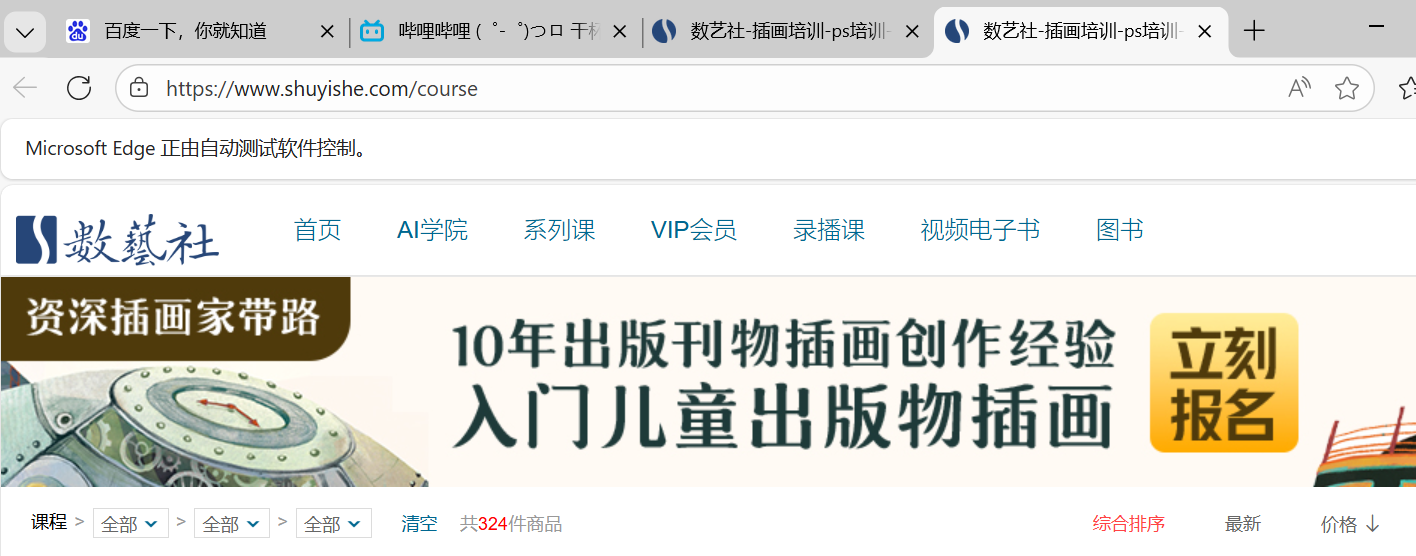
会自动打开多个网页
获取渲染后的网页代码
python
from selenium import webdriver
from selenium.webdriver.edge.options import Options
edge_options =Options()
edge_options.binary_location = r"c:\Program Files (x86)\Microsoft\Edge\Application\msedge.exe"
driver = webdriver.Edge(options=edge_options)
driver.get('https://www.baidu.com')
print(driver.page_source)