 还没有看过上、中篇的读者可以阅读之前文章了解整个系列的内容:
LangChain 中的 LLMGraphTransformer
为了让我们的图谱更智能,我们使用 LangChain 从文本描述中提取实体(电影、演员等)和关系。LLMGraphTransformer 旨在使用语言模型将基于文本的文档转换为图文档。
让我们从初始化的过程开始:
ini
llm_transformer = LLMGraphTransformer(
    llm=llm,
)
提供的 LLM 与我们用于自定义图构建器的是同一个。在这种情况下,我们使用默认参数,让模型可以自由地对节点、边和属性进行实验。但是,有几个参数值得了解,可能会进一步提升该算法的性能:
●allowed_nodes 和 allowed_relationships:我们没有指定,所以默认情况下允许所有节点和关系类型。
●strict_mode=True:如果指定了约束,则确保输出中仅包含允许的节点和关系。
●node_properties=False:禁用节点的属性提取。
●relationship_properties=False:禁用关系的属性提取。
●prompt:传入一个 ChatPromptTemplate 来自定义 LLM 的上下文。这与我们在自定义 LLM 中所做的类似。
该算法的一个缺点是速度相当慢,特别是考虑到我们没有提供节点和关系的列表。因此,我们将只使用数据集中 1000 行中的 100 行来加快速度:
ini
printfdf_sample = df.head(100) # 减少样本量以加快处理速度("hello world!");接下来,让我们准备数据集。我们说过"LLMGraphTransformer 旨在将基于文本的文档转换为图文档",这意味着我们需要将 pandas 数据框转换为文本:
ini
df_sample = movies.head(100)

documents = []
for _, row in tqdm(df_sample.iterrows(),
                   total=len(df_sample),
                   desc="正在创建文档",
                   position=0,
                   leave=True):
    try:
        # 使用正确的换行符格式化文本
        text = ""

        for col in df.columns:
            text += f"{col}: {row[col]}\n"

        documents.append(Document(page_content=text))

    except KeyError as e:
        tqdm.write(f"缺失列: {e}")
    except Exception as e:
        tqdm.write(f"处理行时出错: {e}")
这将把每一行转换为文本并将其添加到 LangChain 的 Document 对象中,该对象与 LangChain 的 LLMGraphTransformer 兼容。
接下来,我们运行 LLM 并开始生成:
ini
graph_documents = await llm_transformer.aconvert_to_graph_documents(documents)请注意,在这种情况下,我们使用 await 和 aconvert_to_graph_documents 而不是 convert_to_graph_documents 来异步处理文档,从而在大规模应用中实现更快的执行速度。
接下来,请耐心等待,因为这将需要一些时间(在我电脑上花费了大约 20 多分钟)。转换完成后,让我们打印生成的节点和关系:
python
print(f"节点:{graph_documents[0].nodes}")
print(f"关系:{graph_documents[0].relationships}")在我这里,我得到了以下结果:
在我这里,我得到了以下结果:
bash
Nodes:[Node(id="Boone's cabin", type='Cabin', properties={}), Node(id='Boone', type='Boone', properties={}), Node(id='Indian maiden', type='Person', properties={}), Node(id='Indian chief', type='Chief', properties={}), Node(id='Florence Lawrence', type='Person', properties={}), Node(id='William Craven', type='Person', properties={}), Node(id='Wallace mccutcheon and ediwin s. porter', type='Director', properties={}), Node(id='Burning arrow', type='Arrow', properties={}), Node(id='Boone', type='Person', properties={}), Node(id='Indian camp', type='Camp', properties={}), Node(id='American', type='Ethnicity', properties={}), Node(id="Boone's horse", type='Horse', properties={}), Node(id='None', type='None', properties={}), Node(id='an indian maiden', type='Maiden', properties={}), Node(id='William craven', type='Cast', properties={}), Node(id='florence lawrence', type='Cast', properties={}), Node(id='Swears vengeance', type='Vengeance', properties={}), Node(id='Daniel Boone', type='Person', properties={}), Node(id='Indians', type='Group', properties={}), Node(id='Daniel boone', type='Title', properties={}), Node(id="Daniel Boone's daughter", type='Person', properties={})]
Relationships:[Relationship(source=Node(id='Daniel Boone', type='Person', properties={}), target=Node(id='Daniel boone', type='Title', properties={}), type='TITLE', properties={}), Relationship(source=Node(id='Daniel Boone', type='Person', properties={}), target=Node(id='American', type='Ethnicity', properties={}), type='ORIGIN_ETHNICITY', properties={}), Relationship(source=Node(id='Daniel Boone', type='Person', properties={}), target=Node(id='Wallace mccutcheon and ediwin s. porter', type='Director', properties={}), type='DIRECTED_BY', properties={}), Relationship(source=Node(id='William Craven', type='Person', properties={}), target=Node(id='William craven', type='Cast', properties={}), type='CAST', properties={}), Relationship(source=Node(id='Florence Lawrence', type='Person', properties={}), target=Node(id='florence lawrence', type='Cast', properties={}), type='CAST', properties={}), Relationship(source=Node(id="Daniel Boone's daughter", type='Person', properties={}), target=Node(id='an indian maiden', type='Maiden', properties={}), type='BEFRIENDS', properties={}), Relationship(source=Node(id='Boone', type='Person', properties={}), target=Node(id='Indian camp', type='Camp', properties={}), type='LEADS_OUT_ON_A_HUNTING_EXPEDITION', properties={}), Relationship(source=Node(id='Indians', type='Group', properties={}), target=Node(id="Boone's cabin", type='Cabin', properties={}), type='ATTACKS', properties={}), Relationship(source=Node(id='Indian maiden', type='Person', properties={}), target=Node(id='None', type='None', properties={}), type='ESCAPES', properties={}), Relationship(source=Node(id='Boone', type='Person', properties={}), target=Node(id='Swears vengeance', type='Vengeance', properties={}), type='RETURNS', properties={}), Relationship(source=Node(id='Boone', type='Person', properties={}), target=Node(id='None', type='None', properties={}), type='HEADS_OUT_ON_THE_TRAIL_TO_THE_INDIAN_CAMP', properties={}), Relationship(source=Node(id='Indians', type='Group', properties={}), target=Node(id='Boone', type='Boone', properties={}), type='ENCOUNTERS', properties={}), Relationship(source=Node(id='Indian camp', type='Camp', properties={}), target=Node(id='Burning arrow', type='Arrow', properties={}), type='SET_ON_FIRE', properties={}), Relationship(source=Node(id='Boone', type='Person', properties={}), target=Node(id='None', type='None', properties={}), type='GETS_TIED_TO_THE_STAKE_AND_TOURED', properties={}), Relationship(source=Node(id='Indian camp', type='Camp', properties={}), target=Node(id='Burning arrow', type='Arrow', properties={}), type='SETS_ON_FIRE', properties={}), Relationship(source=Node(id='Indians', type='Group', properties={}), target=Node(id="Boone's horse", type='Horse', properties={}), type='ENCOUNTERS', properties={}), Relationship(source=Node(id='Boone', type='Person', properties={}), target=Node(id='Indian chief', type='Chief', properties={}), type='HAS_KNIFE_FIGHT_IN_WHICH_HE_KILLS_THE_INDIAN_CHIEF', properties={})]
接下来,是时候将生成的图文档添加到我们的知识图谱中了。我们可以通过利用 Neo4j 的 LangChain 集成来实现:
ini
graph = Neo4jGraph(url=uri, username=user, password=password, enhanced_schema=True)
graph.add_graph_documents(graph_document
让我们将图连接存储在 graph 变量中,传入您在应用程序开始时使用的相同 URL、用户名和密码。然后,让我们调用 add_graph_documents 方法将所有图文档添加到我们的数据库中。
完成该过程后,让我们最后一次切换到 Neo4j Browser,查看我们的新知识图谱。
像往常一样,运行以下查询来查看知识图谱:
less
MATCH p=(m:Movie)-[r]-(n)
RETURN p
LIMIT 100;
在我这里,知识图谱看起来像这样:
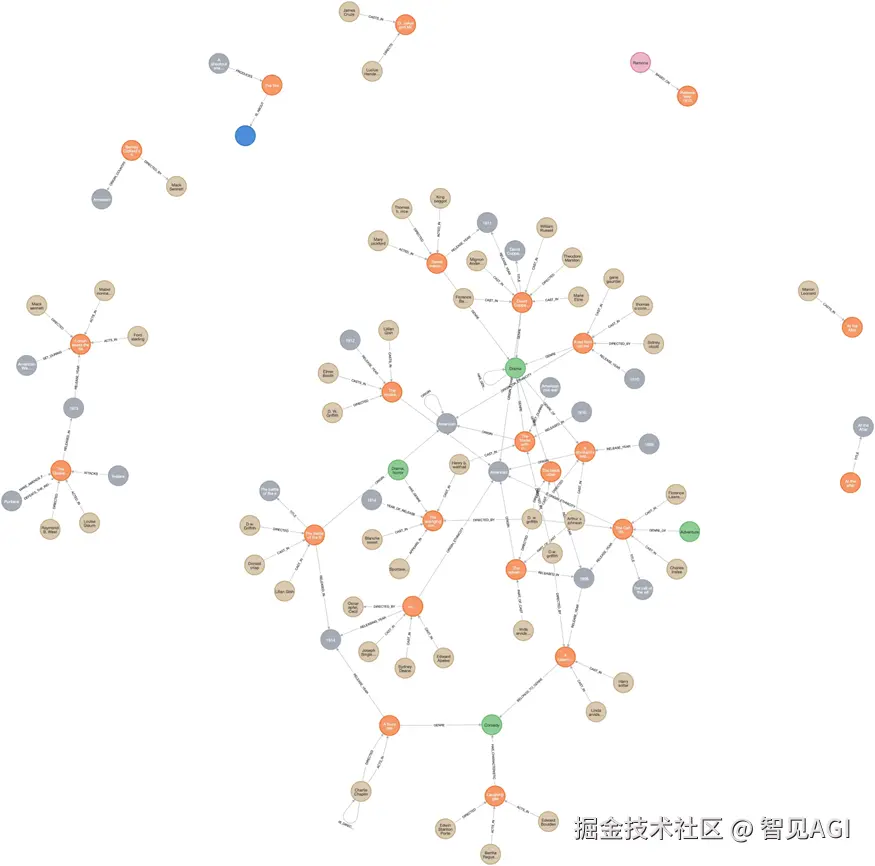
由 LLMGraphTransformer 生成的知识图谱
但我们还没有完成。您可能还记得,我们的任务实际上是查询知识图谱以帮助我们找到电影。在本文中,我将提供一个简单的文本转 Cypher 方法,该方法将利用 LLM 生成 Cypher 查询、运行 Cypher 查询,并使用检索到的信息作为上下文来回答用户查询。但是,请注意这只是一个简单的方法,我们将在后面的文章中探索高级检索方法。 首先,让我们刷新图谱的模式,因为我们将使用它让 LLM 理解我们的知识图谱:
scss
graph.refresh_schema()接下来,我们来配置 QA 链:
ini
CYPHER_GENERATION_TEMPLATE = """任务:生成 Cypher 语句以查询图数据库。
指令:
仅使用模式中提供的关系类型和属性。
不要使用任何未提供的其他关系类型或属性。
模式:
{schema}
{schema}
注意:不要在响应中包含任何解释或道歉。
不要回答任何可能要求您构建 Cypher 语句以外的问题。
除了生成的 Cypher 语句外,不要包含任何文本。
返回完整的节点,不要只返回属性。

问题是:
{question}"""

CYPHER_GENERATION_PROMPT = PromptTemplate(
    input_variables=["schema", "question"], template=CYPHER_GENERATION_TEMPLATE
)

chain = GraphCypherQAChain.from_llm(
    llm,
    graph=graph,
    verbose=True,
    allow_dangerous_requests=True,
    return_intermediate_steps=True,
    cypher_prompt=CYPHER_GENERATION_PROMPT
)
在上面的代码中,我们向 LLM 提供了一个提示来帮助它进行生成,并传入图变量的模式。 最后,让我们问它一些问题:
arduino
chain.run("请提供一份关于电影《大卫科波菲尔》的电影概述")输出:
less
Generated Cypher:
MATCH p=(n:Title {id: 'David Copperfield'})-[*1..2]-()
RETURN p
Full Context:
[{'p': [{'id': 'David Copperfield'}, 'TITLE', {'id': 'David Copperfield'}]}, {'p': [{'id': 'David Copperfield'}, 'TITLE', {'id': 'David Copperfield'}, 'CAST_IN', {'id': 'Florence La Badie'}]}, {'p': [{'id': 'David Copperfield'}, 'TITLE', {'id': 'David Copperfield'}, 'RELEASE_YEAR', {'id': '1911'}]}, {'p': [{'id': 'David Copperfield'}, 'TITLE', {'id': 'David Copperfield'}, 'GENRE', {'id': 'Drama'}]}, {'p': [{'id': 'David Copperfield'}, 'TITLE', {'id': 'David Copperfield'}, 'DIRECTED', {'id': 'Theodore Marston'}]}, {'p': [{'id': 'David Copperfield'}, 'TITLE', {'id': 'David Copperfield'}, 'ORIGIN_ETHNICITY', {'id': 'American'}]}, {'p': [{'id': 'David Copperfield'}, 'TITLE', {'id': 'David Copperfield'}, 'CAST_IN', {'id': 'Mignon Anderson'}]}, {'p': [{'id': 'David Copperfield'}, 'TITLE', {'id': 'David Copperfield'}, 'CAST_IN', {'id': 'William Russell'}]}, {'p': [{'id': 'David Copperfield'}, 'TITLE', {'id': 'David Copperfield'}, 'CAST_IN', {'id': 'Marie Eline'}]}]
INFO:httpx:HTTP Request: POST http://127.0.0.1:11434/api/generate "HTTP/1.1 200 OK"

> Finished chain.
'David Copperfield is a 1911 American drama film directed by Theodore Marston. The movie stars David Copperfield, Florence La Badie, Mignon Anderson, William Russell, and Marie Eline in various roles. It provides an overview of the life and adventures of David Copperfield through the eyes of his various companions and experiences.'通过设置 verbose=True,我们可以输出中间步骤:生成的 Cypher 查询和提供的上下文。
总结
本文作为构建知识图谱的现代方法的入门介绍。首先,我们探索了传统方法并概述了 Cypher 语言,然后创建了一个简单的 LLM 图构建器来自动化图构建过程,其性能与手动过程中实现的性能相匹配。最后,我们更进一步,引入了 LangChain 的 LLMGraphTransformer,它显著改进了我们的知识图谱。然而,这只是我们 Graph RAG 之旅的开始,特别是我们的图构建器之旅。我们还需要探索和从头构建更多现代方法,我们将在未来的文章中完成这些工作。
此外,我们上面讨论的策略仍然没有考虑 Graph-RAG 的第二个组件:图检索器。尽管改进实际的图谱也会提高检索性能,但我们仍然没有从检索的角度进行思考。例如,按照我们目前采取的方向,标签、节点、边和属性越多越好。然而,这实际上使检索器函数更难识别要检索的正确信息。事实上,现代方法还考虑在知识图谱中遵循树形结构,通过创建宏观区域并进一步将其分解为微观区域来帮助检索。
目前,我希望您在不同的数据集上测试所有这些代码,并在扩展我所提供的简单的 LLM 图构建器时发挥创造力。尽管 LLMGraphTransformer 似乎是一个非常方便的选择,可以用最少的代码快速构建灵活的图构建器,但这种方法需要更多时间来构建我们的知识图谱。此外,从头开始构建它将确保您掌握并完全理解 Graph-RAG 背后的每个组件。