import numpy as np
import pandas as pd
import matplotlib.pyplot as plt
import seaborn as sns
from sklearn.model_selection import train_test_split

# --- 1. 全局绘图设置 ---
plt.rcParams['font.sans-serif'] = ['SimHei']  # 用来正常显示中文标签
plt.rcParams['axes.unicode_minus'] = False   # 用来正常显示负号
sns.set(style="whitegrid", font='SimHei')    # Seaborn 也要同步设置字体


df = pd.read_csv('housing.csv')

# 为了讲义可读性,我们重命名列为中文对照
# 注意:原始 CSV 的列顺序是固定的,所以直接按顺序重命名是安全的

print("="*30 + " 数据集概览 " + "="*30)
print(f"数据形状: {df.shape}")
# print(df.head()) # 打印前5行预览
print(df.info()) # 打印前5行预览

# print(df['ocean_proximity'].value_counts())

mapping = {
    'INLAND': 1,       # 内陆,房价最低
    '<1H OCEAN': 2,    # 离海近1小时以内
    'NEAR OCEAN': 3,   # 靠近海岸
    'NEAR BAY': 4,     # 靠近海湾
    'ISLAND': 5        # 小岛,通常最贵
}
df['ocean_proximity'] = df['ocean_proximity'].map(mapping)

continuous_features = df.select_dtypes(include=['int64', 'float64']).columns.tolist()
for feature in continuous_features:
    mode_value = df[feature].mode()[0]            #获取该列的众数。
    df[feature].fillna(mode_value, inplace=True)

# ==========================================
# 3. 数据切分
# ==========================================
# 最后一列 'Strength' 是我们要预测的目标 (y)
X = pd.concat([df.iloc[:, :-2], df.iloc[:, -1]], axis=1)
y = df.iloc[:, -2]

# 80% 训练,20% 测试
X_train, X_test, y_train, y_test = train_test_split(X, y, test_size=0.2, random_state=42)


from sklearn.ensemble import RandomForestRegressor
from sklearn.metrics import mean_squared_error, mean_absolute_error, r2_score

# =============================
# 4. 训练随机森林回归模型
# =============================
rf = RandomForestRegressor(
    n_estimators=200,
    max_depth=None,
    random_state=42
)

rf.fit(X_train, y_train)

# =============================
# 5. 预测
# =============================
y_pred = rf.predict(X_test)

# =============================
# 6. 评价指标(回归)
# =============================
mse = mean_squared_error(y_test, y_pred)
rmse = np.sqrt(mse)
mae = mean_absolute_error(y_test, y_pred)
r2 = r2_score(y_test, y_pred)

print("="*20, "随机森林回归:模型表现", "="*20)
print(f"MAE  (平均绝对误差): {mae:.4f}")
print(f"RMSE (均方根误差): {rmse:.4f}")
print(f"R²   (决定系数): {r2:.4f}")
import shap
shap.initjs()   # Jupyter 环境自动渲染

# 1. 构造解释器
explainer = shap.TreeExplainer(rf)

# 2. 选择样本(提高计算效率)
X_sample = X_train.sample(200, random_state=42)

# 3. 计算 SHAP
shap_values = explainer.shap_values(X_sample)

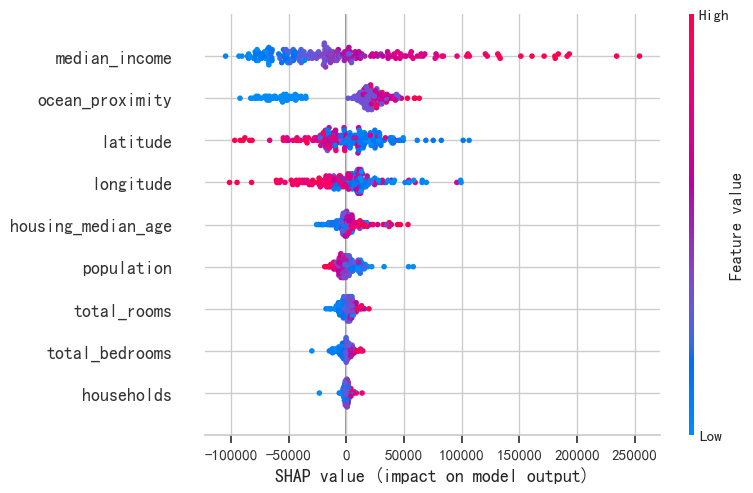
# 4. Summary 散点图
shap.summary_plot(shap_values, X_sample, plot_type="dot")

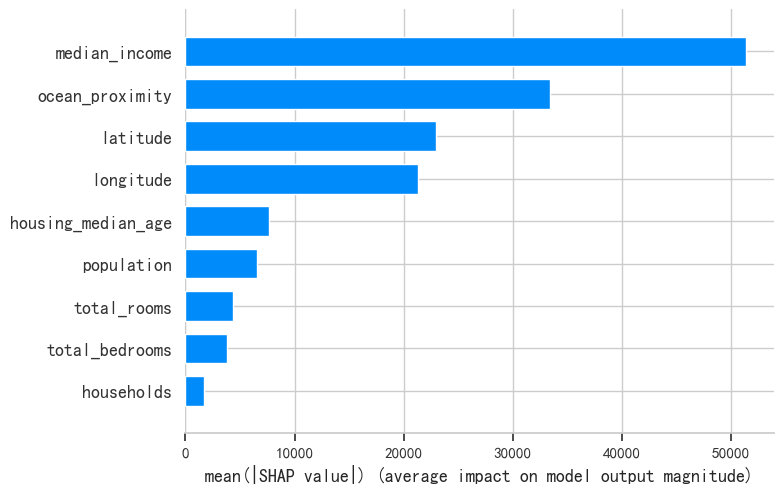
# 5. Summary 条形图
shap.summary_plot(shap_values, X_sample, plot_type="bar")

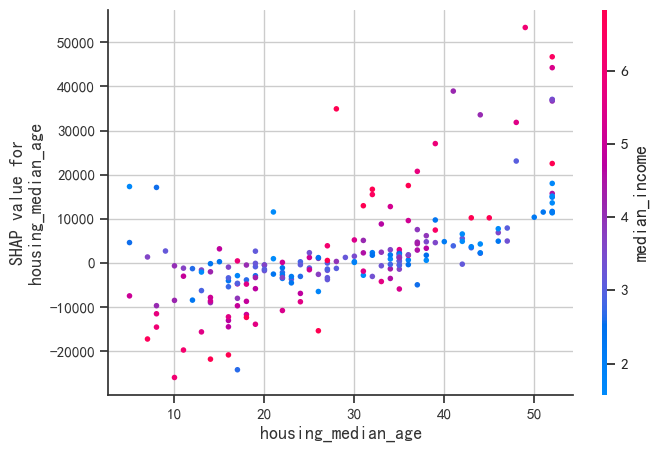
# 6. 特定特征的 Dependence Plot
shap.dependence_plot("housing_median_age", shap_values, X_sample)

# 7. 单一样本 Force Plot
shap.force_plot(explainer.expected_value, shap_values[0], X_sample.iloc[0])