Lottie是一种用于在应用中显示动画的格式,lvgl lottie控件运行在lvgl项目中使用lottie动画。
以下是在GUI-Guider中的使用:
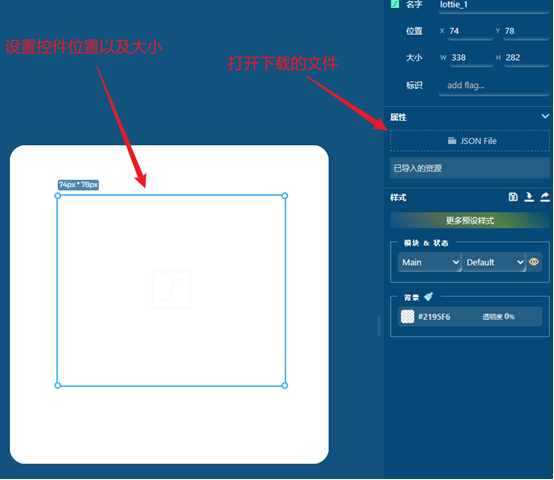
1.依赖
在网上下载有关lottie格式的文件例如".json",然后在lv_conf.h中启用lottie支持
#define LV_USE_Lottie 1
2.使用
1从文件中使用rlottie
要从文件使用创建 Lottie 动画:
lv_obj_t * lottie = lv_rlottie_create_from_file(parent, width, height, "path/to/lottie.json");
请注意,Rlottie 使用标准的 STDIO C 文件 API,因此您可以使用 路径"通常",不需要特定于 LVGL 的驱动程序号。
2从原始字符串数据使用rlottie
lv_example_rlottie_approve.c 包含 RAW 格式的示例动画格式。而不是存储 JSON 字符串,而是为原因如下:
• 避免在 JSON 文件中转义字符 "
• 某些编译器不支持很长的字符串
lvgl/scripts/filetohex.py 可用于将 Lottie 文件转换为十六进制数组。例如:
./filetohex.py path/to/lottie.json > out.txt
要从原始数据创建动画:
extern const uint8_t lottie_data\[\];
lv_obj_t* lottie = lv_rlottie_create_from_raw(parent, width, height, (const char *)lottie_data);
3.获取与控制
Lottie 是标准且流行的格式,因此您可以找到许多动画 Web 上的文件。例如:https://lottiefiles.com/
。
LVGL 提供了两个功能来控制动画模式:lv_rlottie_set_play_mode() 和 lv_rlottie_set_current_frame() 。 在调用第一种方法时,您将结合您的意图,例如 这些示例:
lv_obj_t * lottie = lv_rlottie_create_from_file(scr, 128, 128, "test.json");
lv_obj_center(lottie);
// Pause to a specific frame
lv_rlottie_set_current_frame(lottie, 50);
lv_rlottie_set_play_mode(lottie, LV_RLOTTIE_CTRL_PAUSE); // The specified frame will be displayed and then the animation will pause
// Play backward and loop
lv_rlottie_set_play_mode(lottie, LV_RLOTTIE_CTRL_PLAY | LV_RLOTTIE_CTRL_BACKWARD | LV_RLOTTIE_CTRL_LOOP);
// Play forward once (no looping)
lv_rlottie_set_play_mode(lottie, LV_RLOTTIE_CTRL_PLAY | LV_RLOTTIE_CTRL_FORWARD);
默认动画模式是 循环向前播放 。
如果不启用循环,则在 LV_EVENT_READY 没有循环,动画就无法取得更大的进步。
为了获得动画中的帧数或当前帧索引,可以将 lv_obj_t 实例强制转换为 :c:struct: lv_rlottie_t 实例并检查 current_frame 和 total_frames 成员。
本文章由威三学社出品
对课程感兴趣可以私信联系