作为前端对cookie和session 的原理并不多, 现在java入门后对前后端cookie和session会话有了进一步的了解
cookie
Cookie是存储在客户端的小型数据片段,由服务器通过HTTP响应头发送给客户端,客户端随后在每次请求中自动携带这些数据回服务器。Cookie主要用于会话管理、个性化设置和用户行为跟踪。
- 存储在客户端,可随意篡改,不安全
- 有大小限制(通常为4KB)
- 有数量限制(一般一个浏览器对于一个网站只能存不超过20个Cookie)
- 不可跨域,但一级域名和二级域名允许共享使用
下面是springboot设置的cookie, 当请求/set-cookie/basic 接口时, 后端就会在浏览器中设置一个key为username, 值为zhangsan , 会保存7天(当然可以通过清空换成,或手动修改的方法篡改), 后面和后端交互的时候,会把cookie携带
java
import javax.servlet.http.Cookie;
import javax.servlet.http.HttpServletResponse;

@RestController
public class CookieController {

    @GetMapping("/set-cookie/basic")
    public String setBasicCookie(HttpServletResponse response) {
        // 创建 Cookie
        Cookie cookie = new Cookie("username", "zhangsan");

        // 设置属性
        cookie.setMaxAge(7 * 24 * 60 * 60);  // 7天,单位:秒
        cookie.setPath("/");                 // 对所有路径有效
        cookie.setSecure(false);             // 是否仅 HTTPS
        cookie.setHttpOnly(true);            // 禁止 JavaScript 访问
        // cookie.setDomain("example.com");  // 设置域名

        // 添加到响应
        response.addCookie(cookie);

        return "Cookie 设置成功";
    }
}
下面是springboot读取cookie
java
import javax.servlet.http.HttpServletRequest;
import javax.servlet.http.Cookie;

@RestController
public class ReadCookieController {

    // 方法1: 从 HttpServletRequest 读取
    @GetMapping("/profile")
    public String getProfile(HttpServletRequest request) {
        Cookie[] cookies = request.getCookies();
        String username = null;

        if (cookies != null) {
            for (Cookie cookie : cookies) {
                if ("username".equals(cookie.getName())) {
                    username = cookie.getValue();
                    break;
                }
            }
        }

        return "用户名: " + (username != null ? username : "未登录");
    }

    // 方法2: 使用 @CookieValue 注解
    @GetMapping("/welcome")
    public String welcome(
            @CookieValue(value = "username", defaultValue = "游客") String username,
            @CookieValue(value = "theme", required = false) String theme) {

        return String.format("欢迎 %s, 主题: %s",
            username,
            theme != null ? theme : "默认");
    }
}
session
Session是存储在服务器端的用户会话信息,用于跟踪用户状态。当浏览器第一次访问服务器时,服务器会创建一个唯一的Session ID并通过Cookie发送给客户端,客户端后续请求携带此Session ID,服务器据此识别用户会话。
客户端发送登录请求
- 服务器验证凭证并创建Session对象
- 生成Session ID并通过Set-Cookie头返回客户端
- 客户端后续请求自动携带Session ID
- 服务器根据Session ID查找对应Session数据
- 服务器返回响应内容
java
import javax.servlet.http.HttpSession;
import org.springframework.web.bind.annotation.*;

@RestController
@RequestMapping("/session")
public class SessionController {

    // 1. 存储 Session 数据
    @PostMapping("/login")
    public String login(@RequestParam String username,
                       HttpSession session) {
        // 存储用户信息
        session.setAttribute("username", username);
        session.setAttribute("loginTime", new Date());
        session.setAttribute("userId", 12345);

        return "登录成功,Session ID: " + session.getId();
    }

    // 2. 读取 Session 数据
    @GetMapping("/profile")
    public Map<String, Object> getProfile(HttpSession session) {
        Map<String, Object> profile = new HashMap<>();

        profile.put("sessionId", session.getId());
        profile.put("username", session.getAttribute("username"));
        profile.put("loginTime", session.getAttribute("loginTime"));
        profile.put("isNew", session.isNew());
        profile.put("creationTime", new Date(session.getCreationTime()));
        profile.put("lastAccessed", new Date(session.getLastAccessedTime()));

        return profile;
    }

    // 3. 删除 Session 数据
    @GetMapping("/logout")
    public String logout(HttpSession session) {
        // 移除单个属性
        session.removeAttribute("username");

        // 或清空所有属性
        Enumeration<String> attrNames = session.getAttributeNames();
        while (attrNames.hasMoreElements()) {
            session.removeAttribute(attrNames.nextElement());
        }

        // 使 Session 无效(登出)
        session.invalidate();

        return "已退出登录";
    }

    // 4. 更新 Session
    @PostMapping("/update-theme")
    public String updateTheme(@RequestParam String theme,
                            HttpSession session) {
        session.setAttribute("theme", theme);
        return "主题已更新为: " + theme;
    }
}
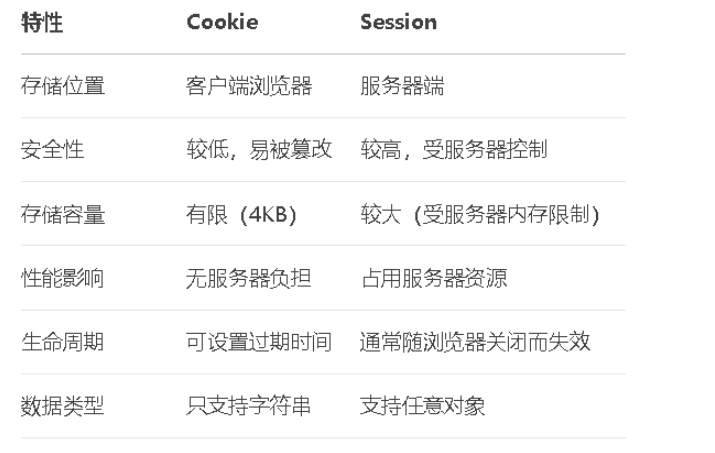
cookie和session
示例
利用hutool设置的简单的验证码类
当生成验证码图片后,同时也获得了图片里的4位code
问题是用户输入的4位字符串如何和生成的code去匹配呢?
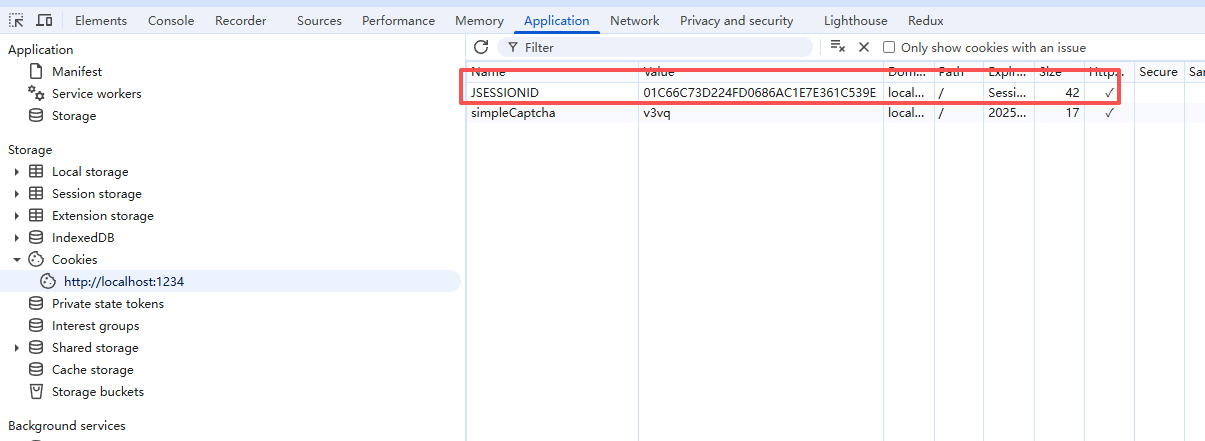
一种方法就是利用session , session是利用cookie来实现的,生成一个JSESSIONID, 告诉后端,我访问的是对应的session.
springboot就可以利用session.getAttribute(SESSION_KEY) 来读取服务器端存的对应的code, 两相对比, 就能校验用户输入的和生成的验证码是否一致了
java
package com.example.demo.autil;

import cn.hutool.captcha.CaptchaUtil;
import cn.hutool.captcha.ShearCaptcha;
import cn.hutool.captcha.generator.RandomGenerator;
import cn.hutool.core.util.StrUtil;
import lombok.extern.slf4j.Slf4j;

import javax.imageio.ImageIO;
import javax.servlet.http.Cookie;
import javax.servlet.http.HttpServletRequest;
import javax.servlet.http.HttpServletResponse;
import javax.servlet.http.HttpSession;
import java.awt.image.BufferedImage;
import java.io.IOException;
import java.io.OutputStream;
@Slf4j
public class SimpleCaptchaUtil {

    private static final int WIDTH = 130;
    private static final int HEIGHT = 48;
    private static final int CODE_COUNT = 4;
    private static final int LINE_COUNT = 4;
    private static final String CODE_CHARS = "23456789abcdefghjkmnpqrstuvwxyz";
    private static final String SESSION_KEY = "captcha_code";

    /**
     * 生成验证码并输出到响应流
     */
    public static void createAndWrite(HttpServletRequest request, HttpServletResponse response)
            throws IOException {

        // 1. 创建验证码
        ShearCaptcha captcha = CaptchaUtil.createShearCaptcha(WIDTH, HEIGHT, CODE_COUNT, LINE_COUNT);
        captcha.setGenerator(new RandomGenerator(CODE_CHARS, CODE_COUNT));

        // 2. 获取验证码和图片
        String code = captcha.getCode();
        BufferedImage image = captcha.getImage();

        // 3. 保存到Session
        HttpSession session = request.getSession();
        session.setAttribute(SESSION_KEY, code);
        session.setMaxInactiveInterval(300); // 5分钟

        // 4. 输出图片
        response.setContentType("image/png");
        response.setHeader("Pragma", "no-cache");
        response.setHeader("Cache-Control", "no-cache");
        response.setDateHeader("Expires", 0);

        // cookie的设置
        // 创建 Cookie
        Cookie cookie = new Cookie("simpleCaptcha", code);

        // 设置属性
        cookie.setMaxAge(7 * 24 * 60 * 60);  // 7天,单位:秒
        cookie.setPath("/");                 // 对所有路径有效
        cookie.setSecure(false);             // 是否仅 HTTPS
        cookie.setHttpOnly(true);            // 禁止 JavaScript 访问
        // 添加到响应
        response.addCookie(cookie);

        try (OutputStream out = response.getOutputStream()) {
            ImageIO.write(image, "png", out);
        }
    }

    /**
     * 验证验证码
     */
    public static boolean validate(String inputCode, HttpServletRequest request) {
        log.info("inputCode:{}", inputCode);
        HttpSession session = request.getSession(false);
        if (session == null) {
            return false;
        }

        String sessionCode = (String) session.getAttribute(SESSION_KEY);
        log.info("sessionCode", sessionCode);

        if (StrUtil.isBlank(inputCode) || StrUtil.isBlank(sessionCode)) {
            return false;
        }
        boolean isFresh = sessionCode.equalsIgnoreCase(inputCode.trim());
        // 一次性验证
//        if (isFresh) {
//            session.removeAttribute(SESSION_KEY);
//        }

        return isFresh;
    }
}
一句话: cookie存在用户的浏览器里, session存在服务器端. 一个会话(用户访问),用户和服务器就有个临时存储数据的地方, 可以临时取用