文章目录
一、进程替换
fork() 之后,⽗⼦各⾃执⾏⽗进程代码的⼀部分,如果⼦进程就想执⾏⼀个全新的程序呢?进程的程序替换来完成这个功能!
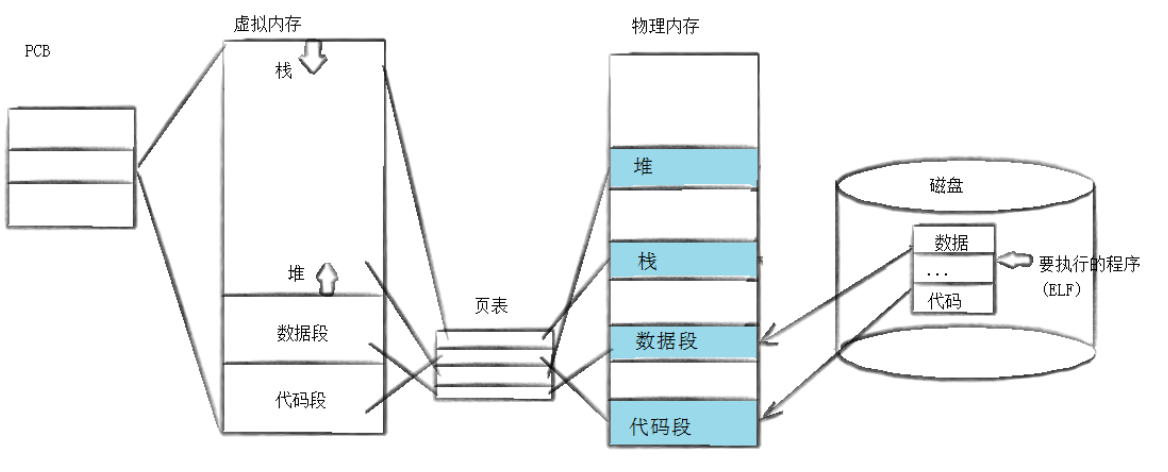
程序替换是通过特定的接⼝,加载磁盘上的⼀个全新的程序(代码和数据),加载到调⽤进程的地址空间中!
1、替换原理
⽤ fork 创建⼦进程后执⾏的是和⽗进程相同的程序(但有可能执⾏不同的代码分⽀),进程往往要调⽤⼀种exec函数以执⾏另⼀个程序。当进程调⽤⼀种exec函数时,该进程的⽤户空间代码和数据完全被新程序替换,从新程序的启动例程开始执⾏。调⽤exec并不创建新进程,所以调⽤exec前后该进程的id并未改变。
2、替换函数
其实有六种以exec开头的函数,统称为exec函数:
cpp
#include <unistd.h>

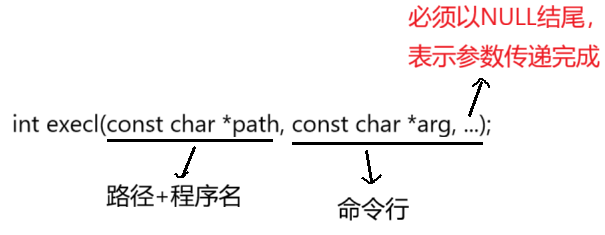
int execl(const char *path, const char *arg, ...);
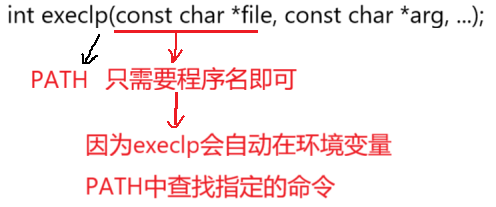
int execlp(const char *file, const char *arg, ...);
int execle(const char *path, const char *arg, ...,char *const envp[]);
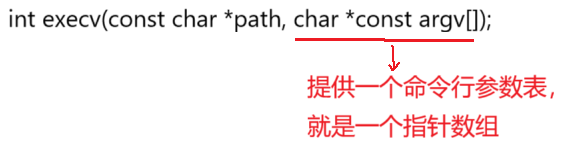
int execv(const char *path, char *const argv[]);
int execvp(const char *file, char *const argv[]);
int execve(const char *path, char *const argv[], char *const envp[]);
函数解释:
- 这些函数如果调⽤成功则加载新的程序从启动代码开始执⾏,不再返回。
- 如果调⽤出错则返回 -1。
- 所以exec函数只有出错的返回值⽽没有成功的返回值。
命令理解:
这些函数原型看起来很容易混,但只要掌握了规律就很好记。
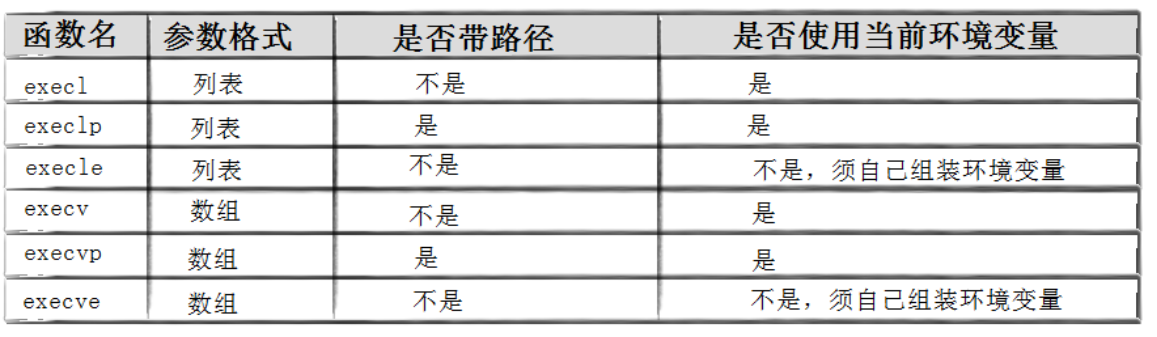
- l(list):表⽰参数采⽤列表
- v(vector):参数⽤数组
- p(path):有p⾃动搜索环境变量PATH
- e(env):表⽰⾃⼰维护环境变量
exec调⽤举例如下:
1)execl
cpp
#include<stdio.h>
#include<unistd.h>
#include<stdlib.h>
#include<sys/types.h>
#include<sys/wait.h>

int main()
{
    printf("我的程序要运行了!\n");

    if(fork() == 0)
    {
        // child
        sleep(1);
        execl("/usr/bin/ls", "ls", "-ln", "-a", NULL);
        exit(1);
    }

    waitpid(-1, NULL, 0);
    printf("我的程序运行完毕了\n");

    return 0;
} 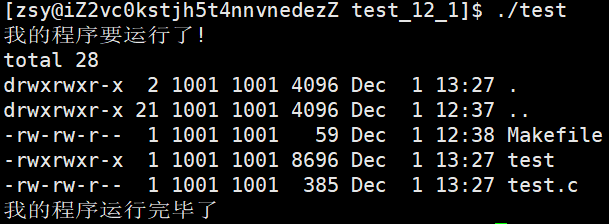
我们发现进程替换并没有影响父进程,原因有二,其一是进程具有独立性,其二是因为数据代码发生了写时拷贝!
同理也可以替换我们自己写的程序:
cpp
// other.c
#include<stdio.h>

int main()
{
    printf("hello world!\n");
    return 0;
}
cpp
// test.c
#include<stdio.h>
#include<unistd.h>
#include<stdlib.h>
#include<sys/types.h>
#include<sys/wait.h>

int main()
{
    printf("我的程序要运行了!\n");

    if(fork() == 0)
    {
        // child
        sleep(1);
        execl("./other", "other", NULL);
        exit(1);
    }

    waitpid(-1, NULL, 0);
    printf("我的程序运行完毕了\n");

    return 0;
} 
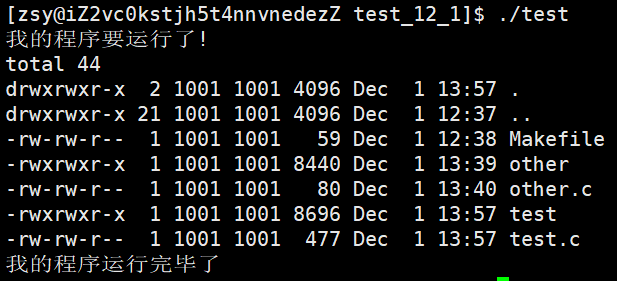
2)execlp
cpp
#include<stdio.h>
#include<unistd.h>
#include<stdlib.h>
#include<sys/types.h>
#include<sys/wait.h>

int main()
{
    printf("我的程序要运行了!\n");

    if(fork() == 0)
    {
        // child
        sleep(1);
        execlp("ls", "ls", "-ln", "-a", NULL);
        exit(1);
    }

    waitpid(-1, NULL, 0);
    printf("我的程序运行完毕了\n");

    return 0;
} 
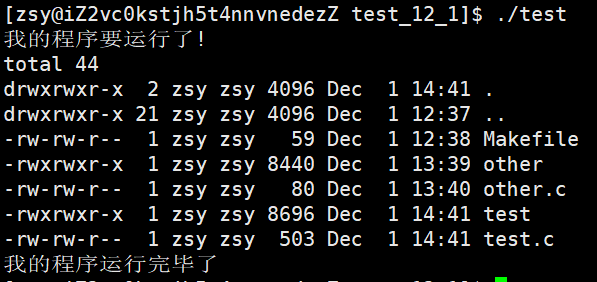
3)execv
cpp
#include<stdio.h>
#include<unistd.h>
#include<stdlib.h>
#include<sys/types.h>
#include<sys/wait.h>

int main()
{
    printf("我的程序要运行了!\n");

    if(fork() == 0)
    {
        sleep(1);

        char* const argv[] = {
            (char* const)"ls",
            (char* const)"-l",
            (char* const)"-a",
            NULL
        };

        execv("/usr/bin/ls", argv);
        exit(1);
    }

    waitpid(-1, NULL, 0);
    printf("我的程序运行完毕了\n");

    return 0;
}
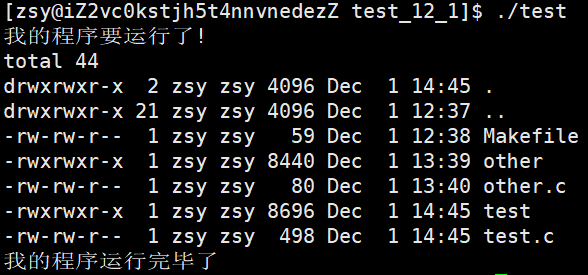
4)execvp

cpp
#include<stdio.h>
#include<unistd.h>
#include<stdlib.h>
#include<sys/types.h>
#include<sys/wait.h>

int main()
{
    printf("我的程序要运行了!\n");

    if(fork() == 0)
    {
        sleep(1);

        char* const argv[] = {
            (char* const)"ls",
            (char* const)"-l",
            (char* const)"-a",
            NULL
        };

        execvp(argv[0], argv);
        exit(1);
    }

    waitpid(-1, NULL, 0);
    printf("我的程序运行完毕了\n");

    return 0;
}
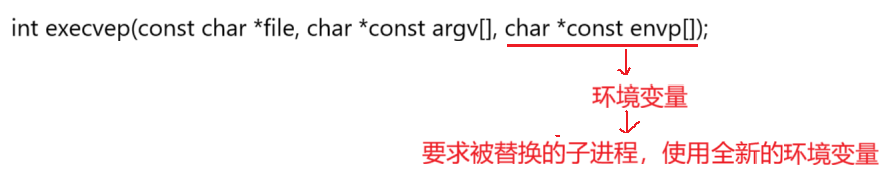
5)execvpe
cpp
// other.c
#include<stdio.h>
#include <unistd.h>

int main(int argc, char *argv[], char *env[])
{
    printf("hello C++, My Pid Is: %d\n", getpid());

    for(int i = 0; i < argc; i++)
    {
        printf("argv[%d]: %s\n", i, argv[i]);
    }

    printf("\n");

    for(int i = 0; env[i]; i++)
    {
        printf("env[%d]: %s\n", i, env[i]);
    }

    return 0;
}
cpp
// test.c
#include<stdio.h>
#include<unistd.h>
#include<stdlib.h>
#include<sys/types.h>
#include<sys/wait.h>

int main()
{
    printf("我的程序要运行了!\n");

    if(fork() == 0)
    {
        // child
        sleep(1);

        char* const argv[] = {
            (char* const)"other",
            (char* const)"-a",
            (char* const)"-b",
            (char* const)"-c",
            (char* const)"-d",
            NULL
        };


        char* const env[] = {
            (char* const)"MYENV=123456789",
             NULL
        };

        execvpe("./other", argv, env);
        exit(1);
    }

    waitpid(-1, NULL, 0);
    printf("我的程序运行完毕了\n");

    return 0;
} 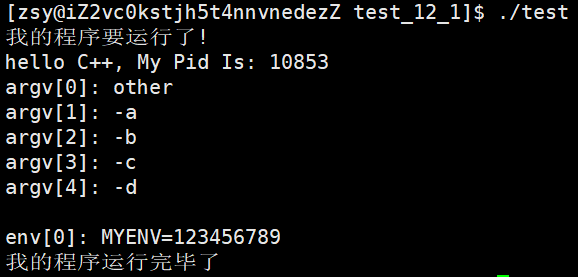
我们发现这里是直接将原有的环境变量所覆盖,从而导成新的环境变量,在实际运用中,如果我们只想将新的环境变量增加到原有的环境变量中,那么该如何实现呢?
6)putenv
那么这里就得引入一个导入环境变量的函数:putenv
cpp
#include <stdlib.h>
int putenv(char *string);
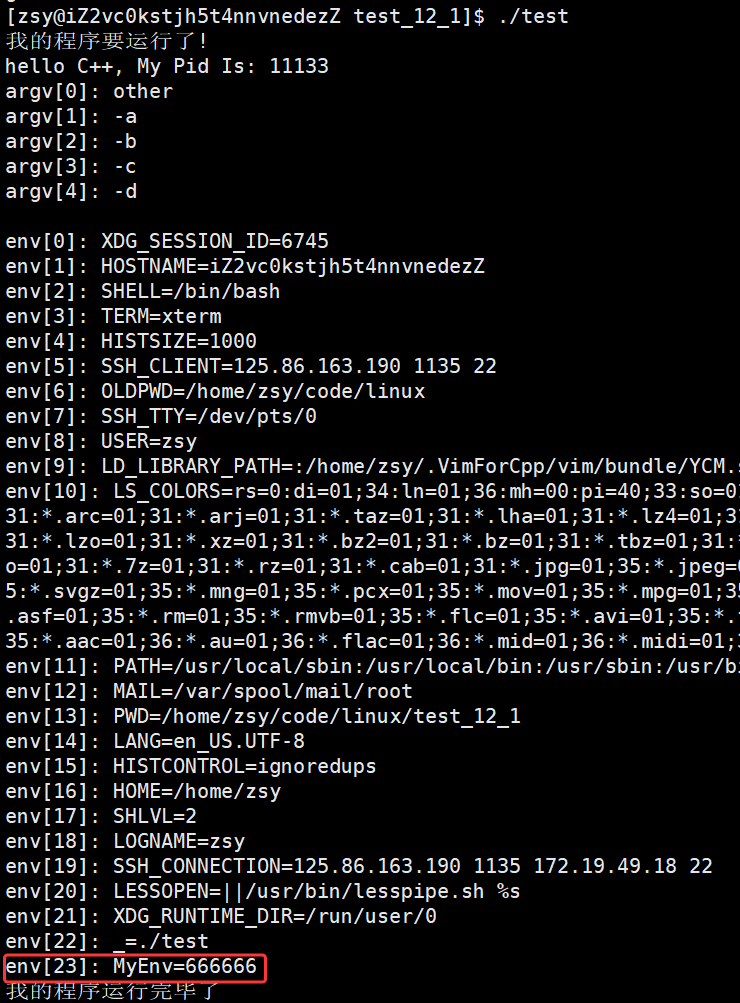
有了这个函数,我们就有两种方式直接导入环境变量给子进程:
- 直接使用putenv函数
cpp
#include<stdio.h>
#include<unistd.h>
#include<stdlib.h>
#include<sys/types.h>
#include<sys/wait.h>

char* newenv = (char*)"MyEnv=666666";

int main()
{
    printf("我的程序要运行了!\n");

    if(fork() == 0)
    {
        // child
        sleep(1);
        char* const argv[] = {
            (char* const)"other",
            (char* const)"-a",
            (char* const)"-b",
            (char* const)"-c",
            (char* const)"-d",
            NULL
        };

        putenv(newenv);// 导入环境变量
        execvp("./other", argv);
        exit(1);
    }

    waitpid(-1, NULL, 0);
    printf("我的程序运行完毕了\n");
    return 0;
} 
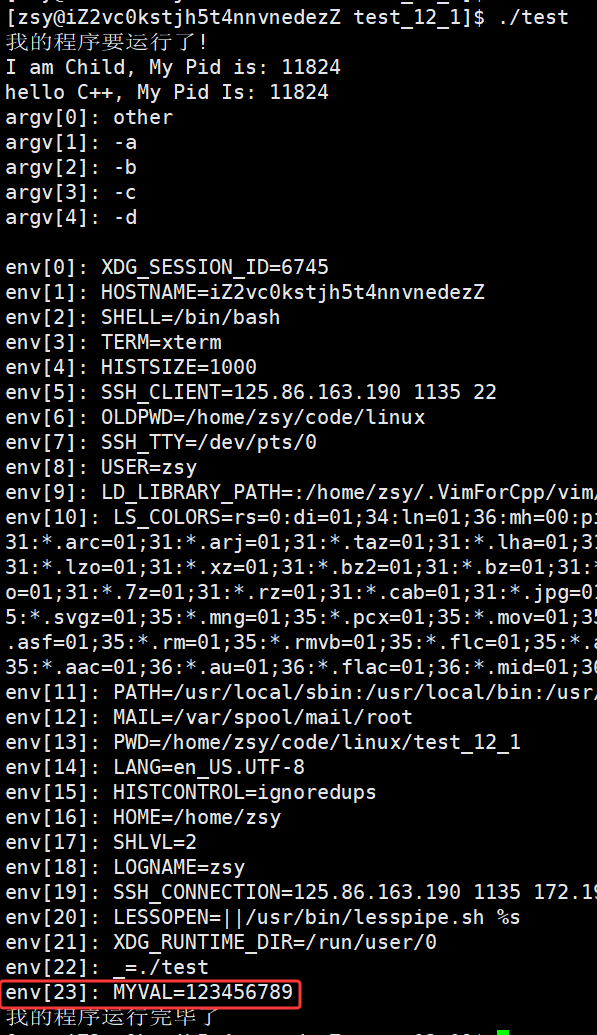
- 使用exec*e的替换函数,结合putenv(),environ
cpp
#include<stdio.h>
#include<unistd.h>
#include<stdlib.h>
#include<sys/types.h>
#include<sys/wait.h>

char* const addenv[] = {
    (char* const)"MYVAL=123456789",
    NULL
};

int main()
{
    printf("我的程序要运行了!\n");

    if(fork() == 0)
    {
        // child
        printf("I am Child, My Pid is: %d\n", getpid());
        sleep(1);

        char* const argv[] = {
            (char* const)"other",
            (char* const)"-a",
            (char* const)"-b",
            (char* const)"-c",
            (char* const)"-d",
            NULL
        };

        for(int i = 0; addenv[i]; i++)
        {
            putenv(addenv[i]);
        }
        extern char** environ;

        execvpe("./other", argv, environ);
        exit(1);
    }

    waitpid(-1, NULL, 0);
    printf("我的程序运行完毕了\n");

    return 0;
} 
7)总结
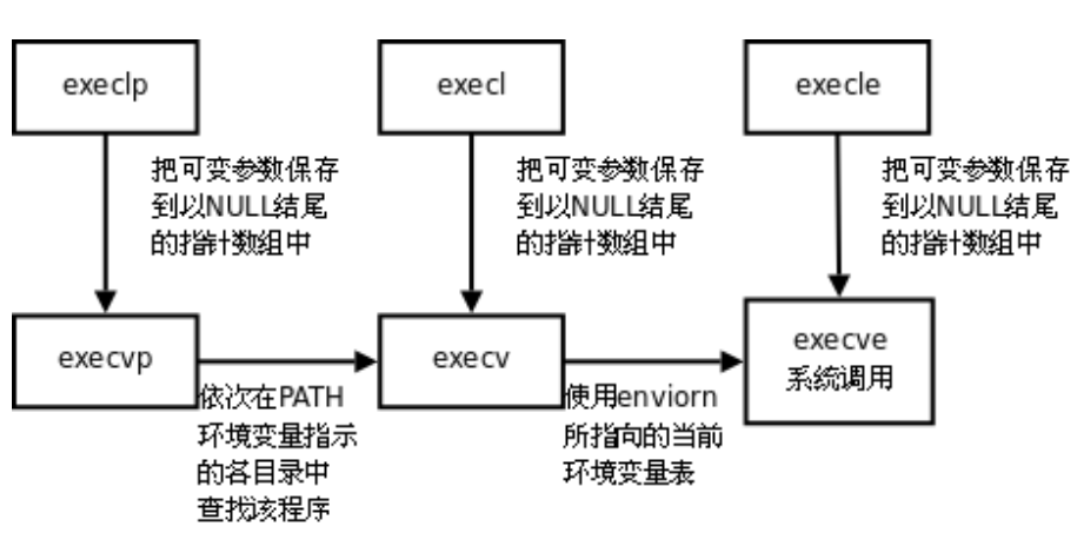
事实上,只有execve是真正的系统调⽤,其它五个函数最终都调⽤execve,所以execve在man⼿册第2节,其它函数在man⼿册第3节。
这些函数之间的关系如下图所⽰。
二、⾃主Shell命令⾏解释器
1、⽬标
- 要能处理普通命令
- 要能处理内建命令
- 要能帮助我们理解内建命令/本地变量/环境变量这些概念
- 要能帮助我们理解shell的允许原理
2、实现原理
考虑下⾯这个与shell典型的互动:
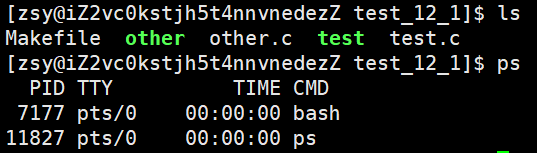
⽤下图的时间轴来表⽰事件的发⽣次序。其中时间从左向右。shell由标识为sh的⽅块代表,它随着时间的流逝从左向右移动。shell从⽤户读⼊字符串"ls"。shell建⽴⼀个新的进程,然后在那个进程中运⾏ls程序并等待那个进程结束。
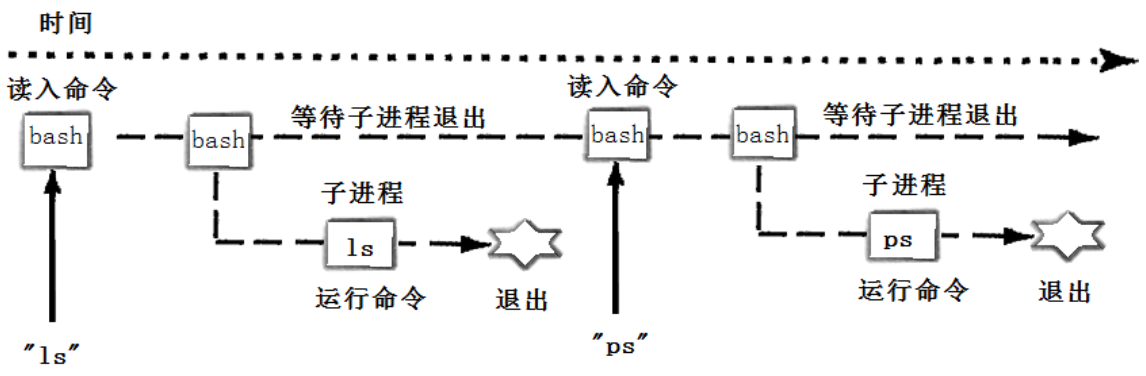
然后shell读取新的⼀⾏输⼊,建⽴⼀个新的进程,在这个进程中运⾏程序并等待这个进程结束。
所以要写⼀个shell,需要循环以下过程:
- 获取命令⾏
- 解析命令⾏
- 建⽴⼀个⼦进程(fork)
- 替换⼦进程(execvp)
- ⽗进程等待⼦进程退出(wait)
3、源码
实现代码:
cpp
#include<iostream>
#include<cstdio>
#include<cstdlib>
#include<cstring>
#include<unistd.h>
#include<sys/types.h>
#include<sys/wait.h>
#include<cstring>
#include<unordered_map>

#define COMMAND_SIZE 1024
#define FORMAT "[%s@%s %s]# "

// 下面是shell定义的全局数据

// 1. 命令行参数表
#define MAXARGC 128
char* g_argv[MAXARGC];
int g_argc = 0;

// 2. 环境变量表
#define MAX_ENVS 100
char* g_env[MAX_ENVS];
int g_envs = 0;

// 3. 别名映射表
std::unordered_map<std::string, std::string> alias_list;

// for test
char cwd[1024];
char cwdenv[1024];

// last exit code
int lastcode = 0;

const char* GetUserName()
{
    const char* name = getenv("USER");
    return name == NULL ? "None" : name;
}

const char* GetHostName()
{
    const char* hostname = getenv("HOSTNAME");
    return hostname == NULL ? "None" : hostname;
}

const char* GetPwd()
{
    //const char* pwd = getenv("PWD");
    const char* pwd = getcwd(cwd, sizeof(cwd));
    if(pwd != NULL)
    {
        snprintf(cwdenv, sizeof(cwdenv), "PWD=%s", cwd);
        putenv(cwdenv);
    }
    return pwd == NULL ? "None" : pwd;
}

const char* GetHome()
{
    const char* home = getenv("HOME");
    return home == NULL ? "None" : home;
}

void InitEnv()
{
    extern char** environ;
    memset(g_env, 0, sizeof(g_env));
    g_envs = 0;

    // 1. 获取环境变量
    for(int i = 0; environ[i]; i++)
    {
        // 申请空间
        g_env[i] = (char*)malloc(strlen(environ[i])+1);
        strcpy(g_env[i], environ[i]);
        g_envs++;
    }
    g_env[g_envs++] = (char*)"HELLO=ENV"; // for test
    g_env[g_envs] = NULL;

    // 2. 导成环境变量
    for(int i = 0; g_env[i]; i++)
    {
        putenv(g_env[i]);
    }
    environ = g_env;
}

// /a/b/c
std::string DirName(const char* pwd)
{
#define SLASH "/"
    std::string dir = pwd;
    if(dir == SLASH) return SLASH;
    auto pos = dir.rfind(SLASH);
    if(pos == std::string::npos) return "BUG?";
    return dir.substr(pos+1);
}

void MakeCommandLine(char cmd_prompt[], int size)
{
    // 将获取的信息存入cmd_prompt数组中
    snprintf(cmd_prompt, size, FORMAT, GetUserName(), GetHostName(), DirName(GetPwd()).c_str());
    //snprintf(cmd_prompt, size, FORMAT, GetUserName(), GetHostName(), GetPwd());
}

void PrintCommandPrompt()
{
    char prompt[COMMAND_SIZE];
    MakeCommandLine(prompt, sizeof(prompt));
    printf("%s", prompt);
    fflush(stdout);
}

bool GetCommandLine(char* out, int size)
{
    // ls -a -l -> "ls -a -l\n" 字符串
    char* c = fgets(out, size, stdin);
    if(c == NULL) return false;
    out[strlen(out)-1] = 0; // 清理\n
    if(strlen(out) == 0) return false;
    return true;
}

// 3. 命令行分析 "ls -a -l" -> "ls" "-a" "-l"
bool CommandParse(char* commandline)
{
#define SEP " "
    g_argc = 0;
    g_argv[g_argc++] = strtok(commandline, SEP);
    while((bool)(g_argv[g_argc++] = strtok(nullptr, SEP)));
    g_argc--;
    return g_argc > 0 ? true:false;
}

void PrintArgv()
{
    for(int i = 0; g_argv[i]; i++)
    {
        printf("argv[%d]->%s\n", i, g_argv[i]);
    }
    printf("argc: %d\n", g_argc);
}


bool Cd()
{
    // cd不带参数(等价于 cd ~) 家目录
    if(g_argc == 1)
    {
        std::string home = GetHome();
        if(home.empty()) return true;
        chdir(home.c_str());
    }
    else
    {
        std::string where = g_argv[1];
        // cd - 切换到上一次目录
        if(where == "-")
        {
            const char* old_pwd = getenv("OLDPWD");
            if(old_pwd != nullptr)
            {
                chdir(old_pwd);
                printf("%s\n", old_pwd);
            }
        }
        else if(where == "~")
        {
            std::string home = GetHome();
            if(!home.empty())
            {
                chdir(home.c_str());
            }
        }
        else // 其他路径, 直接切换
        {
            chdir(where.c_str());
        }
    }

    return true;
}

void Echo()
{
    if(g_argc == 2)
    {
        // echo "hello world"
        // echo $?
        // echo $PATH
        std::string opt = g_argv[1];
        if (opt == "$?")
        {
            std::cout << lastcode << std::endl;
            lastcode = 0;
        }
        else if (opt[0] == '$')
        {
            std::string env_name = opt.substr(1);
            const char* env_value = getenv(env_name.c_str());
            if (env_value)
                std::cout << env_value << std::endl;
        }
        else
        {
            std::cout << opt << std::endl;
        }
    }
}

// 内建命令: 不能由子进程执行,要由shell自己执行
bool CheckAndExecBuiltin()
{
    std::string cmd = g_argv[0];
    if(cmd == "cd")
    {
        Cd();
        return true;
    }
    else if(cmd == "echo")
    {
        Echo();
        return true;
    }
    else if(cmd == "export")
    {

    }
    else if(cmd == "alias")
    {
        //std::string nickname = g_argv[1];
        //alias_list.insert(k,v);
    }

    return false;
}

int Execute()
{

    pid_t id = fork();
    if(id == 0)
    {
        // child
        execvp(g_argv[0], g_argv);
        exit(1);
    }

    // father
    int status = 0;
    pid_t rid = waitpid(id, nullptr, 0);
    if(rid > 0)
    {
        lastcode = WEXITSTATUS(status);
    }
    return 0;
}


int main()
{
    // 从父shell中获取环境变量
    InitEnv();

    while(true)
    {
        // 1. 输出命令行提示符
        PrintCommandPrompt();

        // 2. 获取用户输入的命令
        char commandline[COMMAND_SIZE];
        if(!GetCommandLine(commandline, sizeof(commandline)))
            continue;

        // 3. 命令行分析 "ls -a -l" -> "ls" "-a" "-l"
        CommandParse(commandline);
        //PrintArgv();

        // 4. 检测并处理内建命令
        if(CheckAndExecBuiltin())
            continue;

        // 5. 执行命令
        Execute();
    }
    return 0;
}
实现效果: