Katago官网:lightvector/KataGo: GTP engine and self-play learning in Go
编译说明:KataGo · ka/KataGo - AtomGit | GitCode
Sabaki:http://github.com/SabakiHQ/Sabaki/
可以直接下载Windows下的安装软件:Releases · SabakiHQ/Sabaki
权重从这里下:KataGo - Networks for kata1
服务器:github.com 这个很老了,可能废弃了
先上结论,我的目的是:Sabaki里面可以调用Katago,实现智能行棋。但是因为系统的cuda让我删了,所以只好用cpu。但是Katago的cpu版本运行后没反应,所以实践未完成。
Sabaki:一款面向文明时代的优雅围棋/西洋棋/圍棋棋盘和SGF编辑器
功能
- 模糊放置棋子
- 读取和保存SGF格式的游戏和集合,支持打开wBaduk NGF和Tygem GIB文件
- 使用Markdown(部分语法)显示格式化的注释,并标注棋局位置和着法
- 自定义棋盘外观,包括纹理和主题
- SGF编辑工具,包括划线和箭头标记
- 复制和粘贴变着
- 强大的撤销/重做功能
- 快速游戏树
- 得分估计器及计分工具
- 通过棋步位置和注释文字查找棋着
- 支持GTP引擎,并集成引擎分析功能
- 猜测模式
- 自动播放棋局
安装
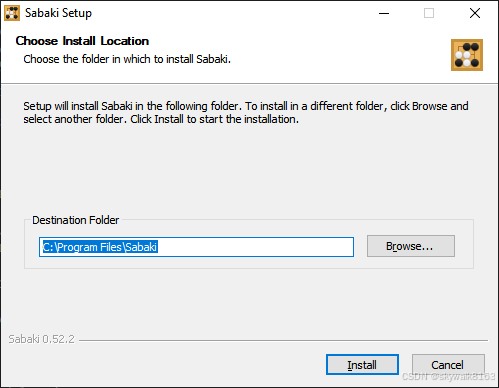
安装完成启动
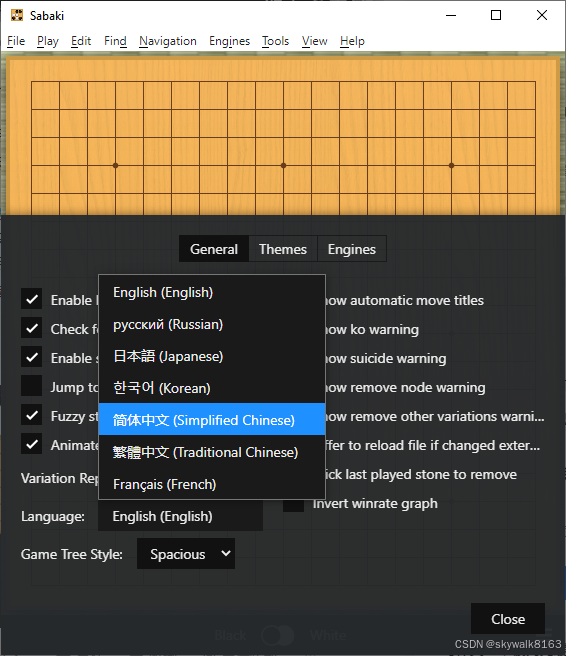
老规矩,先改成中文界面
添加Katago引擎
菜单"引擎"→"管理引擎"→"添加"
名称:KataGo
路径:D:\Katago\katago.exe
参数:gtp -model b28c512nbt-uec.bin.gz -config gtp.cfg
实际配置:
KataGo
路径:"E:\Program Files\Sabaki\Sabaki.exe"
参数:
点"测试"出现 "GTP ready" 即 OK。
Lizzieyzy 更简单:第一次启动会弹框,填同样的 exe/权重路径即可。
这里当时理解错了,应该是安装好Katago,然后配置里面配好Katago的一些路径等参数。
在百度aistudio上跑katago (v100), 然后可以用Sabaki, Lizzie等进行远程连接。
https://aistudio.baidu.com/projectdetail/681506
用法:
任意修改下面代码中USER_NAME和USER_PASSWORD的值,改成自己的(只能有数字和英文字母),然后点击运行即可。 这样katago就跑起来了。
然后可以下载ikatago客户端,在Sabaki, Lizzie, anago等各软件里进行远程连接。
具体操作可看操作视频(感谢群友@DreamKeeper的专业视频):
https://www.bilibili.com/video/BV1B541187Ny
ikatago客户端可以从这里下载: (连不上的可以加群下载)
https://github.com/kinfkong/ikatago-client/releases
这个,是好几年前的项目了,没再去运行。
Linux安装Katago
#!/bin/bash
# 安装依赖
sudo apt update
sudo apt install -y build-essential cmake git libopenblas-dev liblapack-dev

# 下载KataGo源码
git clone https://github.com/lightvector/KataGo.git
cd KataGo/cpp

# 生成配置文件
cmake . -DUSE_BACKEND=OPENCL
make -j

# 下载权重文件
wget https://github.com/lightvector/KataGo/releases/download/v1.3.3-nets/g170-b30c320x2-s4824661760-d1229536699.gz

# 测试性能
./katago benchmark -tune -model g170-b30c320x2-s4824661760-d1229536699.gz -config katago.cfg
第一次让 AI 跑全盘分析
在 Sabaki 打开一张棋谱(SGF),菜单"引擎"→"附加分析",勾选 KataGo,等 2-3 秒右下角出现胜率/目差即可。
想批量复盘:Lizzieyzy 打开 SGF → 菜单"分析"→"自动分析",设 visits=5000,点开始后去做别的事,跑完会自动存带注释的新 SGF。
开始编译
%%writefile install.sh

#!/bin/bash
# 安装依赖
sudo apt update
sudo apt install -y build-essential cmake git libopenblas-dev liblapack-dev

# 下载KataGo源码
git clone https://github.com/lightvector/KataGo.git
cd KataGo/cpp

# 生成配置文件
cmake . -DUSE_BACKEND=OPENCL
make

# 下载权重文件
wget https://github.com/lightvector/KataGo/releases/download/v1.3.3-nets/g170-b30c320x2-s4824661760-d1229536699.gz

# 测试性能
./katago benchmark -tune -model g170-b30c320x2-s4824661760-d1229536699.gz -config katago.cfg
编译完成,下载模型
wget https://media.katagotraining.org/uploaded/networks/models/kata1/kata1-b28c512nbt-adam-s11165M-d5387M.bin.gz但是运行后,没有看到有监听的端口。
因为这个是在远程网络的V100环境下,不知道怎么远程调用而放弃。
windows下编译
由于把windows下的gpu驱动搞崩了,所以安装cpu版本
git clone https://github.com/lightvector/KataGo.git
# 或者
git clone https://gitcode.com/gh_mirrors/ka/KataGo
cd KataGo/cpp
# If you get missing library errors, install the appropriate packages using your system package manager and try again.
cmake . -DUSE_BACKEND=EIGEN -DUSE_AVX2=1
make -j
但是没有Eigen3,编译报错,进行不下去。
尝试安装lizzieyzy
尝试安装lizzieyzy
这个据说是一键安装,更适合不懂的宝宝
注册katago用户
这个也不是必须的。
https://katagotraining.org/accounts/signup/但是到lizzieyzy里配置Katago,还是失败。
生成一个自定义的 gtp 配置文件
到katago的目录去:E:\ai\katago-v1.16.4-eigenavx2-windows-x64>
katago.exe genconfig -model kata1-b28c512nbt-adam-s11165M-d5387M.bin.gz -output gtp_custom.cfg几秒就执行完毕,而且没有生成期待的文件:gtp_custom.cfg
总结
实践失败,以后再试。
调试
编译报错说缺少Eigen3
cmake . -DUSE_BACKEND=EIGEN -DUSE_AVX2=1
-- Selecting Windows SDK version 10.0.22621.0 to target Windows 10.0.19045.
-- Building 'katago' executable for GTP engine and other tools.
-- -DUSE_BACKEND=EIGEN, using Eigen CPU backend.
-- Including Git revision in the compiled executable, specify -DNO_GIT_REVISION=1 to disable
CMake Warning at CMakeLists.txt:438 (find_package):
  By not providing "FindEigen3.cmake" in CMAKE_MODULE_PATH this project has
  asked CMake to find a package configuration file provided by "Eigen3", but
  CMake did not find one.

  Could not find a package configuration file provided by "Eigen3" with any
  of the following names:

    Eigen3Config.cmake
    eigen3-config.cmake

  Add the installation prefix of "Eigen3" to CMAKE_PREFIX_PATH or set
  "Eigen3_DIR" to a directory containing one of the above files.  If "Eigen3"
  provides a separate development package or SDK, be sure it has been
  installed.


CMake Error at CMakeLists.txt:441 (message):
  *** KataGo: Eigen3 was not found.  If you've downloaded Eigen3, you can
  IGNORE the whole above error from CMake and just set 'EIGEN3_INCLUDE_DIRS'
  to the root eigen3-3.*.* directory after unzipping it.  Among other things
  it should contain 'Eigen' and 'unsupported' subdirs, which is all KataGo
  needs.  Otherwise, you will need to 'build' Eigen3 even though it is
  header-only and install it via MSVC in order for cmake to find it via
安装
- If using the Eigen backend, Eigen3, version 3.3.x. (http://eigen.tuxfamily.org/index.php?title=Main_Page#Download).
这里碰到一个问题,我的gitlib账户过期了...
只好到gitcode找镜像了
https://gitcode.com/gh_mirrors/ei/eigen-git-mirror/tree/branches/3.3搞不定,不会安装Eigen3