🤖Spring Ai Alibaba-1.1.0.0-RC1-LlmRoutingAgent
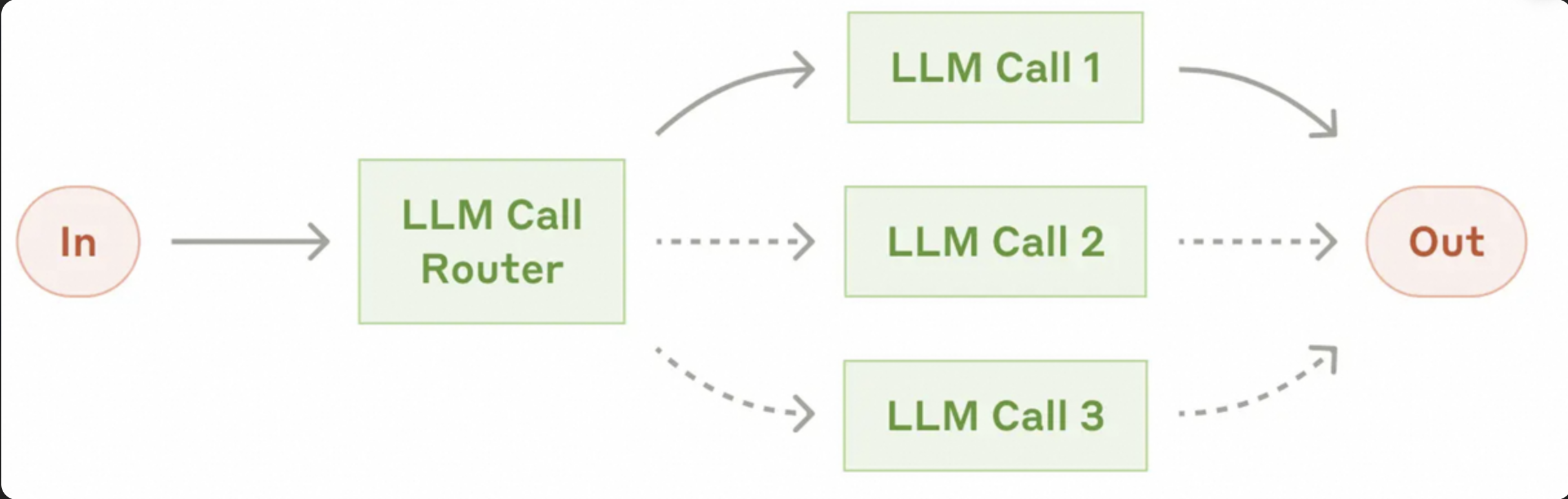
在路由模式中,使用大语言模型(LLM)动态决定将请求路由到哪个子Agent。这种模式非常适合需要智能选择不同专家Agent的场景。
流程:
- 路由Agent接收用户输入
- LLM分析输入并决定最合适的子Agent
- 选中的子Agent处理请求
- 结果返回给用户
一、🏗️ 架构概览
二、✨ 项目概述
这是一个基于 Spring AI Alibaba 的 LLM 路由 Agent 示例项目。该项目演示了如何构建和使用 LlmRoutingAgent 来智能地将用户请求路由到最适合的专家 Agent。项目实现了两种不同类型的专家 Agent:
- 编程专家 Agent - 擅长处理编程相关问题
- 商业分析专家 Agent - 擅长商业分析、市场研究和战略规划
三、🛠️ 技术栈
- Spring Boot 3.4.x
- Spring AI Alibaba 1.1.0.0-RC1
- Agent框架: spring-ai-alibaba-agent
- Alibaba Cloud DashScope (通义千问 API)
- 监控组件: Micrometer, Prometheus 1.16.0
- 构建工具: Apache Maven 3.9.11
- 编程语言: Java 17+
四、📁 项目结构
SpringAiAlibabaLlmRoutingAgent/
├── src/
│   ├── main/
│   │   ├── java/
│   │   │   └── com/alibaba/springaialibaballmroutingagent/
│   │   │       ├── SpringAiAlibabaLlmRoutingAgentApplication.java  # 应用启动类
│   │   │       ├── config/                                         # 配置类目录
│   │   │       │   ├── AgentConfig.java                            # Agent 配置类
│   │   │       │   ├── LlmConfig.java                              # AI 核心配置类
│   │   │       │   ├── MonitoringConfig.java                       # 监控配置类
│   │   │       │   └── StorageConfig.java                          # 存储配置类
│   │   │       ├── controller/                                     # 控制器目录
│   │   │       │   └── LlmRoutingAgentController.java             # 路由 Agent 控制器
│   │   │       ├── listener/                                       # 监听器目录
│   │   │       │   └── ComprehensiveGraphListener.java            # 图形生命周期监听器
│   │   └── resources/                                              # 资源目录
│   │       └── application.properties                              # 应用配置文件
├── pom.xml                                                         # Maven 配置文件
└── README.md                                                       # 项目说明文件
五、⚙️ 配置pom.xml
dependency>
    <groupId>org.springframework.boot</groupId>
    <artifactId>spring-boot-starter-web</artifactId>
    <version>3.4.12</version>
</dependency>
<dependency>
    <groupId>org.springframework.boot</groupId>
    <artifactId>spring-boot-starter-actuator</artifactId>
    <version>3.4.12</version>
</dependency>
<dependency>
    <groupId>io.micrometer</groupId>
    <artifactId>micrometer-registry-prometheus</artifactId>
    <version>1.16.0</version>
</dependency>
<dependency>
    <groupId>com.alibaba.cloud.ai</groupId>
    <artifactId>spring-ai-alibaba-agent-framework</artifactId>
    <version>1.1.0.0-RC1</version>
</dependency>
<dependency>
    <groupId>com.alibaba.cloud.ai</groupId>
    <artifactId>spring-ai-alibaba-starter-dashscope</artifactId>
    <version>1.1.0.0-RC1</version>
</dependency>
六、📝 配置application.properties
server.port=8022
spring.application.name=SpringAiAlibabaLlmRoutingAgent
spring.ai.dashscope.api-key=${qwen-api}
spring.ai.dashscope.model=qwen-turbo
# 启用字符编码过滤器
server.servlet.encoding.enabled=true
# 强制对所有请求和响应使用指定的字符编码
server.servlet.encoding.force=true
# 设置字符编码
server.servlet.encoding.charset=UTF-8
# Micrometer 监控配置
management.endpoints.web.exposure.include=health,info,metrics,prometheus
management.prometheus.metrics.export.enabled=true
七、🧰 配置类
🔗存储配置类
@Configuration
public class StorageConfig {
    /**
     * 创建内存存储Bean
     * 用于存储单次执行过程中的临时数据
     * @return MemoryStore实例
     */
    @Bean
    public MemoryStore memoryStore() {
        return new MemoryStore();
    }

    /**
     * 创建内存保存器Bean
     * 用于持久化Agent的状态信息
     * @return MemorySaver实例
     */
    @Bean
    public MemorySaver memorySaver() {
        return new MemorySaver();
    }
}
🔗注册表配置类
@Configuration
public class MonitoringConfig {

    /**
     * 创建ObservationRegistry Bean
     * 用于配置和初始化ObservationRegistry实例
     * @return ObservationRegistry实例
     */
    @Bean
    public ObservationRegistry observationRegistry() {
        return ObservationRegistry.create();
    }
}
🔗agent 配置类
@Configuration
public class AgentConfig {

    /**
     * 创建编程专家Agent Bean
     * @param dashScopeChatModel DashScope聊天模型
     * @return ReactAgent实例
     */
    @Bean
    public ReactAgent codeAgent(DashScopeChatModel dashScopeChatModel) {
        return ReactAgent.builder()
                .name("code_agent")
                .model(dashScopeChatModel)
                .description("专门处理编程相关问题,包括代码编写、调试、重构和优化。" +
                        "擅长Java、Python、JavaScript等主流编程语言。")
                .instruction("你是一个资深的软件工程师,擅长多种编程语言的代码编写、调试、重构和优化。" +
                        "请根据用户的需求提供准确的代码解决方案。")
                .outputKey("code_result")
                .build();
    }

    /**
     * 创建商业分析专家Agent Bean
     * @param dashScopeChatModel DashScope聊天模型
     * @return ReactAgent实例
     */
    @Bean
    public ReactAgent businessAgent(DashScopeChatModel dashScopeChatModel) {
        return ReactAgent.builder()
                .name("business_agent")
                .model(dashScopeChatModel)
                .description("专门处理商业分析、市场研究和战略规划问题。" +
                        "不处理技术实现细节。")
                .instruction("你是一个资深的商业分析师,擅长商业分析、市场研究和战略规划。" +
                        "请根据用户的需求提供专业的商业建议和分析报告。")
                .outputKey("business_result")
                .build();
    }

    /**
     * 创建通用型Agent Bean
     * @param dashScopeChatModel DashScope聊天模型
     * @return ReactAgent实例
     */
    @Bean
    private ReactAgent createFallbackAgent(DashScopeChatModel dashScopeChatModel) {
        return ReactAgent.builder()
                .name("fallback_agent")
                .model(dashScopeChatModel)
                .description("通用型Agent,处理无法明确分类到其他专家的任务")
                .instruction("你是一个通用型AI助手,请尽力回答用户的各种问题。")
                .outputKey("fallback_result")
                .build();
    }
}
八、🎯 控制器
@RestController
public class LlmRoutingAgentController {

    @Resource
    private ReactAgent codeAgent;

    @Resource
    private ReactAgent businessAgent;

    @Resource
    private ReactAgent createFallbackAgent

    @Resource
    private DashScopeChatModel dashScopeChatModel;

    @Resource
    private ObservationRegistry observationRegistry;

    @Resource
    private MemoryStore memoryStore;


    /**
     * 统一处理各种任务请求
     *
     * @param task 任务描述
     * @return 结果
     */
    @GetMapping("/ai/process")
    public String processTask(@RequestParam(name = "task") String task,
                              @RequestParam(name = "user_id") String user_id) {
        String thread_id = "user_" + user_id;
        // 创建路由Agent实例
        LlmRoutingAgent routingAgent = LlmRoutingAgent.builder()
                .name("content_routing_agent")
                .description("根据用户输入的任务,选择最合适的专家处理。")
                .systemPrompt("你是一个智能任务路由助手。你的职责是根据用户提供的具体{task}内容,选择最合适的专家Agent来处理。")
                .model(dashScopeChatModel)
                .subAgents(List.of(codeAgent, businessAgent, createFallbackAgent))
                .fallbackAgent("fallbacks_agent") // 设置默认的fallbackAgent
                .compileConfig(CompileConfig.builder()
                        .recursionLimit(10)
                        .observationRegistry(observationRegistry)
                        //.withLifecycleListener(new ComprehensiveGraphListener())
                        .build())
                .build();

        RunnableConfig runnableConfig = RunnableConfig.builder()
                .threadId(thread_id)
                .addMetadata("user_id", user_id)
                .store(memoryStore)
                .build();

        try {
            Optional<OverAllState> result = routingAgent.invoke(task, runnableConfig);

            if (result.isPresent()) {
                OverAllState state = result.get();

                // 获取最后一个有效的AssistantMessage文本
                return state.data().values().stream()
                        .filter(value -> value instanceof AssistantMessage)
                        .map(value -> (AssistantMessage) value)
                        .reduce((first, second) -> second)
                        .map(AssistantMessage::getText)
                        .filter(text -> text != null && !text.isEmpty())
                        .orElse("未找到处理结果");
            } else {
                return "未能生成结果";
            }
        } catch (GraphRunnerException e) {
            throw new RuntimeException(e);
        }
    }
}
九、🌐 测试场景
http://localhost:8022/ai/process?task=请用Java实现一个快速排序算法&user_id=1

http://localhost:8022/ai/process?task=请分析当前中国电动汽车市场的竞争格局&user_id=1

http://localhost:8022/ai/process?task=中国足球为什么这么垃圾?&user_id=1
十、🚀 扩展能力
-
统一监控与治理:耗时统计、成功率分析等。
-
prometheus 实时监控
-
引入redisStore实现存储
-
自定义合并策略